2014
January 2014 january
The following features are included in the January 2014 release. Please check your Marketo Edition for feature availability.
Forms 2.0 forms
Heads up: Documentation for Forms 2.0 is coming soon!
Take control of the form creation process and give your web developers a break. Forms 2.0 are designed to empower Marketers to create both visually and functionally robust forms without needing programming knowledge.
Give Your Forms the Visual Makeover They Deserve:
Theme designs, button customization, and flexible layouts enable you to design modern looking forms that’ll fit right in with your site’s look and feel.
Conditional Visibility and Follow-up page Logic:

Want “State” to only show up if a user selects USA as their “Country”? How about presenting different whitepapers to customers based on how they answer questions on your form? Build conditional logic into your forms right from the editor. No javascript required!

Easily Embed Forms on your own landing pages:
Gone are the days of lifting html code from forms placed on Marketo landing pages and dropping them in an iFrame. Simply grab the embed code and place it on your landing page where you want the form to render. Two modes -normal and lightbox- give you even more flexibility with Marketo forms on your site.

Communication Limits for Email Program communication-limits-for-email-program
Set Communication Limits on an email program to ensure you do not over-communicate to your database. If a person is over the limit defined, she will not receive the email.

Additional Fields in Program Membership Analysis additional-fields-in-program-membership-analysis
Now you can add and group your Program Membership Analysis metrics by lead and company attributes. For example, you can add the Industry field to see the split of your program members and successes.

February 2014 february
The following features are included in the February 2014 release. Please check your Marketo Edition for feature availability. After the release, be sure to come back to find links to detailed Knowledge Base articles for each feature!
Engagement Score as Winning Criteria engagement-score-as-winning-criteria
Use the engagement score to determine the winning variant in your A/B split test or Champion/Challenger test. The test must run for a minimum of 24 hours, to give an adequate engagement score.

Email Program Results Tab email-program-results-tab
View the results and activities logged for the email program.

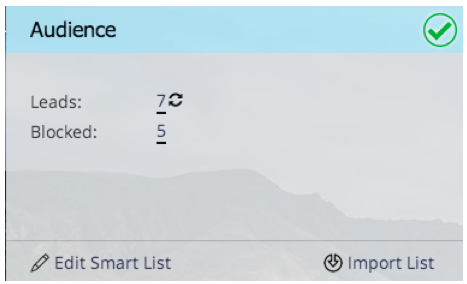
People/Leads Blocked from Mailing people-leads-blocked-from-mailing
Click the people/leads blocked from mailing number to see who will not receive the email due to being unsubscribed, black listed, having an invalid or blank email address, or being marketing suspended.
Export Email Program Data export-email-program-data
Export email metrics to Excel, including AB Test variant data.
Engagement Score in Engagement Stream Performance Report engagement-score-in-engagement-stream-performance-report
We added the Engagement Score to the Engagement Stream Performance Report to help you see how effective the content in your engagement program is.

Program Details in Email Analysis program-details-in-email-analysis
Now you can group your email metrics by Program Name, Channel and Tags. The program name is added to the Email Name field when the email is a local asset to the Program. The new Program Name field shows the program name of the smart campaign that sent the email. This could be different from the program in the Email Name field if the email is a local asset of a different program.

Update to Clicks Link Filters and Trigger update-to-clicks-link-filters-and-trigger
The following filter and trigger names have been updated:
- Clicks Link to Clicks Link on Web Page
- Clicked Link to Clicked Link on Web Page
- Not Clicked Link to Not Clicked Link on Web Page

Forms 2.0 Enhancements forms-enhancements
We’ve given Forms 2.0 several “quality of life” updates with this release. In addition to enabling progressive profiling on embedded forms, we’ve made workflow and UX changes that will make it easier to use the more advanced functionality in the editor, including the visibility rules, advanced thank you pages, and hidden fields.

March 2014 march
The following features are included in the March 2014 release. Please check your Marketo Edition for feature availability. After the release, be sure to come back for links to knowledge base articles for each feature.
Email Program Dashboard Refresh Button email-program-dashboard-refresh-button
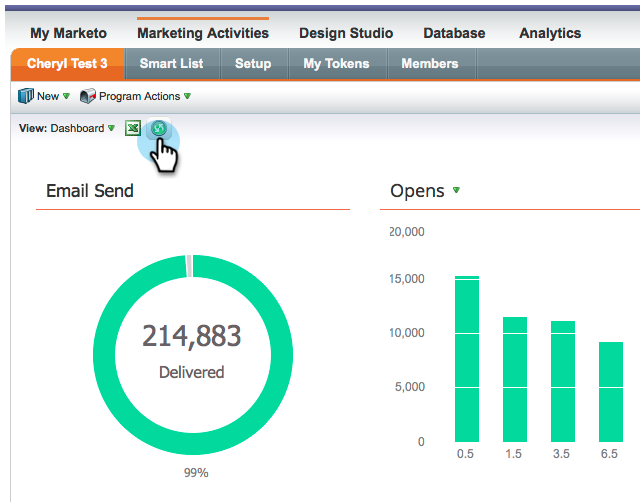
Use the refresh button to get up-to-the minute email metrics about your email send or your AB test!
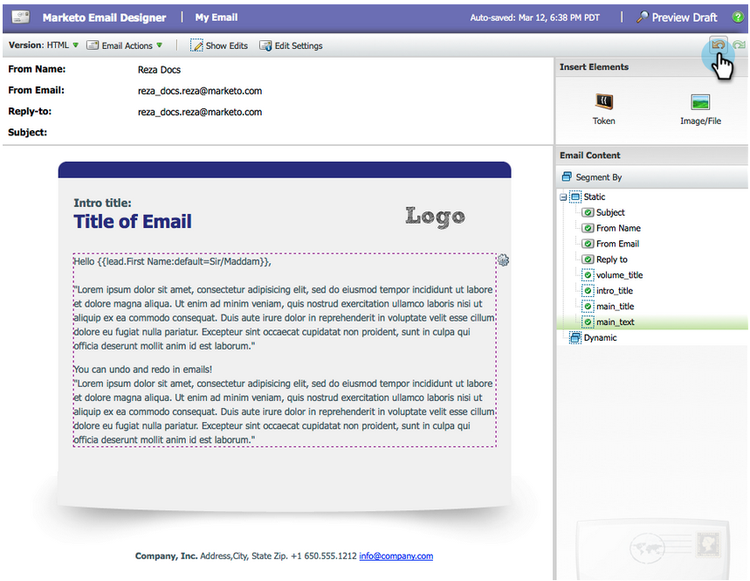
Undo/Redo in the Email Editor and Snippet Editor undo-redo-in-the-email-editor-and-snippet-editor
Undo or redo up to 50 actions for the current session.
Program Status Columns in Program Performance Report program-status-columns-in-program-performance-report
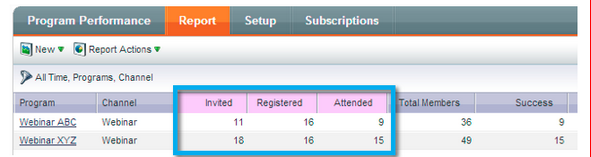
When using the program performance report, you can now see how many people are in which program statuses.
Inclusive and Operational Programs for Analytics inclusive-and-operational-programs-for-analytics
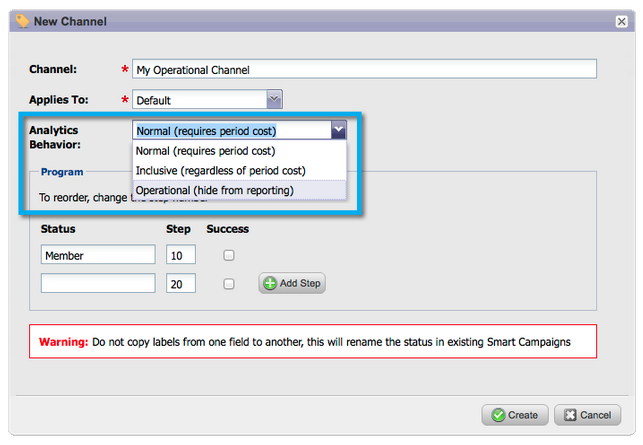
You can now include programs without period costs in Revenue Explorer and Analyzers by setting the Analytics Behavior option to “Inclusive” when you edit Program Channels. You can also exclude operational programs from reporting all together by choosing “Operational”.
Hybrid and Implicit Options for Lead Conversion hybrid-and-implicit-options-for-lead-conversion
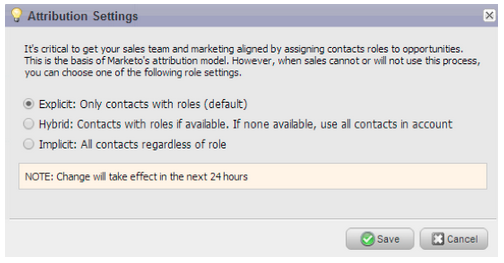
You can change the way Marketo ties contacts and opportunities for the lead conversion metrics in Lead Analysis. You can change the attribution setting to one of three choices. Changing this setting does not modify any Marketo or CRM data; it simply changes the way your reports run and it can be reverted at any time.
The Explicit setting will only treat contacts with roles in an opportunity as converted leads (default behavior). Implicit will treat all contacts associated to the account in the opportunity, regardless of role, as converted. Hybrid will treat contacts with roles as converted if available; if none, we treat all contacts in the account as converted.
As a reminder, this setting also changes program attribution metrics.
Additional User Language additional-user-language
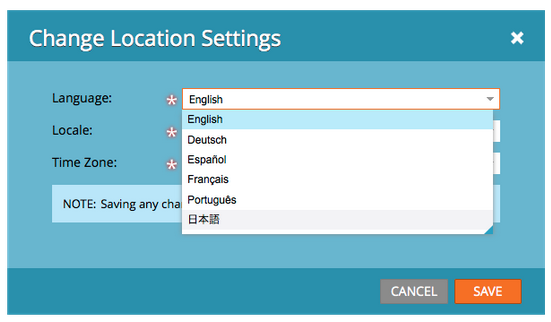
Select Your Marketo Application Language. View the Marketo Lead Management interface in your preferred language – now supporting Japanese.
Marketo Developer Blog marketo-developer-blog
The Marketo Developer blog is dedicated to those web developers and software engineers who support the rapidly evolving needs of the modern marketer. You can subscribe to announcements on new integration options, API version updates, and a new series of how-to articles that include code samples and best practices on integration with the Marketo platform.
The first article in this series will walk you through how to efficiently retrieve information on the people (customers/contacts/leads) that are stored within Marketo using the API.
May 2014 may
The following features are included in the May 2014 release. Please check your Marketo Edition for feature availability. After the release, be sure to come back to find links to detailed Knowledge Base articles for each feature!
Delete Workspace delete-workspace
Now you can delete an unused workspace. Be sure to move all assets into another workspace before attempting to delete the workspace.
Schedule First Cast schedule-first-cast
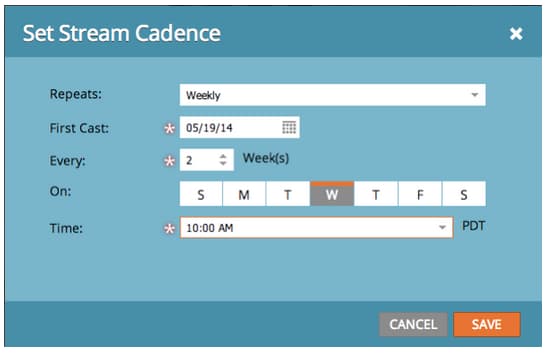
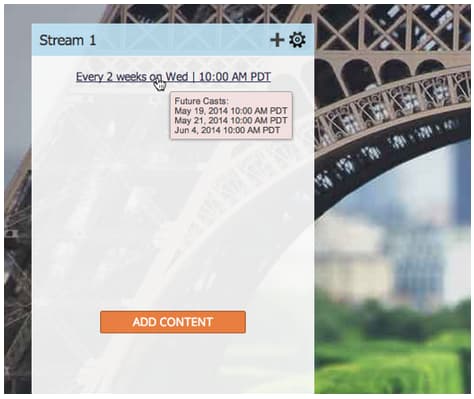
In engagement programs, you can schedule the date for the first cast to run. For example, specify the cadence to be every 2 weeks and select the date of the first cast.
Enhanced Engagement Programs enhanced-engagement-programs
Now everyone gets multiple programs, streams and communication limits.
Link Tracking in Text Emails link-tracking-in-text-emails
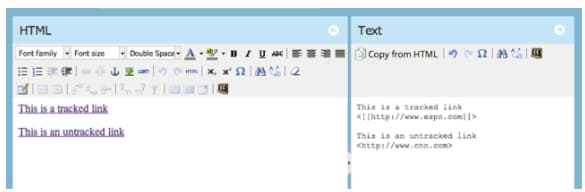
Add double square brackets around URLs in the text version of your emails to indicate when links should be converted into re-directed Marketo tracking links
[[https://www.marketo.com]]By default, no links will be tracked in the text version of emails. Add this new syntax to indicate when a link should be converted into a tracking link. The behavior of HTML links is unchanged. To add tracked links to your emails:
- HTML version: Just insert your link. It will be tracked by default.
- Text version: Enter the URL surrounded by double square brackets.
To add untracked links to your emails:
- HTML version: Insert your link and add the “mktNoTrack” class to the link.
- Text version: Just enter the URL. It will be untracked by default.
Link Markup in Sample Emails link-markup-in-sample-emails
See how your links will behave in emails ahead of time. Sample emails now display links exactly how they would appear to your leads. Preview which links have been converted to tracking links, giving you a better sense of how the message will actually appear to recipients.
Abort Campaign abort-campaign
Don’t panic! If you find a mistake, use the new abort campaign button to immediately stop campaigns in their tracks. You’ll receive a notification outlining how many leads were pending in each flow step when the campaign was stopped.
Sales Insight in Japanese, Portuguese and Spanish sales-insight-in-japanese-portuguese-and-spanish
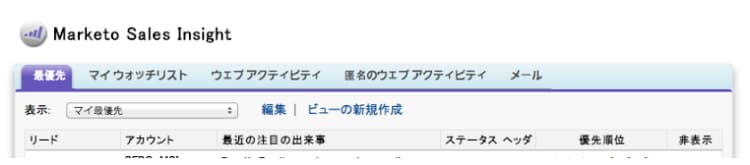
Download the latest version of Sales Insight from AppExchange so your Japanese, Portuguese and Spanish speaking sales agents view Sales Insight content in their preferred language.
Program Status and Success Timeframe in Program Membership Analysis program-status-and-success-timeframe-in-program-membership-analysis
View how many members are in each Program Status and when they changed to each status, including the date when they achieved Program Success.
A/B Test Emails in Email Analysis a-b-test-emails-in-email-analysis
Report on each of your A/B test email variants in Email Analysis.
Analytics Packaging Changes analytics-packaging-changes
Revenue Cycle Modeler and Success Path Analyzer are now included in MA Standard Edition.
Mobile Platform Info mobile-platform-info
Segment and trigger off of leads opening and clicking emails from their mobile devices.
June 2014 june
The following features are included in the June 2014 release. Please check your Marketo Edition for feature availability.
Updated UI - Coming Soon! updated-ui-coming-soon
A new look and feel, including navigation for Marketo Lead Management is coming soon in a later release!
Sales Insight plugin for Outlook 2013 sales-insight-plugin-for-outlook
This will require a download of the new plug-in. You can download it from here.
Token Resolution token-resolution
When you send a test email from Sales Insight, currently tokens in the email do not resolve and the default value is sent. This enhancement will ensure that tokens resolve in test emails.
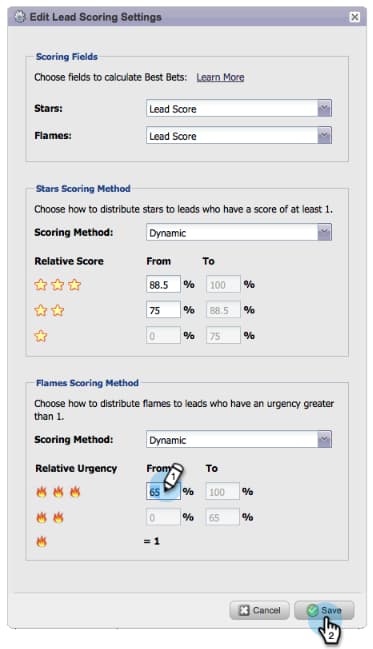
Customize Percentages for Stars and Flames customize-percentages-for-stars-and-flames
Set the percentage of leads that get 1, 2, or 3 stars and flames.
Lead REST API lead-rest-api
Create, read, and update leads programmatically through our new ReST API. To get started with ReST you need to create a custom service in Marketo. Then head over to the developers site for details on using this API.
Marketo Real-Time Personalization (RTP) Campaigns Page Update marketo-real-time-personalization-rtp-campaigns-page-update
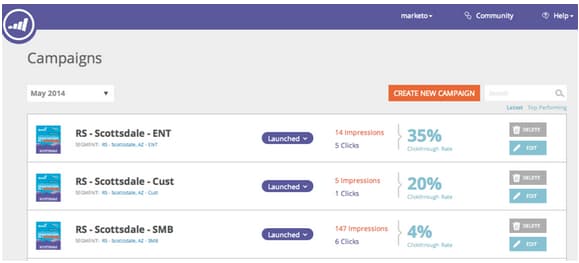
RTP Campaigns now include a new design with thumbnail views and campaign performance. Additionally, you can organize your campaigns according to date or top performance.
Web Analytics Integrations web-analytics-integrations
Append all your RTP data within your web analytics platform.
The integration with Google Analytics (GA) is now enabled by default, so under Account Settings turn on the switch for which data you want to send through to GA custom variables and events.
We also completed the integration with Adobe SiteCatalyst.
July 2014 july
The following features are included in the July 2014 release. Please check your Marketo Edition for feature availability. Come back after the release for links to detailed feature documentation.
Marketing Calendar marketing-calendar
See all of your events, emails and more across programs. This new product will be available at no charge to customers with 10 or fewer Marketo Lead Management or Dialog users.
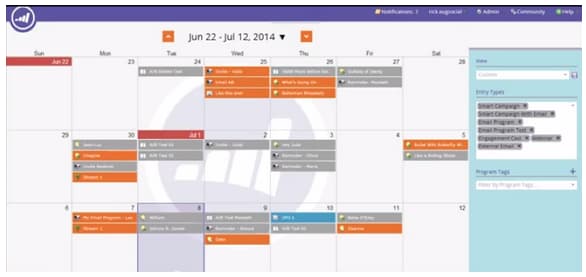
Documentation on the Marketing Calendar will be available at release time.
New Look and Feel new-look-and-feel
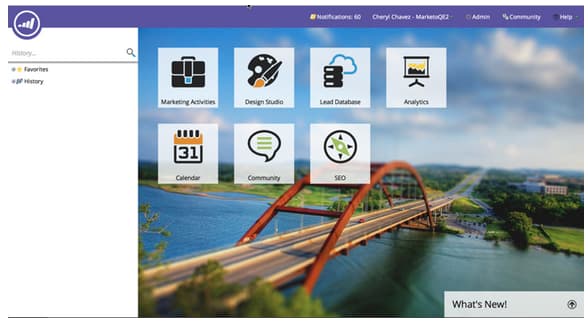
Marketo Lead Management will be updated with a new look and feel that is modern and sleek, and includes an updated navigation.
Date Operators date-operators
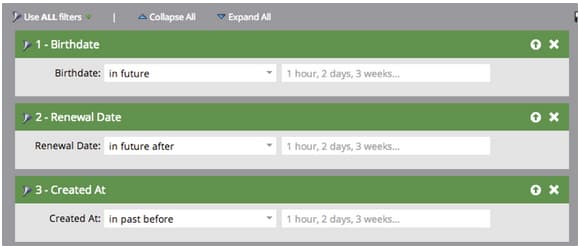
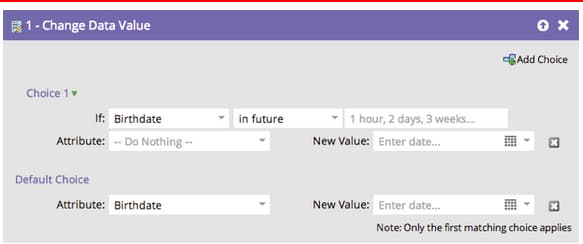
Advanced filters for “in past before”, “in future”, and “in future after”. For example, find leads that have a birth date in the next 3 months, or a contract that is expiring after 6 months.
Program Schedule View program-schedule-view
In addition to the marketing calendar you manage your events and default programs with, a new schedule view right on the program.
- Reschedule all dates at once
- New Tentative Dates - pencil it in!
- Custom Entry types - ToDo, Press Release, anything you want
List Operations in the REST API list-operations-in-the-rest-api
We’ve added the calls below related to list operations in ReST. See https://experienceleague.adobe.com/en/docs/marketo-developer/marketo/rest/rest-api for the full documentation.
- Get List By ID
- Get Multiple Lists
- Import to List
- Get Import to List Status
Fast List Import fast-list-import
Over 50x faster, your files will zoom into Marketo! The old “Normal” and “Optimized for New Leads” import options have been replaced with “Default (Fast Import)”.
The “Skip New Leads and Updates” option remains unchanged.
New Improved Munchkin! new-improved-munchkin
Rollout will be staged starting in mid-July and continuing for the next several months.
- Removes the dependency jQuery for full and future compatibility
- More compatible with other JavaScript on your site
- Fully tested on many sites over the past year!
RTP: Real-Time Personalization Campaign Templates rtp-real-time-personalization-campaign-templates
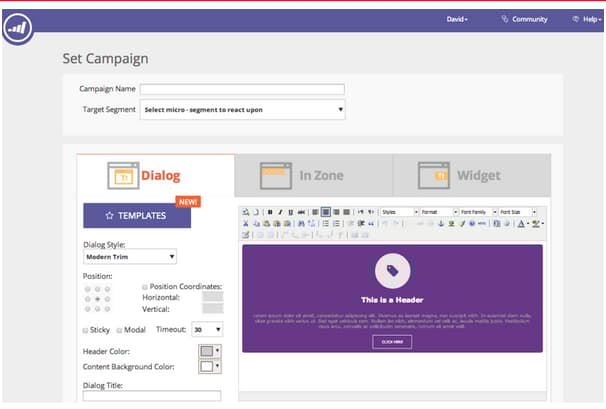
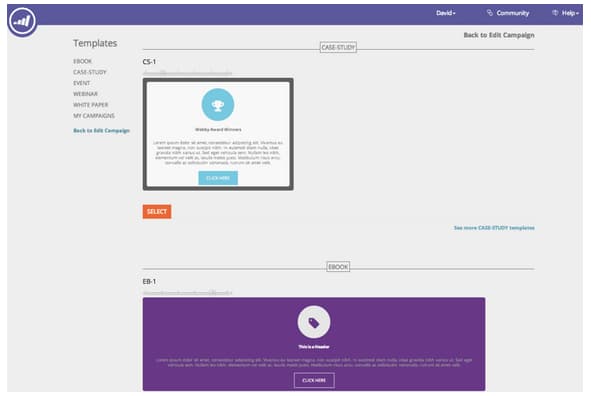
The RTP Set Campaign page now includes ready-made templates. Choose from a variety of styles including webinars, case studies, ebooks.
RTP: JavaScript API Enhancements rtp-javascript-api-enhancements
New RTP API call to get real-time visitor data such as organization, industry, location and segment code match. In addition, hovering over a segment name in the Segments page will reveal a tooltip showing the segment code. See our developers site for full documentation.
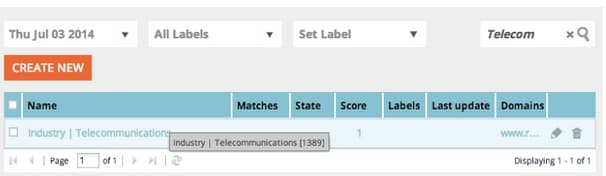
RTP: HTML5 support in Campaign Content Editor rtp-html-support-in-campaign-content-editor
The content WYSIWYG editor in the Set Campaigns page now has full HTML5 compatibility. Click on the “HTML” icon within the editor to insert any HTML5 code.
August 2014 august
The following features are included in the August 2014 Release. Check your Marketo edition for feature availability. Come back after the release for links to detailed feature documentation.
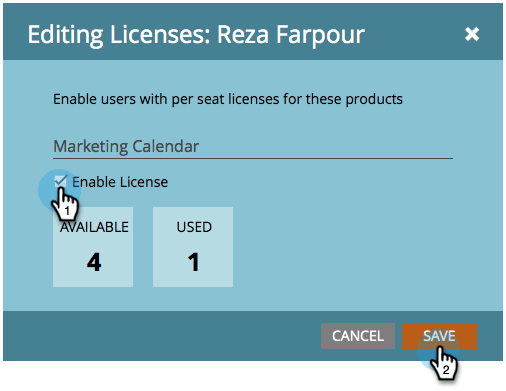
Marketing Calendar Licenses marketing-calendar-licenses
After September 5th, 2014 only 5 users can have free access to the marketing calendar. Be sure to Issue/Revoke a Marketing Calendar License to the users of your choice before then for un-interrupted access.
New User Permissions new-user-permissions
The following new user permissions were added:
Export Users and Roles from Admin export-users-and-roles-from-admin
You can now Export a List of Users and Roles from Marketo. You can also include a “Last Login” time stamp to be included with the export.

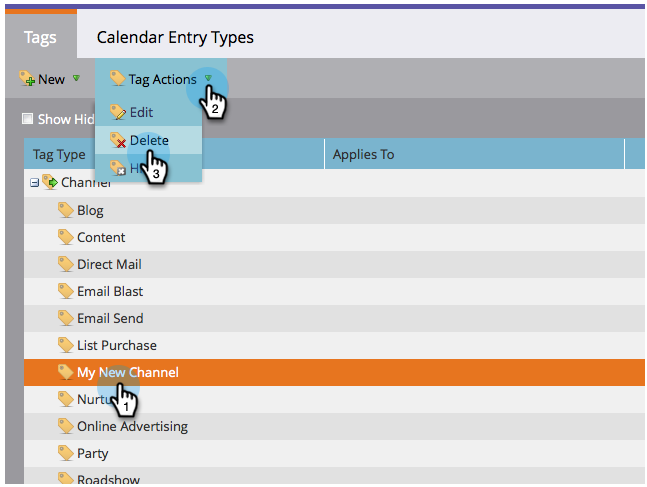
Delete Channels and Tags delete-channels-and-tags
You can now delete any unused channels and statuses. As always, you can only hide one that is currently in use.

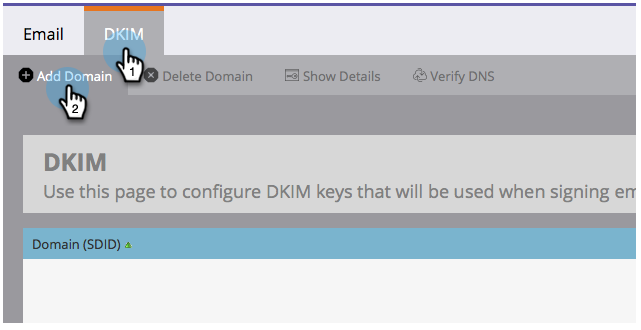
Automated DKIM automated-dkim
For improved deliverability, all outgoing emails will be DKIM (DomainKeys Identified Mail) signed. By default, emails will use Marketo’s shared DKIM signature. You will have the option to customize this signature.
Real-Time Personalization Updates real-time-personalization-updates
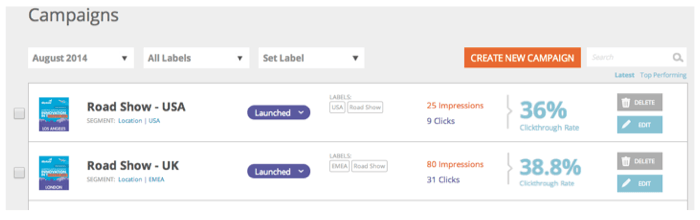
We have added labels to the campaign page so that you can tag to your hearts content.
Mobile Targeting mobile-targeting
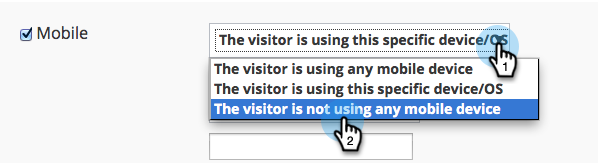
You asked on the community and we delivered! You can now include, exclude or set a specific call to action for mobile and tablet users.
Enhanced 1:1 Segmentation and Targeting enhanced-segmentation-and-targeting
You can now use advanced filter operators for targeting known visitors.

Campaign Sharing campaign-sharing
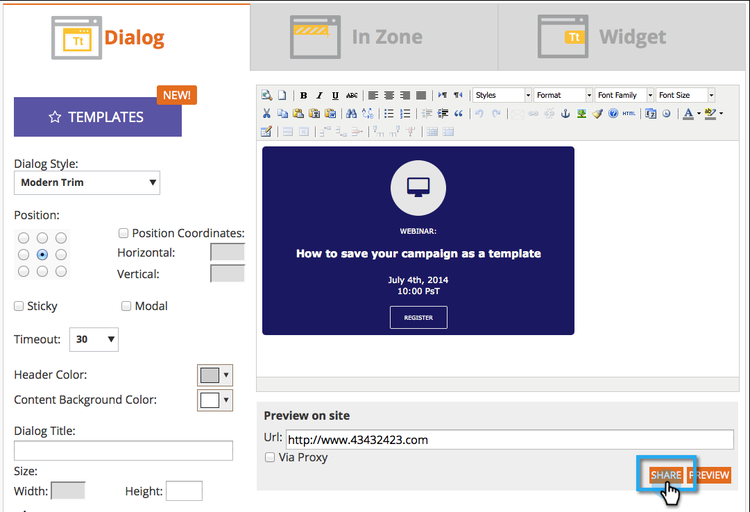
You now have the ability to quickly and easily share an RTP campaign preview link.
Content Recommendation Engine Report content-recommendation-engine-report
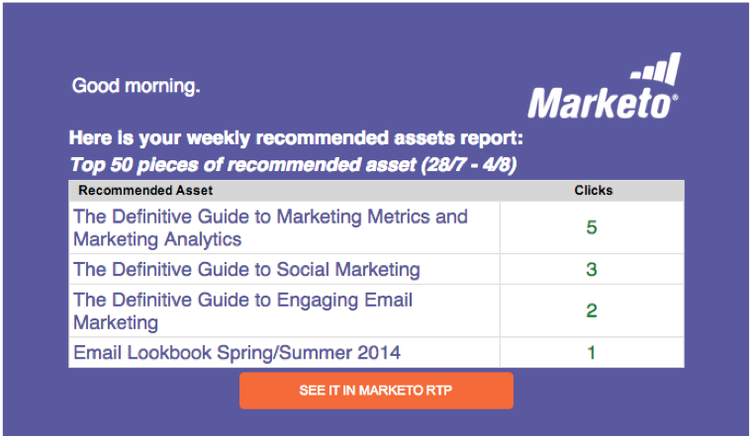
We have added a new content recommendation engine report for you to see a nice summary.
Enhanced User Administration enhanced-user-administration
Admin users can now lock users due to multiple failed login attempts. You can also unlock those users if desired.
Tracking Control tracking-control
You can now exclude specific IPs from all tracking and reporting in Real-Time Personalization.

October 2014 october
Check your Marketo edition for feature availability. Documentation will come at time of release.
Program Focus in Marketing Calendar program-focus-in-marketing-calendar
Create and edit entries directly from the marketing calendar.

New REST API Calls new-rest-api-calls
Use the API to pull new activities or changes to leads:
- Get Lead Changes
- Get Lead Activities
- Get Activity Types
- Get Paging Token
Full details will be available after the release at https://experienceleague.adobe.com/en/docs/marketo-developer/marketo/rest/rest-api.
MSI - Send Marketo Email for Microsoft Dynamics msi-send-marketo-email-for-microsoft-dynamics
Send and track sales emails to leads and contacts from Microsoft Dynamics.

MSI - Add to Marketo Campaigns for Microsoft Dynamics msi-add-to-marketo-campaigns-for-microsoft-dynamics
Add leads and contacts to Marketo smart campaigns directly from within Microsoft Dynamics. Marketing can choose which Marketo campaigns are available to sales.
Custom Entity Support for Microsoft Dynamics Sync custom-entity-support-for-microsoft-dynamics-sync
Use custom object data from Microsoft Dynamics for filtering and triggering in smart lists, smart campaigns, programs…
Shareholder Support for Microsoft Dynamics Sync shareholder-support-for-microsoft-dynamics-sync
Sync down opportunity shareholder data from Dynamics. Also supported are opportunities connected to an account using the “Primary Account” field as well as opportunities connected to contact using the “Primary Contact” sync.
RTP - Dashboard Enhancements rtp-dashboard-enhancements
The dashboard is now enhanced to include more at-a-glance data:
- Total organization visits
- Top 5 performing industries
- Total engaged visitors
RTP - New Mobile Templates for Campaigns rtp-new-mobile-templates-for-campaigns
Quickly and easily create mobile campaigns with these new templates.
RTP - User Context API rtp-user-context-api
Use a new call that tracks visitor’s past visit history. Personalize campaigns based on the visitor’s:
- Past pages viewed
- Products interested in
- What RTP campaigns they have seen
Visit https://experienceleague.adobe.com/en/docs/marketo-developer/marketo/javascriptapi/rich-media-recommendation for full details.
December 2014 december
The following features are included in the December 2014 release. Please check your Marketo Edition for feature availability. After the release, be sure to come back to find links to detailed articles for each feature!
Sales Insight Reports sales-insight-reports
The Sales Insight Email Performance Report allows you to see email metrics by email and Sales Representative. It supports emails sent out through Salesforce, Microsoft Dynamics, the Outlook plug-in and the Gmail plug-in.


Facebook Custom Audiences facebook-custom-audiences
Once your Marketo admin has added Facebook via Admin > LaunchPoint, you can easily create, update or replace a Facebook Custom Audience with leads from a Marketo static or smart list. Look for the new Facebook icon along the bottom of the lead grid of any static or smart list.

Improved Cloning Across Workspaces improved-cloning-across-workspaces
Cloning a program to another workspace has never been easier! When you click clone, you select the destination workspace. No more cloning into a folder and then moving the folder!
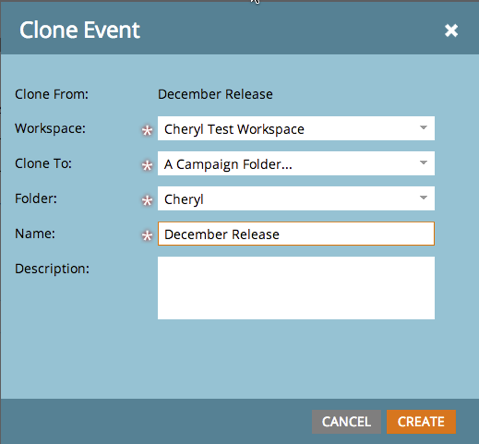
Reference Smart List reference-smart-list
Smart lists that are shared with another workspace can be referenced when building a smart list or flow.
List Import Improvements list-import-improvements
Import files encoded in UTF-16, Shift-JIS, or EUC-JP. We continue to support UTF-8 encoded files.
Link Tracking in Email Scripting link-tracking-in-email-scripting
Links within email scripts will now be tracked and available within the Email Link Performance report.
Token Encoding Setting token-encoding-setting
We’ve rolled out a new security feature to automatically HTML encode tokens, which will be enabled by default in March 2015. Until then, toggle this functionality in Field Management to test the behavior ahead of time. All lead and company tokens will be encoded when inserted into emails or landing pages. Options will also be available for individual fields.
New REST API Calls new-rest-api-calls-december
Three new calls for the Lead & Activity REST API:
· Get Lead Partitions
· Associate Lead
· Merge Lead
Full details will be available after the release at https://experienceleague.adobe.com/en/docs/marketo-developer/marketo/home
Munchkin Javascript Compatibility Enhancements munchkin-javascript-compatibility-enhancements
We’ve made several minor enhancements to Munchkin to ensure it continues to load quickly and function as desired in cases with other JavaScript on the page.
Rollout will be staged starting in mid-December and continuing for the next several months.
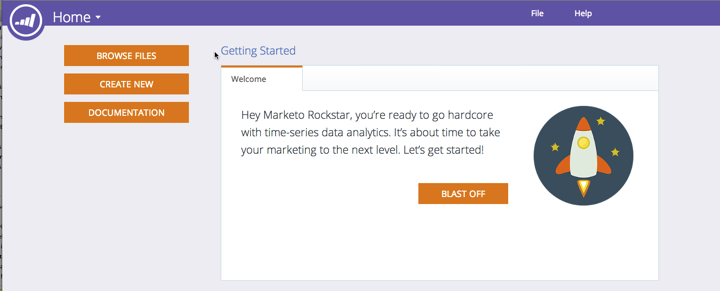
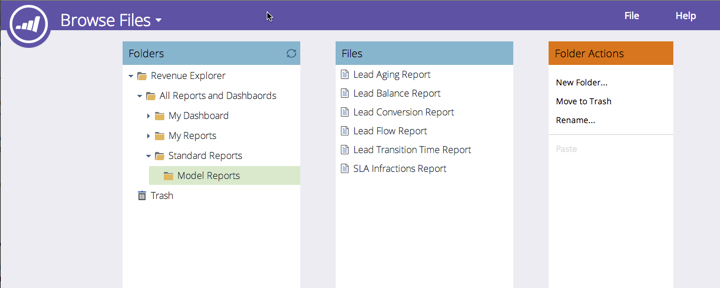
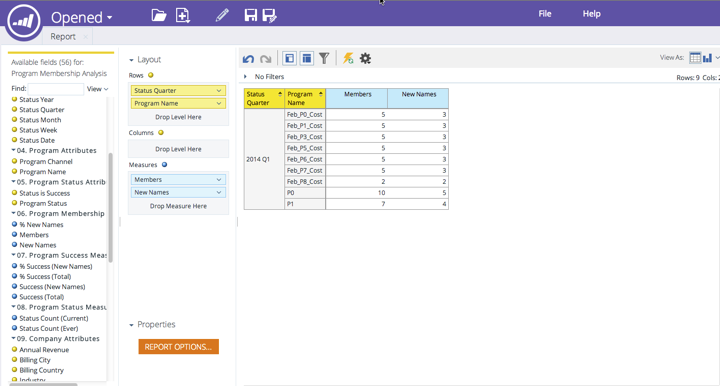
Revenue Explorer Upgraded Look and Feel revenue-explorer-upgraded-look-and-feel
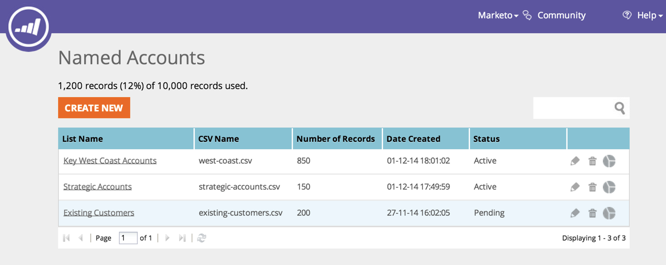
RTP: Named Account List Module rtp-named-account-list-module
Manage and monitor your key high-yield accounts in the new Named Accounts page. Upload new lists of named accounts to identify and target these organizations. We’ve automated the process providing you more control and flexibility to implement your account-based marketing plans and target your key accounts across different channels (web and advertising).

RTP: Sliding Effect for In Zone Campaigns rtp-sliding-effect-for-in-zone-campaigns
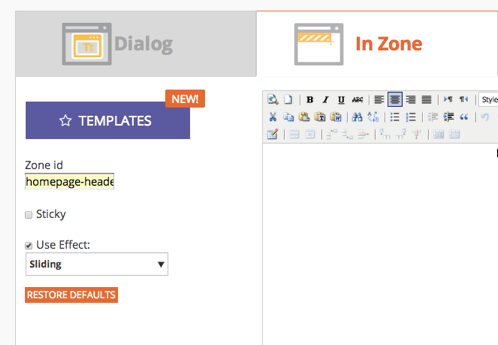
We’ve added a new Sliding effect for In Zone campaigns to allow for your personalized content to slide into place upon page load.