Release Notes 2026 release-notes-2026
This page lists all the features and improvements for Journey Optimizer released in 2026.
August '26 release notes aug-26-updates
Content Management
The following capabilities and improvements have been introduced to Content management in this release.
Generating content in Journey Optimizer now sources brand-approved images directly from Adobe Experience Manager Assets Essentials and up. Three modes control the balance: Balanced (Digital Asset Management-first, AI fills gaps, default), Assets (Digital Asset Management-sourced), and Creative (AI).
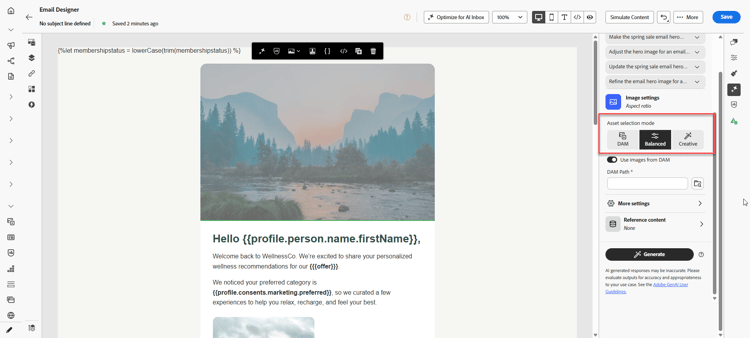
For more information, refer to the detailed documentation.
Availability date: August 5, 2026
-
Content variant size warning - Journey Optimizer now surfaces a soft-limit warning when a content variant exceeds its recommended size threshold — 1200 KB for templates and messages, 700 KB for fragments, and 1000 KB for landing pages. Saving and publishing are not blocked. Learn more
Availability date: August 25, 2026
-
Fragment count limits in content - Journey Optimizer now validates the number of unique fragments used within a piece of content: up to 60 per variant and up to 120 across all variants of a single message. Warnings appear at 75% of each limit; publishing is blocked once the hard limit is reached. Learn more
Availability date: August 25, 2026
Journeys aug-26-journeys
-
Start and end dates in the journey header - When start and/or end dates are configured on a journey, they are now surfaced in the journey header next to the status badge. The displayed label adapts based on whether each date is upcoming or has already passed. Read more
Availability date: August 20, 2026
-
New list functions in the advanced expression editor - Two new functions are available in the advanced expression editor:
mergeListscombines two lists, with or without deduplication, anddifferenceListsreturns the items of one list that are not present in another. Learn moreAvailability date: August 13, 2026
-
Send-Time Optimization in the Wait activity - Send-Time Optimization is now available in the Wait activity, letting Adobe’s AI determine the optimal time to continue to any downstream activity. Learn more
Availability date: August 13, 2026
Campaigns aug-26-campaigns
The following capabilities and improvements have been introduced to Campaigns in this release.
Journey Optimizer now supports up to five PDF attachments total per email in API-triggered campaigns, including both static and recipient-specific PDFs. Recipient-specific PDF files are fetched securely from Data Landing Zone and attached at send time, with each file's location passed directly in the API payload. This allows existing upstream document generation systems to remain in place, with Journey Optimizer handling delivery.
Supported use cases include invoices, statements, tickets, contracts, shipping labels, and similar documents that vary per recipient. Personalized PDF attachments are available only for transactional API-triggered email campaigns and are not supported in journeys or orchestrated campaigns.
Larger attachment volumes and sizes are supported via the PDF attachment add-on; for information, contact your Adobe representative.
For more information, refer to the detailed documentation.
Availability date: August 12, 2026
-
Per-campaign lifecycle alert subscriptions - You can now subscribe to supported campaign lifecycle alerts for a single campaign, in addition to the existing sandbox-level subscription. This lets you monitor individual high-priority campaigns without receiving the same alert for every campaign in the sandbox. Learn more
Availability date: August 13, 2026
-
Action Campaign authoring flow redesign - Adobe Journey Optimizer Action Campaign authoring flow has been redesigned to deliver a significantly more intuitive, efficient, and seamless user experience.
Availability date: August 23, 2026
Orchestrated Campaigns august-26-oc
The following capabilities and improvements have been introduced to Orchestrated Campaigns in this release.
You can now apply Quiet Hours. Quiet Hours let you define time-based exclusions to prevent messages from being sent during specific periods, helping you respect customer preferences and compliance requirements across campaign orchestration use cases.
For more information, refer to the detailed documentation.
Availability date: August 18, 2026
You can now schedule outbound messages to be delivered in controlled batches over time. Ideal for high-volume or time-sensitive campaigns, wave sending also supports better deliverability and helps maintain a strong sender reputation by reducing the risk of being flagged as spam.
For more information, refer to the detailed documentation.
Availability date: August 18, 2026
You can now add LINE actions into your Orchestrated campaigns. This new activity allows you to build and deliver highly personalized content, including text, stickers, images, videos, location data, and rich Flex Messages, to engage your customers seamlessly on the LINE platform. This capability is only available for a set of organizations (Limited Availability). To gain access, contact your Adobe representative.
For more information, refer to the detailed documentation.
Availability date: August 12, 2026
-
Ability to Manage Profile Target Dimensions - You can now delete a Profile Target Dimension or edit and swap its configured identity namespace, providing greater control and flexibility over your data setups. Learn more
Availability date: August 18, 2026
-
Personalize email sender details per recipient and campaign (Limited availability) - Orchestrated campaigns now support personalization of email header fields, including From name, From email prefix, Reply-to name, and Reply-to email, as well as the execution address, using profile attributes or relational data. This allows sender details to reflect the relevant advisor, location, or branch for each recipient, rather than routing all sends through a single corporate address. Header values can be set at the channel level and overridden per campaign using contextual data for more precise control. Learn more
This capability is only available for a set of organizations (Limited Availability).
Availability date: August 18, 2026
-
Target dimension simplification - The active targeting dimension is now shown on the workflow canvas, so you can see which dimension is used by a channel activity. The multi-entity segmentation flow is simpler as you no longer need a separate “Change dimension” activity. Moreover, you can now choose explicitly whether messages are sent at the profile level or at a secondary dimension level. Learn more
Availability date: August 18, 2026
Loyalty aug-26-loyalty
Journey Optimizer introduces Loyalty Insights, a new CX Coworker skill for asking questions about challenge performance and other loyalty program data ingested into the Loyalty field groups in Adobe Experience Platform.
For more information, refer to the detailed documentation.
Availability date: August 31, 2026
Channels august-26-channels
-
Live activity execution metadata (executionMetadata) - API-triggered Live activity campaigns (Transactional and Marketing) now support an optional executionMetadata field on each recipient. This lets you attach custom key/value data, such as an order ID, loyalty tier, or region code, to an execution. Learn more
Availability date: August 19, 2026
-
Performance Add-on for throughput - Push - A new high throughput transactional messaging mode is available in API-triggered campaigns. This mode is designed for large-scale, real-time transactional messaging and supports up to 5,000 transactions per second with higher availability. Previously only available for the email channel, this capability is now also available for the push channel, for organizations that have purchased the Adobe High Throughput Transactional Messaging add-on offering. Contact your Adobe representative for more details. Learn more
Availability date: August 11, 2026
Configuration august-26-configuration
-
Multi-SAN support in CSR generation for custom subdomain setup - When setting up or migrating a custom subdomain using the Custom delegation method, the Certificate Signing Request (CSR) is now automatically generated with both
data.{subdomain}andcdn.{subdomain}as Subject Alternative Names (SANs). Previously, the generated CSR only includeddata.{subdomain}, requiring manual addition ofcdn.{subdomain}before submission to the Certificate Authority. Learn moreAvailability date: August 20, 2026
Decisioning decisioning-august
-
Placement-level frequency capping in Decisioning - Frequency capping rules in Decisioning can now be scoped to individual placements, giving you finer control over how often an offer is shown in a given surface. Two modes are available: placement-specific capping, which defines a cap that applies only when the offer is displayed in a selected placement, and per-placement capping, which applies a cap independently across every placement where the offer appears, so each placement maintains its own capping counter. Note that placement-related capping does not apply to offers capped using rules based on Adobe Experience Platform data. Learn more
Availability date: August 24, 2026
-
Mirror pages in visual fragments - You can now insert mirror pages into a visual fragment. Decisioning attributes render correctly on the mirror page link, even when the fragment is used in an email campaign that leverages Decisioning. The mirror page must be added to the visual fragment before the fragment is published in order for decisioning attributes to display. Learn more
Availability date: August 11, 2026
Email Designer august-26-email-designer
-
Increase column counts without losing content in the Email Designer - You can now increase the column count of an existing structure — for example, from 2 columns to 3 — without deleting it and losing your content. Learn more
Availability date: August 5, 2026
-
More background image placement options in the Email Designer - Four new Image placement options are available for background images: Full Width - Top, Full Width - Bottom, Full Height - Left, and Full Height - Right. Each scales the image proportionally along one axis, like the existing Full Width and Full Height options, but anchors it to a specific edge instead of centering it, giving you more control over which part of a hero image stays in view. Learn more
Availability date: August 4, 2026
Usability improvements august-26-usability
-
Multi-selection in the new journey canvas - The new journey canvas experience introduces simplified multi-node selection: hold Shift and drag to select multiple nodes at once, rather than selecting them individually. This enables bulk actions, such as copy, delete, or save as a journey fragment, to be performed efficiently across several nodes. Learn more
Availability date: August 17, 2026
-
Bulk operations in journey inventory - You can now perform new bulk actions directly from the journey inventory list, making it faster to manage multiple journeys at once. Select several journeys and apply any of the following new actions in a single step: add to package, delete, move to folder, edit tags, or manage access. This reduces the need to repeat the same action one journey at a time, streamlining journey management for teams working with large numbers of journeys. Learn more
Availability date: August 12, 2026
-
New Content Simulation experience for content testing - The Simulate content workflow introduces a redesigned experience with a scrollable grid and Side by side, Vertically stacked, and Wrap layouts. Render all variants or select a subset, name and manage variants from their cards, and switch between content previews and editable attribute details. The bottom action bar provides controls to add variants, upload files, select simulated users, and export variants, with AI generation and desktop/mobile views available when supported by your content. Invalid-link counts on variant cards provide access to URL validation details. Click Old experience in the bottom action bar to return to the classic layout. Learn more
Availability date: August 11, 2026
July '26 release notes july-26-updates
Loyalty Challenges july-26-loyalty
Journey Optimizer introduces Loyalty Challenges, a new capability in this release.
Loyalty Challenges turn loyalty initiatives into engaging, gamified experiences that motivate customers to take valuable actions, such as making purchases, writing reviews, or any desired behavior.
Administrators can use the Loyalty configurations menu to connect Journey Optimizer with your loyalty ecosystem, including reward fulfillment APIs, event definitions, product inventory, exclusions, and identity settings. Marketers can then design standard, streak, or sequential challenges, define tasks and rewards, deliver branded content cards and messages, and monitor performance with AI-powered reporting dashboards. Journey Optimizer generates the journeys that orchestrate each challenge in the background, so teams can focus on the customer experience and business goals.
Loyalty also introduces Coworker skills that let teams perform key challenge operations more efficiently, including creating challenges, setting challenge properties, managing audiences and related configuration, and reviewing insights to monitor challenge participation and reward performance.
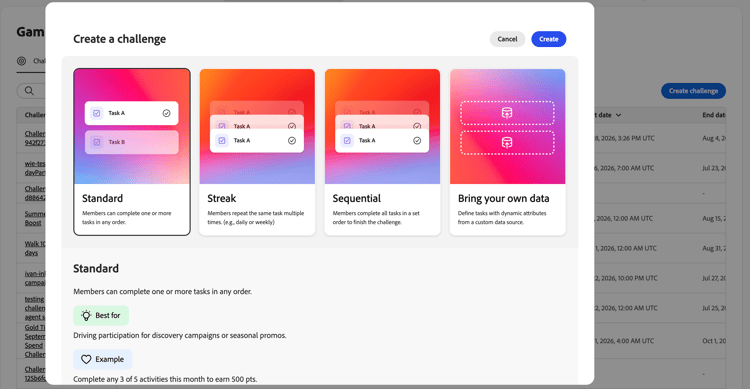
This capability is only available for organizations licensed for Journey Optimizer Loyalty. To gain access, contact your Adobe representative.
For more information, refer to the detailed documentation.
Availability date: July 28, 2026
Channels july-26-channels
The following capabilities and improvements have been introduced in this release.
Journey Optimizer now introduces Custom channels, a new capability that lets administrators bring any outbound HTTP-based messaging channel — such as WeChat, Kakao Talk, Messenger, or a proprietary provider — directly into Journey Optimizer through a no-code Channel Builder.
Once configured, custom channels are available across campaigns, journeys, and orchestrated campaigns, with the same full set of capabilities as native channels: personalization with the expression editor, content experimentation, preview and proof, out-of-the-box reporting, and consent and governance enforcement.
This fills a gap previously addressed by custom actions, which are limited only to journeys and lack dedicated channel capabilities.
Custom outbound channels are currently available as Limited Availability. To gain access, contact your Adobe representative.
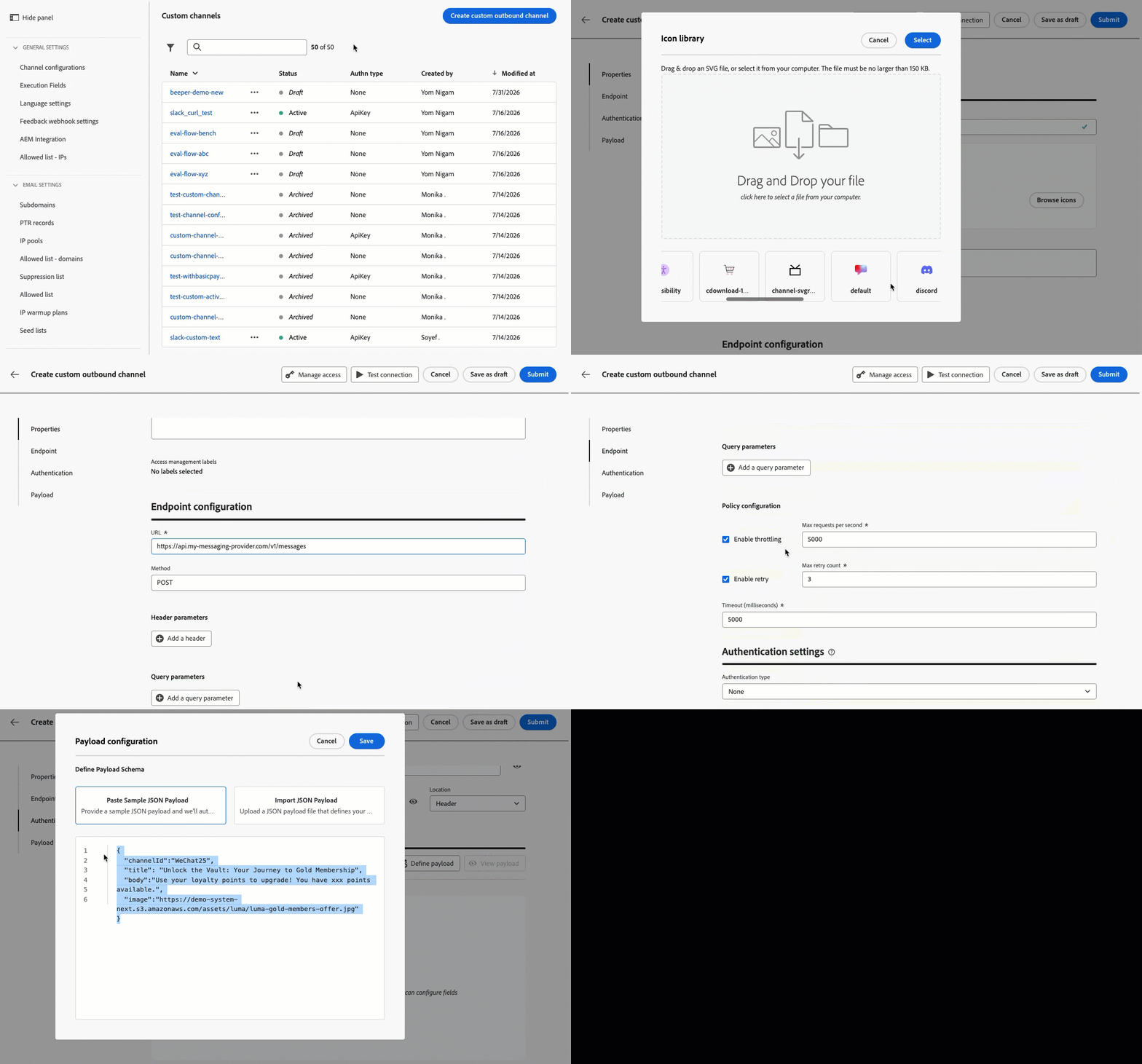
For more information, refer to the detailed documentation.
Availability date: July 31, 2026
You can now configure a journey or campaign action to include multiple outbound channels (Email, Push, Mobile message) and let Journey Optimizer automatically deliver through the best channel for each customer. Three optimization modes are available:
- Manual ranking: specify your preferred channel order.
- Customer preference: use the customer's preferred channel from their profile (Experience Data Model Consents & Preferences attribute).
- AI model-based ranking: use machine learning propensity scores to infer the most effective channel per customer.
When the top-ranked channel is unavailable (not opted-in, frequency-capped, or not configured), the system falls back to the next available channel.
This capability is only available for a set of organizations (Limited Availability). To gain access, contact your Adobe representative.
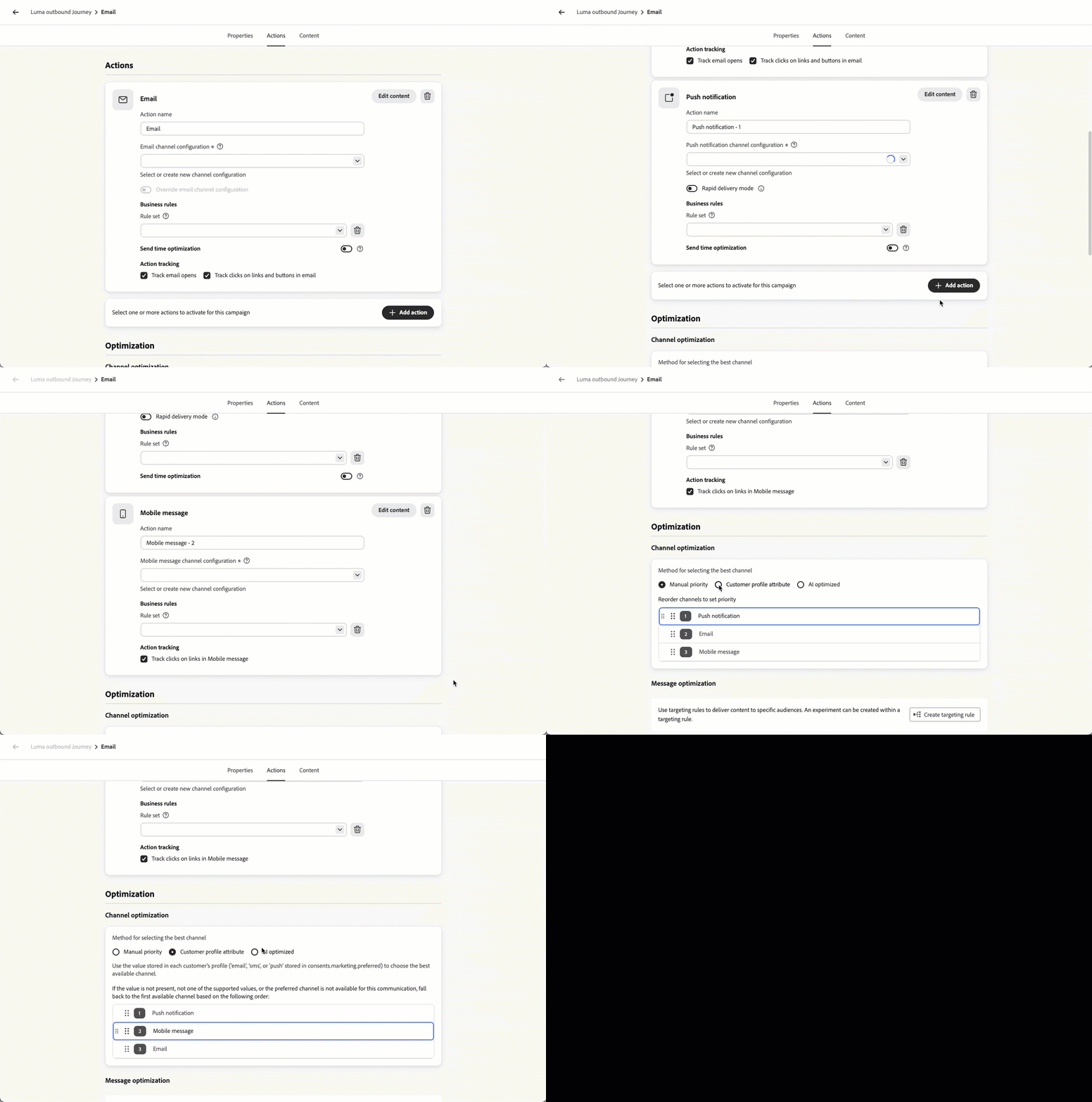
For more information, refer to the detailed documentation.
Availability date: July 22, 2026
-
WhatsApp Channel: Support WhatsApp Flow templates - You can now send WhatsApp Flow templates in Adobe Journey Optimizer to deliver interactive multi-screen experiences like surveys and lead capture. Responses are captured upon submission and stored as raw JSON payloads in the new Journey Optimizer Channel Tracking Event Dataset:
- AJO Channel Tracking Event Dataset: Captures all inbound WhatsApp responses, including those submitted through WhatsApp Flow templates.
-
Enhanced Custom Provider Integrations - Mobile - Custom provider integrations now offer expanded flexibility with key messaging and header updates:
-
Header Customization: You can now edit the default Content-Type header value and add up to 10 custom header parameters.
-
SMS Payload Support: Added support for Adobe Journey Optimizer helper functions within the SMS payload, including encode64.
-
Administration july-26-administration
The following capabiolities and improvements have been added to administration and data management in this release.
Adobe Journey Optimizer now supports Web Application Firewall IP allowlisting for landing pages, enabling organizations to enforce that all incoming requests are routed exclusively through their configured Web Application Firewall infrastructure. With this enhancement, customers can configure Journey Optimizer to reject any direct requests that bypass the Web Application Firewall layer, ensuring that security policies defined in tools such as Imperva are consistently applied.
This capability strengthens the security posture for enterprises with strict network access requirements, giving them full control over the traffic flow to their Journey Optimizer-hosted landing pages.
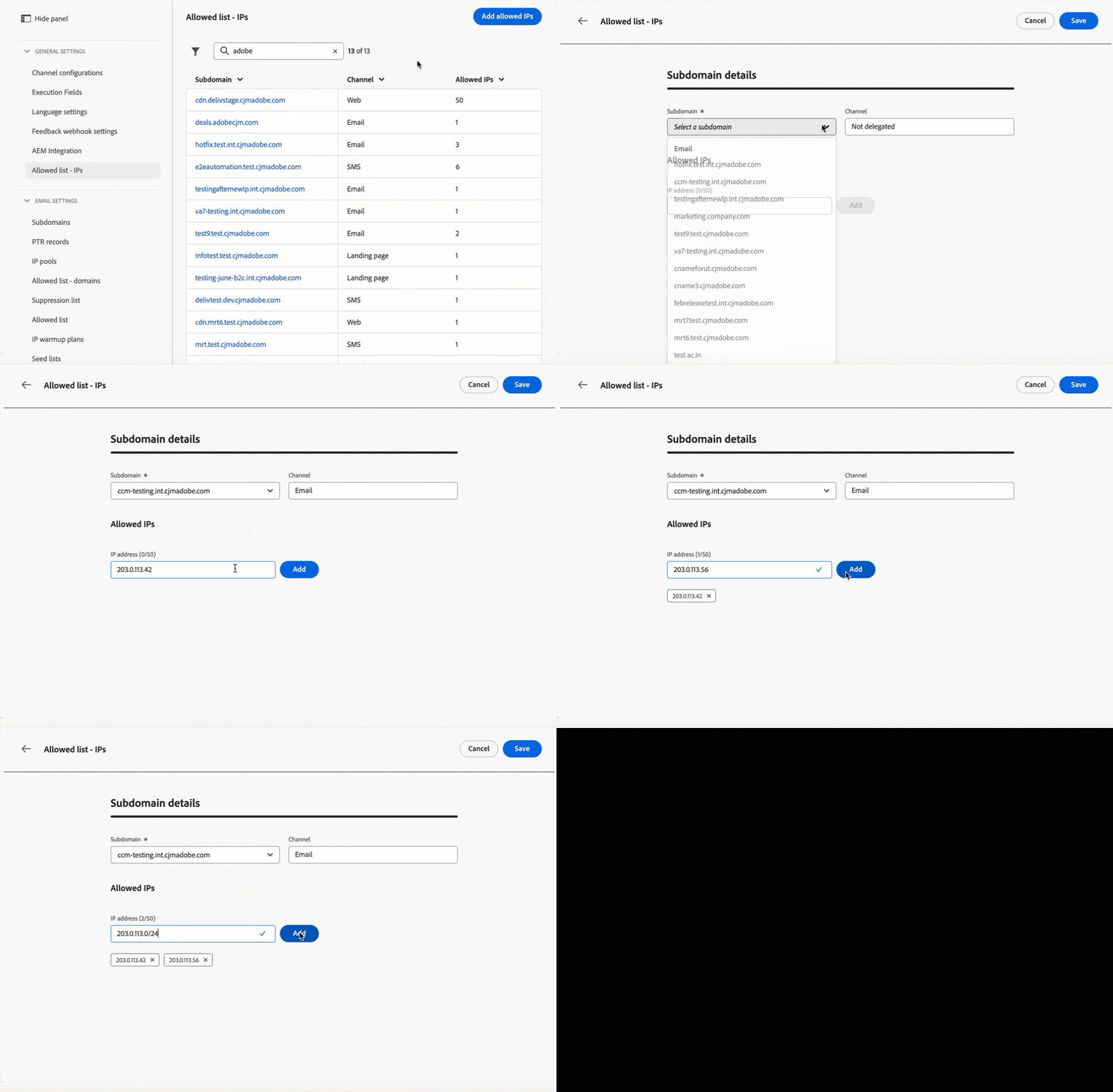
For more information, refer to the detailed documentation.
Availability date: July 30, 2026
-
Manage domains for complete/base URL personalization - You can now create and manage approved domains for complete and base URL personalization directly from the Administration settings in Adobe Journey Optimizer, without having to contact Adobe support. Learn more
Availability date: July 30, 2026
-
Dataset Time-to-live (TTL) guardrail — existing sandboxes - The time-to-live (TTL) guardrail for Journey Optimizer system-generated datasets (90 days in the profile store, 13 months in the data lake) will be enforced on existing customer sandboxes and organizations starting October 1, 2026. Learn more
Email Design july-26-email
The following capabilities and improvements have been added to email design in this release.
The Email Designer now includes a library of ready-to-use layout modules — such as headers, product cards, information blocks, and footers — that you can drag and drop directly into your email canvas.
Each module comes pre-configured with editable properties (image, title, text, button, links) and can be fully customized through the WYSIWYG interface, speeding up email creation without requiring you to build structures from scratch.
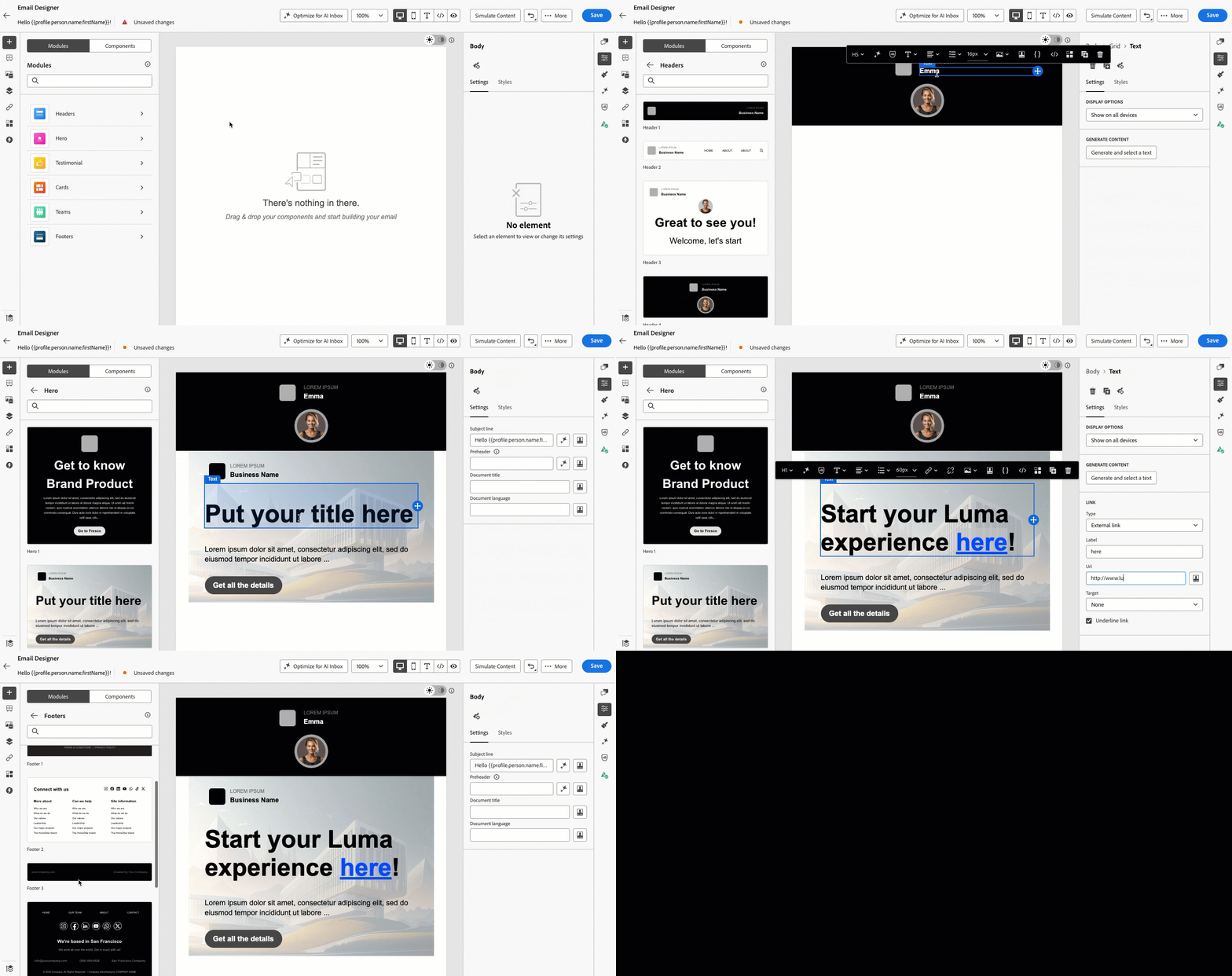
For more information, refer to the detailed documentation.
Availability date: July 29, 2026
Journey Optimizer now includes automated technical validation directly in the Email Designer, helping you catch HTML and CSS issues before sending.
Checks cover unsupported elements such as <script> and <base> tags, empty divs that can break layout in Microsoft Outlook, HTML meta refresh tags, and CSS or HTML size thresholds that trigger rendering failures in Gmail.
Results are surfaced as errors, warnings, or informational notices directly in the authoring panel, with contextual details and one-click fixes where available, so issues can be resolved without leaving the editor.
Previously available in Limited Availability, this capability is now generally available to all customers.
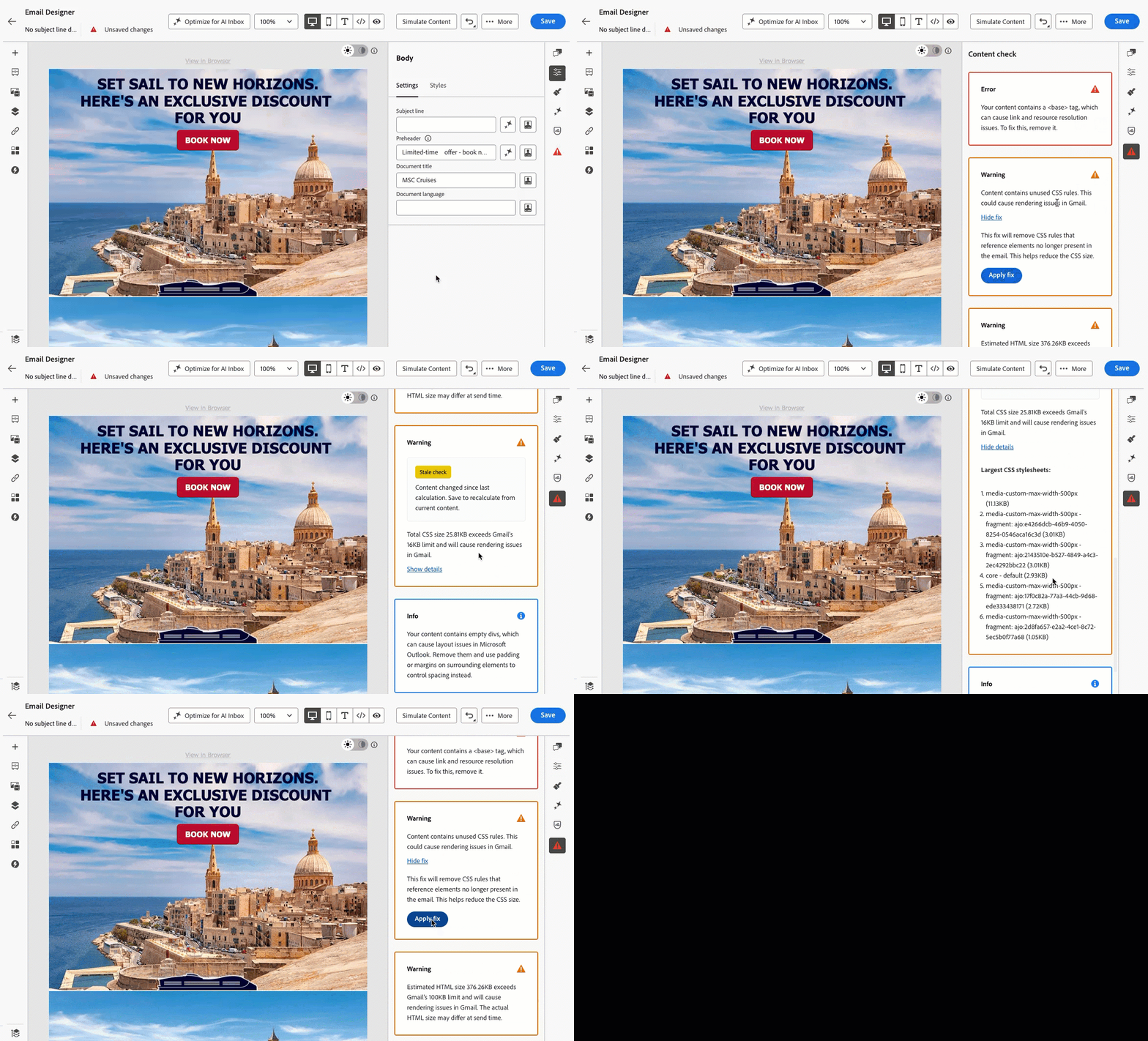
For more information, refer to the detailed documentation.
Availability date: July 16, 2026
-
Expression fragments support in
<head>- Expression fragments can now be used in the<head>of email templates. This allows you to centralize styling or any custom code in a single fragment and reuse it across multiple templates. When a fragment is updated and republished, all emails built from templates referencing it automatically inherit the latest code — eliminating the need to manually update each email individually. Learn moreAvailability date: July 29, 2026
Journeys july-26-journeys
The following capabilities and improvements have been added to journeys in this release.
A new user interface has been introduced for the journey canvas, delivering improved performance for large journeys, automatic layout for better readability, and a guided authoring experience.
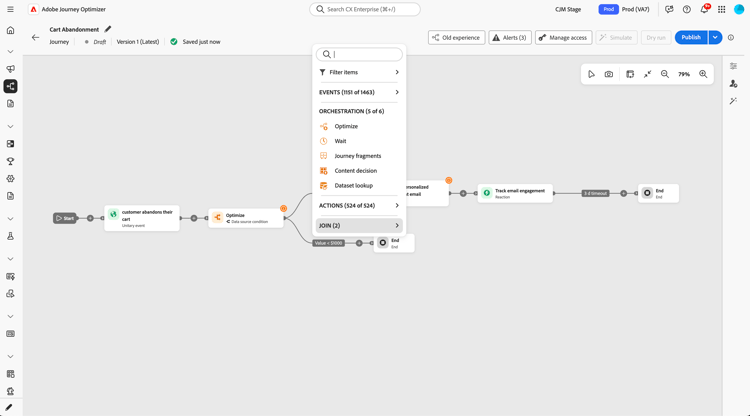
To switch to the new UI, click the New experience button. This setting is saved at the journey level, so the journey reopens in the new experience by default. To revert, click Old experience. Learn more.

Availability date: July 16, 2026
-
[Deprecation]{class="badge negative"} Batch audiences no longer supported in Audience Qualification node and Exit Criteria - Starting September 2026, Journey Optimizer will block publication for any journey using a batch audience in an Audience Qualification node or in Exit Criteria. A validation warning is already surfaced in the journey canvas. Existing live journeys are not affected. New, draft, and duplicated journeys that include this configuration must be updated before September 2026. Use a streaming audience in the Audience Qualification node, or switch to a Read Audience activity. For Exit Criteria, use a streaming audience. Learn how to migrate your journeys
-
External audiences in Journey Simulation - Journey Simulation now supports External Audiences. When simulating journeys targeting CSV or Federated Audience Composition audiences, you can mock enrichment attributes from those audiences directly through the UI form or a JSON import. The UI dynamically displays only the specific enrichment attributes used in your journey logic, enabling precise validation of decision branches and personalization rules prior to going live. Learn more
Availability date: July 29, 2026
-
Circuit breaker protection for slow custom action endpoints - For endpoints routed through the slow custom action service, Journey Optimizer now temporarily caps all calls for up to 5 minutes when more than 20% of calls in a 120-second window exceed 5 seconds, if there are at least 200 calls in the 120-second observation window. This helps prevent overloading endpoints that are already slow. Learn more
Availability date: July 29, 2026. This capability is being gradually rolled out across regions.
Orchestrated campaigns july-26-oc
The following capabilities and improvements are coming to orchestrated campaigns in this release.
Orchestrated campaigns now support loading a CSV or TXT file directly into the campaign canvas as the targeting audience, without first ingesting the file into Adobe Experience Platform. The file data is consumed at execution time and is not persisted as an Adobe Experience Platform dataset. During file setup, you can define column mappings, data types, NULL handling, and per-column error policies. Rows that fail validation are rejected and logged before the campaign runs, keeping the audience clean without manual pre-processing. This is particularly suited for ad-hoc sends or partner list campaigns where building a full ingestion pipeline is not practical.
For more information, refer to the detailed documentation.
Availability date: July, 6 2026
-
View Orchestrated Campaign Transitions permission - Added a new View Orchestrated Campaign Transitions permission to replace the legacy View File in Orchestrated Campaigns option. This change allows you to hide preview results within campaign transitions to support personally identifiable information compliance.
Availability date: July 29, 2026
Decisioning decisioning
-
Decisioning rules creation from natural language expression - You can now describe the Decisioning rule you want to create in plain language and let AI generate it for you. This capability is available to customers with access to Adobe AI capabilities.
This capability is available to organizations with access to Adobe AI capabilities. It is only available for a set of organizations (Limited Availability). To gain access, contact your Adobe representative.
Availability date: July 29, 2026
-
Decision items’ dynamic custom attributes - Decision item custom attributes can now be personalized at delivery time using profile, contextual, and audience data. This removes the need to maintain duplicate offers for minor content variations, allowing marketers to manage fewer, more flexible decision items. Learn more
Availability date: July 27, 2026
-
Decisioning rules and ranking formulas simulation - You can now simulate your Decisioning rules and ranking formulas directly from the rule or formula editor. Add manual test variants or generate them using AI, then run the expression against your test data to validate eligibility and review ranked results, all before deploying to production. Variants generation is available to customers with access to Adobe AI capabilities.
This capability is only available for a set of organizations (Limited Availability). To gain access, contact your Adobe representative.
Availability date: July 29, 2026
Learn more about rules simulation | Learn more about ranking formulas simulation
Content management july-26-content
The following capabilities and improvements have been added to content management in this release.
Transitioning to Adobe Journey Optimizer from another marketing platform is easier with guided capabilities that help you move existing email content and journeys into Journey Optimizer. A dedicated workspace lets you reuse what you have instead of rebuilding from scratch.
This capability is only available for a set of organizations (Limited Availability). To gain access, contact your Adobe representative.
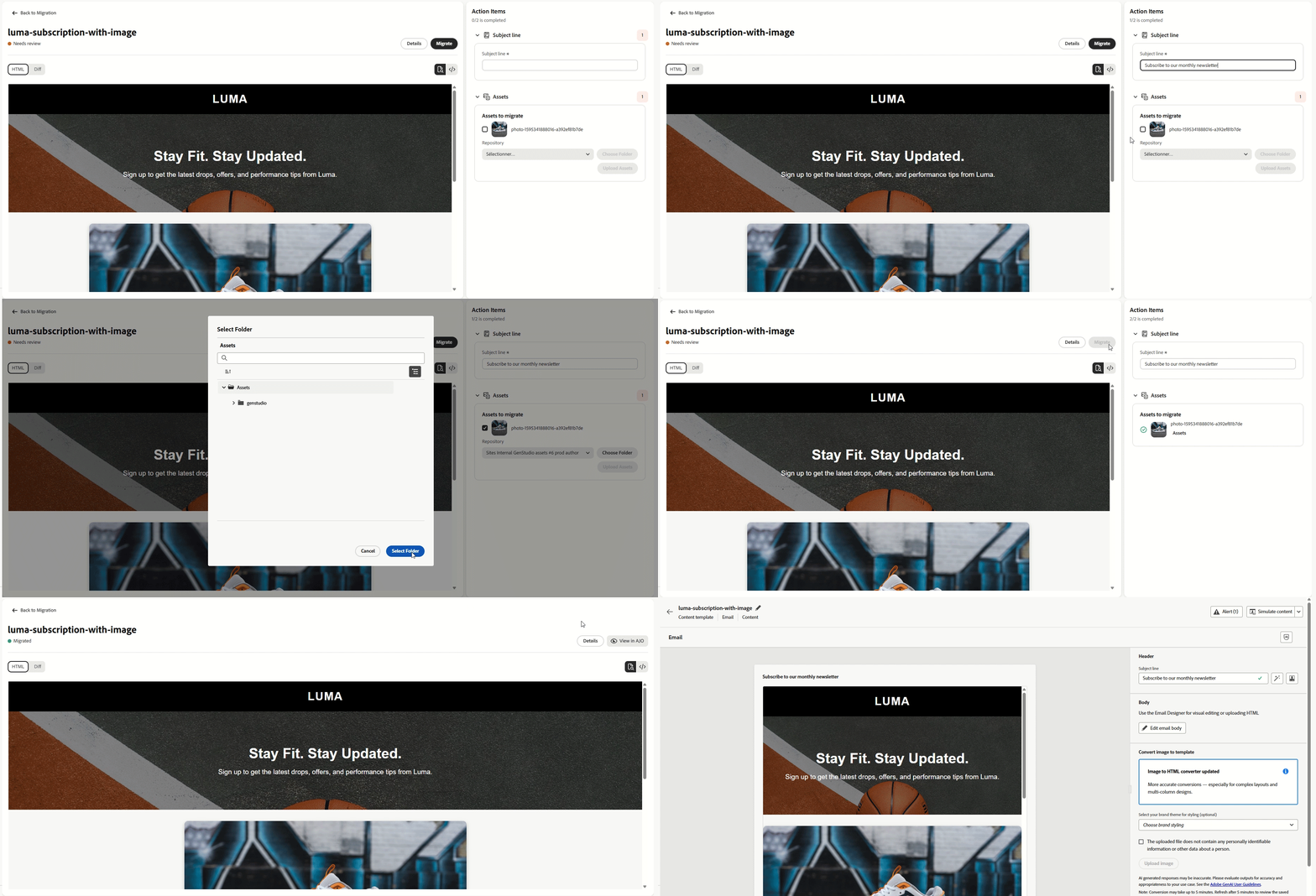
For more information, refer to the detailed documentation.
Availability date: July 30, 2026
-
New helper functions in personalization expressions - New helper functions are now available in personalization expressions:
appendQueryParams: Appends a query parameter to a URL, or replaces it if the key already exists.dateBetween: Checks whether a date falls within a start and end date range (inclusive).equalsAnyIgnoreCase: Returns true when a string matches any provided value, ignoring case.getUrlFragment: Extracts the fragment portion of a URL (the part after #).join: Concatenates array elements into a single string using a separator.decode64: Decodes a Base64-encoded string. If the input is not valid Base64, the original input string is returned unchanged.parseJson: Parses a JSON string into a structured variable that can be used in the template.valueAtPath: Assigns a value from a data path to a template variable, with optional indexing to extract a specific element from arrays or collections.abort: Stops message delivery when reached during rendering.
The
concatfunction has also been enhanced and now supports two or more arguments.In addition, the following Template Migration Functions are now available to assist with migrating existing templates to Journey Optimizer:
ampCompare: Compares two values using the specified comparison operator.ampSubstr: Returns a portion of a string between the specified start and end indices.compareTo: Compares two strings lexicographically.
Learn more about helper functions
Availability date: July 28, 2026
-
“AI Assistant” renamed to “Generate content” - AI Assistant has been renamed to Generate Content throughout Adobe Journey Optimizer. This update is limited to naming and terminology; no functional changes have been introduced. Navigation labels, buttons, menus, and dialogs for content generation, image generation, personalization expressions, and content experimentation have been renamed from “AI Assistant” to “Generate Content.”
Availability date: July 30, 2026
-
Multilingual improvements - Language Settings can now be duplicated from an existing active setting, so you no longer need to fully rebuild a configuration to make changes. You can also copy a condition from one locale to another while authoring Language Settings, streamlining setup for sites with many languages.
Availability date: July 30, 2026
Content & Integrations july-26-integration
The following improvements are coming to content management and integrations in this release.
Journey Optimizer and Adobe Experience Manager Dynamic Media integration enables open-time personalization for Dynamic Media templates, unlocking hyper-personalized use cases. Customers can create and publish personalized templates in Adobe Experience Manager and use them in Journey Optimizer, with data rendered at open time.
For more information, refer to the detailed documentation.
Availability date: July 30, 2026
-
AJO MCP server new tools - The Adobe Journey Optimizer MCP server now exposes five additional read-only channel configuration tools, enabling you to query channel configurations, supporting resources, and marketing actions directly from your AI assistant. You can now use List Channel Configurations (across all AJO channels), Get Channel Configuration, List Configuration Resources, Get Configuration Resource, and List Marketing Actions. Read more
Availability date: July 9, 2026
Reporting july-26-reporting
The following improvement is coming to reporting in this release.
-
New Estimated Click Metrics for Email Reporting - To provide a more accurate view of real customer engagement, new estimated metric are now available across Journeys, Campaigns, and Channel Live reports.
-
Estimated CTR (Click-through rate): Calculated as estimated clicks relative to the total number of delivered messages.
-
Estimated CTOR (Click-to-open rate): Calculated as estimated clicks relative to the total number of estimated opens.
Availability date: July 29, 2026
-
Usability improvements july-26-usability
-
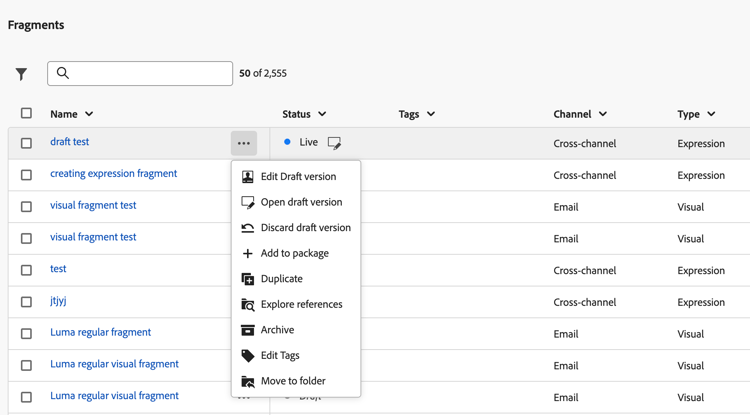
Quick launch shortcuts in Fragments inventory - You can now quickly access common actions from the Fragments list using the More actions button. Available shortcuts include editing the fragment, opening its details, and discarding the draft version. Learn more
-
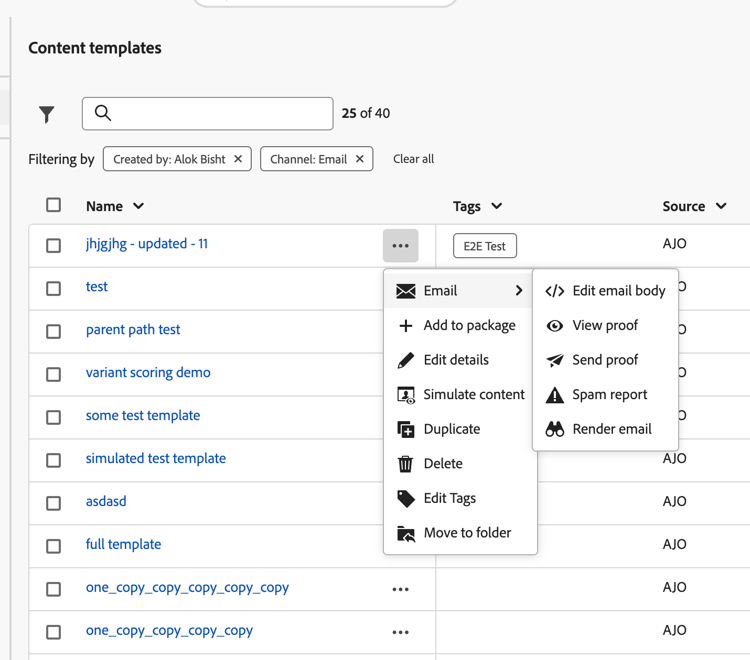
Quick launch shortcuts in Templates inventory - The More actions button in the Content Templates list now provides quick access to common actions: editing template details, simulating content, and deleting a template. Additional channel-specific shortcuts are also available: for email templates, edit the email body, view or send a proof, run a spam report, and render the email; for mobile message templates, check the character count and number of segments. Learn more
June '26 release notes june-26-rn
Journeys june-26-journeys
The following capabilities and improvements have been added to journeys in this release. Additional changes are also expected in the upcoming days or weeks.
You can now set your journey to Simulation. This mode allows you to validate your logic using simulated users. These are temporary profiles created specifically for the simulation, allowing you to test freely without needing to manage persistent test profiles in Adobe Experience Platform.
Previously released in Limited Availability, Journey Simulation is now available to all environments. With this General Availability release, you can now use Journey Agent to generate simulated users and events directly in the Simulation menu.
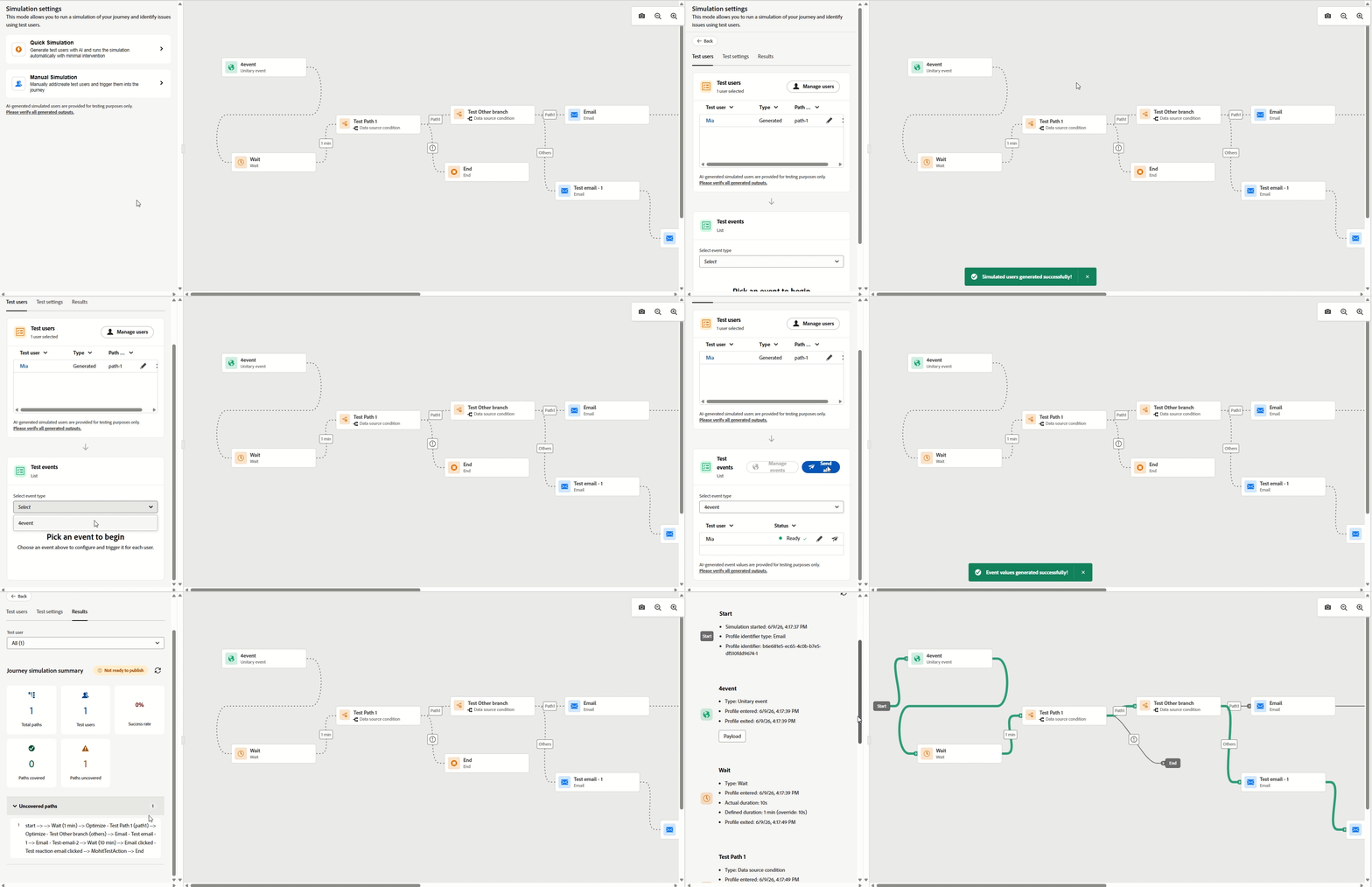
For more information, refer to the detailed documentation.
Availability date: June 9, 2026
You can now create Journey Fragments in Adobe Journey Optimizer. Journey Fragments are reusable sets of journey nodes that you can build once and drop into any journey across your sandbox. Whether it's an eligibility check, a preferred channel routing logic, or a welcome sequence, fragments help teams move faster and stay consistent, without rebuilding the same logic from scratch every time.
Once created, fragments are stored in a dedicated Fragment Inventory and can be inserted into any journey using the Journey fragments activity.
Previously available in Limited Availability, this capability is now generally available to all customers. Journey fragments also support Sandbox tooling, allowing you to package and export fragments across sandboxes.
For more information, refer to the detailed documentation.
Availability date: June 9, 2026
The Optimize activity now supports Targeting rules which enable you to define specific criteria that customers must meet to qualify for a particular journey path, based on audience segments or profile attributes.
Unlike experimentation, where customers are assigned to paths randomly, targeting uses deterministic logic to ensure that the appropriate audience or customer profile is routed to the intended path.
Previously released in Limited Availability, this capability is now available to all environments (General Availability).
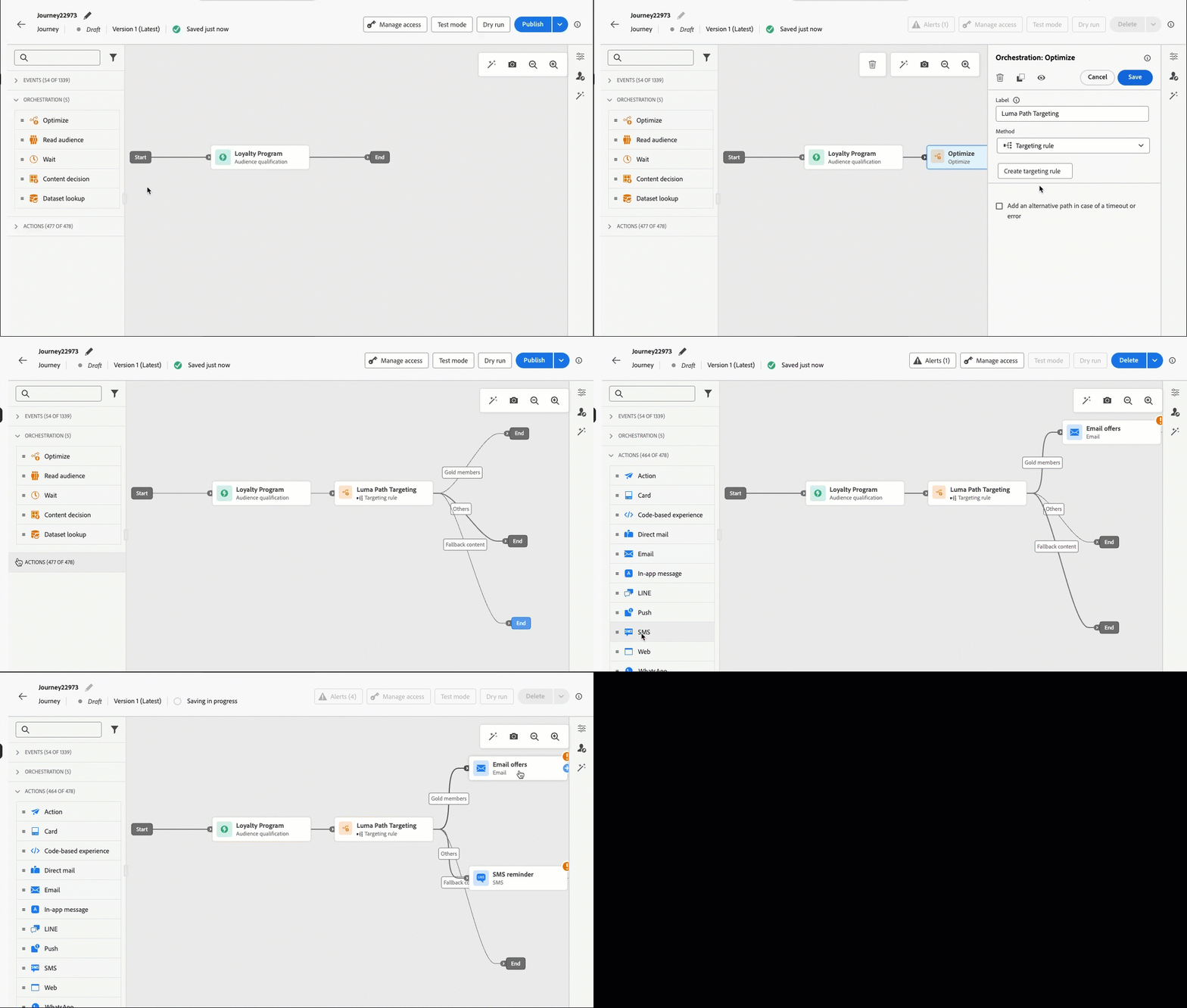
For more information, refer to the detailed documentation.
Availability date: June 8, 2026
AI Assistant now operates in the journey advanced expression editor to convert natural-language prompts into valid expressions and conditional logic. Describe the expression you want to build, and AI Assistant generates ready-to-use code you can apply immediately or refine through follow-up prompts.
This capability is available to all customers as a Public Beta.
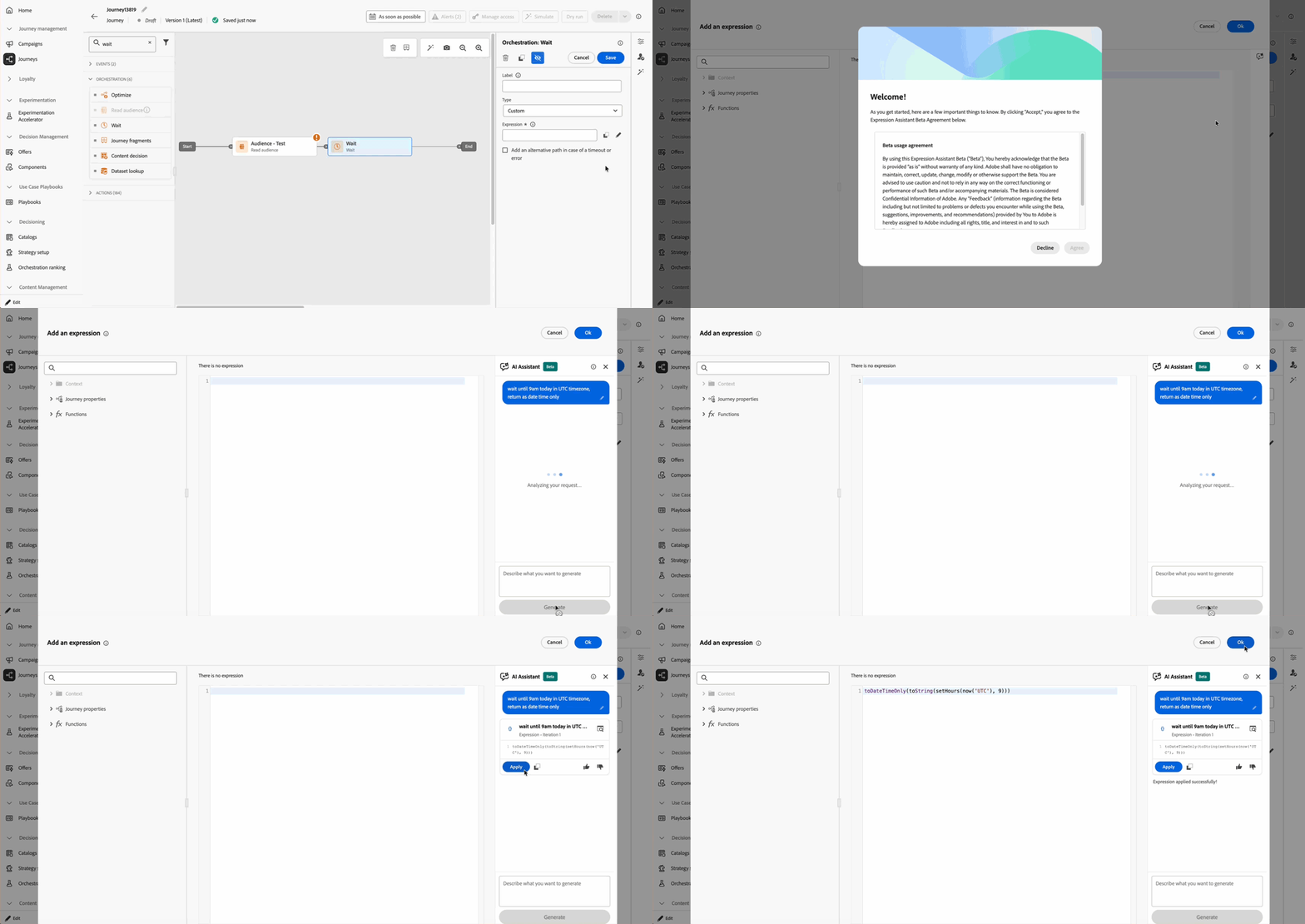
For more information, refer to the detailed documentation.
Availability date: June 3, 2026
-
[Deprecation]{class="badge negative"} Batch audiences no longer supported in Audience Qualification node and Exit Criteria - Starting September 2026, Journey Optimizer blocks publication for any journey using a batch audience in an Audience Qualification node or in Exit Criteria. Existing live journeys are not affected. New, draft, and duplicated journeys that include this configuration must be updated before September 2026. Use a streaming audience in the Audience Qualification node, or switch to a Read Audience activity. For Exit Criteria, use a streaming audience. Learn how to migrate your journeys
-
Stop a paused journey directly - You can now stop a journey directly from the Paused state. Previously, a paused journey had to be resumed to Live before it could be stopped. Read more
Availability date: June 18-22, 2026
-
Supplemental identifier support for external audiences - Supplemental identifiers in journeys are now supported for external audiences, including audiences imported from a CSV file and audiences created with Federated Audience Composition. You can designate any non-identity attribute or non-person identity attribute from the audience as the supplemental ID, no schema labeling is required. Read more
Availability date: June 11, 2026
-
Automatic stop for non-recurring Read Audience journeys - Non-recurring Read Audience journeys now automatically transition to Stopped status once the last active profile exits. Previously, these journeys remained Live until the 91-day global timeout expired — even when no profiles were flowing through them anymore. With this improvement, journey status reflects actual execution state as soon as it completes, keeping your journey inventory accurate without manual intervention.
Note that this behavior does not apply to journeys that include nodes causing waiting periods, such as Wait nodes, Reaction nodes, or event-triggered transitions. These journeys remain subject to the standard 91-day global timeout. Learn more
Availability date: June 9, 2026
-
Certificate-Based Custom Authentication in custom actions - Custom actions now support Certificate-Based Custom Authentication. By adding
subType: "certificateCredential"to a custom authorization configuration, Journey Optimizer uses Adobe’s managed certificate to sign a JWT client assertion and exchange it for an access token — no client secret required. Designed for enterprise APIs that enforce certificate-based identity verification, such as Microsoft Entra ID. Learn moreAvailability date: June 4, 2026
-
Increased live journey limit and new guardrails - You can now have up to 200 active journeys, increased from the previous limit of 100. Read more
Availability date: June 18, 2026. This capability is being gradually rolled out to all regions over the next few days.
Orchestrated campaigns june-26-oc
The following capabilities and improvements are coming to orchestrated campaigns in this release.
-
Loop-based personalization for relational data - The personalization editor now supports a Loop block that iterates over relational collections, such as orders, accounts, or bookings, and renders one content block per record inside a single email or mobile message. Collections are configured through the data picker using personalization tokens, with no expression writing required. Read more
Availability date: June 26, 2026
Decisioning june-26-decisioning
The following capabilities and improvements have been added to Decisioning in this release.
You can now add Decision policies into Direct Mail journeys and campaigns. Decision policies are containers for your offers that leverage the Decisioning engine to dynamically return the best content for each audience member. Direct Mail decisioning also supports batch decisioning use cases, enabling you to export the corresponding offer items for every profile in a given Adobe Experience Platform audience.
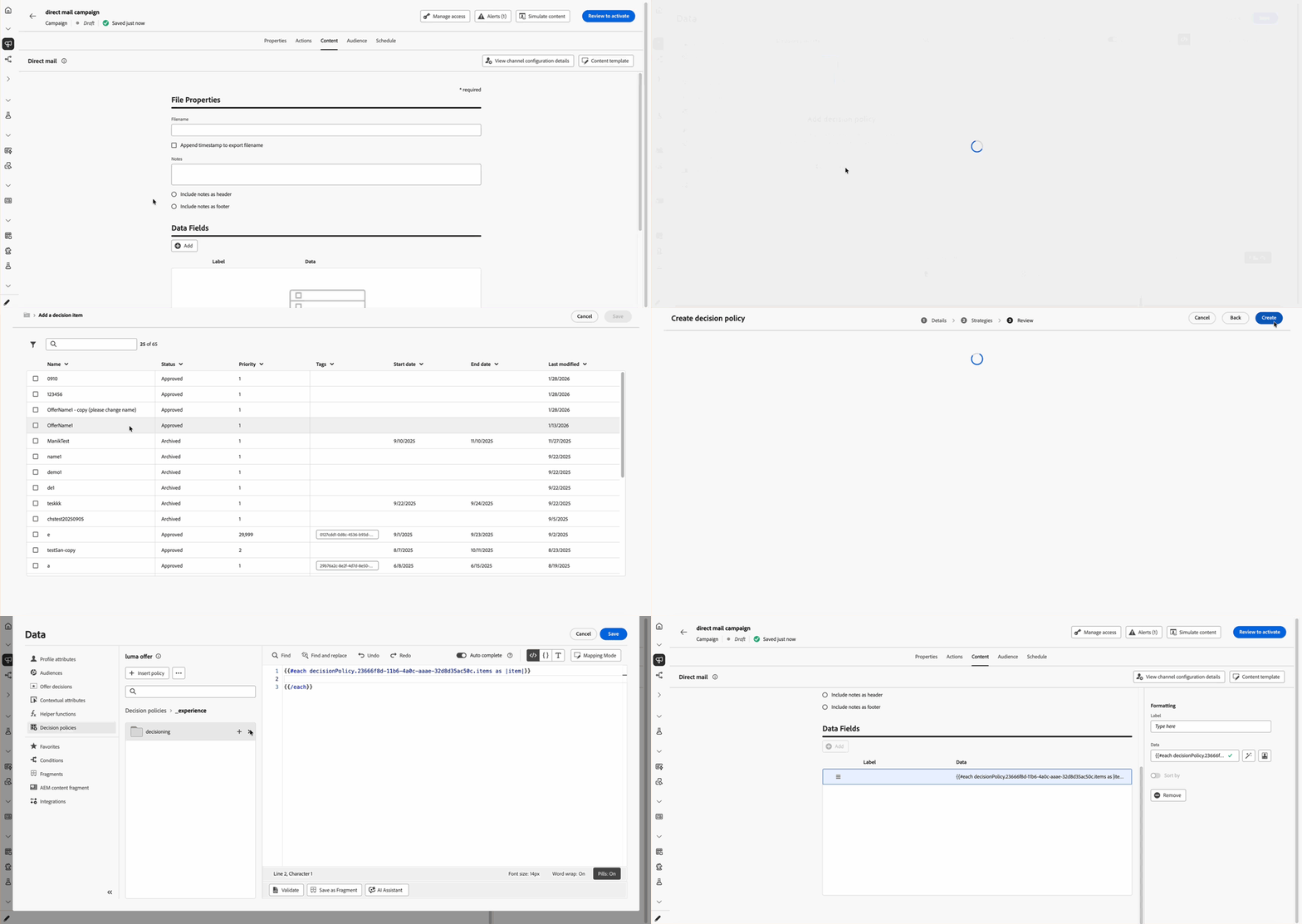
For more information, refer to the detailed documentation.
Availability date: June 3, 2026
-
Leverage Adobe Experience Manager content fragments in Decisioning - You can now map Adobe Experience Manager content fragments to decision items in Decisioning and leverage them inside decision policies to deliver the right fragment to the right customer at the right time. Previously released in Limited Availability, this capability is now available to all environments (General Availability). Read more
Availability date: June 18, 2026
Content management june-26-content
The following capabilities and improvements have been added to content management in this release.
Two updates are now available to the Simulate content workflow:
- New default path — Clicking Simulate content now opens the Simulate content variations experience by default. From a single screen, you can add sample input manually or from a CSV/JSON file, reuse simulated users, preview rendering, and send proofs. To preview with Adobe Experience Platform test profiles, send proofs with test profile data, or check email inbox rendering and spam reports, click Simulate content, then select Simulate content (AEP profiles) from the dropdown.
- AI-generated content variants — In the Simulate content variations experience, click Generate to use AI to automatically create content variants. The system analyzes your message, detects personalization fields and conditional branches, and fills in realistic values so you can validate rendering without building every variant by hand.
For more information, refer to the detailed documentation.
Availability date: June 9, 2026
Email channel june-26-email
The following capabilities have been added to the email channel in this release.
Journey Optimizer now includes an option to reduce the size of your email's HTML by stripping unnecessary whitespace, comments, and redundant code — without affecting how the email renders.
This can improve deliverability by avoiding size thresholds that some email providers use to flag or reject messages and may reduce load time for recipients.
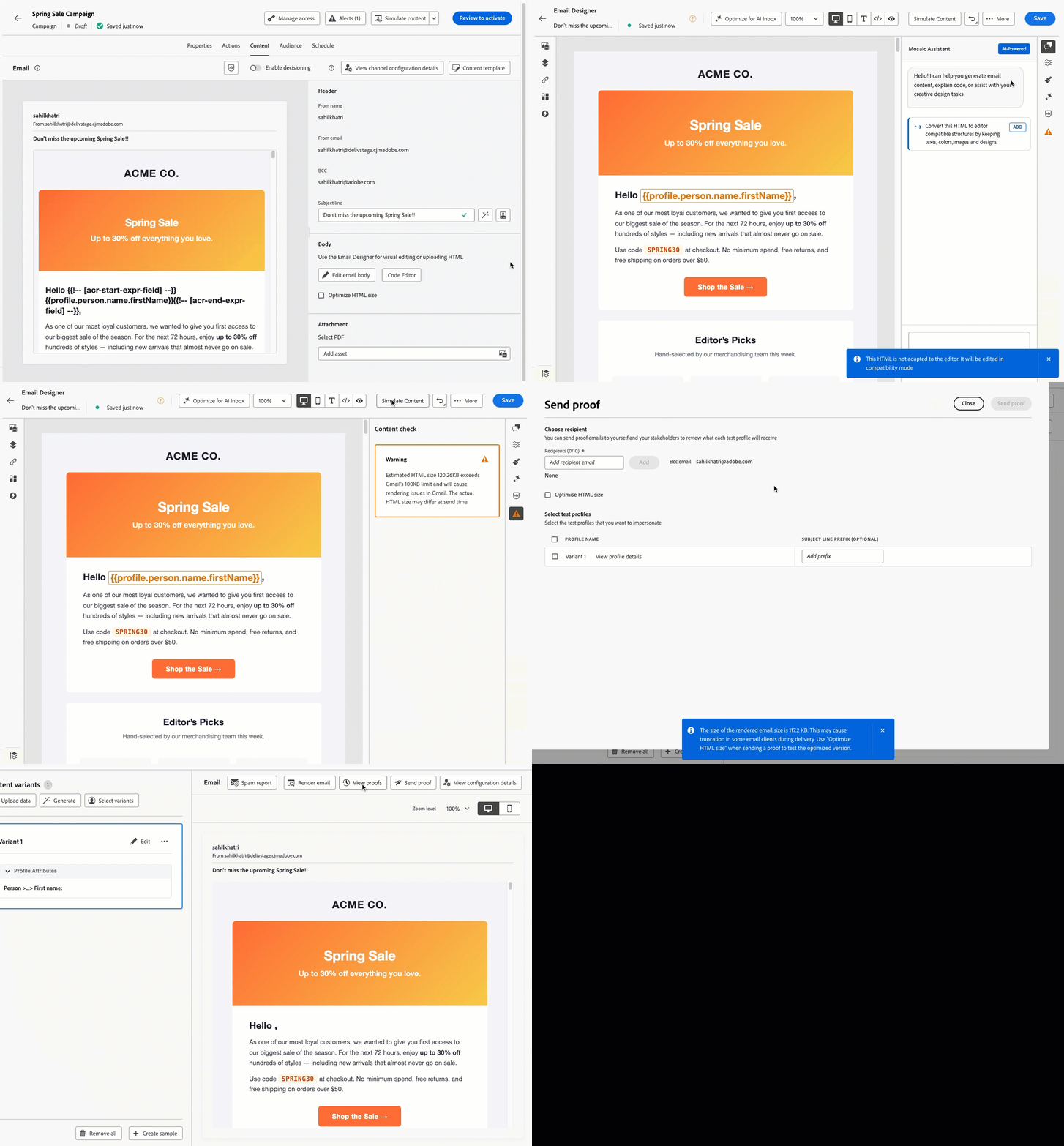
For more information, refer to the detailed documentation.
Availability date: June 26, 2026
You can now add rich text to customizable fragments that are used in your emails content.
For example, when using the Text component as an editable field in the Email Designer, you can directly format the content (for example, bold and italics) and insert hyperlinks.
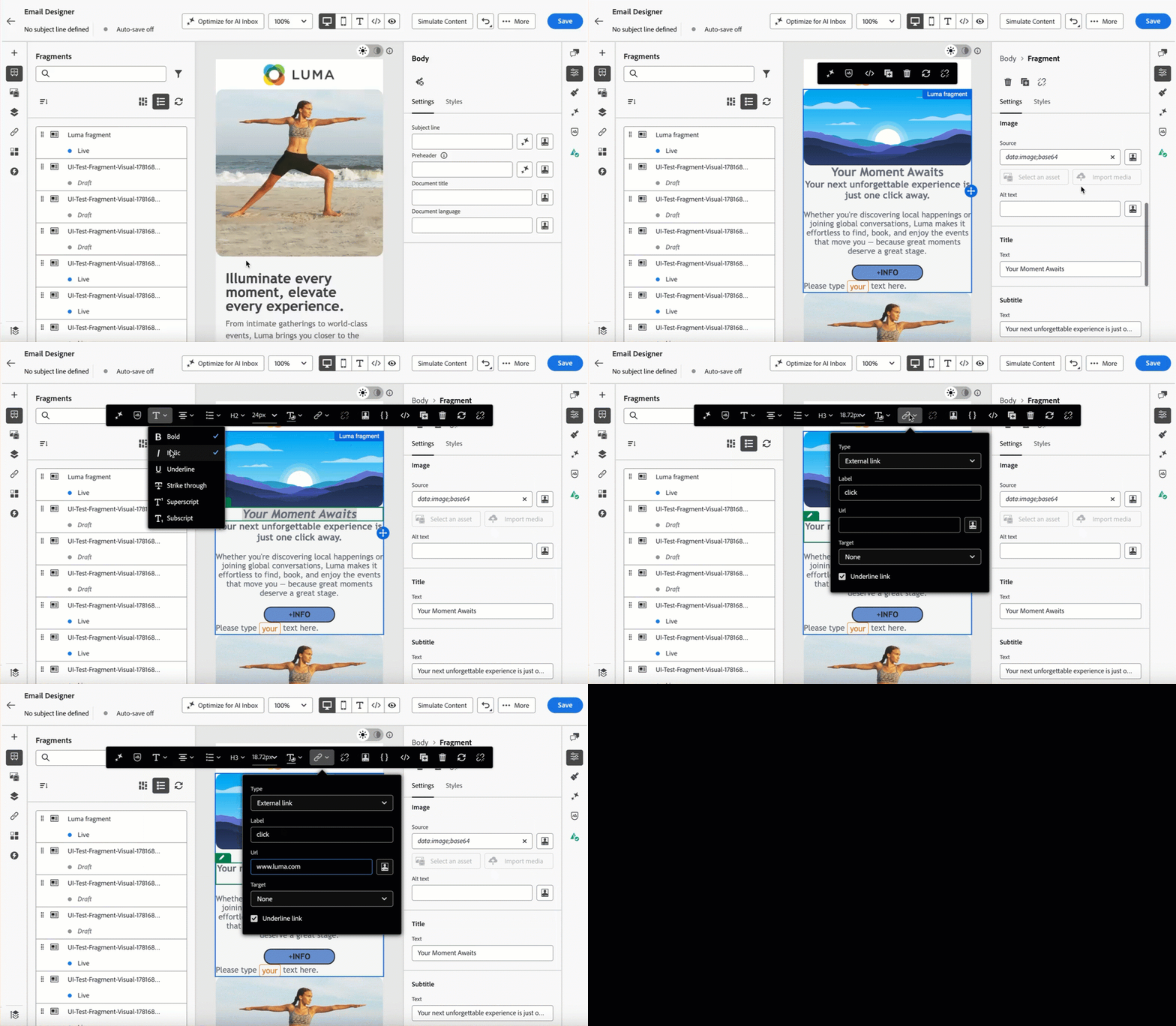
For more information, refer to the detailed documentation.
Availability date: June 19, 2026
Journey Optimizer now includes automated technical validation directly in the Email Designer, helping you catch HTML and CSS issues before sending.
Checks cover unsupported elements such as <script> and <base> tags, empty divs that can break layout in Microsoft Outlook, HTML meta refresh tags, and CSS or HTML size thresholds that trigger rendering failures in Gmail.
Results are surfaced as errors, warnings, or informational notices directly in the authoring panel, with contextual details and one-click fixes where available, so issues can be resolved without leaving the editor.
This capability is only available for a set of organizations (Limited Availability). To gain access, contact your Adobe representative.
For more information, refer to the detailed documentation.
Availability date: June 18, 2026
-
Enhanced Image to HTML converter - A new version of the Image to HTML converter feature is now available, bringing improved accuracy for HTML generation. This update leverages higher-tier LLM models to deliver more precise and reliable HTML output from image inputs.
Availability date: June 18, 2026
Content & Integrations june-26-integration
The following capabilities and improvements are coming to content management and integrations in this release.
This release brings several enhancements to make Adobe Experience Manager Content Fragments more usable, more governable, and more production-ready within Journey Optimizer authoring workflows:
- Journey Optimizer now supports fetching Content Fragments from multiple Adobe Experience Manager configurations, including author, publish and authenticated publish tiers.
- Once a fragment is selected, its context is preserved throughout the message, enabling authors to reuse fragment fields across content blocks without reselecting.
- A new dedicated Content Fragments listing page has been introduced in Journey Optimizer for improved lifecycle management; users can identify out-of-sync fragments and trigger manual syncs to stay current.
- Locale and variation support now allows marketers to work with alternate versions of the same Content Fragment more deliberately.
- You now have flexibility in how Adobe Journey Optimizer accesses your Adobe Experience Manager content. This release introduces the ability to switch the source repository for Content Fragments used in your journeys and campaigns.
- Now compatible with Managed Services, you can view, access, and use Adobe Experience Manager Content Fragments directly in Journey Optimizer for personalization. Simply add your Adobe Experience Manager Managed Services repository URL in the configuration settings as a one-time setup.
For more information, refer to the detailed documentation.
Availability date: June 18, 2026
Reporting june-26-reporting
The following improvements have been added to reporting in this release.
-
New Estimated Click Metrics for Email Reporting - To provide a more accurate view of real customer engagement, new estimated metric are now available across Journeys, Campaigns, and Channel reports.
-
Estimated CTR (Click-through rate): Calculated as estimated clicks relative to the total number of delivered messages.
-
Estimated CTOR (Click-to-open rate): Calculated as estimated clicks relative to the total number of estimated opens.
Availability date: June 25, 2026
-
Configuration june-26-configuration
The following configuration improvements are coming in this release.
-
URL parameter encryption - You can now encrypt URL parameters in tracking and landing page links added to your email messages. This provides an additional layer of security for sensitive parameter data. Previously released in Limited Availability, this capability is now available to all environments (General Availability). Read more
Availability date: June 1, 2026
-
New permissions for key registry - Two new permissions are now required to access and manage the keys needed for URL parameter encryption: Manage Key Registry and View Key Registry. Read more
Availability date: June 1, 2026
Administration june-26-administration
The following improvements have been added to administration and data management in this release.
-
[Important]{class="badge informative"} AJO Message Feedback Event Dataset moving to batch ingestion - The AJO Message Feedback Event Dataset is moving from streaming ingestion to batch ingestion. As a result, expect a data latency of up to 2 hours for this dataset. If you have built reports in Customer Journey Analytics or run queries using this dataset, account for this increased latency going forward. Read more
Availability date: June 10, 2026
-
Customer alerts for campaign lifecycle events - New system alerts now notify you of key lifecycle events for Action and API-triggered campaigns. Subscribe at the sandbox level. Read more
Availability date: June 1, 2026
Mobile messaging (SMS, MMS, RCS & LINE) june-26-mobile
The following improvements are coming to mobile messaging in this release.
-
Unique Clicks for SMS reports - A new Unique Clicks module has been introduced to SMS reports, bringing the same level of granular performance tracking to SMS that is currently available for Email reports.
-
SMS - Display Usage Metrics - For customers purchasing SMS directly through Adobe Journey Optimizer, a new SMS usage dashboard has been introduced. You can now view and track your last 90 days of message sending metrics, categorized by Mobile Originated (MO) and Mobile Terminated (MT) messages. This data is also available for download via CSV, providing greater visibility and control over your SMS spend. Learn more
-
Estimated Clicks for SMS report - A new Estimated Clicks metric is now available in Journeys, Campaigns, and Channel reports for email and SMS. This metric excludes identified bot and non-human interaction (NHI) traffic to provide a clearer view of genuine customer engagement. The existing Clicks metric remains available and continues to report total clicks.
Usability improvements june-26-usability
-
Folders for Journeys - You can now organize your journeys into folders to improve navigation and management in the interface. Read more
Availability date: June 30, 2026
May '26 release notes may-26-rn
Journeys may-26-journeys
The following capabilities and improvements have been added to journeys in this release.
You can now create Journey Fragments in Adobe Journey Optimizer. Journey Fragments are reusable sets of journey nodes that you can build once and drop into any journey across your sandbox. Whether it's an eligibility check, a preferred channel routing logic, or a welcome sequence, fragments help teams move faster and stay consistent, without rebuilding the same logic from scratch every time.
Once created, fragments are stored in a dedicated Fragment Inventory and can be inserted into any journey using the Journey fragments activity.
This capability is only available for a set of organizations (Limited Availability). To gain access, contact your Adobe representative.
For more information, refer to the detailed documentation.
Availability date: May 13, 2026
You can now set your journey to Simulation. This mode allows you to validate your logic using simulated users. These are temporary profiles created specifically for the simulation, allowing you to test freely without needing to manage persistent test profiles in Adobe Experience Platform.
This capability is available to all customers as a Limited Availability with essential capabilities.
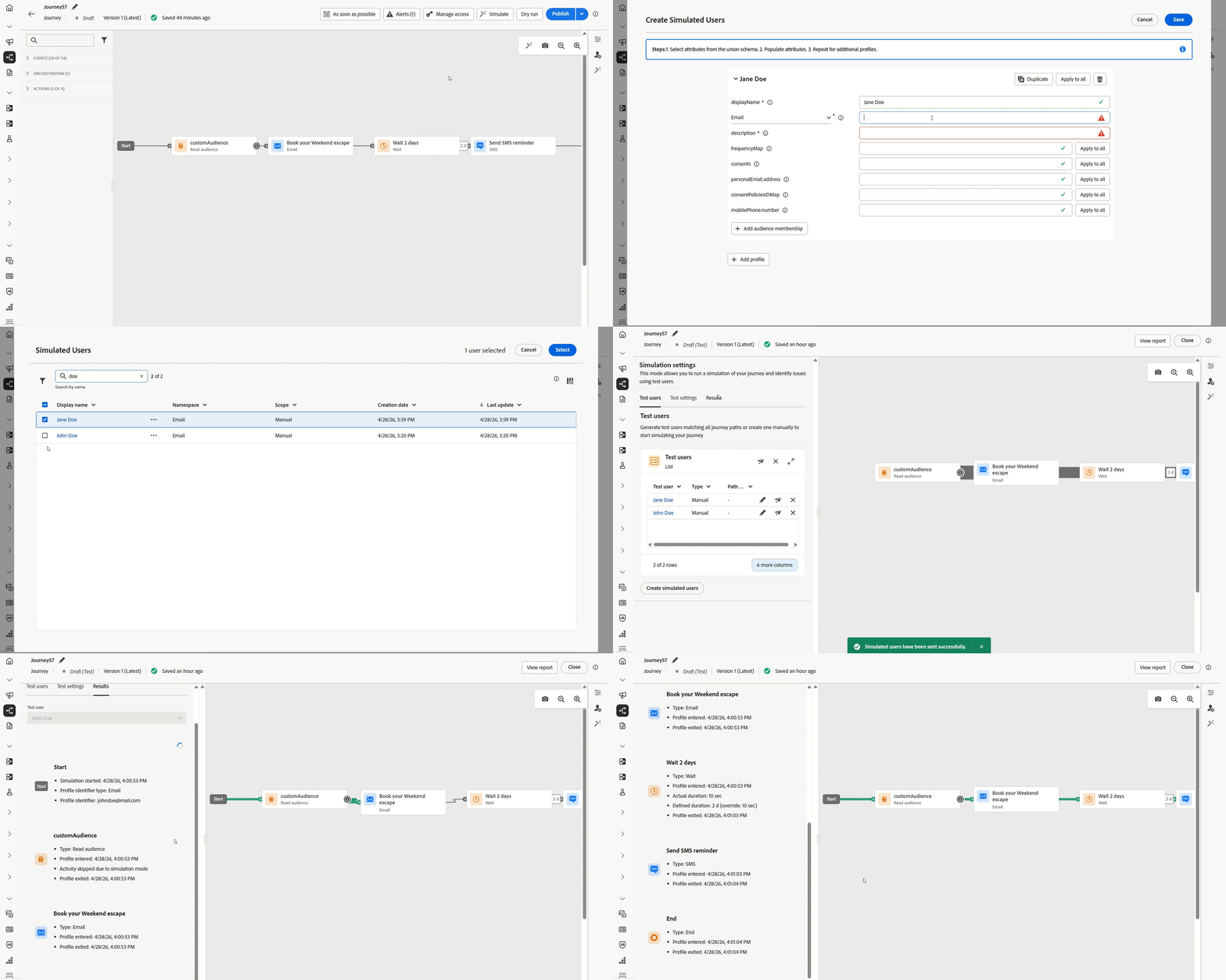
For more information, refer to the detailed documentation.
Availability date: May 5, 2026
Orchestrated campaigns may-26-oc
The following capabilities and improvements have been added to orchestrated campaigns in this release.
Orchestrated campaigns can now be linked together by triggering an orchestrated campaign directly from another orchestrated campaign's End activity.
This makes it possible to break complex orchestration logic into smaller, reusable flows that can be called from multiple parent campaigns rather than rebuilt each time. The payload passed at runtime is available for segmentation and personalization in the downstream campaign, so each linked campaign can behave based on the context it receives.
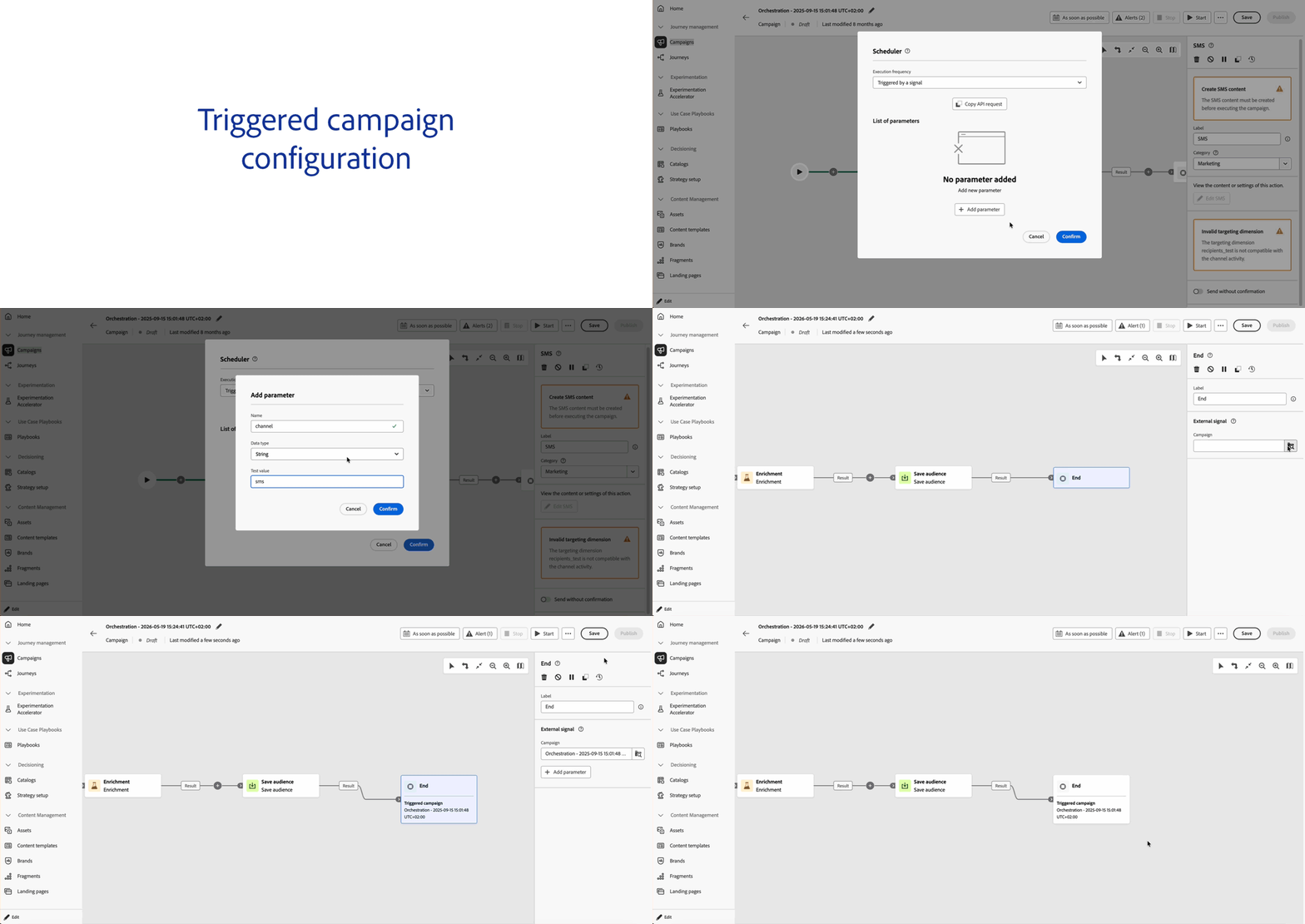
For more information, refer to the detailed documentation.
Availability date: May 20, 2026
-
Add links in Enrichment activity - The Add Link functionality is now available in the Enrichment Activity for Orchestrated Campaigns. This allows you to create a direct relationship between your working table data and your existing database tables.
Availability date: May 20, 2026
Decisioning may-26-decisioning
The following capabilities and improvements have been added to Decisioning in this release.
Adobe Journey Optimizer now uses AI to detect Decisioning rules and ranking formulas that can be simplified. In the inventory, a red indicator appears on any rule for which the AI has identified an optimization opportunity. Clicking the indicator displays the original expression alongside the AI-suggested version. From there, you can download a file to review how simulated profiles are evaluated by each version and confirm they behave identically, then replace the expression with the optimized one.
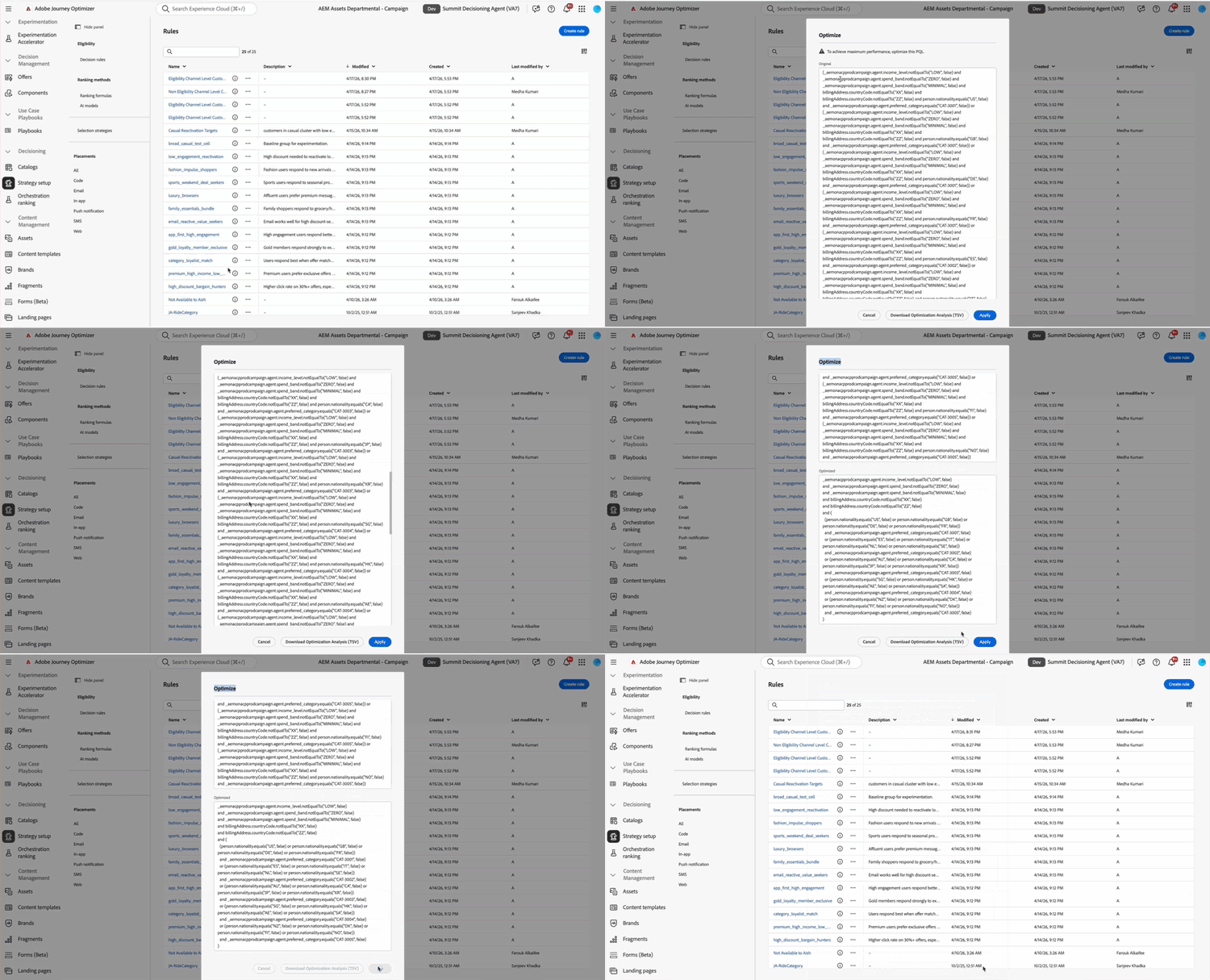
For more information, refer to the detailed documentation.
Availability date: May 5, 2026
-
Adobe Experience Manager content fragments in Decisioning - You can now map Adobe Experience Manager content fragments to decision items in Decisioning and leverage them inside decision policies to deliver the right fragment to the right customer at the right time. Read more
This capability is only available for a set of organizations (Limited Availability). To gain access, contact your Adobe representative.
Availability date: May 20, 2026
-
Decision policy details from campaign summary - From the campaign summary page, you can now review the full structure of each decision policy—including selection strategies, decision items, andfallback offers—without duplicating or editing the campaign. You can also copy a JSON summary to the clipboard for troubleshooting with Adobe Support or your engineering team. Read more
Availability date: May 20, 2026
-
Decisioning migration workflow APIs - The API contract for creating dependency analysis and migration workflows has been updated: pass
request-levelas a query parameter on the request URL (sandbox,offer, ordecision). Request level must no longer be sent in the JSON body. Read moreAvailability date: May 6, 2026
Email channel may-26-email
The following capabilities and improvements have been added to the email channel in this release.
It is now possible to add deep links to your email content through a dedicated option in the Email Designer. This ensures users are taken directly to the right in-app content instead of being redirected to browsers or app stores, preserving context and engagement.
Note that although the Deeplink option is available to all customers, deep links only work if you have completed the required configuration and mobile app implementation steps.
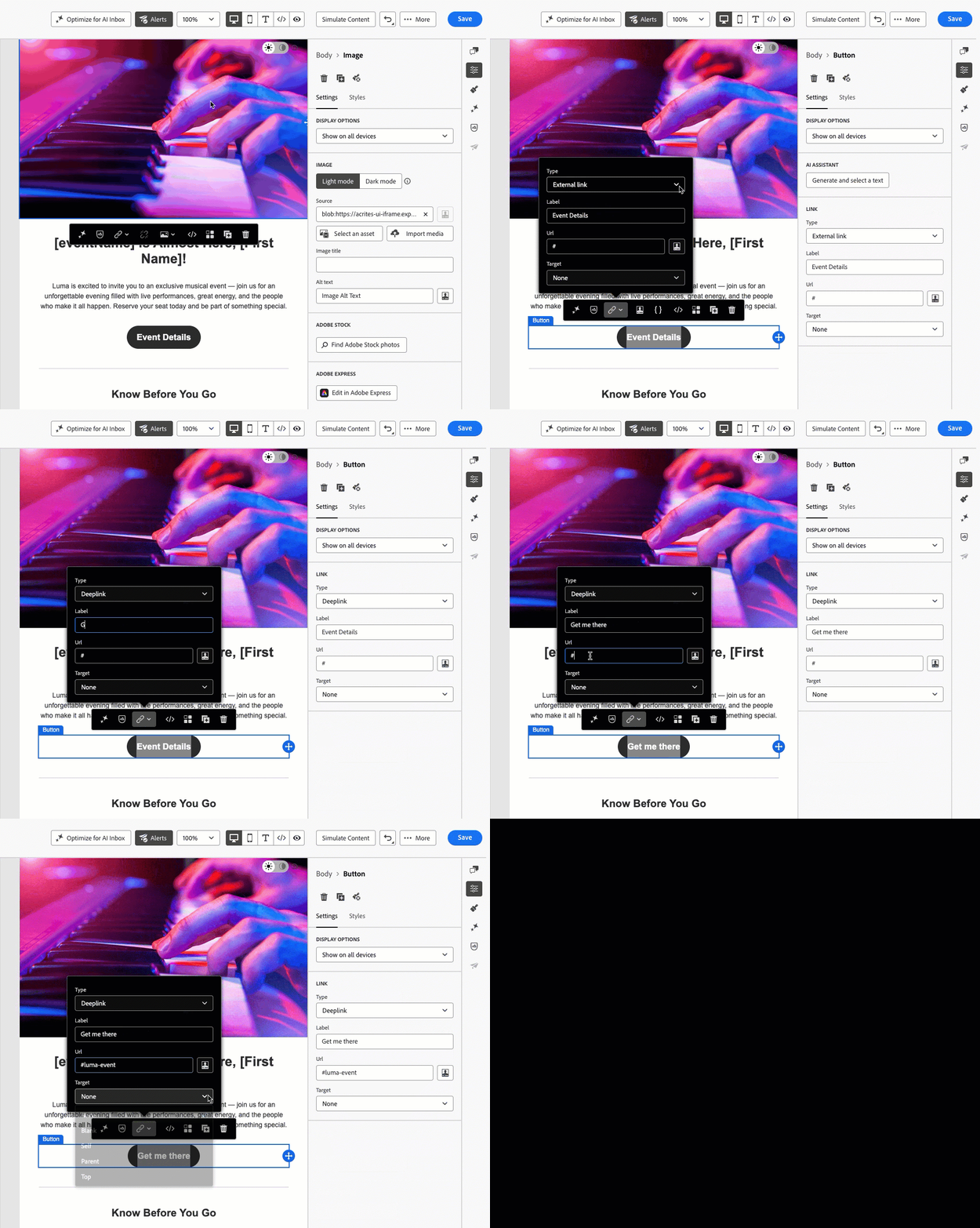
For more information, refer to the detailed documentation.
Availability date: May 12, 2026
-
Restrict inheritance breaking in fragments - When creating or editing a fragment, you can now choose whether it can be modified when used in emails. Locking a fragment ensures it stays synchronized everywhere it appears, preventing local edits that could break brand standards or compliance requirements. This setting can be updated later, applying to future usages. Read more
Availability date: May 21, 2026
Mobile messaging (SMS, MMS & RCS) may-26-mobile
The following capabilities and improvements have been added to mobile messaging in this release.
SMS, MMS, and RCS are now unified under a single Mobile Message action in Adobe Journey Optimizer, making it easier to manage all mobile message types from one place. As part of this update, you can now author rich media RCS messages, including images, carousels, and suggested actions, directly in Journey Optimizer through a new native authoring experience.
For more information, refer to the detailed documentation.
Availability date: May 20, 2026
-
Character Count - In Adobe Journey Optimizer, you can now use the Character Count to monitor the length of your SMS messages in real time. It helps you see when a message will be split into multiple segments to better manage formatting and avoid unexpected increases in sending costs. Read more
-
SMS inbounds to a custom dataset - In SMS API credentials, route inbound SMS to a custom, profile-enabled Experience Event dataset you select instead of only the default tracking dataset. Read more
-
Webhook interface enhancement - When configuring SMS webhooks, the user interface now includes a built-in setup guide with practical examples, making it easier to align provider payloads and troubleshoot issues without leaving the configuration flow. Read more
-
Deep links in SMS content - It is now possible to add deep links to your SMS content using the Url helper function. This ensures that the recipients are taken directly to the intended in-app content, without routing them through a web browser or an app store - provided you have completed the required configuration and mobile app implementation steps. Read more
WhatsApp channel may-26-whatsapp
The following improvements have been added to the WhatsApp channel in this release.
-
WhatsApp button support and tracking - WhatsApp templates now support Quick reply, Call to action – URL, and Call to action – phone, Copy code is not supported. Journey Optimizer sends supported buttons and tracks interactions alongside your other channel reporting.
-
WhatsApp channel context data - Journey Optimizer now captures additional interaction data returned from the WhatsApp channel and stores it in the AJO EmailTrackingExperienceEvent Dataset under the
whatsAppChannelContextfield group. Read moreaccordion The following fields are captured and can be used to build audiences and analyze WhatsApp engagement messageType– WhatsApp message type (e.g.templateBased,response)inboundMessage– Inbound reply content (e.g.stop,start,subscribe)inboundNumber– Sender ID where the inbound message was receivedchannelType– Channel category (Utility,Marketing, orPromotional)profileNumber– Phone number from which the inbound message was receivedorigTimestamp– Original timestamp from Meta / WhatsAppstatus– Delivery status including standardized provider feedback (sent,delivered,bounce,error,delay,duplicate,denylist,exclude, orunknown) and the raw provider status messagereactionEvent– Content of the user response: emoji for reactions, or message text for replies to a specific messagereactionMessageID– ID of the original message being responded toreactionActionName– Type of response action (react,unreact, orreply)interactiveSelectedTitle– User-selected title from a WhatsApp interactive messageinteractiveType– Interactive message type (list reply,button reply, orbutton)interactiveSelectedDescription– Description of the selected WhatsApp interactive optioninteractiveSelectedID– ID of the selected option from WhatsApp
Content & Integrations may-26-content
The following capabilities and improvements have been added to content management and integrations in this release.
Journey Optimizer now uses the Content Advisor selector, a unified modal for selecting both Experience Manager Assets and Content Fragments. The new selector includes:
- Browsing, searching, and filtering across all assets and fragments.
- AI semantic search: describe what you need in plain language, e.g. "coffee in the mountains", to surface contextually relevant assets based on meaning and content, not just text matches. Multi-lingual queries are also supported.
- Brief upload: upload a marketing brief to automatically surface assets that align with your campaign context based on its content and requirements.
- Dynamic Media renditions: pick and apply image renditions for dynamic assets without leaving the selector.
For more information, refer to the detailed documentation.
Availability date: May 19, 2026
The Integrations feature allows you to connect third-party data sources directly to Adobe Journey Optimizer. By simplifying how you pull in external data and composable content, this feature makes it easier to deliver personalized, dynamic messaging across all your channels.
Previously released in Beta, this capability is now available to all environments (General Availability).
For more information, refer to the detailed documentation.
Availability date: May 4, 2026
- Cross-organization repository access in the Assets Selector - You can now seamlessly select assets from repositories across multiple organizations directly within the Adobe Experience Manager Asset Selector.
Usability improvements may-26-usability
The following usability improvements were also released in May 2026.
Lists
-
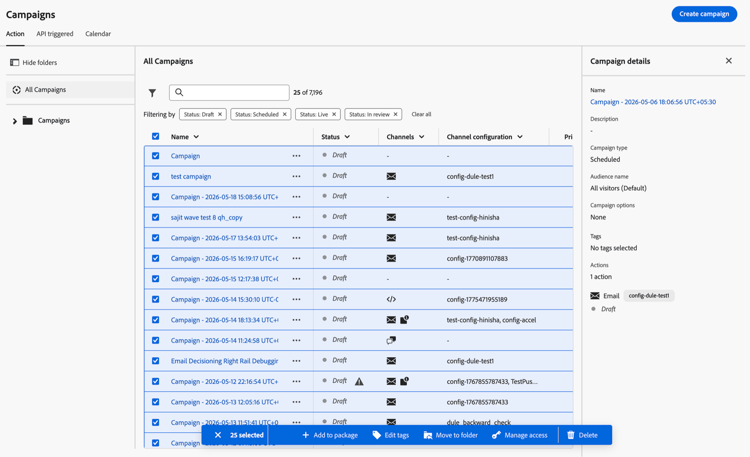
Bulk actions - You can now select multiple items at once in the Campaigns, Fragments, and Templates lists and perform bulk operations from a single action bar, including adding items to a package, moving them to a folder, editing tags, managing access, and archiving or deleting them. Learn more
-
Sorting and column resizing - The Campaigns, Fragments, and Templates lists now support sorting by clicking any column header. In the Campaigns folders view, sorting and filtering by Priority and Channel configuration is also available. Column widths in the Fragments and Templates lists are also resizable — drag the column border to fit the data you care about most. Learn more
Content authoring
-
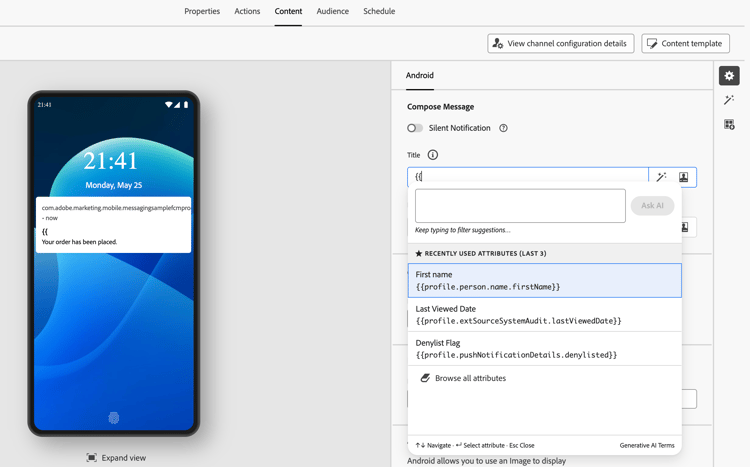
Inline profile attribute editing - Inline profile attribute editing in the Email Designer was initially released in April. As part of the May release, this capability has been decoupled from AI Assistant and extended to the Push channel editor. Learn more
-
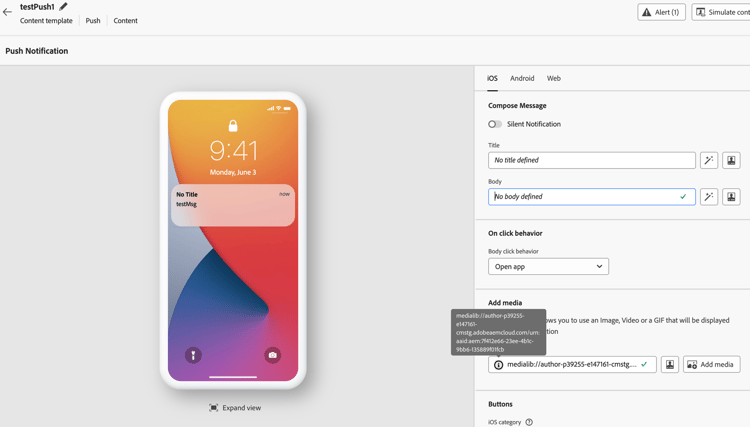
Link URL tooltip in Push channel editor - When a URL in any link or media field is too long to display, a tooltip icon is always visible next to the field — hover over it to see the complete URL. Learn more
April '26 release notes april-26-rn
New capabilities april-26-features
The following capabilities were released in April 2026.
Orchestrated campaigns now support an Incremental query activity that targets only profiles or events that are newly eligible since the last execution.
This keeps recurring campaigns focused on net-new audiences (new sign-ups, newly qualified loyalty members, and similar segments) while reducing query workloads and avoiding redundant sends over time.
For more information, refer to the detailed documentation.
Availability date: April 30, 2026
With Journey Optimizer, you can now send emails where the transmitting entity (Sender) differs from the authoring entity (From). Email clients that support this will typically render it as "Sender on behalf of From" or show a "via" indicator. Fill in the optional Sender headers fields in the email channel settings to configure this capability.
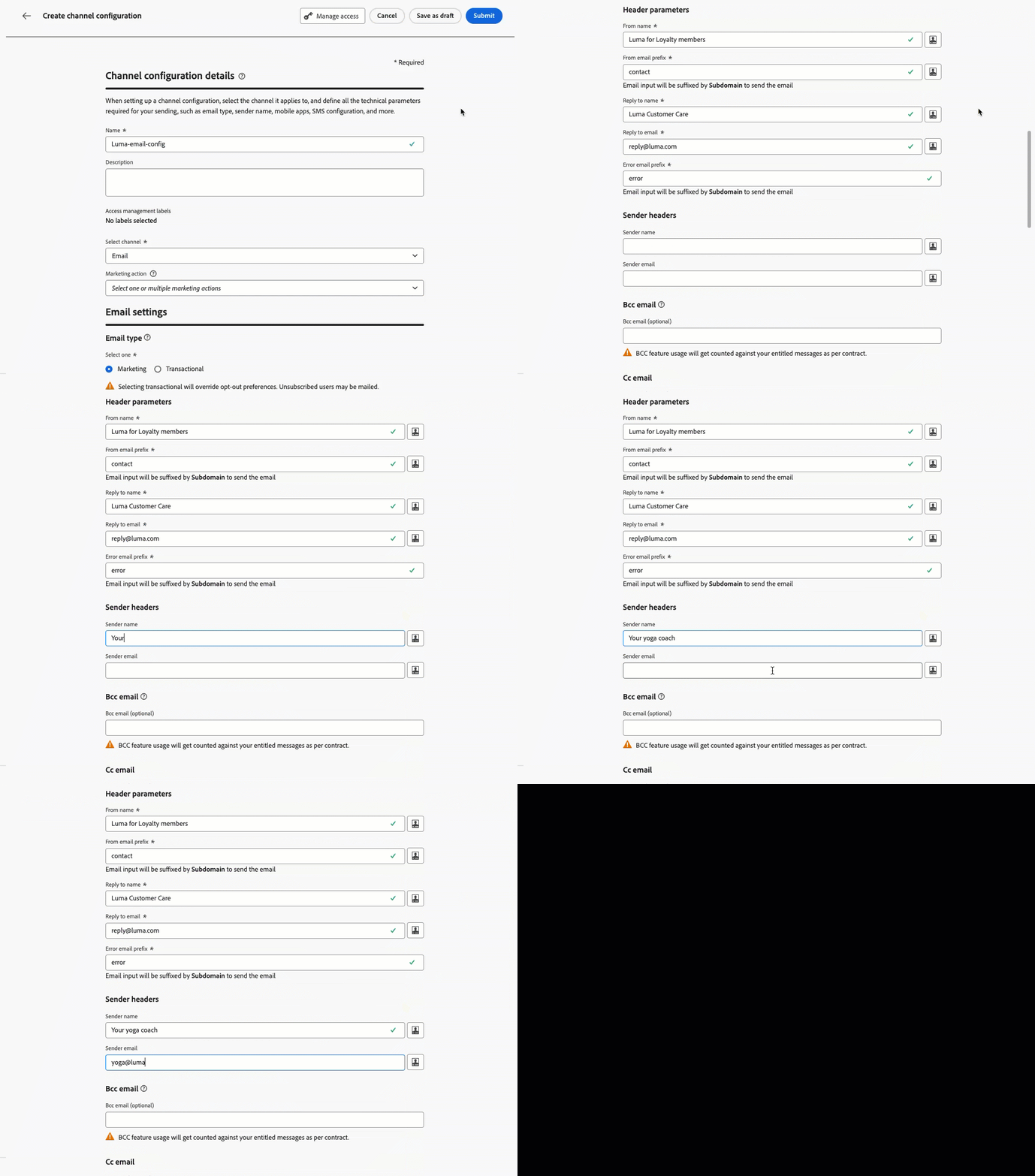
For more information, refer to the detailed documentation.
You can now configure an optional CC (carbon copy) field in your email channel settings. Unlike BCC, CC recipients are visible to the primary recipient, enabling transparent communication and clearer ownership.
This allows you to automatically copy the right stakeholder on each message—such as a relationship manager or account owner—while ensuring the customer knows who to contact for follow-up.
The CC field supports personalization, so a single configuration can dynamically route copies based on profile data, making it scalable across multiple use cases without additional setup.
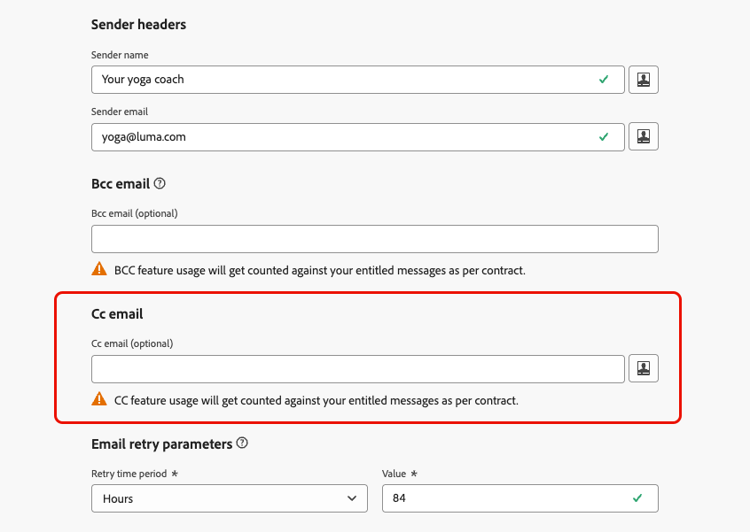
For more information, refer to the detailed documentation.
Sandbox Tooling now supports packaging and copying orchestrated campaigns from one sandbox to another. This eliminates the need to manually rebuild campaigns in each environment. When a campaign is packaged, its core dependent objects such as merge policies, messages, are automatically included, so the imported campaign arrives ready to configure and validate. To protect production environments, all imported campaigns land in draft status in the target sandbox, giving teams a review and approval step before any campaign goes live.
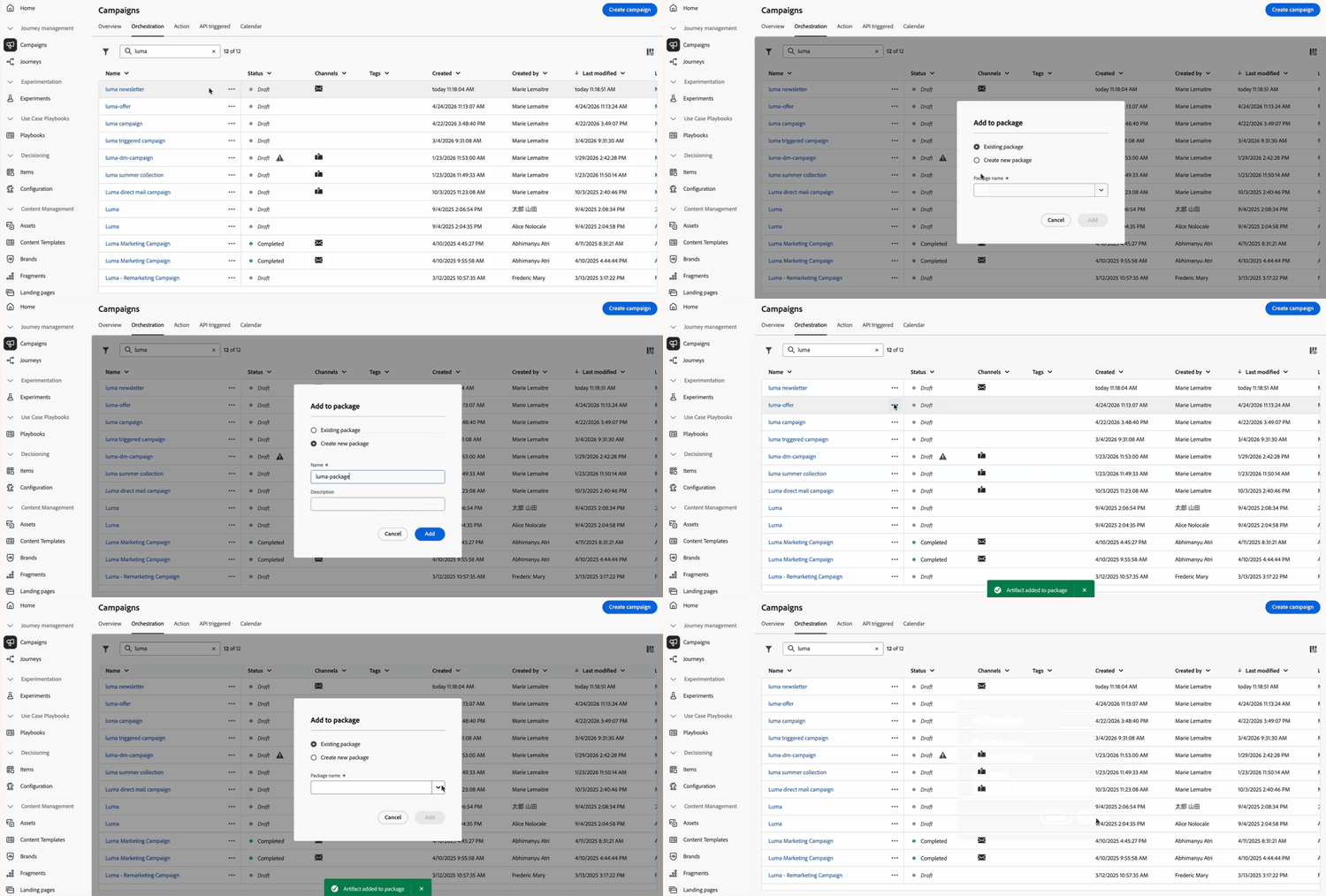
For more information, refer to the detailed documentation.
Adobe Journey Optimizer now provides an MCP (Model Context Protocol) server that surfaces campaign, channel configuration, and sandbox operations directly inside any MCP-compatible application. With this integration, different personas can collaborate around the same orchestration data. Instead of writing queries against the Adobe Journey Optimizer REST API or navigating multiple UI screens, you can describe your intent conversationally and let the LLM invoke the appropriate MCP tools. This capability is currently available in Claude Web and Desktop.
This capability is available to all customers in Public Beta.
For more information, refer to the detailed documentation.
You can now use AI models in your ranking formulas to automatically boost journey priority scores based on customer profile attributes and contextual factors, ensuring customers enter the most relevant journeys.
This capability is only available for a set of organizations (Limited Availability). To gain access, contact your Adobe representative.
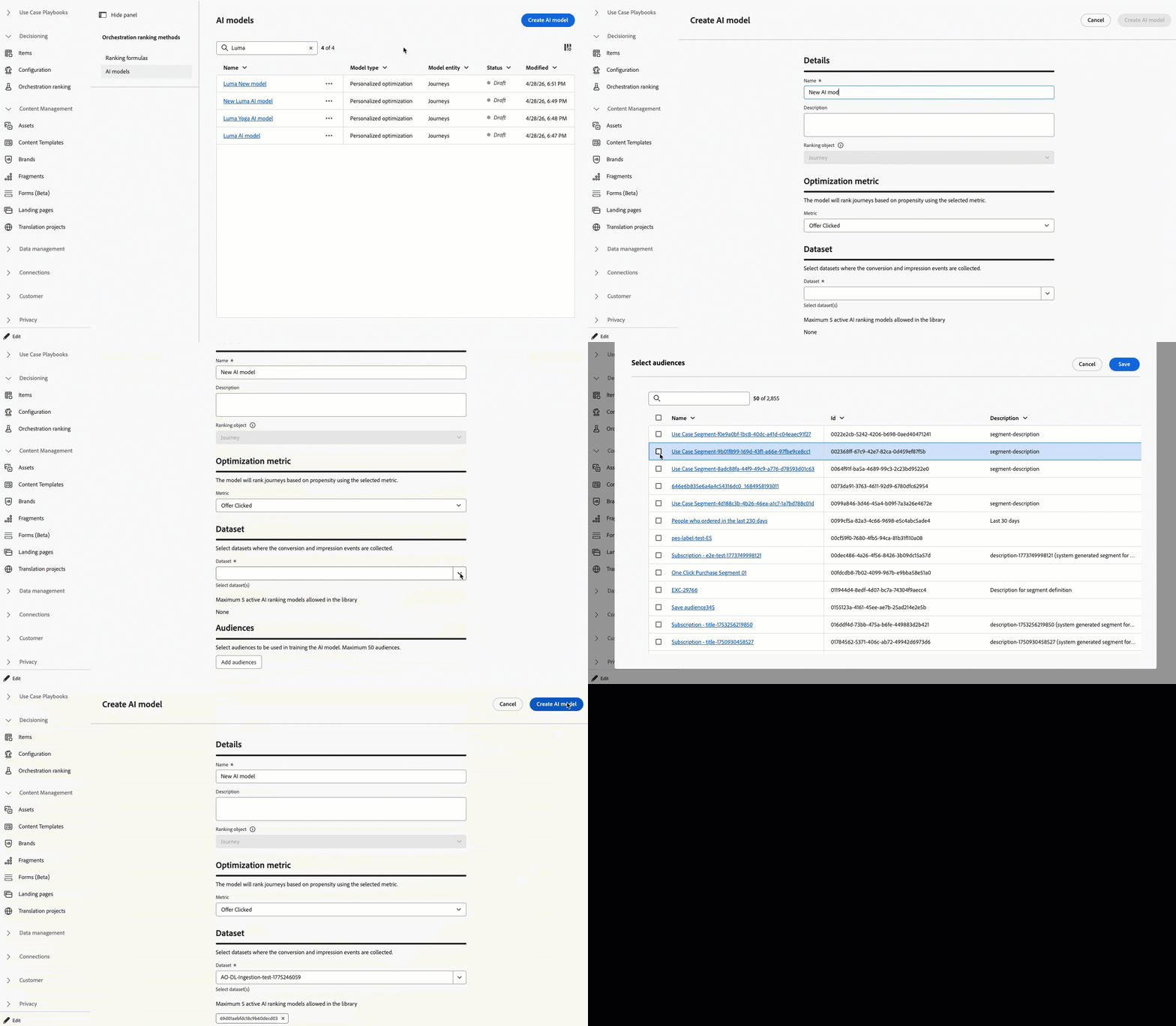
For more information, refer to the detailed documentation.
The Adobe Express integration in Adobe Journey Optimizer lets you use Adobe Express's editing tools directly during content creation, enabling you to resize, remove backgrounds, crop, and convert assets to JPEG or PNG.
Previously released in Limited Availability, this capability is now available to all environments (General Availability).

For more information, refer to the detailed documentation.
Availability date: April 23, 2026
Adobe Journey Optimizer now includes a new capability that ensures your emails are optimally structured for AI-powered inboxes such as Apple Intelligence and Google Gemini in Gmail.
As AI assistants increasingly control how recipients read and act on email, this feature helps you generate and author content that performs well across downstream AI tasks including summarization, triage, prioritization, and intent extraction.
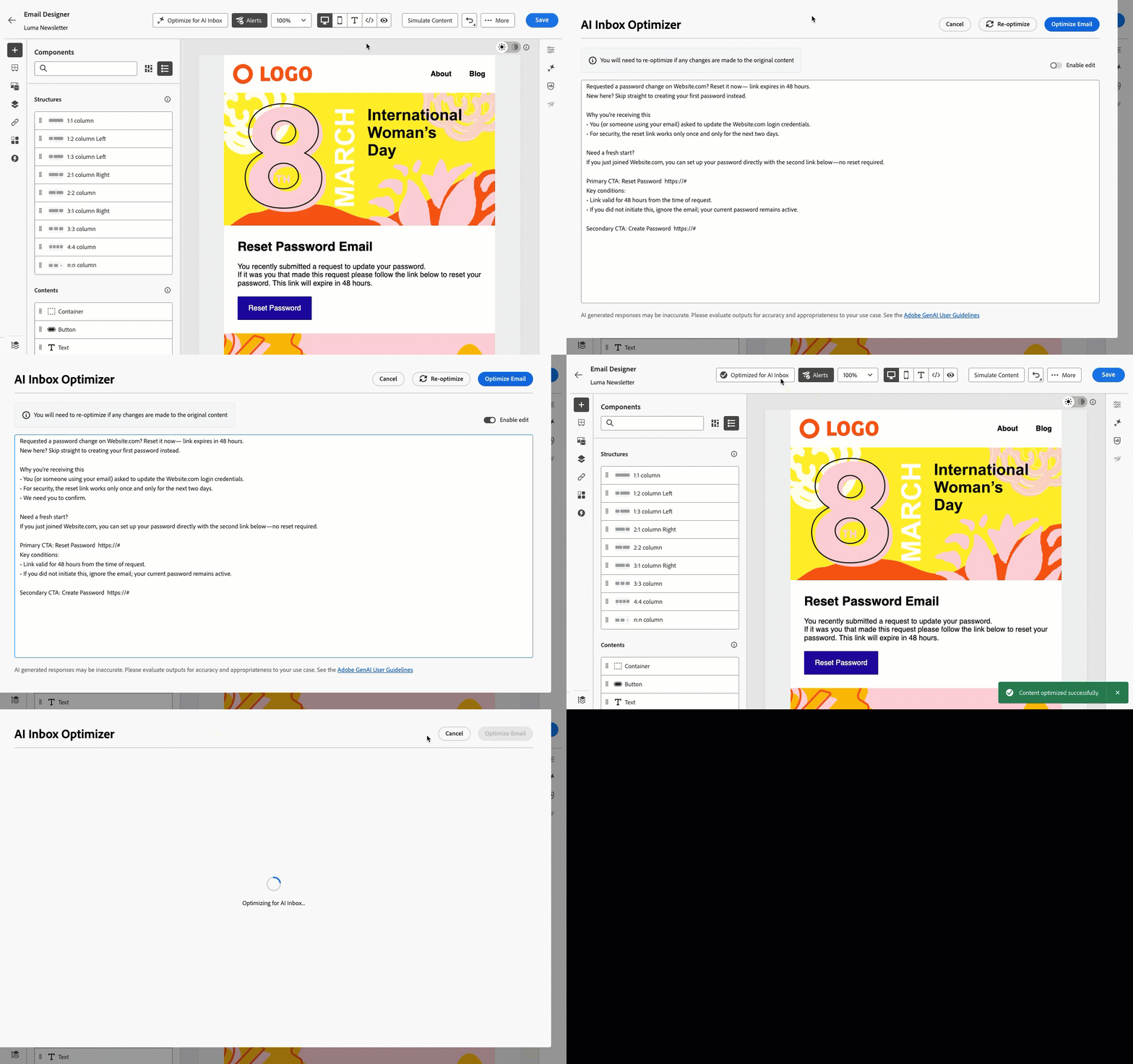
For more information, refer to Optimize email for AI inboxes.
Availability date: April 17, 2026
Adobe Journey Optimizer now includes AI Assistant directly in the personalization editor and the Email Designer that converts natural-language prompts into valid personalization expressions and conditional logic, no syntax expertise required. Describe the personalization you want to achieve, and AI generates ready-to-use code you can apply immediately or refine through follow-up prompts.
The assistant also works in reverse. Select any existing expression and ask it to explain the logic, identify issues, or suggest improvements. This makes it useful not just for authoring new expressions, but for reviewing and debugging existing ones across your team.
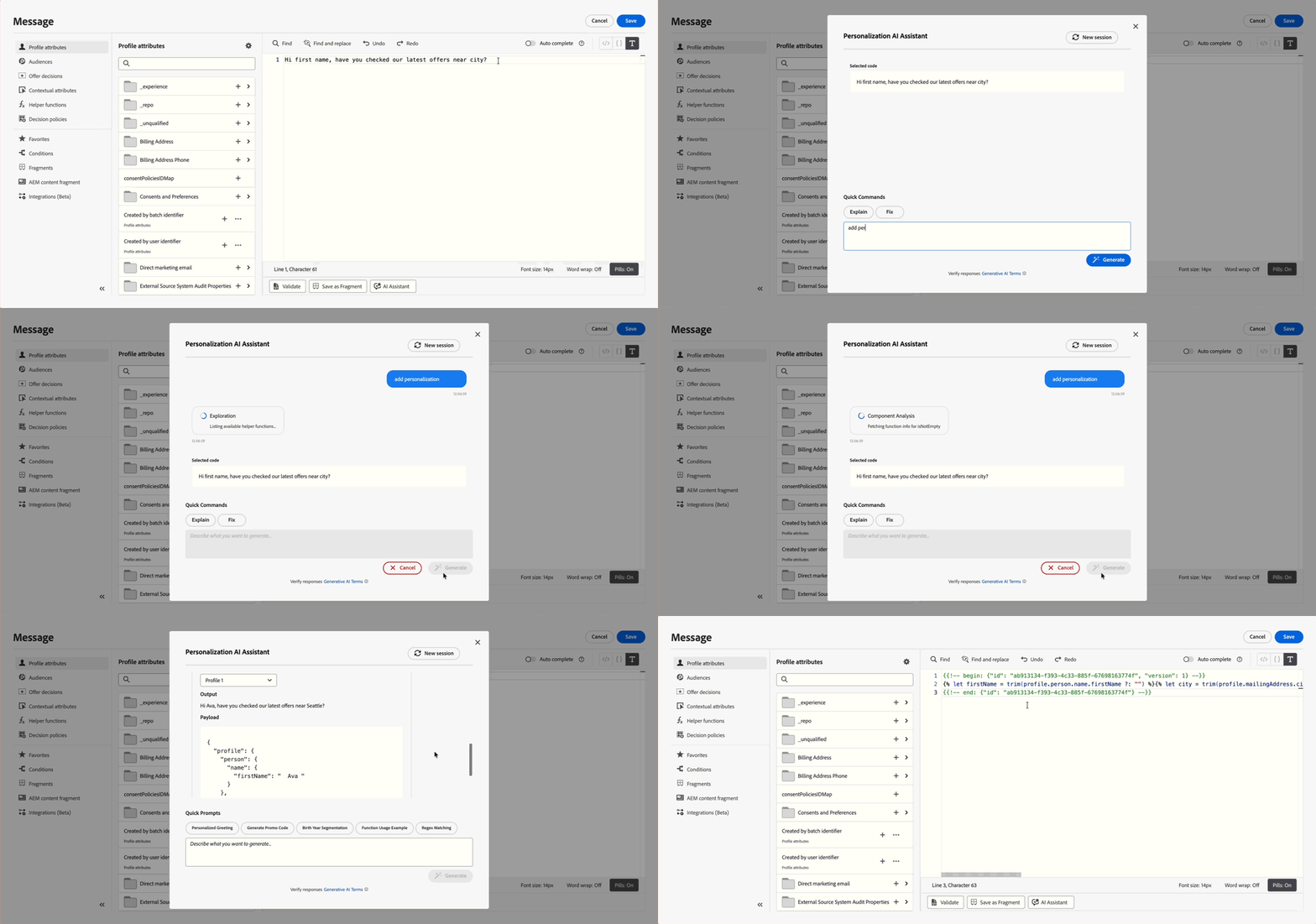
For more information, refer to AI Assistant for Personalization Expressions.
Availability date: April 13, 2026
Use the new Optimize node to run A/B tests or multi-armed bandit experiments to determine the best path to meet your business-centric KPIs. This tool allows you to test, vary, and customize communications, sequencing, and timing to best reach your customers.
Previously released in Limited Availability, this capability is now available to all environments (General Availability).
As part of the General Availability, this release introduces experiment type selection (A/B or multi-armed bandit) and Scale the winner for unitary journeys.
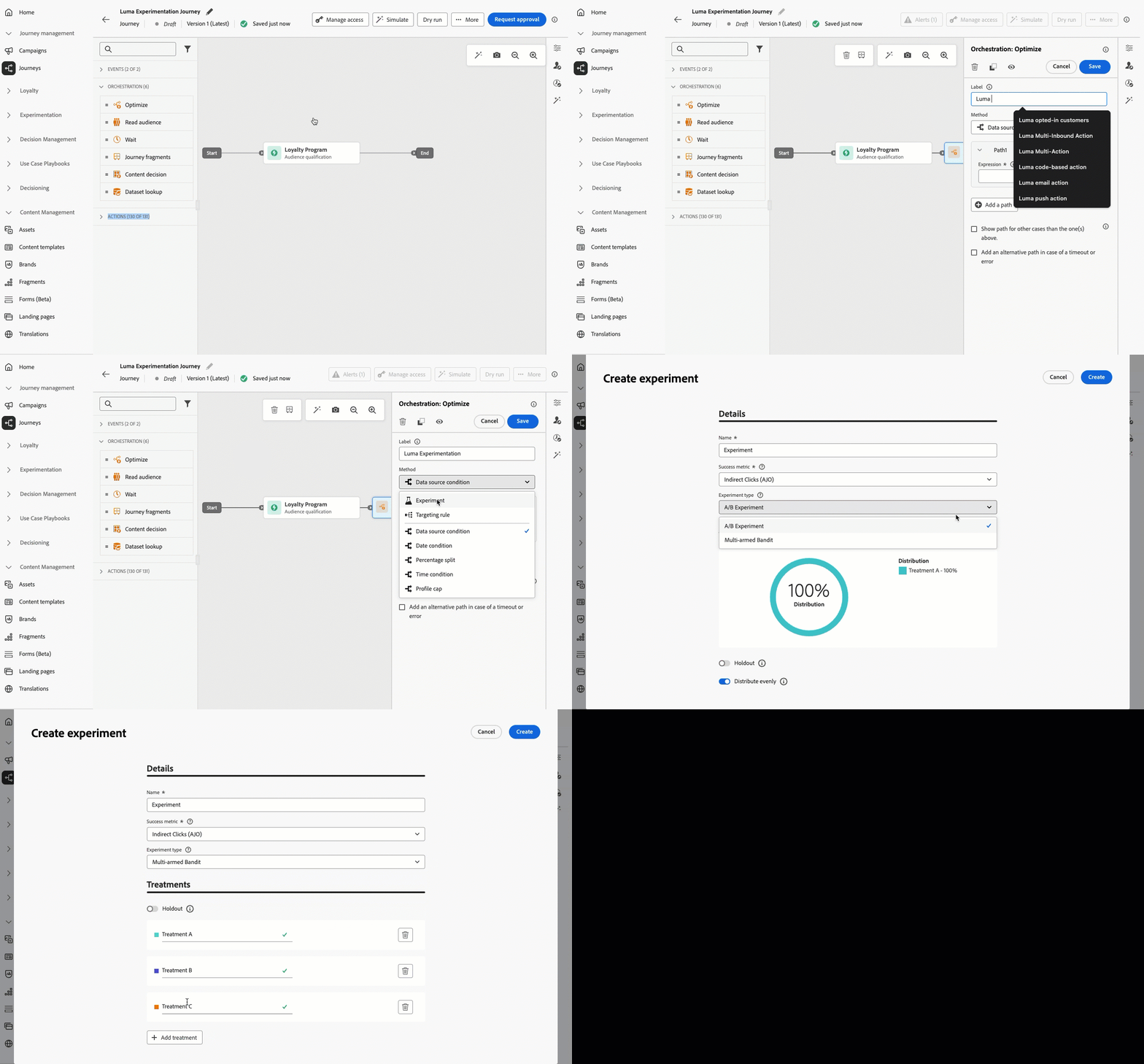
For more information, refer to the detailed documentation.
Availability date: April 7, 2026
Inbox is a mobile functionality, available with Content Cards, that enables customers to create a centralized location within their app or website to display messages sent to their users. This extends the lifetime of marketing communications by ensuring messages remain accessible even after they are dismissed.
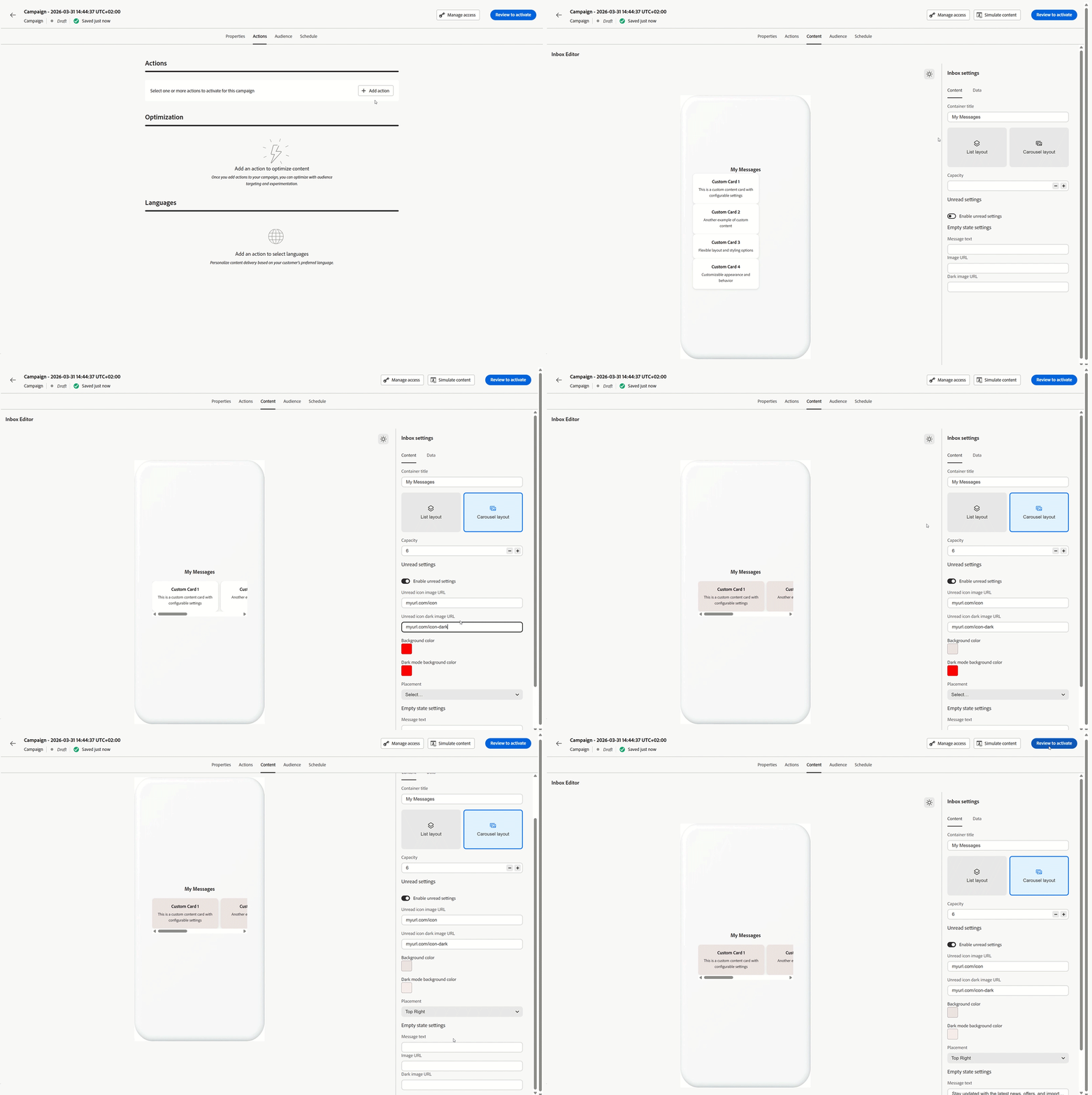
For more information, refer to the detailed documentation.
Availability date: April 7, 2026
You can now use Decisioning to personalize and optimize the content of your email messages. Leverage Priority Scores, Formulas, or AI Models to display the most relevant offers and content to each recipient.
Previously released in Limited Availability, this capability is now available to all environments (General Availability). With this General Availability release, mirror pages are now supported.
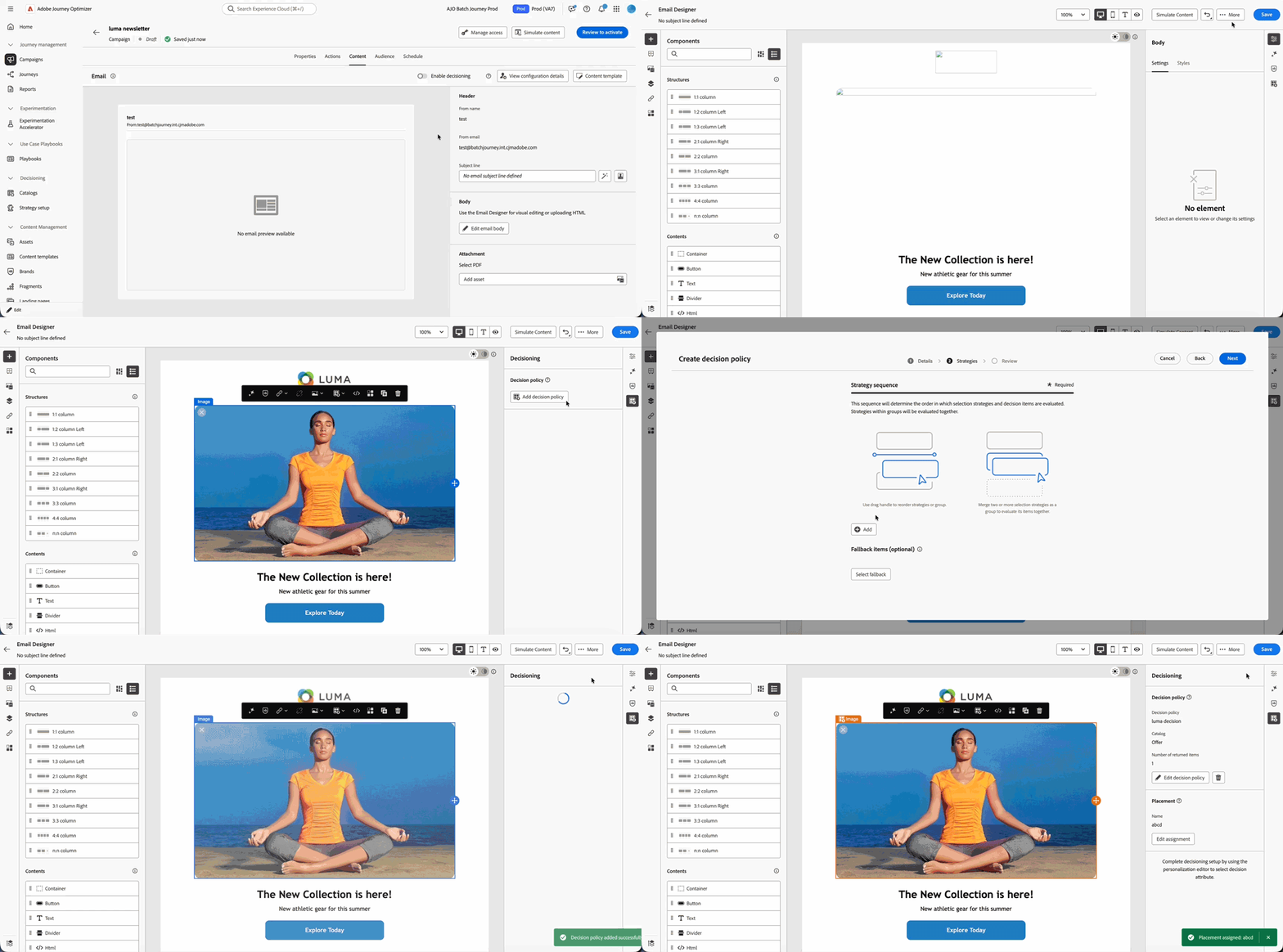
For more information, refer to the detailed documentation.
Availability date: April 6, 2026
Improvements april-26-improv
The following improvements were also released in April 2026.
AI
-
Prompt Assistant enhancement - Prompt Assistant enhances AI content generation by analyzing user prompts in real time and identifying gaps in clarity, completeness, and context. It suggests improved rewrites and provides actionable guidance to enrich prompts with key details like audience, tone, and intent. The feature also asks targeted clarifying questions to help users refine their inputs before generation. This results in more accurate, high-quality outputs with fewer iterations. Learn more
Availability date: May 5, 2026
Push
- Personalize App id in channel settings - In the Push channel configuration settings, you can now personalize the App id field so that each recipient can receive a push notification from the appropriate brand based on their profile information. Read more
Decisioning
-
Decisioning migration workflow APIs - The API contract for creating dependency analysis and migration workflows has been updated: pass
request-levelas a query parameter on the request URL (sandbox,offer, ordecision). Request level must no longer be sent in the JSON body. Read moreAvailability date: May 6, 2026
-
Attach fragments to decision items - Journey Optimizer now provides the ability to attach fragments to decision items which can be leveraged in code-based experience and email campaigns through decision policies. Read more
Previously released in Limited Availability, this capability is now available to all environments (General Availability).
-
Temporarily unavailable fragments are skipped - When using fragments in decision items, if a fragment is temporarily unavailable on Edge, it is skipped and the journey or campaign continues rendering instead of failing. Read more
Availability date: April 14, 2026
Adobe Experience Manager Integrations
-
Adobe Experience Manager Content Fragment Variation Support - You can select Content Fragment variations (for example language or channel variants) when inserting Adobe Experience Manager Content Fragments, with improved handling for locale and multilingual scenarios. Read more
Previously released in Limited Availability, this capability is now available to all environments (General Availability).
-
Adobe Experience Manager Content Fragment context while authoring - Your Content Fragment selection stays active as you move between text fields and content blocks, so you can add more fragment fields without reopening Open AEM Content advisor each time. Read more
Previously released in Limited Availability, this capability is now available to all environments (General Availability).
Email design
-
Advanced HTML editor for email content - Advanced HTML mode lets you edit the HTML source of your content in the Email Designer, add advanced expressions (such as conditions) in the source, and toggle between HTML view and Desktop view without losing your changes.
Previously available for email content templates only, this capability is now deployed to email content in the Email Designer (for example, emails authored in journeys and campaigns), in addition to email content templates. It is currently in Limited Availability — contact your Adobe representative to gain access. Read more
Availability date: April 9, 2026
Journeys
-
Current journey payload size visible in journey properties - The journey properties panel now displays the current size of the journey payload compared to the configured limit — for example, 1.5 MB (out of 4 MB). This read-only indicator helps you monitor journey complexity before publishing and avoid errors caused by the payload size limit being exceeded. Read more
Availability date: April 30, 2026
Journey Path Optimization
-
Experiment type - You can now choose between A/B experiment (fixed split at the start) or Multi-armed bandit (automatic split with weekly weight updates) when configuring a path experiment. Read more
Availability date: April 7, 2026
-
Path experimentation: Scale the Winner - You can now automatically or manually roll out the winning path of an experiment to your full audience. Once a winner is determined, you can amplify its reach and effectiveness without constantly monitoring the experiment. Read more
This capability is available only in unitary journeys (event-triggered and Audience qualifications). It is not available for Read audience journeys.
Availability date: April 7, 2026
-
Conditions - The Optimize activity is the new vehicle for creating conditional paths in journeys. It replaces the former Condition activity, which has been removed from the UI. All conditional logic is retained and is now handled through the Optimize activity’s conditions. Read more
Previously released in Limited Availability, this capability is now available to all environments (General Availability).
Availability date: April 7, 2026
Orchestrated campaigns
- Global variables in Orchestrated Campaigns - Orchestrated Campaigns now support global variables that can be defined once and reused across all activities within a workflow, simplifying configuration and ensuring consistency in dynamic values, expressions, and content personalization. Read more
- Data Modeler enhancements - Orchestrated relational schemas now support composite keys spanning multiple fields. Loading a schema from a DDL file also brings in enumerations, and loading from either a DDL or Excel file automatically creates composite relationships between tables. In the entity relationship view, composite links now display the full set of field pairings between tables after a file is uploaded. Read more
March '26 release notes march-26-rn
The New capabilities and Improvements sections cover capabilities already available.
Release date: March 24-25, 2026
New capabilities march-26-features
URL parameters in tracking and landing page links added to your email messages can now be encrypted, providing an additional layer of security for sensitive parameter data.
- Register and manage encryption keys in the dedicated Administration registry.
- Use the new `Encrypt` helper function in expressions to encrypt sensitive data in URLs for the query parameters you want to protect at render time.
This capability is only available for a set of organizations (Limited Availability). To gain access, contact your Adobe representative.
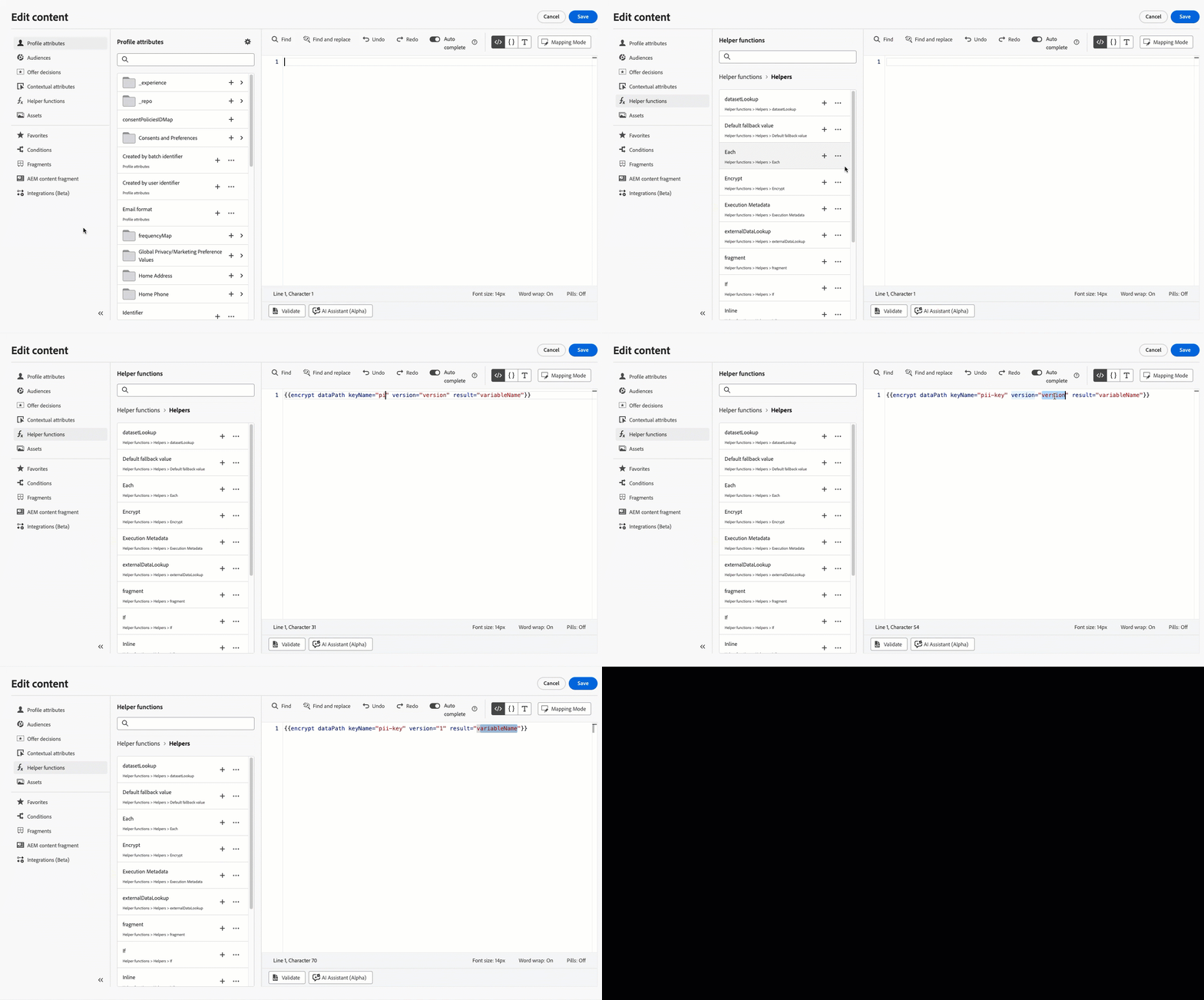
For more information, refer to the detailed documentation.
Availability date: March 31, 2026
You can now convert images into email content templates directly in Journey Optimizer. Use AI-powered analysis to automatically generate structured HTML templates from visual references, significantly reducing email design time.
Previously released in Limited Availability, this capability is now available to all environments (General Availability).
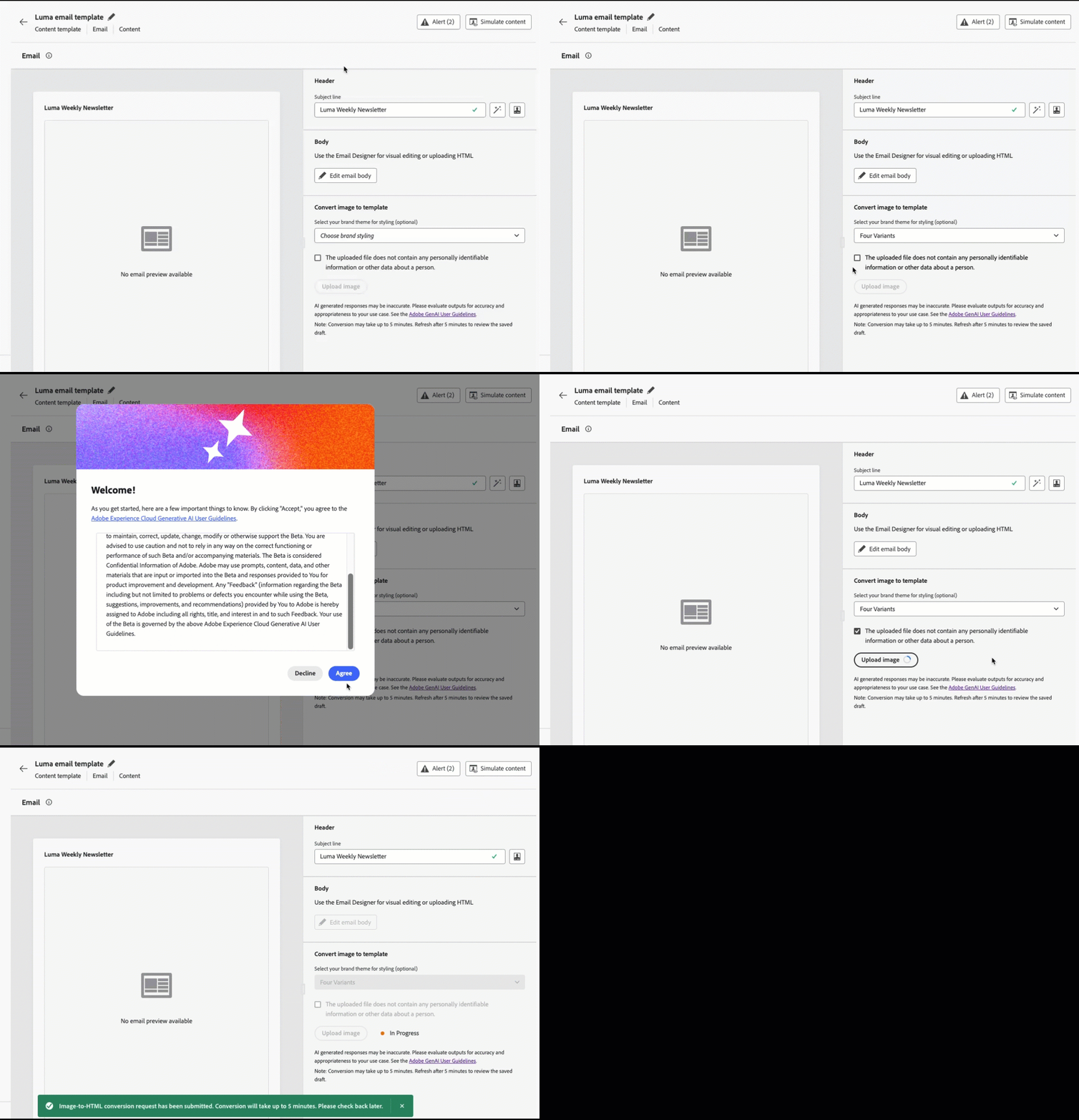
For more information, refer to the detailed documentation.
Availability date: March 31, 2026
With Journey Optimizer, you can capture profile attributes through your landing pages.
Create, design and manage custom forms tailored to your needs based on a specific dataset. You can then leverage these forms in landing pages to add the profile attributes of your choice into the dataset defined for each form.
Previously released in Limited Availability for customers in the United States and Australia, this capability is now available to all environments (General Availability).
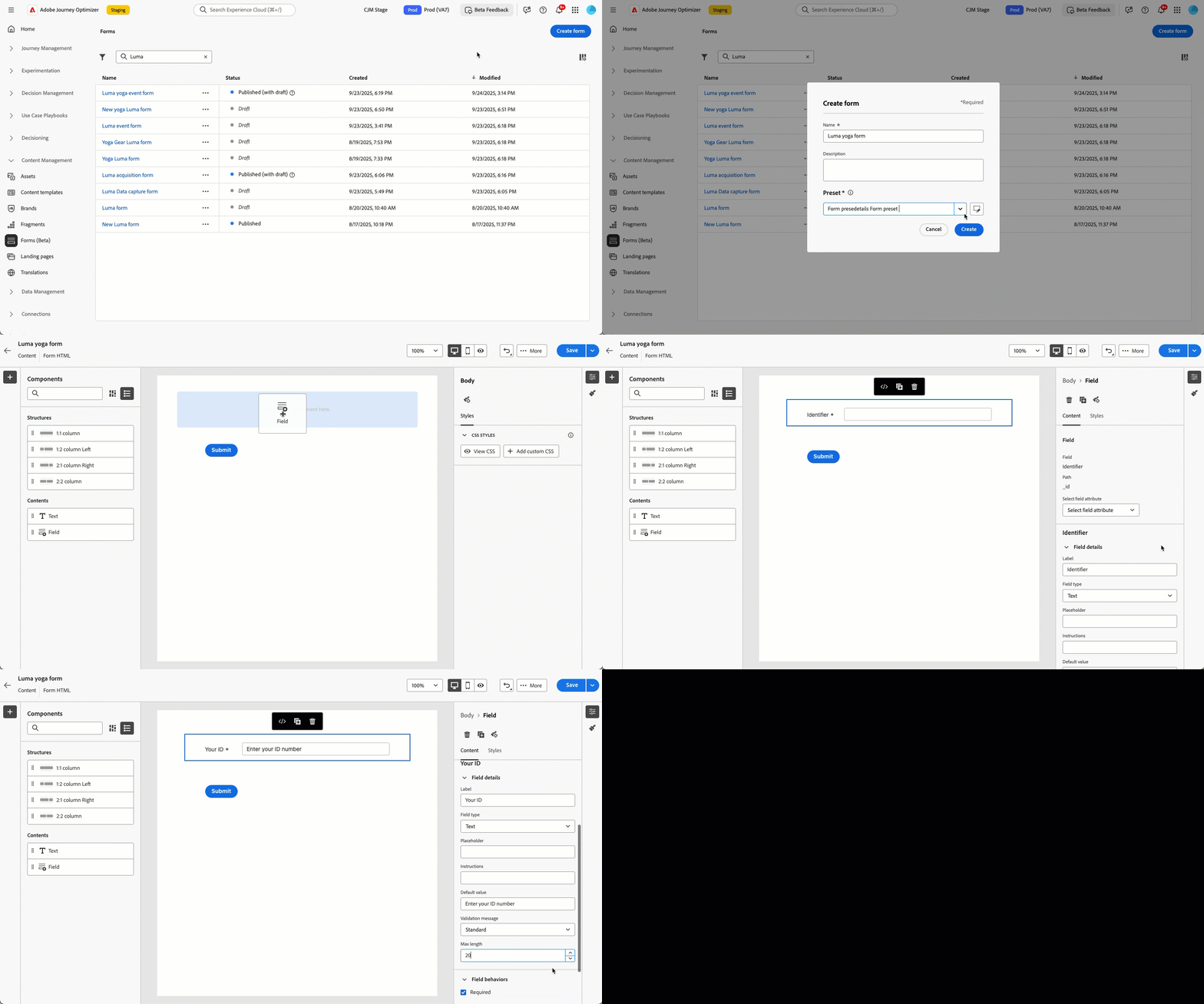
For more information, refer to the detailed documentation.
Availability date: March 26, 2026.
A new Test activity is now available in Orchestrated Campaigns. This activity routes workflow execution to different branches based on defined conditions, enabling you to validate campaign logic and configurations before activating live deliveries.
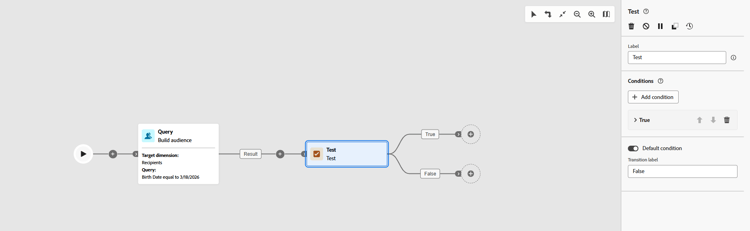
For more information, refer to the detailed documentation.
A new Dataset lookup activity in journeys lets you dynamically retrieve data from Adobe Experience Platform record datasets at runtime — giving you access to information that is not part of the profile or event payload, so customer interactions stay relevant and timely.
Previously released in Limited Availability to a restricted set of organizations, the Dataset lookup activity in journeys is now available to all customers entitled to [dataset lookup](../data/lookup-aep-data.md), while remaining in Limited Availability.
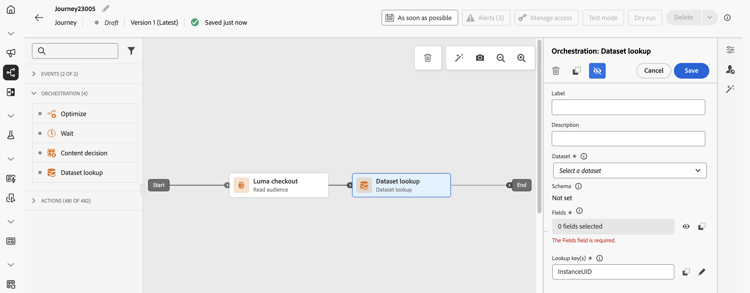
For more information, refer to the detailed documentation.
Following the General Availability of the Action activity in February 2026, legacy native channel activities (Email, Push, SMS, In-app, Web, Code-based experience, and Content Card) in the journey canvas are now deprecated.
You must now use the single Action activity to configure all channel actions, replacing the need for separate channel-specific nodes.
Existing journeys using legacy channel activities continue to function without any changes or migration required.
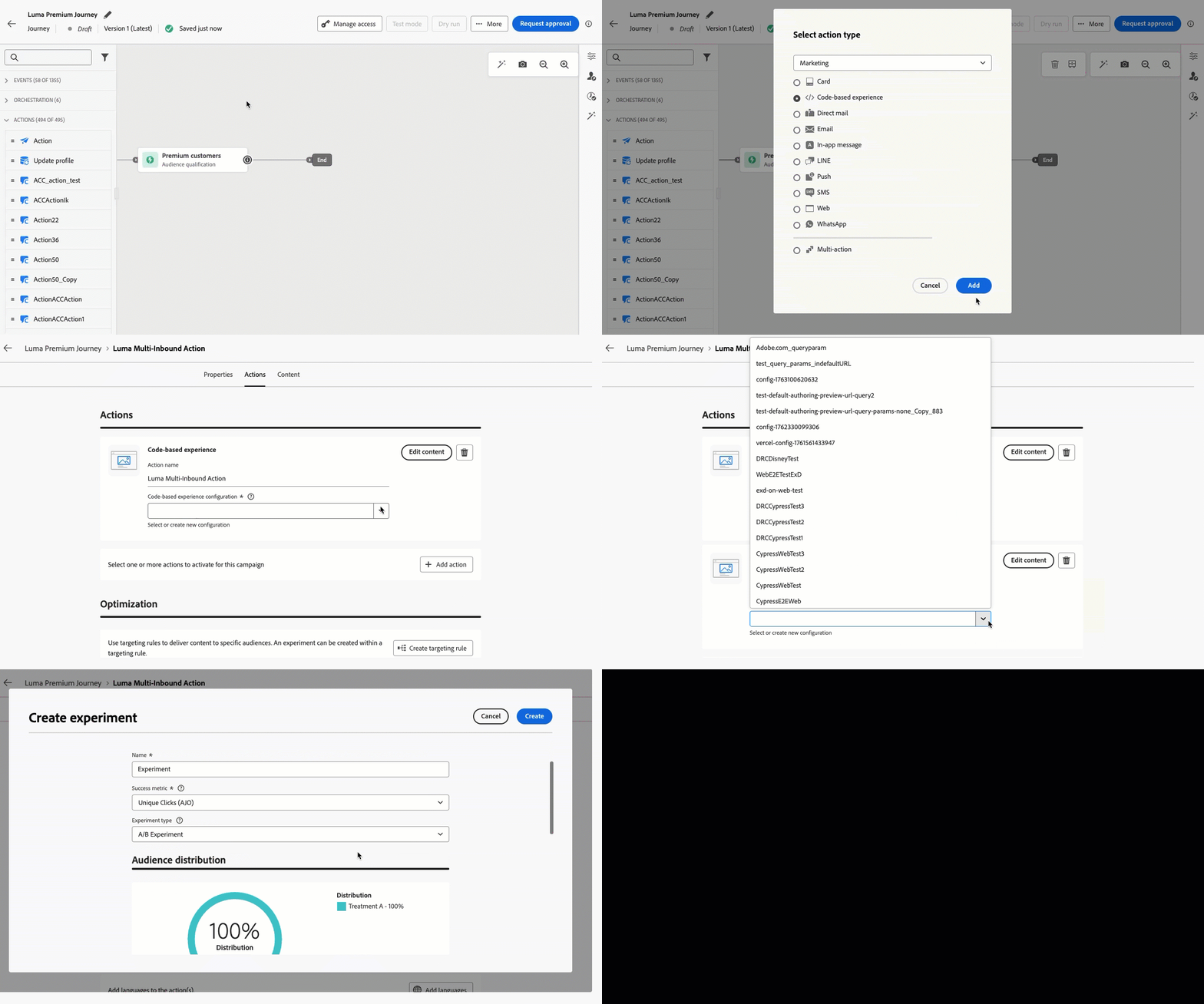
For more information, refer to the detailed documentation.
Advanced HTML mode for email content templates lets you edit the HTML source of your content in the Email Designer, add advanced expressions (such as conditions) in the source, and toggle between HTML view and Desktop view without losing your changes.
This capability is available in content templates for the Email channel only. It is currently in Limited Availability — contact your Adobe representative to gain access.
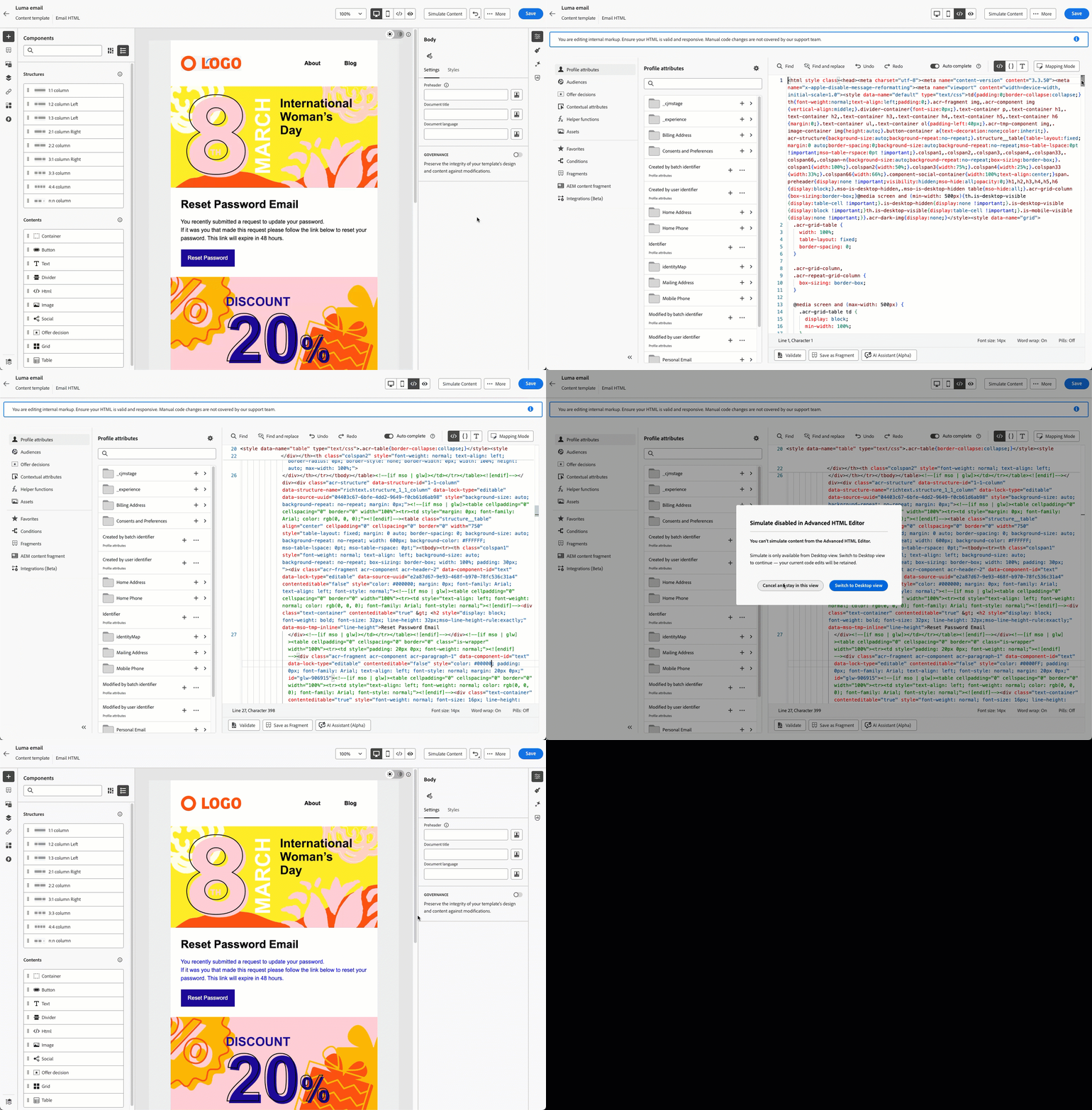
For more information, refer to the detailed documentation.
Availability date: March 10, 2026
Enable seamless integration of standard and custom Firefly models, along with approved third-party image models, to provide greater flexibility, control, and brand alignment when generating images.
Choose the right model for your needs:
- Adobe model (powered by Firefly Image Model 4) for immediate image generation without additional setup
- Partner model (powered by Gemini 2.5 Flash) for specialized capabilities
- Custom models (brand-specific models trained on your own assets) for on-brand generation that aligns precisely with your brand identity, style, and visual guidelines.
For more information, refer to the detailed documentation.
Availability date: March 2, 2026
Bring real-time experiences directly to your customers' Lock Screens and Dynamic Island with iOS Live Activity in Adobe Journey Optimizer. Deliver live updates, from order tracking and flight status to event countdowns, live scores and delivery progress, without requiring users to open your app. Keep your audience informed and engaged at exactly the right moment, right where they are.
Previously released in beta, this capability is now available to all environments (General Availability).
For more information, refer to the detailed documentation.
Availability date: March 3, 2026
Powered by Adobe Experience Platform Agent Orchestrator, Journey Agent is available in Journey Optimizer and enables you to analyze journeys through a natural language interface. You can now also generate and manage channel-specific content directly in Journey Agent, creating content for channels such as email and push, applying and previewing templates, refining tone and style through prompts, and opening content in Content Designer for in-context editing.
This capability is only available for a set of organizations (Limited Availability). To gain access, contact your Adobe representative.
For more information, refer to the detailed documentation.
Availability date: March 4, 2026
Journey Optimizer now allows you to monitor the health, training status, and performance of your Decisioning AI models. This allows you to verify training success, troubleshoot failures, and understand impact on your outcomes in order to select the best offers for each customer using AI. Note that this capability is available for Decisioning only (not for legacy Decision Management models).
This capability is currently available for personalized optimization models only (not auto-optimization).
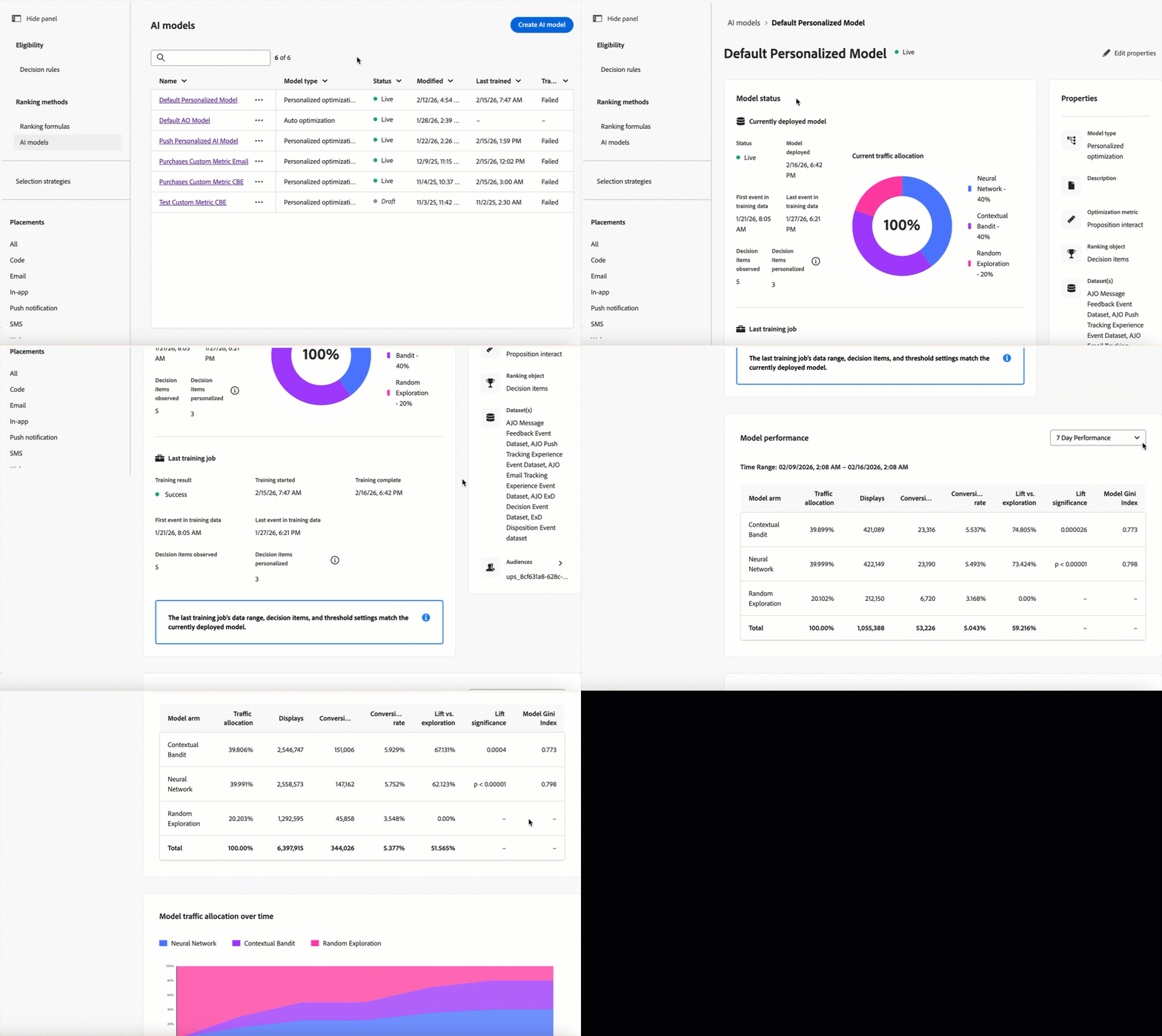
For more information, refer to the detailed documentation.
Availability date: March 9, 2026
Orchestrated campaigns can now be triggered via an API signal. To set this up, configure the target campaign as Triggered by a signal, publish it, then fire it using an API call. Any parameters included in the API call are available as variables within the running campaign. Note that signal-triggered orchestrated campaigns remain batch campaigns and are distinct from API-triggered campaigns.
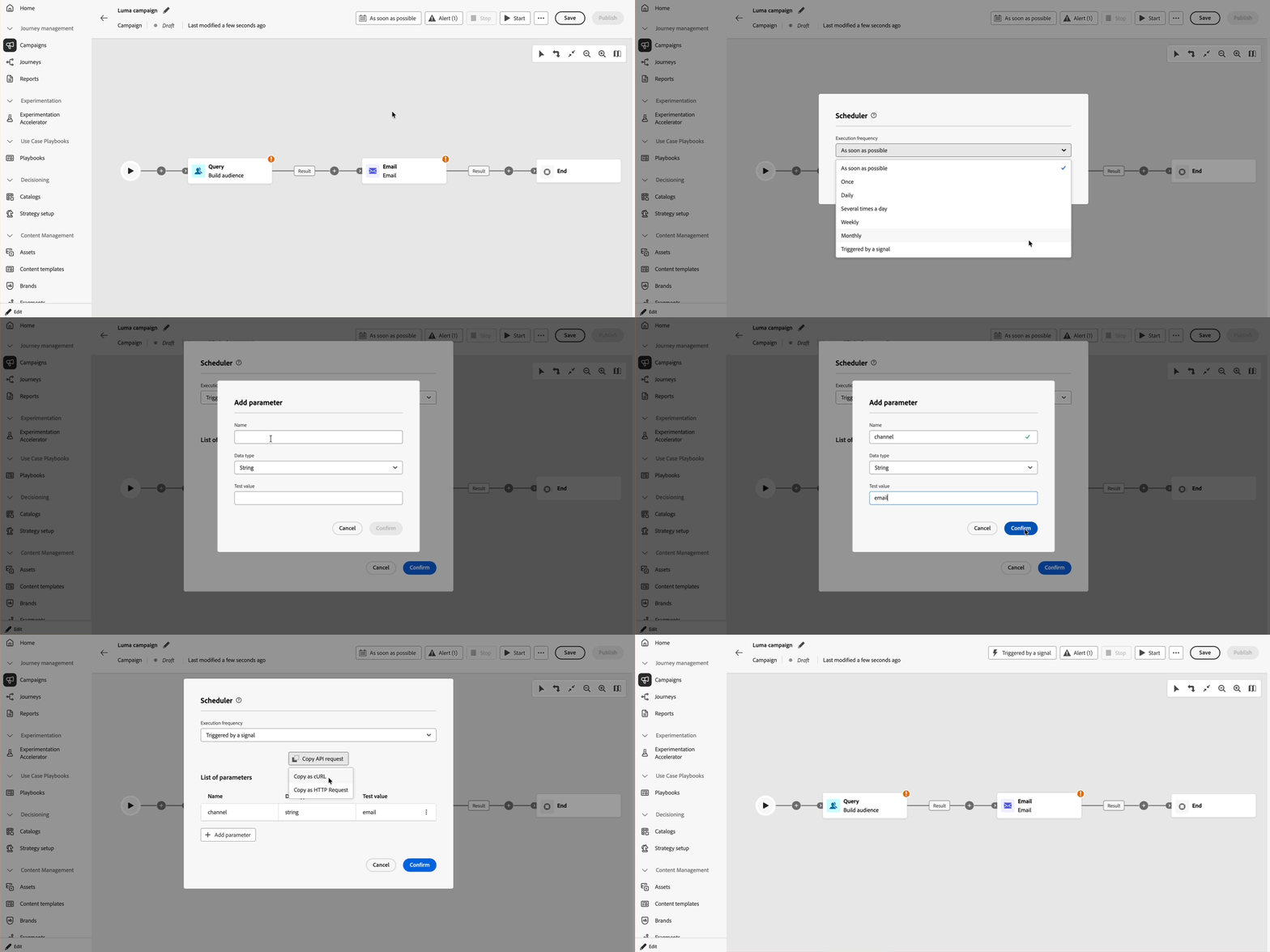
For more information, refer to the detailed documentation.
In Orchestrated campaigns, you can now set a channel activity to the Transactional category. This applies transactional channel configurations to that activity and is useful when business rules should not apply or when customers' opt-in is not required.
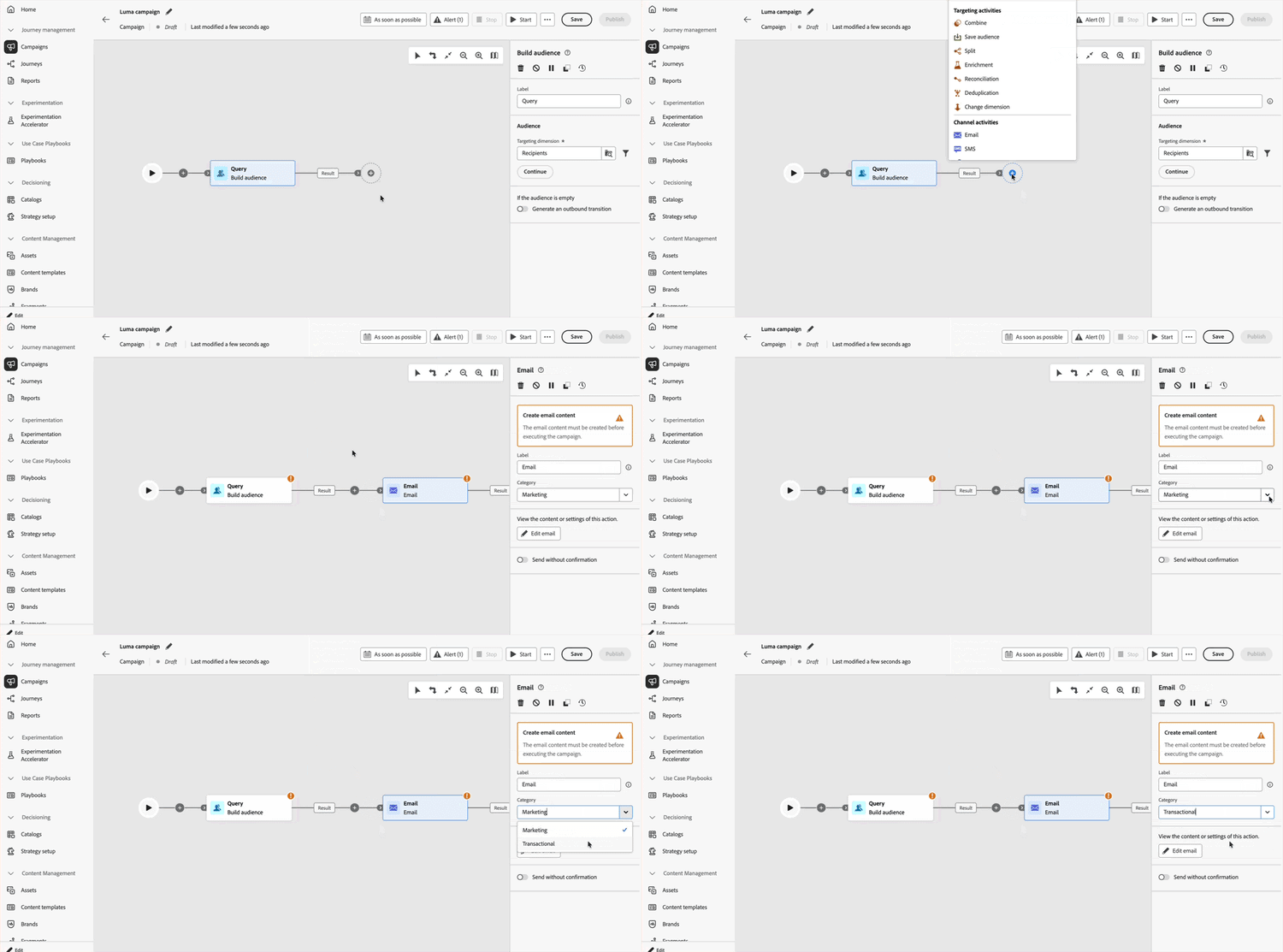
For more information, refer to the detailed documentation.
This capability will be gradually rolled out to all regions over the next few days.
Improvements march-26-improv
Improvements coming with this release are listed below.
Personalization
-
Complete/base URL personalization - You can personalize destination URLs using profile attributes (for example, for the domain or path). To enable this capability, provide Adobe with your list of accepted domains. Read more
Previously released in Limited Availability for use in journeys, this capability is now available to all environments (General Availability).
Availability date: April 1, 2026
Reporting
-
Send-Time Optimization: updated controls location and new lift report - Send-Time Optimization (STO) controls have been relocated to the Action configuration menu. Additionally, a new lift report is now available in Journeys reports to measure the impact of STO on your campaign performance metrics. Read more
Availability date: March 27, 2026
Configuration
-
AJO domain certificates renewal unsuccessful - You can now subscribe to receive system alerts, either by email or in the Journey Optimizer notification center, when a domain certificate used for email deliverability is nearing expiration or has already expired. Read more
Availability date: March 26, 2026
-
AJO Secondary Recipient Feedback Event Dataset rename - The
AJO Email BCC Feedback EventDataset has been renamed toAJO Secondary Recipient Feedback EventDataset. The impact varies depending on your situation:- Existing users: Only the display name is updated. The underlying table name remains unchanged.
- New users and sandboxes: Both the display name and the table name reflect the new name.
- Existing users with new sandboxes: Both the display name and the table name are updated to the new name.
note NOTE New datasets show the new name immediately. For older dataset names, backfill and reconciliation proceed gradually and may take several weeks to complete. Availability date: March 2, 2026
Journeys
-
Update Profile action: support for multiple profile attributes - The Update Profile action activity now supports updating up to five profile attributes in a single node. Previously, each action could only update one attribute at a time, requiring multiple nodes to update several attributes. Use the new Update another field button to add additional field/value pairs, reducing canvas complexity and improving performance. Learn more
-
Wave sending of outbound messages in journeys - You can now schedule messages from Journey Optimizer journeys to be delivered in controlled batches over time. Learn more
Previously released in Limited Availability for use in journeys, this capability is now available to all environments (General Availability).
Availability date: March 16, 2026
-
Pause and resume details in journey technical details - The journey technical details now include additional pause and resume information: the date and time of the last pause and resume, the display name and internal identifier of the user who performed each action, and a full set of paused journey settings such as pause behavior, maximum pause duration, and auto-resume state. Learn more
Availability date: March 2, 2026
Decisioning
-
Decisioning migration — offer and context attributes - The Migration API entity mapping now lists offer attributes (
migratedofferattributeson the Personalized offer item schema) and context attributes (migratedcontextattributeson the migration dataset schema). Read moreAvailability date: March 31, 2026
February '26 release notes feb-26-01-rn
New capabilities feb-26-01-features
You can now use ranking formulas to automatically boost journey priority scores based on customer profile attributes and contextual factors, ensuring customers enter the most relevant journeys.
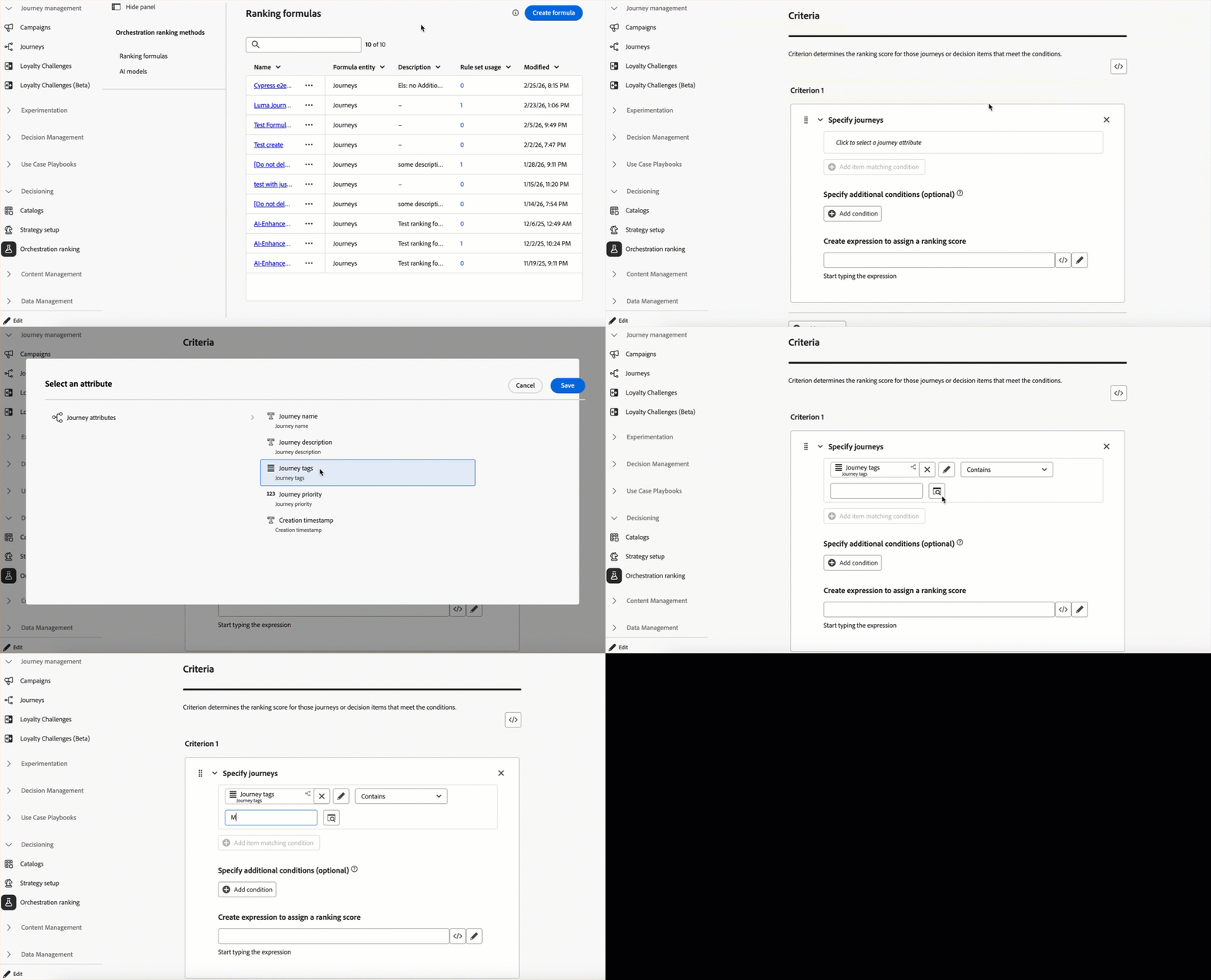
This capability is only available for a set of organizations (Limited Availability). To gain access, contact your Adobe representative.
For more information, refer to the detailed documentation.
Availability date: February 24, 2026
Journey Optimizer supports a new generic Action activity that enables you to configure both single actions and multi-action inbound action groups, allowing for streamlined action configuration within the journey canvas. In particular, this new feature allows for:
- A simplified native action configuration within the journey canvas.
- The capacity to create multi-action inbound action groups.
- The ability to add optimization to any built-in channel action.
- The ability to add both experimentation and multilingual options to any action.
Previously released in Limited Availability, this capability is now available to all environments (General Availability).
For more information, refer to the detailed documentation.
Availability date: February 20, 2026
Note: All native channels are now accessible through the Action journey activity. Legacy native channel activities will be deprecated with the March release. Existing journeys that include legacy actions will continue to function as is—no migration is required.
You can now schedule messages from Journey Optimizer campaigns or journeys to be delivered in controlled batches over time.
Wave sending offers the following benefits:
- Better deliverability – Spread sends over time to help maintain a strong sender reputation and reduce the risk of being flagged as spam.
- Load control – Avoid overwhelming downstream systems (e.g. call centers, landing pages) by limiting how many messages go out at once.
- High-volume and time-sensitive use cases – Suited to large audiences or when you need to control timing (e.g. call center capacity, ramp-up, or time-bound offers).
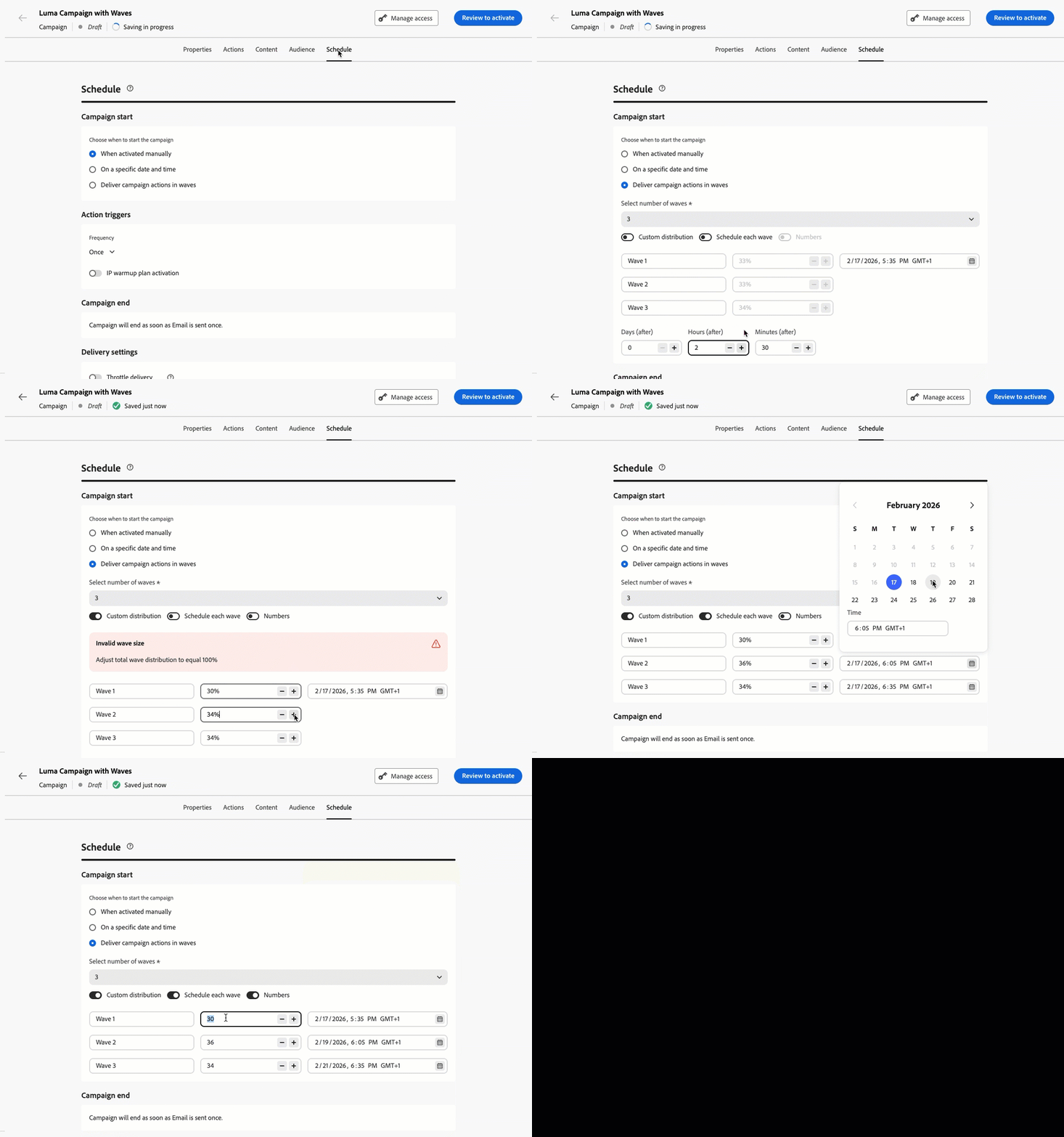
In campaigns, this capability is available to all environments (General Availability). For more information, refer to the detailed documentation.
In journeys, this capability is only available for a set of organizations (Limited Availability) – To gain access, contact your Adobe representative. For more information, refer to the detailed documentation.
Availability date: February 19, 2026
You can now migrate subdomains using the CNAME delegation mode to custom delegation directly from the interface, so you can meet stricter security policies in line with your company's guidelines without re-creating channel configurations.
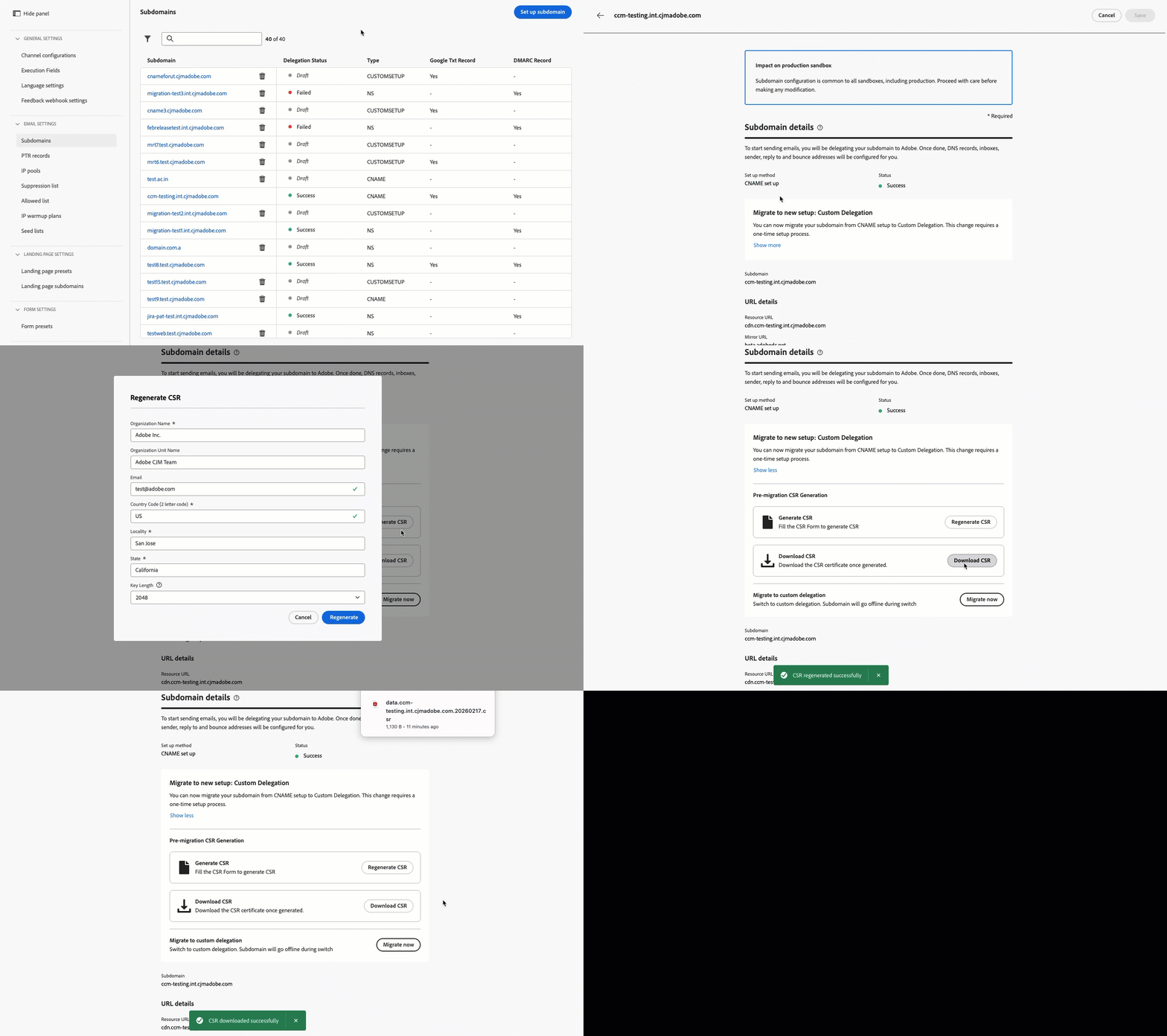
This capability is only available for a set of organizations (Limited Availability). To gain access, contact your Adobe representative.
For more information, refer to the detailed documentation.
Availability date: February 19, 2026
Adobe Journey Optimizer now supports Web push notifications, expanding the push channel beyond mobile. You can seamlessly deliver notifications to both mobile and desktop browsers, enabling you to reach customers directly on their devices without requiring an app. This enhancement allows you to engage users with timely, personalized messages in real time, leveraging the same authoring workflows and targeting capabilities already available for mobile push.
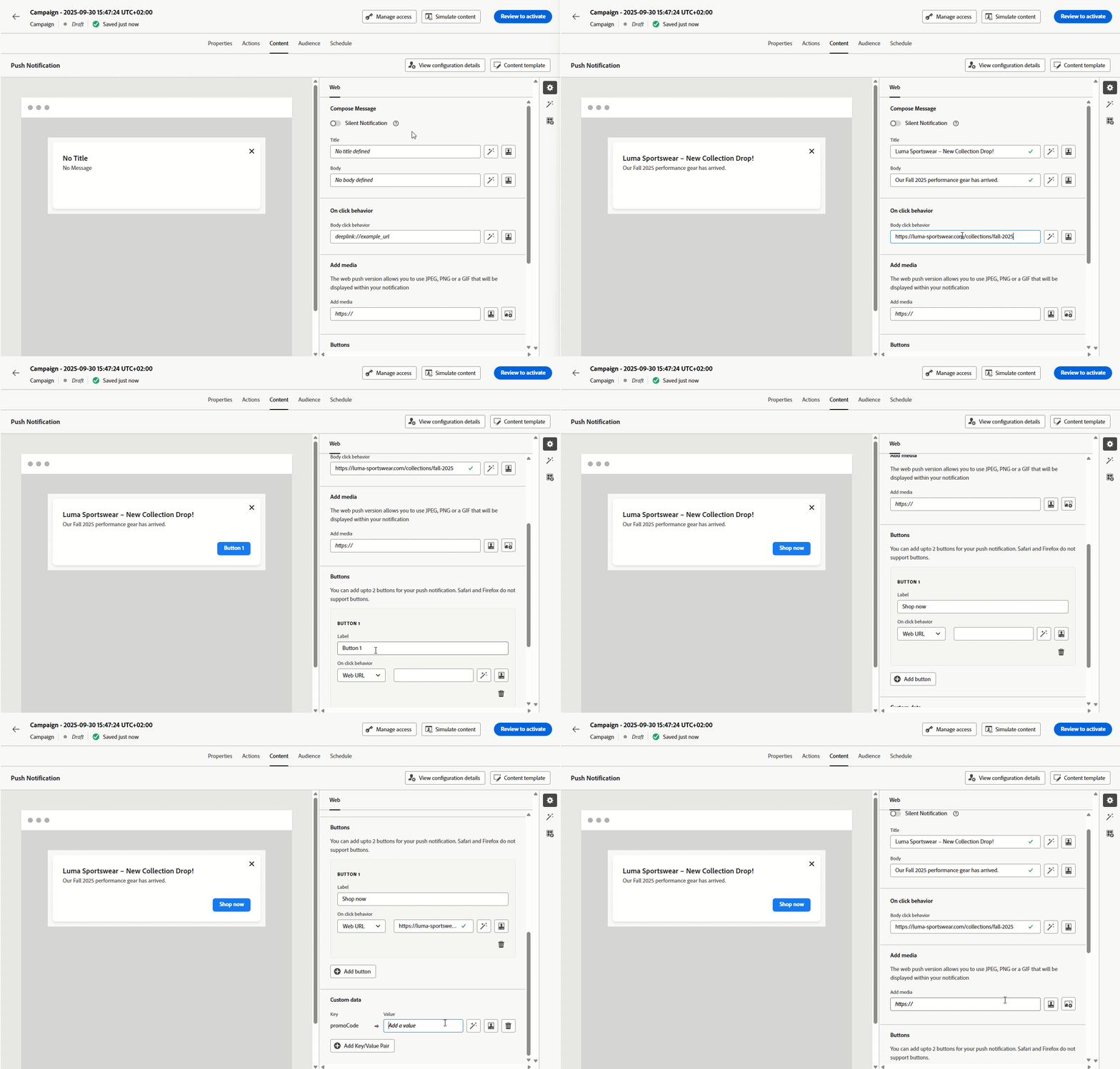
Previously released in Beta, this capability will be available to all environments (General Availability).
For more information, refer to the detailed documentation.
Availability date: February 13, 2026
A new Content decision activity is now available in the journey canvas for integrating personalized offers directly into your customer journeys. This activity enables you to deliver decision-based content and reference those offers throughout your journey—in conditions for creating eligibility-based branching, in custom actions for passing offer data to external systems, and in other activities for building fully personalized customer experiences.
Previously released in Limited Availability, this capability is now available to all environments (General Availability).
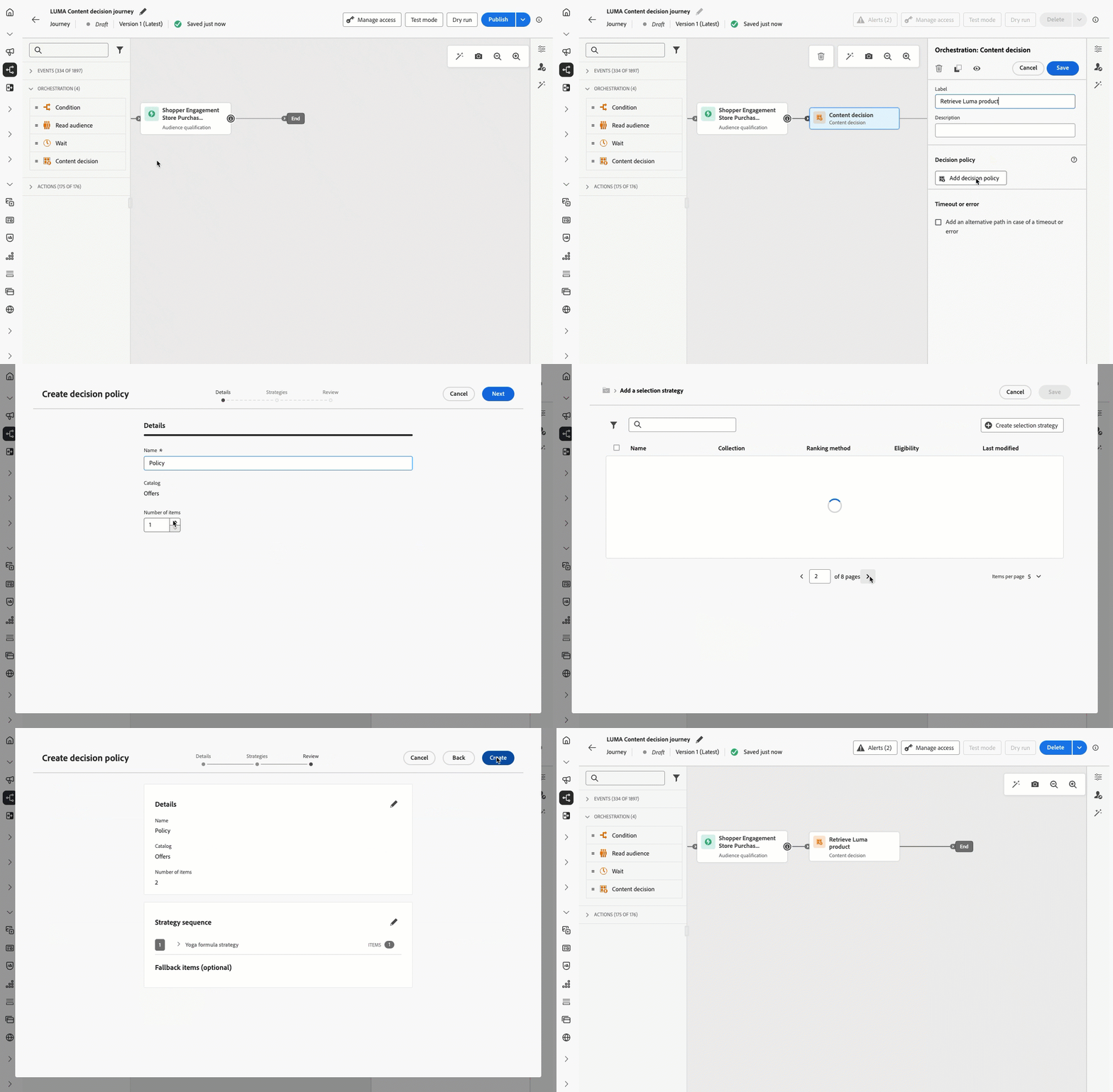
For more information, refer to the detailed documentation.
Availability date: February 10, 2026
Migration tooling APIs are now available to programmatically migrate Decision management entities to Decisioning, featuring:
- Flexible migration scopes (sandbox, offer, or decision level)
- Automated dependency analysis and validation
- Rollback support for completed migrations
- Detailed migration reports with object mappings
For more information, refer to the detailed documentation.
Availability date: February 3, 2026
Gain deeper insight into the health and performance of your custom action endpoints with a new monitoring dashboard and enriched journey step event data. Track successful calls, errors, throughput, response times, and queue wait times to quickly understand when, where, and why anomalies occur.
Previously released in Limited Availability, this capability is now available to all environments (General Availability).
For more information, refer to the detailed documentation.
Availability date: February 3, 2026
You can now personalize and optimize the content of your SMS messages with Decisioning. Use Priority Scores, Formulas, or AI Models to display the best content to your customers.
For more information, refer to the detailed documentation.
Availability date: February 2, 2026
Improvements feb-26-01-improv
Improvements coming with this release are listed below.
Configuration
- Experience event usage in journey expressions - Starting April 1, 2026, the use of experience event attributes in journey expressions will no longer be supported for organizations that have not used this capability in the last 90 days. This capability has already been unavailable for new customer organizations since July 8, 2025. For alternatives, see Experience event lookup in journeys.
Content Management
-
Use themes to convert images to email templates - When converting an image to an email template in Journey Optimizer, you can now use a theme as input so the generated HTML follows your brand parameters. Styling such as background color, button color, fonts, line spacing, margins, and padding is applied automatically, reducing manual design work and delivering a template that is ready to use with minimal edits. Read more
Availability date: February 17, 2026.
Email Designer
-
Text indentation - You can now apply customizable left indentation to the first line of paragraphs in text components directly from the properties panel. This improves readability for long-form content such as editorials and articles. Read more
Availability date: February 18, 2026.
Decisioning
-
Edge inbound support for using Adobe Experience Platform data in Decisioning - Using Adobe Experience Platform data in Decisioning now supports edge inbound use cases, in addition to email and custom actions in journeys. Read more
This capability is only available for a set of organizations (Limited Availability). To gain access, contact your Adobe representative.
-
Decisioning preview in Code-based Experience channel - You can now preview decision items when configuring Decisioning with the Code-based Experience channel. Preview is available directly in the authoring interface before going live. Read more
Availability date: February 18, 2026
Personalization
-
Execution Metadata helper - The
executionMetadatahelper function is now available to all Journey Optimizer customers. Use it to dynamically append contextual information to any native action and capture it in a dataset for export to external systems. Read morePreviously released in Limited Availability, this capability is now available to all environments (General Availability).
Availability date: February 20, 2026.
SMS
-
SMS Webhooks - Webhooks are now supported across all SMS providers. You can configure each webhook based on its intended purpose: Inbound webhooks to capture incoming messages and Feedback webhooks to receive delivery receipts, status updates, and other message-related events. Read more
Availability date: February 2, 2026.
January '26 release notes jan-26-rn
New capabilities jan-26-01-features
You can now personalize and optimize the content of your Push notifications with Decisioning. Use Priority Scores, Formulas, or AI Models to display the best content to your customers.
Experience Decisioning with push notifications requires a specific version of the Mobile SDK. Before implementing this feature, check the release notes to identify the required version and ensure you have upgraded accordingly. You can also view all available SDK versions for your platform in this section.
For more information, refer to the detailed documentation.
Availability date: January 30, 2026
Previously limited to Campaigns, Direct Mail channel is now available on the journey canvas, enabling you to incorporate Direct Mail into your journeys. Direct Mail can now be used in both batch and 1:1 journey scenarios, with support for file extraction configuration and time-based frequency settings.
Previously released in Limited Availability, this capability is now available to all environments (General Availability).
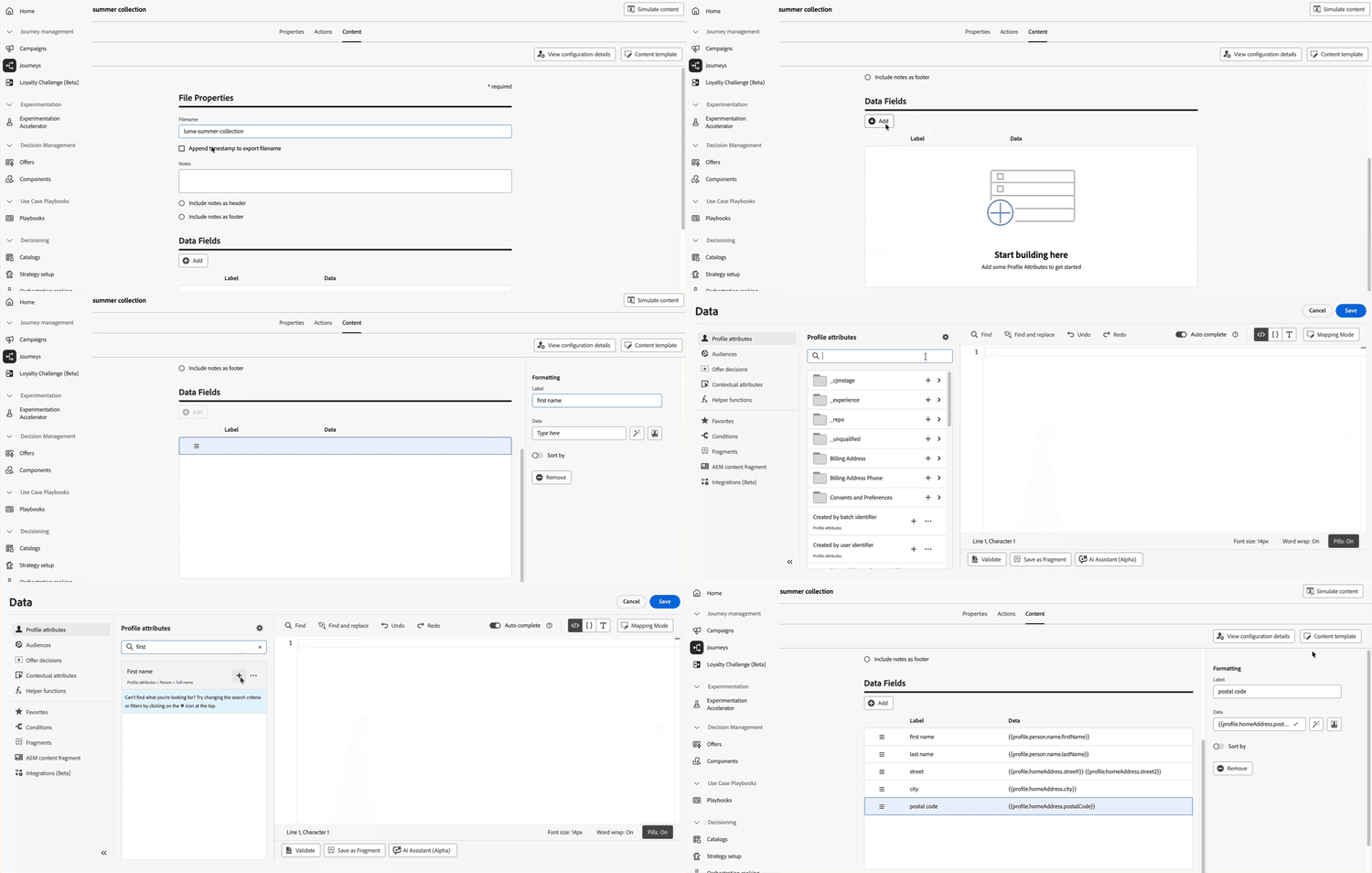
For more information, refer to the detailed documentation.
Availability date: January 29, 2026
Quiet hours let you define time-based exclusions for Email, SMS, Push, and WhatsApp channels. They ensure that no messages are sent during specific periods of time, helping you respect customer preferences and compliance requirements. You can apply quiet hours through rule sets, which can be assigned to individual actions in campaigns or journeys for precise control.
Previously released in Limited Availability, this feature is now available to all environments. With this General Availability release, the feature now includes the ability for customer to queue a campaign action until the completion of Quiet Hours, and the ability to preview the activated Quiet Hours rule.
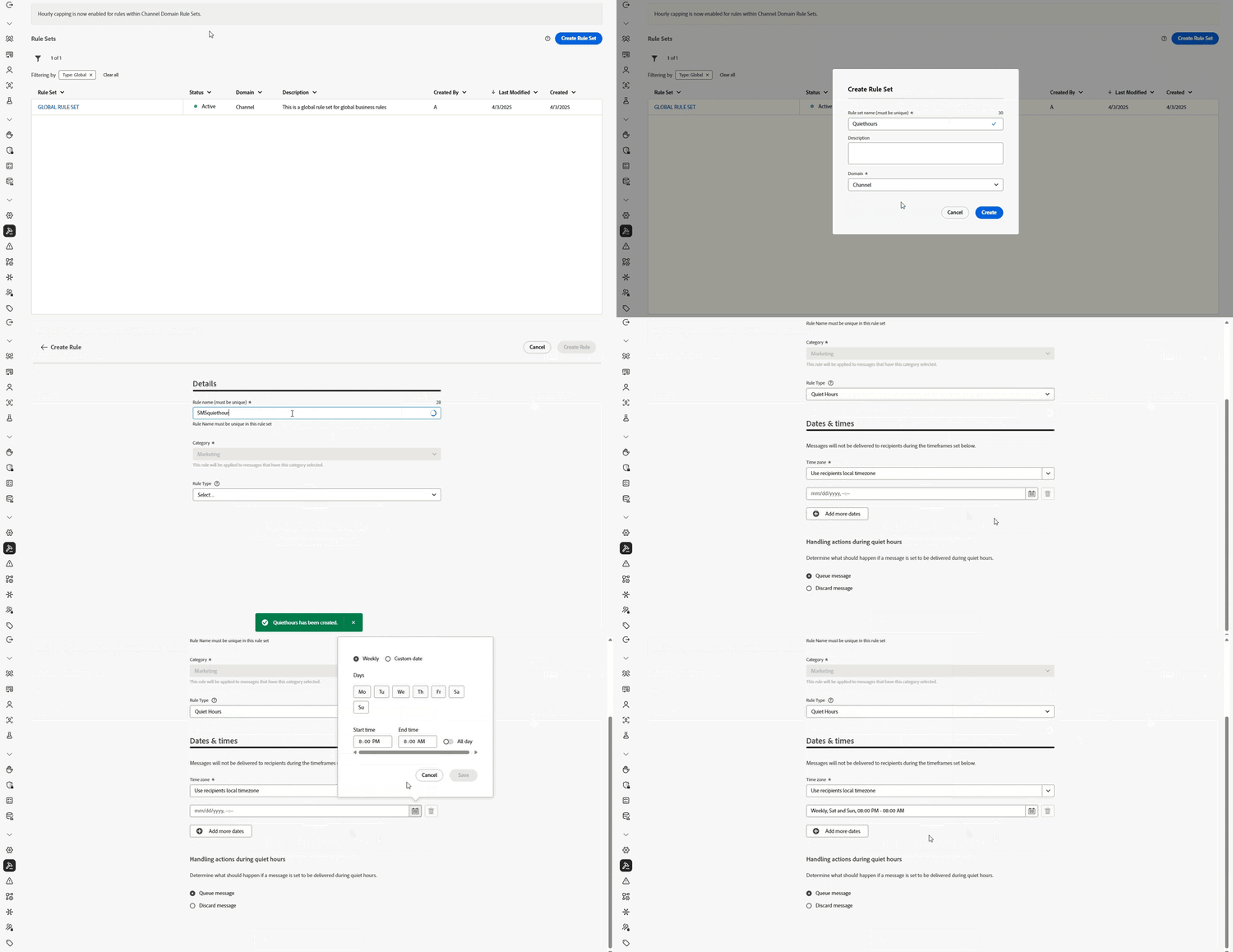
For more information, refer to the detailed documentation.
Availability date: January 29, 2026
A new Message Export capability is now available for email and SMS channels. This feature allows you to automatically export sent message content to a dedicated Experience Platform dataset, enabling you to:
- Meet regulatory compliance requirements (such as HIPAA)
- Archive messages for legal claims and customer care inquiries
- Retain copies of personalized content sent to individuals
Records are retained in the AJO Message Export Dataset for 7 calendar days from ingestion. During this retention period, you can export them to your own storage via Experience Platform destinations. The feature is enabled at the channel configuration level, giving you granular control over which messages are exported.
This capability is only available for the email and SMS channel, for organizations that have purchased the Message Export add-on offering. For more information, contact your Adobe representative.
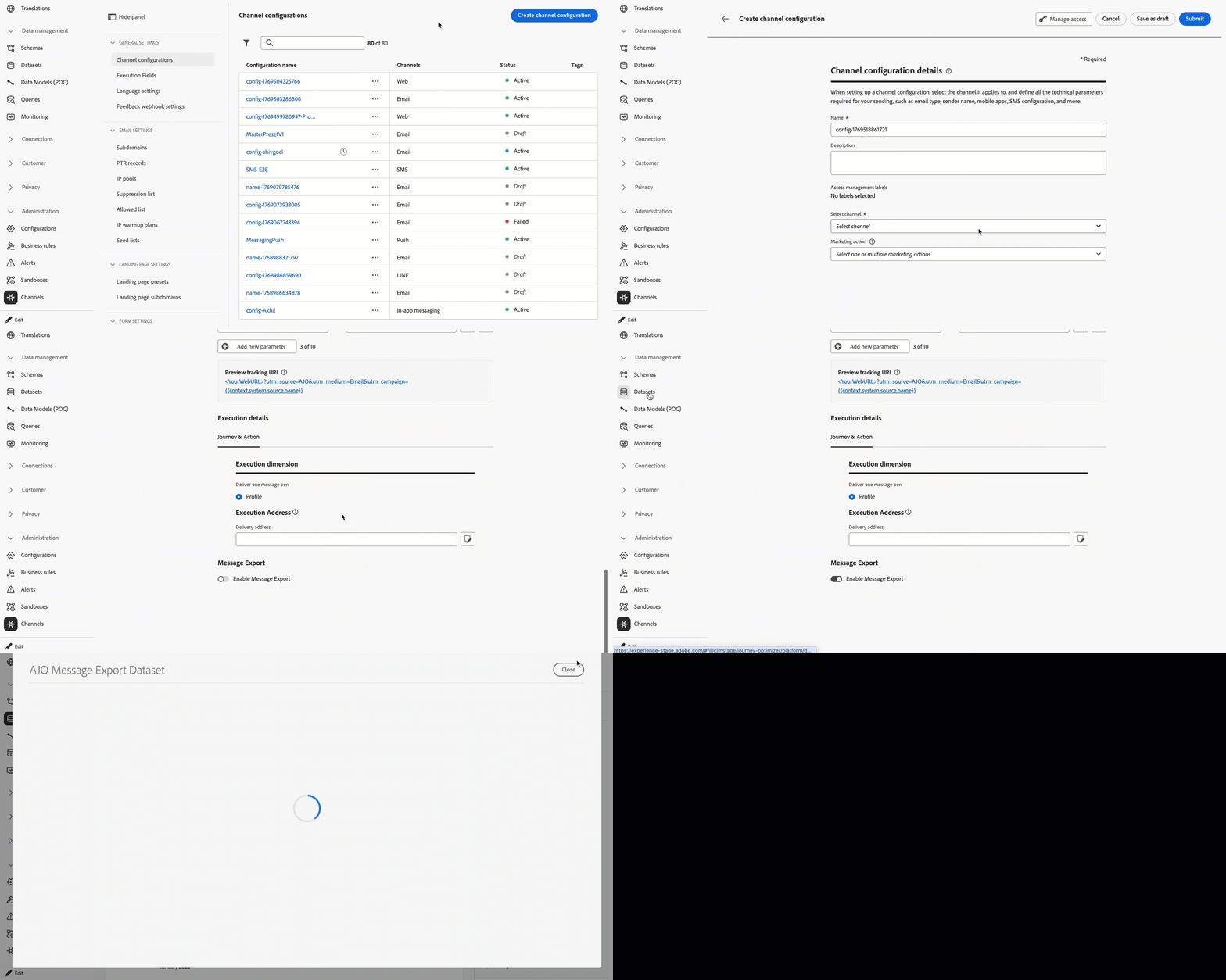
For more information, refer to the detailed documentation.
Availability date: January 28, 2026
Direct mail channel is now available in orchestrated campaigns. The Direct mail activity facilitates direct mail sending within your Orchestrated campaign, for both one-time and recurring messages. It serves to automate the process of generating the extraction file required by direct mail providers. You can combine channel activities into the Orchestrated campaign canvas to create cross-channel campaigns that can trigger actions based on customer behavior and data.
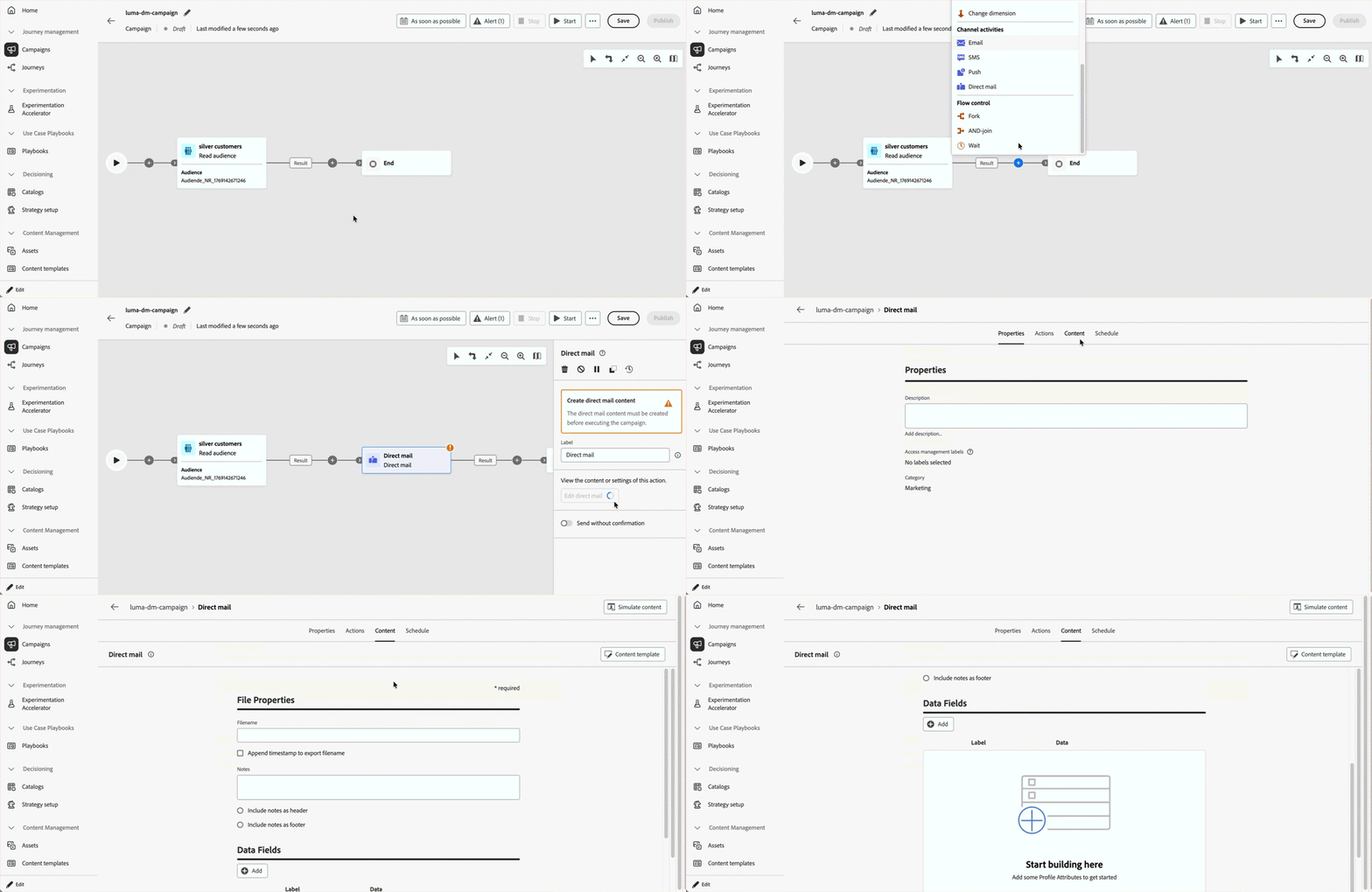
For more information, refer to the detailed documentation.
Availability date: January 28, 2026
Journey Agent now offers creation capabilities, enabling Journey Optimizer users to build and configure marketing journeys through a natural language interface. With these new skills, practitioners can quickly create journeys by simply describing their requirements in conversational prompts. This innovation streamlines the journey creation process, allowing marketers to concentrate on strategy rather than technical configuration.
For more information, refer to the detailed documentation.
Availability date: January 12, 2026
A new Journey Optimizer API is now available, enabling you to programmatically retrieve and inspect campaign-related data such as details, versions, and configurations.
For more information, refer to the detailed documentation.
Availability date: November 24, 2025
You can now quickly apply pre-approved themes to ensure brand consistency across all emails, speed up your campaign creation process, and independently produce high-quality emails while reducing dependency on design teams.
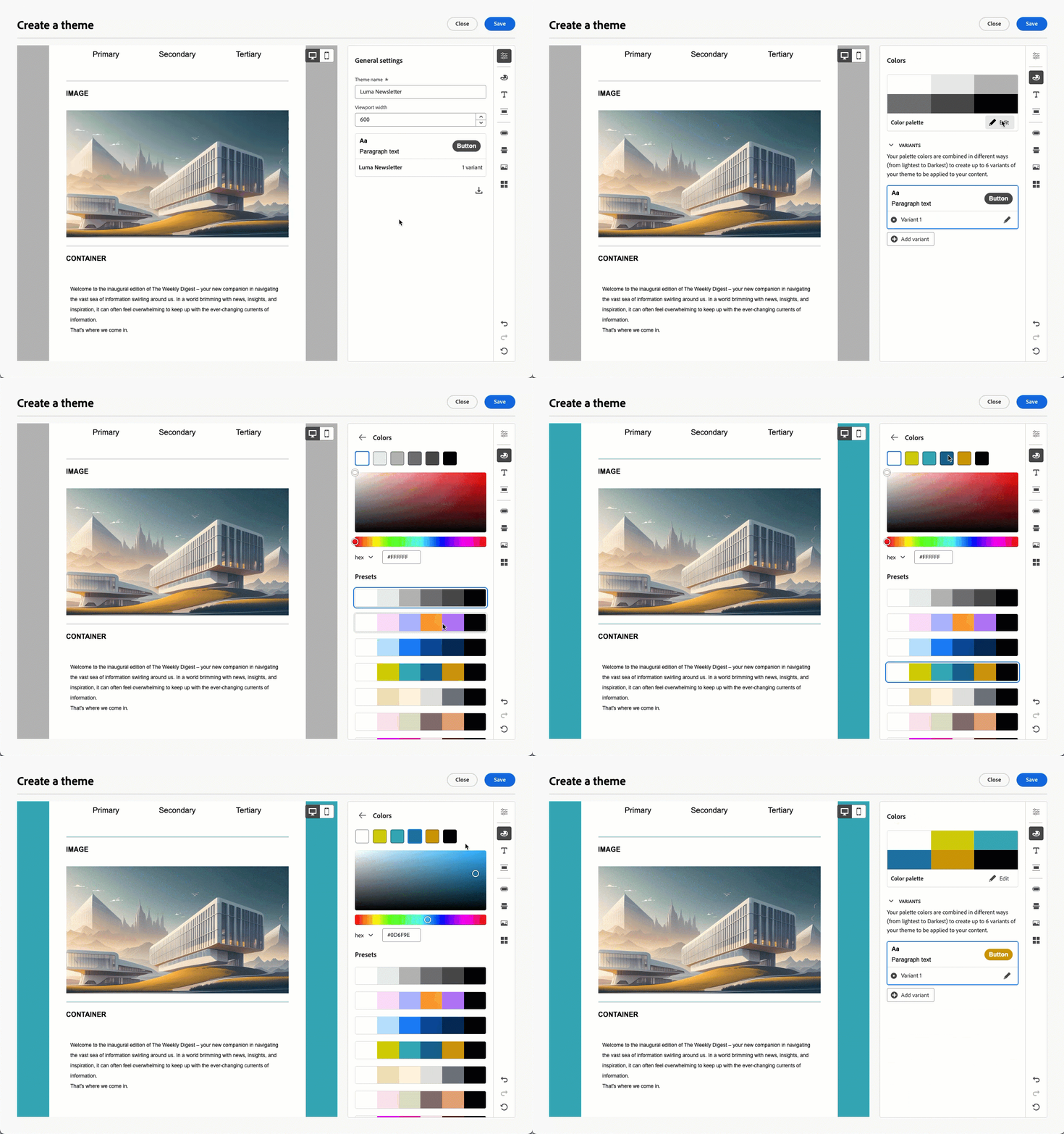
Previously released in beta version, this capability is now available for a set of organizations (Limited Availability). To gain access, contact your Adobe representative.
For more information, refer to the detailed documentation.
Availability date: November 5, 2025
Improvements jan-26-01-improv
AI
-
AI Assistant Content Quality Checks - In addition to brand alignment, you can now evaluate overall content quality to uncover potential issues with readability, cohesiveness, and effectiveness, independent of your brand guidelines. These automated checks help identify unclear messaging, inconsistent tone, or structural gaps. Read more.
Journeys
-
Combine native and Adobe Campaign message actions - Journey Optimizer now lets you combine Adobe Campaign v7/v8 message actions with native channel actions in the same journey. Read more
Availability date: January 27, 2026.
-
Custom action error response payload - You can now define an optional error response payload for custom actions. When a call fails, the error payload is exposed in the journey context (under the action’s errorResponse node) and is available in the timeout/error branch, alongside
jo_status_code, to support richer fallback logic and debugging. Read moreAvailability date: January 27, 2026.
-
Journey payload size validation in journeys - Journey Optimizer now validates payload sizes to help ensure optimal performance and system stability. When building or publishing journeys, you receive clear warnings and errors if payload sizes approach or exceed recommended limits, along with actionable guidance to optimize your journey configuration. This proactive validation helps you identify potential issues early and maintain journey performance. Read more
Availability date: January 27, 2026.
-
Journey alerts - New pre-configured alerts are available for journeys.
- Profile Discard Rate Exceeded - Ratio of profile discards to entered profiles over the last 5 mins exceeded threshold
- Custom Action Error Rate Exceeded - Ratio of custom action errors to successful HTTP calls over the last 5 mins exceeded threshold
- Profile Error Rate Exceeded - Ratio of profiles-in-error to entered profiles over the last 5 mins exceeded threshold
For more information, refer to the detailed documentation.
Availability date: October 14, 2025.
Orchestrated campaigns
-
Data usage label inheritance for audiences - Labels applied in Adobe Experience Platform now automatically carry over when saving audiences in orchestrated campaigns, reducing manual DULE tagging. Read more
-
Predefined filters with parameters - You can now create predefined filters with parameters in orchestrated campaigns for reusable, editable rules. Read more
-
Select attributes and copy distribution values - You can now select or copy values directly from the distribution of values view in orchestrated campaigns. Read more
-
Message confirmation before send - A confirmation step is now enabled by default before sending orchestrated campaigns to reduce accidental sends. Read more
-
Predefined retargeting filters - To support easier retargeting for orchestrated campaign use cases, this release introduces new campaign feedback filters. These filters let you directly target audiences based on message engagement, such as sent, opened only, opened or clicked, or opened and clicked, and select the specific campaign or in-transition campaign you want to retarget. Read more
-
Rate control support - Orchestrated campaigns now support rate control to help you pace deliveries and align with volume constraints. Read more
-
Restart button - Orchestrated campaigns now include a restart button so you can quickly re-launch runs when needed before publishing the campaign. Read more
-
User-generated metadata support - The executionMetadata helper function is now available in the personalization editor for Orchestrated campaigns, enabling you to attach contextual information to any native action and store it in a dataset for export to external systems. Read more
Availability date: January 27, 2026.
-
Revert live campaigns to draft status - You can now revert live orchestrated campaigns to draft status when they encounter execution errors or when you need to modify scheduled campaigns before they start executing. This option is available until the first message is sent. Read more
Campaigns
-
Schedule Campaign using Profile Time Zone - Campaign scheduling can now use each profile’s time zone to deliver messages at the intended local time. Read more
Note: This improvement is only be available for a set of organizations (Limited Availability).
Availability date: January 27, 2026.
Permissions
-
Prevent self-approval for journeys and campaigns - Added an option when creating or setting Approval Policy to prevent journey or campaign creators from approving their own objects. Read more
Availability date: January 27, 2026.