On this page: Learn how journeys end both for individual profiles and overall, and how to close or stop a live journey when you need to halt new entrances or all processing.
How a live journey ends
Journeys are closed when the global journey timeout is reached, or after the last occurrence of a recurring audience-based journey. Learn how journeys are closed.
If you need to terminate a live journey, we recommend that you close it manually. The arrival of new customers in the journey is then blocked. Profiles who already entered in the journey are able to experience it to the end.
You can also stop a journey, only in case of an emergency and if all journey processing must to be ended immediately. People who already entered a journey are all stopped in their progress.
-
You cannot restart or delete a closed or stopped journey. You can create a new version of it or duplicate it.
-
Only finished journeys can be deleted.
How profiles end a journey
A journey ends for an individual in two specific contexts:
- The individual reaches at the last activity of a path, then moves to the End tag.
- The individual reaches at a Condition activity (or a Wait activity with a condition) and does not match any of the conditions.
The individual can then reenter the journey if reentrance is allowed. Learn more about entrance/reentrance management
Journey End tag end-tag
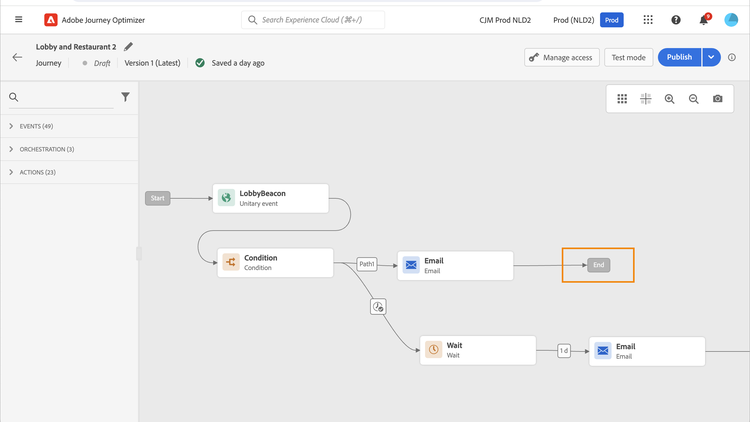
While authoring a journey, an End tag is displayed at the end of each path. This node cannot be added by a user, cannot be removed and only its label can be changed. It marks the end of each path of the journey.
If the journey has several paths, we recommend that you add a label to each end to make reports easier to read. Learn more about journey reports.
Close a journey close-journey
A journey can close because of the following reasons:
- A non-recurring Read Audience journey automatically stops after a safety buffer following its scheduled run. Learn more
- After the last occurrence of a recurring audience-based journey.
- The journey is closed manually via the Close to new entrances button.
- The global journey timeout of 91 days is reached.
After the 91-day journey global timeout, a Read audience journey switches to the Finished status. This behavior is set for 91 days only as all information about profiles who entered the journey is removed 91 days after they entered. Persons still in the journey automatically are impacted. They exit the journey after the 91-day timeout. Learn more about the journey global timeout.
Automatic journey stop for non-recurring audiences auto-stop-non-recurring
A non-recurring Read Audience journey automatically transitions to Stopped status after a safety buffer following its scheduled run. This eliminates the previous behavior where non-recurring Read Audience journeys remained in Live status until the 91-day global timeout expired, even though no profiles were actively flowing through them.
How it works:
- The journey runs and all profiles from the audience are processed.
- As each profile reaches the end of the journey, it exits normally.
- After the scheduled run, the journey remains in Live status during a safety buffer period.
- After the safety buffer elapses (~96 hours after the journey’s scheduled run time), the journey automatically transitions to Stopped status shortly afterward.
This behavior applies to non-recurring Read Audience journeys only. Recurring journeys are not affected.
-
Auto-stop timing: The safety buffer accounts for two windows: a 24-hour idle window to allow any in-flight sends to complete, and a 72-hour Quiet Hours allowance (Quiet Hours can defer sends by up to 72 hours). The total buffer is approximately 96 hours (~4 days) after the journey’s scheduled run time. The journey remains in Live status during this period. This is expected behavior and does not indicate a problem.
-
Waves-based journeys are excluded: This auto-stop behavior does not apply to waves-based journeys, and journeys that use Send-Time Optimization. These journeys remain active across all scheduled waves and are stopped only by the standard 91-day global timeout, unless they are closed or stopped manually.
-
This auto-stop behavior does not apply to non-recurring journeys that include nodes causing waiting periods, such as Wait nodes (timer-based), Reaction nodes (waiting on events like email open or click), or event-triggered transitions. These journeys remain subject to the standard 91-day global timeout.
-
You can still close a non-recurring Read Audience journey manually at any time using the Close to new entrances option. The auto-stop behavior simply ensures the journey stops automatically when it is no longer needed, without requiring manual intervention.
When is a journey considered “finished”? journey-finished-definition
The definition of “finished” varies depending on the journey type:
Close to new entrances close-to-new-entrances
Closing a journey manually ensures that customers who already entered the journey can finish their path but new users are not able to enter the journey. When a journey is closed (for any of the reasons above), it will have the status Closed. The journey stops letting new individuals enter the journey. Profiles already in the journey can finish the journey normally. After the default global timeout of 91 days, the journey will switch to the Finished status.
For journeys that start with Audience Qualification, learn how closing a journey affects the sandbox Audience Qualification limit.
You can stop a journey from the Live or Paused state. When the journey is Paused, you do not need to resume it to Live first. Learn more about stopping a paused journey.
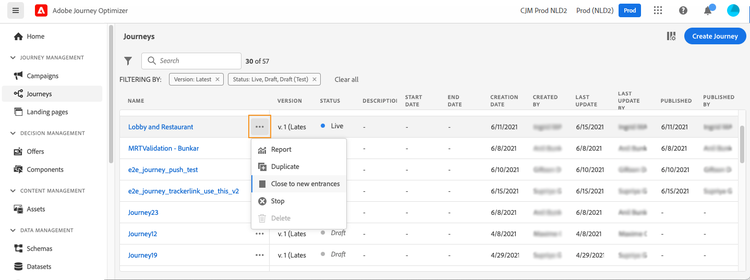
To close a journey from the list of journeys, click the Ellipsis button that is located to the right of the journey name and select Close to new entrances.
You can also:
-
In the Journeys list, click the journey you want to close.
-
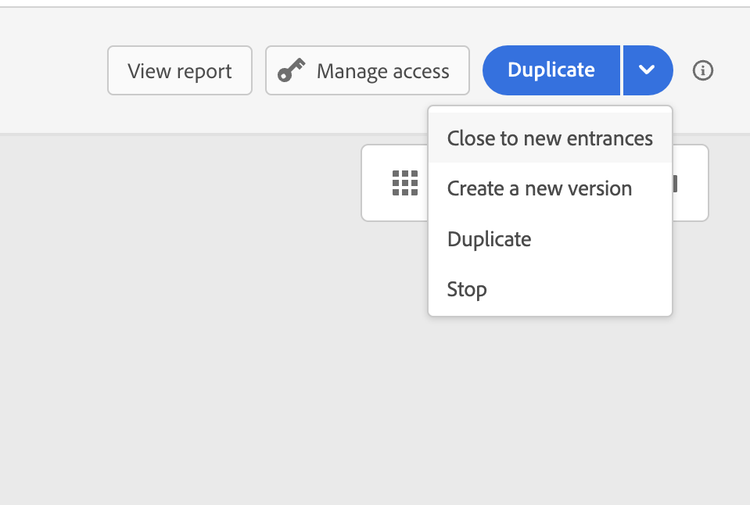
On the top-right, click the down arrow.
-
Click Close to new entrances, and confirm in the dialog box.
Stop a journey stop-journey
In case you need to stop the progress of all individuals in the journey, you can stop it. Stopping the journey timeout all individuals in the journey. However, stopping a journey involves that people who already entered a journey are all stopped in their progress. The journey is basically switched off. If you want to end to a journey, best practice is to close it.
You can also stop a Paused journey directly, without resuming it to Live first. Learn more.
You can stop a journey, for example, if a marketer realizes that the journey targets the wrong audience or a custom action supposed to deliver messages is not working correctly. To stop a journey from the list of journeys, click the Ellipsis button that is located to the right of the journey name and select Stop.
You can also:
-
In the Journeys list, click the journey you want to stop.
-
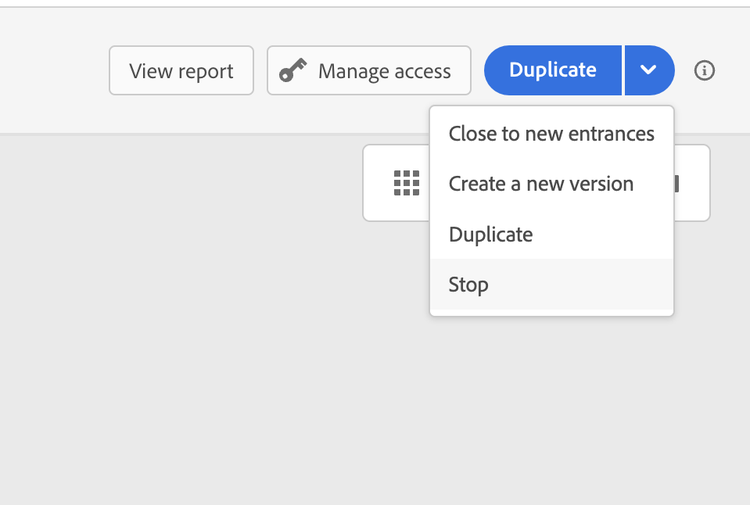
On the top-right, click the down arrow.
-
Click Stop, and confirm in the dialog box.
When stopped, the journey status is set to Stopped.
Related topics
- Journey entry and exit criteria guide - Complete guide with real-world examples and best practices
- Profile entrance management - Configure how profiles enter journeys
- Configure exit criteria - Set up automatic profile removal from journeys
- Pause a journey - Temporarily halt journey execution
This section contains structured knowledge intended to support interpretation, retrieval, and question answering related to this topic.
For complete understanding, this information should be combined with the documentation on this page. Neither source is intended to stand alone; the page describes the feature, while this section provides additional context that helps disambiguate terminology, intent, applicability, and constraints.
- TL;DR: This page explains the different ways a live journey can end — including the global 91-day timeout, manual closure to new entrances, and emergency stop — along with their effects on in-progress profiles.
Intents:
- Close a live journey to new entrances while allowing current profiles to complete it
- Stop a journey immediately to halt all in-progress profiles
- Understand the difference between Closed, Stopped, and Finished journey statuses
- Determine when a journey is considered “finished” based on its type and configuration
- Delete a journey once it has reached the Finished status
Glossary:
- End tag: An auto-generated, non-removable node displayed at the end of each journey path during authoring; its label can be changed (product-specific)
- Close to new entrances: A manual action that prevents new profiles from entering a journey while allowing existing profiles to complete their path (product-specific)
- Global journey timeout: The 91-day maximum duration after which a journey automatically switches to Finished status and all profile data is removed (product-specific)
- Stopped status: A journey state in which all in-progress profiles are immediately halted; the manual Stop action is used only for emergencies, though a non-recurring Read Audience journey also auto-transitions to Stopped after its run (product-specific)
Guardrails:
- Closed and Stopped journeys cannot be restarted or deleted; only a new version or duplicate can be created.
- Only journeys in Finished status can be deleted.
- Stopping a journey requires the Manage journeys permission; journeys with inline campaigns or messaging nodes also require Campaigns > Publish Campaigns permission.
- After the 91-day global timeout, all profile journey data is removed and remaining profiles are automatically exited.
- A non-recurring Read Audience journey without long-running Wait, Reaction, or event-triggered nodes automatically transitions to Stopped approximately 96 hours (~4 days) after its scheduled run. The journey remains in Live status during this buffer. Waves-based journeys, and journeys that use Send-Time Optimization, are excluded from this auto-stop and remain subject to the 91-day global timeout unless manually closed or stopped.
Terminology:
- Canonical name: Close to new entrances — Acronym: n/a — variants: close journey, manually close
- Do not confuse: “Stopped” journey ≠ “Closed” journey — stopped halts all profiles immediately; closed only blocks new entrances
- Do not confuse: “End tag” ≠ “End activity” — the End tag is auto-generated and cannot be removed; the End activity is a placeable canvas node
FAQ:
- Q: What is the difference between closing and stopping a journey? — Closing blocks new entrances but lets existing profiles finish; stopping immediately halts all profiles in their tracks.
- Q: Why does a non-recurring journey remain in Live status for several days after its run? — This is expected. AJO applies a safety buffer of ~96 hours (~4 days): 24 hours to allow in-flight sends to complete, plus 72 hours for Quiet Hours deferrals. The journey transitions to Stopped shortly after the buffer elapses.
- Q: Do waves-based journeys auto-stop after ~96 hours? — No. Waves-based journeys, and journeys that use Send-Time Optimization, are excluded from this automatic stop so they can stay active across all scheduled waves. They follow the standard 91-day journey timeout unless closed or stopped manually.
- Q: When does a Read audience journey reach Finished status? — For a non-recurring Read Audience journey: it auto-stops to Stopped approximately 96 hours (~4 days) after its scheduled run (safety buffer: 24h idle window + 72h Quiet Hours allowance). The journey remains in Live status during this buffer. If Wait, Reaction, or event nodes keep profiles active, the standard 91-day global timeout applies instead. Finished is reached when a Closed journey hits the 91-day global timeout, or per recurring-journey rules in the finished-definition table.
- Q: Can I delete a Closed journey? — No, only Finished journeys can be deleted.
- Q: What happens to profiles still in a journey when the 91-day timeout hits? — They are automatically exited from the journey at that point.
- Q: Do I need special permissions to stop a journey? — Yes, the Manage journeys permission is required, plus Campaigns > Publish Campaigns if the journey contains inline campaigns or messaging nodes.