On this page: Get familiar with the core access control concepts in Journey Optimizer, including roles, permissions, sandboxes, and object- and attribute-based access control, so you can plan how to grant users the right access.
Journey Optimizer allows you to define and manage the permissions assigned to different users. Permissions are a set of rights and restrictions that authorize or deny access to in-product features and capabilities.
Access control for Journey Optimizer is provided through Permissions in Adobe CX Enterprise. This functionality leverages roles and policies, which link users with permissions and sandboxes.
In order to configure access control for Journey Optimizer, you must have system or product administrator privileges for your organization. The minimum role that can grant or withdraw permissions is a product administrator. Other administrator roles that can manage permissions are system administrators (no restrictions). See the Adobe Help Center article on administrative roles for more information.
User management in Journey Optimizer is based on these key concepts:
-
Roles: Roles refer to a collection of users who share the same permissions and sandboxes. These roles allow you to easily manage access and permissions for different groups of users within your organization. A role comes with a set of unitary rights (permissions) which allows users access to certain functionalities or objects in the interface.
With Journey Optimizer, you can choose from a range of pre-existing Roles, each with varying levels of permissions, to assign to your users. Learn more about the available Built-in roles on this page. -
Permissions: Permissions are unitary rights which allow you to define the authorizations assigned to Roles. Each permission is gathered under resources, e.g. Journey or Offers, which represents the different functionalities or objects in Journey Optimizer. Learn more in the Permission levels section.
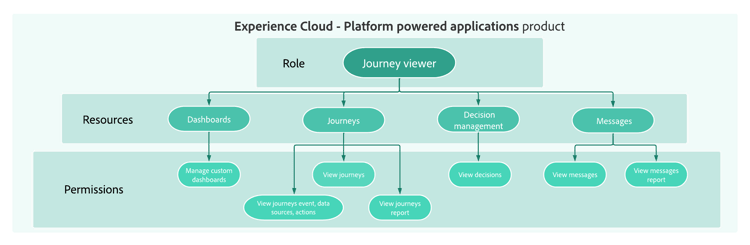
-
Sandboxes: Virtual sandboxes partition instances into separate, isolated virtual environments. Sandboxes are assigned through roles in Permissions. Learn more about using sandboxes.
-
Object-based access control: Labels to limit the access to an object. This approach protects sensitive digital assets from unauthorized users and ensures further protection of personal data. Learn more about Object-based access management.
-
Attribute-based access control: Authorizations to manage data access for specific teams or groups of users. Attribute-based access control enables administrators to control access to specific objects and/or capabilities based on attributes. Attributes can be metadata added to an object, such as a label added to a schema field or segment. An administrator defines access policies that include attributes to manage user access permissions. Learn more about Attribute-based access management.
Let’s dive deeper
Now that you have an understanding of access control concepts in Journey Optimizer, it’s time to dive deeper into these documentation sections to start configuring permissions.




This section contains structured knowledge intended to support interpretation, retrieval, and question answering related to this topic.
For complete understanding, this information should be combined with the documentation on this page. Neither source is intended to stand alone; the page describes the feature, while this section provides additional context that helps disambiguate terminology, intent, applicability, and constraints.
- TL;DR: Access control for Journey Optimizer is provided through Permissions in Adobe CX Enterprise, and user management is based on five key concepts: roles, permissions, sandboxes, object-based access control, and attribute-based access control.
Intents:
- Understand the five core access control concepts: roles, permissions, sandboxes, object-based access control, and attribute-based access control
- Know who can configure access control (system or product administrator)
- Navigate to the right documentation section for each access control topic
- Plan how to grant users the right access by learning the core access control concepts
Glossary:
- Roles: A collection of users who share the same permissions and sandboxes; with Journey Optimizer, you can choose from a range of pre-existing Roles, each with varying levels of permissions (product-specific)
- Permissions: Unitary rights defining the authorizations assigned to Roles, grouped under resources such as Journey or Offers (product-specific)
- Sandboxes: Virtual sandboxes partition instances into separate, isolated virtual environments; Sandboxes are assigned through roles in Permissions (product-specific)
- Object-based access control: Labels to limit the access to an object; this approach protects sensitive digital assets from unauthorized users and ensures further protection of personal data (product-specific)
- Attribute-based access control: Authorizations to manage data access for specific teams or groups of users; it enables administrators to control access to specific objects and/or capabilities based on attributes, which can be metadata added to an object, such as a label added to a schema field or segment (product-specific)
Guardrails:
- Configuring access control requires system or product administrator privileges (prerequisite); system administrators have no restrictions
- The minimum role that can grant or withdraw permissions is a product administrator (as stated on the page)
Terminology:
- Canonical name: Attribute-based access control — Acronym: ABAC — variants: Attribute-based access management (link text on the page)
- Canonical name: Object-based access control — Acronym: OLAC (Object level access control, the name used on the related object-based access page) — variants: Object-based access management (link text on the page)
- Do not confuse: “Object-based access control” (labels to limit the access to an object) ≠ “Attribute-based access control” (access based on attributes, which can be metadata added to an object, such as a label added to a schema field or segment)
- Do not confuse: “Roles” (a collection of users with shared permissions and sandboxes) ≠ “Permissions” (the unitary rights grouped under resources that are assigned to roles)
FAQ:
- Q: Who can configure access control in Journey Optimizer? — Users with system administrator or product administrator privileges.
- Q: What is the minimum administrator level required to grant or withdraw permissions? — Product administrator.
- Q: Are sandboxes managed independently of roles? — The page states that Sandboxes are assigned through roles in Permissions.
- Q: Where is access control for Journey Optimizer managed? — Through Permissions in Adobe CX Enterprise; this functionality leverages roles and policies, which link users with permissions and sandboxes.