On this page: Learn how to use the Optimize activity to create multiple journey paths based on experimentation, targeting, and conditions, replacing the former Condition activity.
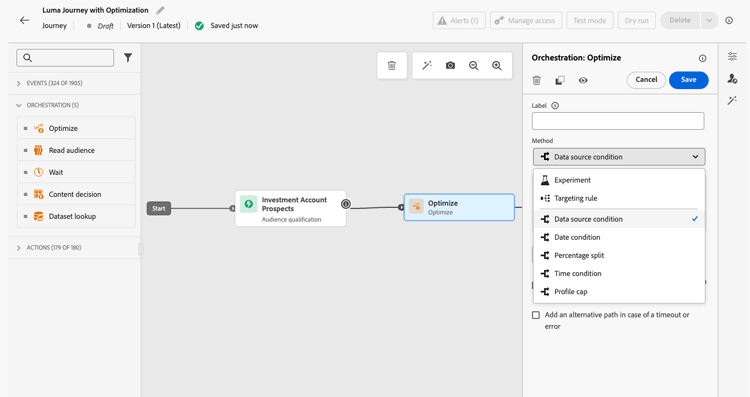
The Optimize activity lets you define how individuals progress through your journey by creating multiple paths based on specific criteria, including experimentation, targeting, and specific conditions - ensuring maximum engagement and success to create highly customized and effective journeys.
What is a journey path? journey-path
A journey path can consist of any of the following: sequencing of communications, time in between them, number of communications, or any combination of these three variables.
For example, one path could contain one email, another could contain two Mobile messages, and a third could contain an email, a Wait node of two hours, and then a Mobile message.
Three ways to optimize your journeys optimization-methods
Through the Optimize activity, you can perform the following actions on your journey paths:
-
Run path experiments - Test different paths based on random splits to determine which performs best according to predefined success metrics (for example: conversion rate, revenue, engagement).
-
Leverage targeting rules - Define specific rules that must be met for a customer to be eligible to enter one of the journey paths, based on audience segments, profile attributes, or contextual data. This ensures the right audience enters the specified path.
-
Apply conditions - Create conditional paths based on specific criteria such as data sources, time, date, percentage splits, or profile caps. This is the equivalent of the former Condition activity.
How it works how-it-works
Once the journey is live, profiles are evaluated against the defined criteria, and based on matching criteria, they are sent down the appropriate path from the journey.
Next steps next-steps
Select the optimization method that best fits your use case:
- Want to test and learn which path performs best? → Go to Path experimentation
- Want to send different audiences down specific paths? → Go to Path targeting
- Want to create conditional logic (if/then scenarios)? → Go to Conditions
This section contains structured knowledge intended to support interpretation, retrieval, and question answering related to this topic.
For complete understanding, this information should be combined with the documentation on this page. Neither source is intended to stand alone; the page describes the feature, while this section provides additional context that helps disambiguate terminology, intent, applicability, and constraints.
- TL;DR: This page introduces the Optimize activity, the replacement for the former Condition activity, which lets users create multiple journey paths using experimentation, targeting rules, or conditional logic.
Intents:
- Understand what the Optimize activity does and how it replaces the former Condition activity
- Create multiple journey paths using path experimentation (A/B testing)
- Define targeting rules to route specific audience segments or profile attributes down separate paths
- Apply conditional logic (if/then) using the Conditions method within the Optimize activity
- Migrate existing journeys that used the Condition activity to the new Optimize activity
Glossary:
- Optimize activity: The journey canvas activity that replaces the former Condition activity and enables creation of multiple paths via experimentation, targeting, or conditions. (product-specific)
- Journey path: A sequence within a journey that can consist of communications, wait times, number of messages, or any combination; profiles are routed to a path based on criteria defined in the Optimize activity. (product-specific)
- Path experimentation: An Optimize method that randomly splits profiles across paths to determine which performs best against predefined success metrics such as conversion rate or revenue. (product-specific)
- Path targeting: An Optimize method that routes profiles to paths based on audience segments, profile attributes, or contextual data. (product-specific)
- Conditions: An Optimize method equivalent to the former Condition activity, creating conditional paths based on data sources, time, date, percentage splits, or profile caps. (product-specific)
Guardrails:
- The former Condition activity has been removed from the UI; existing journeys using it continue to work and now display with a new icon as Optimize activities using the Conditions method
- Custom labels set on former Condition nodes are preserved after the migration to Optimize
Terminology:
- Canonical name: Optimize activity — Acronym: none — variants: journey path optimization, Optimize node
- Synonyms: “Optimize activity (Conditions method)” = “former Condition activity”
- Do not confuse: “Path experimentation” ≠ “Path targeting” — Path experimentation uses random splits to test which path performs best; path targeting uses defined rules to route specific audiences to specific paths
FAQ:
- Q: What happened to the Condition activity? — It has been replaced by the Optimize activity and removed from the UI. Existing journeys that used Condition activities continue to work unchanged; they now display with a new icon as Optimize activities using the Conditions method.
- Q: What are the three methods available in the Optimize activity? — Path experimentation (random A/B splits to find the best-performing path), Path targeting (rule-based routing by audience or profile attributes), and Conditions (if/then conditional logic equivalent to the former Condition activity).
- Q: How does path experimentation differ from path targeting? — Path experimentation randomly splits profiles to test and compare path performance against success metrics; path targeting routes specific audiences or profile types down designated paths based on defined criteria.
- Q: Is path targeting generally available? — Yes, as of June 8, 2026.
- Q: What is a journey path? — A path is a sequence within a journey that can include a combination of communications, wait periods, and message counts; profiles are evaluated and routed to the appropriate path by the Optimize activity criteria.