On this page: Learn how to set up path experimentation with the Optimize activity to test different journey paths using A/B or multi-armed bandit experiments, identify the best-performing treatment by success metric, and scale the winner.
Experimentation allows you to test different paths based on a random split to determine which performs best based on predefined success metrics.
To set up path experimentation in a journey, follow the steps below.
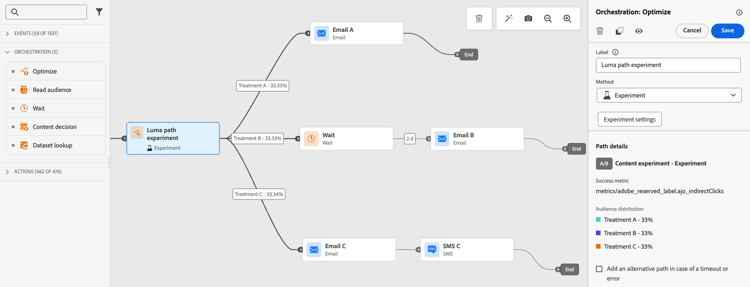
Let’s say you want to compare three paths:
- one path with one email;
- a second path with a Wait node of two days and an email;
- a third path with an email and then a mobile message.
-
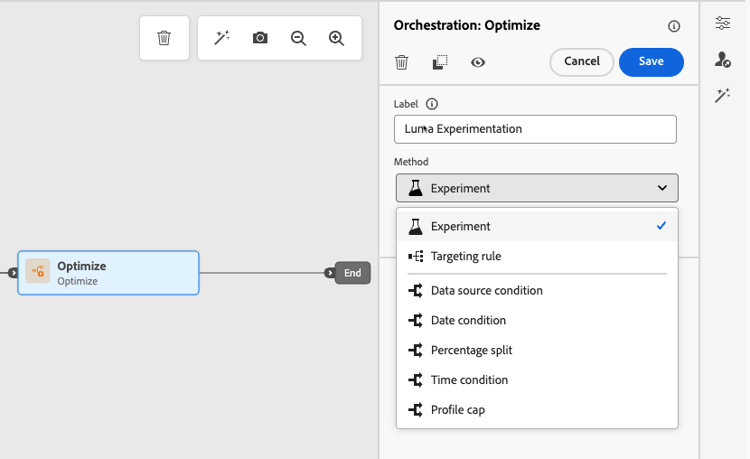
From the Orchestration section, drag and drop the Optimize activity into the journey canvas.
-
Add an optional label, which can be useful to identify the activity in reporting and test mode logs.
-
Select Experiment from the Method drop-down list.
-
Click Create experiment.
-
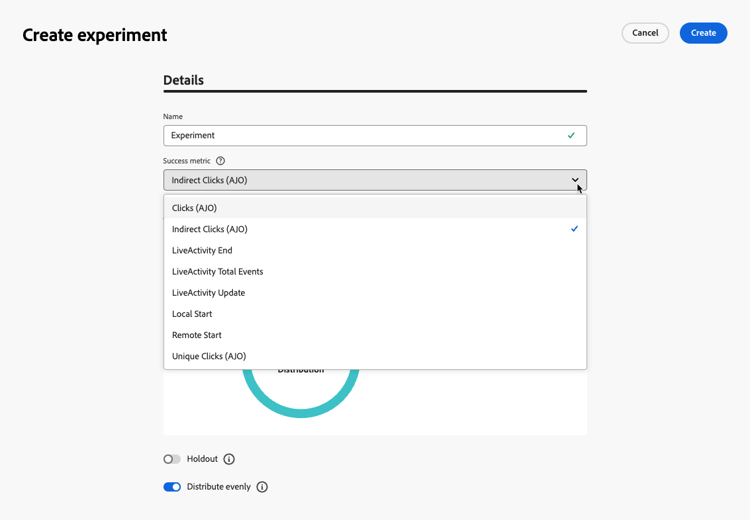
Select the Success metric you want to set for your experiment. Learn more on the available metrics and how to configure the list in this section.
-
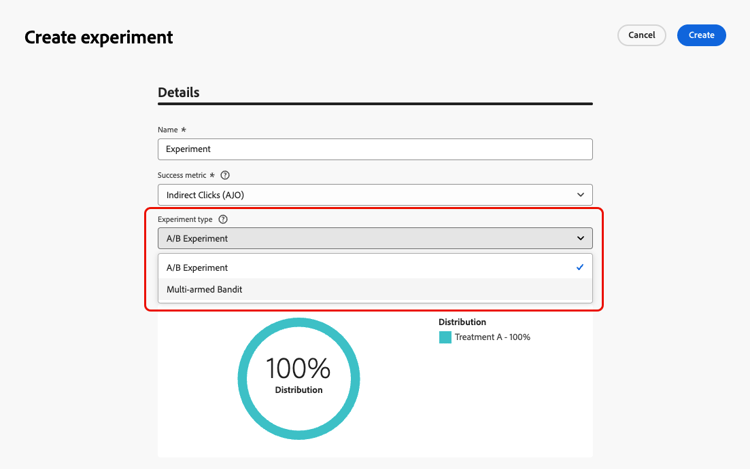
Select the Experiment type for your path experiment:
-
A/B experiment — Define the traffic split between treatments at the start of the test. Performance is evaluated based on your chosen primary metric; reporting shows the observed lift between treatments.
-
Multi-armed bandit — Traffic split between treatments is handled automatically. Every 7 days, performance on the primary metric is reviewed, and weights are adjusted accordingly. Reporting continues to show lift, as for A/B tests.
➡️ Learn more about the difference between A/B and Multi-armed bandit experiments
-
-
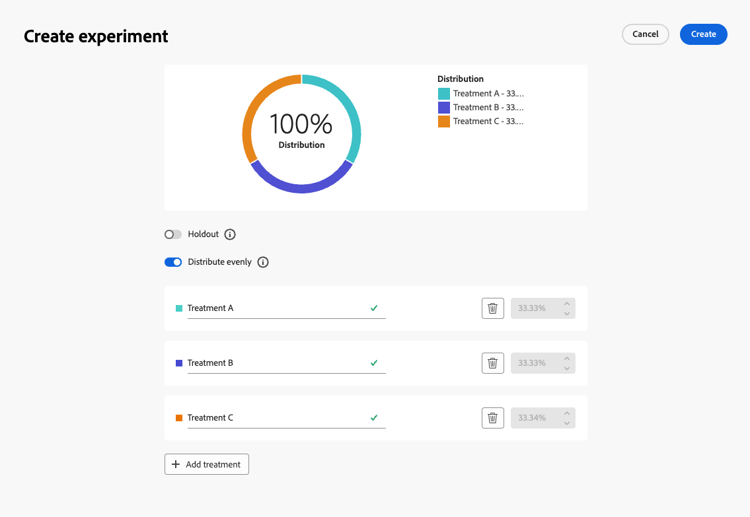
You can choose to add a Holdout group to your delivery. This group will not enter any path from this experiment.
note NOTE Switching on the toggle bar will automatically take 10% of your population. You can adjust this percentage if needed. -
You can allocate a precise percentage to each Treatment, or simply switch on the Distribute evenly toggle bar.
-
Enable the auto-scale experiment to automatically roll out the winning variation of your experiment. Learn more on how to scale the winner
-
Click Create.
-
Define the elements you want for each branch resulting from the Experiment, for example:
-
Drag and drop an Email activity onto the first branch (Treatment A).
-
Drag and drop a Wait activity of two days onto the first branch, followed by an Email activity (Treatment B).
-
Drag and drop an Email activity onto the third branch, followed by a Mobile message activity (Treatment C).
-
-
Optionally, use the Add an alternative path in case of a timeout or an error to define a fallback action. Learn more
-
Click Validate in the journey header and resolve any errors before testing the journey. Learn about journey validation.
-
When testing is complete and validation is current and passed, publish your journey.
Once the journey is live, users are randomly assigned to go down different paths. Journey Optimizer tracks which path performs best and provides actionable insights.
Follow the success of your journey with the Journey Path Experiment report. Learn more
Path assignment on journey re-entrance path-assignment
Path assignment is persistent for a profile across multiple entrances into the same journey version. For example, if a profile enters a journey on day 1 and is assigned to path A and then re-enters the journey on day 2, it will again be assigned to path A. This ensures a consistent experience for the user and is required for statistically valid reporting and analysis.
However, the assignments are only persistent within a given journey version. Once you publish a new journey version, the randomization changes and a profile can end up getting assigned to a different path.
If you have multiple path experimentation activities in a journey, each activity applies an independent random assignment.
Experiment use cases uc-experiment
The following examples show how to use the Optimize activity with the Experiment method to determine which path works best overall.
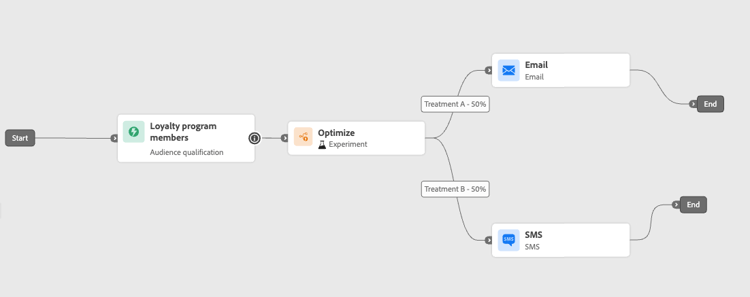
Test whether sending the first message by email versus mobile message drives higher conversions.
➡️ Use the conversion rate as the success metric (for example: purchases, sign-ups).
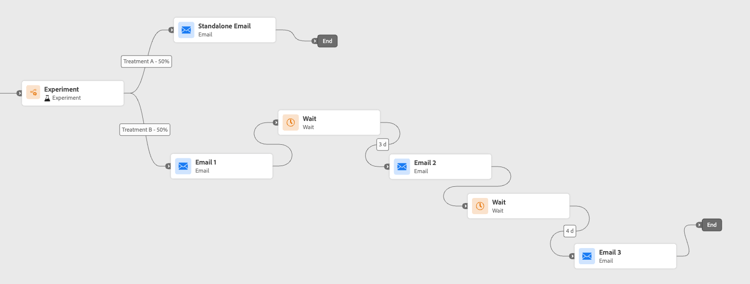
Run an experiment to check if sending one email versus three emails over a week results in more purchases.
➡️ Use purchases or the unsubscribe rate as the success metric.
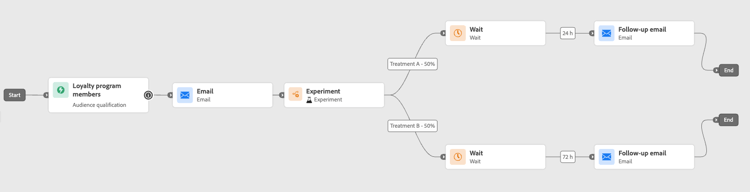
Compare a 24-hour wait versus a 72-hour wait before a follow-up to determine which timing maximizes engagement.
➡️ Use the click-through rate or revenue as the success metric.
Scale the winner scale-winner
Scale the Winner enables you to automatically or manually roll out the winning variation of an experiment to your full audience. This feature ensures that, once a winner is determined, you can amplify its reach and effectiveness without constantly monitoring the experiment.
You can choose between two modes:
-
Auto-scaling: Configure auto-scaling settings when creating your experiment by choosing the timing and conditions for scaling the winning treatment or a fallback option if no winner emerges.
-
Manual Scaling: Manually review experiment results and initiate the rollout of the winning treatment, maintaining full control over timing and decisions.
Auto-scaling autoscaling
Auto-scaling lets you set predefined rules for when to roll out the winning treatment or a fallback—based on the experiment’s results.
Note that once auto-scaling has occurred, manual scaling is no longer available.
To enable auto-scale in your experiments:
-
Set up your journey and configure your experiment as needed. Learn more
-
Enable the auto-scale option when setting up your experiment.
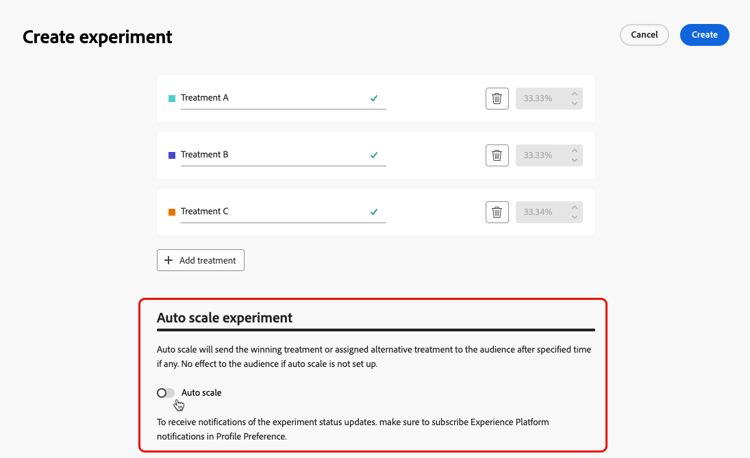
-
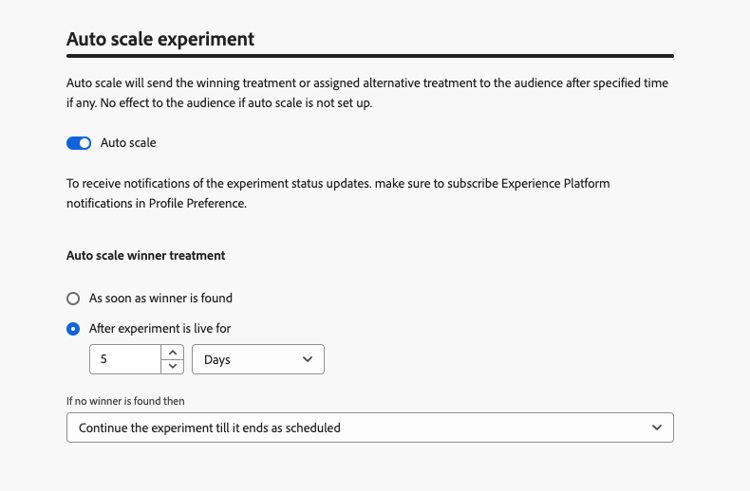
Select when the winner should be scaled:
- As soon as winner is found.
- After experiment is live for the selected time.
The auto-scale time must be scheduled before the experiment’s end date. If it is set for a time after the end date, a validation warning will appear, and the journey will not be published.
-
Choose the fallback behavior if no winner is found by scale time:
- Continue experiment till its ends as scheduled.
- Scale the alternative treatment after a specified time.
Once all parameters are met, your winning or alternative treatment is sent to your audience.
Manual scaling manual-scaling
Manual scaling gives you the ability to review experiment results and decide when to roll out the winning treatment on your own schedule.
Note that if you manually scale the winner before the scheduled auto-scale time, the auto-scale is canceled.
To manually scale the winner of your experiments:
-
Set up your journey and configure your experiment as needed. Learn more
-
Let the experiment run until a winner is identified or statistical significance is achieved.
-
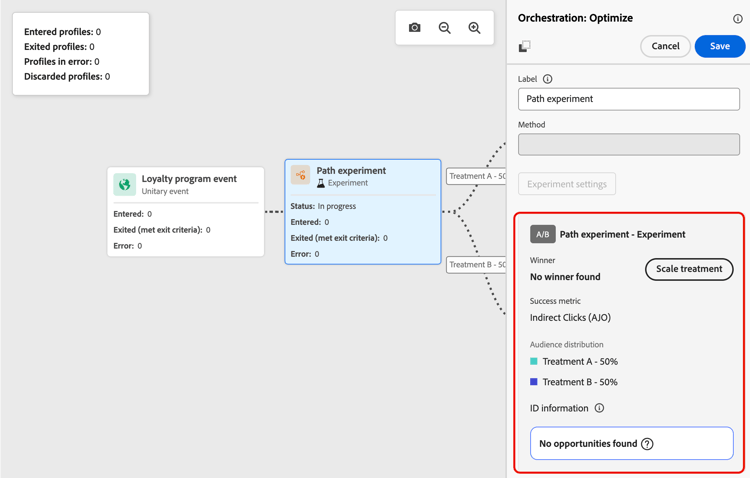
Open your journey and select the Optimize activity that contains the path experiment.
Review the results in the Path experiment view to identify the top-performing treatment.
-
Click Scale treatment to push the winning treatment to the rest of your audience.
-
Select the treatment you want to scale from the drop-down menu and click Scale.
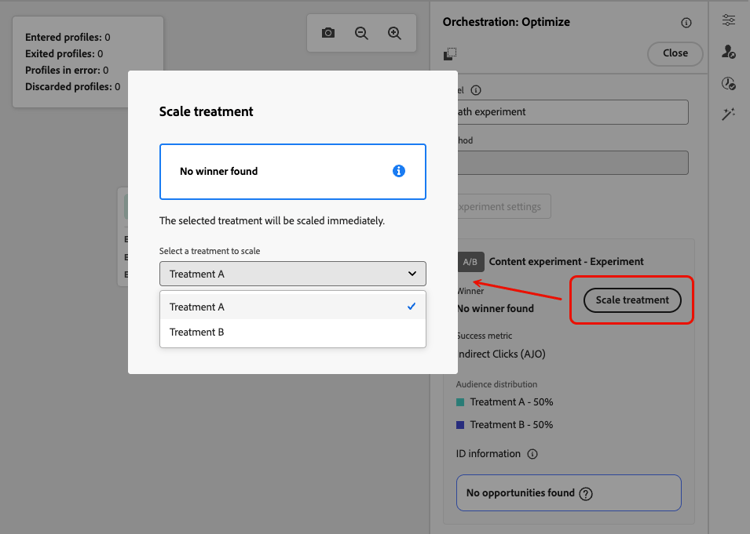
Note that scaling the treatment may take up to one hour. You will receive a notification once the manual scaling process is finished.
This section contains structured knowledge intended to support interpretation, retrieval, and question answering related to this topic.
For complete understanding, this information should be combined with the documentation on this page. Neither source is intended to stand alone; the page describes the feature, while this section provides additional context that helps disambiguate terminology, intent, applicability, and constraints.
- TL;DR: This page explains how to configure and run path experimentation in Adobe Journey Optimizer journeys using A/B or Multi-armed bandit methods, and how to scale the winning treatment automatically or manually.
Intents:
- Set up an A/B or Multi-armed bandit path experiment in a journey
- Define success metrics to evaluate experiment performance
- Allocate traffic between treatment paths evenly or by custom percentage
- Add a holdout group to exclude a portion of the audience from all treatments
- Enable auto-scaling to automatically roll out the winning treatment
- Manually scale the winning treatment after reviewing experiment results
Glossary:
- Optimize activity: A journey canvas activity used with the Experiment method to test different paths based on a random split (product-specific)
- Treatment: A single path variant in a path experiment (e.g., Treatment A, Treatment B) (product-specific)
- Success metric: Used to track and evaluate the best performing treatment in an experiment (product-specific)
- Multi-armed bandit: An experiment type where traffic split is adjusted automatically every 7 days based on primary metric performance (product-specific)
- Scale the Winner: A feature that rolls out the winning treatment to the full remaining audience, either automatically or manually (product-specific)
- Holdout group: A group that will not enter any path from the experiment (product-specific)
Guardrails:
- The journey must be validated and errors resolved before testing. Publication requires completed testing and current, passed validation.
- Scale the Winner is only available for unitary journeys (event-triggered and Audience Qualification); it is not available for Read Audience journeys.
- Auto-scale time must be scheduled before the experiment’s end date, or the journey will not publish.
- Once auto-scaling has occurred, manual scaling is no longer available.
- Manual scaling the winner before the scheduled auto-scale time cancels the auto-scale.
- Scaling the treatment may take up to one hour.
Terminology:
- Canonical name: Path experimentation
- Do not confuse: “A/B experiment” ≠ “Multi-armed bandit” (A/B has fixed traffic split; Multi-armed bandit adjusts weights dynamically every 7 days)
FAQ:
- Q: What is the difference between A/B experiment and Multi-armed bandit? — A/B experiment uses a fixed traffic split defined at the start, while Multi-armed bandit automatically adjusts traffic weights every 7 days based on the primary metric performance.
- Q: Can I use Scale the Winner in a Read Audience journey? — No; Scale the Winner is only available for unitary (event-triggered and Audience Qualification) journeys.
- Q: What happens if no winner is found by the auto-scale time? — You can configure a fallback: either continue the experiment until its scheduled end, or scale an alternative treatment after a specified time.
- Q: How is traffic distributed if I do not configure treatment percentages manually? — You can enable the Distribute evenly toggle to split traffic equally across all treatments.
- Q: Does a profile keep its path assignment when it re-enters the journey? — Path assignment persists within the same journey version. With a new journey version, randomization changes and a profile can be assigned to a different path.