On this page: Generate SMS usage reports in Adobe Journey Optimizer to reconcile mobile-terminated (MT) and mobile-originated (MO) volume with vendor billing, using a Sinch MMS API credential and downloadable CSV output.
SMS usage metrics are available when you purchase SMS through Adobe Journey Optimizer. Reports summarize send and receive traffic by short code or phone number, aggregated by day, for the last 90 days.
To view usage metrics, an administrator must:
-
Create a Sinch MMS API credential used only to retrieve usage data from Sinch.
These steps require the Manage SMS settings permission. Learn more about permissions.
Create a Sinch MMS API credential sinch-mms
Usage reports require an API credential with SMS vendor set to Sinch MMS. This credential lets Journey Optimizer retrieve usage data from Sinch. It is separate from the Sinch credentials used to send SMS or MMS messages, although the field values come from the same Sinch project.
-
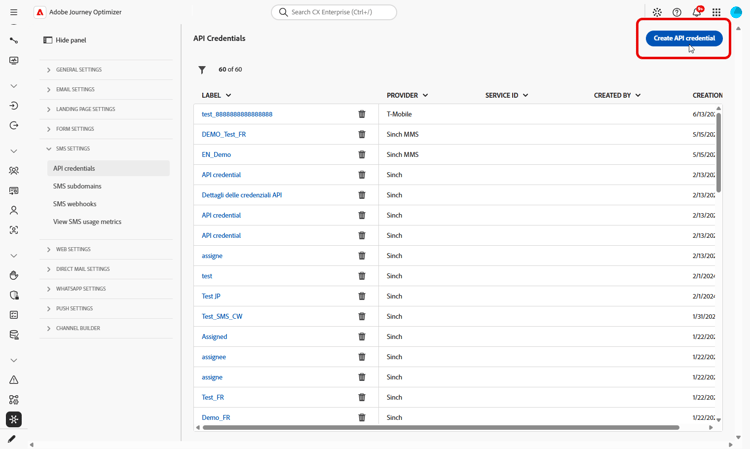
In the left rail, go to Administration > Channels > SMS Settings, then select API Credentials. Click Create new API credentials.
-
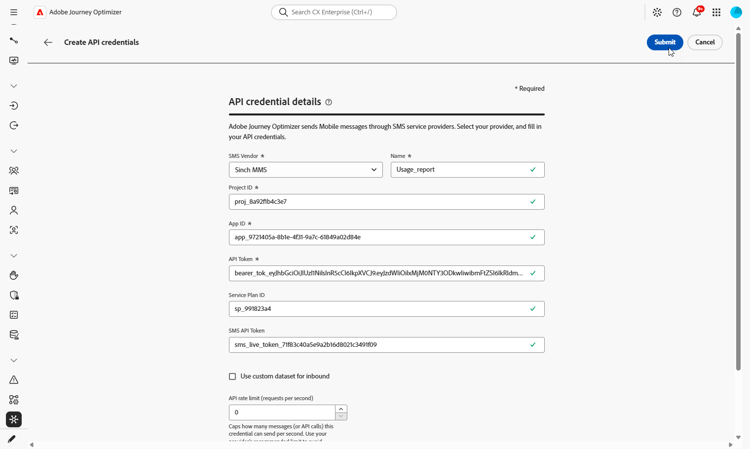
Configure the credential as follows:
-
SMS vendor: Sinch MMS.
-
Name: enter a name for your API credential.
-
Project ID: enter the ID of your Sinch project.
-
App ID: enter the ID of the application associated with your Sinch project.
-
API Token: enter the API token used to authenticate requests to Sinch.
-
-
Click Submit when you finish configuring the credential.
-
To delete a credential, click the bin icon next to it in the API Credentials menu.
-
To modify a credential, locate it in the API Credentials menu and click Edit.
The credential is now available for configuring SMS usage reports.
Configure and view SMS usage reports configure-sms-usage-report
The SMS usage reports present mobile-originated (MO) and mobile-terminated (MT) volume by short code to support reconciliation between vendor billing and messaging activity in Journey Optimizer.
-
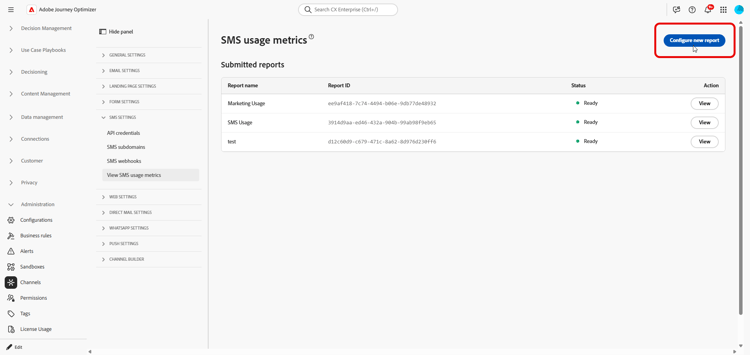
In the left rail, browse to Administration > Channels > SMS Settings.
-
Access the View SMS usage metrics menu, then, click Configure new report.
-
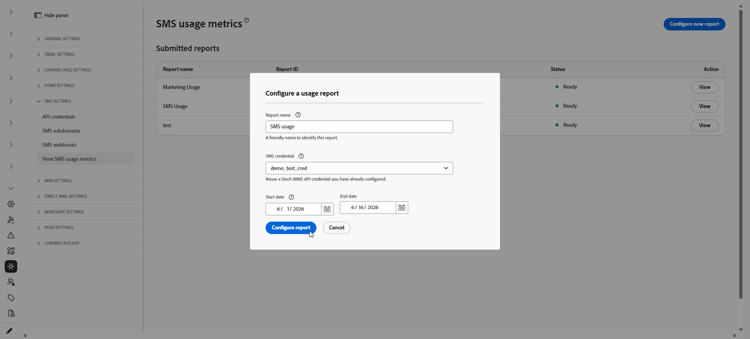
Configure the report:
-
Report name: enter a label that helps you recognize your report.
-
SMS credentials: select the Sinch MMS API credential you previously created for your SMS usage reporting.
-
Start date and End date: set the date range for the report. Usage data is available only for the last 90 days.
-
-
Click Configure report to submit the request.
-
On the Submitted reports list, find the report you configured and click Retrieve report.
The status changes to Pending while the report is generated.
-
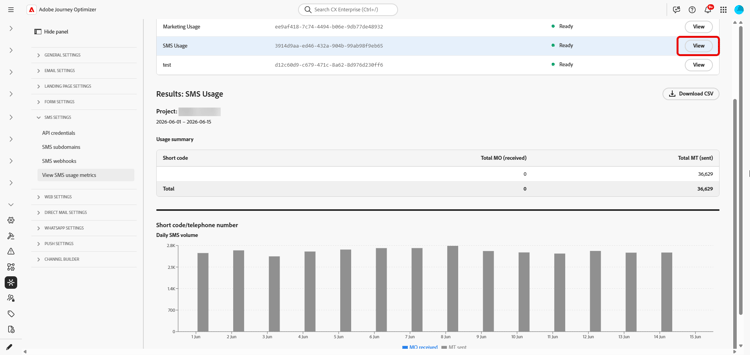
Once your report status is updated to Ready, click View to open the report. The report includes:
-
Usage summary: total mobile-originated (MO) and mobile-terminated (MT) messages for the selected dates, broken down by short code.
-
Daily SMS volume: SMS volume by day, broken down by short code.
-
-
To export the report, click Download CSV. Journey Optimizer downloads a CSV file for the report you are viewing.
This section contains structured knowledge intended to support interpretation, retrieval, and question answering related to this topic.
For complete understanding, this information should be combined with the documentation on this page. Neither source is intended to stand alone; the page describes the feature, while this section provides additional context that helps disambiguate terminology, intent, applicability, and constraints.
- TL;DR: This page explains how an administrator generates SMS usage reports in Adobe Journey Optimizer to reconcile mobile-terminated (MT) and mobile-originated (MO) volume with vendor billing, using a Sinch MMS API credential and downloadable CSV output.
Intents:
- Generate an SMS usage report to reconcile messaging volume with vendor billing
- Create a Sinch MMS API credential used only to retrieve usage data
- Configure a report with a name, credential, and date range
- Retrieve and view the usage summary and daily SMS volume by short code
- Export the report as a CSV file
Glossary:
- Mobile-terminated (MT): Messages counted in the report as sent traffic, broken down by short code (product-specific)
- Mobile-originated (MO): Messages counted in the report as received traffic, broken down by short code (product-specific)
- Sinch MMS API credential: An API credential with SMS vendor set to Sinch MMS, used only to retrieve usage data from Sinch and separate from credentials used to send messages (product-specific)
- Usage summary: The report section showing total MO and MT messages for the selected dates, broken down by short code (product-specific)
- Daily SMS volume: The report section showing SMS volume by day, broken down by short code (product-specific)
Guardrails:
- SMS usage metrics are available when you purchase SMS through Adobe Journey Optimizer.
- Usage data is available only for the last 90 days.
- Reports require an API credential with SMS vendor set to Sinch MMS, which is separate from the Sinch credentials used to send SMS or MMS messages, although the field values come from the same Sinch project.
- Generating usage reports requires the Manage SMS settings permission.
- Reports summarize send and receive traffic by short code or phone number, aggregated by day.
Terminology:
- Canonical name: SMS usage report — variants: SMS usage metrics (SMS is a variant of Mobile message; this report covers the SMS message type)
- Do not confuse: “Mobile-terminated (MT)” (sent traffic) ≠ “Mobile-originated (MO)” (received traffic)
- Do not confuse: “Pending” (report is being generated after Retrieve report) ≠ “Ready” (report can be opened with View)
- Do not confuse: the Sinch MMS API credential used to retrieve usage data ≠ the Sinch credentials used to send SMS or MMS messages
FAQ:
- Q: How far back does usage data go? — Usage data is available only for the last 90 days.
- Q: Which credential is required for usage reports? — An API credential with SMS vendor set to Sinch MMS, which is separate from the credentials used to send messages although the field values come from the same Sinch project.
- Q: What permission do I need to generate reports? — The Manage SMS settings permission is required.
- Q: What does a generated report contain? — A Usage summary with total MO and MT messages for the selected dates broken down by short code, and a Daily SMS volume section showing SMS volume by day broken down by short code.
- Q: How do I export the report? — Click Download CSV to download a CSV file for the report you are viewing.