On this page: Learn how to use the Incremental query targeting activity to return only new records on each Orchestrated campaign run, excluding profiles already targeted in previous executions.
The Incremental query activity is a Targeting activity that runs a database query each time the Orchestrated campaign runs. The important part is that it only ever outputs new records. Anyone already picked up in a prior run is excluded, so you avoid re-targeting the same people or re-exporting the same rows.
Use it when the campaign can run multiple times, or example, when you schedule the campaign, e.g. weekly or when it is triggered by an external signal or API. Each run targets only records that were not returned in a previous run, so you avoid duplicates.
Typical uses:
- Messaging and audiences: Pull only new sign-ups, new purchasers, or other “new since last run” segments into the next step (e.g. email, mobile message).
- Ongoing exports: Send only new or updated rows to files for reporting or BI tools, without duplicating what you already exported.
Configure the Incremental query activity incremental-query-configuration
Set the targeting dimension, build your query, and choose how the activity decides which records to exclude from future runs.
-
Drop an Incremental query activity into your Orchestrated campaign.
-
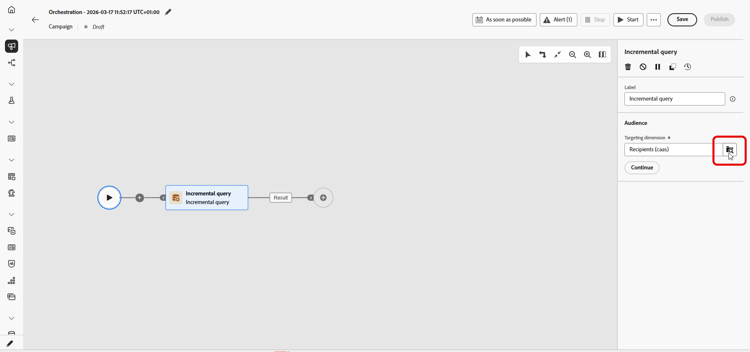
In Audience, pick the Targeting dimension, e.g. recipients, subscribers, and click Continue. Learn more on Targeting dimensions.
-
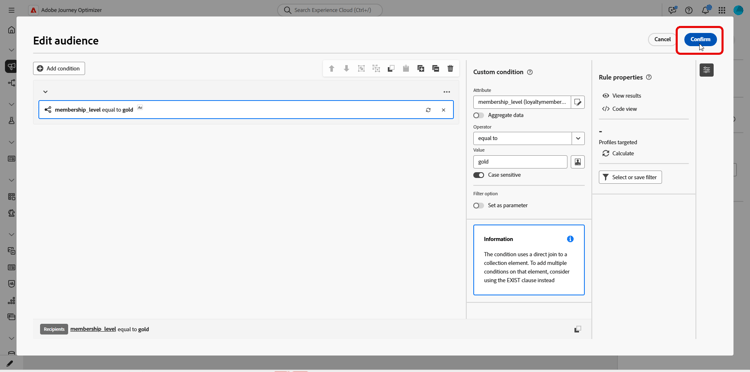
Click Add condition to define the query. Learn how to use the rule builder.
-
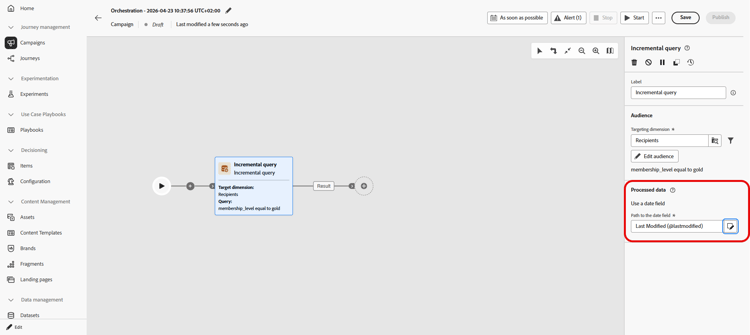
Under Processed data, choose your Path to the date field. The attribute must use the Date Time format. Each run returns only rows whose date is after the last execution.
Example incremental-query-example
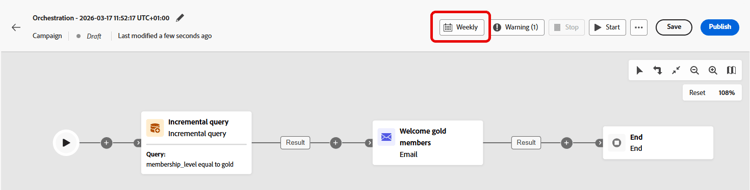
The following example sends a welcome email to profiles who have just become gold members. The campaign can be scheduled to run weekly, every Monday. Each run targets only profiles that qualified for gold membership since the previous run, so each recipient receives the welcome email once.
- Incremental query: Selects gold members. First run: all current gold members. Later runs: only profiles that became gold members since the previous execution.
- Email delivery: Sends the welcome email to the profiles output by the query.