On this page: Learn how to add a visible CC field to emails in an Adobe Journey Optimizer channel configuration, how it differs from BCC, and the related recommendations and limitations.
You can add a visible CC (carbon copy) field to emails sent by Journey Optimizer through your journeys and campaigns. This optional feature is configured at the channel configuration level, alongside the email header parameters and BCC email option.
Like BCC, the CC field is meant to send a copy of the email to an additional address. However, it differs from BCC in the following ways:
- The CC email address is visible to the primary recipient, so it enables the primary recipient to see who is copied and know whom to contact for follow-up.
- Unlike BCC, the CC email field supports personalization, which enables you to use one channel configuration for many scenarios, and send the copy to the right person per recipient (e.g. their relationship manager). For API-triggered campaigns, this allows you to CC the address relevant to a specific event or transaction.
Enable CC email enable-cc
To enable the CC email option, configure the CC field in the email channel configuration.
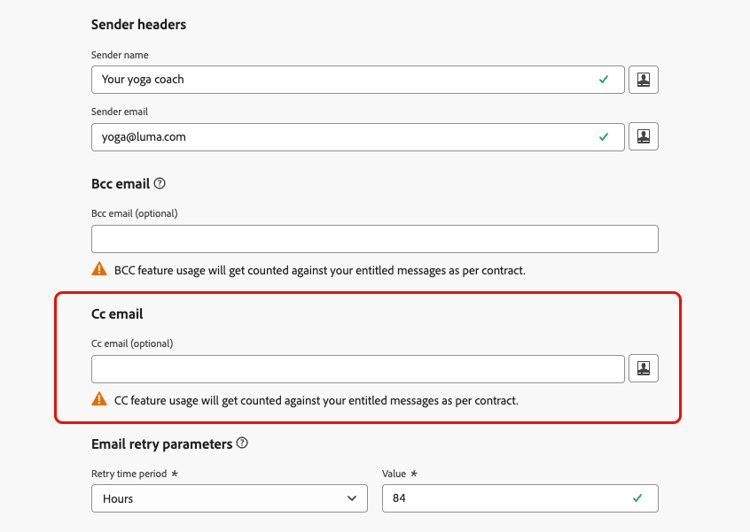
You can specify any external address in correct format, except an email address defined on a subdomain delegated to Adobe. For example, if you delegated the marketing.luma.com subdomain to Adobe, any address like abc@marketing.luma.com is prohibited.
The CC email field accepts three types of values:
-
A hardcoded value, which can be a fixed email address.
-
A profile attribute, such as the relationship manager email address available in the profile.
-
A contextual attribute - this value can only be used in API-triggered campaigns. It is retrieved from the API payload which must include the context variable
context.channel.email.ccvalueswith the CC address value passed as a string.note warning WARNING When CC is set using a context variable, it is supported only in API-triggered campaigns. If you use that channel configuration in a journey or an action campaign, the email is sent to the primary recipient only; no copy is sent to the CC address.
Any attachment included in the message is sent to both the primary recipient and the CC address.
If the CC value is invalid or missing at send time (e.g. an empty context variable), the CC copy is skipped; the primary recipient still receives the email.
If there are multiple values for the CC field (for example, when using a profile attribute or expression that resolves to several addresses), only the first value is used for sending the email.
Edit CC email in existing channel configurations cc-edit
If you edit an email configuration and add or change the CC field, you can only use:
- A hardcoded CC email address, or
- A context variable (for API-triggered use).
Recommendations and limitations cc-recommendations-limitations
-
Entitlement: CC usage is counted toward your entitled message volume. Use CC only where you need visible CC recipients. Check your contract for licensed volumes.
-
Privacy and compliance: To ensure your privacy compliance, CC emails must be processed by a system capable of storing securely personally identifiable information (PII) when applicable. As messages can contain sensitive or private data, such as PII, make sure the CC address is correct and secure the access to messages.
-
Inbox management: Your inbox used for CC should be properly managed for space and delivery. If the inbox returns bounces, some emails may not be received.
-
Delivery timing: Messages may be delivered to the CC email address before the target recipients. CC messages can also be sent even though the original messages may have bounced.
-
Consent and suppression: The CC email address is not checked against consent or suppression.
-
Reporting: Opens, clicks, and other engagement from CC recipients are included in email reporting metrics. Do not open or click through the emails sent to the CC address, as it is taken into account in the total opens and clicks from the send analysis, which could cause miscalculations in reports.
-
Spam: Do not mark messages as spam in the CC inbox, as it will impact all the other emails sent to this address.
-
Deliverability: Use CC in line with your sending practices and recipient expectations. Excessive use of CC can affect deliverability; follow deliverability best practices and your contract terms.