On this page: Learn how to use supplemental identifiers — secondary identifiers such as an order or booking ID — to run a separate journey instance per identifier and personalize messages with its attributes.
By default, journeys are executed in the context of a profile ID. This means that, as long as the profile is active in a given journey, it won't be able to re-enter another journey. To prevent this, Journey Optimizer allows you to capture a supplemental identifier, such as an order ID, subscription ID, prescription ID, in addition to the profile ID.
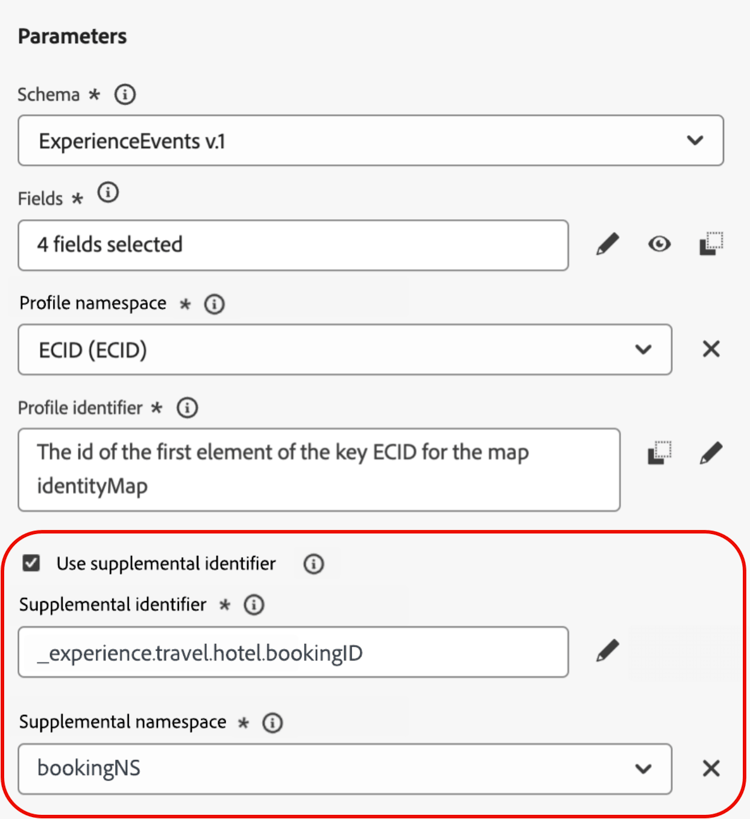
In this example, we have added a booking ID as a supplemental identifier.
By doing so, journeys are executed in the context of the profile ID associated to the supplemental identifier (here, the booking ID). One instance of the journey is executed for each iteration of the supplemental identifier. This allows multiple entrances of the same profile ID in journeys if they have made different bookings.
In addition, Journey Optimizer allows you to leverage attributes of the supplemental identifier (e.g., booking number, prescription renewal date, product type) for message customization, ensuring highly relevant communications.
➡️ Discover this feature in video
Guardrails & limitations guardrails
-
Supported journeys: Supplemental identifiers are supported for event-triggered and Read audience journeys. They are not supported for Audience qualification journeys (i.e., journeys starting with an Audience qualification activity).
-
Inbound actions: Supplemental identifiers are currently not supported for inbound actions, such as in-app and web actions.
-
Concurrent instance limits: Profiles cannot have more than 10 concurrent journey instances.
-
Data type and schema structure: The supplemental identifier must be of type
string. It can be an independent string attribute or it can be a string attribute within an array of objects. The independent string attribute will result in a single journey instance, whereas the string attribute within an array of objects will result in a unique journey instance per iteration of the object array. String arrays and maps are not supported. -
Journey reentrance
Journey reentrance behavior with supplemental identifiers follows the existing reentrance policy:
- If the journey is non-reentrant, the same profile ID + supplemental ID combination cannot reenter the journey.
- If the journey is reentrant with a time window, the same profile ID + supplemental ID combination can reenter after the defined time window.
-
Data Use Labelling and Enforcement (DULE) - No DULE validation checks are performed on the supplemental ID. This means that this attribute will not be considered when the journey is looking for data governance policy violations.
-
Downstream events configuration
If you are using another event downstream in the journey, it must use the same supplemental ID and have the same ID namespace.
-
Read audience journeys
- Business events: Supplemental ID is disabled if you use a business event.
- Event and context fields: The supplemental identifier must not be sourced from an event or journey context field.
- Attribute selection: Any non-identity attribute (or non-person identity) can be used as the supplemental ID, for all audience types (Unified Profile Service, CSV import, and Federated Audience Composition). Person-based identity attributes are not permitted. For external audiences, see Supplemental identifiers with external audiences for supported data patterns and configuration requirements.
- Reading rate: For read audience journeys using an array-type supplemental ID field, the reading rate of the Read audience activity is limited to a maximum of 500 profiles per second.
Exit criteria behavior with supplemental IDs exit-criteria
Precondition: Journey enabled for supplemental ID (via unitary event or read audience activities)
The table below explains the behavior of profiles in a supplemental ID-enabled journey when exit criteria is configured:
Note: Supplemental ID namespace must match that of the initial node.
Add a supplemental identifier and leverage it in a journey add
To use a supplemental identifier in an event-triggered journey, follow these steps:
-
Add the supplemental ID to the event
-
Create or edit the desired event. Learn how to configure a unitary event
-
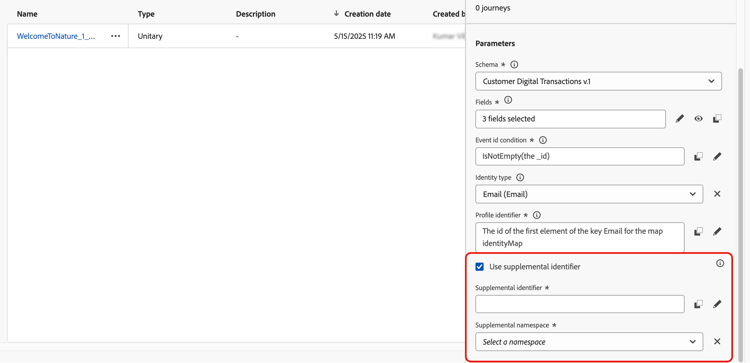
In the event configuration screen, check the Use supplemental identifier option.
-
Use the expression editor to select the field you want to use as the supplemental ID (e.g., booking ID, subscription ID).
Make sure you are using the expression editor in Advanced mode to select the attribute.
-
-
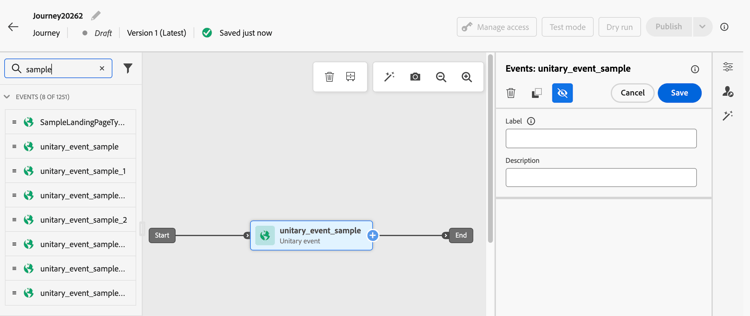
Add the event to the journey
Drag the configured event onto the journey canvas. It will trigger journey entry based on both the profile ID and the supplemental ID.
To use a supplemental identifier in a Read audience journey, follow these steps:
-
Add and configure a Read audience activity in the journey
-
Drag a Read audience activity in your journey.
-
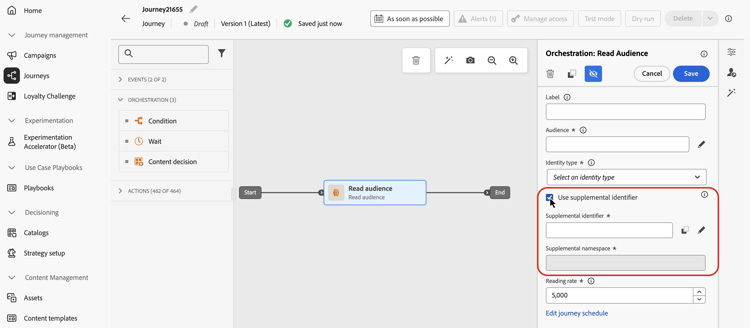
In the activity properties pane, toggle on the Use supplemental identifier option.
-
In the Supplemental identifier field, use the expression editor to select the supplemental identifier attribute.
For audiences imported from a CSV file, if your CSV audience contains multiple rows per profile ID, make sure Express Activation is enabled first — see Supplemental identifiers with external audiences.
note NOTE Make sure you are using the expression editor in Advanced mode to select the attribute.
-
Leverage supplemental ID attributes
Use the expression editor and personalization editor to reference attributes of the supplemental identifier for personalization or conditional logic. Attributes are accessible from the Contextual attributes menu.
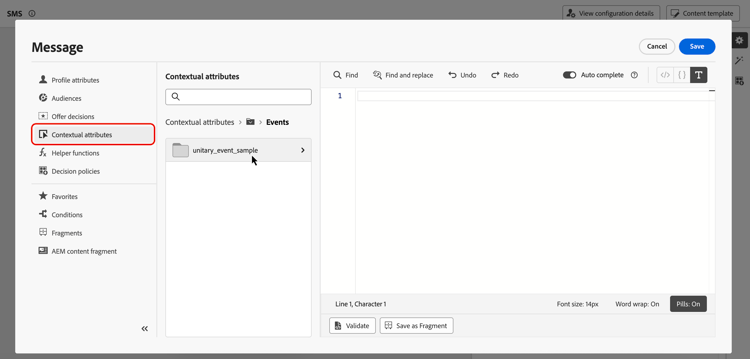
For event-triggered journeys if you are working with arrays (e.g., multiple prescriptions or policies), use a formula to extract specific elements.
In an object array with the supplemental ID as bookingNum and an attribute at the same level called bookingCountry, the journey will iterate through the array object based on the bookingNum and create a journey instance for each object.
-
The following expression in the condition activity will iterate through the object array and check whether the value of
bookingCountryis equal to “FR”:code language-none @event{<event_name>.<object_path>.<object_array_name>.all(currentEventField.<attribute_path>.bookingNum==${supplementalId}).at(0).<attribute_path>.bookingCountry}=="FR" -
The following expression in the email personalization editor will iterate through the object array, pull out the
bookingCountryapplicable to the current journey instance, and display it in the content:code language-none {{#each context.journey.events.<event_ID>.<object_path>.<object_array_name> as |l|}} {%#if l.<attribute_path>.bookingNum = context.journey.technicalProperties.supplementalId%} {{l.<attribute_path>.bookingCountry}} {%/if%} {{/each}} -
Example of the event used to trigger the journey:
code language-none "bookingList": [ { "bookingInfo": { "bookingNum": "x1", "bookingCountry": "US" } }, { "bookingInfo": { "bookingNum": "x2", "bookingCountry": "FR" } } ]
Supplemental ID and journey arbitration arbitration
Journey arbitration (including concurrency caps and entry counting within rulesets) operates at the profile ID level, not the (profile ID, supplemental ID) pair level. This means a concurrency cap of 1 may block a second journey instance for the same profile even when it carries a different supplemental ID value.
Contact your Adobe representative for guidance on arbitration behavior before relying on specific arbitration settings in production.
Related documentation:
Supplemental identifiers with external audiences external-audiences
Supplemental ID is supported for external audiences, including audiences imported from a CSV file and audiences created with Federated Audience Composition. When configuring a journey that reads from a CSV or Federated Audience Composition audience, you can designate any non-identity attribute in that audience as the supplemental ID. Journey Optimizer then creates a separate journey instance per unique profile + supplemental ID combination.
-
Use case 1: One row per unique profile + supplemental ID pair
This is the primary use case for CSV and Federated Audience Composition audiences. The audience contains multiple rows where each row represents a unique combination of a profile (e.g., a customer) and a supplemental ID (e.g., an account or order ID). Each row is treated as an independent activation record.
table 0-row-3 1-row-3 2-row-3 3-row-3 profile_id account_id (Supplemental ID) other_attributes customer_001 ACC-1001 … customer_001 ACC-1002 … customer_002 ACC-2001 … In this example,
customer_001has two accounts. Journey Optimizer creates a separate journey instance for each unique profile +account_idpair. -
Use case 2: One row per profile with an array of supplemental IDs
This use case is available for audience types that support arrays. A single row in the audience contains a profile with an array attribute holding multiple supplemental ID values. Journey Optimizer creates one journey instance per value in the array.
table 0-row-3 1-row-3 2-row-3 profile_id account_ids (array, Supplemental ID) other_attributes customer_001 [ACC-1001, ACC-1002] … customer_002 [ACC-2001] … In this example, Journey Optimizer generates two journey instances for
customer_001(one per account ID) and one instance forcustomer_002. This behaves consistently with how supplemental ID works for Unified Profile Service audiences.
How to configure external-configuration
For CSV audiences using Use Case 1 (where the audience intentionally contains multiple rows for the same profile ID)you must enable Express Activation before configuring the journey. See the prerequisite below. For all other cases, configure the journey directly.
| note important |
|---|
| IMPORTANT |
This prerequisite applies only to CSV audiences where the audience intentionally contains multiple rows for the same profile ID (Use Case 1). Federated Audience Composition audiences have Express Activation enabled by default and do not require this step. The Audience Portal UI does not support setting expressActivation — you must use the External Audience API. |
You must enable expressActivation on the audience at creation time. This tells Journey Optimizer to activate every record independently, without deduplication by profile ID. This flag cannot be changed after the audience is created.
Use the following API call when creating the audience:
Endpoint:
| code language-http |
|---|
|
Required headers:
| code language-http |
|---|
|
Request body (set expressActivation: true):
| code language-json |
|---|
|
| note |
|---|
| NOTE |
expressActivation defaults to false. It must be set at audience creation time and cannot be changed after creation. All Federated Audience Composition audiences have Express Activation enabled by default and do not require this flag. |
See the create external audience API documentation for the full reference.
To configure the journey:
- Open or create a journey with a Read audience node.
- In the Read audience node settings, select your CSV or Federated Audience Composition audience.
- Toggle on the Use supplemental identifier option, then in the Supplemental identifier field, use the expression editor in Advanced mode to choose the attribute you want to use as the secondary identifier (e.g.,
account_id,order_number). - The selected attribute is treated as the supplemental ID for the journey — no identity registration is required.
Deduplication behavior external-dedup
When an audience has Express Activation enabled (always true for Federated Audience Composition - must be set explicitly for CSV), Journey Optimizer handles deduplication based on how the journey is configured:
Example use cases
These examples show how supplemental identifiers support multiple related records.
Policy renewal notifications
-
Scenario: An insurance provider sends renewal reminders for each active policy held by a customer.
-
Execution:
- Profile: “John”.
- Supplemental IDs:
"AutoPolicy123", "HomePolicy456". - Journey executes separately for each policy, with personalized renewal dates, coverage details, and premium information.
Subscription Management
-
Scenario: A subscription service sends tailored messages for each subscription when an event is triggered for that subscription.
-
Execution:
- Profile: “Jane”.
- Supplemental IDs:
"Luma Yoga Program ", "Luma Fitness Program". - Each event includes a subscription ID and details about that subscription. Journey executes separately for each event/subscription, allowing personalized renewal offers per subscription.
Product Recommendations
-
Scenario: An e-commerce platform sends recommendations based on specific products purchased by a customer.
-
Execution:
- Profile: “Alex”.
- Supplemental IDs:
"productID1234", "productID5678". - Journey executes separately for each product, with personalized upsell opportunities.
How-to video video
Learn how to enable and apply a supplemental identifier in Adobe Journey Optimizer.
This section contains structured knowledge intended to support interpretation, retrieval, and question answering related to this topic.
For complete understanding, this information should be combined with the documentation on this page. Neither source is intended to stand alone; the page describes the feature, while this section provides additional context that helps disambiguate terminology, intent, applicability, and constraints.
- TL;DR: This page explains how to use supplemental identifiers in Adobe Journey Optimizer journeys to allow a single profile to have multiple concurrent journey instances, each scoped to a distinct secondary ID such as a booking, subscription, or policy ID.
Intents:
- Understand when and why to use a supplemental identifier instead of relying solely on a profile ID
- Configure a supplemental identifier in an event-triggered journey by marking an attribute as an identity in the event schema
- Configure a supplemental identifier in a Read audience journey by enabling the option in the Read audience activity
- Reference supplemental identifier attributes for message personalization and conditional logic using the expression editor
- Apply the correct expression syntax to iterate over object arrays keyed by a supplemental ID
- Identify guardrails and limitations before implementing supplemental identifiers in a journey
Glossary:
- Supplemental identifier: A secondary identifier (e.g., order ID, booking ID, subscription ID) used alongside the profile ID to scope a journey instance to a specific record, enabling multiple concurrent instances per profile (product-specific)
- Profile ID: The primary identifier used by default to execute journeys; a profile active in a journey cannot re-enter another journey without a supplemental ID
- Non-person identifier namespace: An identity namespace that does not represent a person (required for supplemental IDs); must be distinct from the primary identity namespace
- joai namespace: Not applicable to this page (see inbound actions troubleshooting)
- DULE: Data Use Labelling and Enforcement — the data governance policy validation framework in Adobe Experience Platform; supplemental IDs are not subject to DULE checks
Guardrails:
- Supplemental identifiers are supported only for event-triggered and Read audience journeys; not supported for Audience qualification journeys
- A profile cannot have more than 10 concurrent journey instances
- Each journey instance counts toward frequency capping even when created via supplemental identifiers
- The supplemental identifier must be of type
string; string arrays and maps are not supported - The supplemental ID attribute must not be marked as Primary identity in the schema
- The namespace used for the supplemental ID must be a non-person identifier namespace
- After applying the non-person identity namespace to a schema, a new event or field group must be created; existing entities cannot be refreshed
- For Read audience journeys with supplemental IDs: the reading rate is limited to 500 profiles per second per journey instance; only Unified Profile Service audiences are supported; supplemental ID must be a profile field (not an event/context field)
- Downstream events in the same journey must use the same supplemental ID and namespace
- Supplemental ID is disabled for Read audience journeys that use a business event
Terminology:
- Canonical name: Supplemental identifier — Acronym: none — variants: supplemental ID, secondary identifier
- Synonyms: “supplemental identifier” = “supplemental ID” (used interchangeably in the UI and documentation)
- Do not confuse: “supplemental identifier” ≠ “primary identity” — the supplemental ID must never be marked as the primary identity in the schema
FAQ:
- Q: What is a supplemental identifier used for? — It allows a single profile to enter and execute a journey multiple times simultaneously, with each instance scoped to a different secondary record such as a booking, subscription, or policy ID.
- Q: Which journey types support supplemental identifiers? — Event-triggered journeys and Read audience journeys. Audience qualification journeys do not support supplemental identifiers.
- Q: How many concurrent journey instances can a profile have with supplemental identifiers? — A maximum of 10 concurrent journey instances per profile.
- Q: Can I use the supplemental ID attributes for message personalization? — Yes. Reference them via the Contextual attributes menu in the expression editor or personalization editor.
- Q: Does the supplemental ID need to be marked as a Primary identity in the schema? — No. It must be marked as an Identity but must not be set as the Primary identity.
- Q: Are DULE governance policies applied to the supplemental identifier? — No. DULE validation checks are not performed on the supplemental ID.