On this page: Build an API-triggered campaign in Journey Optimizer so you can remotely start, update, and end Live activities for individual users or audiences.
After configuring your mobile configuration and implement your Adobe Experience Platform mobile SDK, you can start creating your Live activity in Journey Optimizer:
-
Access the Campaigns menu, then click Create campaign.
-
Select the API triggered campaign type.
-
Select API-triggered Marketing for audience-based campaigns
-
Select API-triggered Transactional for individual campaigns.
note important IMPORTANT Note that for API-triggered Transactional, High Throughput option should not be enabled. 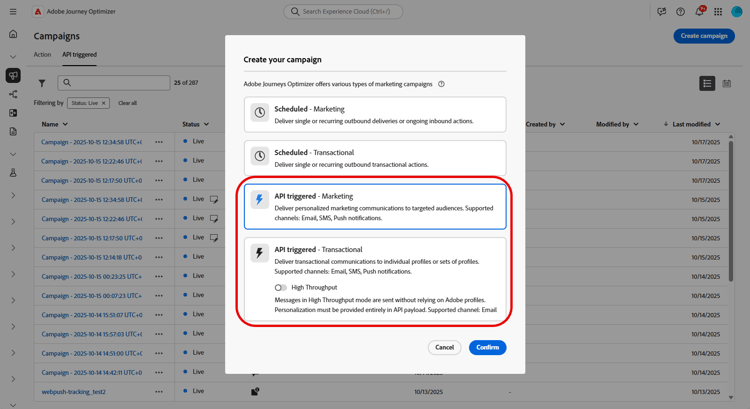
-
-
From the Properties section, edit your Campaign’s Title and Description.
-
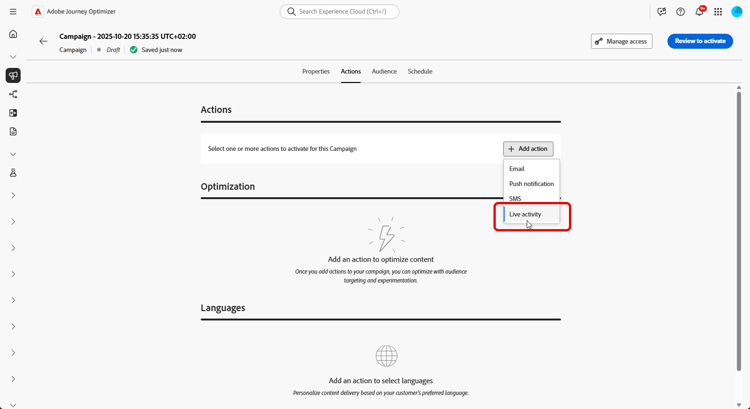
In the Actions section, choose Live activity and select or create a new configuration.
Learn more about Live activity configuration on this page.
-
Click Create experiment to start configuring your content experiment and create treatments to measure their performance and identify the best option for your target audience. Learn more
-
From the Audience tab, choose your Identity type Learn more.
note NOTE For API-triggered Marketing campaigns, you can select an existing audience that acts as the first segmentation before checking APNs channelID subscription from the API payload. -
Campaigns are designed to be executed on a specific date or on a recurring frequency. Learn how to configure the Schedule of your campaign in this section.
-
Once configured, click Review to activate, then click Activate.
-
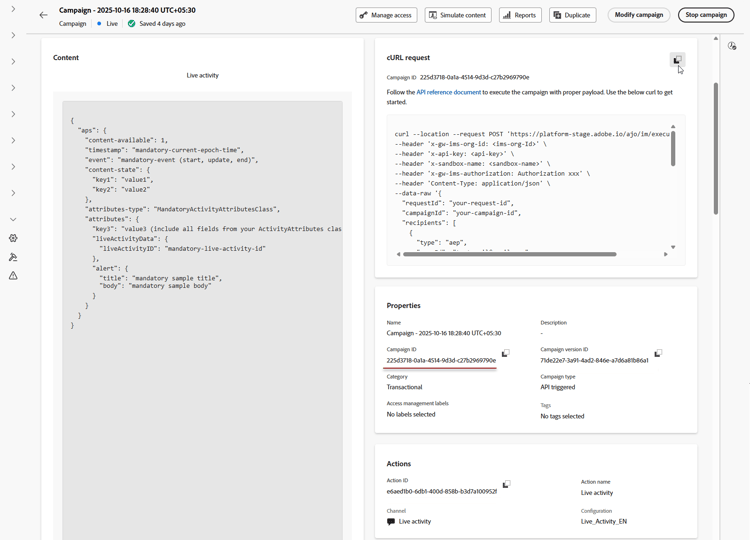
After the campaign is activated, use the provided cURL request as a template to trigger Live activity start, update, or end events. Update the sample payload with your specific data before execution.
Ensure that you also copy the Campaign ID identifiers to include in your payload.
➡️ Refer to the API Triggered Campaigns Documentation for authentication requirements, including OAuth tokens and API keys.
After designing your Live activity, you can track measuring the impact of your Live activity with built-in reports.
Payload examples payload
The payload structure depends on the platform iOS uses the Apple Push Notification service (APNs) aps object, while Android uses the Firebase Cloud Messaging (FCM) fcm object. Use the examples below for your platform and campaign type.
iOS payload
For iOS, place personalization and lifecycle fields in the APNs aps object. Ensure that attributes-type matches the name of your app’s LiveActivityAttributes struct and that attributes matches the fields defined in that struct.
Unitary use cases (API-triggered Transactional campaign)
This payload example is for individual campaigns using API-triggered Transactional campaign type. Note that most of the fields from the following payload example are mandatory, only requestId, dismissal-date and alert are optional.
| code language-json |
|---|
|
Broadcast use cases (API-triggered Marketing campaign)
This payload example is for audience-based campaigns using API-triggered Marketing campaign type.
| code language-json |
|---|
|
Android payload
For Android, place Live activity fields in the Firebase Cloud Messaging (FCM) fcm object. Define dynamic values in content_state using custom_key_* keys that your app’s style provider is configured to handle.
Unitary use cases (API-triggered Transactional campaign)
fcm object contains two time fields, both expressed in epoch seconds:timestampcontrols message ordering. Each start, update, and end event must use a value greater than the previous event for the samenotification_id(ortopic_namefor broadcasts). Updates are displayed only if their timestamp is newer than the last processed value. Older or equal timestamps are ignored.whencontrols the notification’s displayed time. This optional field corresponds to Android’ssetWhenmethod and does not affect message ordering. Keep its value reasonably current, as an outdated value can cause display issues.
Use these payloads for individual campaigns of the API-triggered Transactional type.
Use the same notification_id for all start, update, and end events to ensure that they target the same Live activity instance.
| code language-json |
|---|
|
To update a Live activity, set event_type to update and keep notification_id unchanged. Update body, critical_text, and the values in content_state as needed to reflect the latest status.
| code language-json |
|---|
|
To end a Live activity, set event_type to end. Optionally, include dismiss_after to specify the delay, in seconds, before the completed Live activity is dismissed.
| code language-json |
|---|
|
Broadcast use cases (API-triggered Marketing campaign)
Use this payload for audience-based campaigns of the API-triggered Marketing type.
Set topic_name to the FCM topic that users’ devices subscribe to. Send all update and end events to the same topic, and keep notification_id unchanged to target the same Live activity notification.
| code language-json |
|---|
|
Add custom data with execution metadata metadata
executionMetadata is only available for API-triggered Transactional campaigns.Attach your own custom data to a profile, such as an order ID, loyalty tier, or region code, using the optional executionMetadata field. Journey Optimizer stores this data alongside the execution so you can retrieve it later from your Live activity feedback dataset and match delivery results to your own business records.
To send this data via the API, see the Messaging API reference for the executionMetadata field. To read the values back on the device, see the Mobile SDK guide on receiving execution metadata from the API trigger.
To add custom data with execution metadata:
-
Add
executionMetadatato a profile, next touserIdandnamespace. Only string keys and string values are accepted, convert any non-string value to a string before sending it. -
Values are recorded exactly as sent.
executionMetadatadoes not support personalization expressions, so any{{...}}expression is treated as literal text rather than resolved. You should always send final, literal values. -
Each profile can carry up to 50 key/value pairs, with a combined size limit of 2 KB for all keys and values. Metadata exceeding this limit is discarded but the Live activity is still delivered. Limit the payload to the information required for reporting purposes.
In this example, orderId, tier, restaurant, and region are your own values. After the Live activity is triggered, you can read them back from the feedback dataset to link the delivery to your order record.
| code language-json |
|---|
|
| note |
|---|
| NOTE |
Retrieve execution metadata on Android the same way as on iOS: from message.feedback events in the AJO Message Feedback dataset. For query examples, see the Advanced: Debugging via dataset queries section. |
| Android uses the open-source Adobe Experience Platform (AEP) Messaging extension for the Mobile SDK. |
In this example, seat and type are custom metadata fields containing your booking details. After triggering the Live activity, retrieve these values from the Live activity feedback dataset to associate the delivery results with your booking record.
| code language-json |
|---|
|
How-to video
Discover how to configure iOS Live activities with Adobe Journey Optimizer to deliver rich, real-time updates on the iPhone Lock Screen and Dynamic Island.
This section contains structured knowledge intended to support interpretation, retrieval, and question answering related to this topic.
For complete understanding, this information should be combined with the documentation on this page. Neither source is intended to stand alone; the page describes the feature, while this section provides additional context that helps disambiguate terminology, intent, applicability, and constraints.
- TL;DR: This page explains how to build an API-triggered campaign in Journey Optimizer to remotely start, update, and end Live activities for individual users or audiences, and how to attach custom data to a profile using the optional
executionMetadatafield.
Intents:
- Create an API-triggered campaign for Live activities, selecting API-triggered Marketing for audience-based campaigns or API-triggered Transactional for individual campaigns
- Choose Live activity in the Actions section and select or create a configuration
- Create a content experiment with treatments to measure performance
- Activate the campaign and use the provided cURL request to trigger start, update, or end events
- Attach custom data to a profile using the optional
executionMetadatafield for later retrieval from the Live activity feedback dataset
Glossary:
- API-triggered Marketing: The campaign type used for audience-based campaigns (product-specific)
- API-triggered Transactional: The campaign type used for individual campaigns (product-specific)
- High Throughput: An option that should not be enabled for API-triggered Transactional Live activity campaigns (product-specific)
- Live activity: The action chosen in the Actions section, tied to a selected or newly created configuration (product-specific)
- executionMetadata: An optional field that attaches custom data to a profile, stored alongside the execution and retrievable from the Live activity feedback dataset (product-specific)
- Live activity feedback dataset: The dataset from which stored
executionMetadatavalues can be retrieved to match delivery results to your own records (product-specific) - event (iOS) / event_type (Android): The payload field whose values are
start,update, orend
Guardrails:
- For API-triggered Transactional campaigns, the High Throughput option should not be enabled.
executionMetadatais only available for API-triggered Transactional campaigns.executionMetadataaccepts only string keys and string values; convert any non-string value to a string before sending.executionMetadatadoes not support personalization expressions, so any{{...}}expression is treated as literal text rather than resolved.- Each profile can carry up to 50 key/value pairs in
executionMetadata(hard limit), with a combined size limit of 2 KB for all keys and values (hard limit). Metadata exceeding this limit is discarded, but the Live activity is still delivered. - In the iOS unitary payload example, most fields are mandatory; only
requestId,dismissal-date, andalertare optional.
Terminology:
- Canonical name: Live activity — Acronym: n/a — variants: Live activities
- Synonyms: “Unitary use cases” = “individual campaigns (API-triggered Transactional)”
- Synonyms: “Broadcast use cases” = “audience-based campaigns (API-triggered Marketing)”
- Do not confuse: “API-triggered Marketing” (audience-based campaigns) ≠ “API-triggered Transactional” (individual campaigns)
- Do not confuse: “start” ≠ “update” ≠ “end” (the values of the
eventfield in iOS payloads and theevent_typefield in Android payloads) - Do not confuse: “dismissal-date” (optional; auto-removes the activity when
eventisend) ≠ “timestamp” (current epoch time)
FAQ:
- Q: Which campaign type do I use for Live activities? — API-triggered Marketing for audience-based campaigns; API-triggered Transactional for individual campaigns.
- Q: Should High Throughput be enabled for API-triggered Transactional? — No; for API-triggered Transactional, the High Throughput option should not be enabled.
- Q: How do I trigger start, update, or end events after activation? — Use the provided cURL request as a template, update the sample payload with your specific data, and copy the Campaign ID into your payload.
- Q: What is
executionMetadatafor? — Attaching your own custom data, such as an order ID, loyalty tier, or region code, to a profile; it is stored alongside the execution and retrievable from the Live activity feedback dataset. It is only available for API-triggered Transactional campaigns. - Q: What are the
executionMetadatalimits? — Up to 50 key/value pairs per profile with a combined 2 KB size limit; only string keys and values are accepted, and personalization expressions are not resolved. Metadata exceeding the limit is discarded, but the Live activity is still delivered.