On this page: Get an overview of Loyalty Challenges, learn how the program works, review prerequisites, and find the documentation needed to set up, create, launch, and measure challenges.
Overview overview
Loyalty Challenges enable you to create engaging, gamified loyalty programs that drive customer behavior and deepen brand relationships. Build challenges that reward customers for specific actions—from making purchases and writing reviews to engaging on social media and referring friends.
With Loyalty Challenges, you can:
- Design flexible challenge types: Create Standard, Streak, or Sequential challenges to match your business goals
- Configure rewards strategically: Deliver points at task milestones or upon full completion to maintain engagement
- Personalize the experience: Use content cards and multi-channel messaging to create immersive, branded experiences
- Integrate seamlessly: Connect with your existing loyalty providers and leverage Experience Platform data
- Track automatically: Monitor customer progress through auto-generated journeys without custom development
- Measure performance: Use built-in reporting dashboards to track program KPIs, challenge results, and task-level metrics
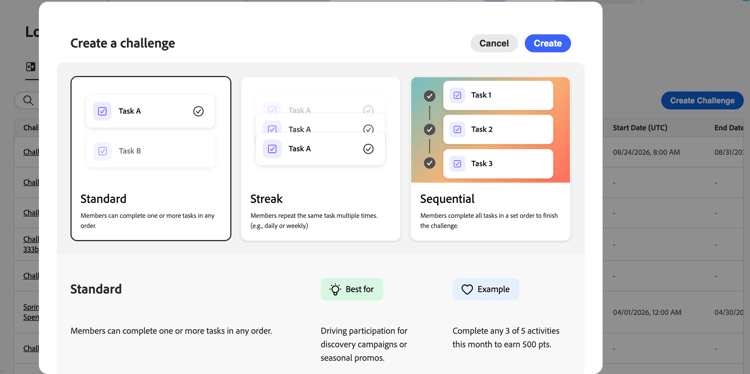
You can create these types of challenge experiences:
-
Standard challenges: Customers complete any specified number of tasks in any order. Use this type when you want flexibility and multiple paths to completion.
Example: “Summer Wellness Challenge” - Complete 3 out of 5 tasks: buy health products, share on social media, refer a friend, write a review, or attend a virtual event -
Streak challenges: Customers complete the same task multiple times consecutively. Use this type to encourage consistent, repeated behavior over time.
Example: “Coffee Lover’s Week” - Purchase coffee products for 7 consecutive days to unlock a free drink reward -
Sequential challenges: Customers complete tasks in a defined order. Use this type to guide customers through a specific journey or onboarding process.
Example: “New Member Journey” - Sign up for emails → Make your first purchase → Write a product review → Refer a friend (complete in this exact order) -
Bring your own data challenges (restricted availability): The challenge framework (tasks and rewards) is assembled from your Loyalty Challenges data integration. You configure Settings, Content, and Messaging as you would for any other challenge type.
How it works how-it-works
Using Loyalty Challenges involves three broad phases — setup, execution, and measurement — typically shared across admin and practitioner roles.
1. Set up your program (admin)
Before challenges can be authored, an administrator configures the program foundations: reward providers, event mappings that map customer actions to task completions, product inventory, and exclusion lists. Learn how to configure loyalty challenges.
2. Author and launch challenges (practitioner)
Marketers create challenges by selecting a type (Standard, Streak, Sequential, or Bring your own data), configuring settings (audience, schedule, rules), and defining tasks and rewards. They can optionally surface the challenge on member-facing interfaces using a content card or code-based experience, and set up channel notifications for key moments across the challenge lifecycle. Once configured, they publish the challenge, generate the auto-built journey, and publish it to make the challenge live. Learn how to create challenges.
3. Monitor performance (practitioner / analyst)
Once a challenge is live, built-in reporting dashboards provide challenge-level metrics: audience funnel performance, task completion rates, reward issuance, and revenue impact. The AI-powered insights engine also surfaces contextual recommendations to help optimize program performance. Explore Loyalty performance.
Prerequisites prerequisites
Before using Loyalty Challenges, ensure you have:
To use Loyalty Challenges, you must be assigned to a Loyalty role. Default roles are available for administrators, practitioners, and analysts in the Prod sandbox. For non-Prod sandboxes, your administrator must create a custom role with the required Loyalty permissions.
Contact your administrator if you cannot access the feature or need additional permissions. Learn how to configure Loyalty Challenges permissions.
Administrators configure reward providers, event mappings, product inventory, exclusions, and global settings in the Loyalty configurations menu. Marketers who only create challenges do not need access to this menu. Learn how to configure loyalty challenges
Contact your administrator if the Loyalty configurations menu is not visible in the left navigation.
Let’s dive deeper lets-dive-deeper
Now that you know what Loyalty Challenges are and how they work, it’s time to dive into the details. Explore the following topics to access the interface, create your first challenge, and define the tasks your customers will complete.
Set up reward providers, event mappings, and org settings
Access & manage challenges and tasks
Learn how to access the inventory and manage challenges and tasks



Track program KPIs, challenge results, and task metrics with built-in dashboards
Developer resources developer-resources
Loyalty Challenges exposes REST APIs that let you programmatically manage challenges and track profile participation:
- Loyalty challenge metadata API — Create, retrieve, update, publish, archive, and duplicate challenges.
- Loyalty challenge state API — Query and update challenge participation state for individual profiles.
For authentication and required headers, see the authentication tutorial.
How-to video video
New to Loyalty Challenges? Watch this overview to understand the capabilities and benefits:
Interactive demo demo
Want to see Loyalty Challenges in action first? Check out the interactive demo.