On this page: Monitor the reliability and performance of the API calls your journeys make to third-party systems so you can quickly spot integration issues, latency, and throttling limits.
The Custom action reporting page allows you to monitor the reliability and performance of API calls made from your journeys to third-party systems. These reports help you quickly identify integration issues, latency bottlenecks, or throttling/capping limits that may impact delivery.
The Custom action reporting page functions like other All-time reports in Journey Optimizer. For details on dashboard functionalities, refer to this documentation.
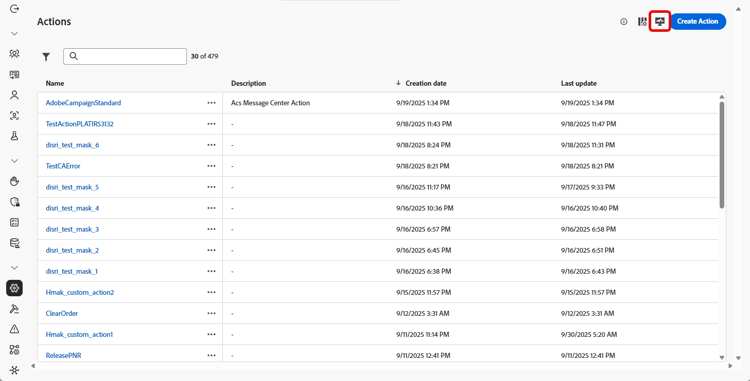
To access the Custom action reporting page, click

➡️ Learn more about Custom actions configuration
In addition to the Custom action reporting page, you can use Adobe Experience Platform Query Service to build queries to report on custom action performance metrics. Query examples are available in this section.
KPIs kpis
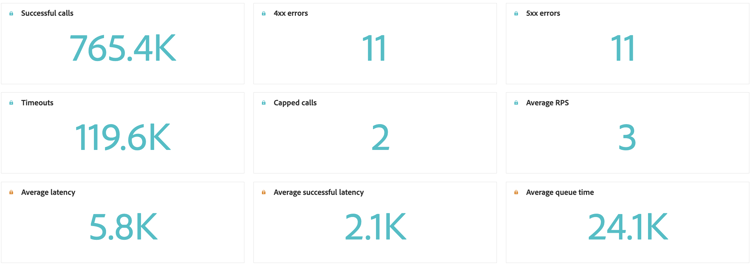
The Custom action Key Performance Indicators (KPIs) serve as a centralized dashboard, providing a consolidated view of the operational health and reliability of your custom action calls. These metrics allow you to evaluate performance, identify bottlenecks, and ensure stable integrations with external systems.
-
Successful calls: Total number of HTTP calls that returned a valid response without error.
-
4xx/5xx errors: Number of failed calls due to client-side (4xx) or server-side (5xx) errors, highlighting configuration issues or endpoint failures.
-
Timeouts: Number of calls that failed because they exceeded the maximum response time. This helps surface latency or performance issues with external endpoints.
-
Capped calls: Number of calls that were blocked due to capping limits, ensuring downstream systems are not overloaded.
-
Average RPS: Number of requests per second processed by the custom action over the selected time range.
-
Average latency: Average end-to-end response time (in milliseconds) for all HTTP calls, including successful calls, errors, and timeouts.
-
Average successful latency: Average end-to-end response time (in milliseconds) for successful calls only, excluding failed requests and timeouts.
-
Average queue time: Average time (in milliseconds) calls spent waiting in the execution queue before being sent. This only applies to throttled endpoints, where Journey Optimizer queues up calls when the throughput limit is reached.
Calls over time calls
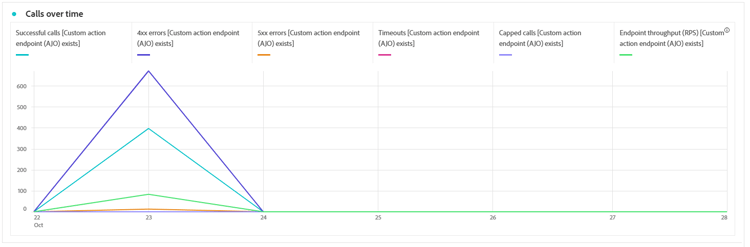
The Calls over time graph shows the HTTP call KPI trend over the time period selected for the report. The granularity of the time series depends on the selected time range. For example:
- For a 7 day report, each data point will show the KPIs for one day.
- If you select a 1-day time range, the graph will show the KPIs per hour.
- If you select a 1-hour time range, the graph will show the KPIs per minute.
➡️See the KPIs section for a description of the HTTP call metrics
Latency over time latency-overtime
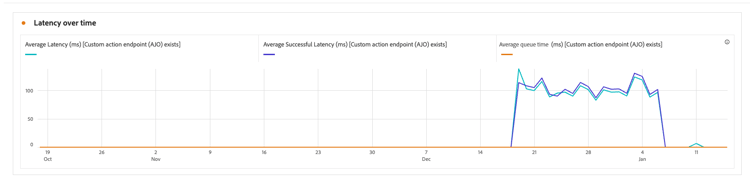
The Latency over time graph visualizes the trend of latency metrics over the selected time period. This time-series view allows you to track performance patterns, identify peak latency periods, and monitor the impact of optimizations or system changes over time.
➡️See the KPIs section for a description of the Latency metrics
Call breakdown breakdown
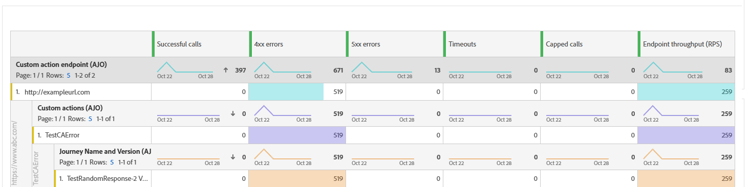
The Calls breakdown table provides a hierarchical breakdown of HTTP call metrics, from the overall metrics per endpoint at the top level to the metrics per Custom Action using each endpoint down to the journeys that rely on them at the bottom level.
➡️See the KPIs section for a description of the HTTP call metrics
Latency breakdown latency-breakdown
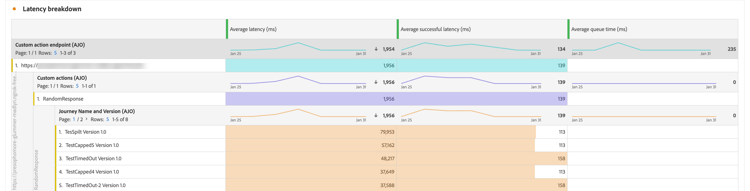
The Latency breakdown table provides a detailed breakdown of latency metrics across your custom actions. This view helps you identify which specific endpoints or actions are experiencing performance issues, enabling you to pinpoint and address latency bottlenecks effectively.
➡️See the KPIs section for a description of the Latency metrics
How-to video video
The video below shows how to monitor the reliability and performance of API calls made from your journeys to third-party systems.
This section contains structured knowledge intended to support interpretation, retrieval, and question answering related to this topic.
For complete understanding, this information should be combined with the documentation on this page. Neither source is intended to stand alone; the page describes the feature, while this section provides additional context that helps disambiguate terminology, intent, applicability, and constraints.
- TL;DR: This page explains how to use the Custom action reporting page to monitor the reliability and performance of the API calls your journeys make to third-party systems.
Intents:
- Access the Custom action reporting page from the Actions homepage
- Review the Custom action KPIs for operational health and reliability
- Track HTTP call KPI trends over time with the Calls over time graph
- Analyze latency patterns with the Latency over time graph
- Drill into metrics per endpoint, custom action, and journey with the breakdown tables
Glossary:
- Custom action reporting page: The reporting page that lets you monitor the reliability and performance of API calls made from your journeys to third-party systems; it functions like other All-time reports (product-specific)
- Capped calls: Number of calls that were blocked due to capping limits, ensuring downstream systems are not overloaded (product-specific)
- Average queue time: Average time (in milliseconds) calls spent waiting in the execution queue before being sent (product-specific)
- Calls breakdown: A hierarchical table breaking metrics down from per endpoint, to per Custom Action using each endpoint, to the journeys that rely on them (product-specific)
Guardrails:
- Average queue time only applies to throttled endpoints, where Journey Optimizer queues up calls when the throughput limit is reached.
- Average latency covers all HTTP calls, including successful calls, errors, and timeouts, while Average successful latency covers successful calls only, excluding failed requests and timeouts.
- The granularity of the Calls over time series depends on the selected time range: a 7 day report shows KPIs per day, a 1-day time range shows KPIs per hour, and a 1-hour time range shows KPIs per minute.
Terminology:
- Canonical name: Custom action reporting page — Acronym: n/a — variants: Custom action report
- Synonyms: “Average RPS” = “requests per second processed by the custom action over the selected time range”
- Do not confuse: “4xx/5xx errors” (failed calls due to client-side or server-side errors) ≠ “Timeouts” (calls that exceeded the maximum response time) ≠ “Capped calls” (calls blocked due to capping limits)
- Do not confuse: “Average latency” (all HTTP calls) ≠ “Average successful latency” (successful calls only)
FAQ:
- Q: What does the Custom action reporting page monitor? — It monitors the reliability and performance of API calls made from your journeys to third-party systems, helping you identify integration issues, latency bottlenecks, or throttling and capping limits.
- Q: How do I access the Custom action reporting page? — Click the Monitoring icon from your Actions homepage.
- Q: What is the difference between Average latency and Average successful latency? — Average latency is the average response time for all HTTP calls including successful calls, errors, and timeouts, while Average successful latency is for successful calls only, excluding failed requests and timeouts.
- Q: When does Average queue time apply? — It only applies to throttled endpoints, where Journey Optimizer queues up calls when the throughput limit is reached.
- Q: Can I report on custom action performance outside this page? — Yes, you can use Adobe Experience Platform Query Service to build queries on custom action performance metrics.