On this page: Learn how to use the Adobe Campaign v7 and v8 integration to send emails, push notifications, and SMS from your journeys through Campaign transactional messaging.
An integration is available if you have Adobe Campaign v7 or v8. It allows you to send emails, push notifications and SMS using Adobe Campaign Transactional Messaging capabilities.
The connection between the Journey Optimizer and Campaign instances is setup by Adobe at provisioning time. Contact Adobe.
When to use: Use Campaign v7/v8 actions when your messaging relies on Campaign transactional templates, Campaign-specific data models, or existing Campaign delivery workflows.
Prerequisites
- Your Adobe Campaign v7/v8 instance is provisioned and connected to Journey Optimizer by Adobe.
- You have access to Campaign Transactional Messaging and the required permissions.
For this to work, you need to configure a dedicated action. Refer to this section.
An end-to-end use case is presented in this section.
- Design your journey, starting with an event. See this section.
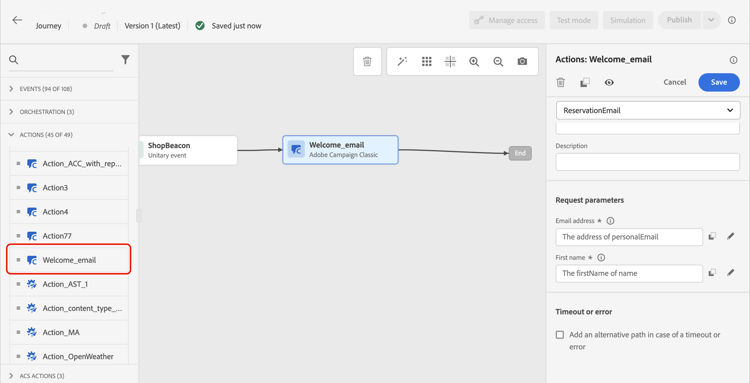
- In the Action section of the palette, select a Campaign action and add it to your journey.
- In the Action parameters, all the fields expected in the message payload are displayed. You need to map each of these fields with the field you want to use, either from the event or from the data source. This is similar to custom actions. Refer to this section.
- Campaign v7/v8 actions can be used alongside native channel actions in the same journey. This does not apply to Campaign Standard actions. See Campaign activity guardrails.
- Campaign v7/v8 actions cannot be used with Read Audience or Audience Qualification activities. See the Read Audience and Audience Qualification guardrails in the Guardrails page.
This section contains structured knowledge intended to support interpretation, retrieval, and question answering related to this topic.
For complete understanding, this information should be combined with the documentation on this page. Neither source is intended to stand alone; the page describes the feature, while this section provides additional context that helps disambiguate terminology, intent, applicability, and constraints.
- TL;DR: This page explains how to use Adobe Campaign v7/v8 as an action in Journey Optimizer journeys to send emails, push notifications, and SMS via Campaign Transactional Messaging.
Intents:
- Add a Campaign v7/v8 action to a journey to send transactional messages
- Map journey event or datasource fields to the Campaign message payload parameters
- Combine Campaign v7/v8 actions with native Journey Optimizer channel actions in the same journey
- Configure the dedicated action required for the Campaign v7/v8 integration
Glossary:
- Campaign Transactional Messaging: Adobe Campaign v7/v8 capability for sending triggered messages (email, SMS, push) via a dedicated action integrated with Journey Optimizer (product-specific)
- Action parameters: Fields in the journey activity pane that map journey data to the expected Campaign message payload (product-specific)
Guardrails:
- The connection between Journey Optimizer and the Campaign instance is set up by Adobe at provisioning time; contact Adobe to enable it.
- A dedicated action must be configured before Campaign v7/v8 actions are available in the journey palette.
- Campaign v7/v8 actions cannot be used with Read Audience or Audience Qualification activities.
- Access to Campaign Transactional Messaging and the required permissions in Campaign are prerequisites.
Terminology:
- Canonical name: Adobe Campaign v7/v8 — Acronym: ACC — variants: Campaign v7, Campaign v8, Campaign Classic
- Do not confuse: “Campaign v7/v8 actions” (can be used alongside native actions) ≠ “Campaign Standard actions” (cannot be combined with native actions in the same journey)
FAQ:
- Q: Who sets up the connection between Journey Optimizer and Campaign v7/v8? — Adobe sets up the connection at provisioning time; you must contact Adobe to have it configured.
- Q: Can Campaign v7/v8 actions be combined with native Journey Optimizer channel actions in the same journey? — Yes, Campaign v7/v8 actions can be used alongside native channel actions; this is not the case for Campaign Standard actions.
- Q: Can Campaign v7/v8 actions be used with Read Audience or Audience Qualification activities? — No, Campaign v7/v8 actions cannot be used with Read Audience or Audience Qualification activities.
- Q: How do I map journey data to the Campaign message payload? — In the Action parameters pane, map each expected payload field to the corresponding field from the journey event or datasource, the same way as custom actions.