On this page: Learn the fundamentals of journeys in Adobe Journey Optimizer, including journey types, the design workflow, key capabilities, and best practices for building personalized customer experiences.
Adobe Journey Optimizer empowers you to create personalized, multistep customer journeys that adapt in real-time to your audience’s behavior and needs. Using an intuitive drag-and-drop canvas, you can orchestrate messages and actions across multiple channels, leveraging contextual data and audience targeting for maximum impact.
This guide provides a clear roadmap to help you understand journey fundamentals, choose the right journey type for your use case, and confidently design journeys that deliver meaningful, timely customer experiences.
What are journeys?
Journeys are automated, multistep customer experiences that orchestrate personalized interactions across channels in response to customer behavior, business events, or scheduled campaigns.
Use Journey Optimizer to:
- Build real-time orchestration use cases using contextual data stored in events or data sources
- Design multistep advanced scenarios that respond dynamically to customer behavior and business events
- Deliver 1:1 personalized experiences at scale across email, push, mobile message, in-app, web, and more
➡️ Ready to start building? Create your first journey in 5 minutes.
Journeys vs campaigns: when to use each journeys-vs-campaigns-intro
Adobe Journey Optimizer offers three approaches to reach customers: Journeys (1:1 real-time orchestration), Campaigns (simple batch or API-triggered delivery), and Orchestrated campaigns (batch canvas workflows with multi-entity data).
Quick decision:
- Use Journeys for multi-step, behavior-driven experiences where each customer progresses at their own pace
- Use Action and API-triggered campaigns for simple, scheduled or triggered message delivery to audiences
- Use Orchestrated campaigns for complex batch workflows requiring multi-entity segmentation and exact pre-send counts
Choose your journey type journey-types
Adobe Journey Optimizer supports four journey types, each designed for different entry mechanisms and business scenarios:
- Unitary journeys: Real-time, event-triggered experiences (cart abandonment recovery, welcome emails)
- Read Audience journeys: Scheduled batch communications to audience segments (newsletters, promotional campaigns)
- Audience Qualification journeys: Real-time responses to audience membership changes (VIP upgrades, re-engagement)
- Business event journeys: Business conditions affecting multiple customers (inventory alerts, flash sales)
➡️ Journey types: choose the right one - Detailed comparison, decision guide, and feature compatibility matrix
Build with the journey designer journey-designer
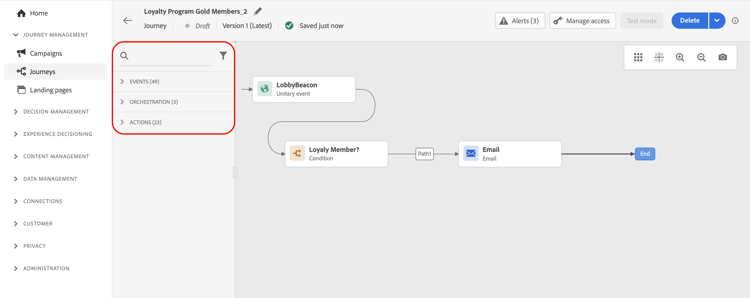
The journey designer is your visual canvas for creating customer experiences. With an intuitive drag-and-drop interface, you can orchestrate every step of your journey without writing code.
What you can do in the designer:

Define entry points
Choose how customers enter: through an event, audience segment, or audience qualification.

Send messages
Use built-in channel actions for email, push, SMS/RCS/MMS, in-app, web, and more—all designed in Journey Optimizer.

Add logic & conditions
Branch your journey based on profile attributes, audience membership, or real-time events.
Leverage data
Use contextual data from events, Adobe Experience Platform, or third-party API services.
Connect external systems
Create custom actions to integrate third-party systems for sending messages or triggering workflows.

Add orchestration activities
Use wait times, jumps, profile updates, and audience management to create sophisticated flows.
➡️ Hands-on learning: Watch the journey designer video or explore end-to-end use cases
Your journey creation workflow workflow
Building successful journeys follows a clear, repeatable process. Here is your step-by-step workflow:
1. Plan → 2. Design → 3. Validate and test → 4. Publish → 5. Monitor → 6. Optimize
1. Plan your journey plan
Before opening the designer, clarify your objectives:
- What is the goal? (e.g., onboard new customers, re-engage inactive users)
- Who is the audience? (specific segment, event-driven individuals)
- Which journey type fits? (See journey types above)
- What channels will you use? (email, push, mobile message, etc.)
2. Design in the canvas design
Use the journey designer to build your flow:
- Set entry conditions - Define how profiles enter (event, audience, qualification)
- Add orchestration logic - Include wait times, conditions, and decision points
- Configure messages - Design your communications or leverage existing templates
- Set up actions - Configure built-in or custom actions to execute
- Define exit criteria - Specify when and how profiles complete the journey
Learn to use the journey designer →
3. Validate and test before going live test
First, click Validate in the journey header. Resolve any errors in the Alerts panel and validate again before continuing. Learn about journey validation.
After validation passes, test your journey to catch issues before customers experience them:
- Use Journey Simulation for fast iteration with temporary simulated users, no test profiles needed
- Use test mode to walk real (but designated test) profiles through the journey step by step
- Use dry run to execute the journey against real production data without sending communications or updating profiles
- Verify all conditions, messages, and actions work as expected
- Check timing, data flows, and personalization
Choose a validation method → | Test your journey → | Learn about dry run →
4. Publish your journey publish
Once testing is complete, publish to make your journey live:
- Review final settings and properties
- Make sure validation is current and passed; if you changed the journey after validation, click Validate again and resolve any errors before continuing
- Publish to activate for real customers
- Note: Live journeys can be stopped but not edited (you must create a new version)
5. Monitor performance monitor
Track how your journey performs in the real world:
- View journey reports and analytics
- Monitor entry, completion, and error rates
- Set up alerts for critical issues
Monitor and report → | Set up alerts →
6. Optimize and iterate optimize
Use insights to improve:
- Analyze engagement metrics and conversion rates
- Test send-time optimization
- Create new journey versions with improvements
- Use AI-powered recommendations
Optimize your journeys → | Send-time optimization →
➡️ Ready to start? Create your first journey now →
Real-world use cases use-cases
Learn from practical examples that demonstrate how to apply journey concepts to solve common marketing challenges:
Welcome new subscribers
When a customer subscribes to your service, trigger a welcome journey that encourages them to complete onboarding steps.
Send-time optimization
Use AI to deliver emails when each customer is most likely to engage, maximizing open and click rates.

Ramp up deliveries
Gradually increase message volume to warm up your sending reputation and avoid deliverability issues.

Target by weekday
Send different content based on the day of the week customers enter your journey for better relevance.
Multi-channel campaigns
Orchestrate seamless experiences across email, push, mobile message, and web channels in a single journey.

All use cases
Explore the complete library of journey use cases with step-by-step implementations.
Explore journey capabilities capabilities
As you get more comfortable with journey building, explore these powerful capabilities to create sophisticated customer experiences:
Advanced Expressions
Build dynamic conditions and personalization using the expression editor for data manipulation and complex logic.
Time zone management
Handle global audiences with automatic time zone adjustments and optimal send times.

Test mode & dry run
Validate journeys with test profiles before going live, and preview execution using real production data without sending communications or updating profiles.
Copy to sandbox
Duplicate journeys across sandboxes to streamline testing and deployment workflows.
Tags & organization
Use tags to categorize and filter journeys for better management at scale.
Throughput control
Limit message throughput to manage sending reputation and avoid overwhelming systems.
Learn by watching video
Get a visual introduction to journey components and learn the basics of building journeys in the canvas:
➡️ Want more videos? Explore journey video tutorials
Common questions common-questions
Adobe Journey Optimizer offers three approaches:
-
Journeys: 1:1 real-time orchestration where each profile travels through steps at their own pace. Best for behavior-driven, multi-step experiences with conditional logic (e.g., onboarding, cart abandonment).
-
Campaigns (Action & API-triggered): Simple message delivery to audiences, executing simultaneously to all profiles either on schedule or via API trigger. Best for promotional campaigns, newsletters, transactional messages.
-
Orchestrated campaigns: Multi-step batch workflows with complex segmentation using relational data (profiles + products/stores/bookings). All profiles processed together with exact pre-send counts. Best for seasonal promotions, product launches, campaigns requiring multi-entity data.
Key difference: Journeys maintain individual customer state for real-time actions; Action and API-triggered campaigns deliver simple messages in batch; Orchestrated campaigns provide batch workflow canvas with multi-entity segmentation capabilities.
➡️ More questions? View complete Journey FAQ with 40+ detailed answers
Need help? help
Use these links to find guidance, troubleshooting, and resources.
Quick links for common tasks
- Create your first journey - Step-by-step guide for beginners
- Journey FAQ - Common questions answered
- Troubleshooting - Diagnose and fix issues
- Error codes reference - Understand error messages
- Guardrails & limitations - Technical boundaries and best practices
Get notified about issues
Set up journey alerts to receive real-time notifications when journeys encounter errors or unusual patterns.
Additional resources
- Journey management hub - Tools for filtering, optimization, and profile management
- Journey activities reference - Complete guide to all activity types
- Troubleshooting execution issues - Debug journey execution problems
- Troubleshooting inbound activities - Fix entry and qualification issues
Ready to build your first journey? Get started now →
This section contains structured knowledge intended to support interpretation, retrieval, and question answering related to this topic.
For complete understanding, this information should be combined with the documentation on this page. Neither source is intended to stand alone; the page describes the feature, while this section provides additional context that helps disambiguate terminology, intent, applicability, and constraints.
- TL;DR: This page is the getting-started hub for Adobe Journey Optimizer journeys, explaining what journeys are, the four journey types, the six-step creation workflow, real-world use cases, and links to advanced capabilities.
Intents:
- Understand what journeys are and how they differ from campaigns and orchestrated campaigns
- Choose the right journey type (Unitary, Read Audience, Audience Qualification, or Business event) for a use case
- Follow the six-step journey creation workflow: Plan, Design, Validate and test, Publish, Monitor, Optimize
- Use Simulation, Test mode, or Dry run to validate a journey before going live
- Publish a journey and monitor performance through reports and alerts
- Explore advanced capabilities such as expressions, timezone management, copy to sandbox, and throughput control
Glossary:
- Journey: An automated, multistep customer experience that orchestrates personalized interactions across channels in response to customer behavior, business events, or scheduled campaigns. (product-specific)
- Journey designer: The visual drag-and-drop canvas in Adobe Journey Optimizer used to build and configure journey flows without writing code. (product-specific)
- Test mode: A way to walk real, designated test profiles through the journey step by step. (product-specific)
- Dry run: A way to execute the journey against real production data without sending communications or updating profiles. (product-specific)
- Journey Simulation: A way to test journeys for fast iteration with temporary simulated users, with no test profiles needed. (product-specific)
- Orchestrated campaigns: Multi-step batch workflows in Adobe Journey Optimizer that use relational data (profiles + products/stores/bookings) and process all profiles together with exact pre-send counts. (product-specific)
Guardrails:
-
Configuration validation must pass before testing. Errors in the Alerts panel must be resolved and validation rerun before continuing. Publication requires current, passed validation; edits after validation require Validate again.
-
Live journeys cannot be structurally edited; changes require creating a new version
-
After validation passes, test before publishing using Journey Simulation, test mode, or dry run
Terminology:
- Canonical name: Journey — variant: customer journey
- Synonyms: “journey designer” = “canvas”
- Do not confuse: “Journey” ≠ “Campaign” — Journeys maintain individual customer state for real-time, multi-step behavior-driven experiences; Campaigns deliver messages in batch to audiences on a schedule or via API trigger
- Do not confuse: “Journey Simulation” uses temporary simulated users; “test mode” uses real, designated test profiles; “dry run” executes against real production data without sending communications or updating profiles
FAQ:
- Q: What is the difference between a journey and a campaign in Journey Optimizer? — Journeys provide 1:1 real-time orchestration where each profile progresses at its own pace through conditional logic; Campaigns deliver messages simultaneously to an audience on a schedule or via API trigger; Orchestrated campaigns are batch canvas workflows for complex multi-entity segmentation.
- Q: Can I edit a live journey? — Limited elements such as name and message content can be edited; structural changes require creating a new version of the journey.
- Q: What are the steps to build a journey? — The six-step workflow is: Plan, Design, Validate and test, Publish, Monitor, and Optimize.
- Q: How do I test a journey without sending communications or updating profiles? — First Validate and resolve any errors, then use dry run to execute the journey against real production data without sending communications or updating profiles.
- Q: What journey type should I use for a welcome email triggered by a subscription? — Use a Unitary journey, which is triggered by a specific individual event such as a subscription sign-up.