
MiniCart container
The MiniCart container displays a summary of the shopper’s shopping cart. It shows a list of products currently in the cart and subtotal amounts. It also provides call-to-action buttons for proceeding to checkout or updating the cart.
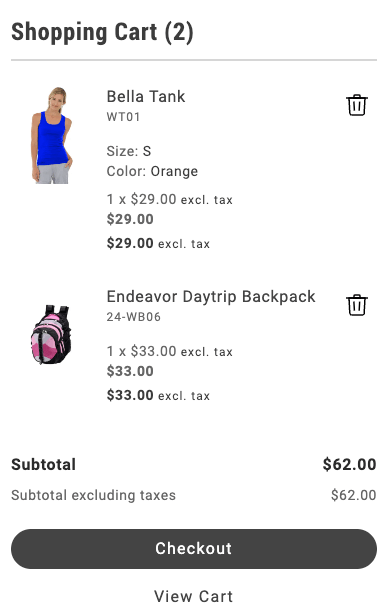
MiniCart container
Configurations
Section titled “Configurations”The MiniCart container provides the following configuration options:
| Parameter | Type | Required | Description |
|---|---|---|---|
children | VNode[] | No | The child elements to be rendered inside the mini cart. |
initialData | CartModel | null | No | The initial data for the mini cart. Defaults to null. |
hideFooter | boolean | No | Flag to hide the footer in the mini cart. Defaults to true. |
slots | { ProductList?: SlotProps } | No | Slot props for customizing the product list display. |
routeProduct | function | No | Function to generate the URL for a product. |
routeCart | function | No | Function to generate the URL for the cart page. |
routeCheckout | function | No | Function to generate the URL for the checkout page. |
routeEmptyCartCTA | function | No | Function to generate the URL for the empty cart call-to-action. |
displayAllItems | boolean | No | Flag to show all items. |
showDiscount | boolean | No | Flag to show discounts in the mini cart. |
showSavings | boolean | No | Flag to show savings in the mini cart. |
enableItemRemoval | boolean | Yes | Flag to enable removing items from the mini cart. When set to true, users can remove products from the cart directly in the mini cart interface. |
enableQuantityUpdate | boolean | { removeOnZero?: boolean } | No | Enables quantity updates in the mini cart. Pass { removeOnZero: true } to remove items when quantity reaches 0. Defaults to false. |
hideHeading | boolean | No | Flag to hide the heading in the mini cart. When set to true, the mini cart header will not be displayed. |
undo | boolean | No | Enables the undo banner to restore recently removed items to the cart. |
confirmBeforeDelete | boolean | No | Enables the confirmation banner when an item is removed from the cart. When set to true, clicking the remove button shows an inline confirmation banner instead of immediately deleting the item. |
The CartModel object has the following shape:
export interface CartModel { id: string; totalQuantity: number; errors?: ItemError[]; items: Item[]; miniCartMaxItems: Item[]; total: { includingTax: Price; excludingTax: Price; }; discount?: Price; subtotal: { excludingTax: Price; includingTax: Price; includingDiscountOnly: Price; }; appliedTaxes: TotalPriceModifier[]; totalTax?: Price; appliedDiscounts: TotalPriceModifier[]; shipping?: Price; isVirtual?: boolean; addresses: { shipping?: { countryCode: string; zipCode?: string; regionCode?: string; }[]; }; isGuestCart?: boolean; hasOutOfStockItems?: boolean; hasFullyOutOfStockItems?: boolean; appliedCoupons?: Coupon[];}
interface TotalPriceModifier { amount: Price; label: string; coupon?: Coupon;}
interface FixedProductTax { amount: Price; label: string;}
export interface Item { taxedPrice: Price; rowTotal: Price; rowTotalIncludingTax: Price; itemType: string; uid: string; url: ItemURL; quantity: number; sku: string; name: string; image: ItemImage; links?: ItemLinks; price: Price; total: Price; discountedTotal?: Price; discount?: Price; regularPrice: Price; discounted: boolean; bundleOptions?: { [key: string]: any }; selectedOptions?: { [key: string]: any }; customizableOptions?: { [key: string]: any }; message?: string; recipient?: string; recipientEmail?: string; sender?: string; senderEmail?: string; lowInventory?: boolean; insufficientQuantity?: boolean; onlyXLeftInStock?: number | null; outOfStock?: boolean; notAvailableMessage?: string; stockLevel?: String; discountPercentage?: number; savingsAmount?: Price; productAttributes?: Attribute[]; fixedProductTaxes?: FixedProductTax[];}
interface ItemError { id: string; text: string;}
interface ItemImage { src: string; alt: string;}
export interface Price { value: number; currency: string;}
interface ItemURL { urlKey: string; categories: string[];}
interface ItemLinks { count: number; result: string;}
interface AttributeOption { value: string; label: string;}
interface Attribute { code: string; value?: string; selected_options?: AttributeOption[];}
interface Coupon { code: string;}Supported slots
Section titled “Supported slots”The MiniCart container supports the following slots:
- ProductList
- ProductListFooter
- PreCheckoutSection
- Thumbnail
- Heading
- EmptyCart
- Footer
- ProductAttributes
- CartSummaryFooter
- CartItem
- UndoBanner
- ConfirmDeleteBanner
- ItemTitle
- ItemPrice
- ItemQuantity
- ItemTotal
- ItemSku
- ItemRemoveAction
Example configuration
Section titled “Example configuration”The following example demonstrates how to render the MiniCart container:
provider.render(MiniCart, { routeProduct: (item) => { return `${item.url.categories.join('/')}/${item.url.urlKey}`; }, routeEmptyCartCTA: () => '#empty-cart', routeCart: () => '#cart', routeCheckout: () => '#checkout', showDiscount: true, // showSavings: true, // enableItemRemoval: true, // enableQuantityUpdate: true, // hideHeading: true, // confirmBeforeDelete: true,})($miniCart);