
Boilerplate skills
Boilerplate skills provide your coding agent with instructions for working in an Adobe Commerce boilerplate storefront. When you install the AEM Boilerplate Commerce skill set, the agent can plan tasks, select the appropriate storefront pattern, write code that follows project conventions, and test the result in a browser.
Benefits
Section titled “Benefits”Use Boilerplate skills when you want your agent to complete a storefront development task rather than answer a question. The skills enable your agent to:
- Plan the work before making code changes.
- Select the appropriate approach for blocks, drop-ins, content models, and browser tests.
- Reduce repetitive project-specific guidance by storing storefront conventions in your repository.
What the skills provide
Section titled “What the skills provide”The AEM Boilerplate Commerce skill set includes six specialized skills, each designed for a specific area of storefront development.
| Skill | What it helps you do |
|---|---|
| Project manager | Break down development tasks, plan phased implementation, and keep work on track before code changes begin |
| Researcher | Find drop-in component APIs, slot names, event payloads, and TypeScript definitions before implementation |
| Block developer | Build and customize Edge Delivery Services blocks using the correct DOM patterns and CSS scoping |
| Drop-in developer | Build and customize drop-in components using containers, slots, events, and API functions |
| Content modeler | Design block table structures that are easy for content authors to use |
| Tester | Verify implementations in a real browser and evaluate Core Web Vitals and accessibility |
The skills work together throughout the development process. Your agent uses the project manager skill to scope the work, the researcher skill to gather the information it needs, and the appropriate developer skill to implement the solution.
Prerequisites
Section titled “Prerequisites”Before installing the skills, make sure you have the following:
-
Node.js 22 or later — Required by the Commerce plugin installed in the next step.
-
An Adobe Commerce boilerplate project — The skills are designed for projects based on the Adobe Commerce boilerplate . If you don’t already have a boilerplate storefront, see Boilerplate overview to create one.
-
The Adobe I/O CLI and Commerce plugin — Install both before continuing:
Terminal window npm install -g @adobe/aio-cliaio plugins:install https://github.com/adobe-commerce/aio-cli-plugin-commerceSee the Adobe I/O CLI installation page and the aio-cli-plugin-commerce repository for details.
Install the skills
Section titled “Install the skills”From the root of your boilerplate project, run the following command:
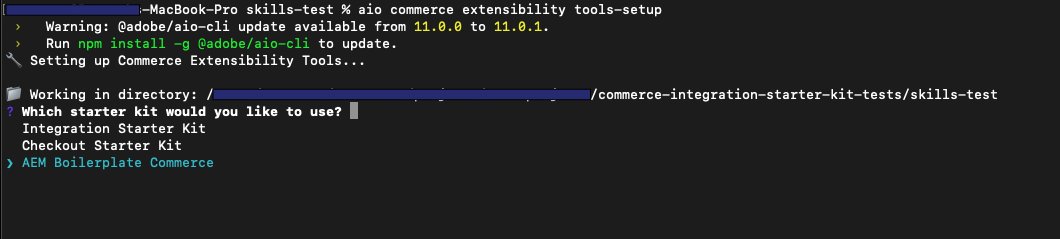
aio commerce extensibility tools-setupThe command prompts you twice. If it can’t detect a package manager from an existing lock file, it prompts you a third time.
-
Select a starter kit. A starter kit is a project template. Choose AEM Boilerplate Commerce to install the Boilerplate Commerce skill set and project conventions.
-
Select your coding agent. Choose your coding agent from the list of supported agents. The installer places the skill files where your agent expects to find them. See Supported agents.
-
Select a package manager. This prompt appears only if the installer can’t detect a package manager from a lock file in your project.
Supported agents
Section titled “Supported agents”After installation, restart your coding agent so it loads the new skills and tool server configuration. Different agents and IDEs surface installed skills in different ways, so there is no single way to confirm installation. In Cursor, for example, you can open the settings panel to view detected skills. For other agents, check the documentation for your agent or IDE to confirm that the skills in your project have loaded.
| Agent | Skills location |
|---|---|
| Cursor | .cursor/skills/ |
| Claude Code | .claude/skills/ |
| GitHub Copilot | .github/skills/ |
| Windsurf | .windsurf/skills/ |
| Gemini CLI | .gemini/skills/ |
| OpenAI Codex | .agents/skills/ |
| Cline | .cline/skills/ |
| Kilo Code | .kilocode/skills/ |
| Antigravity | .agent/skills/ |
| Other | ./skills/ (project root) |
What gets installed
Section titled “What gets installed”The setup command installs @adobe-commerce/commerce-extensibility-tools as a development dependency and adds the following project files and directories:
| File or directory | Purpose |
|---|---|
AGENTS.md (project root) | Provides project-wide instructions that your agent reads at the start of each session. |
<agent-skills-dir>/ | Contains the Boilerplate skills, organized by development area. |
| Tool server config file | Connects your agent to the commerce-extensibility:search-commerce-docs tool (separate from the AI tools for drop-ins) for live documentation search. |
This tool server is separate from the AI tools for drop-ins. It provides your agent with access to Adobe Commerce documentation for integration patterns, architecture, and security guidance. For slot, event, and API lookups, use the AI tools for drop-ins. See Drop-in API accuracy above.
How to use the skills
Section titled “How to use the skills”Once installed, the skills work automatically—you don’t need to reference them by name. Simply describe what you want to build. The project manager skill scopes the task, the researcher skill gathers the necessary information, the appropriate developer skill implements the solution, and the tester skill verifies the result.
Example prompt — Trigger the planning workflow and developer skills with a single detailed request:
Use the planning workflow to add a social sharing button below the product title on the product detail page so shoppers can share products on social media.