
Tutorials
Validate a shipping address
When your address verification service returns a suggested shipping address that differs from what a shopper entered, you can let them choose between the two before placing the order. This tutorial shows you how to add that confirmation step to the commerce-checkout block using the AddressValidation container.
What you’ll edit or create
Section titled “What you’ll edit or create”- Edit the checkout block —
blocks/commerce-checkout/commerce-checkout.js - Edit the
AddressValidationcontainer - Edit the
PlaceOrdercontainer - Create the validation stub —
blocks/commerce-checkout/utils.js
What you’ll build
Section titled “What you’ll build”By the end of this tutorial, you’ll have:
- A modal that renders the
AddressValidationcontainer, showing the shopper’s original and suggested shipping addresses. - Address verification wired into the
handlePlaceOrdercallback of thePlaceOrdercontainer, running before the order places. - The shipping form updated automatically when the shopper selects the suggested address.
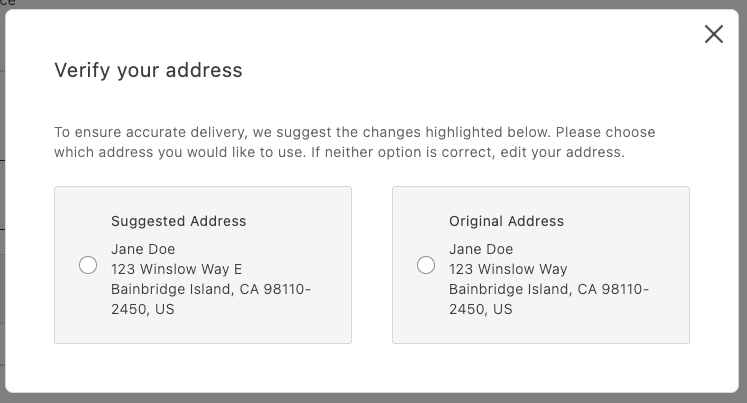
AddressValidation displayed in a modal
Integration
Section titled “Integration”// in commerce-checkout.js blockimport * as checkoutApi from '/@dropins/storefront-checkout/api.js';import * as orderApi from '/@dropins/storefront-order/api.js';import { PaymentMethodCode } from '/@dropins/storefront-payment-services/api.js';import { events } from '@adobe-commerce/event-bus';import { SHIPPING_ADDRESS_DATA_KEY } from '/constants.js';import { showModal, validateAddress } from '/utils.js';
// Handler passed to the PlaceOrder containerconst handlePlaceOrder = async ({ cartId, code }) => { await displayOverlaySpinner(loaderRef, $loader); try { // Payment Services credit card if (code === PaymentMethodCode.CREDIT_CARD) { if (!creditCardFormRef.current) { console.error('Credit card form not rendered.'); return; } if (!creditCardFormRef.current.validate()) { // Credit card form invalid; abort order placement return; } // Submit Payment Services credit card form await creditCardFormRef.current.submit(); }
// Address validation const suggestion = await validateAddress(); if (suggestion) { const container = document.createElement('div'); await showModal(container); await renderAddressValidation(container, { suggestedAddress: suggestion, handleSelectedAddress: async ({ selection, address }) => { if (selection === 'suggested') { // Update the shipping form using the suggested address sessionStorage.removeItem(SHIPPING_ADDRESS_DATA_KEY); shippingForm.setProps((prevProps) => ({ ...prevProps, inputsDefaultValueSet: address, })); } else { // Place order await orderApi.placeOrder(cartId); } removeModal(); }, }); } else { // Place order await orderApi.placeOrder(cartId); } } catch (error) { console.error(error); throw error; } finally { removeOverlaySpinner(loaderRef, $loader); }};// in containers.jsimport AddressValidation from '/@dropins/storefront-checkout/containers/AddressValidation.js';import { render as CheckoutProvider } from '/@dropins/storefront-checkout/render.js';
/** * Renders the AddressValidation container in its own host element * @param {HTMLElement} container - DOM element to render into */export const renderAddressValidation = async ( container, { suggestedAddress, handleSelectedAddress }) => CheckoutProvider.render(AddressValidation, { suggestedAddress, handleSelectedAddress, })(container);// in utils.js (example stub)export const validateAddress = async () => { // Here’s where your API call goes
return { city: 'Bainbridge Island', countryCode: 'US', postcode: '98110-2450', region: 'CA', street: ['123 Winslow Way E'], };};Finally, add some padding for better appearance:
.modal-content .checkout-address-validation { padding: var(--spacing-big);}Next steps
Section titled “Next steps”- See the
AddressValidationcontainer for props and behaviors. - Ensure your suggestion matches the
CartAddressInputformat. - See Validate a saved address to add the same confirmation step when shoppers save an address in their account.