On this page: Start from what you want to accomplish, then jump to the Adobe Journey Optimizer capability that solves it — without needing to know the feature name first.
Adobe Journey Optimizer offers many capabilities, and the right one depends on what you are trying to achieve. This guide is organized around business goals rather than product features: find the goal that matches your need, then follow the link to start with the recommended capability.
Use this page as a quick router — scan for your goal and jump straight to the right capability. If you are just getting started, begin with Get started with Journey Optimizer to find the right entry point for your role.
Where an end-to-end tutorial isn’t available for a specific scenario, the link takes you to the best current starting point to learn the capability and begin.
AI is built into many of these capabilities — look for the (AI) tag in the tables below. The conversational AI Assistant can also answer product questions and surface operational insights about your journeys at any time. For the full set of intelligent features, see Work with AI.
Set up Journey Optimizer for your team setup-admin
For administrators and technical users who need to configure the environment before building journeys or campaigns.
Engage customers as events happen engage-real-time
For scenarios where you react to a customer action or event as it happens.
Before you build: make sure you have (1) a journey entry event configured to capture the sign-up trigger, (2) an email or push channel surface set up for your sandbox, and (3) at least one test profile available to validate the journey before publishing.
Before you build: you need (1) a behavioral event that captures the cart or browse action from your web or mobile SDK, (2) a wait activity strategy decided (typically 1–4 hours before the first nudge), and (3) a channel surface ready for the follow-up message. Note: the journey must include a condition to exit profiles who complete the purchase before the wait period ends.
Before you build: you need (1) an audience defined in Adobe Experience Platform that identifies inactive profiles (e.g. no purchase or login in 60 days), (2) a decision on re-engagement channel (email, push, or SMS), and (3) a suppression rule or frequency cap to avoid contacting recently messaged profiles. Use a Read Audience journey entry — not an event — for this scenario.
Reach audiences at scale reach-at-scale
For scheduled, one-to-many outreach to a defined audience.
Before you build: you need (1) a published audience segment in Adobe Experience Platform, (2) an email channel surface with a verified sending domain, and (3) any content fragments or templates you plan to reuse already published. Scheduled campaigns are the right choice here — not journeys — if this is a one-time or recurring send with no branching logic.
Personalize what each customer sees personalize
For tailoring offers and content to each individual.
Before you build: decisioning requires a specific setup sequence. You need (1) decision items (offers) created with eligibility rules and attributes, (2) a selection strategy or ranking formula configured, and (3) a decision policy attached to the surface where offers will appear. Skipping this sequence is the most common reason first-time decisioning setups fail to return results.
Coordinate & govern delivery coordinate-govern
For controlling how, when, and how often customers are contacted across channels.
Choose a channel to deliver on choose-channel
Measure & optimize measure-optimize
For tracking performance, diagnosing issues, and improving results over time.
Starter flows starter-flows
Each starter flow below is a short, outcome-oriented set of steps: what you will build, who it is for, and how to get there. Pick the goal that matches your first project and follow the links to the detailed documentation.
Welcome new customers flow-welcome
You will build: An automated welcome series that greets every new subscriber and nudges inactive ones.
Best for: Marketers · Capability: Event-triggered journey
- Confirm your unified profiles and audiences are receiving the sign-up event.
- Create your first journey and use the sign-up event as the entry.
- Add a welcome email, then a wait step and a follow-up push notification for profiles that have not engaged.
- Personalize the content with profile attributes such as first name and stated interests.
Recover abandoned carts flow-cart
You will build: An automated recovery flow that reminds customers of items left behind.
Best for: Marketers · Capability: Event-triggered journey
- Make sure the cart-abandonment event reaches Journey Optimizer (work with your data team if needed).
- Build a journey triggered by the abandonment event.
- Send a personalized reminder email; if there is no click within 24 hours, branch to a push follow-up.
- Personalize with the abandoned items and loyalty status.
Send transactional messages flow-transactional
You will build: On-demand order, shipping, or appointment confirmations triggered by an external system.
Best for: Marketers & Developers · Capability: Campaign triggered by an external system
- Review how campaigns triggered by an external system work and what payload they expect.
- Design the message template and personalize it with the transaction details.
- Have your developer call the campaign endpoint from your order or fulfillment system.
➡️ Work with campaigns triggered by an external system
Launch a campaign with content testing flow-campaign
You will build: A scheduled promotion that automatically picks the best-performing content.
Best for: Marketers · Capability: Scheduled campaign + content experimentation
- Get started with campaigns and define your audience.
- Use content generation to draft subject-line and copy variations.
- Set up a content experiment to test variants on a sample, then send the winner to the rest.
Personalize offers per customer flow-offers
You will build: A decision that shows the single best offer to each customer.
Best for: Marketers · Capability: Decisioning
- Get started with offer decisioning and create your offers and eligibility rules.
- Add the decision to a journey or campaign message.
- Layer in intelligent features to rank and optimize offers automatically.
Use case playbooks playbooks
Use Case Playbooks are pre-built workflows that help you implement common marketing scenarios quickly. Each playbook includes ready-to-use journeys, messages, schemas, and segments.
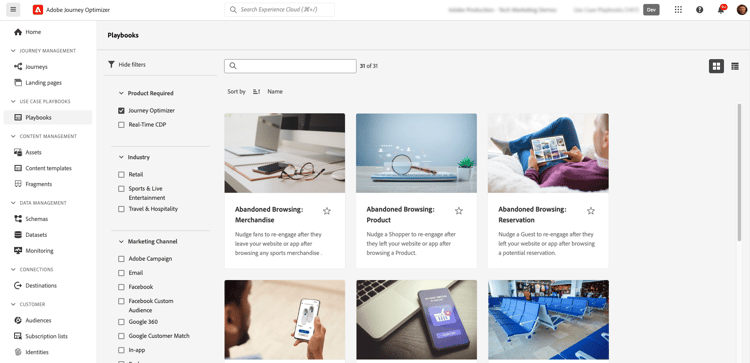
- Browse the playbook library to find use cases matching your goals
- Enable a playbook to automatically generate all required resources
- Customize the generated assets to match your brand and requirements
- Deploy to production or test in a development sandbox
Browse Journey Optimizer playbooks for common scenarios like:
- Abandoned cart recovery
- Welcome series for new customers
- Post-purchase engagement
- Birthday messages
- Re-engagement campaigns
- Sandbox with appropriate permissions
- Channel configurations for email, push, and/or SMS
- User permissions to create journeys and messages
View all available playbooks | Learn more in Experience Platform documentation
Example scenarios example-scenarios
These examples illustrate how Journey Optimizer’s capabilities work together across different roles, industries, and channels.
Delayed shipment recovery scenario-delayed-shipment
Role: Marketer | Core capability: Unified profile + audience exclusion
A clothing store typically sends post-purchase surveys to all customers who have purchased products in the last week. Due to inclement weather, a few shipments experienced delays. Seeing which customers have not received their shipments, the clothing store can exclude them from the scheduled customer satisfaction send and instead send a personalized email apologizing for the delay and offering a discount code with product recommendations based on the customer’s past purchases.
Real-time in-store engagement scenario-instore
Role: Marketer | Core capability: Geofence triggering + push
The same retailer can engage a loyal customer who pulls into the store parking lot by sending them a push notification about a sweater that is back in stock in the customer’s size.
Get started with push notifications
Cart abandonment recovery scenario-cart
Role: Marketer | Core capability: Event-triggered multi-step journey
When a customer adds items to an online cart but leaves without completing the purchase, Journey Optimizer detects the event and starts a recovery journey automatically. The customer receives a personalized email reminding them of the items left behind. If they do not click through within 24 hours, a follow-up push notification is sent — personalized based on their browsing history and loyalty status.
Streaming service welcome series scenario-welcome
Role: Marketer | Core capability: Event-triggered welcome journey
When a customer subscribes to a streaming service, Journey Optimizer detects the sign-up event and immediately starts a multi-step welcome journey. The customer receives a welcome email encouraging them to open the app for the first time. If no login activity is detected within 48 hours, a follow-up push notification is sent with personalized content recommendations based on their stated interests during sign-up — turning a passive subscriber into an active, engaged user from day one.
Reservation reminder with directions scenario-reservation
Role: Marketer | Core capability: Scheduled + location-aware messaging
A hospitality brand sends each guest a timely reminder one hour before their reservation. The notification includes the guest’s name, reservation time, and location-based directions to the venue — automatically assembled from the customer profile and booking data, with no manual effort from the marketing team.
Proactive service outage notification scenario-outage
Role: Operations | Core capability: Automated audience selection at scale
When a service disruption occurs, Journey Optimizer automatically identifies the affected customers based on their account data and usage patterns. Those customers receive a proactive notification acknowledging the issue and outlining next steps — turning a potentially negative experience into a moment of transparency and trust, delivered at scale.
Intelligent promotional campaign scenario-ai-campaign
Role: Marketer | Core capability: Content generation + experimentation
A retail brand planning a product launch uses Journey Optimizer’s Generate Content to generate multiple subject line and body copy variations in minutes — guided by a natural language prompt and their uploaded brand guidelines. Built-in content experimentation automatically identifies the best-performing variant among an initial audience sample. The winning message is then deployed to the remaining recipients, maximizing engagement without additional copywriting effort.
Explore intelligent features | Learn about content experimentation
Maintenance alerts via mobile app scenario-maintenance
Role: Operations | Core capability: Non-marketing journey orchestration
Non-marketers such as operations teams and customer support can use Adobe Journey Optimizer to manage operational notifications or monitor onboarding processes. For example, an amusement park where visitors download a mobile app as part of their experience: maintenance staff can use Journey Optimizer to notify park visitors of rides currently closed due to maintenance.
Video library videos
Browse curated video content by topic. Each tab links to the relevant tutorials and playlists on Experience League.
- Introduction to Journey Optimizer — Core concepts and a product tour.
- Journey Optimizer tutorials overview — The full catalog of guided videos.
- Introduction to building a journey — Build your first event-triggered journey.
- Build journeys with Journey Agent — Create journeys from a natural-language prompt.
- Generate Content — Generate copy, images, and variations.
- Use decisioning to personalize web offers — Tailor offers per customer.
- Monitor & analyze your journey with live reports — Track performance as your journeys run.
- Create content experiments for email campaigns — Test and optimize content.
Choosing between journeys, campaigns, and orchestrated campaigns choosing
For a detailed comparison with a decision tree and feature tables, see Journeys vs Campaigns: choose the right approach. Once you have decided on Journeys, see Journey types: choose the right one to pick between unitary event, read audience, audience qualification, and business event journeys.
Not sure? not-sure
If your goal maps to a term you are unfamiliar with, or you are unsure which capability the table points to, start with the Journey Optimizer key terminology page to clarify the concepts behind each capability.
You can also build hands-on confidence with the end-to-end exercises in the Journey Optimizer tutorials.