On this page: Discover how Orchestrated campaigns in Adobe Journey Optimizer let you query relational datasets, build audiences with exact counts, and deliver marketing and transactional messages across multiple channels.
Campaign Orchestration in Adobe Journey Optimizer powers sophisticated, brand-initiated campaigns across channels — both marketing and transactional. Marketing campaigns help you drive engagement, revenue, and customer loyalty at scale. Transactional messages do not require opt-in and are suited for time-sensitive communications such as disruptions, emergencies, or cancellations.
While cross-channel marketing is essential, Orchestrated campaigns make it seamless. With a visual, drag-and-drop interface, you can design and automate complex marketing workflows, from segmentation to message delivery, across multiple channels. Everything happens in one intuitive environment, built for speed, control, and efficiency.
To view campaign schedules, use the unified Calendar menu. Learn how to use the Calendar.
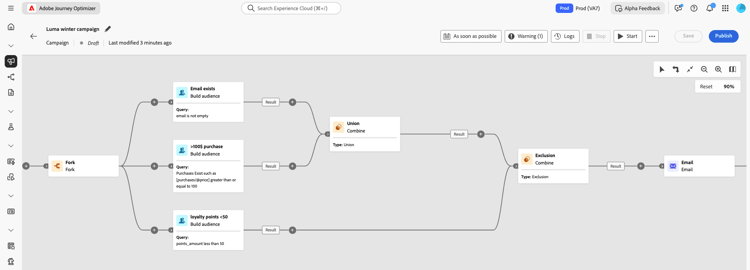
➡️ Discover Orchestrated campaigns in video
Core capabilities
Campaign Orchestration is built around four key pillars:

Instantly query across datasets to create audience segments using any combination of data types and dimensions.

Go beyond person-based campaigns—use entities like product catalogs, store locations, or service data to target with precision.
Support multi-level sending, where one message is sent per Profile and per associated secondary entity. These secondary entities can include contact addresses, bookings, subscriptions, contracts, or other linked data. For example, this enables campaigns to be sent to all known addresses of a Profile or for each booking associated with that Profile.

Get exact segmentation counts and full campaign scope before launch, ensuring accuracy and confidence.

Design multi-steps campaigns, from daily messages to complex campaigns like seasonal promotions or major product launches.
Orchestrated campaigns & journeys
Even though the Orchestrated campaigns visualization has similarities to journeys, it solves different purposes and use cases:
-
Journeys - 1 to 1 canvas where each profile travels through the different steps at their own pace. The state of each customer is maintained within its context to trigger real-time actions.
-
Orchestrated campaigns - Unlike journeys, Orchestrated campaigns operate using a batch canvas that calculates segments. All profiles are processed together at the same time.
Both canvases are optimized for their respective use cases: Journey canvas publishes journey that tend to live for a longer period of time, while Campaign canvas is designed for iterative and incremental runs of a batch campaign.
What’s inside an Orchestrated campaign? gs-ms-campaign-inside
The Orchestrated campaign canvas is a representation of what is supposed to happen. It describes the various tasks to be performed and how they are linked together.
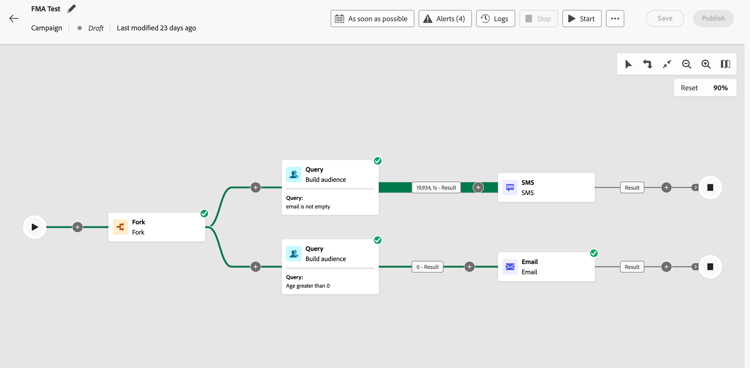
Each Orchestrated campaign contains:
-
Activities: An activity is a task to be performed. The various activities are represented on the canvas by icons. Each activity has specific properties and other properties that are common to all activities.
In an Orchestrated campaign canvas, a given activity can produce multiple tasks, in particular when there is a loop or recurrent actions.
-
Transitions: Transitions link a source activity to a destination activity and define their sequence.
-
Worktables: The worktable contains all the information carried by the transition. Each Orchestrated campaign uses several worktables. The data conveyed in these tables can be used throughout the Orchestrated campaign’s life cycle.
A typical entry-level Orchestrated campaign follows this pattern: Build audience → Fork → Channel A + Channel B.
This approach lets you target the same audience with two parallel branches in a single campaign run — for example, one branch using a Marketing email and another using a Transactional email. Each branch is independent and can use a different channel configuration, message content, or category.
Introduction video video-oc
Learn key concepts and capabilities available with Orchestrated campaigns.
Let’s dive deeper
Now that you have an understanding of what orchestrated campaigns are, it’s time to dive deeper into these documentation sections to start working with the feature.


Additional resources
- Build your first rule - Master the rule builder to create targeted queries and segment your audiences with precision using relational data.
- Create relational schemas - Understand how to set up and configure relational schemas to leverage multi-entity data in your campaigns.
- Reporting for Orchestrated campaigns - Track and analyze your campaign performance with detailed reporting metrics and insights.
- Start and monitor campaigns - Learn best practices for launching campaigns and monitoring their execution in real-time.
- Guardrails and limitations - Review important guardrails, limitations, and best practices to ensure optimal campaign performance.
- Frequently Asked Questions - Find answers to common questions about Orchestrated campaigns features, capabilities, and use cases.
- Orchestrated campaign tutorials - Explore step-by-step video tutorials covering features and best practices.
- Engage customers by browsing activity - Re-engage profiles who browsed but did not purchase, using a multi-step orchestrated campaign.
- Notify users about product availability - Alert customers when a product they showed interest in is back in stock.
- Send wishlist item updates - Trigger personalized messages when wishlist items go on sale or become available.
This section contains structured knowledge intended to support interpretation, retrieval, and question answering related to this topic.
For complete understanding, this information should be combined with the documentation on this page. Neither source is intended to stand alone; the page describes the feature, while this section provides additional context that helps disambiguate terminology, intent, applicability, and constraints.
- TL;DR: This page introduces Orchestrated campaigns in Adobe Journey Optimizer, explaining their core capabilities, how they differ from journeys, and what an Orchestrated campaign contains.
Intents:
- Understand what Campaign Orchestration enables: brand-initiated marketing and transactional campaigns across channels.
- Learn the four core capabilities of Campaign Orchestration.
- Distinguish Orchestrated campaigns from journeys.
- Identify the components of an Orchestrated campaign canvas: activities, transitions, and worktables.
- Recognize a typical entry-level Orchestrated campaign pattern using the Fork activity.
- Find the licensing requirement needed to access Campaign Orchestration.
Glossary:
- Campaign Orchestration: the capability in Adobe Journey Optimizer that powers sophisticated, brand-initiated campaigns across channels, both marketing and transactional (product-specific)
- Marketing campaigns: campaigns that help drive engagement, revenue, and customer loyalty at scale (product-specific)
- Transactional messages: messages that do not require opt-in and are suited for time-sensitive communications such as disruptions, emergencies, or cancellations (product-specific)
- On-Demand Audiences: instant querying across datasets to create audience segments using any combination of data types and dimensions (product-specific)
- Multi-entity segmentation & sending: targeting using entities like product catalogs, store locations, or service data beyond person-based campaigns, including multi-level sending where one message is sent per Profile and per associated secondary entity (such as contact addresses, bookings, subscriptions, or contracts) (product-specific)
- Pre-send visibility & precision: exact segmentation counts and full campaign scope available before launch (product-specific)
- Multi-step campaign workflows: design of multi-step campaigns, from daily messages to complex campaigns like seasonal promotions or major product launches (product-specific)
- Activity: a task to be performed, represented on the canvas by icons; a given activity can produce multiple tasks, in particular when there is a loop or recurrent actions (product-specific)
- Transition: links a source activity to a destination activity and defines their sequence (product-specific)
- Worktable: contains all the information carried by the transition; each Orchestrated campaign uses several worktables, and the data conveyed can be used throughout the campaign’s life cycle (product-specific)
Guardrails:
- Available channels vary based on licensing model and add-ons.
Prerequisites and permissions:
- To access Campaign Orchestration, the license must include either the Journey Optimizer – Campaigns & Journeys package or the Journey Optimizer - Campaigns package.
Terminology:
- Canonical name: Campaign Orchestration — variants: Orchestrated campaigns
- Do not confuse: “Marketing campaigns” (drive engagement, revenue, and customer loyalty at scale) ≠ “Transactional messages” (do not require opt-in, suited for time-sensitive communications such as disruptions, emergencies, or cancellations)
- Do not confuse: “Journeys” (1 to 1 canvas, real-time, profiles travel through steps at their own pace, state maintained within its context to trigger real-time actions) ≠ “Orchestrated campaigns” (batch canvas that calculates segments, all profiles processed together at the same time)
- Do not confuse: “Activity” (a task performed on the canvas) ≠ “Transition” (links a source activity to a destination activity) ≠ “Worktable” (contains the information carried by a transition)
FAQ:
- Q: What is required to access Campaign Orchestration? — The license must include either the Journey Optimizer – Campaigns & Journeys or the Journey Optimizer - Campaigns package.
- Q: How do Orchestrated campaigns differ from journeys? — Journeys use a 1 to 1 canvas where each profile travels through steps at its own pace with its state maintained in context; Orchestrated campaigns use a batch canvas that calculates segments, with all profiles processed together at the same time.
- Q: What does a typical entry-level Orchestrated campaign look like? — Build audience → Fork → Channel A + Channel B, letting two parallel branches target the same audience in a single campaign run, each with independent channel configuration, message content, or category.
- Q: What are the four core capabilities of Campaign Orchestration? — On-Demand Audiences, Multi-entity segmentation & sending, Pre-send visibility & precision, and Multi-step campaign workflows.
- Q: What does an Orchestrated campaign contain? — Activities, transitions, and worktables.
- Q: Do transactional messages require opt-in? — No, transactional messages do not require opt-in and are suited for time-sensitive communications such as disruptions, emergencies, or cancellations.
Examples:
- A typical entry-level Orchestrated campaign follows the pattern Build audience → Fork → Channel A + Channel B, for example one branch using a Marketing email and another using a Transactional email.
Related pages:
- For the list of supported channels: Channels in journeys & campaigns (channels/gs-channels.md)
- For details on activities shown on the canvas: various activities (orchestrated/activities/about-activities.md)
- For using the Fork activity in a campaign pattern: Learn how to use the Fork activity (orchestrated/activities/fork.md)
- For distinguishing Marketing vs Transactional messages in more depth: Understand Marketing vs Transactional messages (orchestrated/activities/channels.md)
- For building audience queries with relational data: Build your first rule (orchestrated/build-query.md)
- For setting up relational schemas for multi-entity data: Create relational schemas (orchestrated/gs-schemas.md)
- For tracking campaign performance: Reporting for Orchestrated campaigns (orchestrated/reporting-campaigns.md)
- For launching and monitoring campaign execution: Start and monitor campaigns (orchestrated/start-monitor-campaigns.md)
- For reviewing limits and best practices: Guardrails and limitations (orchestrated/guardrails.md)
- For common questions about features and use cases: Frequently Asked Questions (orchestrated/orchestrated-campaigns-faq.md)
- For an example of re-engaging profiles who browsed but did not purchase: Engage customers by browsing activity (orchestrated/engage-customers-uc.md)
- For an example of alerting customers about restocked products: Notify users about product availability (orchestrated/product-availability-uc.md)
- For an example of triggering wishlist-related messages: Send wishlist item updates (orchestrated/wishlist-uc.md)
Personas:
- marketer: Can use On-Demand Audiences, Multi-entity segmentation and sending, Pre-send visibility and precision, and Multi-step campaign workflows to build and launch Orchestrated campaigns. Can query across datasets to create audience segments and design multi-step campaigns such as seasonal promotions or major product launches in the drag-and-drop interface. The page states that available channels vary based on licensing model and add-ons. Where: “Core capabilities”.
Onboarding:
- Level: Beginner
- First minimal step: Build audience, then fork into two channel branches, for example one branch using a Marketing email and another using a Transactional email.
- Success check: Exact segmentation counts and full campaign scope display before launch.
- Next: Work with the various activities shown on the Orchestrated campaign canvas: Work with Orchestrated campaign activities (orchestrated/activities/about-activities.md); Master the rule builder to create targeted queries and segment your audiences with precision using relational data: Build your first rule (orchestrated/build-query.md)