Get Started with Journey Optimizer ajo-gs
This page introduces Adobe Journey Optimizer: what it is, who it’s for, its key capabilities, and how it fits into the Adobe Experience Platform architecture. It is the recommended starting point for new users.
What is Adobe Journey Optimizer? about-ajo
Adobe Journey Optimizer is an enterprise application for creating and delivering connected, contextual, and personalized customer experiences across all channels and touchpoints. It is built natively on Adobe Experience Platform and leverages a unified real-time customer profile, an API-first open framework, centralized offer decisioning, and AI/ML capabilities. Journey Optimizer enables brands to orchestrate both scheduled marketing campaigns and real-time, event-triggered communications — from a single application, at scale. The result is meaningful brand experiences that boost customer loyalty and lifetime value.
This guide applies to marketing practitioners, operations teams, and administrators new to Journey Optimizer.
➡️ Discover Journey Optimizer (video)
Key capabilities key-capabilities
Adobe Journey Optimizer is an agile and scalable application for creating and delivering personalized, connected, and timely customer experiences across any app, device, or channel.
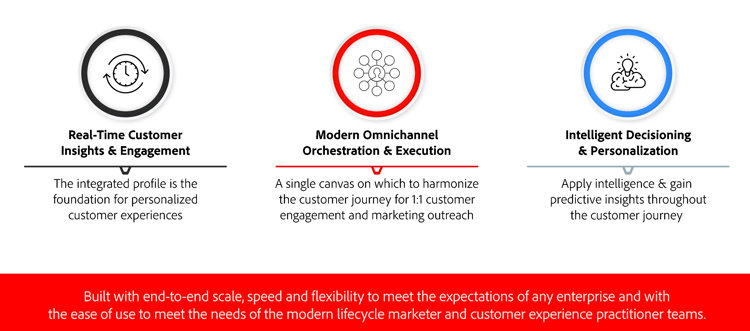
Key capabilities include:
Real-time Customer Insights & Engagement
An integrated profile fuses live data from all sources across customer touchpoints, including behavioral, transactional, financial, and operational data to optimize personal and contextual experiences for customers in their time. Learn about profiles and audiences
Modern Omnichannel Orchestration & Execution
A single canvas on which to harmonize and optimize the customer journey for 1:1 customer engagement and marketing outreach — to help brands deliver more value across the customer lifecycle. Customer journeys designed in Adobe Journey Optimizer can be dynamic and event-based to help brands react to real-time signals as well as connect those interactions with scheduled campaigns so the right decisions can be made about what communications to send a customer, when, and through what channels. Embedded content creation tools — including a drag-and-drop visual designer, reusable templates, content fragments, and a personalization editor — allow teams to author, personalize, and manage messages for every channel directly within the same workflow. Build your first journey | Design your content
Intelligent Decisioning & Personalization
Brands can apply centralized decisioning and incorporate artificial intelligence and machine learning to configure predictive insights throughout the customer experience, making it easier to automate decisions and optimize the experience at scale. Decisioning powers centralized offers across channels at scale through Adobe Journey Optimizer. Explore offer decisioning | Discover AI features
Use cases use-cases
These examples illustrate how Journey Optimizer’s capabilities work together across different roles, industries, and channels.
Delayed shipment recovery uc-delayed-shipment
Role: Marketer | Core capability: Unified profile + audience exclusion
A clothing store typically sends post-purchase surveys to all customers who have purchased products in the last week. Due to inclement weather, a few shipments experienced delays. Seeing which customers have not received their shipments, the clothing store can exclude them from the scheduled customer satisfaction send and instead send a personalized email apologizing for the delay and offering a discount code with product recommendations based on the customer’s past purchases.
Real-time in-store engagement uc-instore
Role: Marketer | Core capability: Geofence triggering + push
The same retailer can engage a loyal customer who pulls into the store parking lot in real time by sending them a push notification about a sweater that is back in stock in the customer’s size.
Get started with push notifications
Cart abandonment recovery uc-cart
Role: Marketer | Core capability: Event-triggered multi-step journey
When a customer adds items to an online cart but leaves without completing the purchase, Journey Optimizer detects the event in real time and starts a recovery journey automatically. The customer receives a personalized email reminding them of the items left behind. If they do not click through within 24 hours, a follow-up push notification is sent — personalized based on their browsing history and loyalty status.
Streaming service welcome series uc-welcome
Role: Marketer | Core capability: Event-triggered welcome journey
When a customer subscribes to a streaming service, Journey Optimizer detects the sign-up event and immediately starts a multi-step welcome journey. The customer receives a welcome email encouraging them to open the app for the first time. If no login activity is detected within 48 hours, a follow-up push notification is sent with personalized content recommendations based on their stated interests during sign-up — turning a passive subscriber into an active, engaged user from day one.
Reservation reminder with directions uc-reservation
Role: Marketer | Core capability: Scheduled + location-aware messaging
A hospitality brand sends each guest a timely reminder one hour before their reservation. The notification includes the guest’s name, reservation time, and location-based directions to the venue — automatically assembled from the customer profile and booking data, with no manual effort from the marketing team.
Proactive service outage notification uc-outage
Role: Operations | Core capability: Automated audience selection at scale
When a service disruption occurs, Journey Optimizer automatically identifies the affected customers based on their account data and usage patterns. Those customers receive a proactive notification acknowledging the issue and outlining next steps — turning a potentially negative experience into a moment of transparency and trust, delivered at scale.
AI-powered promotional campaign uc-ai-campaign
Role: Marketer | Core capability: AI content generation + experimentation
A retail brand planning a product launch uses Journey Optimizer’s AI Assistant to generate multiple subject line and body copy variations in minutes — guided by a natural language prompt and their uploaded brand guidelines. Built-in content experimentation automatically identifies the best-performing variant among an initial audience sample. The winning message is then deployed to the remaining recipients, maximizing engagement without additional copywriting effort.
Explore AI & intelligent features | Learn about content experimentation
Maintenance alerts via mobile app uc-maintenance
Role: Operations | Core capability: Non-marketing journey orchestration
Non-marketers such as operations teams and customer support can use Adobe Journey Optimizer to manage operational notifications or monitor onboarding processes. For example, an amusement park where visitors download a mobile app as part of their experience: maintenance staff can use Journey Optimizer to notify park visitors of rides currently closed due to maintenance.
Availability & Licensing availability
This documentation covers the current release of Journey Optimizer and applies to both B2C and B2B edition users unless otherwise noted. Components and capabilities available in your environment depend on your permissions and on your licensing package. For any question, reach out to your Adobe Customer Success Manager or your Adobe representative.
Adobe Experience Cloud general privacy guidelines and procedures apply to Journey Optimizer. Learn more about Adobe Experience Cloud privacy.
Architecture architecture
Journey Optimizer is built natively on Adobe Experience Platform, sharing its data foundation, identity graph, and governance services — for a detailed walkthrough of how these systems work together, see Understanding Journey Optimizer.
Related resources related-resources
- Key steps to start — Role-based quickstart guides for admins, marketers, and data engineers.
- Get started with data management — Learn how data is ingested, unified, and activated in Journey Optimizer.
- Design journeys and send messages — Build your first customer journey and configure channel actions.
- Live reports — Monitor campaign and journey performance in real time.
- Introduction to Journey Optimizer tutorial — A guided video walkthrough of core Journey Optimizer concepts.
- Journey Optimizer Security Overview (PDF) — Security architecture, data protection, and compliance details.
- Journey Optimizer Product Description — Official licensing terms and edition feature breakdown.