
AI agent skills
AI agent skills give your coding agent deep, domain-specific knowledge about Adobe Commerce storefront development. When you install the AEM Boilerplate Commerce skill set, your agent understands the boilerplate’s architecture, drop-in component patterns, block conventions, and best practices — so you spend less time explaining context and more time building.
What the skills provide
Section titled “What the skills provide”The AEM Boilerplate Commerce skill set installs six specialized skills into your coding agent. Each skill covers a focused area of storefront development.
| Skill | What it helps you do |
|---|---|
| Project manager | Breaks down tasks, guides phased delivery, and keeps development on track before any code is written |
| Researcher | Looks up drop-in component APIs, slot names, event payloads, and TypeScript definitions before implementing |
| Block developer | Builds and customizes Edge Delivery Services blocks using correct DOM patterns and CSS scoping |
| Drop-in developer | Customizes drop-in components using containers, slots, events, and API functions |
| Content modeler | Designs block table structures that are easy for content authors to work with |
| Tester | Verifies implementations in a real browser and checks Core Web Vitals and accessibility |
The skills work together. For every new task, your agent starts with the project manager skill to scope the work, consults the researcher skill before implementing, and delegates to the appropriate developer skill based on what needs to be built.
Prerequisites
Section titled “Prerequisites”Before installing the skills, make sure you have the following:
-
Node.js 22 or later — The Adobe I/O CLI requires Node 22+. Use nvm to manage multiple Node versions.
-
An AEM Boilerplate Commerce project — The skills are designed for projects based on the Commerce Boilerplate . If you have not created a boilerplate storefront, see Getting started to create one.
-
Adobe I/O CLI — Install or update with npm:
npm install -g @adobe/aio-cliSee the Adobe I/O CLI installation guide for more details.
-
Adobe I/O Commerce plugin — Install the Commerce plugin for the aio CLI:
aio plugins:install https://github.com/adobe-commerce/aio-cli-plugin-commerceSee the aio-cli-plugin-commerce repository for additional details.
Install the skills
Section titled “Install the skills”Run the following command from the root of your boilerplate project:
aio commerce extensibility tools-setupThe command walks you through a series of two prompts:
-
Select a starter kit — A starter kit is a starting project template. Choose AEM Boilerplate Commerce to tell the installer which skill set and conventions to copy into your project (other starter kits may be added in the future).
-
Select your coding agent — Choose your agent from the list of supported agents. This determines where the skill files are installed so your agent can find them (for example, Cursor uses
.cursor/skills/).
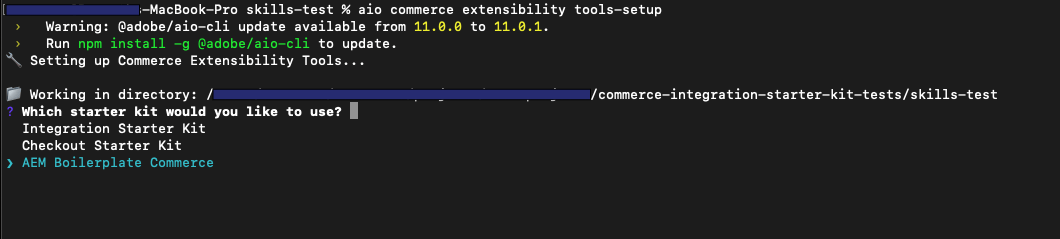
The command installs the @adobe-commerce/commerce-extensibility-tools package as a dev dependency, copies the skill files into your agent’s skills directory, and configures MCP (Model Context Protocol) so your agent can access Commerce documentation search tools.
Supported agents
Section titled “Supported agents”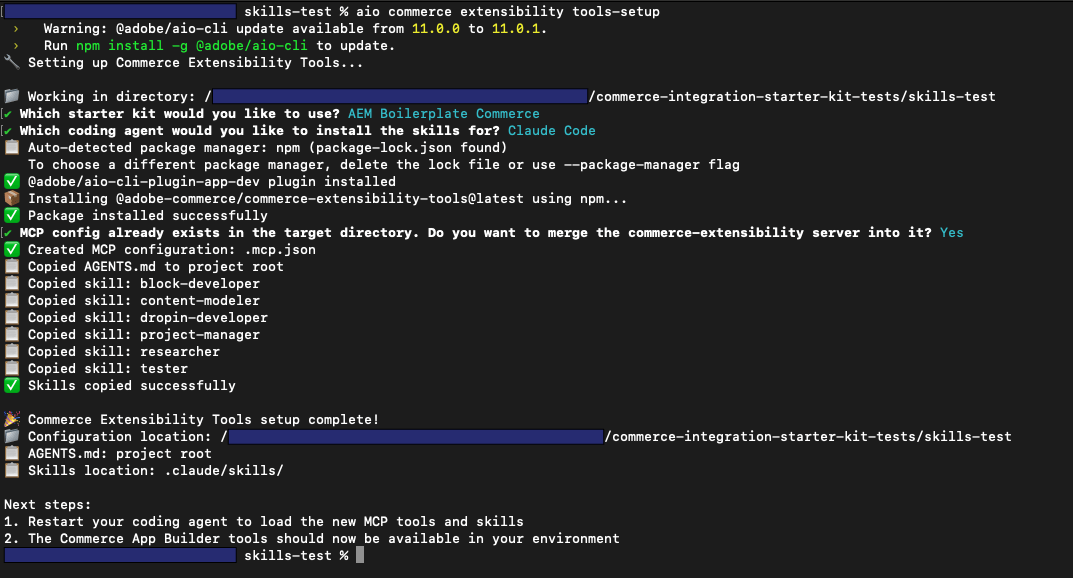
After the install completes, restart your coding agent so it picks up the new skills and MCP configuration.
Different agents and IDEs expose skills in different ways, so there is no single way to confirm that the skills are installed correctly. Check your agent’s or IDE’s documentation for how to verify that it has loaded your project’s skills. For example, in Cursor you can open the configuration or settings area to see the list of skills it has detected; other agents use different UIs or indicators.
| Agent | Skills location |
|---|---|
| Cursor | .cursor/skills/ |
| Claude Code | .claude/skills/ |
| GitHub Copilot | .github/skills/ |
| Windsurf | .windsurf/skills/ |
| Gemini CLI | .gemini/skills/ |
| OpenAI Codex | .agents/skills/ |
| Cline | .cline/skills/ |
| Kilo Code | .kilocode/skills/ |
| Antigravity | .agent/skills/ |
| Other | ./skills/ (project root) |
How to use the skills
Section titled “How to use the skills”Once installed, the skills are available to your agent automatically. You don’t need to reference them by name in every prompt. Here is how the agent uses them:
- Start every new task by describing what you want to build. The project manager skill activates first to assess complexity and confirm the plan with you before any code is written.
- For drop-in customizations, the agent uses the researcher skill to look up the correct slot names, event payloads, and API functions from the actual source before writing code — not from assumptions.
- For block development, the agent follows boilerplate conventions: DOM manipulation with
document.createElement(), CSS selectors scoped to the block name, and checking/blocksfor existing solutions before creating new ones. - For content structure, the agent uses the content modeler skill to design block tables that work for both developers and content authors.
- After implementation, the agent uses the tester skill to verify the result in a real browser, not just by reviewing code.
Example prompt — You can trigger the planning workflow and developer skills with a single, detailed request. For example:
Use the planning workflow to add a button to the product pages that allows the user to quickly share the product on social media platforms like Facebook and Twitter. The button should be displayed below the title section on the product detail page.
What gets installed
Section titled “What gets installed”After running the setup command, your project contains:
| File or directory | Purpose |
|---|---|
AGENTS.md (project root) | Top-level instructions your agent reads at the start of every session |
<agent-skills-dir>/ | Skill files with domain-specific rules for each development area |
| MCP config file | Connects your agent to the commerce-extensibility:search-commerce-docs tool for live documentation search |
The MCP tool gives your agent access to Adobe Commerce and App Builder documentation directly from within your coding session, which is what the researcher skill uses as its primary information source.
Related resources
Section titled “Related resources”| Resource | Description |
|---|---|
| Boilerplate getting started | Create and run your storefront locally |
| Drop-in components | Drop-in component API reference |
| Blocks reference | Reference for all available Commerce blocks |
| aio-cli-plugin-commerce | Source and full documentation for the Commerce CLI plugin |