
Adobe Experience Platform
Overview
Section titled “Overview”Adobe Experience Platform (AEP) is a comprehensive suite of services that enables you to collect, unify, and analyze customer data from multiple touchpoints. By integrating your Adobe Commerce storefront with AEP, you can gain deeper insights into customer behavior and create more personalized experiences.
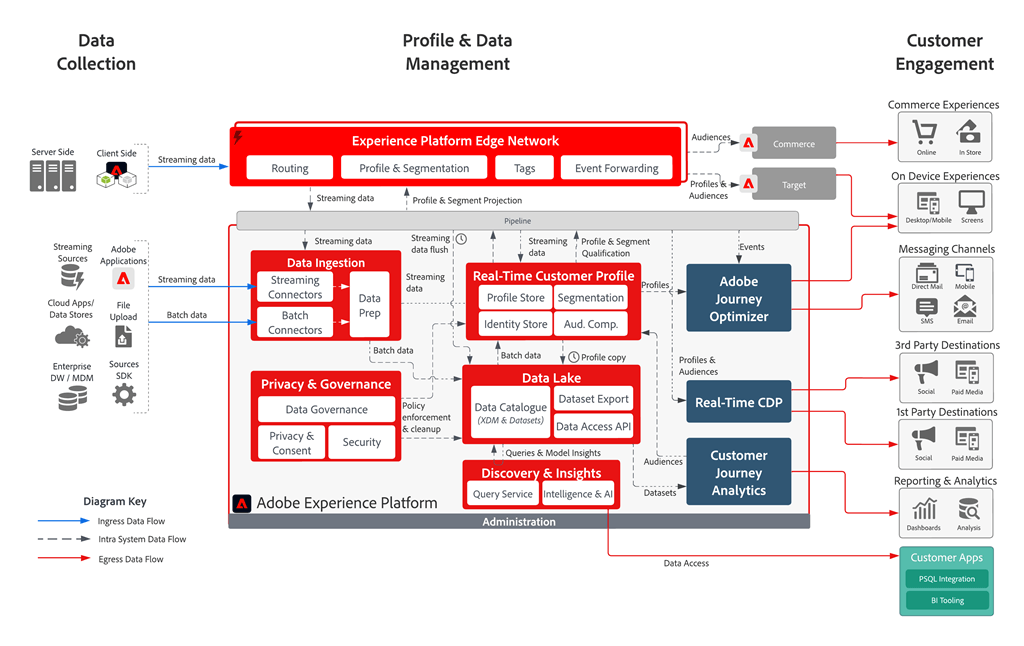
This integration allows your storefront to send commerce events (product views, purchases, cart actions) directly to the Experience Platform Edge Network, where they can be processed, stored, and used for real-time personalization and analytics.
For more information about Adobe Experience Platform capabilities, see the Adobe Experience Platform documentation .
Prerequisites
Section titled “Prerequisites”Before configuring your integration with Adobe Experience Platform, ensure you have the following:
Required Identifiers
Section titled “Required Identifiers”- IMS Organization ID: Your Adobe organization identifier (format:
1234567890ABCDEF7F000101@AdobeOrg) - Datastream ID: A configured datastream for routing data (format:
12345678-1234-1234-1234-123456789012)
How to Find Your Identifiers
Section titled “How to Find Your Identifiers”IMS Organization ID: To locate your IMS Organization ID, refer to the Organizations documentation . You can typically find this in:
- Adobe Admin Console
- Developer Console
- Any Adobe Experience Cloud application under Account Settings
Datastream ID: Your datastream must be configured to route data to Adobe Experience Platform. For detailed instructions on creating and configuring a datastream, see the Datastreams documentation .
Configuration
Section titled “Configuration”To enable data flow from your storefront to the Experience Platform Edge Network, you need to add your AEP credentials to your storefront configuration.
Method 1: Configuration File (Recommended)
Section titled “Method 1: Configuration File (Recommended)”Add your AEP credentials to the analytics section of your storefront configuration :
{ "public": { "default": { "analytics": { "aep-ims-org-id": "1234567890ABCDEF7F000101@AdobeOrg", "aep-datastream-id": "12345678-1234-1234-1234-123456789012", "base-currency-code": "USD", "environment": "Testing", ... } } }}When both aep-ims-org-id and aep-datastream-id are configured, the storefront automatically:
- Enables event forwarding to Adobe Experience Platform
- Configures the AEP context with your credentials
- Begins sending commerce events to the Experience Platform Edge Network
Method 2: Direct Script Configuration (Alternative)
Section titled “Method 2: Direct Script Configuration (Alternative)”Alternatively, you can configure AEP directly in your scripts/delayed.js file:
window.adobeDataLayer.push( { aepContext: { imsOrgId: '1234567890ABCDEF7F000101@AdobeOrg', datastreamId: '12345678-1234-1234-1234-123456789012' } }, { eventForwardingContext: { aep: true } });Configuration Parameters
Section titled “Configuration Parameters”| Parameter | Description | Required | Example |
|---|---|---|---|
aep-ims-org-id | Your Adobe IMS Organization ID | Yes | "1234567890ABCDEF7F000101@AdobeOrg" |
aep-datastream-id | Your configured datastream ID for routing data to AEP | Yes | "12345678-1234-1234-1234-123456789012" |
What This Configuration Does
Section titled “What This Configuration Does”aep-ims-org-id: Identifies your Adobe organization for routing events to the correct Experience Platform environmentaep-datastream-id: Specifies the datastream configuration that determines how events are processed and where they are sent- Automatic event forwarding: When both values are present, the storefront automatically enables
eventForwardingContext.aepand configures theaepContext
Storefront events
Section titled “Storefront events”Once configured, your storefront will automatically send the following types of events to Adobe Experience Platform:
- Shopping events: Cart updates and views (
addToCart,removeFromCart,shoppingCartView), page views (pageView,productPageView), checkout (startCheckout,completeCheckout) and more. - Customer profile events: Customer login (
signIn), customer logout (signOut), create account (createAccount), edit account (editAccount). - Search events: Search query (
searchRequestSent) and search results (searchResponseReceived).
For a complete list of storefront events, see the Storefront events documentation .
These events are processed in real-time and can be used for:
- Customer journey analysis
- Real-time personalization
- Audience segmentation
- Attribution modeling
Validation
Section titled “Validation”Testing Your Integration
Section titled “Testing Your Integration”Check browser console
Section titled “Check browser console”After implementing the configuration, open your browser’s developer tools and verify that:
- No JavaScript errors appear
- Adobe Data Layer events are being fired
- Network requests to Adobe Experience Platform Edge Network are successful
Monitor data ingestion
Section titled “Monitor data ingestion”Use Adobe Experience Platform’s monitoring tools to confirm data is being received:
- Navigate to your AEP workspace
- Check the Monitoring section for incoming data
- Verify events appear in your configured datasets
Validate event structure
Section titled “Validate event structure”Ensure events contain the expected commerce data fields and customer identifiers
Troubleshooting
Section titled “Troubleshooting”If data is not flowing as expected:
- Verify credentials: Double-check your IMS Organization ID and Datastream ID
- Check datastream configuration: Ensure your datastream is properly configured to route to Adobe Experience Platform
- Review browser network tab: Look for failed requests to Adobe Experience Platform endpoints
- Validate Adobe Data Layer: Confirm the Adobe Data Layer is properly initialized before your AEP configuration
For detailed validation procedures, refer to the Data Ingestion Monitoring documentation .
Next Steps
Section titled “Next Steps”After successful integration:
- Configure schemas: Set up XDM schemas in Adobe Experience Platform to structure your commerce data
- Create audiences: Build customer segments based on commerce behavior
- Set up Real-Time CDP: Use collected data for personalization and marketing activation
- Monitor performance: Regularly review data quality and ingestion metrics
For a complete implementation example, see the Organizations documentation and AEM Commerce Boilerplate integration .