在此頁面上:探索Adobe Journey Optimizer中的AI和機器學習功能,從Adobe CX Enterprise Coworker、AI Assistant和專業代理程式,到創作內容和Journey Optimizer功能中的AI支援整合及最佳化功能。
Adobe Journey Optimizer運用人工智慧和機器學習的強大功能,協助您建立、最佳化和提供卓越的客戶體驗。 從同事和AI Assistant中的交談式代理,到預測最佳傳送時間並產生個人化內容,AI功能可簡化您的工作流程並最大化影響。
快速導覽 quick-navigation
使用這些群組連結來跳至您需要的功能:
Coworker cx-coworker
關於同事 about-cx-coworker
同事是Adobe的對話式體驗,可與您的業務應用程式整合,協助您更有效率地工作,自動化客戶體驗和跨Adobe應用程式的行銷工作流程。 您不必一次執行一個手動設定步驟,而是以自然語言描述業務目標,然後由同事計畫、執行及驗證工作。
Co-worker是AI Assistant的進化:它保留了AI Assistant代理程式已經執行的所有工作(產品知識、營運和資料深入分析),同時新增了完成端對端工作所需的企業工具、技能、治理和記憶體,而不僅僅是回答問題。 正在以滾動方式將組織從AI助理轉換為同事,並且某些組織可能會保留對AI助理的存取權,直到為同事啟用為止。 進一步了解轉換至同事。
在Co-worker檔案中瞭解更多:
Journey Optimizer的同事技能 cx-coworker-skills
在Adobe Journey Optimizer中, Co-worker可提供這些功能的專屬技能:
- 歷程:使用自然語言提示建立歷程、產生頻道特定的訊息復本和設計、使用歷程模擬來模擬歷程邏輯、比較歷程版本、取得讀取對象歷程批次的端對端執行時間表,並診斷歷程流失、排程重疊、執行異常和歷程詳細目錄衛生問題,以及透過歷程追蹤設定檔。 檢視歷程的所有同事技能。
- 忠誠度:建立並設定忠誠度挑戰,以及查詢忠誠度點數、層級分配和收入量度。 檢視忠誠度的所有同事技能。
- 內容管理:使用15個讀取/寫入MCP工具來探索、建立、更新、複製及發佈範本、片段、登入頁面和內嵌訊息變體。 檢視所有同事內容管理工具。
- 決策:瞭解為何特定優惠方案顯示給設定檔或區段、追蹤適用性、排名和上限;以自然語言建立、解釋、模擬和最佳化適用規則和排名公式。 檢視Decisioning的所有同事技能。
- 頻道:檢視、列出並檢查您的頻道設定和認證,以及在聊天中建立、測試和管理自訂頻道。 檢視頻道的所有同事技能。
MCP伺服器 mcp-server
使用模型上下文通訊協定(MCP)將Adobe Journey Optimizer連線到與MCP相容的AI應用程式,例如Claude Web、Claude Desktop和Cursor。 MCP伺服器可讓您使用純語言提示來查詢行銷活動、歷程、優惠方案和管道設定,不需要API呼叫或UI導覽。 所有作業目前都是唯讀的。
- 使用MCP使用者端 — 使用Journey Optimizer MCP伺服器查詢Claude Web、Claude Desktop或Cursor的行銷活動、歷程和優惠方案。
AI助理和AI代理程式 ai-assistant
AI Assistant是您的Adobe Journey Optimizer產品內對話指南,由創作AI和用於歷程最佳化和實驗的專業代理程式提供技術支援。 AI助理正由同事成功 — 請參閱上文,瞭解兩者的關係。
存取 AI 助理
按一下頂端列中的AI助理圖示,開啟熒幕右側的助理面板。
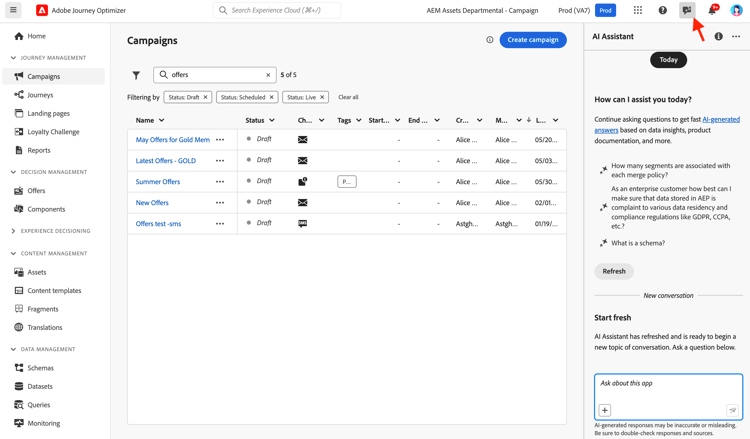
AI助理可以做什麼
產品知識 — 詢問有關Adobe Journey Optimizer功能和概念的問題:
- 「如何在Adobe Journey Optimizer中設定行銷活動?」
- 「如何建立自訂動作以用於歷程?」
- 「一個沙箱中可以有多少個已上線活動?」
營運深入分析(Beta) — 取得歷程的即時資訊:
- 「我有多少個即時歷程?」
- 「給我所有已排程歷程的清單」
- 「過去7天內已建立多少歷程?」
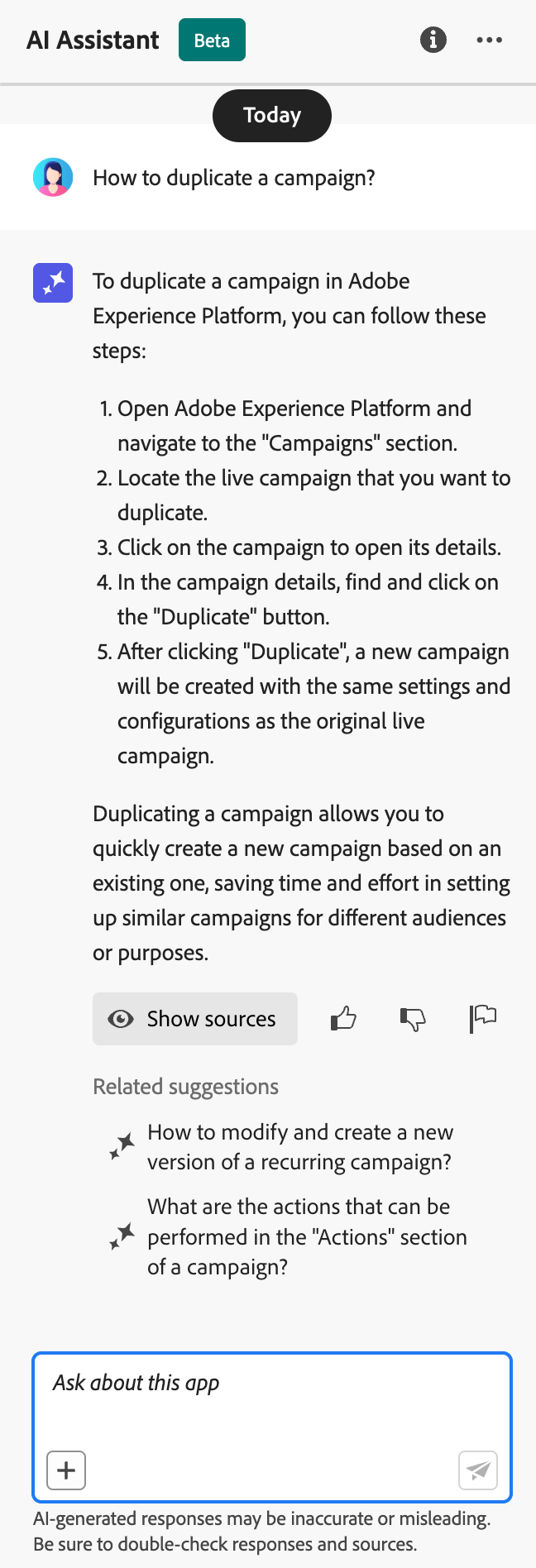
如何使用AI助理
- 在面板底部的文字欄位中輸入您的問題
- 按Enter鍵以提交查詢
- 檢閱AI產生的回應
- 按一下 顯示來源 以存取相關檔案
- 使用向上/向下縮圖為回應品質評分
進一步瞭解Experience Platform中的AI Assistant
進階AI代理程式 ai-agents
Adobe Journey Optimizer以AI Assistant的對話功能為基礎,提供專門的AI代理程式,為歷程最佳化和實驗提供深入分析和可操作的建議。
Journey Agent journey-agent
Journey Agent包含AI助理中的兩項技能:分析和建立。 使用它們來最佳化現有歷程,或從自然語言提示建立新歷程。
- 檢視歷程 — 直接在AI助理中檢視歷程的深入分析
- 管理歷程 — 直接在AI助理中建立新的歷程
- 檢視區段 — 檢視對象的深入分析並搜尋現有對象
- 管理區段 — 直接在AI Assistant中建立新對象
- 檢視歷程事件、資料來源和動作 — 建立技能以搜尋歷程事件和自訂動作所需
歷程分析技能 journey-analyze-skill
歷程分析代理程式可協助您透過自然語言分析將歷程效能最佳化:
- 歷程流失分析 — 識別客戶在歷程中流失的位置及原因,偵測脫離模式
- 對象重疊偵測 — 分析多個歷程中的對象重疊,以防止疲勞過度鎖定目標
- 排程衝突偵測 — 識別以相同對象為目標的排程歷程之間的時間衝突
- 營運分析 — 取得提示型分析,例如「顯示所有即時歷程」或「超過X個歷程中使用了哪些對象」
- 「對歷程[歷程名稱]執行流失分析」
- 「歷程[歷程名稱]是否有任何排程衝突?」
- 「顯示歷程[歷程名稱]的對象重疊衝突」
- 「哪些對象用於超過5個歷程?」
歷程建立技能 journey-create-skill
歷程建立代理程式可幫助您從自然語言提示建立歷程,將您的目標轉換為結構化的歷程設定:
- 自然語言歷程建立 — 描述您想要的歷程並自動建立
- 以事件和受眾為基礎的開始 — 建立事件觸發、以受眾為基礎、業務事件或受眾資格歷程
- 條件邏輯 — 根據客戶屬性或行為建置分割路徑
- 多頻道傳訊 — 新增電子郵件、推播和行動裝置動作
- 排程 — 設定開始日期與步驟之間的時間
- 「建立歷程,從客戶線上購買並傳送感謝推播通知時開始。」
- 「使用兩星期內的三封電子郵件,從12/20開始建立以我日間徒步旅行者受眾為目標的歷程。」
- 「建立歷程,此歷程從使用者進入我的商店位置開始,並根據他們是否有有效的電子郵件地址進行追蹤。」
Experimentation Agent experimentation-agent
Experimentation Agent可讓您跨網站、電子郵件、推播訊息和應用程式執行和管理數位實驗的方式,以現代化方式呈現:
- 效能分析 — 清楚瞭解實驗中所發生的情況
- 深入分析產生 — 結果發生的說明
- 機會探索 — 後續動作指南
- 內容分析 — 檢查傳訊元素,瞭解某些處理優於其他處理方式的原因
- 建議產生 — 根據見解建議新的處理或調整
- 「哪些實驗是為了[行銷活動名稱]?」
- 「對於我的[實驗名稱],目前採用何種處理方法?」
- 「我們從[實驗名稱]中學到了什麼?」
- 「您建議我在完成此實驗後做什麼?」
- 「最近的測試出現了哪些常見模式?」
- 檢視實驗 — 檢視AI Assistant中的實驗深入分析
- 管理實驗中繼資料 — 在AI助理中建立新的實驗
注意:可使用Journey Optimizer Experimentation Accelerator授權。
其他AI代理 additional-ai-agents
- Audience Agent — 用於跨Adobe Experience Platform的對話式受眾探索和管理,包括重複偵測和大小追蹤。 進一步瞭解Audience Agent
- Agent Orchestrator — 協調多個專業代理程式以解決複雜的多步驟行銷挑戰。 Orchestrator會自動決定要涉及的代理程式,並有效率地排序其工作。 進一步瞭解Agent Orchestrator
由AI支援的內容產生 content-generation
使用創作AI建立跨多個管道的內容並加以個人化,可在維持品牌一致性的同時加速內容建立流程。 產生內容適用於電子郵件、推播通知、行動訊息和網頁體驗 — 協助您產生主旨列、內文、影像和完整的訊息變化。
主要功能
- 產生完整內容 — 以單一流程產生電子郵件、網頁、登入頁面和推播的完整內容體驗(文字和影像)。 使用AI產生完整內容
- 文字產生 — 根據您的品牌語調和目標建立吸引人的復本。 使用AI產生文字
- 影像產生 — 使用Adobe Firefly產生自訂影像。 使用AI產生影像
- 內容變數 — 產生A/B測試的多個變數。 使用AI的內容實驗
- Personalization — 從Personalization編輯器或電子郵件Designer工具列(新增運算式)產生新運算式、說明現有程式碼或修正產生內容的問題。 產生個人化運算式的內容
- 品牌一致性 — 確保產生的內容符合您的品牌指導方針。 評估品牌一致性
- 範本支援 — 善用您現有的電子郵件範本。 使用內容範本
最佳做法
- 明確 — 提供清晰、詳細的提示,以獲得更好的結果。 瞭解提示最佳實務
- 上傳品牌資產 — 使用PDF、影像或ZIP檔案(最多50MB)來維持品牌一致性
- 使用自訂範本 — 使用最多8至10個影像的品牌特定範本
- 提供意見回饋 — 速率輸出以協助改善AI模型
- 檢閱所有內容 — 發佈前請一律檢閱AI產生的內容是否準確
Journey Optimizer中的AI相關功能 ajo-ai-features
探索人工智慧和機器學習如何增強Journey Optimizer的特定功能:
Adobe Journey Optimizer可以自動分析決策規則和以PQL語法表示的排名公式,並建議保留原始邏輯的簡化。 發現簡化後,規則或公式旁邊會出現紅色的 Optimize 指標,開啟原始和AI建議運算式的並排比較,並透過可下載的分析來驗證兩者行為相同。
主要功能
- 保留邏輯的簡化 - AI會建議較短的運算式,在模擬的設定檔上傳回相同的結果。
- 驗證報告 — 下載分析(TSV),在套用變更之前,顯示每個模擬設定檔在兩個版本中的評估方式。
- 一鍵套用 — 直接從 最佳化 視窗,以最佳化版本取代原始的PQL。
資格
只有PQL運算式大於2 KB (UTF-8編碼)的規則和排名公式才會被鎖定進行分析,不會分析較小的運算式。
權限
此功能使用與 產生內容 相同的產生AI存取控制項。 必須授予使用者在 AI小幫手 資源上的 產生內容 許可權。 深入瞭解產生內容存取權
Experiment Accelerator可協助您使用AI導向的深入分析和建議更快速地執行實驗,更快速地識別成功內容變化。
主要功能:
- 自動產生多個內容變數
- 接收實驗設計的人工智慧建議
- 取得績效趨勢的早期指標
- 加速統計顯著性時間
根據個別客戶行為模式,使用人工智慧來預測傳送每則訊息的最佳時間,最大化參與度。
運作方式
傳送時間最佳化會分析歷史參與資料(開啟和點按),以預測每個客戶何時最有可能與您的訊息互動。 系統會在您指定的時間範圍內自動排程交貨。
何時使用
| table 0-row-2 1-row-2 2-row-2 3-row-2 4-row-2 | |
|---|---|
| 最適合 | 不建議用於 |
| 行銷活動和電子報 | 時效性極強的營運訊息(訂單確認、密碼重設) |
| 促銷訊息 | 緊急通知(航班延誤、緊急警報) |
| 教育內容 | 具有特定時間需求的事件型訊息 |
| 參與行銷活動 |
使用AI支援的轉換技術,將靜態影像設計(JPEG、PNG)轉換為可編輯的HTML電子郵件範本。
與Adobe GenStudio for Performance Marketing整合以建立AI支援的電子郵件內容,並將範本匯入Journey Optimizer以進行協調。 將Journey Optimizer範本匯出至GenStudio、使用AI產生變數,並帶回以進行部署。 (可用性限制,僅限電子郵件通道。)
使用AI支援的評分,測量語調、聲音和訊息的一致性,評估內容與品牌指引的符合程度。
用於決策的AI模型 ai-decisioning
建立智慧型排名模型,依轉換率(轉換÷曝光數)將優惠排名,自動顯示每位客戶最可能轉換的優惠。
模型型別
- 自動最佳化 — 學習您優惠方案的整體、非個人化效能,以隨著時間自動改善轉換。 由於模型大約每6小時會重新訓練一次,因此在選件經常變更時非常適合。
- 個人化最佳化 — 使用客戶設定檔屬性、行為和對象成員資格,來預測每個人的最佳優惠方案。 當您需要每個客戶的不同排名(而不是一個整體獲勝者)時,請選擇此選項。
需求
最低資料需求依模型型別而異:
- 自動最佳化 — 過去14天內至少有2個選件包含100個以上的顯示事件和5個以上的點按事件。 低於此臨界值的選件會視為新選件,且僅透過探索流量提供。
- 個人化最佳化 — 使用滾動式30天視窗。 Adobe建議每週每個選件至少1,000次曝光和100個轉換事件;根據預設,曝光次數少於1,000次或轉換次數少於50次的選件,將不會獲得為其訓練的模型。 最多可以選取5個對象來訓練單一模型。
This section contains structured knowledge intended to support interpretation, retrieval, and question answering related to this topic.
For complete understanding, this information should be combined with the documentation on this page. Neither source is intended to stand alone; the page describes the feature, while this section provides additional context that helps disambiguate terminology, intent, applicability, and constraints.
- TL;DR: This page is an overview of the AI and machine learning features across Journey Optimizer, including CX Coworker, AI Assistant, AI agents, AI-powered content generation, integrations and tools, Send-Time Optimization, AI decisioning, and content experimentation.
Intents:
- Understand what CX Coworker is, how it relates to AI Assistant, and which skills it provides for journeys, loyalty, and content management
- Simulate journey logic with the Journey Simulation skill in CX Coworker
- Understand what AI Assistant can do and how to access it
- Learn which AI agents are available and what permissions each requires
- Generate content and message variations with AI across supported channels
- Predict the best send time per customer with Send-Time Optimization
- Rank and personalize offers with AI decisioning models
- Optimize Decisioning rules and ranking formulas with AI-suggested simplifications
Glossary:
- CX Coworker: Adobe’s conversational experience that integrates with business applications, automating customer experience and marketing workflows across Adobe applications; you describe a business goal in natural language and Coworker plans, executes, and validates the work (product-specific)
- Journey Create (CX Coworker skill): A CX Coworker skill for journeys that builds journeys with natural language prompts (product-specific)
- Journey Simulation (CX Coworker skill): A CX Coworker skill for simulating journey logic (product-specific)
- Channel Content Create (CX Coworker skill): A CX Coworker skill for journeys that generates channel-specific message copy and designs (product-specific)
- Journey Analyze (CX Coworker skill): A CX Coworker skill for journeys that diagnoses journey drop-offs, scheduling overlaps, and execution anomalies (product-specific)
- Loyalty Challenge Management (CX Coworker skill): A CX Coworker skill for loyalty that creates and configures loyalty challenges (product-specific)
- Loyalty Insights (CX Coworker skill): A CX Coworker skill for loyalty that queries loyalty points, tier distributions, and revenue metrics (product-specific)
- AI Assistant: The conversational guide to Journey Optimizer that answers product-knowledge questions and, in Beta, surfaces operational insights about journeys (product-specific)
- Journey Agent: An AI agent offering two skills in AI Assistant, Analyze and Create, for optimizing or building journeys from natural language (product-specific)
- Experimentation Agent: An AI agent that analyzes and manages digital experiments across websites, emails, push messages, and applications (product-specific)
- Generate Content: AI-powered content generation for subject lines, body text, images, and message variations (product-specific)
- Auto-optimization: A ranking model type that learns from overall, non-personalized offer performance and retrains roughly every 6 hours (product-specific)
- Personalized optimization: A ranking model type that uses customer profile attributes, behavior, and audience membership to predict the best offer per individual (product-specific)
- Send-Time Optimization: An AI capability that predicts the optimal send time per customer from historical engagement data (product-specific)
- Journey Optimizer MCP server: A capability that connects Journey Optimizer to MCP-compatible AI applications for plain-language queries; all operations are currently read-only (product-specific)
Guardrails:
- Content Management (CX Coworker) is powered by 15 read/write MCP tools.
- AI Assistant requires agreement to the Adobe Experience Cloud Generative AI User Guidelines before use.
- Operational Insights are in Beta, are currently only available for Journeys, and reflect data from your current sandbox.
- Send-Time Optimization is not recommended for time-sensitive operational messages (order confirmations, password resets), urgent notifications (flight delays, emergency alerts), or event-based messages with specific timing requirements.
- AI Content Generation is only available for the Email, Push, Web, and Mobile message channels.
- Brand asset uploads support PDFs, images, or ZIP files (max 50 MB) (hard limit).
- Custom templates support up to 8-10 images.
- Auto-optimization requires at least 2 offers with 100+ display events and 5+ click events each within the last 14 days; offers below this threshold are treated as new and only served through exploration traffic.
- Personalized optimization uses a rolling 30-day window; Adobe recommends at least 1,000 impressions and 100 conversion events per offer per week (recommended); by default, offers with fewer than 1,000 impressions or 50 conversions do not get a model trained for them.
- Up to 5 audiences can be selected to train a single personalized optimization model.
- AI-powered rule and formula optimization analyzes only rules and ranking formulas whose PQL expression is larger than 2 KB (UTF-8 encoded); smaller expressions are not analyzed.
- AI-powered rule and formula optimization requires the Generate Content permission on the AI Assistant resource.
- The Journey Optimizer MCP server currently supports read-only operations only.
- GenStudio for performance marketing integration is in Limited availability and email channel only.
- The Experimentation Agent is available with the Journey Optimizer Experimentation Accelerator license and requires View Experiments and Manage Experiment Metadata permissions.
Terminology:
- Canonical name: Send-Time Optimization — Acronym: n/a — variants: send-time optimization
- Synonyms: “Generate Content” = “AI content generation”
- Do not confuse: “Auto-optimization” (learns from overall, non-personalized performance) ≠ “Personalized optimization” (predicts the best offer per individual)
- Do not confuse: “Journey Analyze skill” (optimize existing journeys) ≠ “Journey Create skill” (build new journeys from prompts)
- Do not confuse: “AI Assistant” (conversational guide) ≠ “AI Agents” (specialized agents for deep analysis and recommendations)
- Do not confuse: “Journey Analyze skill” and “Journey Create skill” (AI Assistant’s Journey Agent skills) ≠ “Journey Analyze (CX Coworker skill)” and “Journey Create (CX Coworker skill)” — the page names these separately: the Journey Agent skills operate within AI Assistant, while Journey Analyze and Journey Create are CX Coworker skills for the Journeys capability.
- Do not confuse: “CX Coworker” (Adobe’s evolution of AI Assistant, described in the CX Coworker section) ≠ “AI Assistant” (the conversational guide it is succeeding)
FAQ:
- Q: How does CX Coworker relate to AI Assistant? — CX Coworker is Adobe’s evolution of the AI Assistant conversational experience; organizations are being transitioned from AI Assistant to CX Coworker on a rolling basis, and some organizations may retain access to AI Assistant until they are enabled for CX Coworker.
- Q: What permissions do I need for AI features? — Generate Content requires the Generate Content permission; AI Assistant product knowledge requires agreement to the Adobe Generative AI User Guidelines; each agent requires its listed View/Manage permissions.
- Q: Is AI-generated content always accurate? — No; always review AI-generated content for accuracy and brand appropriateness, and use the thumbs up/down feedback tools.
- Q: Which channels support AI Content Generation? — Only the Email, Push, Web, and Mobile message channels.
- Q: What are the requirements for AI ranking models? — They differ by model type; Auto-optimization and Personalized optimization have distinct minimum interaction-data thresholds described in Requirements.
- Q: How do I get access to these features? — Most AI features are included with Journey Optimizer; some capabilities such as Send-Time Optimization or AI Agents may require enablement by Adobe, so contact your Adobe representative.
Personas:
- marketer: Can generate subject lines, body text, images, and complete message variations using Generate Content. The page states that Generate Content is available for email, push notifications, mobile messages, and web experiences. Where: “AI-Powered content generation”.
Onboarding:
- Level: Beginner
- First minimal step: Select the AI Assistant icon in the top bar to open the assistant panel on the right side of your screen.
- Success check: The panel opens on the right side of your screen.
- Next: To generate content for the email channel: Get started with email (email/get-started-email.md); To learn more about AI content generation: Get started with Generate Content in Journey Optimizer (content-management/gs-generative.md)