在此頁面上:瞭解如何將GenStudio for Performance Marketing與Journey Optimizer整合,以匯出電子郵件範本、產生品牌內內容變數,以及匯入回以用於您的電子郵件行銷活動。
開始使用GenStudio gs-genstudio
Adobe GenStudio for Performance Marketing是創作AI優先的應用程式,可讓行銷團隊建立自己的廣告和電子郵件,以推動具影響力、個人化的行銷活動,符合您的品牌標準並遵守您的企業政策。 善用Adobe AI技術,提供一套完整的工具,簡化內容建立及管理的複雜性,讓創意人員可專注在創新上。
若要提升行銷效率並維持品牌一致性,您可以將 GenStudio for Performance Marketing 體驗與 Adobe Journey Optimizer 緊密整合。 這可讓您運用GenStudio的AI支援內容建立以及Journey Optimizer的進階協調功能。
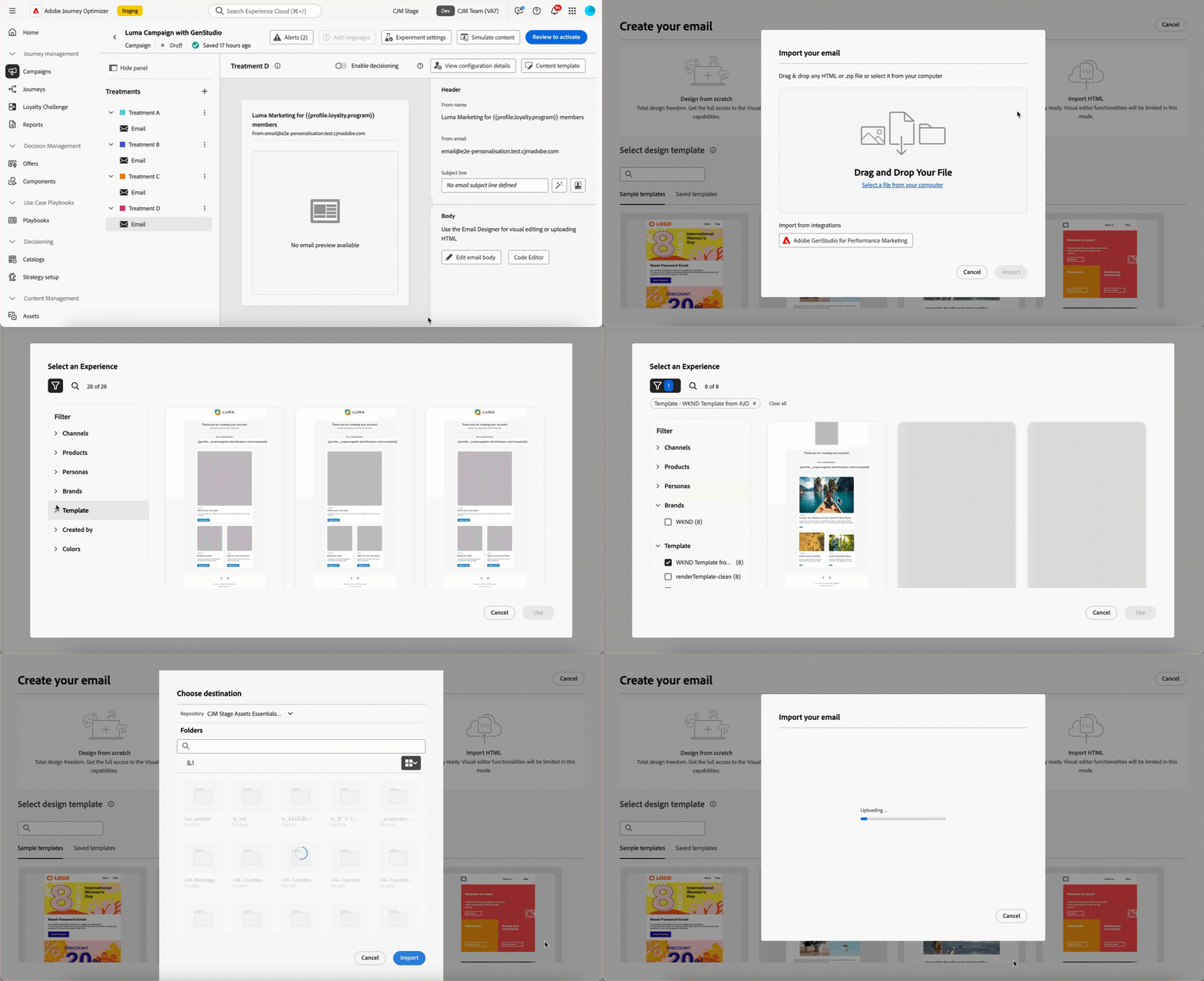
➡️ 在影片中探索此功能
先決條件 genstudio-prerequisites
若要使用GenStudio for Performance Marketing與Journey Optimizer的整合,請確定符合下列需求:
-
您的組織必須有GenStudio for Performance Marketing的有效授權。
-
GenStudio for Performance Marketing和Adobe Journey Optimizer都必須屬於相同的IMS組織。
-
使用者必須在GenStudio for Performance Marketing中至少擁有 Collaborator 角色或以上角色,才能使用整合功能。 進一步瞭解GenStudio中的使用者角色
在Journey Optimizer中運用GenStudio功能 use-genstudio
GenStudio for Performance Marketing與Journey Optimizer整合可讓您公司的行銷人員更有效地合作,以簡化程式。
例如,使用Journey Optimizer開發和自動化電子郵件行銷活動的技術行銷人員,可以與使用GenStudio建立內容的效能行銷人員共同作業。
透過這項整合,兩者可以共同作業,輕鬆地將GenStudio中的品牌上內容整合到Journey Optimizer中,傳遞吸引人的電子郵件,以鎖定特定客戶細分並提升銷售量。
主要功能 genstudio-capabilities
這項整合為您的行銷組織開啟了強大的功能:
-
由AI支援的內容產生:運用Adobe的創作AI,以智慧型複製建議和設計元素有效率地建立多個品牌內電子郵件變體。
-
順暢的工作流程整合:將Journey Optimizer電子郵件範本匯出至GenStudio、建立具有AI提示的變體,並以簡化的程式將其匯入回Journey Optimizer。
-
集中式資產管理:存取GenStudio的ContentHub (由Adobe Experience Manager Assets提供技術支援),在一個集中式位置組織、儲存和擷取所有數位資產。
-
內容實驗:將多個GenStudio電子郵件變數匯入至Journey Optimizer,並利用實驗功能來測試及識別表現最佳的內容。
-
效能導向型深入分析:使用AI支援的分析追蹤行銷活動績效,以瞭解哪些創意元素會與您的對象產生共鳴,並最佳化未來的行銷活動。
常見使用實例 genstudio-use-cases
GenStudio for Performance Marketing與Journey Optimizer之間的整合支援各種行銷情境:
-
產品上市行銷活動:快速產生產品公告的多個電子郵件變體,以不同的對象區段進行測試,並在您的客戶群中擴充成功版本。
-
節日和季節性促銷活動:使用GenStudio範本大規模產生時效性強的促銷活動內容,確保在緊迫期限內保持品牌一致性。
-
大規模A/B測試:在GenStudio中建立許多內容變異,並在Journey Optimizer中系統地測試這些變異,以持續改善電子郵件效能。
-
多區段個人化:在GenStudio中產生不同客戶角色的量身打造內容,然後將每個變數部署至Journey Optimizer中的對應區段,以發揮最大關聯性。
使用GenStudio整合 how-to-use
整合工作流程包含兩個主要步驟:將範本從Journey Optimizer匯出至GenStudio,以及將GenStudio體驗匯入回Journey Optimizer。
將HTML範本從Journey Optimizer匯出至GenStudio export-from-ajo-to-genstudio
首先,將包含您品牌指引的Journey Optimizer HTML範本匯出至GenStudio for Performance Marketing。 請遵循下列步驟。
-
在Journey Optimizer中,存取歷程或行銷活動中的電子郵件內容。 了解作法
-
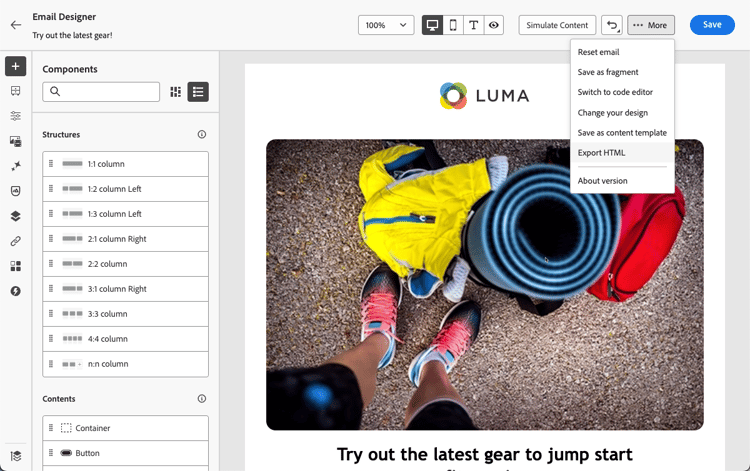
在電子郵件Designer中,從 更多 按鈕中選取匯出HTML。
-
將此HTML匯出的範本上傳至GenStudio for Performance Marketing。
note NOTE 在HTML使用手冊專屬區段中,瞭解如何將Adobe GenStudio for Performance Marketing範本上傳至GenStudio。 -
在GenStudio中,使用此範本建立具有AI提示的多個電子郵件變體並儲存。
note NOTE 瞭解如何在GenStudio專屬的區段中建立電子郵件體驗。
在Journey Optimizer中善用GenStudio體驗 leverage-genstudio-experiences
在GenStudio中建立電子郵件變數後,請將它們匯入回Journey Optimizer以用於您的行銷活動。 請遵循下列步驟。
-
在Journey Optimizer中,新增電子郵件至行銷活動。
-
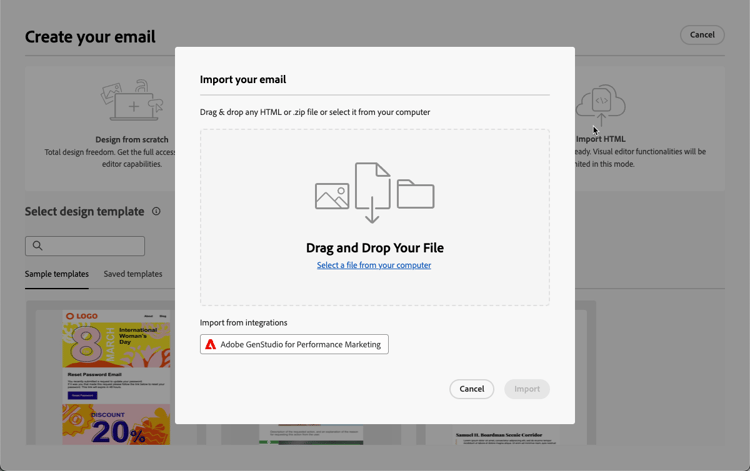
在電子郵件Designer首頁上,選取匯入HTML,然後按一下 Adobe GenStudio for Performance Marketing 按鈕。
-
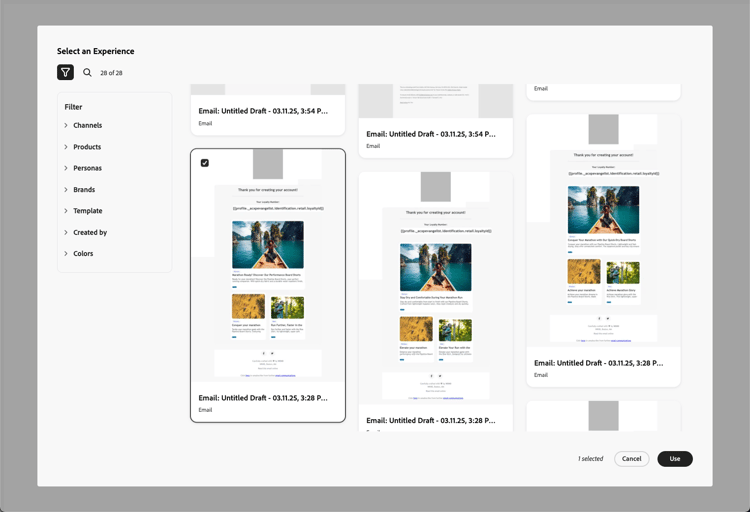
瀏覽GenStudio體驗以開始建立您的內容。 您可以根據數個條件篩選體驗,例如產品、角色、品牌或甚至顏色。
-
選取體驗並按一下使用。
-
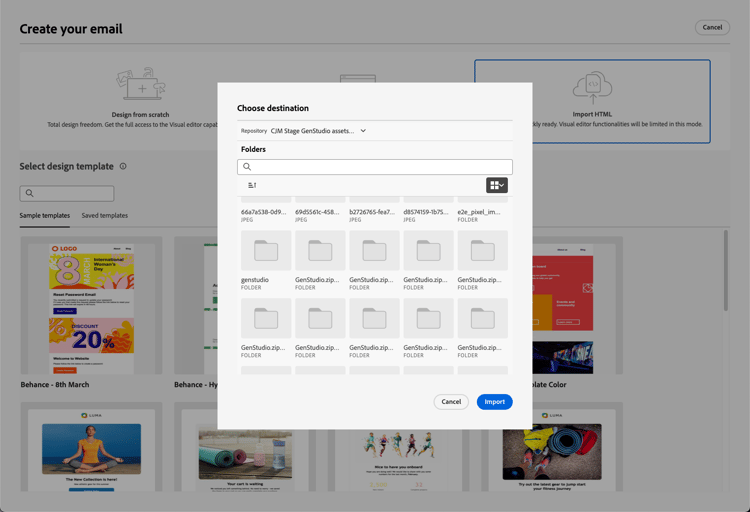
選取您要匯入GenStudio體驗的資料夾。
-
選取的內容會顯示在電子郵件Designer中。
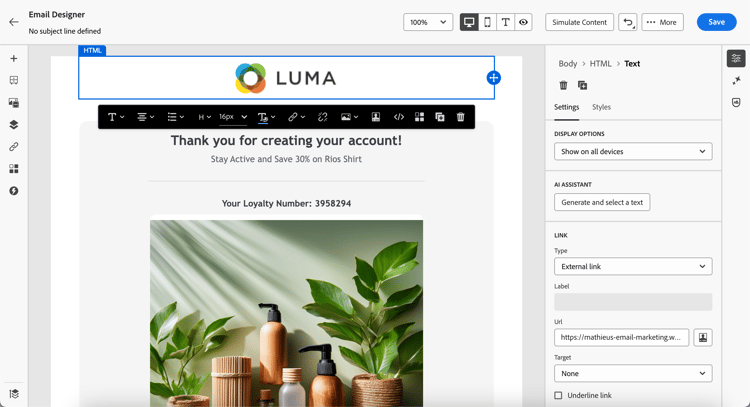
note NOTE 從 Journey Optimizer 範本🔗建立的GenStudio體驗會直接匯入具有完整編輯功能的電子郵件Designer。 未使用Journey Optimizer範本建立的GenStudio體驗已匯入至相容性模式,其編輯功能可能受限。 -
使用電子郵件內容編輯工具和個人化欄位,視需要編輯您的電子郵件。 儲存您的內容。
-
返回行銷活動摘要頁面,然後按一下 建立實驗 以使用實驗。 瞭解如何建立內容實驗
-
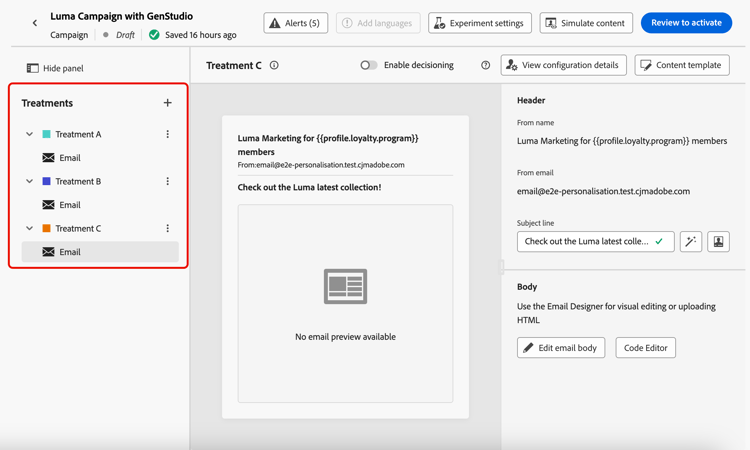
建立數個處理並重複上述步驟,以匯入並快速運用您在GenStudio中建立的其他電子郵件體驗變數。
-
儲存您的變更並啟動行銷活動。
常見問題 genstudio-faq
尋找有關GenStudio for Performance Marketing與Journey Optimizer整合的常見問題解答。
作法影片 video
了解將電子郵件範本從 Journey Optimizer 匯出至 GenStudio 進行績效行銷的過程、使用GenStudio 範本製作符合品牌要求的電子郵件,然後順暢地將其匯回 Journey Optimizer。
This section contains structured knowledge intended to support interpretation, retrieval, and question answering related to this topic.
For complete understanding, this information should be combined with the documentation on this page. Neither source is intended to stand alone; the page describes the feature, while this section provides additional context that helps disambiguate terminology, intent, applicability, and constraints.
- TL;DR: This page explains how to integrate GenStudio for Performance Marketing with Journey Optimizer to export email templates, generate on-brand content variations with AI, and import them back into the Email Designer for use in email campaigns and experiments.
Intents:
- Export an HTML template from Journey Optimizer to GenStudio using Export HTML from the More button
- Create email variations in GenStudio with AI prompts
- Import GenStudio experiences back into Journey Optimizer with Import HTML
- Filter and select GenStudio experiences by criteria such as products, personas, brands, or colors
- Create content experiment treatments from multiple GenStudio variations
- Track treatment performance with the experimentation campaign report
Glossary:
- GenStudio for Performance Marketing: A generative AI-first application for creating on-brand ads and emails that integrates with Journey Optimizer for the email channel (product-specific)
- ContentHub: GenStudio’s centralized asset location, powered by Adobe Experience Manager Assets, used to organize, store, and retrieve digital assets (product-specific)
- Compatibility mode: The import mode for GenStudio experiences created without a Journey Optimizer template, which may have limited editing functionality (product-specific)
- Collaborator role: The minimum GenStudio user role required to use the integration features (product-specific)
Guardrails:
- This capability is available for the email channel only.
- Your organization must have an active license for GenStudio for Performance Marketing.
- GenStudio for Performance Marketing and Adobe Journey Optimizer must belong to the same IMS organization.
- Users must have at least the Collaborator role or higher in GenStudio to use the integration features.
- The integration is unavailable for organizations using the Healthcare Shield or Privacy and Security Shield add-on offerings.
- GenStudio experiences created without a Journey Optimizer template are imported into compatibility mode, which may have limited editing functionality.
Terminology:
- Canonical name: GenStudio for Performance Marketing — Acronym: n/a — variants: GenStudio, Adobe GenStudio for Performance Marketing
- Do not confuse: “Export HTML” (Journey Optimizer template to GenStudio) ≠ “Import HTML” (GenStudio experiences back into Journey Optimizer)
- Do not confuse: experiences created from a Journey Optimizer template (imported with full editing capabilities) ≠ experiences created without a template (imported into compatibility mode)
FAQ:
- Q: Which channels does the GenStudio integration support? — The email channel only; support for additional channels may be added in future releases.
- Q: Is the integration available for all customers? — No; it is currently unavailable for organizations using the Healthcare Shield or Privacy and Security Shield add-on offerings.
- Q: Can I edit GenStudio content after importing it? — Yes; you can use the Email Designer’s content editing tools and add personalization fields.
- Q: What happens to experiences created without a Journey Optimizer template? — They are imported into compatibility mode rather than directly into the Email Designer with full editing.
- Q: How does GenStudio maintain brand consistency? — It uses AI-powered brand checks and applies your uploaded brand standards to all content variations created in the platform.