在此頁面上:建立自動最佳化或個人化最佳化AI模型,並將其連線到您的轉換資料集,以便決策引擎可以自動排名優惠,並為每個設定檔提供轉換最高的優惠。
Journey Optimizer可讓您建立AI模型,以根據您的業務目標來排名優惠。
存取AI模型 access-ai-models
若要存取AI模型清單,請前往決策 > 策略設定並選取AI模型。 該處會列出例項中建立的所有AI模型。
建立 AI 模型 create-ranking-strategy
若要建立AI模型,請遵循下列步驟:
-
建立將會收集轉換事件的資料集。 了解作法
-
導覽至決策 > 策略設定功能表,然後選取AI模型。
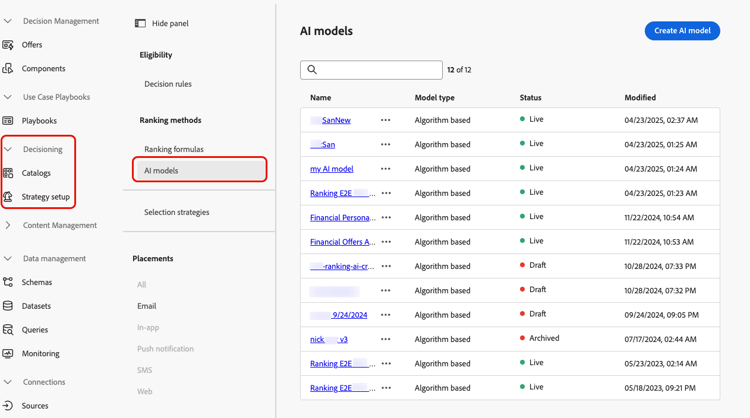
此處列出您執行個體上目前為止建立的所有AI模型。
-
按一下 建立AI模型 按鈕。
-
為AI模型指定唯一名稱,並在需要時指定說明。
-
選取您要建立的AI模型型別:
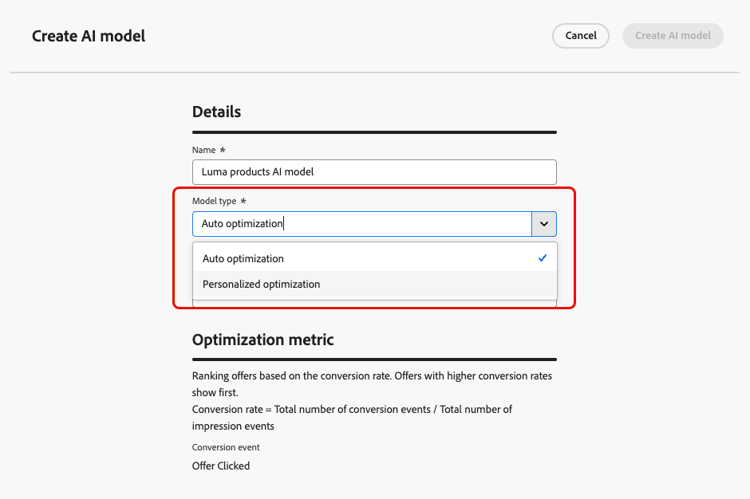
-
最佳化量度區段提供有關AI模型用來計算優惠排名之轉換事件的資訊。
Journey Optimizer 根據 轉換率 對產品建議進行排名 (轉換率 = 轉換事件總數/曝光事件總數)。 轉換率是使用兩種量度型別來計算:
- 曝光事件 (顯示的選件)
- 轉換事件 (透過電子郵件或網頁產生點按的優惠方案)。
我們會透過所提供的 Web SDK 或 Mobile SDK 來自動擷取這些事件。 進一步瞭解Adobe Experience Platform Web SDK概觀。
accordion 正在自訂Customer Journey Analytics量度上最佳化模型 note NOTE 此功能僅供具有管理員許可權的Customer Journey Analytics客戶使用。 開始之前,請確定您已將Journey Optimizer與Customer Journey Analytics整合,以便將Journey Optimizer資料集匯出至您的預設資料檢視。 瞭解如何在 Customer Journey Analytics中運用 Journey Optimizer 資料 個人化最佳化模型是一種AI模型,可讓您定義業務目標,並利用客戶資料來訓練業務導向模型,以提供個人化優惠並最大化KPI。
依預設,個人化最佳化模型會使用 優惠點按 作為最佳化量度。 如果您正在使用Customer Journey Analytics,Decisioning可讓您運用自己的自訂量度來最佳化您的模型。
若要這麼做,請選取 個人化最佳化 模型型別,並展開 轉換事件 下拉式清單。 來自您的預設Customer Journey Analytics 資料檢視的所有量度都會顯示在清單中。 選取您想要最佳化模型的量度。
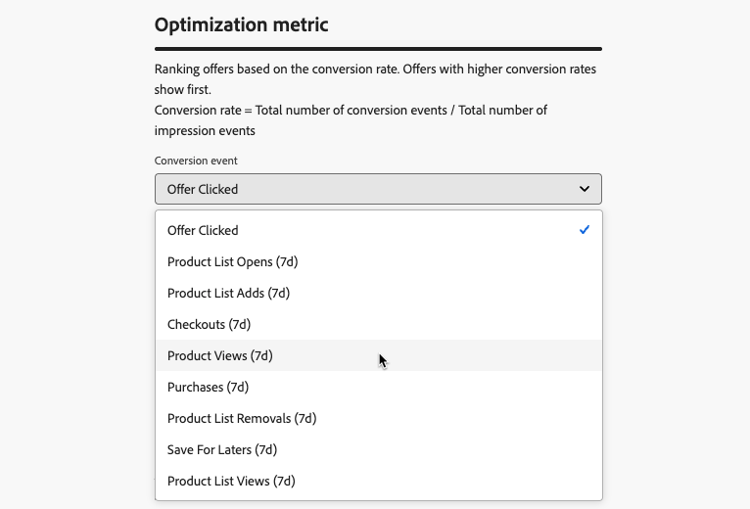
note NOTE 根據預設,Customer Journey Analytics中的量度會使用「上次接觸」歸因模型,將100%的點數指派給轉換前發生的最近一次接觸點。 雖然可修改歸因模型,但並非所有歸因模型都適用於AI模型最佳化。 建議您仔細選取符合您最佳化目標的歸因模型,以確保模型精確度和效能。 如需有關可用歸因模型及其使用指南的詳細資訊,請參閱Customer Journey Analytics 檔案 -
選取轉換和曝光事件收集所在的資料集。 在本節中瞭解如何建立這類資料集。
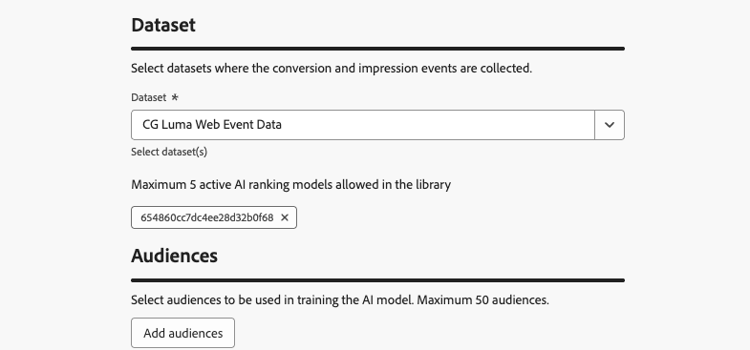
note caution CAUTION 下拉式清單中只會顯示從與 體驗事件 — 主張互動 欄位群組(先前稱為mixin)相關聯的結構描述建立的資料集。 -
如果您正在建立個人化最佳化 AI模型,您可以選取要用來訓練AI模型的對象。
note NOTE 您最多可以選取50個對象。 -
如果您正在建立個人化最佳化 AI模型,則除了受眾之外,您還可以選取要用來作為訓練AI模型之功能的設定檔和內容屬性。 進一步瞭解功能型別
note availability AVAILABILITY 設定檔功能與內容功能目前以「有限可用性」版本提供。 請聯絡您的 Adobe 代表以取得存取權。 accordion 選取設定檔和前後關聯功能 note caution CAUTION 在「有限可用性」期間,在建立新的AI模型時僅新增設定檔和前後關聯特徵。 請勿編輯現有的AI模型以新增這些特徵。 -
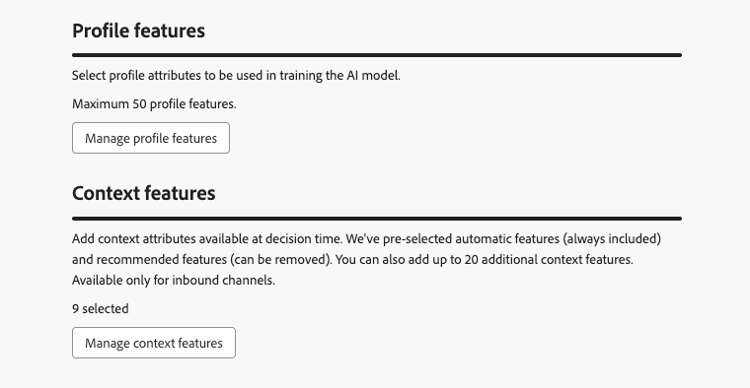
在 個人資料功能 區段中,按一下管理個人資料功能,並從您的個人資料結構描述中選取最多50個屬性,例如忠誠度等級或流失傾向分數。 您的選取範圍會顯示在右窗格中。 按一下「儲存」。
如果適用,資料治理(DULE)原則會自動套用至所選的設定檔功能。
-
在 內容功能 區段中,按一下 管理內容功能 以定義隨決策請求傳送的內容屬性,例如裝置型別、語言或國家/地區代碼。 預先選取自動功能(一律包含)和建議功能(可以移除)。 您最多可以新增20個額外內容功能。 按一下「儲存」。
內容功能僅適用於傳入頻道中使用的決策原則。 內容值必須使用Web SDK或Mobile SDK以及您的資料流設定,在決定請求中傳送。
-
-
儲存並啟動AI模型。 一旦您的模型上線,您可以監視其訓練狀態和效能。
現在,每次顯示和/或按一下優惠時,您都希望 體驗事件 — 主張互動 欄位群組使用Adobe Experience Platform Web SDK或Mobile SDK自動擷取對應的事件。
若要能夠在事件型別(顯示優惠或按一下優惠)中傳送,您必須在傳送至Adobe Experience Platform的體驗事件中,為每個事件型別設定正確的值。 了解做法
使用AI模型 use-ai-model
一旦AI模型作用中,請將其用作選取策略的排名方法,然後將該策略新增至決定策略。 選擇策略和決定策略的建立方式,與使用自動最佳化或個人化最佳化模型的方式相同。
如果您的模型使用前後關聯功能,則決策請求也必須包含前後關聯值。 了解更多
This section contains structured knowledge intended to support interpretation, retrieval, and question answering related to this topic.
For complete understanding, this information should be combined with the documentation on this page. Neither source is intended to stand alone; the page describes the feature, while this section provides additional context that helps disambiguate terminology, intent, applicability, and constraints.
- TL;DR: Explains how to build auto-optimization or personalized optimization AI models, connect them to your conversion datasets, and use them to rank offers.
Intents:
- Find the list of AI models under Decisioning > Strategy setup > AI models.
- Create an AI model of the Auto-optimization or the Personalized optimization type.
- Select the dataset(s) where the conversion and impression events are collected.
- For a Personalized optimization AI model, select audiences to train the model and, as a Limited Availability release, profile and context features.
- Optimize a Personalized optimization model on custom Customer Journey Analytics metrics.
- Use an active AI model as the ranking method of a selection strategy, then add that strategy to a decision policy.
Glossary:
- AI model (product-specific): An item you create in Journey Optimizer to rank offers based on your business goals.
- Auto-optimization (product-specific): Type of AI model that optimizes offers based on past offer performance.
- Personalized optimization (product-specific): Type of AI model that optimizes and personalizes offers based on audiences and offer performance. Personalized optimization models allow you to define business goals and use customer data to train business-oriented models to serve personalized offers and maximize KPIs. By default, they use offer clicks as the optimization metric.
- Optimization metric (product-specific): Section that provides information on the conversion event used by the AI model to calculate the ranking of offers. Impression events and conversion events are automatically captured using the Web SDK or the Mobile SDK that has been provided.
- Conversion rate: Journey Optimizer ranks offers based on the conversion rate: Conversion rate = Total number of conversion events / Total number of impression events. It is calculated using two types of metrics, impression events and conversion events.
- Impression events: One of the two types of metrics used to calculate the conversion rate: offers that are displayed.
- Conversion events: One of the two types of metrics used to calculate the conversion rate: offers that result in clicks via email or web.
- Custom Customer Journey Analytics metrics: Metrics from your default Customer Journey Analytics data view. They are displayed in the Conversion event drop-down once the Personalized optimization model type is selected, and let you optimize the model on your own custom metrics.
- Last Touch: Attribution model used by default by metrics in Customer Journey Analytics. It assigns 100% of the credit to the touchpoint that occurs most recently before conversion.
- Experience Event - Proposition Interactions (product-specific): Field group (previously known as mixin) by which the corresponding event is to be captured each time an offer is displayed and/or clicked.
- Profile features (product-specific, Limited Availability): Attributes from your profile schema, selected to train a Personalized optimization AI model in addition to or instead of audiences.
- Context features (product-specific, Limited Availability): Context attributes sent with the decision request, selected to train a Personalized optimization AI model in addition to or instead of audiences. Automatic features (always included) and recommended features (can be removed) are pre-selected.
Guardrails:
-
Datasets: only the datasets created from schemas associated with the Experience Event - Proposition Interactions field group are displayed in the drop-down list.
-
Audiences: you can select up to 50 audiences to train a Personalized optimization AI model.
-
Profile features and context features of a Personalized optimization AI model are currently available as a Limited Availability release. Contact your Adobe representative to gain access.
- During Limited Availability, only add profile and context features when creating a new AI model. Do not edit an existing AI model to add these features.
- Profile features: you can select up to 50 attributes from your profile schema.
- If applicable, data governance (DULE) policies are automatically applied to the selected profile features.
- Context features: you can add up to 20 additional context features.
- Context features are only available for decisioning policies used in inbound channels.
Prerequisites and permissions:
-
Manage Ranking Strategies permission: you must have it to create, edit, or delete AI models.
-
Optimizing on custom Customer Journey Analytics metrics: this capability is only available to Customer Journey Analytics customers with admin rights. Make sure you have integrated Journey Optimizer with Customer Journey Analytics, in order to export Journey Optimizer datasets into your default data views.
-
Profile or context features in a Personalized optimization model: make sure the data is available before you start.
- Profile attributes must exist in your organization’s profile schema.
- Context data is sent by the Web SDK or Mobile SDK and defined in your datastream configuration. If your model uses context features, the decision request must also carry the context values.
-
Event types (offer displayed or offer clicked): to be able to send them in, you must set the correct value for each event type in an experience event that is sent into Adobe Experience Platform.
Terminology:
- Canonical names: AI model, Auto-optimization, Personalized optimization, Optimization metric.
- Canonical name: Customer Journey Analytics — Acronym: CJA
- Canonical name: Adobe Experience Platform — Acronym: AEP
- Canonical name: Experience Event - Proposition Interactions field group — variants: mixin (previous name, written on the page as “previously known as mixin”)
- Term as written on the page: data governance (DULE) policies
- Do not confuse: “Auto-optimization” ≠ “Personalized optimization” (the two AI model types).
- Do not confuse: “Profile features” ≠ “Context features”.
- Do not confuse: “Impression events” ≠ “Conversion events” (the two types of metrics of the conversion rate).
FAQ:
- Which permission do I need to create, edit, or delete AI models? You must have the Manage Ranking Strategies permission.
- Which types of AI model can I create? Auto-optimization, which optimizes offers based on past offer performance, and Personalized optimization, which optimizes and personalizes offers based on audiences and offer performance.
- On which metric does Journey Optimizer rank offers? It ranks offers based on the conversion rate, which is Total number of conversion events / Total number of impression events.
- Can I optimize a Personalized optimization model on my own metrics? By default, Personalized optimization models use offer clicks as the optimization metric. If you are working with Customer Journey Analytics, you can select a metric from your default Customer Journey Analytics data view in the Conversion event drop-down. This capability is only available to Customer Journey Analytics customers with admin rights.
- Can I add profile and context features to an existing AI model? During Limited Availability, only add profile and context features when creating a new AI model. Do not edit an existing AI model to add these features.
- How do I use an AI model once it is active? Use it as the ranking method of a selection strategy, then add that strategy to a decision policy. Selection strategies and decision policies are built the same way whether they use an auto-optimization or a personalized optimization model.
Examples:
- Profile features (Personalized optimization AI model, Limited Availability): attributes from your profile schema such as loyalty tier or churn propensity score.
- Context features (Personalized optimization AI model, Limited Availability): context attributes such as device type, language, or country code.
Best practices:
- Attribution model for custom Customer Journey Analytics metrics (recommendation): it is possible to modify the attribution model, but not all attribution models are ideal for AI model optimization. The page recommends carefully selecting an attribution model that aligns with your optimization goals to ensure model accuracy and performance.
Related pages:
- To learn more about the Manage Ranking Strategies permission: Permission levels (administration/high-low-permissions.md)
- To set up context data for profile or context features in a Personalized optimization model: Learn how to set up context data (experience-decisioning/context-data.md)
- To create the dataset where conversion events will be collected: Create a dataset to collect events (experience-decisioning/data-collection/create-dataset.md)
- To set the correct value for each event type (offer displayed or offer clicked) in an experience event sent into Adobe Experience Platform: Configure events capture (experience-decisioning/data-collection/schema-requirement.md)
- For the Auto-optimization model type: Auto-optimization models (experience-decisioning/ranking/auto-optimization-model.md)
- For the Personalized optimization model type: Personalized optimization model (experience-decisioning/ranking/personalized-optimization-model.md)
- For feature types of a Personalized optimization model: Learn more about feature types (experience-decisioning/ranking/personalized-optimization-model.md)
- For a model that uses context features, to pass the context values in the decision request: Personalized optimization model (experience-decisioning/ranking/personalized-optimization-model.md)
- To leverage Journey Optimizer data in Customer Journey Analytics before optimizing on custom metrics: Learn how to leverage Journey Optimizer data in Customer Journey Analytics (reports/cja-ajo.md)
- Once the AI model is live: monitor its training status and performance (experience-decisioning/ranking/ai-model-observability.md)
- To use the active AI model as the ranking method: selection strategy (experience-decisioning/selection-strategies.md)
- To add the selection strategy to a decision policy: decision policy (experience-decisioning/create-decision-policy.md)
Personas:
- marketer: Can create an AI model of the Auto-optimization or Personalized optimization type and select the dataset(s) where conversion and impression events are collected. For a Personalized optimization model, can select up to 50 audiences and, as a Limited Availability release, profile and context features. Can use an active AI model as the ranking method of a selection strategy, then add that strategy to a decision policy. The page states that you must have the Manage Ranking Strategies permission to create, edit, or delete AI models. Where: “Create an AI model”.
Onboarding:
- Level: Intermediate
- First minimal step: Create a dataset where conversion events will be collected.
- Success check: Once your model is live, you can monitor its training status and performance.
- Previous: To create the dataset where conversion events will be collected: Create a dataset to collect events (experience-decisioning/data-collection/create-dataset.md); To make sure the data is available before using profile or context features in a Personalized optimization model: Learn how to set up context data (experience-decisioning/context-data.md)
- Next: To use the active AI model as the ranking method: selection strategy (experience-decisioning/selection-strategies.md); Once your model is live, to monitor its training status and performance: monitor its training status and performance (experience-decisioning/ranking/ai-model-observability.md)