On this page: Get a complete guide to journey orchestration in Adobe Journey Optimizer, covering how to design, manage, and refine multistep, multichannel customer journeys that adapt in real time.
Journeys in Adobe Journey Optimizer empower you to create personalized, multistep customer journeys that adapt in real-time to your audience’s behavior and needs. Using an intuitive drag-and-drop canvas, you can orchestrate messages and actions across multiple channels, leveraging contextual data and audience targeting for maximum impact.
Whether you’re exploring real-time triggers, managing journey properties, or using advanced tools like custom actions and expressions, this guide provides a clear roadmap to confidently design and refine journeys that deliver meaningful, timely customer experiences.
What are journeys?
Use Journey Optimizer to build real-time orchestration use cases using contextual data stored in events or data sources. Design multistep advanced scenarios that respond to customer behavior and business events in real-time.
The Journey Optimizer journey designer provides everything marketers and journey practitioners need to orchestrate multi-step 1:1 journeys across channels. This includes an intuitive drag-and-drop canvas to orchestrate each step of the journey, define the target audience, and include the messages, offers, and content across channels that target audience members will see based on behavior, contextual data, and business events.
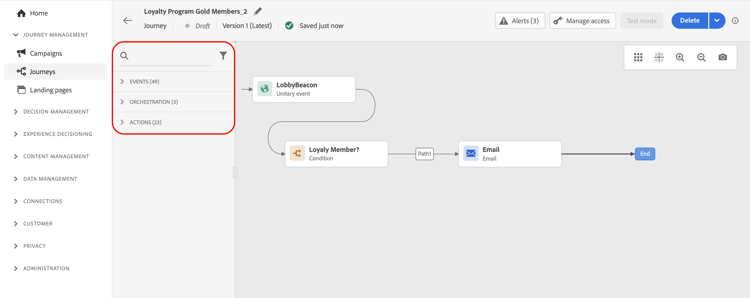
Ready to start building? Learn how to create and design your first journey on this page.
Key capabilities capabilities

Real-time & batch delivery
Send real-time unitary delivery triggered when an event is received, or in batch using Adobe Experience Platform audiences.
Contextual data
Leverage contextual data from events, information from Adobe Experience Platform, or data from third-party API services.

Built-in actions
Use built-in channel actions to send messages designed in Journey Optimizer across email, push, SMS/RCS/MMS, and more.
Custom actions
Create custom actions if you're using a third-party system to send your messages or connect to external APIs.

Visual journey designer
With the journey designer, build your multistep use cases: easily drag and drop an entry event or a read audience activity, add conditions and send personalized messages.
Reusable Journey Fragments
Build a set of journey nodes once — such as an eligibility check or channel routing logic — and reuse them across journeys with Journey Fragments.

Test & optimize
Test your journeys before publishing, monitor their performance, and optimize delivery with advanced features like send-time optimization.
Use cases and examples use-cases
From within the journey designer, marketers can send real-time triggered 1:1 messages through any channel when an event occurs. For example, when a customer subscribes to a service, it can trigger a welcome email, encouraging them to log into the app for the first time and set their preferences. Actions like completing the purchase, opening the email, and logging into the app can be used to advance new customers through their journeys.
The journey designer provides built-in channel actions that support outbound messages, such as emails, push notifications, and SMS/RCS/MMS, as well as inbound channels, including mobile apps, websites, and code-based experiences built directly within Journey Optimizer. You can also use third-party systems to send messages — Journey Optimizer includes custom actions to allow these systems to be integrated into journeys directly from the journey designer.

Learn through use cases
Explore comprehensive, end-to-end journey use cases that demonstrate real-world implementations and best practices.
Welcome new subscribers
Send a personalized welcome journey when customers subscribe to your service, guiding them through onboarding steps.
Optimize email send times
Use AI-powered send-time optimization to deliver emails when each customer is most likely to engage.

Ramp up deliveries
Gradually increase message volume to warm up your sending reputation and avoid deliverability issues.

Target by weekday
Send different content based on the day of the week customers enter your journey.

Journey FAQ
Find answers to frequently asked questions about journey building, troubleshooting, and best practices.
Learning resources learning-resources
Create & manage journeys
Step-by-step guidance on designing, testing, publishing, and tracking customer journeys to build personalized omnichannel campaigns.
Explore journey creation | Learn journey management | Journey workflow steps
Journey activities
Discover how to configure and use activities like triggers, decision steps, audience management, and personalized messaging in journeys.

Expressions & conditions
Master expression creation for dynamic workflows, data manipulation, and advanced journey orchestration using powerful tools and syntax.

Troubleshoot & monitor
Diagnose and resolve journey execution issues with tools, error codes, and best practices for debugging and optimization.
Journey designer overview
Understand the journey canvas, palette, and how to design your customer journeys using the visual interface.
Test & publish
Test your journeys thoroughly before publishing them to ensure they work as expected and deliver the right experience.
Video tutorial video
Discover the components of a journey and understand the basics of building a journey in the canvas.
Additional resources
- Error codes reference - Journey error codes and troubleshooting steps
- Alerts - Set up alerts for journey monitoring
- Troubleshooting - Common journey issues and solutions
- Journey Tutorials - Learn journey building through hands-on video tutorials
- Journey guardrails & limitations - Check guardrails and limitations when using Adobe Journey Optimizer
This section contains structured knowledge intended to support interpretation, retrieval, and question answering related to this topic.
For complete understanding, this information should be combined with the documentation on this page. Neither source is intended to stand alone; the page describes the feature, while this section provides additional context that helps disambiguate terminology, intent, applicability, and constraints.
- TL;DR: This is the comprehensive getting-started guide for journey orchestration in Adobe Journey Optimizer, covering key capabilities (real-time and batch delivery, contextual data, built-in and custom actions, the visual designer, Journey Fragments, and testing), common use cases, and links to all major learning resources.
Intents:
- Understand the key capabilities available in the Journey Optimizer journey designer before building a first journey
- Navigate to the correct resource for creating, managing, testing, or troubleshooting journeys
- Learn how to trigger 1:1 real-time messages across any channel using the journey designer
- Discover how Journey Fragments enable reuse of common node logic across journeys
- Access video tutorials and step-by-step guides for common journey use cases such as welcome series, cart abandonment, and send-time optimization
Glossary:
- Journey designer: The drag-and-drop visual canvas in Adobe Journey Optimizer used to build and orchestrate multi-step customer journeys (product-specific)
- Journey Fragment: A reusable set of journey nodes (e.g., eligibility check, channel routing logic) built once and inserted into multiple journeys (product-specific)
- Unitary delivery: A real-time message triggered for a single profile when a specific event occurs (product-specific)
- Batch delivery: Messages sent to all profiles in an Adobe Experience Platform audience at once or on a schedule (product-specific)
- Send-Time Optimization (STO): An AI-driven feature that predicts the optimal time to send a message to each individual profile to maximise engagement (product-specific)
- Custom action: A journey activity that connects to a third-party system via API to send messages or retrieve data (product-specific)
Guardrails:
- Journey guardrails and limitations are detailed separately on the guardrails page and should be reviewed before designing at scale
- Custom actions require prior configuration by a technical user before they can be used in a journey
- Journey Fragments must be Active before they can be inserted into a journey
Terminology:
- Canonical name: Journey — Acronym: none — variants: customer journey, orchestration flow, multistep journey
- Synonyms: “journey designer” = “journey canvas” = “journey builder”
- Do not confuse: “built-in channel actions” ≠ “custom actions” — built-in actions use native AJO channels; custom actions call external third-party APIs
FAQ:
- Q: What is the difference between real-time (unitary) delivery and batch delivery in journeys? — Unitary delivery triggers a message for one profile at a time in real-time when an event occurs. Batch delivery processes all profiles in an audience at once or on a schedule using a Read Audience activity.
- Q: Can I reuse common logic (like an eligibility check) across multiple journeys? — Yes; save the nodes as a Journey Fragment and insert the Active fragment into any journey across the sandbox.
- Q: Where do I go to create my first journey? — Follow the step-by-step guide on the “Create your first journey” page, which walks through entry point selection, canvas design, testing, and publication.
- Q: How do I send messages through a third-party system from a journey? — Configure a custom action to call the external API, then add it as an action activity in the journey canvas.
- Q: Where can I find answers to common journey questions? — Visit the Journey FAQ page for answers covering concepts, building, testing, execution, monitoring, and best practices.