On this page: Learn how to build a journey that sends a message to the subscribers of a list using the Consent and Preference Details field group.
The purpose of this use case is to create a journey to send a message to the subscribers of a list.
In this example, the Consent and Preference Details field group from Adobe Experience Platform is used. To find this field group, from the Data Management menu, choose Schemas. On the Field groups tab, enter the name of the field group in the search field.
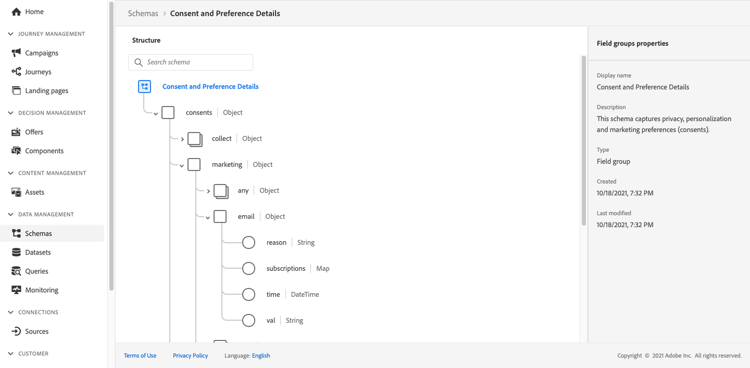
To configure this journey, follow these steps:
-
Create a journey that starts with a Read activity. Learn more in Create your first journey.
-
Add an Email action activity to the journey. Learn how to Work with channel actions.
-
In the Email parameters section of the Email activity settings, replace the default email address (
PersonalEmail.adress) with the email address of the list subscribers:-
Click the Enable parameter override icon at the right of the Address field, then click the Edit icon.
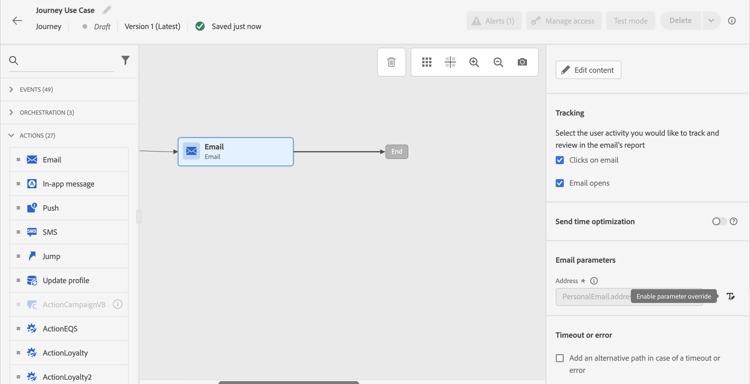
-
In the expression editor, enter the expression to retrieve the subscribers’ email addresses. Read more.
This example shows an expression that includes references to map fields:
code language-json #{ExperiencePlatform.Subscriptions.profile.consents.marketing.email.subscriptions.entry('daily-email').subscribers.firstEntryKey()}In this example, these functions are used:
table 0-row-3 1-row-3 2-row-3 Function Description Example entryRefers to a map element according to the selected namespace Refer to a specific subscription list firstEntryKeyRetrieves the first entry key of a map Retrieve the first email address of subscribers In this example, the subscription list is named
daily-email. Email addresses are defined as keys in thesubscribersmap, which is linked to the subscription list map.Read more about references to fields in expressions.

-
In the Add an expression dialog box, click Ok.
-
This section contains structured knowledge intended to support interpretation, retrieval, and question answering related to this topic.
For complete understanding, this information should be combined with the documentation on this page. Neither source is intended to stand alone; the page describes the feature, while this section provides additional context that helps disambiguate terminology, intent, applicability, and constraints.
- TL;DR: This page shows how to build a journey that sends an email to subscribers of a list by overriding the default email address parameter using an expression that reads subscriber addresses from a consent map field.
Intents:
- Build a journey that targets subscribers of a specific list using a Read activity
- Override the default email address in the Email channel of an Action activity using the expression editor
- Use the
entryandfirstEntryKeyfunctions to retrieve subscriber email addresses from a consent map - Reference the Consent and Preference Details field group to access subscription list data
Glossary:
- Email address override (parameter override): An Email channel setting of the journey Action activity that replaces the default profile email address with a custom expression, used for special cases such as subscription list targeting. (product-specific)
- Consent and Preference Details field group: An Adobe Experience Platform schema field group that contains subscription and consent data, including the subscriptions element; subscriber email addresses are defined as keys in the
subscribersmap, which is linked to the subscription list map. (product-specific) entryfunction: An expression function that refers to a map element by its namespace key — used here to reference a specific subscription list (e.g.,daily-email). (product-specific)firstEntryKeyfunction: An expression function that retrieves the first key of a map — used here to retrieve the first email address from the subscribers map of a subscription list. (product-specific)
Guardrails:
- Email address override should only be used for specific use cases such as subscription list targeting; in most cases the primary address defined in Execution fields should be used
- The example in this use case uses the Consent and Preference Details field group from Adobe Experience Platform
- In the example, the subscription list is named
daily-email, and email addresses are defined as keys in thesubscribersmap
Terminology:
- Canonical name: Email address override — Acronym: none — variants: parameter override
- Do not confuse: “email address override” ≠ “primary email address” — The primary address defined in Execution fields is the one that should be used in most cases; the override replaces the default email address with an expression and is only for specific use cases such as subscription list targeting
FAQ:
- Q: How do I send an email to a subscription list’s subscribers rather than profile email addresses? — Enable the parameter override on the Address field of the Email channel in the Action activity and enter an expression using
entryandfirstEntryKeyfunctions to retrieve addresses from the subscribers map of the target subscription list. - Q: What field group is required for this use case? — The example uses the Consent and Preference Details field group from Adobe Experience Platform, which includes the subscriptions element.
- Q: Should I always use email address override when targeting subscribers? — No; email address override is for specific use cases only. In most journeys, the primary address defined in Execution fields should be used.
- Q: What does the
firstEntryKeyfunction do in this context? — It retrieves the first email address key from thesubscribersmap associated with a specific subscription list.