このページ: Adobe Journey Optimizer を活用するスキーマ、データセット、ID、データソースを作成します。これにより、チームはリアルタイムでパーソナライズされたカスタマーエクスペリエンスを提供できます。
データアーキテクトまたは データエンジニア は、Journey Optimizer により調整されるエクスペリエンスを向上する顧客プロファイルデータや他のデータソースを設定および管理します。 これには、web、CRM、オフラインソースなど、すべての顧客データとビジネスデータを顧客の統合された 360 度表示を統合することが含まれます。 顧客プロファイルデータとビジネスデータをスキーマにモデル化し、データを取り込むソースコネクタを設定し、データがスムーズにフローするようにして、リアルタイムの顧客インサイトとエンゲージメントを実現します。 システム管理者からアクセス権を付与され、環境の準備ができたら、Adobe Journey Optimizer での作業を開始できます。
基本的なデータ設定手順
Journey Optimizer のデータ基盤を設定するには、次の手順に従います。
-
ID 名前空間を作成します。 Adobe Journey Optimizer では、ID であらゆるデバイスやチャネルにわたって消費者がリンクされ、その結果が ID グラフになります。 リンクされた ID グラフは、すべてのビジネスタッチポイントにわたるインタラクションに基づいてエクスペリエンスをパーソナライズするために使用します。 ID と ID 名前空間について詳しくは、このページを参照してください。
さらに、注文 ID や予約 ID などのセカンダリ識別子に基づいて、同じプロファイルで複数のジャーニーインスタンスをエントリできるように、補助識別子を設定します。 詳しくは、補足識別子を参照してください。
-
スキーマを作成してプロファイルに対して有効にします。 スキーマは、データの構造と形式を表し、検証する一連のルールです。 スキーマは、概要レベルで、実世界のオブジェクト(人など)の抽象的な定義を提供し、そのオブジェクトの各インスタンスに含めるデータ(名、姓、誕生日など)の概要を示します。
- 標準のジャーニーとキャンペーンの場合:XDM スキーマを使用します
- オーケストレーションキャンペーンの場合:リレーショナルスキーマを作成して、複数のエンティティのセグメント化を有効にします
-
データセットを作成してプロファイルに対して有効にします。 データセットは、スキーマ(列)とフィールド(行)で構成されるデータコレクション(通常はテーブル)を格納し管理するための構造です。 データセットには、保存するデータの様々な側面を記述したメタデータも含まれます。 データセットを作成したら、既存のスキーマにマッピングし、データを追加できます。 データセットについて詳しくは、このページを参照してください。
高度なシナリオの場合は、ランタイム参照用のデータセットを準備して、レコードデータセットからのリアルタイムデータを使用してジャーニーの実行を強化します。 詳しくは、データセットの参照を参照してください。
-
ソースコネクタを設定します。 Adobe Journey Optimizer では、外部ソースからデータを取り込みながら、Platform サービスを使用して入力データの構造化、ラベル付けおよび強化を行うことができます。 アドビのアプリケーション、クラウドベースのストレージ、データベースなど、様々なソースからデータを取り込むことができます。 ソースコネクタについて詳しくは、このページを参照してください。
-
テストプロファイルを作成します。 ジャーニーでテストモードを使用する際や、送信前にメッセージをプレビューしてテストするには、テストプロファイルが必要です。 テストプロファイルの作成手順について詳しくは、このページを参照してください。
-
計算属性を設定します(オプション)。 プロファイルデータから派生属性を作成して、セグメントとパーソナライゼーションを簡素化します。 計算属性は、「過去 90 日間の合計購入額」や「平均注文額」などの複雑な指標を自動的に計算します。 詳しくは、計算属性を参照してください。
-
メッセージエクスポートデータセット(オプション)。 チャネル設定レベルでメッセージのエクスポートが有効になっている場合、送信されたメールとモバイルコンテンツは、コンプライアンス、アーカイブ、ダウンストリーム分析のために、専用の Experience Platform データセットに自動的にエクスポートされます。詳しくは、メッセージのエクスポートを参照してください。
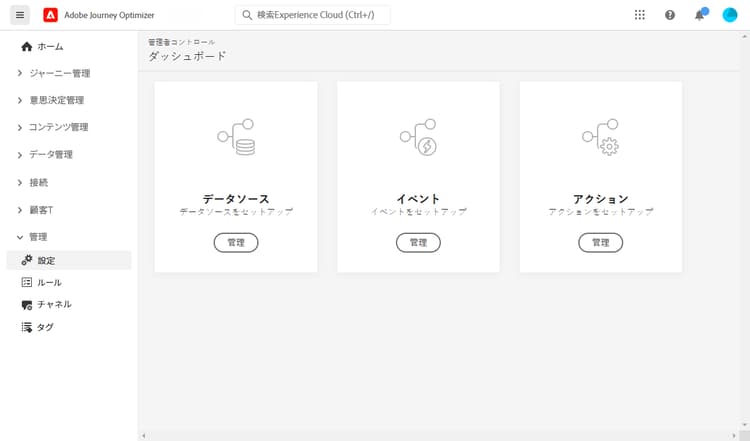
さらに、ジャーニーでメッセージを送信できるようにするには、データソース、イベントおよび アクション を設定する必要があります。 詳しくは、この節を参照してください。
-
データソースを設定すると、システムへの接続を定義して、ジャーニーで使用する追加情報を取得することができます。 データソースについて詳しくは、この節を参照してください。
-
イベントを使用すると、ジャーニーをまとめてトリガーし、ジャーニーに流入してくる個人にリアルタイムでメッセージを送信できます。 イベントの設定では、ジャーニーで想定されるイベントを設定します。 受信イベントのデータは、Adobe Experience Data Model(XDM)に従って正規化されます。 イベントは、認証済みイベントと未認証イベント(Adobe Mobile SDK イベントなど)のストリーミング取得 API から取り込みます。 イベントについて詳しくは、この節を参照してください。
-
Journey Optimizer にはビルトインのメッセージ機能があり、ジャーニー内でメッセージを作成し、コンテンツをデザインできます。 Adobe Campaign などのサードパーティシステムを使用してメッセージを送信する場合は、カスタムアクションを作成します。 アクションについて詳しくは、この節を参照してください。
ジャーニーデータの監視と分析
ジャーニーが実行されると、データレイクでジャーニーステップイベントのクエリを実行して、パフォーマンスの監視、問題のトラブルシューティング、顧客行動の分析を行うことができます。 SQL クエリを使用して以下を分析します。
- プロファイルのエントリパターンと終了パターン
- エラー率と破棄理由
- オーディエンスを読み取りエクスポートジョブのパフォーマンス
- カスタムアクションのパフォーマンス指標
- ジャーニーインスタンスの状態とボトルネック
データ分析とトラブルシューティングを開始するには、すぐに使用できるジャーニー分析用のクエリ例を参照してください。
役割をまたいだ共同作業
データ設定作業は、他のチームに不可欠です。
アクセスとガバナンスに関する管理者との共同作業:
- データ管理とスキーマ作成に必要な権限をリクエスト
- 開発とテスト用のサンドボックスへのアクセスを調整
- データガバナンスポリシーと同意管理に関して調整
- データ保持ポリシーとストレージ要件について相談
データ構造とイベントに関する開発者との共同作業:
- 実装に必要な XDM スキーマとイベント構造を指定
- 送信する必要があるイベントとその必須のペイロード形式を定義
- データ収集要件とデータ品質基準に関して調整
- イベント配信とデータ取り込みを連携してテスト
オーディエンスとデータに関するマーケターとの共同作業:
- パーソナライゼーションとセグメント化用の計算属性を作成
- キャンペーンとジャーニーの要件に基づいてオーディエンスを作成
- オーケストレーションキャンペーン用のリレーショナルスキーマを設定
- 高度なユースケース用にマルチエンティティのセグメント化をサポート
- マーケターがジャーニーとキャンペーンのどちらかを選ぶ際には、ジャーニーとキャンペーンの比較やジャーニーの種類を共有し、ユースケースに最適なデータアーキテクチャを選べるよう支援します。
その他の役割ガイド other-role-guides
This section contains structured knowledge intended to support interpretation, retrieval, and question answering related to this topic.
For complete understanding, this information should be combined with the documentation on this page. Neither source is intended to stand alone; the page describes the feature, while this section provides additional context that helps disambiguate terminology, intent, applicability, and constraints.
- TL;DR: This page is the Data Engineer getting-started path, covering the essential data configuration steps — identities, schemas, datasets, source connectors, test profiles, and event and action setup — that power the experiences orchestrated by Journey Optimizer.
Intents:
- Create identity namespaces and configure supplemental identifiers
- Create schemas and datasets and enable them for profiles
- Configure source connectors to ingest data from external sources
- Create test profiles for test mode and message preview and testing
- Configure Data Sources, Events, and Actions to send messages in journeys
- Query journey step events in the Data Lake to monitor and analyze journey data
Glossary:
- Identity namespace: A construct that links consumers across devices and channels, producing an identity graph used to personalize experiences (product-specific)
- Supplemental identifier: A secondary identifier, such as an order ID or booking ID, that enables the same profile to enter multiple journey instances (product-specific)
- Schema: A set of rules that represent and validate the structure and format of data, providing an abstract definition of a real-world object (product-specific)
- Dataset: A storage and management construct for a collection of data, typically a table containing a schema (columns) and fields (rows) (product-specific)
- Dataset lookup: Preparing datasets for runtime lookups to enrich journey execution with real-time data from record datasets (product-specific)
- Test profile: A profile required when using test mode in a journey and to preview and test messages before sending (product-specific)
Guardrails:
- Test profiles are required when using test mode in a journey and to preview and test messages before sending.
- For standard journeys and campaigns, use XDM schemas; for Orchestrated campaigns, create relational schemas to enable multi-entity segmentation.
- Message export datasets apply only when message export is enabled at the channel configuration level, after which sent email and Mobile message content is automatically exported to a dedicated Experience Platform dataset.
- You can start working once the System Administrator has granted you access and prepared your environment.
- To send messages in journeys, you must configure Data Sources, Events, and Actions.
Terminology:
- Canonical name: Data Engineer — variants: Data Architect
- Acronym: XDM = Adobe Experience Data Model
- Implementation order: Administrator → Data Engineer → Developer → Marketer
- Do not confuse: “XDM schemas” (for standard journeys and campaigns) ≠ “relational schemas” (for Orchestrated campaigns and multi-entity segmentation)
FAQ:
- Q: When are test profiles needed? — They are required when using test mode in a journey and to preview and test messages before sending.
- Q: Which schema type should I create? — XDM schemas for standard journeys and campaigns, and relational schemas for Orchestrated campaigns to enable multi-entity segmentation.
- Q: What do I need to configure so messages can be sent in journeys? — Data Sources, Events, and Actions.
- Q: Where do incoming events come from and how is their data structured? — Events come from Streaming Ingestion APIs for authenticated and unauthenticated events, and the incoming data is normalized following the Adobe Experience Data Model (XDM).
- Q: How can I monitor and troubleshoot running journeys? — Query journey step events in the Data Lake using SQL to analyze entry and exit patterns, error rates and discard reasons, and journey instance states and bottlenecks.