このページ:補助識別子(注文 ID や予約 ID などのセカンダリ識別子)を使用して、識別子ごとに個別のジャーニーインスタンスを実行し、その属性を使用してメッセージをパーソナライズする方法について説明します。
デフォルトでは、ジャーニーはプロファイル ID のコンテキストで実行されます。 つまり、特定のジャーニーでプロファイルがアクティブである限り、別のジャーニーに再エントリできません。 これを防ぐには、Journey Optimizer では、プロファイル ID に加えて、注文 ID、サブスクリプション ID、処方箋 ID などの 補助識別子 を取得できます。
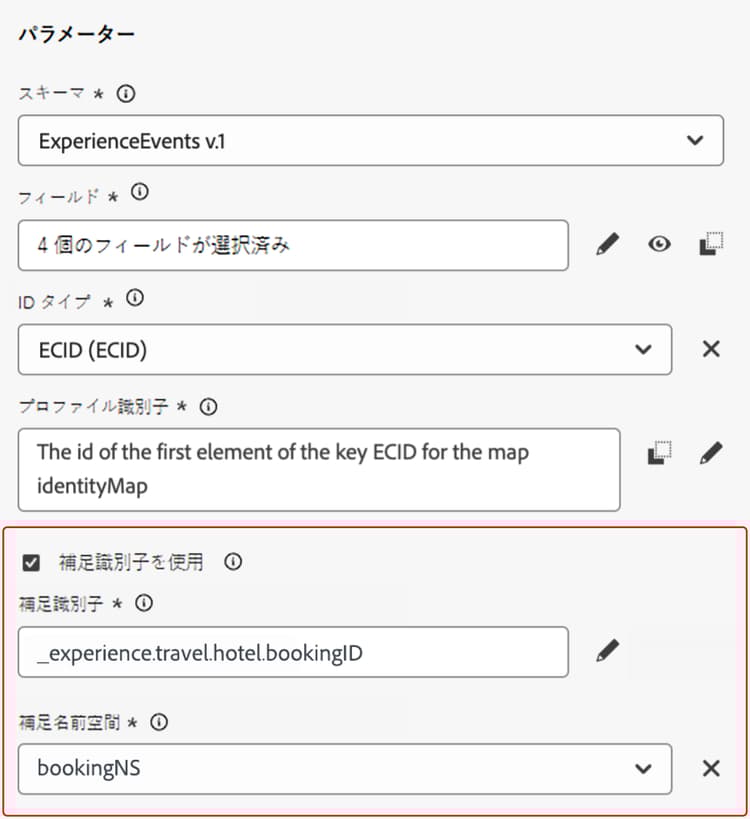
この例では、予約 ID を補助識別子として追加しています。
これにより、ジャーニーは、補助識別子(ここでは予約 ID)に関連付けられたプロファイル ID のコンテキストで実行されます。 補助識別子の反復ごとに、ジャーニーのインスタンスが 1 つ実行されます。 これにより、異なる予約を行った場合、ジャーニーで同じプロファイル ID の複数のエントリが可能になります。
さらに、Journey Optimizer を使用すると、補助識別子の属性(予約番号、処方箋の更新日、製品タイプなど)を活用してメッセージをカスタマイズできるので、関連性の高いコミュニケーションを確保できます。
ガードレールと制限 guardrails
-
サポートされているジャーニー:イベントトリガージャーニーと オーディエンスを読み取り ジャーニーでは、補助識別子がサポートされています。 オーディエンスの選定ジャーニー(例:オーディエンスの選定アクティビティから開始するジャーニー)ではサポートされていません。
-
インバウンドアクション:現在、アプリ内アクションや web アクションなどのインバウンドアクションでは、補助識別子はサポートされていません。
-
同時インスタンス制限:プロファイルには、10 を超えるジャーニーインスタンスを同時に含めることはできません。
-
データタイプとスキーマ構造:補足識別子は、
stringタイプにする必要があります。 独立した文字列属性や、オブジェクト配列内の文字列属性にすることができます。 独立した文字列属性では、単一のジャーニーインスタンスが生成されますが、オブジェクト配列内の文字列属性では、オブジェクト配列の反復ごとに一意のジャーニーインスタンスが生成されます。 文字列配列およびマップはサポートされていません。 -
ジャーニーの再エントリ
補助識別子を使用したジャーニーの再エントリ動作は、既存の再エントリポリシーに従います。
- ジャーニーが再エントリ不可の場合、同じプロファイル ID + 補助 ID の組み合わせでジャーニーに再エントリすることはできません。
- 時間枠でジャーニーが再エントリ可能な場合、定義した時間枠の後に同じプロファイル ID + 補助 ID の組み合わせで再エントリできます。
-
Data Use Labelling and Enforcement(DULE) - 補助 ID に対して DULE 検証チェックは実行されません。 つまり、ジャーニーでデータガバナンスポリシー違反を探す際には、この属性は考慮されません。
-
ダウンストリームイベントの設定
ジャーニーのダウンストリームで別のイベントを使用している場合は、同じ補助識別子を使用し、同じ ID 名前空間を持つ必要があります。
-
オーディエンスを読み取りジャーニー
- ビジネスイベント:ビジネスイベントを使用する場合、補助 ID は無効になります。
- イベントフィールドとコンテキストフィールド:補助識別子をイベントまたはジャーニーコンテキストフィールドから取得できません。
- 属性選択:すべてのオーディエンスタイプ(統合プロファイルサービス、CSV インポート、連合オーディエンス構成)に対して、ID 以外の属性(またはユーザー以外の ID)を補助 ID として使用できます。 ユーザーベースの ID 属性は許可されません。 外部オーディエンスの場合、サポートされているデータパターンと設定要件について詳しくは、外部オーディエンスを含む補助識別子を参照してください。
- 読み取り率:配列タイプの補助 ID フィールドを使用するオーディエンスを読み取りジャーニーの場合、オーディエンスを読み取りアクティビティの読み取り率は、1 秒あたり最大 500 プロファイルに制限されます。
補助 ID を使用した離脱条件の動作 exit-criteria
前提条件:補助 ID に対してジャーニーが有効になっていること(単一イベントまたはオーディエンスを読み取りアクティビティ経由)
以下の表に、離脱条件が設定されている場合の補助 ID が有効になっているジャーニーでのプロファイルの動作を示します。
メモ:補助 ID 名前空間は、初期ノードの名前空間と一致する必要があります。
補助識別子の追加とジャーニーでの活用 add
イベントトリガージャーニーで補助識別子を使用するには、次の手順に従います。
-
イベントに補足 ID を追加
-
目的のイベントを作成または編集します。 単一イベントの設定方法の詳細情報
-
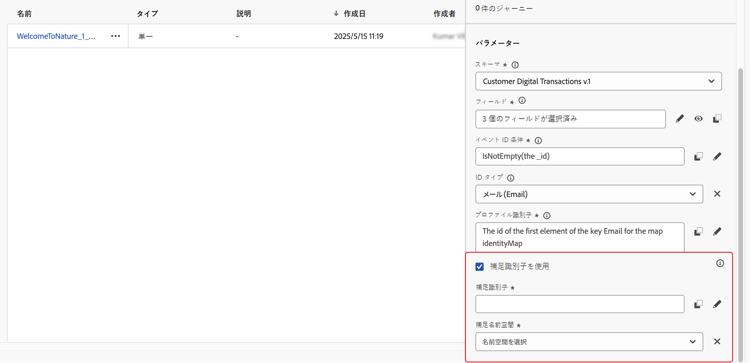
イベント設定画面で、「補助識別子を使用」オプションをオンにします。
-
式エディターを使用して、補助 ID(例:予約 ID、購読 ID)として使用するフィールドを選択します。
式エディターを 詳細設定モード で使用して、属性を選択していることを確認します。
-
-
ジャーニーにイベントを追加
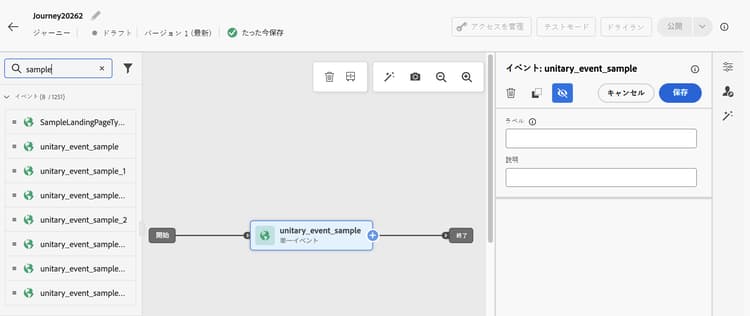
設定したイベントをジャーニーキャンバスにドラッグします。 プロファイル ID と補足 ID の両方に基づいてジャーニーエントリがトリガーされます。
オーディエンスを読み取りジャーニーで補助識別子を使用するには、次の手順に従います。
-
ジャーニーでのオーディエンスを読み取りアクティビティの追加と設定
-
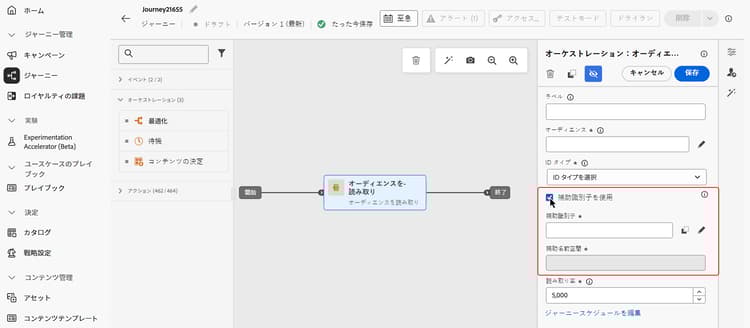
オーディエンスを読み取りアクティビティをジャーニーにドラッグします。
-
アクティビティのプロパティパネルで、「補助識別子を使用」オプションをオンに切り替えます。
-
「補助識別子」フィールドで、式エディターを使用して、補助識別子の属性を選択します。
APIを介して作成された外部オーディエンス(CSV ファイルから読み込まれたオーディエンス 🔗など)の場合、オーディエンスがプロファイル IDごとに複数の行を含む場合は、最初にExpress アクティベーションが有効になっていることを確認します。外部オーディエンスを含む補足識別子を参照してください。
note NOTE 式エディターを 詳細設定モード で使用して、属性を選択していることを確認します。
-
補助 ID 属性を活用
式エディターとパーソナライゼーションエディターを使用して、パーソナライゼーションまたは条件付きロジックの補足識別子の属性を参照します。 属性は、コンテキスト属性メニューからアクセスできます。
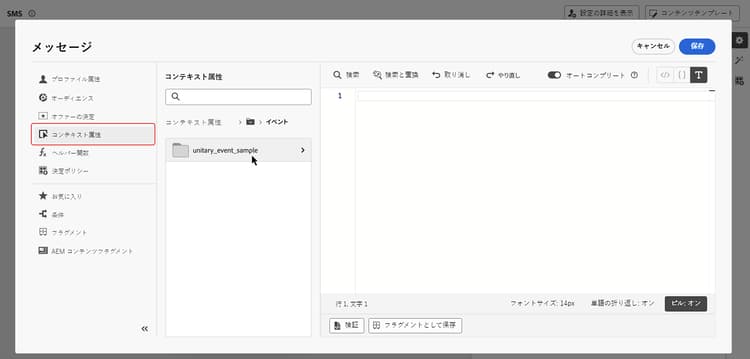
イベントトリガージャーニーでは、配列(複数の処方箋やポリシーなど)を操作している場合は、式を使用して特定の要素を抽出します。
補足 ID が bookingNum で、同じレベルの属性が bookingCountry であるオブジェクト配列では、ジャーニーは bookingNum に基づいて配列オブジェクトを反復し、各オブジェクトのジャーニーインスタンスを作成します。
-
条件アクティビティの次の式は、オブジェクト配列を反復し、
bookingCountryの値が「FR」と等しいかどうかを確認します。code language-none @event{<event_name>.<object_path>.<object_array_name>.all(currentEventField.<attribute_path>.bookingNum==${supplementalId}).at(0).<attribute_path>.bookingCountry}=="FR" -
メールパーソナライゼーションエディターの次の式は、オブジェクト配列を反復し、現在のジャーニーインスタンスに適用可能な
bookingCountryを取得して、コンテンツに表示します。code language-none {{#each context.journey.events.<event_ID>.<object_path>.<object_array_name> as |l|}} {%#if l.<attribute_path>.bookingNum = context.journey.technicalProperties.supplementalId%} {{l.<attribute_path>.bookingCountry}} {%/if%} {{/each}} -
ジャーニーをトリガーするために使用されるイベントの例:
code language-none "bookingList": [ { "bookingInfo": { "bookingNum": "x1", "bookingCountry": "US" } }, { "bookingInfo": { "bookingNum": "x2", "bookingCountry": "FR" } } ]
補助 ID とジャーニーの判別 arbitration
ジャーニーの判別(ルールセット内の同時実行キャップとエントリ数を含む)は、(プロファイル ID、補助 ID)ペアレベルではなく、プロファイル ID レベルで操作されます。 つまり、同時実行キャップが 1 の場合、同じプロファイルに対する 2 番目のジャーニーインスタンスが、異なる補助 ID 値が含まれる場合でもブロックされることがあります。
本番の特定の判別設定に依存する前に、判別の動作に関するガイダンスについて詳しくは、アドビ担当者にお問い合わせください。
関連ドキュメント:
外部オーディエンスを含む補助識別子 external-audiences
補助 ID は、CSV ファイルからインポートされたオーディエンスや、連合オーディエンス構成で作成されたオーディエンスなど、外部オーディエンスに対してサポートされています。 CSV または連合オーディエンス構成オーディエンスから読み取るジャーニーを設定する場合、そのオーディエンスの ID 以外の属性を補助 ID として指定できます。 次に、Journey Optimizer は、一意のプロファイルと補助 ID の組み合わせごとに個別のジャーニーインスタンスを作成します。
-
ユースケース 1:一意のプロファイルごとに 1 行 + 補助 ID ペア
これは、CSVやFederated Audience Composition オーディエンスなどの外部オーディエンスの主要なユースケースです。 オーディエンスには複数の行が含まれ、各行はプロファイル(例:顧客)と補助 ID(例:アカウント ID や注文 ID)の一意の組み合わせを表します。 各行は、独立したアクティベーションレコードとして処理されます。
table 0-row-3 1-row-3 2-row-3 3-row-3 profile_id account_id (補助 ID) other_attributes customer_001 ACC-1001 … customer_001 ACC-1002 … customer_002 ACC-2001 … この例では、
customer_001には 2 つのアカウントがあります。 Journey Optimizer は、一意のプロファイルとaccount_idペアごとに個別のジャーニーインスタンスを作成します。 -
ユースケース 2:補助 ID の配列を含むプロファイルごとに1行
このユースケースは、配列をサポートするオーディエンスタイプで使用できます。 オーディエンスの 1 つの行には、複数の補助 ID 値を保持する配列属性を使用するプロファイルが含まれます。 Journey Optimizer は、配列の値ごとに 1 つのジャーニーインスタンスを作成します。
table 0-row-3 1-row-3 2-row-3 profile_id account_ids (配列、補助 ID) other_attributes customer_001 [ACC-1001、ACC-1002] … customer_002 [ACC-2001] … この例では、Journey Optimizer は
customer_001に 2 つのジャーニーインスタンス(アカウント ID ごとに 1 つ)を生成し、customer_002に 1 つのインスタンスを生成します。 これは、統合プロファイルサービスのオーディエンスに対する補助 ID の仕組みと一貫して動作します。
設定方法 external-configuration
ユースケース 1 (オーディエンスが意図的に同じプロファイル IDに複数の行を含む)を使用するAPIを介して作成された外部オーディエンスの場合、ジャーニーを設定する前にExpress Activationを有効にする必要があります。 以下の前提条件を参照してください。 連合オーディエンス構成のオーディエンスでは、自動でExpress Activationが有効になっているため、手作業が必要ありません。 その他のすべてのケースでは、ジャーニーを直接設定します。
| note important |
|---|
| IMPORTANT |
この前提条件は、API (CSVまたはその他の外部で作成されたオーディエンス)を介して作成されたすべての外部オーディエンスに適用されます。このオーディエンスには、同じプロファイル IDの複数の行が意図的に含まれています(ユースケース 1)。 連合オーディエンス構成オーディエンスは、構成フローの一部として常にexpressActivation: trueで自動的に作成されるため、この手順は必要ありません。 オーディエンスポータル UI は、expressActivation の設定をサポートしていません。External Audience API を使用する必要があります。 |
作成時にオーディエンスで expressActivation を有効にする必要があります。 これにより、Journey Optimizer は、プロファイル ID 別に重複排除することなく、すべてのレコードを独立してアクティブ化できます。 このフラグは、オーディエンスの作成後に変更できません。
オーディエンスの作成時に、次の API 呼び出しを使用します。
エンドポイント:
| code language-http |
|---|
|
必須ヘッダー:
| code language-http |
|---|
|
リクエスト本文(expressActivation: true を設定):
| code language-json |
|---|
|
| note |
|---|
| NOTE |
expressActivation のデフォルトは false です。 オーディエンス作成時に設定する必要があり、作成後に変更できません。 連合オーディエンス構成オーディエンスでは、Express アクティベーションが自動的に有効になるので、このフラグは必要ありません。 |
完全な参照について詳しくは、外部オーディエンス API の作成ドキュメントを参照してください。
ジャーニーを設定するには:
- オーディエンスを読み取りノードを含むジャーニーを開くか、作成します。
- オーディエンスの読み取り ノード設定で、外部オーディエンス(CSVまたはFederated Audience Composition オーディエンスなど)を選択します。
- 「補助識別子を使用」オプションをオンに切り替え、「補助識別子」フィールドで、式エディターを 詳細設定モード を使用して、セカンダリ識別子として使用する属性(例:
account_id、order_number)を選択します。 - 選択した属性はジャーニーの補助 ID として処理されるので、ID の登録は不要です。
重複排除の動作 external-dedup
オーディエンスでExpress Activationが有効になっている場合(Federated Audience Composition用に自動的に設定されます。CSVなどの他の外部オーディエンスのAPI ペイロードで明示的に設定する必要があります)、Journey Optimizerは、ジャーニーの設定方法に基づいて重複排除を処理します。
ユースケースの例
これらの例は、補助識別子が複数の関連レコードをどのようにサポートするかを示します。
ポリシー更新通知
-
シナリオ:保険プロバイダーは、お客様が保持するアクティブなポリシーごとに更新リマインダーを送信します。
-
実行:
- プロファイル:「John」。
- 補足 ID:
"AutoPolicy123", "HomePolicy456"。 - ジャーニーは、パーソナライズされた更新日、カバレッジの詳細、プレミアム情報と共に、各ポリシーに対して個別に実行されます。
購読管理
-
シナリオ:購読サービスは、この購読のイベントをトリガーする際に、各購読に対して調整されたメッセージを送信します。
-
実行:
- プロファイル:「Jane」。
- 補足 ID:
"Luma Yoga Program ", "Luma Fitness Program"。 - 各イベントには、サブスクリプション ID およびそのサブスクリプションに関する詳細が含まれます。 ジャーニーは、各イベント/購読に対して個別に実行されるので、購読ごとにパーソナライズされた更新オファーが可能になります。
製品レコメンデーション
-
シナリオ:e コマースプラットフォームは、お客様が購入した特定の製品に基づいてレコメンデーションを送信します。
-
実行:
- プロファイル:「Alex」。
- 補足 ID:
"productID1234", "productID5678"。 - ジャーニーは、パーソナライズされたアップセルの商談と共に、各製品に対して個別に実行されます。
チュートリアルビデオ video
Adobe Journey Optimizer で補足識別子を有効にして適用する方法について説明します。
This section contains structured knowledge intended to support interpretation, retrieval, and question answering related to this topic.
For complete understanding, this information should be combined with the documentation on this page. Neither source is intended to stand alone; the page describes the feature, while this section provides additional context that helps disambiguate terminology, intent, applicability, and constraints.
- TL;DR: This page explains how to use supplemental identifiers in Adobe Journey Optimizer journeys to allow a single profile to have multiple concurrent journey instances, each scoped to a distinct secondary ID such as a booking, subscription, or policy ID.
Intents:
- Understand when and why to use a supplemental identifier instead of relying solely on a profile ID
- Configure a supplemental identifier in an event-triggered journey by marking an attribute as an identity in the event schema
- Configure a supplemental identifier in a Read audience journey by enabling the option in the Read audience activity
- Reference supplemental identifier attributes for message personalization and conditional logic using the expression editor
- Apply the correct expression syntax to iterate over object arrays keyed by a supplemental ID
- Identify guardrails and limitations before implementing supplemental identifiers in a journey
Glossary:
- Supplemental identifier: A secondary identifier (e.g., order ID, booking ID, subscription ID) used alongside the profile ID to scope a journey instance to a specific record, enabling multiple concurrent instances per profile (product-specific)
- Profile ID: The primary identifier used by default to execute journeys; a profile active in a journey cannot re-enter another journey without a supplemental ID
- Non-person identifier namespace: An identity namespace that does not represent a person (required for supplemental IDs); must be distinct from the primary identity namespace
- joai namespace: Not applicable to this page (see inbound actions troubleshooting)
- DULE: Data Use Labelling and Enforcement — the data governance policy validation framework in Adobe Experience Platform; supplemental IDs are not subject to DULE checks
Guardrails:
- Supplemental identifiers are supported only for event-triggered and Read audience journeys; not supported for Audience qualification journeys
- A profile cannot have more than 10 concurrent journey instances
- Each journey instance counts toward frequency capping even when created via supplemental identifiers
- The supplemental identifier must be of type
string; string arrays and maps are not supported - The supplemental ID attribute must not be marked as Primary identity in the schema
- The namespace used for the supplemental ID must be a non-person identifier namespace
- After applying the non-person identity namespace to a schema, a new event or field group must be created; existing entities cannot be refreshed
- For Read audience journeys with supplemental IDs: the reading rate is limited to 500 profiles per second per journey instance; only Unified Profile Service audiences are supported; supplemental ID must be a profile field (not an event/context field)
- Downstream events in the same journey must use the same supplemental ID and namespace
- Supplemental ID is disabled for Read audience journeys that use a business event
Terminology:
- Canonical name: Supplemental identifier — Acronym: none — variants: supplemental ID, secondary identifier
- Synonyms: “supplemental identifier” = “supplemental ID” (used interchangeably in the UI and documentation)
- Do not confuse: “supplemental identifier” ≠ “primary identity” — the supplemental ID must never be marked as the primary identity in the schema
FAQ:
- Q: What is a supplemental identifier used for? — It allows a single profile to enter and execute a journey multiple times simultaneously, with each instance scoped to a different secondary record such as a booking, subscription, or policy ID.
- Q: Which journey types support supplemental identifiers? — Event-triggered journeys and Read audience journeys. Audience qualification journeys do not support supplemental identifiers.
- Q: How many concurrent journey instances can a profile have with supplemental identifiers? — A maximum of 10 concurrent journey instances per profile.
- Q: Can I use the supplemental ID attributes for message personalization? — Yes. Reference them via the Contextual attributes menu in the expression editor or personalization editor.
- Q: Does the supplemental ID need to be marked as a Primary identity in the schema? — No. It must be marked as an Identity but must not be set as the Primary identity.
- Q: Are DULE governance policies applied to the supplemental identifier? — No. DULE validation checks are not performed on the supplemental ID.