このページ:アクションとカスタムアクションを使用して、REST API 呼び出しを通じてパーソナライズされたエクスペリエンスを配信し、サードパーティシステムを接続する方法について説明します。これにより、ビルトインメッセージ以外のジャーニーを拡張できます。
アクションとは、プッシュ通知、メール、モバイルメッセージ、またはビジネスで使用するその他のデジタルエンゲージメントの手段など、パーソナライズされたリアルタイムのエクスペリエンスを顧客に提供するための接続です。
➡️ この機能をビデオで確認
Journey Optimizer には、メッセージ機能がビルトインされています。 カスタムアクションを使用すると、メッセージや API 呼び出しを送信するサードパーティシステムの接続を設定できます。 アクションは、JSON 形式のペイロードを使用した REST API を介して呼び出すことができる、任意のプロバイダーの任意のサービスで設定できます。
カスタムアクションは、技術ユーザーによって定義され、マーケターが使用できるようになる追加のアクションです。設定が完了すると、ジャーニーの左側のパレットの「アクション」カテゴリに表示されます。 詳しくは、このページを参照してください。
アクションリストを表示したり、新しいアクションを設定したりするには、「管理」メニューセクションで「設定」を選択します。 「アクション」セクションで、「管理」をクリックします。 アクションのリストが表示されます。 インターフェイスの詳細については、このページを参照してください。
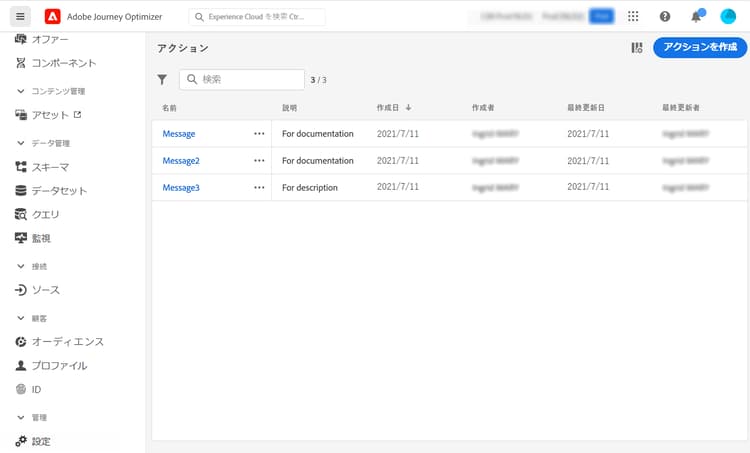
カスタムアクションのトラブルシューティング方法について詳しくは、この専用ページを参照してください。
チュートリアルビデオ video
カスタムアクションの設定方法を説明します。
その他のリソース
カスタムアクションの設定と使用について詳しくは、以下の節を参照してください。
- カスタムアクションの設定 - カスタムアクションの作成および設定方法について説明します
- カスタムアクションの使用 - ジャーニーでのカスタムアクションの使用方法について説明します
- コレクションをカスタムアクションパラメーターに渡す - 実行時に値が動的に入力されるコレクションをカスタムアクションパラメーターに渡す方法について説明します
- カスタムアクションのトラブルシューティング - カスタムアクションのトラブルシューティング方法について説明します
This section contains structured knowledge intended to support interpretation, retrieval, and question answering related to this topic.
For complete understanding, this information should be combined with the documentation on this page. Neither source is intended to stand alone; the page describes the feature, while this section provides additional context that helps disambiguate terminology, intent, applicability, and constraints.
- TL;DR: This page introduces actions and custom actions in Journey Optimizer, which let you deliver personalized real-time experiences and connect third-party systems through REST API calls.
Intents:
- Understand what actions and custom actions are and how they extend journeys
- Distinguish built-in message capability from third-party custom actions
- Identify when to use the Adobe Campaign v7/v8 integration versus a custom action
- Access the action list from the Configurations Actions area
- Learn who is responsible for configuring custom actions
Glossary:
- Action: A connection through which you deliver personalized, real-time experiences to customers, such as push notifications, email, mobile messages, or other digital engagement (product-specific)
- Custom action: A configured connection to a third-party system that sends messages or API calls, defined by technical users and made available to marketers (product-specific)
- Built-in message capability: The messaging capability that comes with Journey Optimizer, distinct from custom actions (product-specific)
Guardrails:
- The configuration of custom actions must be performed by a technical user.
- An action can be configured with any service from any provider that can be called through a REST API with a JSON-formatted payload.
- Once configured, custom actions appear in the left palette of your journey, in the Action category.
Terminology:
- Canonical name: Custom action — Acronym: n/a — variants: action, custom actions
- Do not confuse: “built-in message capability” (native Journey Optimizer messaging) ≠ “custom action” (third-party connection through a REST API)
- Do not confuse: “action” (the general connection concept) ≠ “custom action” (the configured third-party connection)
FAQ:
- Q: What is a custom action? — A configured connection of a third-party system to send messages or API calls, usable with any provider callable through a REST API with a JSON-formatted payload.
- Q: Who must configure custom actions? — The configuration of custom actions must be performed by a technical user.
- Q: How do I connect Adobe Campaign v7 or v8? — An integration is available upon request; refer to the Adobe Campaign v7/v8 integration page.
- Q: Where do custom actions appear after configuration? — In the left palette of your journey, in the Action category.
- Q: Where is the action list found? — Select Configurations in the ADMINISTRATION menu section, then click Manage in the Actions section.
Personas:
- developer: Can configure a custom action to connect third-party systems such as Epsilon, Facebook, Adobe Developer, or Firebase for sending messages or API calls. The page states that an action can use any service or provider through a REST API with a JSON-formatted payload. Where: “Get started with custom actions”.
- admin: Can access the action list by selecting Configurations in the ADMINISTRATION menu section. Can select Manage in the Actions section to display the list of actions. The page states that the configuration of custom actions must be performed by a technical user. Where: “Get started with custom actions”.
Onboarding:
- Level: Experienced
- First minimal step: Select Configurations in the ADMINISTRATION menu section, then select Manage in the Actions section.
- Success check: The list of actions is displayed.
- Previous: For a complete overview and configuration checklist for Data Sources, Events, and Actions before configuring custom actions: Configure journeys – Data Sources, Events, and Actions (configuration/about-data-sources-events-actions.md)
- Next: Using Adobe Campaign v7 or v8 for messaging: Integrate with Adobe Campaign v7/v8 (action/acc-action.md); Using a third-party system such as Epsilon, Facebook, Adobe Developer, or Firebase to send messages: Configure a custom action (action/about-custom-action-configuration.md)