このページ:ソースコネクタの概要と、CRM、クラウドストレージ、データベースから Adobe Journey Optimizer にデータを取り込む方法について説明します。これにより、パーソナライズされたデータドリブンなカスタマージャーニーを強化できます。
ソースとは what-is-source
ソースとは、外部データを Adobe Journey Optimizer に取り込むコネクタです。 ソースを使用すると、CRM プラットフォーム、クラウドストレージ、データベースなど、既に使用しているシステムから顧客情報をインポートし、そのデータをパーソナライズされたカスタマージャーニーの作成に使用できます。
ソースは、Journey Optimizer と外部データシステム間の橋渡しと考えてください。 データが自動的に同期されるので、常に最新の顧客情報を入手し、マーケティングキャンペーンを強化できます。
ソースが重要な理由 why-sources-matter
Journey Optimizer で、パーソナライズされたデータ駆動型のカスタマーエクスペリエンスを作成するには、ソースが不可欠です。 理由は次のとおりです。
- 統合顧客ビュー - 複数のシステムからデータを組み合わせて、各顧客の全体像を確認します
- リアルタイムパーソナライゼーション - 新しいデータを使用して、ジャーニーにおいてタイムリーで関連性の高いメッセージを配信します
- 自動データ同期 - 手動でデータをインポートすることなく、顧客情報を最新の状態に保持します
- 効率的なワークフロー - 一度接続すると、データが自動的にジャーニーにフローされます
例えば、ソースを使用して、e コマースプラットフォームから購入履歴をインポートし、顧客が購入した商品に基づいてパーソナライズされた製品のレコメンデーションを送信するジャーニーを作成できます。
ソースを使用して実行できること sources-use-cases
Journey Optimizer のソースの一般的なユースケースは次のとおりです。
- CRM システムから顧客データを読み込む - Salesforce や Microsoft Dynamics などのプラットフォームから連絡先情報、環境設定、エンゲージメント履歴を同期します
- 購入データの接続 - eコマースプラットフォームから注文履歴や製品の環境設定を取り込んで、オファーをパーソナライズします
- ロイヤルティプログラムデータの統合 - ポイント残高や階層情報にアクセスし、最も関与した顧客に報酬を提供します
- 行動データの同期 - web サイトのインタラクションやアプリの使用パターンをインポートして、関連性の高いジャーニーをトリガーします
- プロファイル属性の更新 - クラウドストレージやデータベースからのデータを使用して、顧客プロファイルを最新の状態に保持します
一般的なソースタイプ source-types
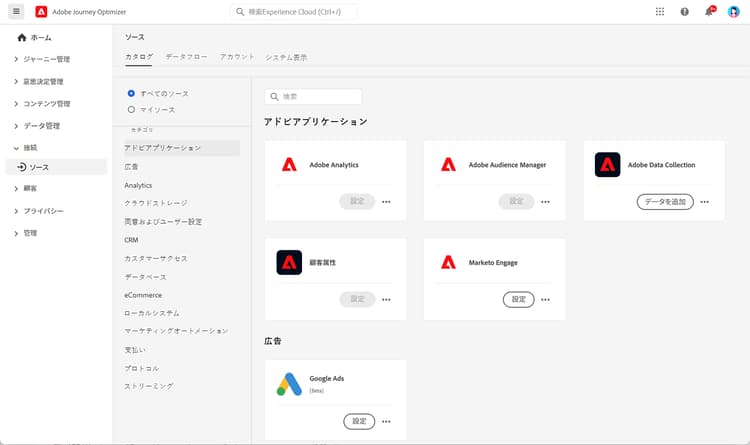
Journey Optimizer では、既存のシステムに接続するための様々なタイプのソースをサポートしています。
アドビアプリケーション:
- Adobe Analytics
- Adobe Audience Manager
- Adobe Campaign
- Adobe Commerce
クラウドストレージ:
- Amazon S3
- Azure Blob ストレージ
- Google Cloud Storage
- SFTP
データベース:
- Amazon Redshift
- Google BigQuery
- Microsoft SQL Server
- MySQL
- PostgreSQL
CRM とマーケティングオートメーション:
- Microsoft Dynamics
- Salesforce
- Salesforce Marketing Cloud
ロイヤルティと報酬:
- Talon.One
- Capillary
- Kobie
- LAVA
➡️完全なリストについて詳しくは、Experience Platform ソースカタログを参照してください
始める前に prerequisites
ソースを設定する前に、以下の点を確認します。
- 適切な権限 - Adobe Experience Platform のソースを管理するためのアクセス権
- ソースシステムの資格情報 - 接続する外部システムの認証の詳細
- データの理解 - 必要なデータフィールドと、Journey Optimizer プロファイルにマッピングされる仕組みを把握します
➡️詳しくは、アクセス制御と権限を参照してください
ソースの仕組み how-sources-work
Adobe Journey Optimizer は、Adobe Experience Platform のソースフレームワークを使用します。 基本ワークフローを次に示します。
- 接続 - 外部データシステムへの認証を設定します
- データを選択 - インポートするデータと同期する頻度を選択します
- フィールドをマッピング - 外部データフィールドと Journey Optimizer プロファイル属性との対応方法を定義します
- スケジュール - 自動データ更新間隔を設定します
- 監視 - データフローを追跡し、同期に関する問題を解決します
設定が完了すると、ソースはバックグラウンドで自動的に実行され、顧客データが最新の状態に保持され、ジャーニーで使用できるようになります。
_change_request_type フィールドは必須です。 サポートされている値は、u(アップサート)または d(削除)です。 これらの値は、大文字の U と D ではなく、小文字の u と d にする必要があります。 オーケストレーションキャンペーンのガードレールと制限の詳細情報詳細情報 learn-more
ソースコネクタの概要、および Journey Optimizer でのソースコネクタの設定方法について詳しくは、次のビデオをご覧ください。
ソースの設定と管理について詳しくは、Adobe Experience Platform ソースドキュメントを参照してください。
次の手順 next-steps
ソースの概要と重要な理由を理解したら、次のことを行います。
- ソースカタログを参照して、システムのコネクタを見つけます
- ソース接続の作成方法を学びます
- データマッピングと変換について理解します
- インポートしたデータをジャーニーで使用する方法を確認します
- Journey Optimizer の完全なデータ設定にソースが適合する仕組みについて詳しくは、データ管理の基本を学ぶを参照してください。
This section contains structured knowledge intended to support interpretation, retrieval, and question answering related to this topic.
For complete understanding, this information should be combined with the documentation on this page. Neither source is intended to stand alone; the page describes the feature, while this section provides additional context that helps disambiguate terminology, intent, applicability, and constraints.
- TL;DR: This page explains what source connectors are, why they matter, the common source types, and how sources bring external data from CRM, cloud storage, and databases into Journey Optimizer for personalized journeys.
Intents:
- Understand what a source is and how it brings external data into Journey Optimizer
- Identify the common source types available for Adobe applications, cloud storage, databases, CRM and marketing automation, and loyalty and rewards
- Confirm the prerequisites needed before configuring sources
- Understand the basic sources workflow from connection through monitoring
- Configure file-based Change Data Capture sources for Orchestrated campaigns correctly
Glossary:
- Source: A connector that brings external data into Adobe Journey Optimizer from systems such as CRM platforms, cloud storage, or databases (product-specific)
- Sources framework: The Adobe Experience Platform framework that Journey Optimizer uses to power sources (product-specific)
_change_request_type: A field required for file-based Change Data Capture sources used with Orchestrated campaigns, indicating the change operation (product-specific)
Guardrails:
- Before configuring sources, you need appropriate permissions to manage sources in Adobe Experience Platform, source system credentials, and an understanding of which data fields you need and how they map to Journey Optimizer profiles.
- For file-based Change Data Capture sources used with Orchestrated campaigns, the
_change_request_typefield is required, and its supported values must be lowercaseu(upsert) ord(delete), not uppercaseUandD. - Once configured, sources run automatically in the background to keep customer data fresh.
Terminology:
- Canonical name: Source — variants: source connector, sources
- Synonyms: “source” = “source connector”
- Do not confuse: “
u(upsert)” ≠ “d(delete)” — both must be lowercase
FAQ:
- Q: What is a source in Journey Optimizer? — A connector that brings external data from systems such as CRM platforms, cloud storage, or databases into Journey Optimizer and makes that data available for personalized journeys.
- Q: Do I have to import data manually? — No; once configured, sources sync data automatically in the background so customer information stays current.
- Q: What do I need before I configure a source? — Appropriate permissions to manage sources in Adobe Experience Platform, source system credentials, and an understanding of your data fields and how they map to profiles.
- Q: What values does the
_change_request_typefield accept for Orchestrated campaign Change Data Capture sources? — Lowercaseufor upsert ordfor delete; uppercaseUandDare not supported.