在此頁面上:瞭解如何暫停並繼續即時歷程,以安全地進行變更或停止傳送、停止或關閉暫停的歷程而不先繼續,以及在暫停期間套用設定檔屬性退出條件。
您可以隨時暫停即時歷程、執行所有需要的變更,然後再次繼續。 在暫停期間,您可以套用設定檔屬性退出條件,以根據其屬性排除設定檔。 歷程會在暫停期間結束時自動繼續。 您也可以手動繼續,或從 已暫停 狀態停止歷程而不先繼續。
主要優點 journey-pause-benefits
暫停和繼續歷程可讓歷程參與者在不中斷客戶體驗的情況下暫時暫停即時歷程,擁有更優異的控制權和彈性。 暫停時,系統就不會傳送任何通訊,設定檔會維持在暫停狀態,直到繼續歷程為止。
此功能減少在錯誤或更新期間(例如:變更訊息內容)傳送意外訊息的風險,支援更安全的歷程管理,並提高從業人員的信心。 直接在UI中檢視暫停的歷程及其狀態,可進一步增強透明度和作業靈敏度。
如何暫停歷程 journey-pause-steps
您可以暫停任何 即時 歷程。
若要暫停您的歷程,請依照下列步驟進行:
-
開啟您要暫停的歷程。
-
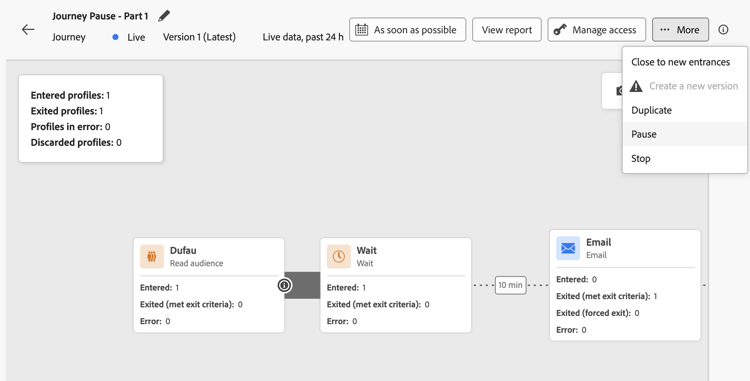
按一下歷程畫布右上角的 …更多 按鈕,然後選取暫停。
-
選取如何管理目前位於歷程中的設定檔。
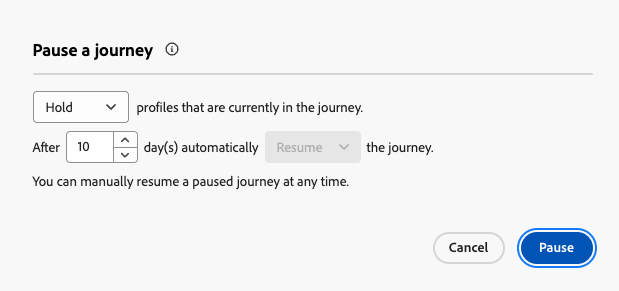
您可以:
- 保留設定檔 — 設定檔將等候下一個 動作 節點,以繼續歷程
- 捨棄設定檔 — 設定檔會在下一個 動作 節點從歷程中排除
暫停歷程時,您會假設您計畫在某個時間點繼續進行。 然而,歷程不能無限期地暫停。 為避免此問題,您可以定義歷程應暫停的時間長度(介於1到14天之間)。 在選取的天數後,歷程會自動繼續。
-
按一下 暫停 按鈕確認。
可在您組織的暫停歷程中保留的設定檔最大數量會顯示在歷程詳細目錄中。 只有在至少一個歷程暫停時,它才會顯示。 此指標也會顯示暫停的歷程總數。 每30分鐘重新整理一次。 進一步瞭解護欄和限制。

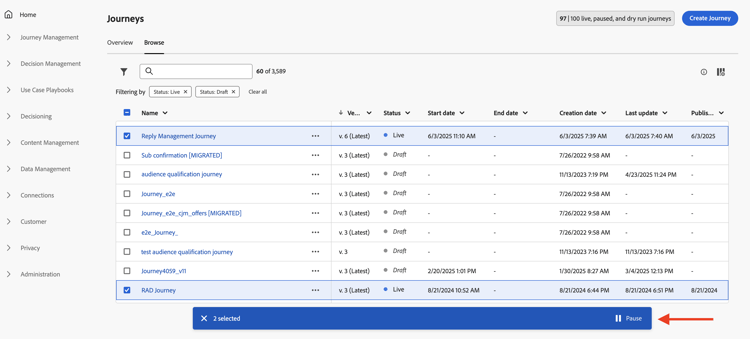
從您的歷程清單中,您可以暫停一或多個 即時 歷程。 若要暫停歷程群組(大量暫停),請在清單中選取它們,然後按一下畫面底部藍色列中的 暫停 按鈕。 暫停按鈕僅在選取 即時 歷程時可用。
暫停的歷程執行邏輯 journey-pause-exec
歷程暫停時,一律會捨棄新的入口,無論保留/捨棄模式為何。
歷程暫停時,設定檔管理和活動執行會根據活動而定。 行為方式詳述如下。 如需完整瞭解,另請參閱此端對端範例。
- 在畫布中的第一個節點:會捨棄對象的任何設定檔資格
- 在其他節點中:與即時歷程中的行為相同,但如果對象資格在 動作 活動後且使用者在該動作上暫停,則會捨棄對象資格。
- 在畫布中的第一個節點:會捨棄事件
- 在其他節點中:與即時歷程中的行為相同,但如果事件在 動作 活動之後,且使用者在該動作上暫停,則會捨棄事件。
與即時歷程的行為相同,但有幾項特性:
-
如果在 讀取對象 活動開始後按下暫停,則已進入歷程的設定檔將會繼續(直到下一個 動作 活動)。 當歷程以特定速度讀取對象時,如果完整對象尚未進入,則會捨棄佇列中的剩餘設定檔。
-
針對單一執行:如果排程日期在繼續日期之前,則恢復時不會顯示錯誤。 將會忽略該排程。
-
對於增量歷程:
- 如果暫停發生在第一次發生之前,則在繼續時,將會播放完整的對象。
- 例如,如果暫停發生,在每日週期的第4天,並且歷程保持暫停直到第9天,則在恢復時,將包含從第4天到第9天輸入的所有設定檔
在本節中瞭解如何疑難排解捨棄。
如何繼續暫停的歷程 journey-resume-steps
暫停的歷程會在最大暫停期間14天結束後自動恢復。 可隨時手動繼續進行。 繼續暫停的歷程可讓新設定檔再次進入。 如果輪廓在暫停期間是等待狀態,將會繼續其歷程。 非常適合在更新或暫停後安全地重新啟動歷程時使用。
若要繼續暫停的歷程並重新開始聆聽歷程事件,請遵循下列步驟:
-
開啟您要繼續的歷程。
-
選取歷程畫布右上角的 …更多 按鈕,然後選取繼續。
歷程會切換至 繼續 狀態。 當歷程繼續時,新進入在一分鐘內開始。 恢復保留的設定檔可能需要一些時間 — 設定檔會以5k tps的速率恢復。 由於所有設定檔都必須繼續,歷程才能再次變成即時,從 繼續 到 即時 狀態的轉換可能需要一些時間。
-
按一下「繼續」按鈕確認。
從歷程清單中,您可以繼續一或多個 已暫停 歷程。 若要繼續歷程群組(大量繼續),請選取它們並按一下畫面底部藍色列中的 繼續 按鈕。 請注意,繼續按鈕只有在選取 已暫停 歷程時才可用。
停止暫停的歷程 stop-close-paused
如果您決定不繼續暫停的歷程,可以從 暫停 狀態結束。 這會立即結束所有歷程處理,並停止歷程中的每個設定檔。 進一步瞭解停止歷程。
若要從歷程畫布停止暫停的歷程,請執行下列步驟:
- 開啟您要停止或關閉的 已暫停 歷程。
- 按一下歷程畫布右上角的 …更多 按鈕。
- 選取停止,然後在對話方塊中確認。
從歷程清單中,您也可以按一下暫停的歷程名稱右邊的 省略符號 按鈕,並選取停止。
檢視歷程何時暫停或繼續 view-pause-resume-info
若要檢視歷程上次暫停或恢復的時間以及由誰執行,請開啟歷程並前往其屬性 (按一下歷程名稱旁的鉛筆圖示)。 使用 複製技術詳細資料 按鈕複製技術資訊,包括:
- 上次暫停和繼續的日期和時間
- 執行上次暫停和上次恢復之使用者的顯示名稱和識別碼
- 暫停的歷程設定(暫停行為、暫停持續時間上限、自動恢復狀態、暫停ID)
此資訊對於疑難排解、稽核或與支援人員共用相當實用。 如需所複製欄位的完整清單,請參閱存取歷程的屬性。
在暫停的歷程中套用退出條件 journey-exit-criteria
歷程暫停時,您可以根據設定檔屬性套用退出條件。 此篩選器可讓您排除與恢復時定義的運算式相符的設定檔。 一旦設定了以設定檔屬性為基礎的退出標準,就會在動作節點上強制執行,即使是新設定檔的進入也一樣。 符合條件的現有設定檔和進入歷程的新設定檔,會在它們遇到的下一個動作節點 上,從歷程 中排除。
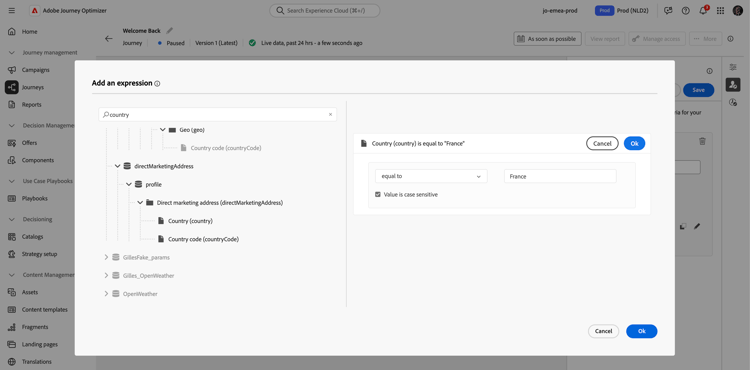
例如,若要從暫停的歷程中排除所有法國客戶,請遵循下列步驟:
-
瀏覽至您要修改的暫停歷程。
-
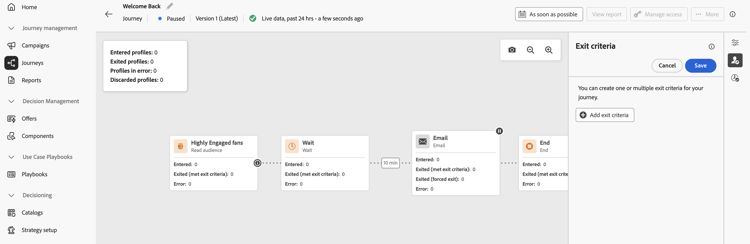
選取 退出條件 圖示。
-
在 退出條件 設定中,按一下 新增退出條件 以根據設定檔屬性定義篩選器。
-
設定運算式,以排除國家/地區屬性等於「法國」的設定檔。
-
儲存您的篩選器,然後按一下 更新歷程 按鈕以套用您的變更。
-
繼續歷程。
在恢復時,country屬性設定為France的所有設定檔將在下一個動作節點自動從歷程中排除。 任何國家/地區屬性設定為France的新設定檔嘗試進入歷程時,也將在下一個動作節點遭到封鎖。
請注意,目前歷程中設定檔的設定檔排除和新設定檔的設定檔排除只會在到達動作節點時發生。
-
您只能為每個歷程設定 一個 設定檔屬性型退出條件。
-
您只能在 已暫停 歷程中建立、更新或刪除以設定檔屬性為基礎的退出條件。
-
在本節🔗中進一步瞭解設定檔屬性型退出條件。
護欄與限制 journey-pause-guardrails
-
歷程版本最多可暫停14天,整個組織的暫停歷程中最多允許100萬個設定檔。
此限制會計算所有暫停歷程中保留的設定檔總數,而非不同的設定檔。 例如,如果在兩個暫停的歷程中保留相同的5M設定檔,則會達到10M的限制。
每30分鐘檢查一次此限制。 這表示您可能會暫時超過1000萬的臨界值,但一旦系統偵測到,則會自動捨棄任何其他設定檔。如果您繼續歷程以將保留的個人檔案數恢復到限制以下,歷程將立即繼續 — 但更新個人檔案計數最多可能需要30分鐘。 在這段期間,系統仍可能將這些設定檔視為已暫停。
-
對於包含傳入活動 (例如,應用程式內、網頁等)的歷程,暫停歷程不會中斷已觸發的通訊。 如果設定檔在暫停前符合入站活動的資格,則仍會傳送相對應的訊息。 若要完全停止所有傳入通訊,您必須停止歷程。
-
暫停歷程不會取消已分派以執行的自訂動作要求。 根據所選的暫停選項,尚未到達下一個「動作」節點的設定檔會被保留或捨棄。 例如,已傳送至外部端點的自訂動作要求仍可處理,且可能在暫停後觸發推播通知。 若要停止進一步的歷程處理,請停止歷程。 停止會終止設定檔在歷程中的前進;不應該理解為召回已分派到外部端點的請求。
-
暫停的歷程計入即時歷程配額
-
已進入歷程但在暫停期間被捨棄的設定檔,仍會計為可參與的設定檔
-
暫停的歷程會以即時方式納入所有商業規則中
-
歷程全域逾時仍適用於暫停的歷程。 例如,如果設定檔處於歷程中90天且歷程已暫停,則此設定檔仍將在第91天結束歷程
-
設定檔到達動作活動時,會在暫停的歷程中捨棄。 如果他們在歷程暫停期間堅持等待,並在繼續後退出,則會繼續歷程且不會被捨棄。 檢視端對端範例
-
即使暫停後,隨著事件繼續處理,這些事件也會計入每秒的Journey Events數量配額,之後節流會成為單一專案
-
當設定檔在暫停的歷程中保留時,在繼續時會重新整理設定檔屬性
-
條件仍會在暫停的歷程中執行,因此如果歷程因資料品質問題而暫停,則可以使用錯誤的資料評估動作節點之前的任何條件
-
在歷程暫停前已通過 最佳化 活動的設定檔,會保留當時進行的路徑指派。 即使基礎對象或條件定義在暫停期間變更,系統也不會回溯重新評估此指派。 系統只會根據最新定義,評估歷程恢復後到達活動的設定檔。
-
對於以 讀取對象 歷程為基礎的增量對象,會考慮暫停的持續時間。 對象資格或事件型歷程則非如此(如果在暫停期間收到對象資格或事件,且他們是歷程中的第一個活動,則捨棄這些事件)
-
如果設定檔保留在歷程中,而且此歷程在幾天後自動繼續,則設定檔會繼續歷程且不會捨棄。 如果您想要卸除這些物件,您必須停止歷程
-
在暫停的歷程中,不會為批次區段警示觸發警示
-
歷程的14天暫停狀態終止後,系統中沒有稽核記錄
-
某些已捨棄的設定檔會顯示在歷程步驟事件中,但不會顯示在報表中。 例如:
- 捨棄 讀取對象 的商業事件
- 讀取對象工作因暫停歷程而捨棄
- 在 Event 活動在設定檔等待的動作之後時,捨棄事件
端對端範例 journey-pause-sample
以下方以歷程為例:
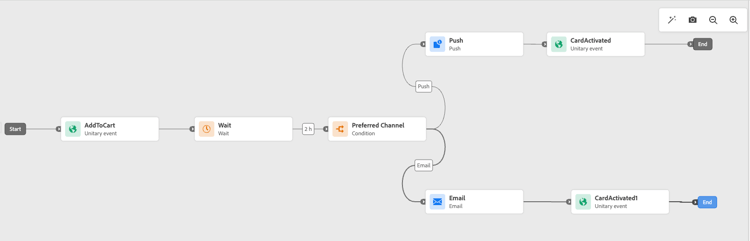
暫停此歷程時,您選取設定檔是 已捨棄 或保留,然後設定檔管理如下:
- AddToCart活動:所有新設定檔入口都已封鎖。 如果設定檔在暫停前已進入歷程,則會繼續前往下一個動作節點。
- 等待活動:設定檔繼續在節點上正常等待,而且即使歷程暫停,也會退出節點。
- 最佳化(條件):設定檔會繼續通過條件,並根據條件所定義的運算式,移至正確的分支。
- 推播/電子郵件活動:在暫停的歷程中,設定檔會開始等待或捨棄(根據使用者在暫停時所做的選擇)下一個動作節點。 因此,設定檔將會開始等待或捨棄在那裡。
- 動作節點之後的事件:如果設定檔正在等候 動作 節點,而且之後有 事件 活動,如果觸發該事件,則會捨棄該事件。
根據此行為,您會看到暫停歷程中的設定檔數目增加,大多是在 動作 活動前的活動中。 舉例來說,在該範例中,等待活動仍處於啟用狀態,當設定檔結束 最佳化(條件) 活動時,會增加該活動的設定檔數量。
當您繼續此歷程時:
- 全新的歷程入口在一分鐘內開始。
- 目前在 動作 活動上等待歷程的設定檔會以5k tps的速率繼續。 接著,他們就可以進入等待的動作,然後繼續歷程。
疑難排解暫停歷程中的設定檔捨棄 discards-troubleshoot
您可以使用Adobe Experience Platform 查詢服務來查詢步驟事件,這可根據設定檔捨棄發生的時間提供詳細資訊。 如需步驟事件的欄位,請參閱Adobe Journey Optimizer結構描述參考。
-
對於在設定檔進入歷程之前發生的捨棄,請使用下列程式碼:
code language-sql SELECT TIMESTAMP, _experience.journeyOrchestration.profile.ID, to_json(_experience.journeyOrchestration) FROM journey_step_events WHERE _experience.journeyOrchestration.serviceEvents.dispatcher.eventType = 'PAUSED_JOURNEY_VERSION' AND _experience.journeyOrchestration.journey.versionID=<jvId>這將列出在歷程進入點發生的捨棄:
-
當對象歷程正在執行且第一個節點仍在處理時,如果歷程已暫停,則會捨棄所有未處理的設定檔。
-
當新的單一事件在歷程暫停時到達開始節點(以觸發入口)時,事件會被捨棄。
-
-
對於在設定檔已位於歷程中時發生的捨棄,請使用下列程式碼:
code language-sql SELECT TIMESTAMP, _experience.journeyOrchestration.profile.ID, to_json(_experience.journeyOrchestration) FROM journey_step_events WHERE _experience.journeyOrchestration.serviceEvents.stateMachine.eventType = 'JOURNEY_IN_PAUSED_STATE' AND _experience.journeyOrchestration.journey.versionID=<jvId>此命令會列出設定檔在歷程中時發生的捨棄專案:
-
如果歷程暫停,並啟用捨棄選項,而且設定檔已在暫停前輸入,則當該設定檔到達下一個動作節點時,將會捨棄該設定檔。
-
如果歷程在選取保留選項的情況下暫停,但設定檔因超過1000萬配額而被捨棄,則這些設定檔在到達下一個動作節點時仍會被捨棄。
-
This section contains structured knowledge intended to support interpretation, retrieval, and question answering related to this topic.
For complete understanding, this information should be combined with the documentation on this page. Neither source is intended to stand alone; the page describes the feature, while this section provides additional context that helps disambiguate terminology, intent, applicability, and constraints.
- TL;DR: This page explains how to pause and resume a live journey in Adobe Journey Optimizer, including profile hold or discard behavior during the pause, how to apply profile attribute exit criteria while paused, and how to troubleshoot profile discards using Query Service.
Intents:
- Pause a live journey to prevent new profile entries and hold or discard in-flight profiles at the next action node
- Resume a paused journey manually or understand when it auto-resumes after the maximum pause period
- Apply a profile attribute exit criteria to exclude specific profiles (e.g., by country) when a journey is paused
- Bulk-pause or bulk-resume multiple live journeys from the journey inventory list
- Troubleshoot profile discards in a paused journey using Adobe Experience Platform Query Service step event queries
- View the audit trail of who paused or resumed a journey and when
Glossary:
- Pause (journey): A state that temporarily suspends a live journey, preventing new entrances and halting profile progress at the next action node; no communications are sent while paused (product-specific)
- Hold mode: A pause option that keeps in-flight profiles waiting at the next action node until the journey resumes (product-specific)
- Discard mode: A pause option that exits in-flight profiles from the journey when they reach the next action node (product-specific)
- Profile Attribute-based exit criteria: A filter applied to a paused journey that excludes profiles matching a defined expression at the next action node upon resume (product-specific)
- Bulk pause / Bulk resume: The ability to pause or resume multiple live or paused journeys simultaneously from the journey inventory list (product-specific)
Guardrails:
- Only users with the Publish journeys permission can pause and resume journeys; stopping a paused journey requires Manage journeys (and Campaigns > Publish Campaigns if inline campaigns or messaging nodes are present)
- Pause duration is configurable from 1 to 14 days; after that the journey auto-resumes
- Profiles held during pause resume at up to 5,000 TPS; the journey remains in Resuming until all held profiles have resumed
- Maximum of 10 million profiles can be held across all paused journeys in an organisation; excess profiles are automatically discarded
- Only one Profile Attribute-based exit criteria can be set per journey
- Profile Attribute-based exit criteria can only be created, updated, or deleted while the journey is paused
- Paused journeys count towards the live journey quota
- Journey global timeout (91 days) still applies during a pause
- Inbound activity communications already triggered before the pause continue to be delivered; to stop them, the journey must be stopped entirely
- Alerts for batch segment do not fire in paused journeys
- Fresh entrances are always discarded when a journey is paused, regardless of Hold or Discard mode
Terminology:
- Canonical name: Pause a journey — Acronym: none — variants: journey pause, pause/resume
- Synonyms: “Hold” = “park profiles”; “Discard” = “exit profiles”
- Do not confuse: “Pause” ≠ “Stop” — Pause is temporary and allows resume; Stop immediately exits all profiles and cannot be undone to a live state
- Do not confuse: “Pause” ≠ “Close to new entrances” — Close to new entrances lets existing profiles finish but does not suspend them; Pause suspends all in-flight profiles at the next action node
FAQ:
- Q: What happens to profiles already in a journey when it is paused? — Depending on the option chosen at pause time, profiles are either held (waiting at the next action node) or discarded (exited from the journey at the next action node).
- Q: How long can a journey remain paused? — Between 1 and 14 days (chosen at pause time); after that it automatically resumes.
- Q: Can I exclude certain profiles while a journey is paused? — Yes; apply a Profile Attribute-based exit criteria (one per journey) while the journey is paused to exclude matching profiles at the next action node upon resume.
- Q: Does pausing a journey stop in-app or web messages already triggered? — No; inbound communications already triggered before the pause continue to be delivered. To stop all inbound communications, you must stop the journey entirely.
- Q: How do I find out which profiles were discarded during a pause? — Query the
journey_step_eventsdataset in Adobe Experience Platform Query Service using thePAUSED_JOURNEY_VERSIONorJOURNEY_IN_PAUSED_STATEevent type filters with the journey version ID.