在此頁面上:連線到第三方REST API並設定驗證,以便您將外部資料提取到您的歷程中來判斷條件和進行個人化。
使用外部資料來源 gs-ext-data-sources
外部資料來源可讓您定義與第三方系統的連線,例如使用飯店訂房系統檢查該人員是否已登記客房。 與內建的Adobe Experience Platform資料來源不同,您可以視需要建立儘可能多的外部資料來源。
-
使用外部系統時的護欄列在此頁面上。
-
現已支援回應,對於外部資料來源使用案例,您應該使用自訂動作,而非資料來源。 如需回應的詳細資訊,請參閱自訂動作回應。 當資料僅在歷程內有用,並且可透過API端點存取外部系統時,沒有資料湖持續性的自訂動作是正確的選擇。 如需所有資料存取選項的比較,請參閱選擇您的資料存取策略。
支援使用 POST 或 GET 以及傳回 JSON 的 REST API。 支援 API 金鑰、基本和自訂驗證模式。
我們以一個氣象 API 服務為例,我想利用它根據即時氣象資料來自訂歷程的行為。
以下是 API 呼叫的兩個範例:
- https://api.adobeweather.org/weather?city=London,uk&appid=1234
- https://api.adobeweather.org/weather?lat=35&lon=139&appid=1234
此呼叫由主要 URL (https://api.adobeweather.org/weather)、兩個參數集 (“city” 代表城市、“lat/long” 代表經緯度)和 API 金鑰 (appid) 組成。
cacheDuration設定之間至少保留一分鐘的緩衝區,尤其是在工作負荷繁重的情況下,以避免到期不相符和401錯誤。建立及設定外部資料來源 create-ext-data-sources
以下是建立和設定新外部資料來源的主要步驟:
-
從資料來源清單中,按一下 建立資料Source 以建立新的外部資料來源。
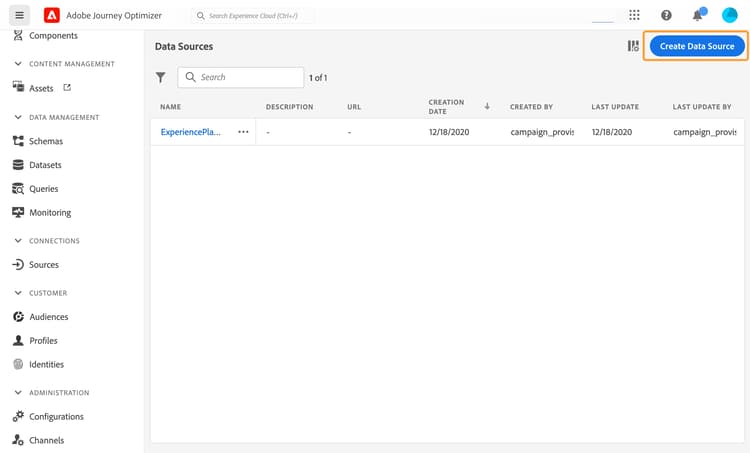
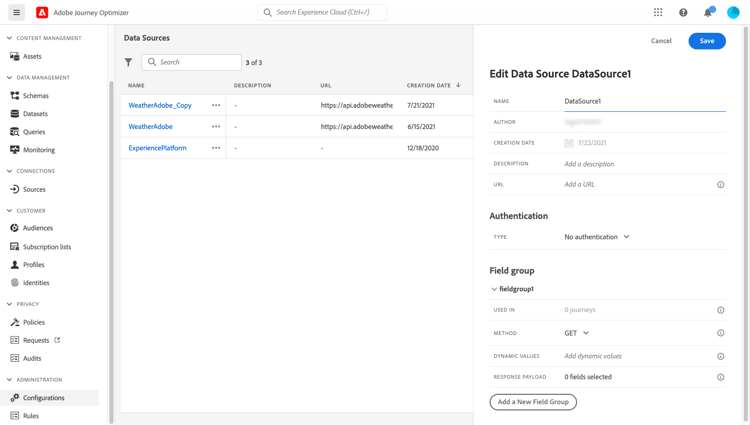
這會開啟畫面右側的資料來源設定窗格。
-
輸入您的資料來源名稱。
只允許使用英數字元和底線。 長度上限為30個字元。
-
新增說明至您的資料來源。 此步驟為選填。
-
新增外部服務的 URL。 在我們的範例中:https://api.adobeweather.org/weather。
note caution CAUTION 基於安全考量,我們強烈建議您使用 HTTPS。 另請注意,我們不允許使用非公開的Adobe位址和IP位址。 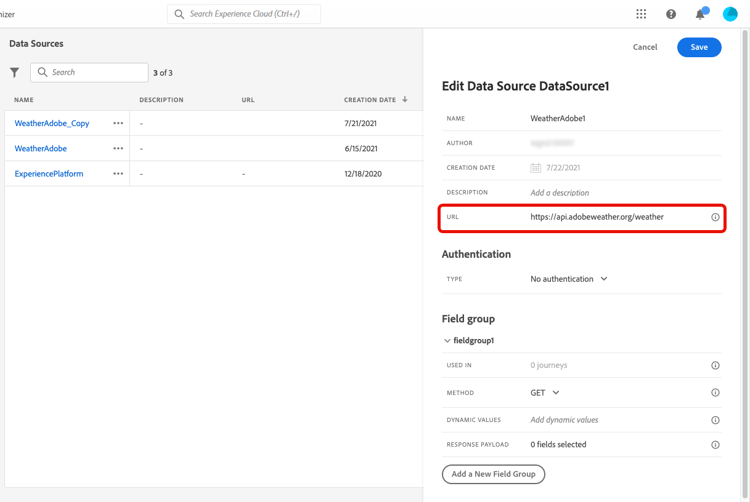
-
根據外部服務組態設定驗證: 無驗證、基本、自訂或API金鑰。
對於基本驗證模式,您需要填寫使用者名稱和密碼。
note NOTE -
執行驗證呼叫時,會在Authentication標頭中新增以base64編碼的
<username>:<password>字串。 -
Adobe Journey Optimizer會自動加密自訂動作中定義的秘密。 每個組織的加密金鑰都會在與其組織繫結的專屬儲存庫中受到安全管理。 憑證在介面中顯示時,預設會加以遮罩,以防止意外曝光。
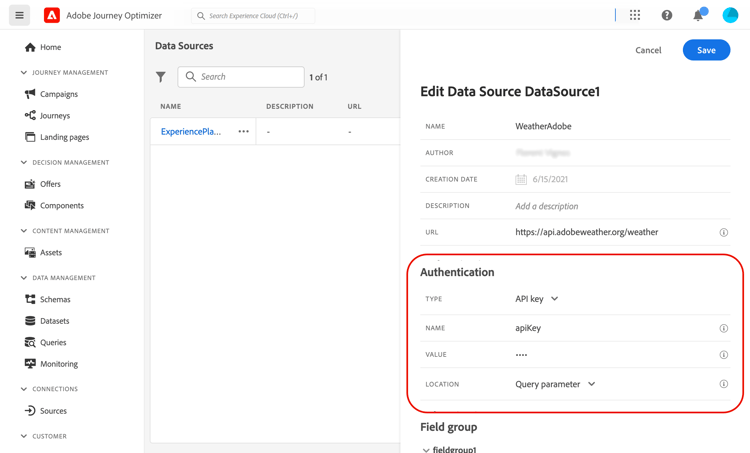
如需自訂驗證模式的詳細資訊,請參閱自訂驗證模式區段。 在我們的範例中,我們選擇API金鑰驗證模式,如下所示:
-
型別: “API金鑰”
-
名稱: “appid” (這是API金鑰引數名稱)
-
值: “1234” (這是我們API金鑰的值)
-
位置: “Query parameter” (API金鑰位於URL)
顯示[型別]、[名稱]、[值]和[位置]輸入的
-
-
按一下新增欄位群組,為每個API引數集新增欄位群組。 欄位群組名稱中只允許使用英數字元和底線。 長度上限為30個字元。 在我們的範例中,我們需要建立兩個欄位群組,每個群各有一個參數集(city 及 long/lat)。
在 “long/lat” 參數集中,我們會建立包含下列資訊的欄位群組:
- 用於:顯示使用欄位群組的歷程次數。 您可以按一下 檢視歷程 圖示,以顯示使用此欄位群組的歷程清單。
- 方法:選取POST或GET方法。 在本例中,我們選取 GET 方法。
- 動態值:在本例中,輸入以逗號「long,lat」分隔的不同引數。 由於參數值視執行內容而定,因此它們會在歷程中定義。 進一步瞭解運算式
- 回應承載:在 承載 欄位內按一下,並貼上呼叫傳回之承載的範例。 例如,我們使用了氣象 API 網站上找到的承載。 確認欄位類型是否正確。 每次呼叫 API 時,系統都會擷取承載範例中包含的所有欄位。 請注意,如果要變更目前傳遞的裝載,可以按一下貼上新的裝載。
- 已傳送裝載:此欄位未出現在我們的範例中。 只有選取 POST 方法時才能使用。 貼上會傳送至第三方系統的承載。
若是GET呼叫所需的引數,您會在 動態值 欄位中輸入引數,系統就會在呼叫結束時自動新增這些引數。 若是 POST 呼叫,您需要:
- 在 動態值 欄位中列出呼叫時要傳遞的引數(在以下範例中:「識別碼」)。
- 在已傳送承載的正文中,也使用完全相同的語法指定它們。 若要這麼做,您必須新增:“param”: 「name of your parameter」 (在以下範例中:「identifier」)。 請遵循下列語法:
{"id":{"param":"identifier"}}
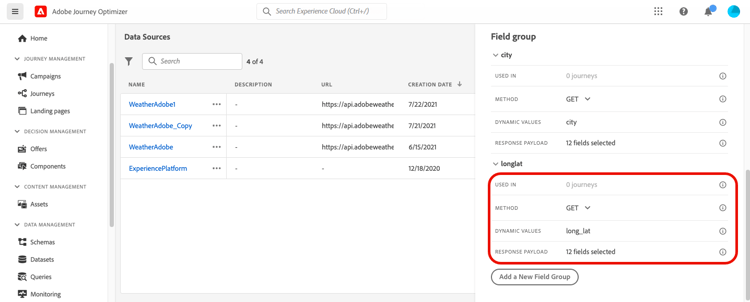
儲存變更後,資料來源已設定完畢,且可供您在歷程中使用,例如在您的條件或個人化電子郵件中。 如果溫度超過 30°C,您可以決定傳送特定通訊。
自訂驗證模式 custom-authentication-mode
自訂驗證模式會用於複雜驗證,常用來呼叫OAuth2等API封裝通訊協定,以擷取要插入到動作之實際HTTP要求中的存取權杖。
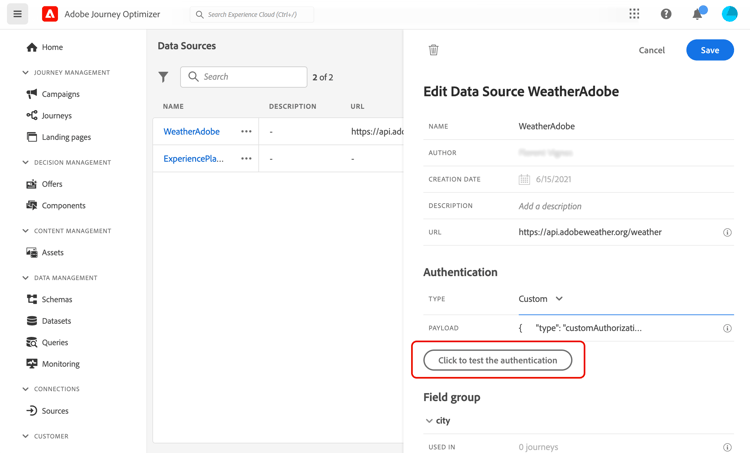
當您設定自訂驗證時,請使用 按一下以檢查驗證 按鈕,以控制自訂驗證裝載是否已正確設定。
資料來源組態中的
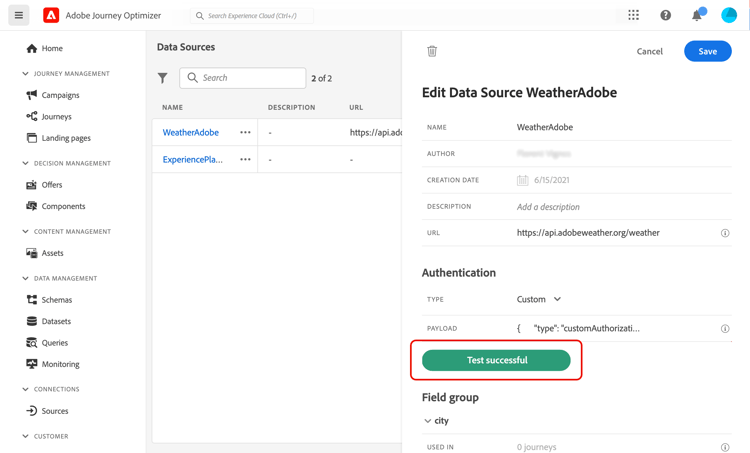
測試成功時,按鈕會變成綠色。
使用此驗證模式,動作執行是兩個步驟的流程:
- 呼叫端點以產生存取權杖。
- 以正確的方式插入存取權仗來呼叫 REST API。
要呼叫的端點定義,用於產生存取權杖 custom-authentication-endpoint
-
endpoint:用來產生端點的URL -
端點(
GET或POST)上的HTTP要求方法 -
headers:必要時,在此呼叫中插入做為標題的機碼值組 -
body:說明方法為POST時呼叫的主體。 我們支援有限的正文結構,如bodyParams (索引鍵值配對)中所定義。 bodyType 說明了呼叫內正文的格式和編碼:form:表示內容型別將會是application/x-www-form-urlencoded (字元集UTF-8),而金鑰 — 值配對將會序列化為:key1=value1&key2=value2&…json:表示內容型別將會是application/json (字元集UTF-8),而金鑰 — 值配對將會序列化為JSON物件,如下所示: { “key1”: “value1”, “key2”: “value2”, …}
存取權杖插入動作之HTTP要求必須採用的方式定義 custom-authentication-access-token
-
authorizationType:定義如何將產生的存取權杖插入動作的HTTP呼叫。 可能的值包括:
bearer:表示存取權杖必須插入到Authorization標頭中,例如: Authorization: Bearer <access token>header:表示存取權杖必須插入為標頭,而標頭名稱是由屬性tokenTarget定義。 例如,如果tokenTarget是myHeader,則存取權杖將會插入為標題,如下所示: myHeader: <access token>queryParam:表示存取權杖必須插入為queryParam,而查詢引數名稱會由屬性tokenTarget定義。 舉例來說,若 tokenTarget 是 myQueryParam,則動作呼叫的 URL 將會是:<url>?myQueryParam=<access token>
-
tokenInResponse:指示如何從驗證呼叫擷取存取權杖。 此屬性可以是:
response:指出HTTP回應是存取權杖- JSON的選擇器(假設回應為JSON,我們不支援XML等其他格式)。 此選擇器的格式為 json://<path to the access token property>。 舉例來說,若呼叫的回應是:{ "access token": “theToken”, “timestamp”: 12323445656 },tokenInResponse 將會是: json: //access_token_
此驗證的格式為:
{
    "type": "customAuthorization",
    "endpoint": "<URL of the authentication endpoint>",
    "method": "<HTTP method to call the authentication endpoint, in 'GET' or 'POST'>",
    (optional) "headers": {
        "<header name>": "<header value>",
        ...
    },
    (optional, mandatory if method is 'POST') "body": {
        "bodyType": "<'form'or 'json'>,
        "bodyParams": {
            "param1": value1,
            ...
        }
    },
    "tokenInResponse": "<'response' or json selector in format 'json://<field path to access token>'",
    "cacheDuration": {
        (optional, mutually exclusive with 'duration') "expiryInResponse": "<json selector in format 'json://<field path to expiry>'",
        (optional, mutually exclusive with 'expiryInResponse') "duration": <integer value>,
        "timeUnit": "<unit in 'milliseconds', 'seconds', 'minutes', 'hours', 'days', 'months', 'years'>"
    },
    "authorizationType": "<value in 'bearer', 'header' or 'queryParam'>",
    (optional, mandatory if authorizationType is 'header' or 'queryParam') "tokenTarget": "<name of the header or queryParam if the authorizationType is 'header' or 'queryParam'>",
}
您可以針對自訂驗證資料來源變更權杖的快取持續時間。 以下是自訂驗證承載的範例。 快取期間在cacheDuration引數中定義。 其會指定快取中產生權杖的保留期間。 單位可能是毫秒、秒、分鐘、小時、天、月、年。
以下是持有人驗證型別的範例:
{
    "type": "customAuthorization",
    "endpoint": "https://<your_auth_endpoint>/epsilon/oauth2/access_token",
    "method": "POST",
    "headers": {
      "Authorization": "Basic EncodeBase64(<epsilon Client Id>:<epsilon Client Secret>)"
    },
    "body": {
      "bodyType": "form",
      "bodyParams": {
        "scope": "cn mail givenname uid employeeNumber",
        "grant_type": "password",
        "username": "<epsilon User Name>",
        "password": "<epsilon User Password>"
      }
    },
    "tokenInResponse": "json://access_token",
    "cacheDuration": {
      "duration": 5,
      "timeUnit": "minutes"
    },
  },
-
每個歷程都會快取驗證Token:如果兩個歷程使用相同的自訂動作,每個歷程都會快取其自己的Token。 該權杖不會在這些歷程之間共用。
-
快取持續時間有助於避免對驗證端點的過多呼叫。 驗證權杖保留在服務中會快取,沒有持續性。 如果重新啟動服務,它會從乾淨的快取開始。 快取持續時間預設為1小時。 在自訂驗證裝載中,可透過指定另一個保留期間來調整它。
憑證式自訂驗證 certificate-credential
對於強制憑證式身分驗證的企業API (例如Microsoft Entra ID),您可以將"subType": "certificateCredential"新增至自訂授權裝載,以設定憑證式自訂驗證。 依預設,Journey Optimizer會使用Adobe的Managed憑證與RS256簽署JWT使用者端宣告,並將其交換為存取權杖。 此預設RS256選項不需要使用者端密碼。 相同承載也支援使用OAuth使用者端密碼進行HMAC簽署,而非Adobe憑證。
此選項將兩個必要欄位新增至標準customAuthorization結構描述: subType和aud。 所有其他欄位(endpoint、method、本文引數、tokenInResponse)保持不變。 當subType不存在時,行為與標準自訂驗證相同 — 不影響現有設定。
subType:設定為"certificateCredential"以啟用憑證式驗證。aud: JWT使用者端宣告中包含的對象值。 對於Microsoft Entra ID,這與endpointURL相同,但必須一律明確設定。alg(選用): JWT簽署演演算法。 支援的值為RS256(預設)、HS256、HS384和HS512。 當alg不存在或設為RS256時,現有的RSA流程會以未變更的方式執行。 測試或執行驗證時,會拒絕任何其他值(包括小寫)。 在自訂授權承載中設定此欄位;簽署演演算法沒有單獨的UI控制項。
client_assertion和client_assertion_type欄位從未由使用者編寫。 它們會在執行階段由平台自動插入,緊接在權杖端點呼叫之前。
RS256驗證的運作方式 certificate-credential-how-it-works
憑證式自訂驗證以JWT使用者端宣告實作OAuth 2.0使用者端認證,如RFC 7523所定義 — 與Microsoft Entra ID和Okta支援的標準相同。 Journey Optimizer使用以Adobe受管理私密金鑰簽署的JWT來證明其身分,而非使用者端密碼。 您的身分提供者會使用Adobe的公開憑證來驗證簽名,您只需在身分提供者中註冊一次該憑證。
代號交換會依照下列步驟進行:
- Journey Optimizer會建立以Adobe私密金鑰簽署的JWT使用者端宣告。
- 判斷提示會連同
client_id、grant_type和scope一併傳送至您的Token端點。 - 您的身分提供者會根據Adobe註冊的公開憑證驗證JWT簽章。
- 您的身分提供者傳回持有者存取權杖。
- Journey Optimizer會使用該權杖來呼叫您的自訂動作端點。
Adobe憑證詳細資料 certificate-credential-details
對於預設的RS256選項,Adobe會管理憑證及其關聯的私密金鑰。 下表摘要列出其主要特性。 這些憑證要求不適用於HMAC簽署。
expiryDate並重新設定您的IDP,然後再撤銷舊憑證。Adobe會在到期前60天自動輪換憑證。 先前的憑證有效期至到期前30天為止。 目前未通知客戶 — 請參閱下方的憑證(僅限RS256)護欄,瞭解如何以程式設計方式監視輪換。
設定憑證式自訂驗證時,請記住下列護欄:
- 權杖端點URL:必須是HTTPS。 避免包含
?的URL,這是貼上授權端點(而非權杖端點)的符號。 method:必須是POST。 OAuth權杖端點僅接受POST請求。client_id:不得為空白,且開頭或結尾不能是空白字元。 空白值會產生看起來有效的JWT,身分提供者會以不透明錯誤拒絕該JWT。scope:在bodyParams中以單一空格分隔的字串表示。 最多總共1000個字元。- 憑證(僅限RS256): Adobe會管理憑證和私密金鑰;您絕對不會上傳或輸入憑證。 在具有RS256的即時歷程中使用自訂動作之前,您必須在身分提供者中註冊Adobe的葉憑證。 若要擷取它,請呼叫mTLS公開憑證API,並尋找
certCommonName為ajo-journeys.aep-mtls.adobe.com的專案。 從該專案(而非中間或根CA憑證)登入publicCertificate值。 由於客戶目前未收到憑證輪換的通知,因此您必須定期呼叫mTLS公用憑證API以檢查expiryDate並更新您IDP中的註冊憑證,然後在舊憑證於到期前30天被撤銷。 HMAC簽署不需要Adobe憑證註冊。
您不會編寫JWT使用者端宣告,Journey Optimizer會為您產生並簽署。 此處提供預期的結構,讓您的身分提供者團隊可以驗證宣告。
下列標題和承載適用於預設的RS256選項。 如需HMAC差異,請參閱HMAC簽署的JWT使用者端宣告。
標頭:
{
  "alg": "RS256",
  "x5t": "<base64url SHA-1 thumbprint of Adobe's leaf certificate>"
}
裝載:
{
  "iss": "<client_id>",
  "sub": "<client_id>",
  "aud": ["<aud value>"],
  "iat": "<current unix timestamp>",
  "exp": "<iat + 600 seconds>",
  "jti": "<unique UUID per request>"
}
請注意下列事項:
- 對於RS256,
exp為iat+ 600秒(10分鐘),符合Okta和Entra ID的要求。 對於HMAC,exp為iat+ 300秒(5分鐘)。 - 每個判斷提示都使用唯一的
jti,因此可以確保重播攻擊的安全。 client_assertion和client_assertion_type由平台自動插入,且永遠不會編寫。
以下是Microsoft Entra ID的憑證憑證憑證驗證型別範例:
{
  "type": "customAuthorization",
  "subType": "certificateCredential",
  "aud": "https://login.microsoftonline.com/{tenantId}/oauth2/v2.0/token",
  "authorizationType": "Bearer",
  "endpoint": "https://login.microsoftonline.com/{tenantId}/oauth2/v2.0/token",
  "method": "POST",
  "body": {
    "bodyType": "form",
    "bodyParams": {
      "client_id": "<your-client-id>",
      "grant_type": "client_credentials",
      "scope": "https://api.example.com/.default"
    }
  },
  "tokenInResponse": "json://access_token"
}
以下是Okta中相同憑證認證驗證型別的範例:
{
  "type": "customAuthorization",
  "subType": "certificateCredential",
  "authorizationType": "bearer",
  "endpoint": "https://<your-okta-domain>/oauth2/v1/token",
  "aud": "https://<your-okta-domain>/oauth2/v1/token",
  "method": "POST",
  "body": {
    "bodyType": "form",
    "bodyParams": {
      "client_id": "<your-okta-app-client-id>",
      "grant_type": "client_credentials",
      "scope": "<your-api-scope>"
    }
  },
  "tokenInResponse": "json://access_token"
}
以下是標頭驗證型別的範例:
{
  "type": "customAuthorization",
  "endpoint": "https://myapidomain.com/v2/user/login",
  "method": "POST",
  "headers": {
    "x-retailer": "any value"
  },
  "body": {
    "bodyType": "form",
    "bodyParams": {
      "secret": "any value",
      "username": "any value"
    }
  },
  "tokenInResponse": "json://token",
  "cacheDuration": {
    "expiryInResponse": "json://expiryDuration",
    "timeUnit": "minutes"
  },
  "authorizationType": "header",
  "tokenTarget": "x-auth-token"
}
以下是登入API呼叫的回應範例:
{
  "token": "xDIUssuYE9beucIE_TFOmpdheTqwzzISNKeysjeODSHUibdzN87S",
  "expiryDuration" : 5
}
bodyParams內的子物件)是支援。HMAC簽署的JWT使用者端宣告 hmac-credential
若要使用HMAC簽署,請在自訂授權承載中將alg設定為HS256、HS384或HS512。 Journey Optimizer使用您的OAuth client_secret作為簽署金鑰。 您的身分提供者必須接受具有相同密碼和演演算法的client_secret_jwt。 不需要Adobe憑證註冊。
HMAC需要與RS256相同的欄位: body.bodyParams中的"subType": "certificateCredential"、明確aud、"method": "POST"、"bodyType": "form"和client_id。 此外,將client_secret新增至body.bodyParams。 最小秘密長度以UTF-8位元組計量,而非字元:
client_secret長度Journey Optimizer 不傳送client_secret至權杖端點。 它會傳送其他編寫的bodyParams並自動新增client_assertion_type=urn:ietf:params:oauth:client-assertion-type:jwt-bearer和client_assertion。
HMAC JWT使用typ: JWT,而選取的alg (不含x5t)和exp為iat + 300秒,而RS256則為600秒。
This section contains structured knowledge intended to support interpretation, retrieval, and question answering related to this topic.
For complete understanding, this information should be combined with the documentation on this page. Neither source is intended to stand alone; the page describes the feature, while this section provides additional context that helps disambiguate terminology, intent, applicability, and constraints.
- TL;DR: This page explains how to create and configure external data sources that connect to third-party REST APIs, including the supported authentication modes, field group setup, custom authentication payloads, and certificate-based custom authentication.
Intents:
- Create and configure an external data source that connects to a third-party REST API
- Choose an authentication mode among No authentication, Basic, Custom, and API key
- Define field groups per API parameter set with Method, Dynamic Values, and payload fields
- Configure custom authentication for protocols such as OAuth2 and check it with the Click to check the authentication button
- Configure JWT client assertion authentication using default RS256 certificate signing or optional HMAC signing
- Set the token cache duration to limit calls to the authentication endpoint
Glossary:
- External data source: A connection to a third-party system that you create; you can create as many as you need (product-specific)
- Field group: A set of fields configured per API parameter set, with Method, Dynamic Values, Response Payload, and (for POST) Sent Payload (product-specific)
- Custom authentication mode: An authentication mode for complex protocols such as OAuth2, where the action execution is a two-step process that first generates an access token and then injects it in the HTTP request (product-specific)
- cacheDuration: The parameter that specifies the retention duration of the generated token in the cache (product-specific)
- Certificate-based custom authentication: A custom authentication subtype (
subType: certificateCredential) where Journey Optimizer signs a JWT client assertion and exchanges it for an access token; the default RS256 option uses Adobe’s managed certificate and requires no client secret (product-specific) - HMAC-signed JWT client assertion: An assertion signed using the OAuth
client_secretas the signing key, selected through the optionalalgfield, without Adobe certificate registration (product-specific)
Guardrails:
- Use custom actions instead of data sources for external data source use cases now that responses are supported (recommended). Custom Actions without Data Lake persistence are the right choice when the data is only useful inside the journey and the external system is accessible via an API endpoint.
- REST APIs using POST or GET and returning JSON are supported; API Key, basic, and custom authentication modes are supported.
- The use of Adobe addresses that are not publicly available and the use of IP addresses is not allowed; HTTPS is strongly recommended for security reasons.
- Data source name: only alphanumeric characters and underscores are allowed, maximum length 30 characters (hard limit).
- Field group name: only alphanumeric characters and underscores are allowed, maximum length 30 characters (hard limit).
- The Sent Payload field is only available if you select the POST method.
- The default cache duration is 1 hour (default) and can be adapted in the custom authentication payload; at least a one-minute buffer between the external API’s token expiration period and the
cacheDurationsetting is recommended, especially under heavy workloads, to avoid expiration mismatches and 401 errors. - The authentication token is cached per journey and is not shared between journeys; there is no persistence, so a service restart starts with a clean cache.
- Encode64 is the only function available in the authentication payload.
- For certificate-based custom authentication,
subTypeandaudare mandatory; the token endpoint URL must be HTTPS,methodmust bePOST,client_idmust not be blank and must have no leading or trailing whitespace. - For certificate-based custom authentication,
scopeis a single space-separated string inbodyParams, maximum 1000 characters total (hard limit). - For RS256 only, you never upload or enter a certificate; before using the custom action in a live journey you must register Adobe’s leaf certificate (not the intermediate or root CA) in your Identity Provider.
- The Adobe certificate applies to the default RS256 (RSA) option; Adobe rotates it 60 days before expiry (certificate lifetime 13 months) and the previous certificate remains valid until 30 days before expiry; customers are not currently notified, so periodically call the mTLS Public Certificate API to check the
expiryDate. - The optional
algfield acceptsRS256(default),HS256,HS384, andHS512. Omittingalgor setting it toRS256preserves the existing RSA flow; any other value, including lowercase, is rejected when the authentication is tested or executed. - HMAC-signed JWT authentication is available in Limited Availability.
- HMAC signing requires
client_idandclient_secretinbody.bodyParams,subType: certificateCredential, explicitaud,method: POST, andbodyType: form. Minimum secret lengths in UTF-8 bytes are 32 for HS256, 48 for HS384, and 64 for HS512. The identity provider client must acceptclient_secret_jwtwith the same secret and algorithm. - For HMAC, Journey Optimizer does not send
client_secretin the token request; it sends the other authoredbodyParamsplusclient_assertion_type=urn:ietf:params:oauth:client-assertion-type:jwt-bearerandclient_assertion. - The HMAC JWT header includes
typand the selectedalg, with nox5t;expisiat+ 300 seconds. RS256 usesiat+ 600 seconds. - When configuring custom authentication for a custom action, nested JSON objects (for example, sub-objects within
bodyParams) are supported.
Terminology:
- Canonical name: external data source - variants: external data sources
- Do not confuse: Dynamic Values (parameters defined in journeys and passed at call time) ≠ Response Payload (example payload returned by the call) ≠ Sent Payload (payload sent to the third-party system, POST only)
- Do not confuse: “RS256” (default JWT signing with Adobe’s managed certificate) and “HS256”, “HS384”, or “HS512” (HMAC JWT signing with the OAuth client secret)
FAQ:
- Q: What kinds of APIs are supported for external data sources? — REST APIs using POST or GET and returning JSON, with API Key, basic, or custom authentication modes.
- Q: What is the maximum length of a data source or field group name? — 30 characters, using only alphanumeric characters and underscores.
- Q: How do I verify that my custom authentication payload is configured correctly? — Use the Click to check the authentication button; when the test is successful, the button turns green.
- Q: What is the default token cache duration and can I change it? — The default cache duration is 1 hour, and you can adapt it by specifying another retention duration in the
cacheDurationparameter of the custom authentication payload. - Q: Do I need to upload a certificate for certificate-based custom authentication? - For the default RS256 option, Adobe manages the certificate and private key; you register Adobe’s leaf certificate in your Identity Provider, retrieved from the mTLS Public Certificate API. HMAC signing requires no Adobe certificate registration.
- Q: Are nested JSON objects allowed when configuring custom authentication for a custom action? — Yes, nested JSON objects such as sub-objects within
bodyParamsare supported.