在此頁面上:瞭解如何使用更新設定檔動作活動,當客戶進行歷程時,擴充或修正現有的Adobe Experience Platform設定檔。
當客戶進行歷程時,請使用 更新設定檔 動作活動來擴充或修正現有的Adobe Experience Platform設定檔。 您可以設定來源為歷程事件、已設定資料來源或靜態值的欄位值,讓您在不離開歷程畫布的情況下保持設定檔資料的正確和可操作。 在設定此活動之前,請先檢閱適用的護欄和限制。
資料集選取範圍 dataset-selection
更新設定檔活動需要專用的資料集來儲存更新。 由於此活動只會更新設定檔存放區 (而非Datalake),所有更新應該儲存在專為 更新設定檔 動作指定的設定檔啟用資料集中。
此外,更新設定檔活動設定不需要身分名稱空間。 因此,請確定選取的資料集使用啟動歷程的動作所使用的相同身分名稱空間,因為這是這些更新將使用的名稱空間。 身分對應也可以由選取的資料集使用。 若未選取具有正確識別名稱空間或使用識別對應的資料集,將導致 更新設定檔 活動失敗。
設定更新設定檔活動 use-profile-update
請依照下列步驟,在您的歷程中設定 更新設定檔 活動。
-
開始設計您的歷程。 深入瞭解建立您的第一個歷程。
-
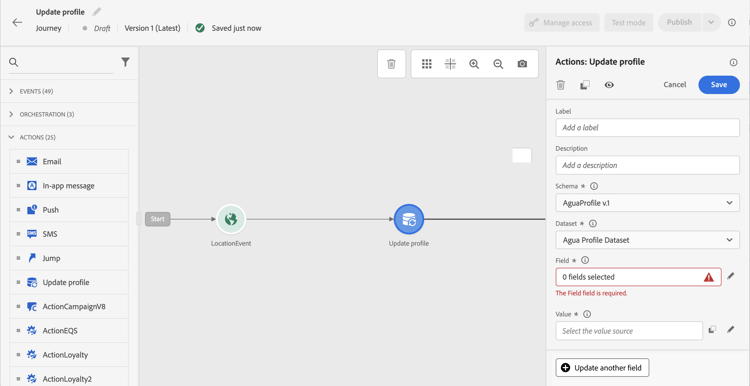
在調色盤的 動作 區段中,將 更新設定檔 活動拖放到畫布中。
-
從清單中選取結構描述。
note NOTE 只有已存在於所選XDM設定檔結構描述中的欄位才可供選取。 如果您需要的欄位未列出,請先將其新增到Adobe Experience Platform中的結構描述。 -
按一下 欄位 以選取要更新的欄位。

-
從清單中選取資料集。
note NOTE 更新設定檔動作會即時更新設定檔資料,但不會更新資料集。 需要選取資料集,因為設定檔是和資料集相關的記錄。 -
按一下 值 欄位以定義您要使用的值:
-
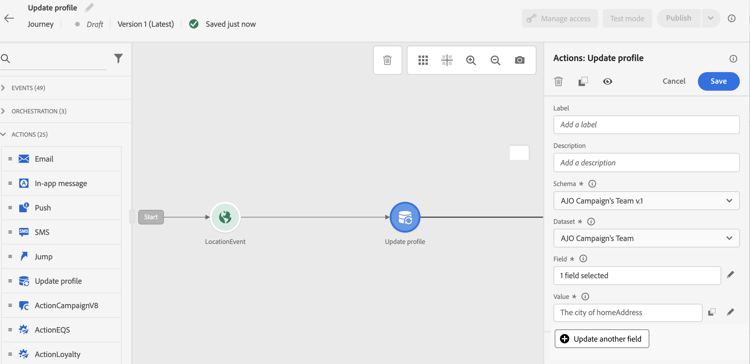
使用簡單運算式編輯器,您可以從資料來源或傳入事件中選取欄位。
設定檔屬性更新的

-
若要定義特定值或運用進階函式,請選取進階模式。
複雜設定檔更新的

-
-
若要更新相同動作中的其他設定檔屬性,請按一下更新其他欄位,然後重複選取欄位和值。 您最多可以在單一 更新設定檔 動作中新增五個欄位/值組。 請參閱護欄和限制。
更新設定檔活動現已設定完成。
測試設定檔更新 using-the-test-mode
請注意,在測試模式中,設定檔更新會立即在測試設定檔上生效,而且不會模擬。
只有測試輪廓才能進入旅程測試模式。 您可以建立新的測試設定檔,或將現有的設定檔轉換為測試設定檔。 在Adobe Experience Platform中,可透過CSV檔案匯入或API呼叫更新設定檔屬性。 更快速的替代方式是在歷程本身中使用 更新設定檔 活動,將測試設定檔布林欄位設為true。
有關如何將現有設定檔轉換為測試設定檔的詳細資訊,請參閱此區段。
護欄與限制 guardrails
- 更新設定檔動作只能用於具有名稱空間的歷程。
- 動作只會更新現有欄位,不會建立新的設定檔欄位。
- 動作僅支援簡單欄位型別(字串、數字、布林值)。 不支援定義為分項清單、建議值、物件陣列或複雜集合(例如產品清單)的XDM欄位。
- 您無法使用 更新設定檔 動作來產生體驗事件,例如購買。
- 如同任何其他動作,您可以定義替代路徑,以防發生錯誤或逾時。 兩個動作無法並行放置。
- 不保證個人資料更新可立即用於相同歷程的下游。 請避免在寫入欄位的 更新設定檔 動作之後直接放置讀取欄位的動作,因為更新值可能尚未反映出來。
- 更新設定檔活動只會更新設定檔存放區,不會更新Data Lake。
- 單一 更新設定檔 動作中最多可更新五個欄位/值組。 使用 更新其他欄位 按鈕以新增更多配對。
- 為獲得更好的效能,請將多個屬性更新群組為單一 更新設定檔 動作,而不是為每個屬性使用一個動作。
This section contains structured knowledge intended to support interpretation, retrieval, and question answering related to this topic.
For complete understanding, this information should be combined with the documentation on this page. Neither source is intended to stand alone; the page describes the feature, while this section provides additional context that helps disambiguate terminology, intent, applicability, and constraints.
- TL;DR: This page explains how to configure the Update Profile activity to enrich or correct an existing Adobe Experience Platform profile with data from journey events, datasources, or static values as a customer progresses through a journey.
Intents:
- Configure the Update Profile activity to modify existing profile attributes during a journey
- Select a profile-enabled dataset dedicated to Update Profile actions
- Map field values from journey events, datasources, or static values to profile attributes
- Update multiple profile attributes (up to five) in a single activity
- Test profile updates in journey test mode
Glossary:
- Update Profile activity: An action activity that writes new values to existing fields in an Adobe Experience Platform profile in real time as a profile moves through a journey (product-specific)
- Profile Store: The Adobe Experience Platform store that holds real-time customer profile data, distinct from the Data Lake (product-specific)
- Identity namespace: A label that distinguishes identity contexts (e.g., email, CRM ID) used to match the profile being updated (product-specific)
- Profile-enabled dataset: An Adobe Experience Platform dataset configured to contribute records to the unified profile (product-specific)
Guardrails:
- The Update Profile action can only be used in journeys that have a namespace defined.
- The action only updates existing XDM fields; it cannot create new profile fields.
- Only simple field types are supported (string, number, boolean); enumerations, object arrays, and complex collections are not supported.
- The action cannot generate experience events such as purchases.
- Up to five field/value pairs can be updated in a single Update Profile action.
- Do not share the dedicated dataset with batch or streaming ingestion processes, as other ingestion runs will overwrite Update Profile changes.
- Profile updates may not be immediately available downstream in the same journey execution.
- The activity only updates the Profile Store, not the Data Lake.
Terminology:
- Canonical name: Update Profile — Acronym: none — variants: Update Profile activity, Update Profile action
- Synonyms: “Profile Store” = “Real-Time Customer Profile store”
- Do not confuse: “Profile Store” (updated by this activity) ≠ “Data Lake” (not updated by this activity)
FAQ:
- Q: Can the Update Profile activity create new profile fields? — No, it can only update fields that already exist in the selected XDM Profile schema.
- Q: Why should I use a dedicated dataset for Update Profile actions? — Sharing the dataset with batch or streaming ingestion can cause other ingestion runs to overwrite the changes made by the Update Profile activity.
- Q: Are profile updates immediately visible to downstream activities in the same journey? — No, updated values may not yet be reflected if an action reads the same field immediately after the Update Profile activity writes it.
- Q: How many fields can I update in a single Update Profile action? — Up to five field/value pairs can be configured in a single activity using the “Update another field” button.
- Q: Do profile updates apply in test mode? — Yes, in test mode the updates take effect immediately on the test profile and are not simulated.