在此頁面上:設定單一事件,讓您可以根據特定人員的行為即時觸發歷程,例如購買或忠誠度里程碑。
單一事件會連結到特定的輪廓。 它們可能是以規則為基礎或由系統產生。 閱讀有關單一事件本節的詳細資訊。
以下是設定新事件的第一個步驟:
-
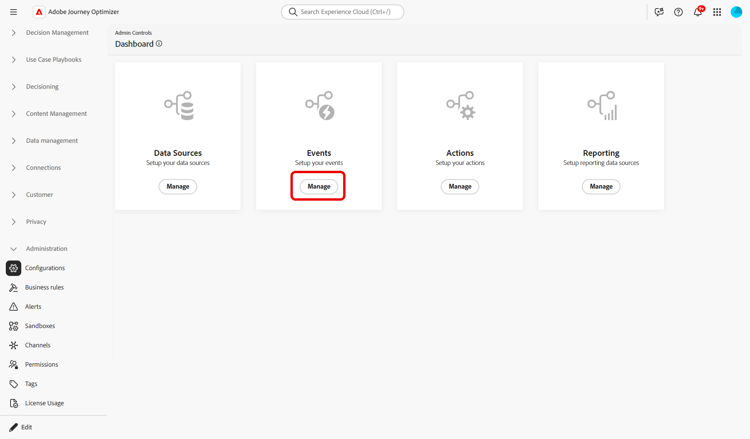
在[管理]功能表區段中,瀏覽至組態,在 事件 區段中,按一下管理。 畫面隨即顯示事件清單。
-
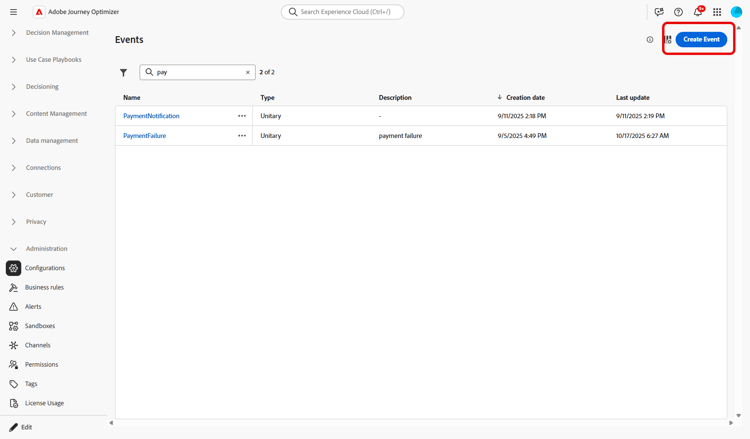
按一下 建立事件 以建立新事件。 事件設定窗格會在畫面右側開啟。
-
輸入事件的名稱。 您也可以新增說明。
note NOTE 只允許使用英數字元和底線。 長度上限為30個字元。 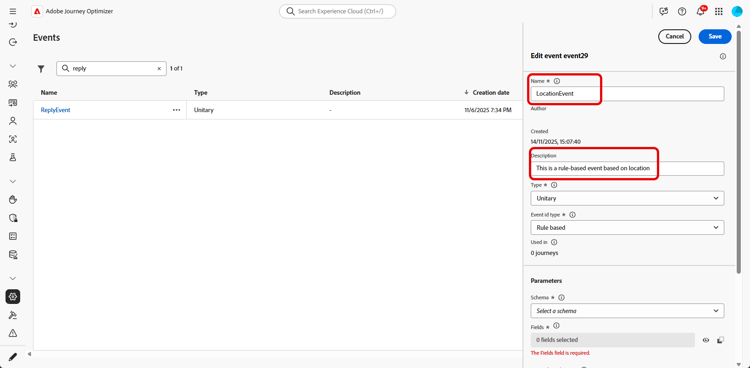
-
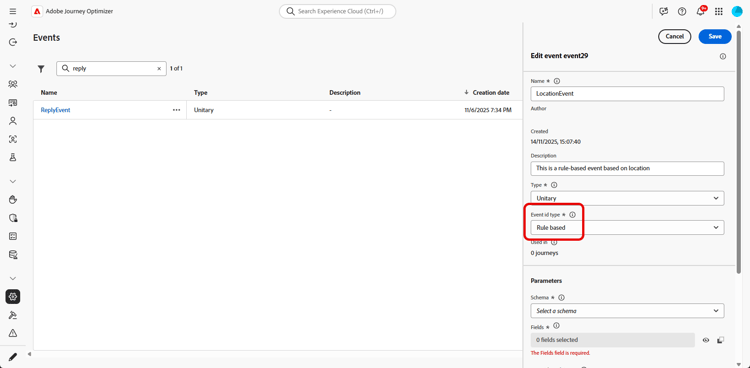
在 型別 欄位中,選擇單一。
-
在 事件識別碼型別 欄位中,選取您要使用的事件識別碼型別: 規則型或系統產生。 閱讀有關本節中事件ID型別的詳細資訊。
-
使用此事件的歷程次數會顯示在 用於 欄位中。 您可以按一下 檢視歷程 圖示,以顯示使用此事件的歷程清單。
-
定義結構和裝載欄位:您可以在此處選取歷程預期會收到的事件資訊(通常稱為裝載)。 接著,您就可以在歷程中使用這項資訊。 請參閱本節。
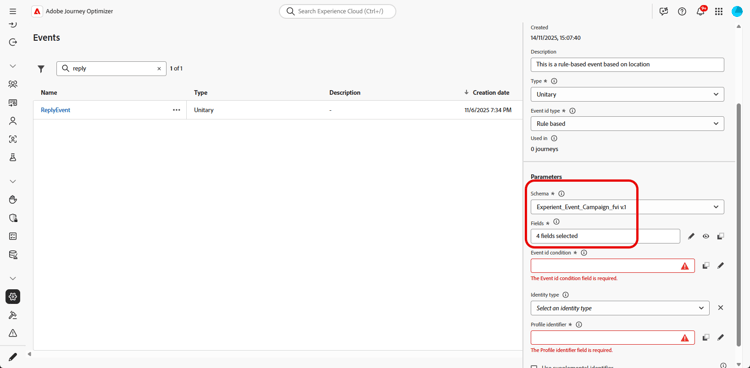
note NOTE 當您選取 系統產生的 型別時,只有具有eventID型別欄位的結構描述才可用。 當您選取 規則型 型別時,您可以選取沙箱中可用的任何體驗事件結構描述。 -
對於規則型事件,請在 事件識別碼條件 欄位內按一下。 使用簡單或進階運算式編輯器,定義系統將使用的條件,以識別將觸發您歷程的事件。
在我們的範例中,我們根據設定檔的城市來撰寫條件。 這表示每當系統收到符合此條件(城市欄位和 巴黎 值)的事件時,就會將其傳遞給歷程。
note NOTE 在簡單運算式編輯器中,並非所有運運算元都可使用,它們取決於資料型別。 例如,對於欄位的字串型別,您可以使用「包含」或「等於」。 如果您在建立事件後,使用新的列舉值修改綱要,則需要按照以下步驟將變更套用至現有事件:從事件欄位中取消選取列舉欄位,確認選擇,然後再次選取列舉欄位。 現在會顯示新的分項清單。 -
新增身分型別。 此步驟為選填,但建議您新增身分型別,以便運用儲存在「即時客戶個人檔案服務」的資訊。 它會定義事件具備的金鑰類型。 請參閱此章節深入瞭解。
-
定義設定檔識別碼:從您的裝載欄位選擇一個欄位,或定義一個公式以識別與事件相關聯的人員。 如果您選取身分型別,此金鑰會自動設定(但仍可編輯)。 事實上,歷程會挑選應該與身分型別對應的金鑰(例如,如果您選取電子郵件身分型別,則會選取電子郵件金鑰)。 請參閱此章節深入瞭解。
-
按一下儲存。
事件現在已設定完畢,且準備好放入歷程中。 若要接收事件,則需要完成其他設定步驟。 請參閱此頁面。
定義裝載欄位 define-the-payload-fields
裝載定義可讓您選擇系統預期從歷程中的事件接收的資訊,以及識別與事件相關聯之人員的金鑰。 裝載是根據Experience Cloud XDM欄位定義。 如需XDM的詳細資訊,請參閱Adobe Experience Platform檔案。
-
從清單中選取XDM結構描述,然後按一下 欄位 欄位或 編輯 圖示。
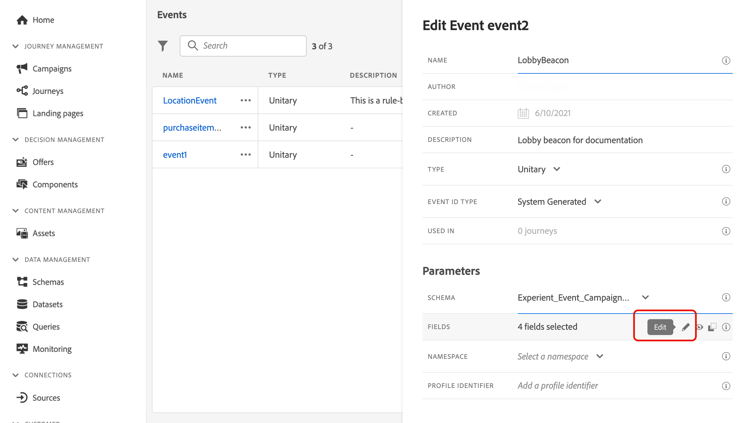
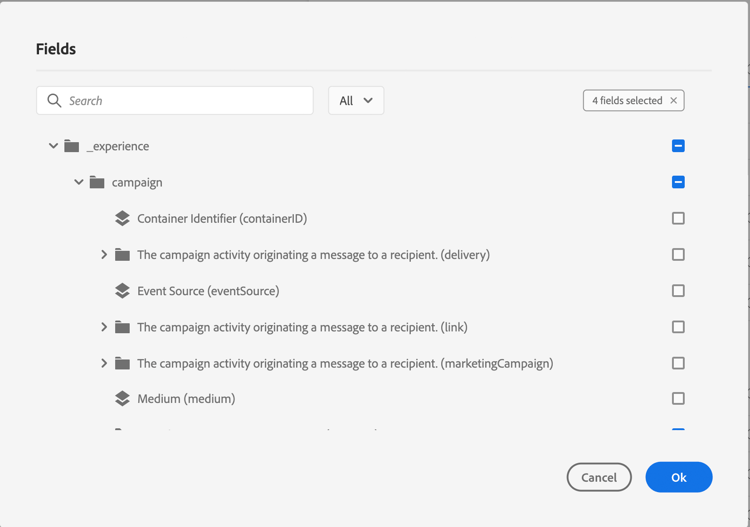
結構描述中定義的所有欄位都會顯示。 欄位清單會因結構描述而異。 您可以搜尋特定欄位,或使用篩選器來顯示所有節點和欄位,或僅顯示選定的欄位。 根據結構描述定義,某些欄位可能是必填欄位並預先選取。 您無法取消選取它們。 依預設,系統會選取歷程正確接收事件所必須的所有欄位。
note NOTE 對於系統產生的事件: - 確定您已將
orchestration欄位群組新增至XDM結構描述 — 這可以確保您的結構描述包含使用Journey Optimizer所需的所有資訊。 - eventID欄位會自動新增至選取的欄位清單,以便Journey Optimizer可以識別事件。 推播事件的系統不應產生ID,請改用有效負載預覽中可用的ID。 了解更多
- 確定您已將
-
選取您預期會從事件接收的欄位。 這些是業務使用者將在歷程中善用的欄位。 它們也必須包含用來識別與事件相關聯之人員的金鑰(請參閱本區段)。
-
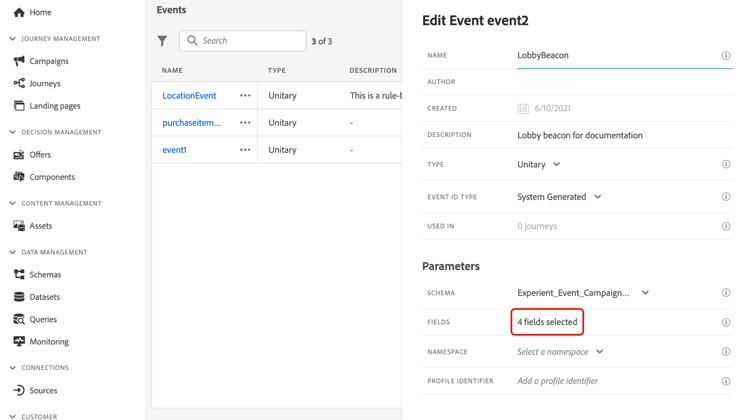
選取完所需的欄位後,按一下 確定 或按Enter。
選取的欄位數目會出現在 欄位 欄位中。
選取身分識別類型 select-the-namespace
身分型別(先前稱為「名稱空間」)可讓您定義用來識別與事件相關聯之人員的金鑰型別。 其設定是選用的。 如果您想要在歷程中擷取來自即時客戶個人檔案的其他資訊,則需要此專案。 如果您僅使用來自協力廠商系統的資料,透過自訂資料來源,則不需要身分型別定義。
您可以使用現有的身分型別,或使用Adobe Experience Platform Identity Service建立新的身分型別。 在Adobe Experience Platform檔案中進一步瞭解。
如果您選取具有主要身分的結構描述,則會預先填入 效能評測器識別碼 和 身分型別 欄位。 如果未定義任何身分,我們選取 identityMap > id 作為主索引鍵。 然後您必須選取身分型別,而且會使用 identityMap > id 預先填入金鑰(身分型別欄位下方)。
選取欄位時,會標籤主要身分欄位。

從下拉式清單中選取身分型別。
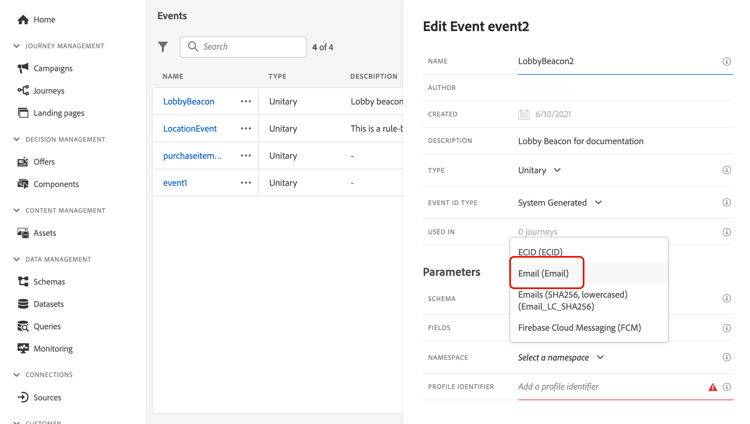
每個歷程只允許一個身分型別。 如果您在同一個歷程中使用數個事件,則需要使用相同的身分型別。 請參閱此頁面。
定義設定檔識別碼 define-the-event-key
索引鍵是欄位或欄位組合,這是事件裝載資料的一部分,可讓系統識別與事件相關聯的人員。 例如,索引鍵可以是Experience Cloud ID、CRM ID或電子郵件地址。
若要使用儲存在Adobe即時客戶設定檔資料庫中的資料,事件索引鍵必須是您在即時客戶設定檔服務中定義為設定檔身分的資訊。
設定檔識別碼可讓系統在事件和個人設定檔之間執行調解。 如果您選取具有主要身分的結構描述,則會預先填入 設定檔識別碼 和 身分型別 欄位。 如果未定義任何身分,則 identityMap > id 是主索引鍵。 然後您必須選取身分型別,而且金鑰會使用 identityMap > id 自動預先填入。
選取欄位時,會標籤主要身分欄位。
如果您需要使用不同的金鑰,例如CRM ID或電子郵件地址,您需要手動新增,如下所述:
-
在 設定檔識別碼 欄位內或鉛筆圖示上按一下。
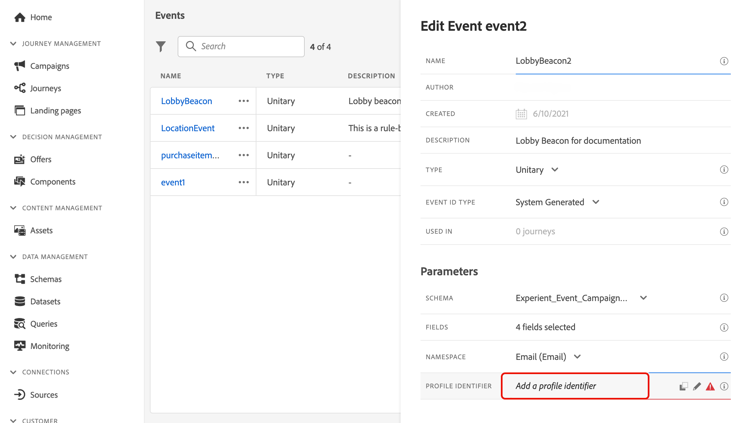
-
選取在裝載欄位清單中選為索引鍵的欄位。
收到事件時,機碼的值可讓系統識別與事件相關聯的人員。 金鑰與身分型別相關聯,可用來在Adobe Experience Platform上執行查詢。 請參閱此頁面。
金鑰也可用來檢查個人是否在歷程中。 事實上,一個人在同一歷程中不能位於兩個不同的位置。 因此,系統不允許相同的金鑰(例如金鑰CRMID=3224)位於相同歷程中的不同位置。
進階運算式編輯器 adv-exp-editor
定義事件ID條件或設定檔識別碼時,您可以切換至進階運算式編輯器,以建立更複雜的索引鍵(例如兩個事件欄位的串連)。
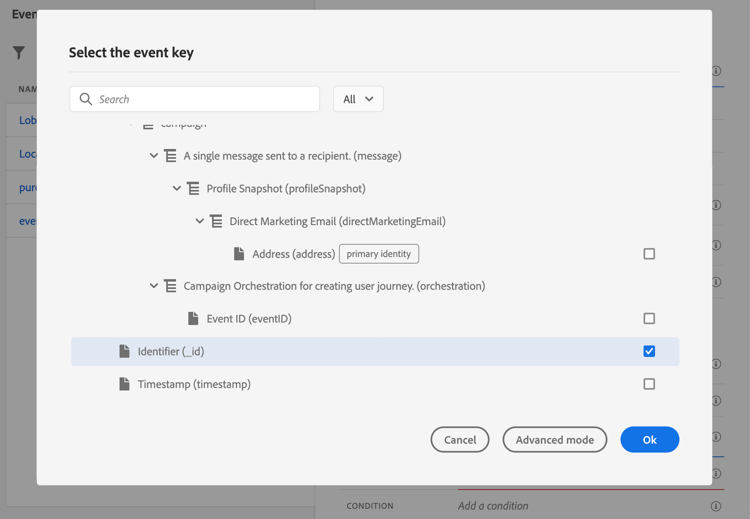
若要執行其他操作,您可以從 進階模式 按鈕存取進階運算式函式。 這些函式可讓您控制用於執行特定查詢的值,例如變更格式、執行欄位串連,僅考慮欄位的一部分(例如10個第一個字元)。 請參閱此頁面。
預覽裝載 preview-the-payload
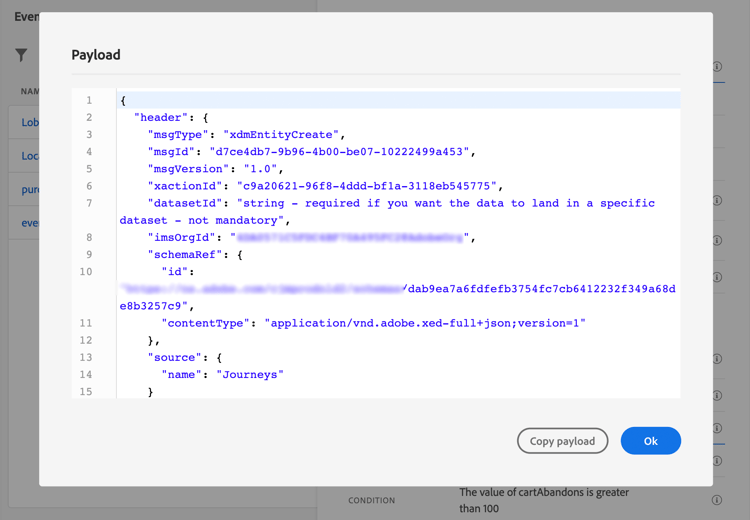
裝載預覽可讓您驗證裝載定義。
-
按一下 檢視裝載 圖示以預覽系統預期的裝載。
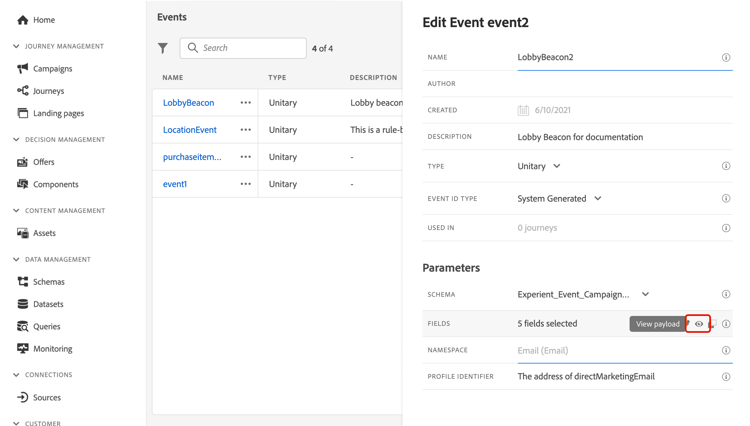
您可以注意到已選取的欄位已顯示。
-
檢查預覽以驗證裝載定義。
-
然後,您可以將裝載預覽與共用給負責事件傳送的人員。 此承載可協助他們設計推送至Journey Optimizer之事件的設定。 請參閱此頁面。
This section contains structured knowledge intended to support interpretation, retrieval, and question answering related to this topic.
For complete understanding, this information should be combined with the documentation on this page. Neither source is intended to stand alone; the page describes the feature, while this section provides additional context that helps disambiguate terminology, intent, applicability, and constraints.
- TL;DR: This page explains how to configure a unitary event, which is linked to a specific profile and can be rule-based or system-generated, including its type, schema and payload fields, identity type, profile identifier, and payload preview.
Intents:
- Create a unitary event and choose the Rule Based or System Generated Event ID type
- Define the schema and select the payload fields the journey expects to receive
- Define the Event ID condition for rule-based events using the simple or advanced expression editor
- Add an identity type and define the profile identifier that reconciles the event with a profile
- Use the advanced expression editor to build more complex keys
- Preview the payload to validate the payload definition
Glossary:
- Unitary event: An event linked to a specific profile that can be rule-based or system-generated (product-specific)
- Identity type: The type of key used to identify the person associated to the event, previously known as namespace; only people-based identity types can be selected (product-specific)
- Profile identifier: The field, or combination of fields, from the event payload that allows the system to identify the person associated to the event (product-specific)
- eventID: For system-generated events, the field automatically added to the list of selected fields so that Journey Optimizer can identify the event; the system pushing the event should not generate an ID and should use the one available in the payload preview (product-specific)
- Orchestration field group: The field group that must be added to the XDM schema for system-generated events so the schema contains all information required to work with Journey Optimizer (product-specific)
- Advanced expression editor: The editor you can switch to for creating more complex keys, such as a concatenation of two event fields (product-specific)
Guardrails:
- The event name allows only alphanumeric characters and underscores, with a maximum length of 30 characters (hard limit).
- When you select the System Generated type, only schemas that have the eventID type field are available; when you select the Rule Based type, you can select any Experience Event schema available in your sandbox.
- Adding an identity type is optional but recommended, and only a people-based identity type can be selected.
- Only one identity type is allowed per journey, so events used in the same journey must use the same identity type.
- The same key, for example CRMID=3224, cannot be at two different places in the same journey.
- For system-generated events, the payload preview requires saving and re-opening the event to generate an event ID.
Terminology:
- Canonical name: Configure a unitary event
- Synonyms: “Identity type” = “namespace”
- Do not confuse: “Rule Based” (uses an Event ID condition, and you can select any Experience Event schema available in your sandbox) ≠ “System Generated” (only schemas that have the eventID type field are available; the eventID field is automatically added to the selected fields)
- Do not confuse: “Event ID condition” (rule used to identify events that trigger the journey) ≠ “Profile identifier” (key used to identify the person associated to the event)
FAQ:
- Q: What are the two Event ID types for a unitary event? — Rule Based, which uses an Event ID condition, and System Generated, for which the eventID field is automatically added to the list of selected fields.
- Q: Is defining an identity type required? — It is optional but recommended, as it allows you to leverage information stored in the Real-time Customer Profile Service; only a people-based identity type can be selected.
- Q: Why does the system not allow the same key at different places in the same journey? — A person cannot be at two different places in the same journey, so the system does not allow the same key to be at different places in the same journey.
- Q: What schemas are available for a System Generated event? — Only schemas that have the eventID type field; for Rule Based events, you can select any Experience Event schema available in your sandbox.
- Q: How do I preview the payload for a system-generated event? — Save the event and re-open it first to generate an event ID, then use the View Payload icon to check the preview.
Personas:
- developer: Can define the schema and payload fields an event expects to receive for use in the journey. Can define the profile identifier, the field or combination of fields that identifies the person associated to the event. The page states that the same key, for example CRMID=3224, cannot be at two different places in the same journey. Where: “Define the profile identifier”.
- admin: Can create a unitary event, name it, and choose the Rule Based or System Generated Event ID type. Can add an identity type to leverage information stored in the Real-time Customer Profile Service. The page states that the event name allows only alphanumeric characters and underscores, with a maximum length of 30 characters. Where: “Configure a unitary event”.
Onboarding:
- Level: Intermediate, Experienced
- First minimal step: Select Create Event to create a new event.
- Success check: The event is now configured and ready to be dropped into a journey.
- Previous: Understand what a unitary event is before configuring one: Work with journey events (event/about-events.md)
- Next: After saving the event, complete the additional steps to send events to a journey: Additional steps to send events to a journey (event/additional-steps-to-send-events-to-journey.md); Use the configured key to perform queries on Adobe Experience Platform in journey activities: Get started with journey activities (building-journeys/about-journey-activities.md)