在此頁面上:熟悉Journey Optimizer中的核心存取控制概念,包括角色、許可權、沙箱,以及物件和屬性型存取控制,因此您可以規劃如何授與使用者正確的存取權。
Journey Optimizer可讓您定義並管理指派給不同使用者的許可權。 許可權是授權或拒絕存取產品內功能的一組許可權和限制。
Journey Optimizer的存取控制是透過Adobe CX Enterprise中的 許可權 提供。 此功能利用角色和原則,將使用者與許可權和沙箱連結。
若要設定Journey Optimizer的存取控制,您必須擁有組織的系統或產品管理員許可權。 可授予或撤銷許可權的最低角色為產品管理員。 可以管理許可權的其他管理員角色是系統管理員(無限制)。 如需詳細資訊,請參閱有關管理角色的Adobe說明中心文章。
Journey Optimizer中的使用者管理是以這些重要概念為基礎:
-
角色:角色是指共用相同許可權和沙箱的使用者集合。 這些角色可讓您輕鬆管理組織內不同使用者群組的存取和許可權。 角色具有一組統一許可權(許可權),可讓使用者存取介面中的特定功能或物件。
透過Journey Optimizer,您可以從預先存在的 角色 範圍中進行選擇,每個角色都有不同的許可權層級,以指派給您的使用者。 深入瞭解此頁面上可用的內建角色。 -
許可權:許可權是統一許可權,可讓您定義指派給 角色 的授權。 每個許可權都集中在資源(例如歷程或優惠)下,代表Journey Optimizer中的不同功能或物件。 在權限層級一節中了解更多 。
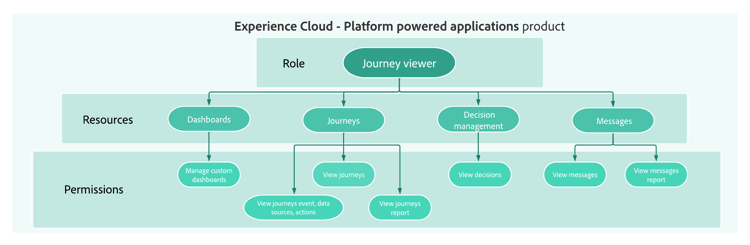
-
沙箱:虛擬沙箱會將執行個體分割成個別的獨立虛擬環境。 沙箱是透過許可權中的角色指派。 深入瞭解使用沙箱。
-
物件型存取控制:限制物件存取的標籤。 這個方法能保護敏感的數位資產,避免未經授權的使用者存取,並確保進一步保護個人資料。 深入瞭解物件式存取管理。
-
以屬性為基礎的存取控制:管理特定團隊或使用者群組資料存取的授權。 以屬性為基礎的存取控制可讓管理員根據屬性控制對特定物件和/或權能的存取。 屬性可以是新增至物件的中繼資料,例如新增至結構欄位或區段的標籤。 管理員定義存取原則,其中包含管理使用者存取許可權的屬性。 深入瞭解以屬性為基礎的存取管理。
讓我們深入探討
現在您已瞭解 Journey Optimizer 中的存取控制概念,您可以更深入探討這些檔案區段,以開始設定許可權。




This section contains structured knowledge intended to support interpretation, retrieval, and question answering related to this topic.
For complete understanding, this information should be combined with the documentation on this page. Neither source is intended to stand alone; the page describes the feature, while this section provides additional context that helps disambiguate terminology, intent, applicability, and constraints.
- TL;DR: Access control for Journey Optimizer is provided through Permissions in Adobe CX Enterprise, and user management is based on five key concepts: roles, permissions, sandboxes, object-based access control, and attribute-based access control.
Intents:
- Understand the five core access control concepts: roles, permissions, sandboxes, object-based access control, and attribute-based access control
- Know who can configure access control (system or product administrator)
- Navigate to the right documentation section for each access control topic
- Plan how to grant users the right access by learning the core access control concepts
Glossary:
- Roles: A collection of users who share the same permissions and sandboxes; with Journey Optimizer, you can choose from a range of pre-existing Roles, each with varying levels of permissions (product-specific)
- Permissions: Unitary rights defining the authorizations assigned to Roles, grouped under resources such as Journey or Offers (product-specific)
- Sandboxes: Virtual sandboxes partition instances into separate, isolated virtual environments; Sandboxes are assigned through roles in Permissions (product-specific)
- Object-based access control: Labels to limit the access to an object; this approach protects sensitive digital assets from unauthorized users and ensures further protection of personal data (product-specific)
- Attribute-based access control: Authorizations to manage data access for specific teams or groups of users; it enables administrators to control access to specific objects and/or capabilities based on attributes, which can be metadata added to an object, such as a label added to a schema field or segment (product-specific)
Guardrails:
- Configuring access control requires system or product administrator privileges (prerequisite); system administrators have no restrictions
- The minimum role that can grant or withdraw permissions is a product administrator (as stated on the page)
Terminology:
- Canonical name: Attribute-based access control — Acronym: ABAC — variants: Attribute-based access management (link text on the page)
- Canonical name: Object-based access control — Acronym: OLAC (Object level access control, the name used on the related object-based access page) — variants: Object-based access management (link text on the page)
- Do not confuse: “Object-based access control” (labels to limit the access to an object) ≠ “Attribute-based access control” (access based on attributes, which can be metadata added to an object, such as a label added to a schema field or segment)
- Do not confuse: “Roles” (a collection of users with shared permissions and sandboxes) ≠ “Permissions” (the unitary rights grouped under resources that are assigned to roles)
FAQ:
- Q: Who can configure access control in Journey Optimizer? — Users with system administrator or product administrator privileges.
- Q: What is the minimum administrator level required to grant or withdraw permissions? — Product administrator.
- Q: Are sandboxes managed independently of roles? — The page states that Sandboxes are assigned through roles in Permissions.
- Q: Where is access control for Journey Optimizer managed? — Through Permissions in Adobe CX Enterprise; this functionality leverages roles and policies, which link users with permissions and sandboxes.