在此頁面上:使用Adobe Journey Optimizer中的屬性式存取控制,將敏感結構描述欄位、設定檔屬性和對象限製為授權角色,以便您可以保護個人資料並防止未經授權的使用者對其採取行動。
以屬性為基礎的存取控制功能可讓您定義授權,以管理特定團隊或使用者群組的資料存取。 其目的在於保護敏感數位資產免受未經授權使用者的攻擊,進一步保護個人資料。
在Adobe Journey Optimizer中使用以屬性為基礎的存取控制,以保護資料並授與特定欄位元素的特定存取權,包括體驗資料模型(XDM)結構描述、設定檔屬性和對象。
如需屬性式存取控制中所使用術語的詳細清單,請參閱Adobe Experience Platform檔案。
在此範例中,標籤已新增至 國籍 結構描述欄位,以限制未經授權的使用者使用它。 若要讓此功能發揮作用,請執行以下步驟:
-
建立新的角色,並將它指派給對應的標籤,讓使用者能夠存取和使用結構描述欄位。
-
將 標籤 指派給Adobe Experience Platform中的 國籍 結構描述欄位。
-
使用Adobe Journey Optimizer中的結構描述欄位。
請注意,也可以使用屬性式存取控制API來存取角色、原則和產品。 如需詳細資訊,請參閱此檔案。
建立角色並指派標籤 assign-role
角色是一組使用者,在您的組織內共用相同的許可權、標籤和沙箱。 屬於 角色 的每個使用者都有權使用產品中包含的Adobe應用程式和服務。 您也可以建立自己的角色,以微調使用者對介面中特定功能或物件的存取權。
若要授與選取的使用者對標示為C2的 國籍 欄位的存取權,請建立具有特定使用者集的新角色,並授與他們標籤C2,以允許他們在 歷程 中使用 國籍 詳細資料。
-
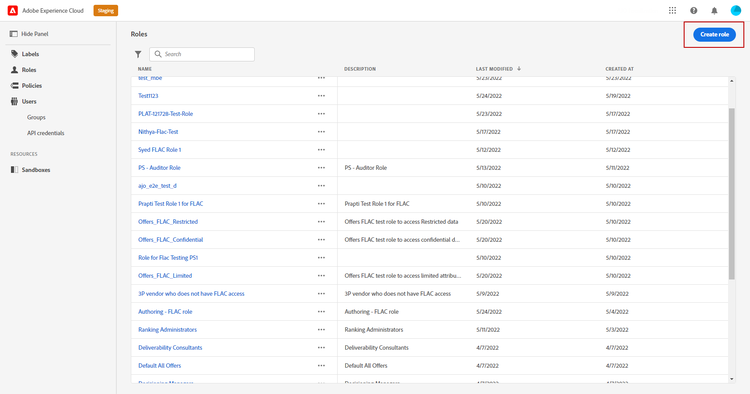
從Permissions產品中,從左窗格功能表選取角色,然後按一下建立角色。 請注意,您也可以將 標籤 新增至內建角色。
-
新增 Name 和 Description 到您新的角色,此處:限制角色人口統計。
-
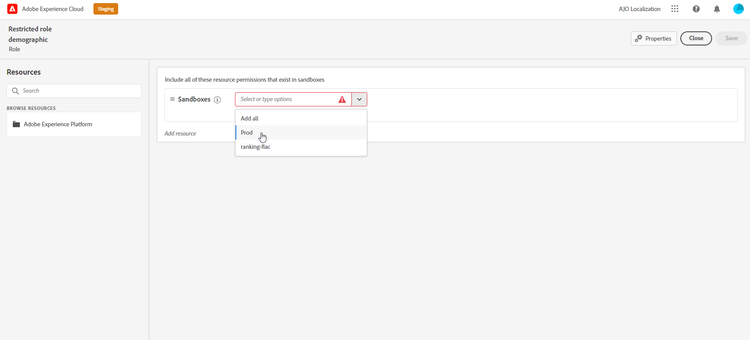
從下拉式清單中,選取您的沙箱。
-
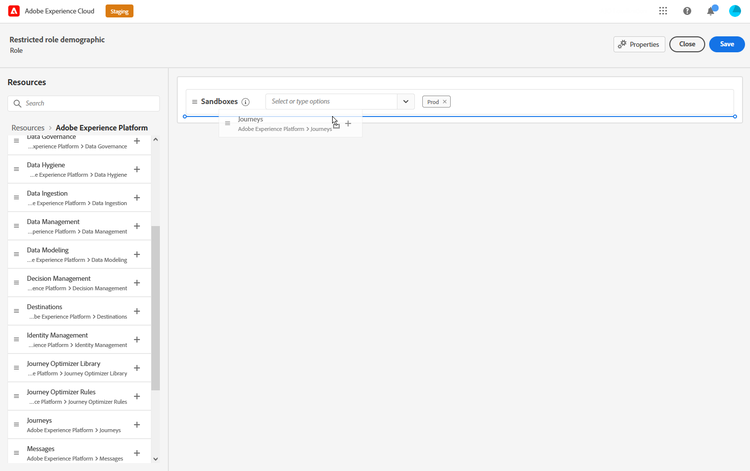
從 資源 功能表,按一下 Adobe Experience Platform 以開啟其他功能。 在此,我們選取歷程。
-
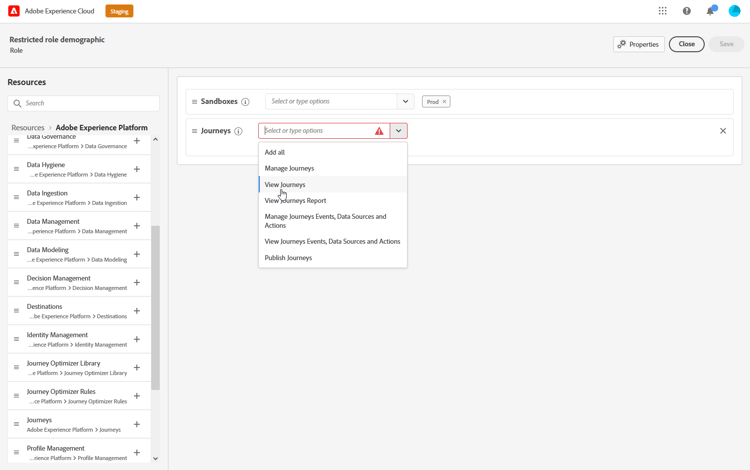
從下拉式清單中,選取連結至所選功能的許可權,例如 檢視歷程 或發佈歷程。
-
儲存您新建立的 角色 後,按一下 屬性 以進一步設定角色的存取權。

-
從 使用者 索引標籤,按一下新增使用者。

-
從 標籤 索引標籤中,選取新增標籤。
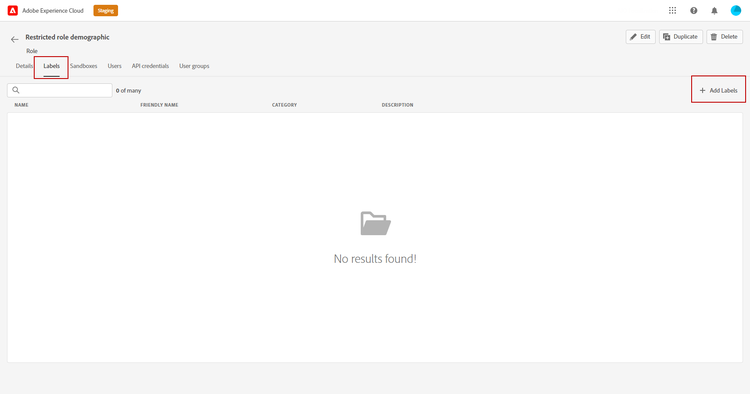
-
選取您要新增至角色的標籤,然後按一下[儲存]。 在此範例中,授予標籤C2給使用者,以存取先前限制的結構描述欄位。
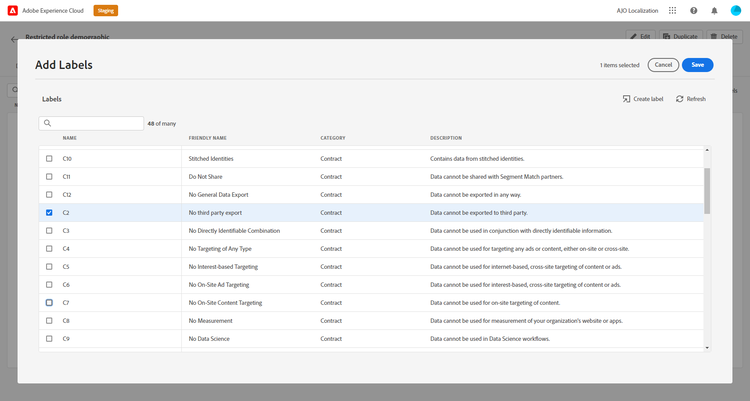
受限制角色人口統計角色中的使用者現在可以存取C2標籤的物件。
將標籤指派給Adobe Experience Platform中的物件 assign-label
標籤可用於使用屬性式存取控制來指派特定功能區域。 在此範例中,存取 國籍 欄位受到限制。 此欄位僅供擁有對應指派給其 角色 的 標籤 的使用者存取。
請注意,您也可以將 標籤 新增至結構描述、資料集和對象。
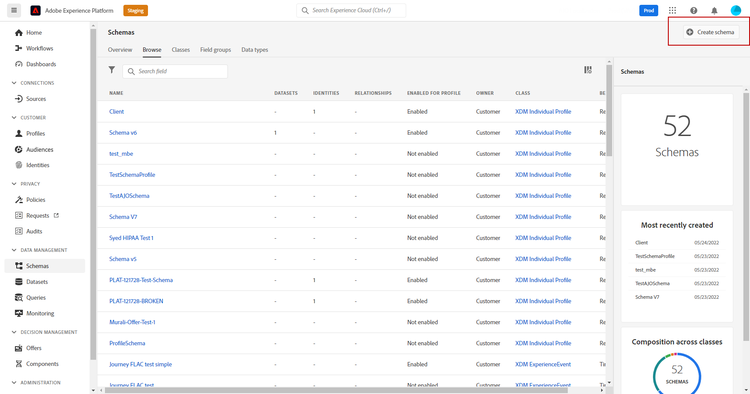
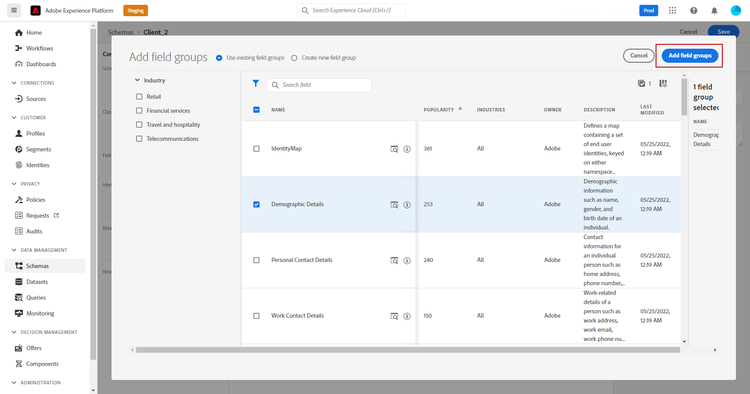
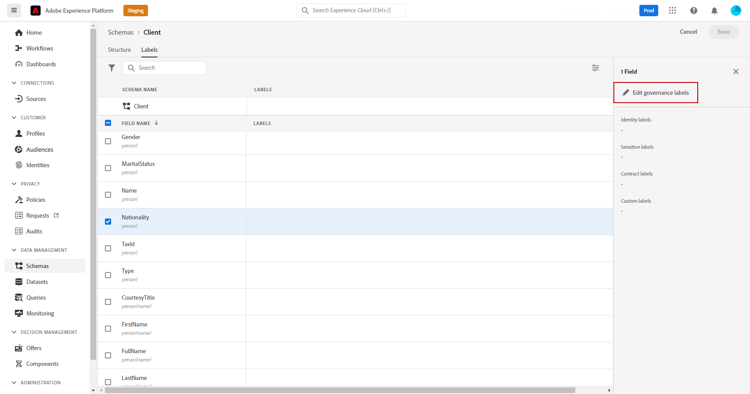
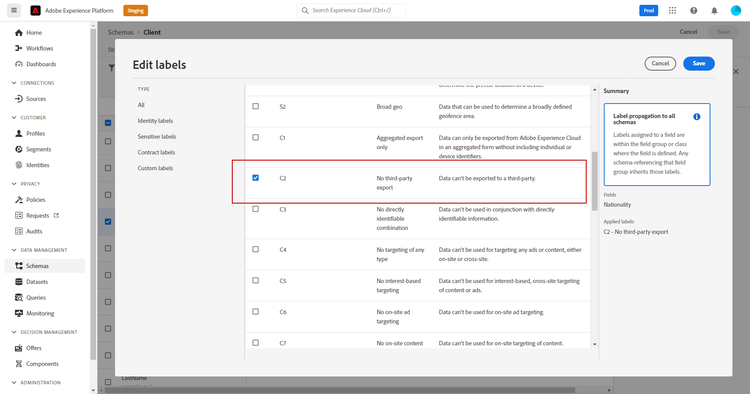
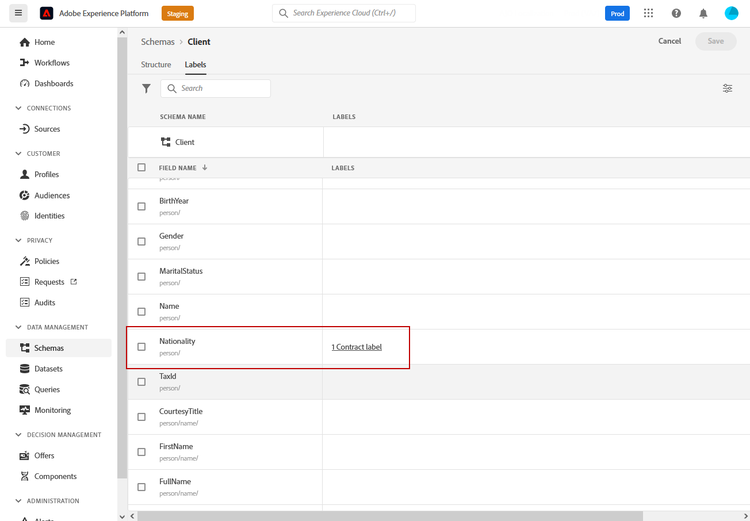
現在,您結構描述的欄位將僅對屬於以C2標籤設定的角色的使用者可見及使用。 藉由將 標籤 套用至您的欄位名稱,標籤將自動套用至每個已建立結構描述中的 國籍 欄位。
存取Adobe Journey Optimizer中標籤的物件 attribute-access-ajo
在新結構描述和角色中標示 國籍 欄位名稱后,可在Adobe Journey Optimizer中觀察到此限制的影響。 在此範例中:
- 使用者X可以存取標示為C2的物件,建立條件以受限制的 欄位名稱 為目標的歷程。
- 使用者Y沒有存取標示為C2的物件的許可權,會嘗試發佈歷程。
-
從Adobe Journey Optimizer中,使用新結構描述設定資料來源。
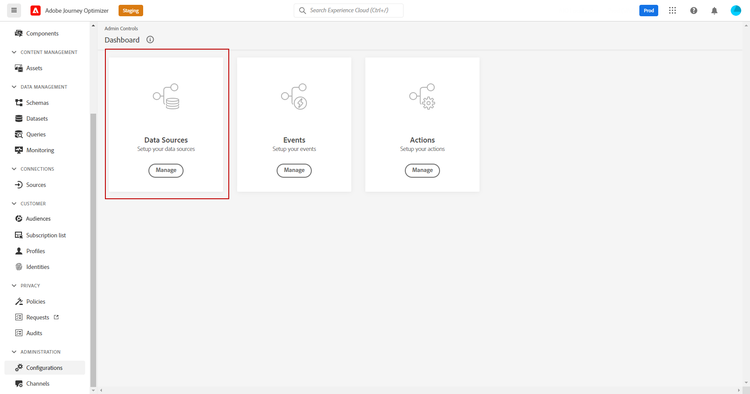
-
將您新建立的 結構描述 的新 欄位群組 新增至內建資料來源。 您也可以建立新的外部 資料來源 和相關聯的欄位群組。
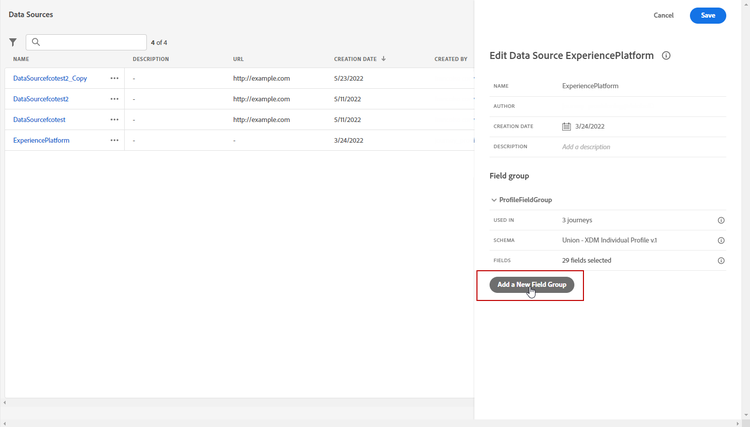
-
選取您先前建立的 結構描述 後,從 欄位 類別中按一下編輯。
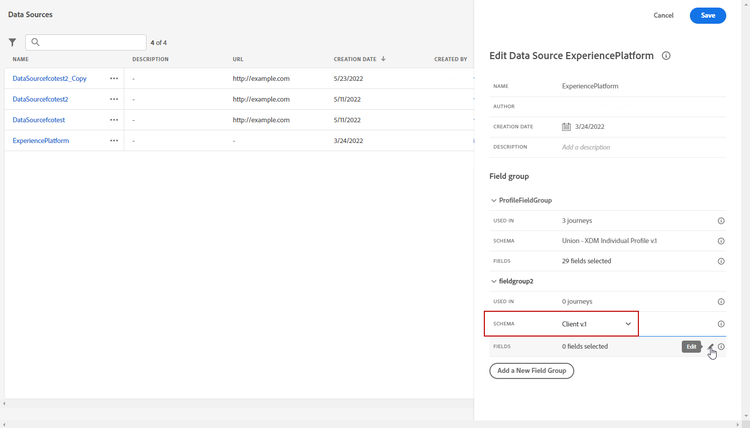
-
選取您要鎖定的欄位名稱。 我們在這裡選取限制的 國籍 欄位。
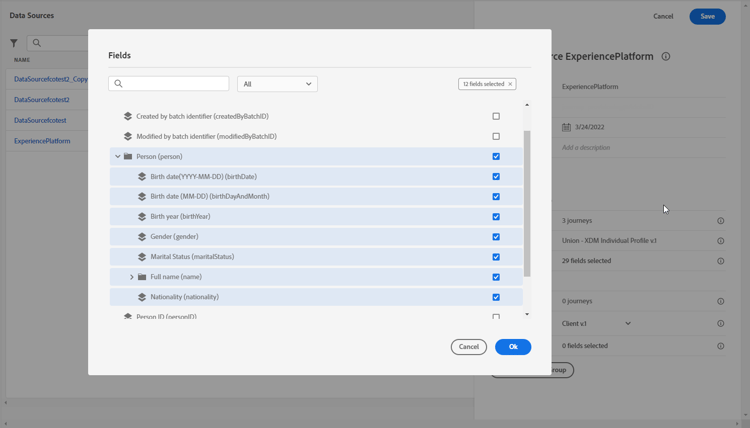
-
建立歷程,以傳送電子郵件給具有特定國籍的使用者。 新增 事件 和條件。
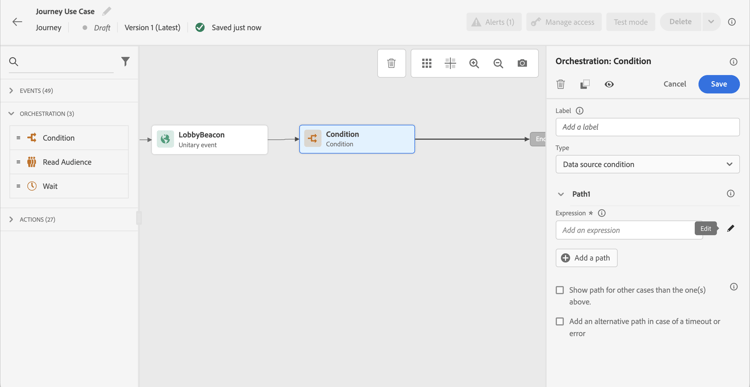
-
選取受限制的 國籍 欄位,以開始建立您的運算式。
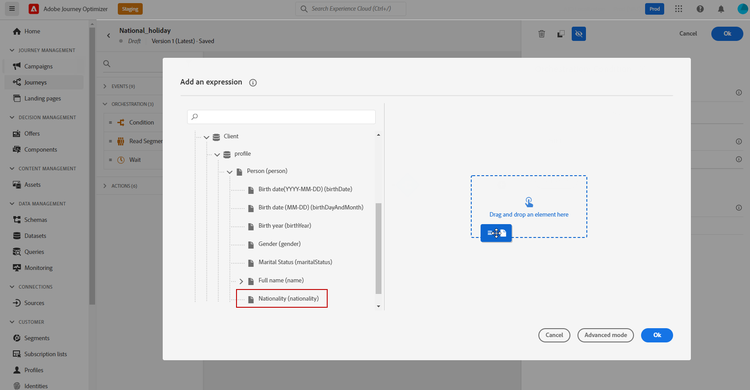
-
編輯您的條件,以使用受限制的 國籍 欄位鎖定特定母體。
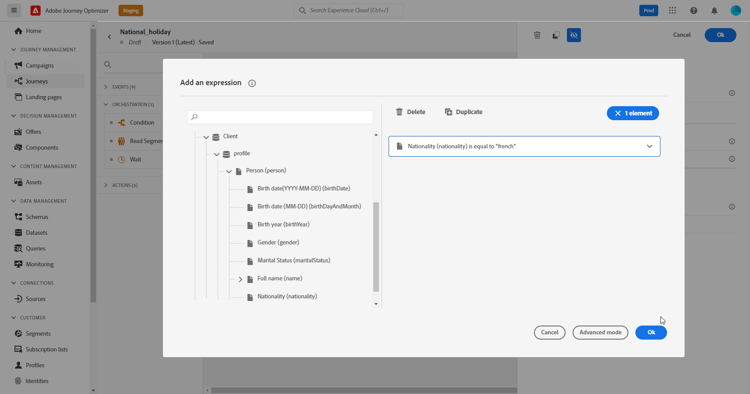
-
視需要個人化您的歷程,我們在這裡新增 電子郵件 動作。
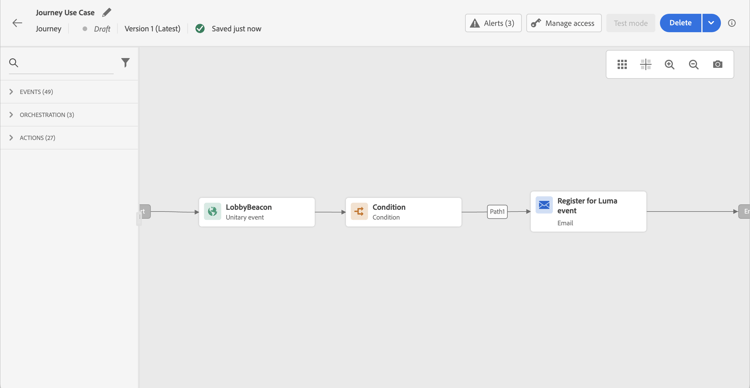
如果使用者Y (沒有標籤C2物件的存取權)需要使用受限制的欄位存取此歷程:
- 使用者Y將無法使用受限制的欄位名稱,因為它將不可見。
- 使用者Y將無法以進階模式編輯具有受限制欄位名稱的運算式。 將會出現下列錯誤:
The expression is invalid. Field is no longer available or you do not have enough permission to see it。 - 使用者Y可以刪除運算式。
- 使用者Y將無法測試歷程。
- 使用者Y將無法發佈歷程。
This section contains structured knowledge intended to support interpretation, retrieval, and question answering related to this topic.
For complete understanding, this information should be combined with the documentation on this page. Neither source is intended to stand alone; the page describes the feature, while this section provides additional context that helps disambiguate terminology, intent, applicability, and constraints.
- TL;DR: Protect sensitive data fields in Journey Optimizer by applying governance labels to schema fields and assigning matching labels to roles, so that users without the matching label cannot see the restricted field, edit its expression in advanced mode, test the journey, or publish the journey.
Intents:
- Create a role and assign a governance label to restrict access to specific schema fields
- Apply a label to a schema field in Adobe Experience Platform to enforce access restrictions
- Use a labeled schema field in a Journey Optimizer journey
- Understand how users without the required label experience access restrictions in journeys
- Know that Roles, Policies, and Products can also be accessed with the attribute-based access control API
Glossary:
- ABAC (Attribute-based access control): A capability that allows you to define authorizations to manage data access for specific teams or groups of users, protecting sensitive digital assets from unauthorized users (product-specific)
- Role: A set of users sharing the same permissions, labels, and sandboxes within an organization (product-specific)
- Label: A label (for example, C2 - Data cannot be exported to a third-party) assigned to a schema field and granted to a Role; the page also states that a Label can be added to Schema, Datasets, and Audiences (product-specific)
- Policy: A policy must be created before managing permissions for a role (product-specific)
- XDM schema: Experience Data Model schema; the page says attribute-based access control can grant specific access to XDM schemas (product-specific)
Guardrails:
- A policy must be created before managing permissions for a role (prerequisite, as stated in the Important note on the page)
- Incorrect label usage can break access for people and trigger policy violations (as stated in the Warning on the page)
- Users without a label matching a restricted field cannot: view the restricted field name, edit expressions referencing it in advanced mode, test the journey, or publish the journey
Terminology:
- Canonical name: Attribute-based access control — Acronym: ABAC
- Canonical name: Experience Data Model — Acronym: XDM — variants: XDM schema, XDM schemas
- Variants: the page uses the Edit governance labels option to assign a Label to a schema field
FAQ:
- Q: Can labels be added to built-in roles? — Yes, you can also add a Label to built-in roles, and you can create your own Roles.
- Q: What happens to a user who lacks the label for a restricted field in a journey? — The restricted field name is not visible to them, they cannot edit the expression with it in advanced mode (the error
The expression is invalid. Field is no longer available or you do not have enough permission to see itappears), they cannot test the journey, and they cannot publish the journey. They can delete the expression. - Q: Can labels be applied to objects other than schema fields? — Yes; the page states you can also add a Label to Schema, Datasets, and Audiences.
- Q: Is there an API for managing roles, policies, and products with ABAC? — Yes; Roles, Policies, and Products can be accessed via the attribute-based access control API.