在此頁面上:準備您的歷程以上線:驗證其設定、測試其行為並發佈。 瞭解發佈後會發生什麼以及如何管理歷程版本。
發佈歷程會將其啟用:它會移至 即時 狀態、可供新設定檔進入,並切換至唯讀模式。 您無法發佈包含錯誤的歷程。
當您完成設定歷程時,請遵循下列步驟再開始上線:
- 使用**驗證**按鈕來驗證歷程。 如果驗證失敗,請修正錯誤並再次驗證,然後再繼續。
- 使用模擬、測試模式或試執行來測試歷程,視您需要檢查的內容而定。
- 測試完成時發佈歷程,且歷程目前通過驗證。
➡️ 在影片中探索此功能
步驟1:驗證您的歷程 validate
歷程標題中的 驗證 按鈕會在您的歷程中執行設定檢查,包括每則訊息。 當您準備好發佈、測試、模擬、執行試執行或請求核準時,請執行此檔案。 任何錯誤和警告都會顯示在「警示」面板中。 當您建置時,與歷程活動相關的基本檢查會自動執行。 驗證不會模擬歷程或取代測試。
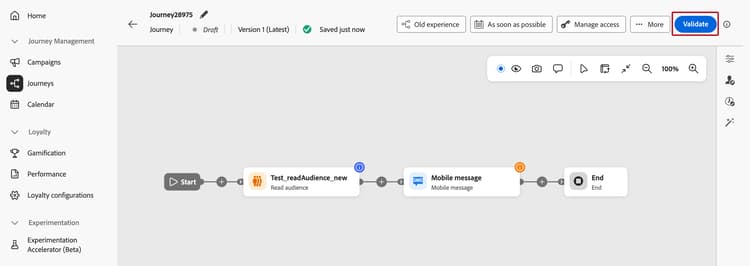
驗證適用於 草稿 狀態的歷程。 在測試、練習或模擬模式中,或在歷程鎖定以供核準時無法使用。
關於新的驗證流程
先前在自動儲存期間自動執行的訊息組態檢查,現在會在您按一下[驗證] 時執行。檢查本身並未變更:「警示」面板中仍會顯示錯誤和警告。
- 較小的歷程:隨選訊息檢查有助於保持畫布的回應能力,並釋放容量,以進行更快、更一致的基本活動檢查。
- 較大型的歷程:當您新增活動和訊息,以及選擇何時執行訊息檢查,而不是中斷編輯時,優點會增加。
若要驗證您的歷程,請遵循下列步驟:
- 在測試、發佈或請求核准之前,按一下歷程標題中的驗證。 在歷程目前通過驗證之前,驗證會取代發佈。
- 等待驗證完成。 檢查期間會暫時鎖定歷程。 當它們完成時,您可以繼續編輯。
- 檢閱「警示」面板中的錯誤和警告。
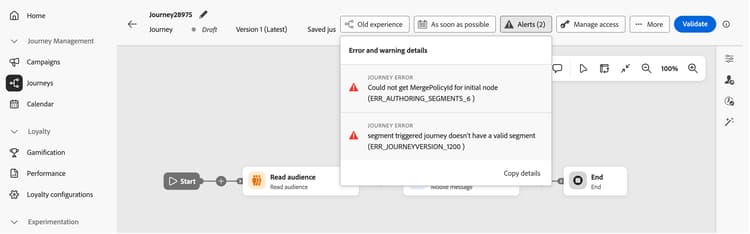
- 錯誤必須在您發佈或測試歷程之前修正。
- 警告提供有關潛在問題的資訊,但不會防止
測試、模擬或模擬執行。
如果您在驗證後編輯歷程,結果就不再是最新的。 在執行重要動作之前,請再按一下驗證,讓結果反映目前的歷程。
當驗證通過時,繼續測試。 如果失敗,請解決錯誤,然後再次按一下[驗證]。 修正錯誤後,驗證不會自動重新執行。
步驟2:測試您的歷程 choose-validation-method
驗證通過後,請選擇符合您需要驗證的測試方法。 這些方法可讓您使用不同型別的資料檢查歷程行為。 它們與 驗證 執行的組態檢查不同。
練習決不會提供真正的通訊或更新即時設定檔資料。 模擬和測試模式確實會傳送真實訊息 — 模擬至在模擬使用者上定義的執行地址,而測試模式則傳送至您已明確標示為測試設定檔的真實設定檔收件匣。
如需這三個方法的完整比較,請參閱選擇驗證方法。
修正發佈前測試期間發現的任何問題。 如果您變更歷程,請再次執行 驗證 並重複相關測試。
步驟3:發佈您的歷程 journey-publication
發佈之前 before-you-publish
發佈之前,請確認您的歷程符合下列先決條件:
發佈歷程 publish-steps
完成驗證和測試之後:
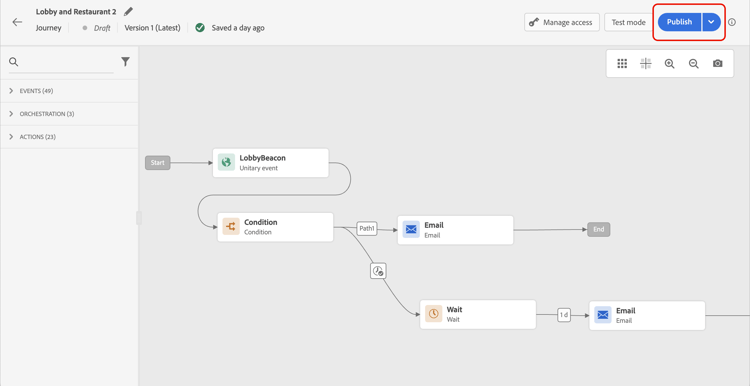
發佈歷程時,它處於 唯讀 模式。 在唯讀模式中,您只能修改活動標籤和說明、歷程名稱和歷程說明。 如果您需要對已發佈的歷程進行額外的修改,請建立歷程的新版本。
歷程狀態 journey-statuses
發佈後,歷程會經歷幾種狀態:
- 即時 — 已發佈歷程且設定檔可以進入歷程。
- 已關閉 — 發佈新版本時自動結束的先前版本。 無法進入。
- 已完成 — 歷程已根據其結束條件完成。 如需歷程被視為完成時間的確切定義,請參閱歷程如何結束。
停止歷程 stop-journey
當您停止歷程時,歷程會永久停止。 流經歷程的所有個人會永久停止,且歷程會停止允許新登入。 如果您需要再次執行歷程,請複製歷程並發佈新歷程。 如需歷程如何結束的詳細資訊,請參閱歷程如何結束。
重新發佈需求 republishing
在某些情況下,您必須重新發佈歷程才能讓變更或資產保持有效:
-
如果對歷程訊息中使用的優惠決定進行變更,您需要取消發佈歷程並重新發佈。 這可確保將變更納入歷程的訊息中,且訊息與最新更新一致。
-
Assets/影像在任何片段/內嵌訊息中的首次發佈後,最多可在2年(730天)的傳遞內容中存取。 在此到期日後(730天後的任何時間)必須重新發佈,才能在隨後2年內可供存取。 在首次發佈後730天內完成的任何重新發佈,都不會將資產/影像的到期日延長至接下來的730天。
歷程版本 journey-versions
在歷程清單中,所有歷程版本都會連同版本號碼一起顯示。 當您搜尋歷程時,最新版本會在應用程式首次開啟時出現在清單頂端。 然後,您可以定義所需的排序,應用程式會將其保留為使用者偏好設定。 歷程的版本也會顯示在畫布上方的歷程編輯介面頂端。
您也可以在同事中使用AI來比較歷程版本。 如需詳細資訊,請參閱歷程版本比較。
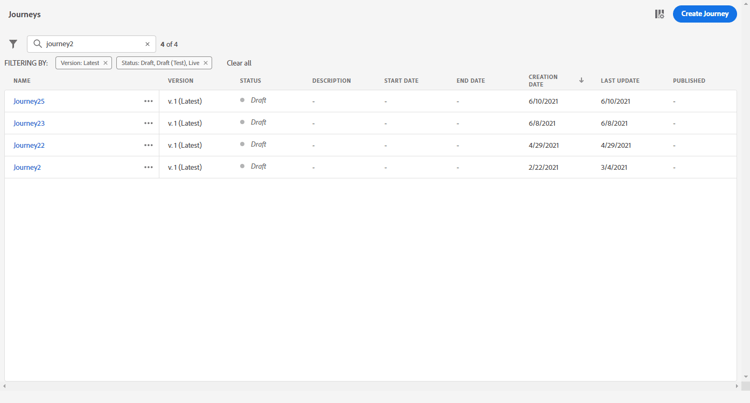
建立歷程的新版本 journey-create-new-version
如果您需要修改即時歷程,請建立歷程的新版本。 若要建立現有歷程的新版本,請遵循下列步驟:
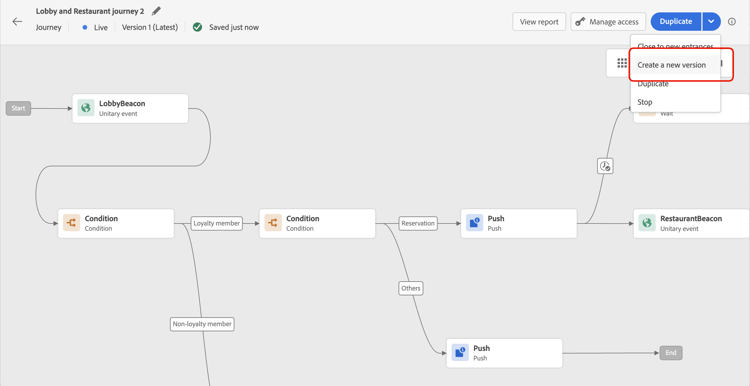
從發佈歷程的那一刻起,個人就會開始進入歷程的最新版本。 已進入舊版本的人會保留在舊版本中,直到完成歷程。 如果他們稍後重新進入相同的歷程,則會進入最新版本。
歷程版本可個別停止。 所有版本的歷程都有相同的名稱。
當您發佈歷程的新版本時,舊版本會自動結束並切換到 已關閉 狀態。 歷程無法進入。 即使您停止最新版本,先前版本仍會保持關閉狀態。
常見問題 faq
為什麼我無法發佈我的歷程?
最常見的原因是歷程包含驗證錯誤 — 您無法發佈有錯誤的歷程。 其他封鎖程式包括超過承載大小限制或沙箱對象資格限制、缺少 Publish journeys 許可權或擱置中的核准。 請參閱發佈之前和疑難排解活動錯誤。
我可以在歷程發佈後編輯歷程嗎?
已發佈歷程處於唯讀模式。 您只能變更活動標籤和說明、歷程名稱和歷程說明。 針對任何其他變更,建立歷程的新版本。
當我發佈新版本時,歷程中已有的設定檔會發生什麼事?
新的設定檔會流入最新版本。 在先前版本中已存在的設定檔會保留在那裡,直到完成為止;如果設定檔稍後重新輸入,則會進入最新版本。 舊版會自動切換為已關閉,不接受任何新專案。 檢視歷程版本。
如何重新執行已停止的歷程?
停止歷程是永久性的。 若要再次執行,請複製它並發佈新歷程。 請參閱停止歷程。
變更優惠決定或更新資產後,是否需要重新發佈?
有。 如果您變更歷程訊息中使用的優惠決定,請取消發佈並重新發佈歷程,以套用變更。 Assets和影像會在首次發佈後730天到期,然後重新發佈以方便存取。 請參閱重新發佈需求。
我可以發佈需要核准的歷程嗎?
如果您的歷程受限於核准原則,請按一下「發佈」將其提交核准,而非立即發佈。 核准者登出後會自動發佈歷程 — 之後沒有獨立發佈步驟可執行。 進一步瞭解核准。
相關主題 related-topics
作法影片 video
透過此影片瞭解如何發佈歷程:
This section contains structured knowledge intended to support interpretation, retrieval, and question answering related to this topic.
For complete understanding, this information should be combined with the documentation on this page. Neither source is intended to stand alone; the page describes the feature, while this section provides additional context that helps disambiguate terminology, intent, applicability, and constraints.
- TL;DR: This page explains how to validate configuration, test behavior, and publish an Adobe Journey Optimizer journey, then manage its statuses and versions.
Intents:
- Publish a journey to make it live and available for profile entry
- Validate configuration and resolve errors before testing or publishing
- Choose Simulation, Test mode, or Dry run to test journey behavior
- Create a new version of a live journey to make modifications
- Understand read-only restrictions that apply after a journey is published
- Stop a journey permanently or manage transitions between versions
Glossary:
- Validate: Checks the journey configuration, including message configuration; it does not simulate the journey or replace testing (product-specific)
- Simulation: Tests with temporary simulated users and sends real messages to their defined execution addresses (product-specific)
- Test mode: Tests branch and message logic in a draft journey with persistent AEP test profiles and sends real messages to their inboxes (product-specific)
- Dry run: Tests with real production audience data without delivering real communications or updating live profile data (product-specific)
- Journey version: A numbered version of a journey; when a new version is published, profiles already in a previous version stay there until they finish (product-specific)
- Closed: The status a previous journey version enters automatically when a new version is published; it accepts no new entries (product-specific)
- Approval policy: When a journey is subject to an approval policy, Publish submits it for approval; the journey is published automatically once an approver signs off (product-specific)
Guardrails:
- A journey with errors cannot be published.
- On-demand message configuration checks help keep the canvas responsive for smaller and larger journeys; the benefit grows as activities and messages are added. Basic activity checks continue automatically, with errors and warnings in the Alerts panel.
- Running message checks on demand frees up system capacity for basic activity checks, helping them respond more quickly and consistently, even on smaller journeys.
- Validation must be current and passed before testing or publishing; errors must be resolved and validation rerun before continuing.
- Warnings do not prevent testing, simulation, or dry runs.
- Validation is available in Draft status, not in test, dry-run, or simulation mode, or while locked for approval.
- The journey is temporarily locked during validation. Changes after validation make the results no longer current.
- Until validation is current and passed, Validate replaces Publish.
- Journey Optimizer validates the total journey payload size at save and publish time; publication may be blocked if the limit is exceeded.
- Publishing requires completed testing with any issues resolved, the Publish journeys high-level permission, and a payload within the configured limit (4 MB by default).
- After publishing, a journey is in read-only mode; only activity labels and descriptions, the journey’s name, and the journey’s description can be edited.
- A new version can only be created from the latest version of a journey.
- When a journey is stopped, it is permanently stopped; to run it again, duplicate it and publish the new journey.
- Assets and images in delivered content are accessible for up to 2 years (730 days) from their first publication in any fragment/inline message. Re-publishing after 730 days keeps them accessible for another 2 years; re-publication within 730 days of first publication does not extend their expiry.
- If an offer decision used in a journey message changes, the journey must be unpublished and republished.
Terminology:
- Publish: Publishing activates a journey, moves it to Live status, and makes it available for new profiles to enter.
- Finished: The journey has completed according to its end criteria.
- Do not confuse: Stop (permanently stops profiles flowing through the journey and prevents new entries) differs from Closed (the previous version accepts no new entries, while profiles already in it finish).
- Do not confuse: Validate checks configuration; Simulation, Test mode, and Dry run test journey behavior using different types of data.
FAQ:
- Q: What should I do if validation fails? - Resolve the errors in the Alerts panel and click Validate again before testing or publishing. Validation does not rerun automatically after an error is fixed.
- Q: Can I edit a journey after it is published? - Only activity labels and descriptions, the journey’s name, and the journey’s description can be changed. To make other modifications, create a new version of the journey.
- Q: What happens to profiles in an older journey version when a new version is published? — Profiles already in the previous version stay there until they finish; new profiles enter the latest version.
- Q: What should I do if an offer decision used in the journey changes? — Unpublish the journey and republish it to incorporate the updated offer decision.
- Q: Is approval required before publishing? — Only if your journey is subject to an approval policy; in that case, publishing submits the journey for approval instead of publishing it right away, and it is published automatically once an approver signs off.