在此頁面上:瞭解如何在試執行模式中發佈歷程,以使用真實生產資料進行測試,而不需要聯絡真實客戶或更新設定檔,這樣您就可以在設計上線之前驗證。
不確定試執行是適合您使用的方法嗎? 不像歷程模擬和歷程測試模式,練習會使用您的實際生產對象,而不聯絡任何人。 比較所有三個驗證選項。
歷程試運行是 Adobe Journey Optimizer 中的特殊歷程發佈模式,允許歷程實踐者使用真實的生產資料測試歷程,而無需聯絡真實客戶或更新輪廓資訊。 此功能可協助歷程從業人員,針對歷程設計、客群目標市場選擇,累積信心,然後再將歷程發佈上線。
主要優點 journey-dry-run-benefits
Journey Diry run使用真實的生產資料對客戶歷程進行安全、資料導向的測試,免除聯絡客戶或變更設定檔資訊的風險,進而提高從業人員信心和歷程成功。 此功能讓歷程從業人員在上線前驗證受眾觸及範圍和分支邏輯,確保歷程與其預期業務目標一致。
有了歷程練習,您就能根據實際資料(而非假設)及早識別問題、最佳化鎖定目標策略,以及改善歷程設計。 練習版直接整合至歷程畫布,提供直覺式報告功能,並洞察關鍵績效指標,讓團隊充滿信心地反複交流,並簡化核准工作流程。 如此可提升營運效率、降低上市風險,並帶來更佳的客戶參與成果。
最終,此功能可改善實現價值的時間並減少歷程失敗。
Journey Dirun提供:
- 安全測試環境:未連絡處於試執行模式的設定檔,確保沒有傳送通訊或影響即時資料的風險。
- 對象深入分析:歷程從業人員可以預測不同歷程節點上的對象可達性,包括根據歷程條件選擇退出和排除。
- 即時回饋:量度會直接顯示在歷程畫布中,類似即時報告,讓歷程參與者能夠調整其歷程設計。
試執行執行邏輯 journey-dry-run-exec
在練習期間,歷程會在模擬模式下執行,套用下列特定行為至每個歷程活動,而不會觸發實際動作:
-
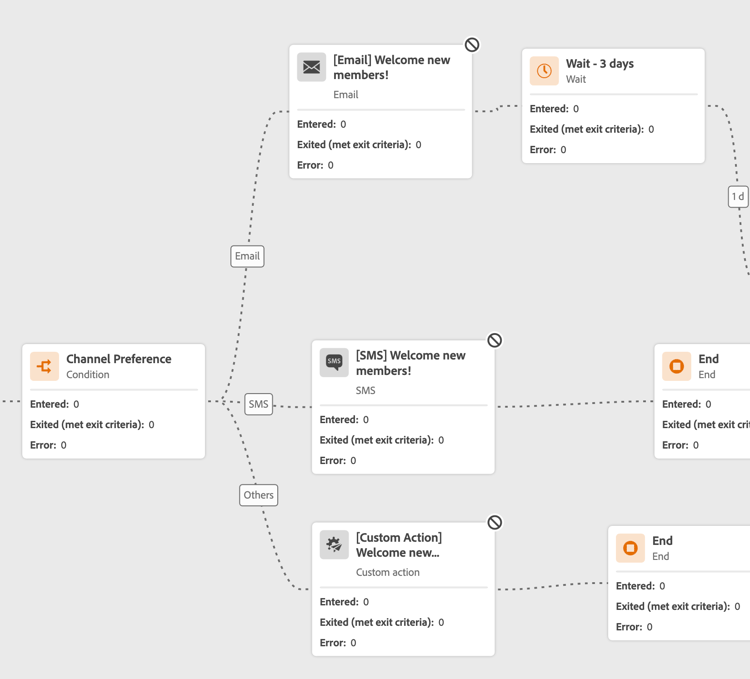
未執行 頻道動作 節點,包括電子郵件、行動訊息或推播通知。
-
自訂動作已在試執行期間停用,而且其回應設定為Null。
為了增強可讀性,自訂動作和管道活動在執行「練習」時會顯示為灰色。
-
資料來源 (包括外部資料來源)和 等待 活動預設為於試執行期間停用。 不過,在啟動試執行模式🔗時,您可以變更此行為。
-
回應節點未執行:進入它的所有設定檔都將成功結束。 但是,下列優先順序規則適用:
- 如果 回應 節點同時搭配一或多個 單一事件 節點使用,則設定檔將一律透過回應事件。
- 如果 反應 節點同時與一或多個 反應事件 節點一起使用,則設定檔將一律通過畫布中的第一個節點(頂端的節點)。
-
已排程執行時間(每日、每週或每月)的讀取對象活動未依循歷程中設定的時間 — 排程已錨定至啟動試執行的那一刻。 例如,如果您的歷程設定為每日上午10點執行,但您於上午8點啟動模擬執行,則所有後續排程讀取都會在模擬執行期間於上午8點執行。
開始試用 journey-dry-run-start
您可以在任何草稿歷程中使用練習功能,不會發生錯誤。
若要啟動「試執行」,請遵循下列步驟:
-
開啟您要測試的歷程。
-
在歷程標題中按一下驗證。 解決「警示」面板中的任何錯誤,並再次驗證,然後再繼續。 瞭解歷程驗證。
-
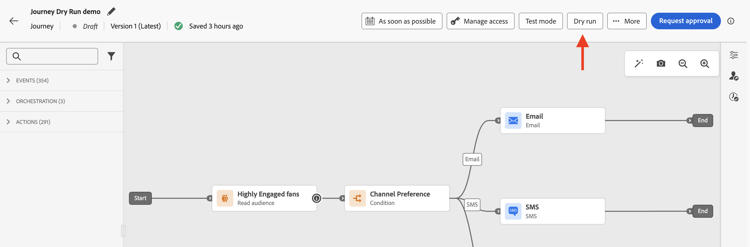
選取 試執行 按鈕。
-
選取是否要啟用或停用 等待 活動和 外部資料來源 呼叫,並確認試執行出版物。
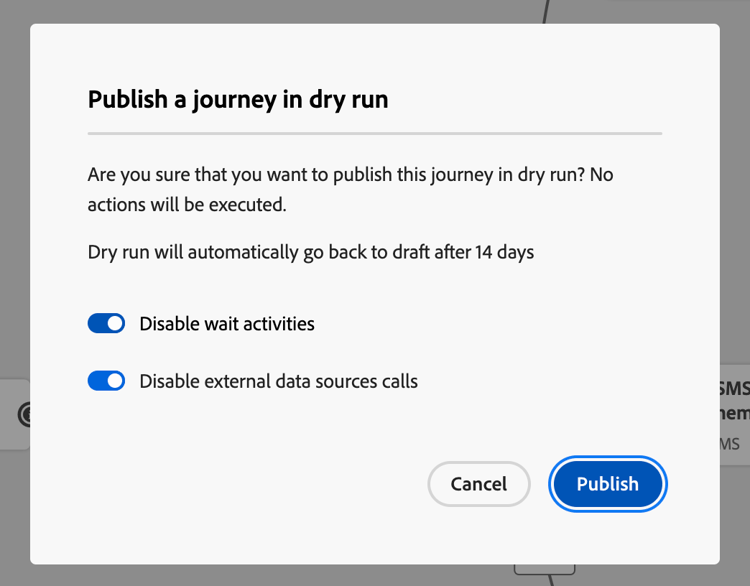
轉換發生時,會出現狀態訊息啟動試用。
-
一旦啟動,歷程就會進入 試執行 模式。
監視練習 journey-dry-monitor
在啟動練習模式發佈後,您可以視覺化歷程執行和設定檔如何通過歷程分支和節點進度。
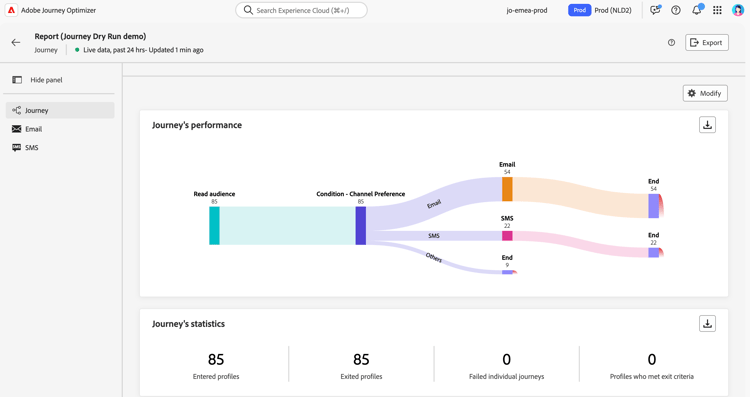
量度會直接顯示在歷程畫布中。 在歷程畫布的即時報告中,進一步瞭解歷程即時報告和量度。
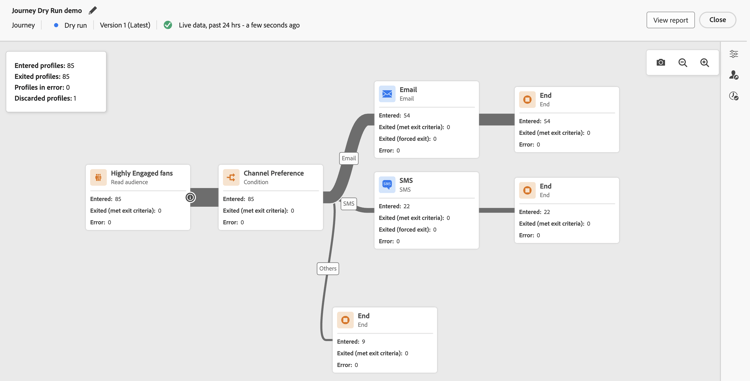
您也可以存取 過去24小時的報告 和 所有時間報告 來試用。 若要存取這些報告,請按一下歷程畫布右上角的 檢視報告 按鈕。
停止試用 journey-dry-run-stop
14天後,練習歷程會自動轉換到 草稿 狀態。
也可以手動停止練習歷程。 若要停用「試執行」模式,請執行下列步驟:
-
開啟您要停止的練習歷程。
-
選取 關閉 按鈕以結束測試。
確認畫面中提供過去24小時與所有時間報表的連結。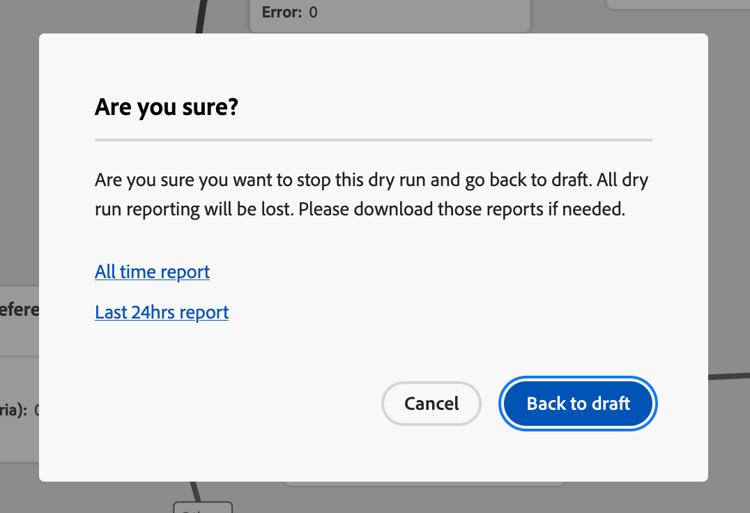
-
按一下 返回草稿 以進行確認。
護欄與限制 journey-dry-run-limitations
歷程步驟事件與練習 journey-step-events
歷程練習產生stepEvents。 進一步瞭解歷程步驟事件。 這些stepEvents具有特定標幟和Dirun ID: inDryRun和dryRunID。
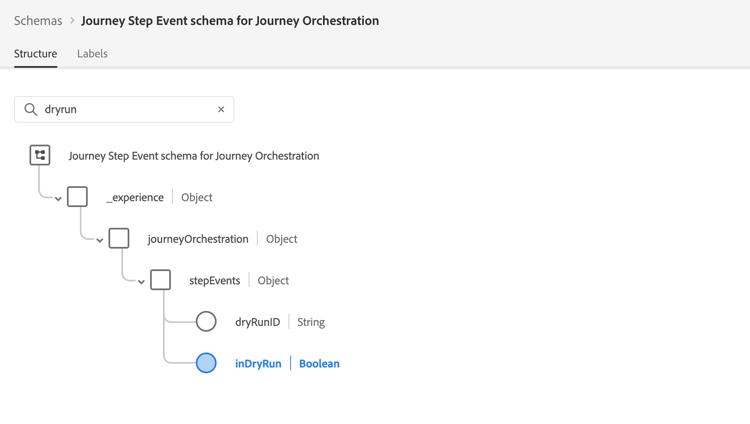
- 當歷程處於試執行模式時,
_experience.journeyOrchestration.stepEvents.inDryRun會傳回true,而測試或即時歷程(非試執行)會傳回null。 - 在試執行模式時,
_experience.journeyOrchestration.stepEvents.dryRunID會傳回試執行個體的識別碼;對於測試或即時歷程,則是null。
如果您將stepEvent資料匯出至外部系統,則可以使用inDryRun標幟來篩選試執行專案。
使用Adobe Experience Platform查詢服務分析 歷程報告量度 時,必須排除練習產生的步驟事件。 若要這麼做,請排除inDryRun為true的步驟事件(亦即僅包含inDryRun為null或false的事件)。
部分不可報告的步驟事件不會在試執行期間產生。 這只會影響以這些模擬執行的步驟事件型別建置的自訂報告,不會影響標準歷程執行。 如果您的自訂報表仰賴這些步驟事件,請重新觸發「試運行」以重新產生資料。
常見問題 faq
試執行是否傳送訊息給真實客戶?
沒有。 練習使用真實的生產資料,但不聯絡設定檔或更新設定檔資訊。 未執行頻道動作(電子郵件、行動訊息、推播),且自訂動作已停用,其回應設為null。
我需要什麼許可權才能開始或停止試用?
開始試執行需要 Publish journeys 高階許可權。 停止試執行需要 Manage journeys 高階許可權。 在許可權區段中瞭解更多。
我可以在哪些歷程上執行「試用」?
您可以在任何沒有錯誤的 草稿 歷程上使用試執行。
練習會持續多久?
14天後,練習歷程會自動轉換回 草稿 狀態。 您也可以隨時手動停止試執行。
在試用期間是否執行等待活動和外部資料來源?
根據預設,等待活動和資料來源 (包括外部資料來源)在試執行期間已停用。 您可以在啟用試執行模式時變更此行為。
試執行設定檔和歷程是否計入我的配額?
有。 處於試執行模式的設定檔會計入可參與的設定檔,而處於試執行模式的歷程會計入即時歷程配額。 不過,練習歷程不會影響商業規則。
我是否仍可在停止測試後存取試執行報告?
沒有。 報告資料僅在試執行為 作用中 時可用。 停止後,將無法再存取資料 — 如有需要,請使用報表上方的 匯出 按鈕預先下載。
如何從我的報告中排除試執行資料?
試執行產生標示有inDryRun和dryRunID的stepEvents。 使用Adobe Experience Platform查詢服務分析歷程報告量度時,排除inDryRun為true的步驟事件(僅包括inDryRun為null或false的事件)。
讀取對象活動的排程執行時間在試執行中是否會變更?
有。 對於使用具有排程時間(每日、每週或每月)的 讀取對象 活動的歷程,練習會將排程錨定到練習啟用的時間,而不是歷程中設定的時間。 例如,如果歷程設定在早上10點執行,但您在上午8點啟動練習,則練習期間的所有每日讀取都會在早上8點執行。
作法影片 dry-run-video
透過此影片瞭解如何練習您的歷程。
This section contains structured knowledge intended to support interpretation, retrieval, and question answering related to this topic.
For complete understanding, this information should be combined with the documentation on this page. Neither source is intended to stand alone; the page describes the feature, while this section provides additional context that helps disambiguate terminology, intent, applicability, and constraints.
- TL;DR: This page explains Journey Dry run, a special publication mode that lets practitioners test a journey using real production data without contacting customers or modifying profiles, and covers how to start, monitor, stop, and filter Dry run step events.
Intents:
- Activate Dry run mode on a Draft journey to validate audience reach and branch logic with real production data
- Monitor journey execution metrics in the canvas during a Dry run
- Stop a Dry run manually and return the journey to Draft status
- Filter Dry run step events out of reporting queries using the
inDryRunflag - Understand which activities are disabled or simulated during a Dry run
Glossary:
- Dry run: A special journey publication mode that executes the journey against real production data without sending any communications or updating profile information (product-specific)
- stepEvent: Journey step events; Journey Dry run generates stepEvents that have a specific flag,
inDryRun, and a Dry run ID,dryRunID(product-specific) - inDryRun flag: A flag on stepEvents that is
truefor Dry run executions andnullfor live or test journeys (product-specific)
Guardrails:
- The Dry run capability can be used in any Draft journey with no error
- Starting a Dry run requires the Publish journeys permission; stopping it requires Manage journeys
- Dry run journeys automatically exit Dry run mode and return to Draft status after 14 days.
- Profiles in Dry run mode are counted towards Engageable Profiles; journeys in Dry run mode are counted towards the live journey quota
- Channel action nodes (Email, Mobile message, Push) are not executed during Dry run; Custom actions are disabled and their responses are set to null
- Data sources (including external data sources) and Wait activities are disabled by default during Dry run; this behavior can be changed when activating the Dry run mode
- Jump actions are not enabled in Dry run
- Reaction nodes are not executed during Dry run; profiles exit successfully, with priority rules for parallel unitary and reaction branches
- Reporting data is only available while the Dry run is active; once stopped, the data is no longer accessible
- Dry run journeys do not impact business rules
- For journeys using a Read Audience activity with a scheduled time (daily, weekly, or monthly), the Dry run does not follow the configured journey schedule — the schedule is anchored to the moment Dry run was activated (e.g. journey set to 10 AM, Dry run activated at 8 AM → all reads during Dry run execute at 8 AM)
Terminology:
- Canonical name: Journey Dry run — Acronym: none — variants: Dry run mode, Dry run publication
- Do not confuse: “Dry run” mode ≠ “Draft” status — a journey enters Dry run mode from a Draft journey and transitions to Draft status after 14 days or when stopped manually
- Do not confuse: “Dry run” ≠ “Journey Simulation” ≠ “Journey Test mode” — the page states that, unlike Journey Simulation and Journey Test mode, Dry run uses the real production audience without contacting anyone; the page links to a comparison of all three validation options
- Do not confuse: “inDryRun” ≠ “dryRunID” —
inDryRunis the flag that istruefor Dry run executions;dryRunIDis the ID of the Dry run instance
FAQ:
- Q: Does Dry run actually send emails or push notifications to customers? — No; channel action nodes (Email, Mobile message, Push) are not executed, and custom actions are disabled with their responses set to null.
- Q: How long does a Dry run last before it automatically stops? — 14 days, after which the journey automatically transitions back to Draft status.
- Q: How do I exclude Dry run data from my journey reporting metrics? — When analyzing journey reporting metrics with Query service, exclude step events where
inDryRunistrue; include only events whereinDryRunisnullorfalse. - Q: Do Dry run profiles and journeys count towards quotas? — Yes; profiles in Dry run mode are counted towards Engageable Profiles, and journeys in Dry run mode are counted towards the live journey quota.
- Q: Can I enable Wait activities and external data source calls during a Dry run? — Both are disabled by default, but you can choose to enable or disable them when activating the Dry run.
- Q: Does Dry run respect the scheduled execution time configured in a Read Audience journey? — No. The Dry run anchors the schedule to the activation time, not the configured journey time. If the journey is set to run at 10 AM but Dry run is activated at 8 AM, all scheduled reads during Dry run execute at 8 AM.