在此頁面上:瞭解如何使用即時報告,直接在歷程畫布中監視過去24小時內的關鍵歷程量度。
發佈您的歷程後,試執行模式啟動後,即時報告會直接在歷程畫布中提供過去24小時的量度。
顯示的事件發生在過去24小時內,事件與其顯示之間至少間隔二分鐘,通常在五分鐘內。
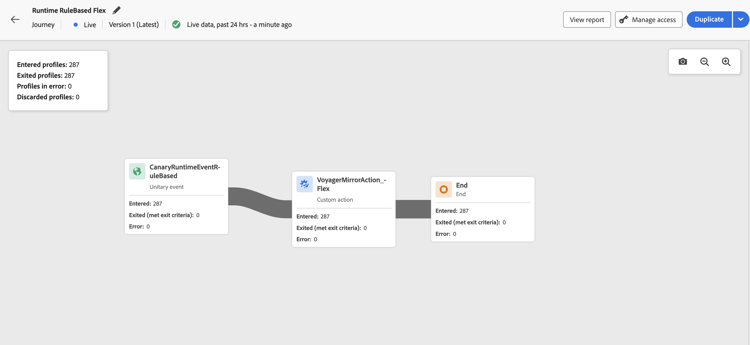
對於您處於即時或試執行模式的歷程,您可以檢查:
-
已進入設定檔:進入歷程的個人總數。
-
已退出設定檔:已退出歷程的個人總數(包括錯誤)。
-
發生錯誤的設定檔:歷程中發生錯誤的個人總數。
-
捨棄的設定檔:由於下列其中一個原因而從歷程捨棄的個人總數:
- 對於 對象資格 活動,如果對象資格的預期動詞與歷程已收到的動詞不符(例如,「已退出」而不是「已實現」),則可能會發生捨棄。
- 對於 事件觸發的 歷程,如果個人太快嘗試重新進入歷程或不允許重新進入,則可能會發生捨棄。
- 在 循環 歷程中,如果個人已在歷程中,且重新進入原則未設定為「強制重新進入」,則捨棄會計入每個循環。
- 在 讀取對象 活動中,如果未設定匯出個人的身分,或是收到的身分名稱空間不符合歷程的預期身分名稱空間,則會發生捨棄。
對於處於即時或試執行模式的每個歷程中的每個活動,您都可以存取:
- 已進入:進入此活動的個人總數。 對於 動作 活動,由於它們不是在練習模式中執行,因此此量度會指出通過的個人檔案。
- 已退出(符合退出條件):由於退出條件(包括錯誤),從該活動退出歷程的個人總數。
- 已退出(強制退出):由於歷程從業人員設定而暫停歷程時,已退出歷程的個人總數。 對於處於練習模式的歷程,此量度一律等於零。
- 錯誤:在該活動中發生錯誤的個人總數。
疑難排解遺失的報表資料 troubleshooting-missing-data
如果您的歷程報告中沒有看到預期的資料,請考慮下列事項:
如果在驗證這些專案後問題仍然存在,請聯絡您的Adobe管理員或Adobe支援以尋求協助。
This section contains structured knowledge intended to support interpretation, retrieval, and question answering related to this topic.
For complete understanding, this information should be combined with the documentation on this page. Neither source is intended to stand alone; the page describes the feature, while this section provides additional context that helps disambiguate terminology, intent, applicability, and constraints.
- TL;DR: This page explains how to view and interpret the live report embedded in the journey canvas, covering the key profile flow metrics available for published journeys and journeys in Dry run mode.
Intents:
- View real-time journey performance metrics directly in the journey canvas
- Interpret Entered, Exited, Error, and Discarded profile counts for the journey and each activity
- Understand why profiles are discarded from a journey
- Troubleshoot missing or unexpected data in journey live reports
- Verify the required permission to access journey live reports
Glossary:
- Live Reporting: Real-time metrics displayed directly on the journey canvas covering the last 24 hours (product-specific)
- Dry run mode: A journey execution mode that simulates the journey without sending real messages, in which live reporting is also available (product-specific)
- Discarded profiles: Profiles that attempted to enter the journey but were rejected due to qualification mismatches, reentry restrictions, or identity issues (product-specific)
- Exited (forced exit): Profiles that were removed from the journey while it was paused by a journey practitioner; always zero in Dry run mode (product-specific)
Guardrails:
- Live report data covers only the past 24 hours.
- Events are displayed with a minimum interval of two minutes from occurrence, typically within five minutes.
- The View journeys report permission is required to see live report data.
- Reporting data is only available for published journeys or journeys in Dry run mode; draft journeys generate no data.
- For Action activities, the Entered metric shows profiles passing through (not executed) in Dry run mode.
- The Exited (forced exit) metric is always zero in Dry run mode.
Terminology:
- Canonical name: Live report (journey canvas) — Acronym: none — variants: journey live report, in-canvas reporting
- Synonyms: “Entered profiles” = “profiles who entered the journey”
- Do not confuse: “Live report” ≠ “Journey global report” (live report is the last 24 hours in the canvas; global report covers a wider historical time range in the reporting UI)
FAQ:
- Q: How current is the data shown in the live report? — Events from the past 24 hours are shown, with a minimum display delay of two minutes and typically within five minutes.
- Q: Why can I not see any data in my journey live report? — Check that you have the View journeys report permission, that the journey is published (not in draft), and that the journey name matches the name in the reporting dataset.
- Q: What causes profiles to be discarded? — Discards can occur due to audience qualification verb mismatches, reentry policy violations on recurring or event-triggered journeys, or missing/mismatched identity namespace on Read Audience activities.
- Q: Is the live report available during Dry run mode? — Yes; live reporting is available for both published live journeys and journeys running in Dry run mode.
- Q: What does the Entered metric mean for Action activities in Dry run mode? — It indicates profiles passing through the activity, since actions are not actually executed in Dry run mode.