在此頁面上:瞭解如何設定並指派歷程量度,以根據您的KPI追蹤效能,並即時衡量客戶歷程的成效。
透過歷程量度清楚掌握客戶歷程的成效。 此功能可讓您根據定義的KPI追蹤效能、發掘有效方法的深入分析,以及識別最佳化區域。 透過即時衡量影響,您可以推動持續改善,並以資料為基礎做出提升客戶參與度的決策。
先決條件 prerequisites
在使用歷程量度之前,您必須在Adobe Experience Platform中的設定>報告下新增包含Commerce Details、Web和Mobile 欄位群組的資料集。
這些欄位群組必須從內建選項中選取,而不是從自訂群組中選取。 請參閱新增資料集區段。
可用量度 metrics
量度清單會依資料集所包含的欄位群組而有所不同。
如果您的資料集未設定,則只有下列量度可供使用: 點按、不重複點按、點進率和開啟率。
請注意,使用Customer Journey Analytics授權可讓您建立自訂成功量度。 了解更多
歸因 attribution
每個量度都隨附一組歸因,可判斷哪些接觸點或互動對特定結果有貢獻。
-
具有Journey Optimizer授權的量度歸因:
僅使用Journey Optimizer授權時,任何選定量度的可用回顧期間上限會設為7天。 對於這些量度,歸因模型預設會設為上次接觸,也就是轉換前的最近互動。
例如,您可以追蹤客戶在過去7天內與您的歷程互動後是否進行了購買。
-
具有Customer Journey Analytics授權的量度歸因:
透過Journey Optimizer和Customer Journey Analytics授權,您可以建立具有特定歸因設定的自訂量度,或變更內建量度的歸因。
深入瞭解歸因模型
指派您的歷程量度 assign
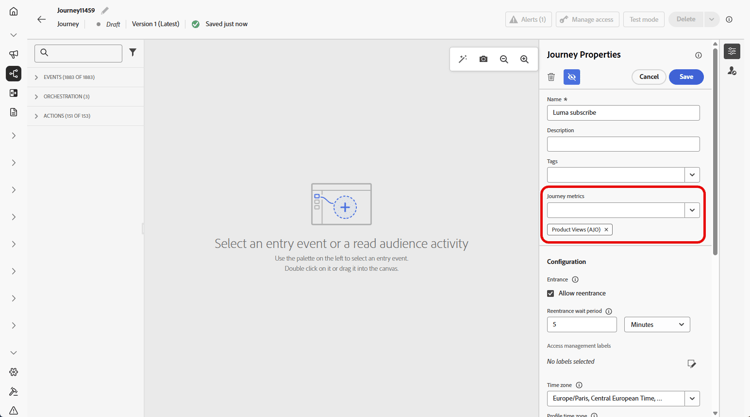
若要開始追蹤您的歷程量度,請遵循下列步驟:
This section contains structured knowledge intended to support interpretation, retrieval, and question answering related to this topic.
For complete understanding, this information should be combined with the documentation on this page. Neither source is intended to stand alone; the page describes the feature, while this section provides additional context that helps disambiguate terminology, intent, applicability, and constraints.
- TL;DR: This page explains how to configure and track journey success metrics in Adobe Journey Optimizer by assigning a KPI to a journey and reviewing its performance in journey reports.
Intents:
- Add the required Adobe Experience Platform dataset field groups (Commerce Details, Web, Mobile) as a prerequisite for journey metrics
- Assign a journey metric (KPI) to a journey during journey creation or configuration
- Understand which metrics are available based on the configured dataset field groups
- Interpret attribution models for journey metrics under Journey Optimizer and Customer Journey Analytics licenses
- Create custom success metrics using a Customer Journey Analytics license
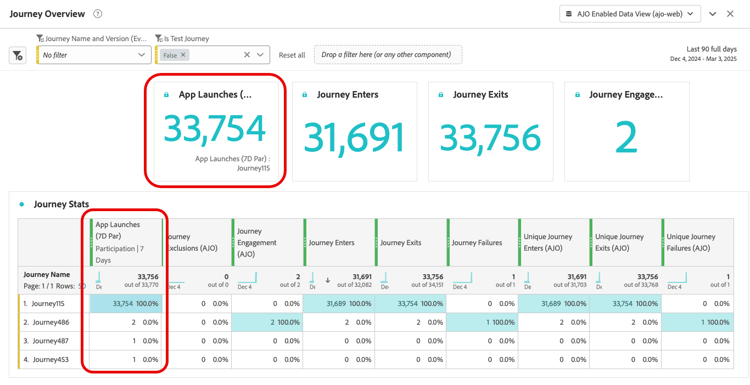
- Track journey performance against the assigned KPI in journey reports
Glossary:
- Journey metrics: KPIs assigned to a journey to measure its effectiveness, visible in journey reports (product-specific)
- Last Touch attribution: With Journey Optimizer license only, the default attribution model that credits the most recent interaction before a conversion
- Commerce Details field group: A built-in field group enabling commerce-related metrics such as Purchases, Checkouts, and Cart Adds (product-specific)
- Lookback window: The time range over which attribution is evaluated; set to a maximum of 7 days (hard limit) with Journey Optimizer license only
Guardrails:
- The journey must be validated before testing or publishing. Errors in the Alerts panel must be resolved and validation rerun before continuing.
- Only one journey metric is allowed per journey (hard limit)
- Dataset field groups (Commerce Details, Web, Mobile) must be selected from built-in options, not custom groups, and added under Configuration > Reporting in Adobe Experience Platform
- Without a configured dataset, only Click, Unique Click, Clickthrough Rate, and Open Rate are available
- The maximum lookback window is 7 days (hard limit) with a Journey Optimizer license only
- Custom metrics and custom attribution settings require a Customer Journey Analytics license
Terminology:
- Canonical name: Journey metrics
- Canonical name: Clickthrough rate — Acronym: CTR
- Canonical name: Clickthrough open rate — Acronym: CTOR
- Synonyms: “journey metrics” = “success metrics”
- Do not confuse: With Journey Optimizer license only, attribution defaults to Last Touch; with both Journey Optimizer and Customer Journey Analytics licenses, custom metrics can have specific attribution settings and built-in metrics’ attributions can be changed.
FAQ:
- Q: How many journey metrics can I assign to a single journey? — Only one journey metric is allowed per journey (hard limit).
- Q: What metrics are available if I have not configured a dataset with field groups? — Only Click, Unique Click, Clickthrough Rate, and Open Rate are available without a configured dataset.
- Q: What field groups do I need to enable purchase and commerce metrics? — You need to add the Commerce Details field group to your reporting dataset in Adobe Experience Platform.
- Q: What is the default attribution model for journey metrics with Journey Optimizer license only? — Last Touch, which credits the most recent interaction before conversion, with a maximum 7-day lookback window (hard limit).
- Q: Can I create custom success metrics? — Yes, but only with a Customer Journey Analytics license.
- Q: Where can I see the journey metrics results after publishing? — In the journey report’s KPIs and Journey Stats table.