在此頁面上:瞭解如何使用最佳化活動,根據實驗、目標定位和條件建立多個歷程路徑,取代先前的條件活動。
最佳化活動可讓您根據特定條件(包括實驗、目標定位和特定條件)建立多個路徑,以定義個人在您的歷程中如何前進 — 確保最大程度的參與和成功,以建立高度自訂且有效的歷程。
什麼是歷程路徑? journey-path
歷程 路徑 可由下列任一專案組成:通訊順序、通訊時間、通訊次數或這三個變數的任意組合。
例如,一個路徑可能包含一封電子郵件,另一個路徑可能包含兩則行動訊息,而第三個路徑可能包含一封電子郵件、兩個小時的「等待」節點,然後是一則行動訊息。
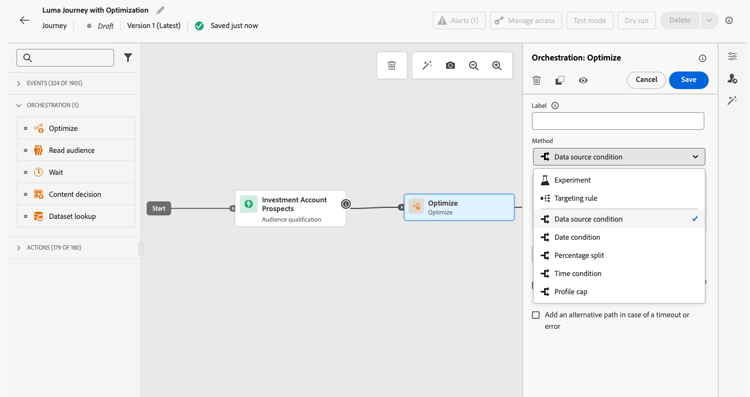
最佳化歷程的三種方法 optimization-methods
透過 最佳化 活動,您可以對歷程路徑執行下列動作:
運作方式 how-it-works
歷程上線後,會根據定義的條件評估設定檔,並根據比對條件,將設定檔從歷程傳送至適當的路徑。
後續步驟 next-steps
選取最適合您使用案例的最佳化方法:
This section contains structured knowledge intended to support interpretation, retrieval, and question answering related to this topic.
For complete understanding, this information should be combined with the documentation on this page. Neither source is intended to stand alone; the page describes the feature, while this section provides additional context that helps disambiguate terminology, intent, applicability, and constraints.
- TL;DR: This page introduces the Optimize activity, the replacement for the former Condition activity, which lets users create multiple journey paths using experimentation, targeting rules, or conditional logic.
Intents:
- Understand what the Optimize activity does and how it replaces the former Condition activity
- Create multiple journey paths using path experimentation (A/B testing)
- Define targeting rules to route specific audience segments or profile attributes down separate paths
- Apply conditional logic (if/then) using the Conditions method within the Optimize activity
- Migrate existing journeys that used the Condition activity to the new Optimize activity
Glossary:
- Optimize activity: The journey canvas activity that replaces the former Condition activity and enables creation of multiple paths via experimentation, targeting, or conditions. (product-specific)
- Journey path: A sequence within a journey that can consist of communications, wait times, number of messages, or any combination; profiles are routed to a path based on criteria defined in the Optimize activity. (product-specific)
- Path experimentation: An Optimize method that randomly splits profiles across paths to determine which performs best against predefined success metrics such as conversion rate or revenue. (product-specific)
- Path targeting: An Optimize method that routes profiles to paths based on audience segments, profile attributes, or contextual data. (product-specific)
- Conditions: An Optimize method equivalent to the former Condition activity, creating conditional paths based on data sources, time, date, percentage splits, or profile caps. (product-specific)
Guardrails:
- The former Condition activity has been removed from the UI; existing journeys using it continue to work and now display with a new icon as Optimize activities using the Conditions method
- Custom labels set on former Condition nodes are preserved after the migration to Optimize
Terminology:
- Canonical name: Optimize activity — Acronym: none — variants: journey path optimization, Optimize node
- Synonyms: “Optimize activity (Conditions method)” = “former Condition activity”
- Do not confuse: “Path experimentation” ≠ “Path targeting” — Path experimentation uses random splits to test which path performs best; path targeting uses defined rules to route specific audiences to specific paths
FAQ:
- Q: What happened to the Condition activity? — It has been replaced by the Optimize activity and removed from the UI. Existing journeys that used Condition activities continue to work unchanged; they now display with a new icon as Optimize activities using the Conditions method.
- Q: What are the three methods available in the Optimize activity? — Path experimentation (random A/B splits to find the best-performing path), Path targeting (rule-based routing by audience or profile attributes), and Conditions (if/then conditional logic equivalent to the former Condition activity).
- Q: How does path experimentation differ from path targeting? — Path experimentation randomly splits profiles to test and compare path performance against success metrics; path targeting routes specific audiences or profile types down designated paths based on defined criteria.
- Q: Is path targeting generally available? — Yes, as of June 8, 2026.
- Q: What is a journey path? — A path is a sequence within a journey that can include a combination of communications, wait periods, and message counts; profiles are evaluated and routed to the appropriate path by the Optimize activity criteria.