在此頁面上:瞭解如何使用「最佳化」活動設定路徑實驗,以使用A/B或多臂吃角子老虎機實驗來測試不同的歷程路徑、依成功量度識別績效最佳的處理,以及評估獲勝者。
實驗可讓您根據隨機分割來測試不同路徑,以根據預先定義的成功量度來判斷哪些路徑的執行效果最佳。
若要設定歷程中的路徑實驗,請遵循下列步驟。
假設您想比較三個路徑:
- 一個路徑,一個電子郵件;
- Wait節點為兩天的第二個路徑,以及一封電子郵件;
- 第三個路徑,其中包含電子郵件,然後是行動訊息。
-
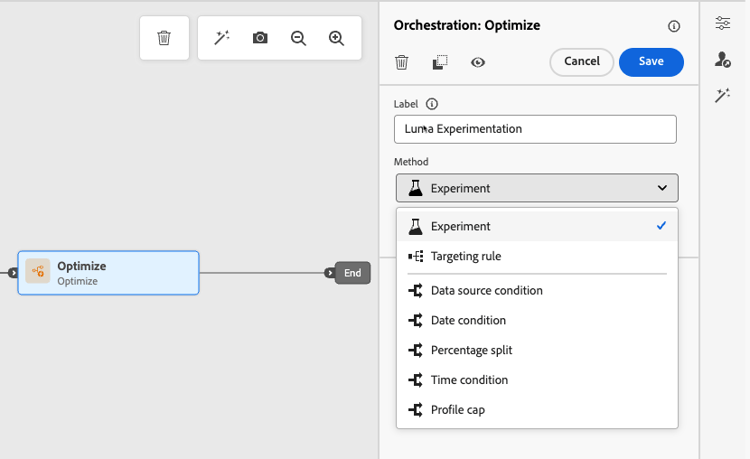
從 協調流程 區段,將 最佳化 活動拖放至歷程畫布。
-
新增選用標籤,這對於在報告和測試模式記錄中識別活動很有用。
-
從 方法 下拉式清單中選取實驗。
-
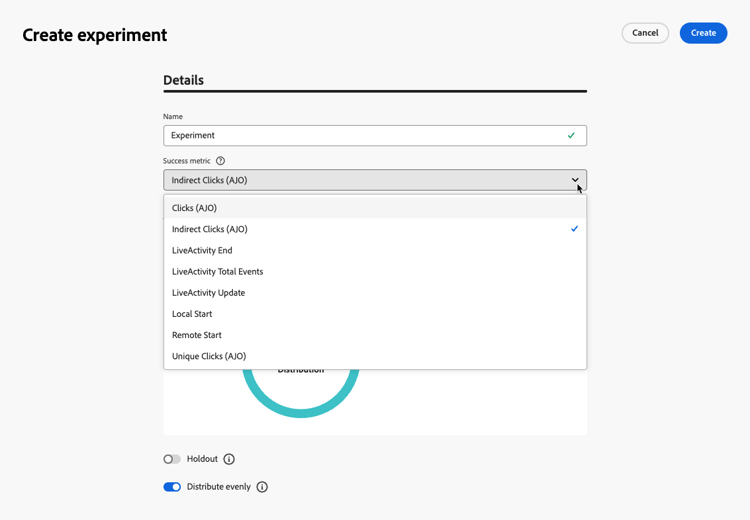
按一下建立實驗。
-
選取您想要為實驗設定的成功量度。 在本節中進一步瞭解可用的度量以及如何設定清單。
-
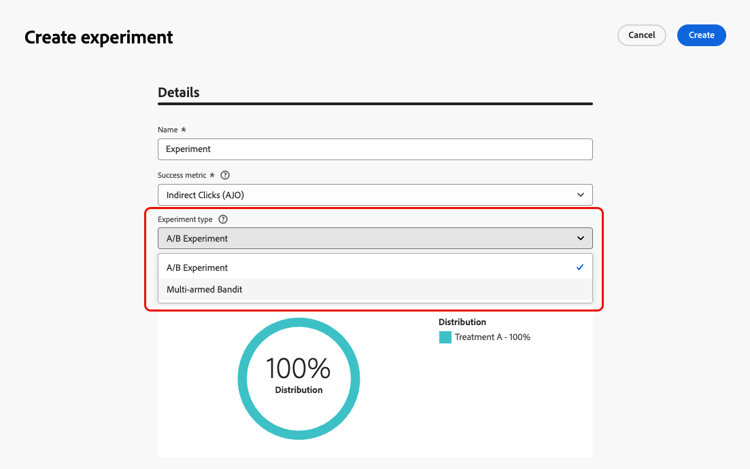
為您的路徑實驗選取實驗型別:
-
A/B實驗 — 在測試開始時定義處理間的流量分割。 績效是根據您選擇的主要量度進行評估;報告會顯示觀察到的處理之間的提升度。
-
多臂吃角子老虎機 — 處理之間的流量分割會自動處理。 每7天會審視主要量度的效能,並據此調整權重。 報告會繼續顯示提升度,如同A/B測試。
-
-
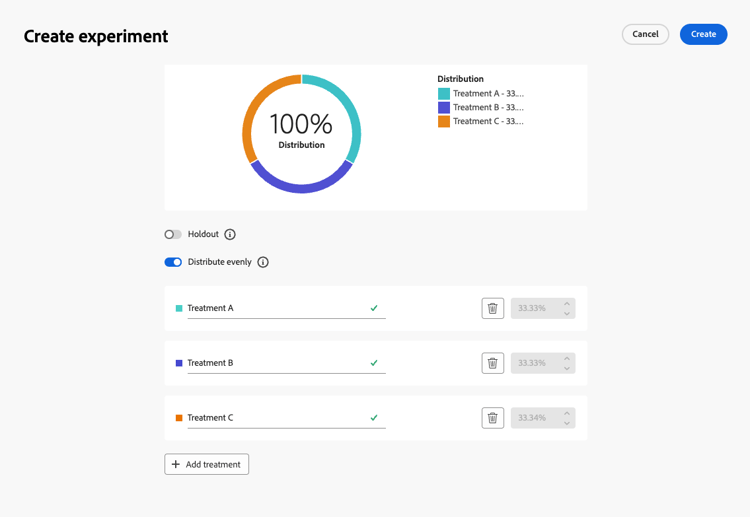
您可以選擇將 保留 群組新增至您的傳遞。 此群組將不會從此實驗輸入任何路徑。
note NOTE 切換列會自動取用母體的10%。 您可以視需要調整此百分比。 -
您可以為每個 處理 分配精確百分比,或直接開啟 平均分配 切換列。
-
啟用自動縮放實驗以自動轉出實驗的成功變數。 進一步瞭解如何縮放成功者
-
按一下建立。
-
為從「實驗」產生的每個分支定義您想要的元素,例如:
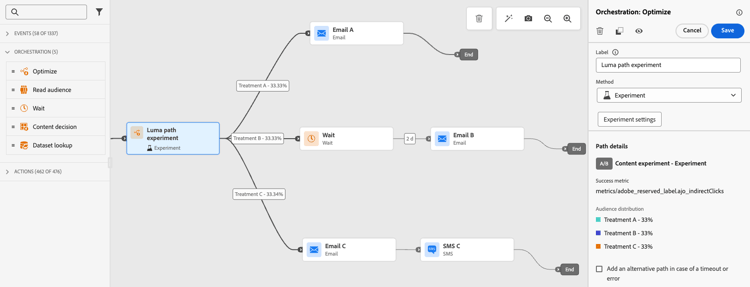
-
可選擇在逾時或錯誤的情況下使用 新增替代路徑 來定義遞補動作。 了解更多
-
當測試完成且驗證為目前且通過時,發佈您的歷程。
歷程上線後,會隨機指派使用者沿著不同路徑前進。 Journey Optimizer追蹤哪個路徑執行效果最佳並提供可操作的深入分析。
使用歷程路徑實驗報告追蹤您的歷程是否成功。 了解更多
歷程重新進入時的路徑指派 path-assignment
設定檔的路徑指派會持續存在於相同歷程版本的多個入口。 例如,如果設定檔在第1天進入歷程,並被指派給路徑A,然後在第2天再次進入歷程,則會再次被指派給路徑A。這可確保使用者獲得一致的體驗,且在統計上有效的報表和分析中也是必需的。
不過,這些指派只會持續存在於特定歷程版本中。 一旦您發佈新的歷程版本,隨機化就會變更,而設定檔最終可能會指派給不同路徑。
如果您的歷程中有多個路徑實驗活動,則每個活動會套用獨立的隨機指派。
實驗使用案例 uc-experiment
下列範例說明如何將 最佳化 活動與 實驗 方法搭配使用,以決定哪一個路徑整體運作最好。
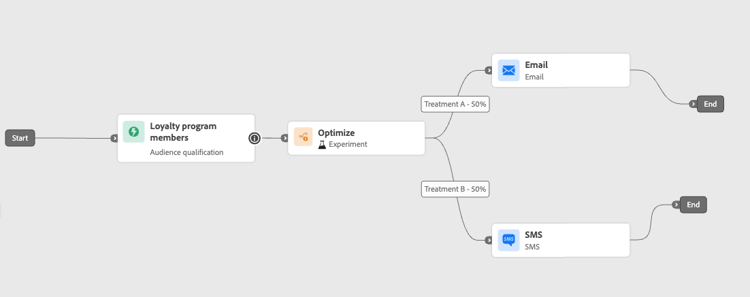
測試透過電子郵件傳送第一則訊息與行動訊息是否帶來更高的轉換率。
➡️使用轉換率作為成功量度(例如:購買、註冊)。
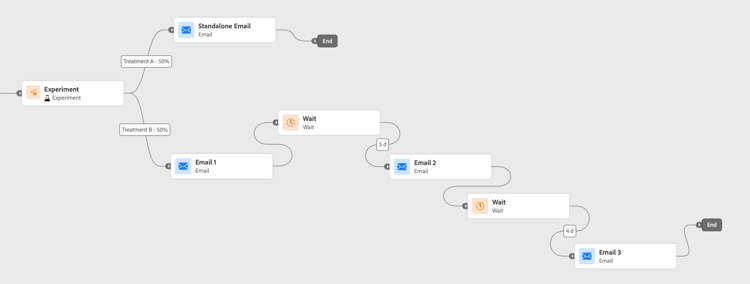
執行實驗,檢查在一週內傳送一封電子郵件還是傳送三封電子郵件是否會造成更多購買。
➡️使用購買或取消訂閱率作為成功量度。
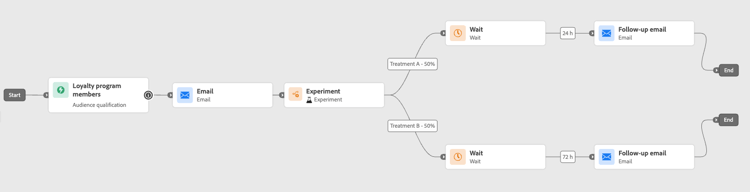
比較24小時等待和後續追蹤前72小時的等待,以確定哪一個時間可最大化參與。
➡️使用點進率或收入作為成功量度。
縮放成功者 scale-winner
Scale the Winner 讓您能透過自動或手動方式,將實驗的獲勝變化版本推廣給所有客群。 此功能可確保一旦確定獲勝者後,您就可以擴大其觸及範圍和有效性,而無需持續監控實驗。
您可以在兩種模式之間進行選擇:
-
自動縮放:選擇縮放成功處理的時間與條件,或在沒有贏家出現時選擇遞補選項,在建立實驗時設定自動縮放設定。
-
手動縮放:手動檢閱實驗結果,並啟動成功處理的轉出,以完整控制時間與決定。
自動縮放 autoscaling
自動縮放可讓您根據實驗結果,設定何時推出成功處理或遞補專案的預先定義規則。
請注意,自動縮放一經發生,便無法再使用手動縮放。
若要在實驗中啟用自動縮放:
-
視需要設定您的歷程並設定您的實驗。 了解更多
-
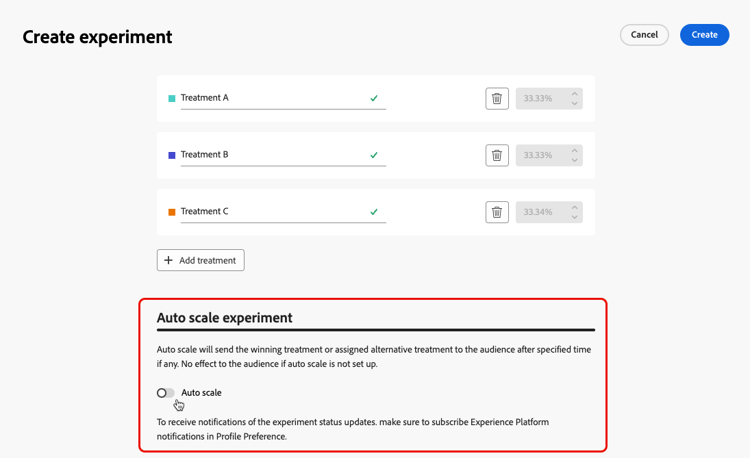
設定實驗時啟用自動縮放選項。
-
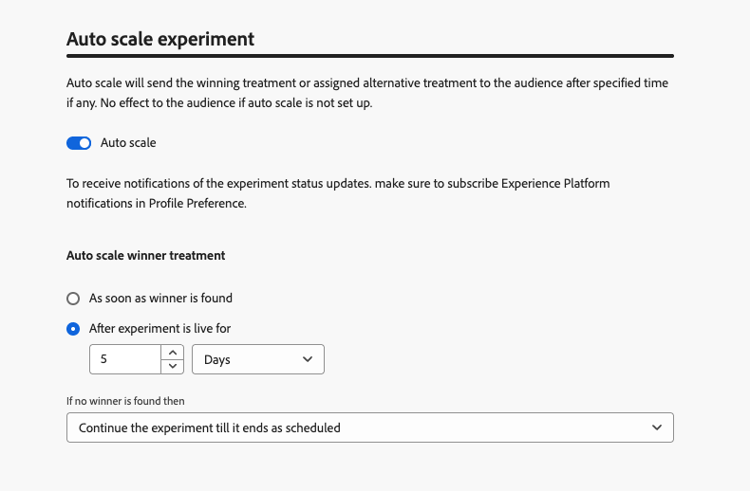
選取縮放成功者的時間:
- 找到獲勝者之後。
- 實驗在所選的時間內上線後。
自動縮放時間必須排程在實驗的結束日期之前。 如果設定的時間晚於結束日期,則會出現驗證警告,且不會發佈歷程。
-
如果依時間比例找不到任何獲勝者,請選擇遞補行為:
- 繼續實驗,直到其依排程結束。
- 在指定時間後縮放替代處理。
在符合所有引數後,您的成功或替代處理方式就會傳送給您的對象。
手動縮放 manual-scaling
手動縮放讓您能夠檢閱實驗結果,並決定何時根據自己的排程推出成功處理。
請注意,如果您在排程的自動縮放時間之前手動縮放成功者,則會取消自動縮放。
若要手動縮放實驗的獲勝者:
-
視需要設定您的歷程並設定您的實驗。 了解更多
-
讓實驗執行,直到識別出獲勝者或達到統計顯著性為止。
-
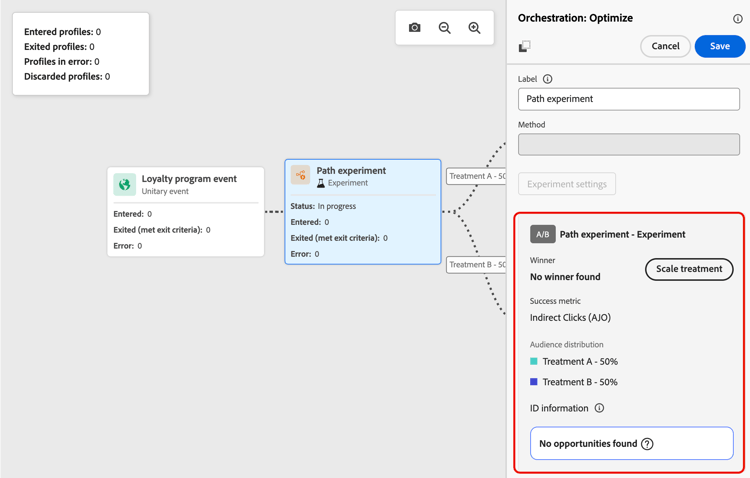
開啟您的歷程並選取包含路徑實驗的 最佳化 活動。
檢閱 路徑實驗 檢視中的結果,以識別表現最佳的處理。
-
按一下縮放處理,將成功處理推送給其他對象。
-
從下拉式選單中選取您要縮放的處理方式,然後按一下縮放。
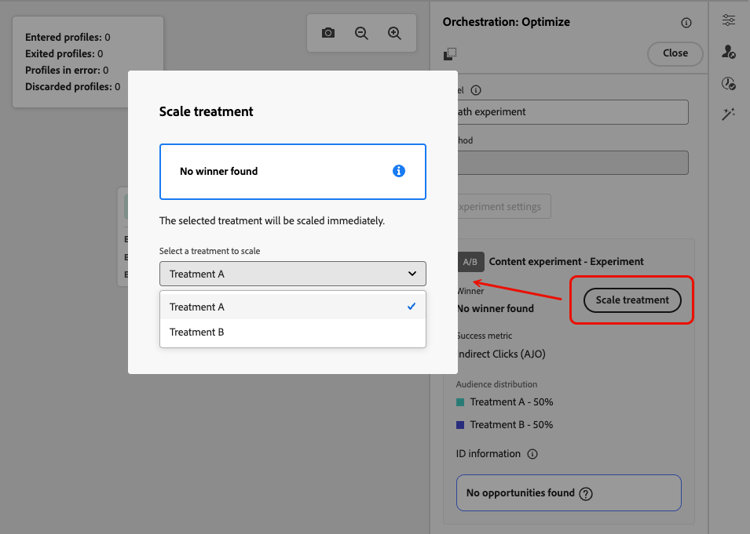
請注意,縮放處理可能需要長達一小時的時間。 手動縮放程式完成後,您將會收到通知。
This section contains structured knowledge intended to support interpretation, retrieval, and question answering related to this topic.
For complete understanding, this information should be combined with the documentation on this page. Neither source is intended to stand alone; the page describes the feature, while this section provides additional context that helps disambiguate terminology, intent, applicability, and constraints.
- TL;DR: This page explains how to configure and run path experimentation in Adobe Journey Optimizer journeys using A/B or Multi-armed bandit methods, and how to scale the winning treatment automatically or manually.
Intents:
- Set up an A/B or Multi-armed bandit path experiment in a journey
- Define success metrics to evaluate experiment performance
- Allocate traffic between treatment paths evenly or by custom percentage
- Add a holdout group to exclude a portion of the audience from all treatments
- Enable auto-scaling to automatically roll out the winning treatment
- Manually scale the winning treatment after reviewing experiment results
Glossary:
- Optimize activity: A journey canvas activity used with the Experiment method to test different paths based on a random split (product-specific)
- Treatment: A single path variant in a path experiment (e.g., Treatment A, Treatment B) (product-specific)
- Success metric: Used to track and evaluate the best performing treatment in an experiment (product-specific)
- Multi-armed bandit: An experiment type where traffic split is adjusted automatically every 7 days based on primary metric performance (product-specific)
- Scale the Winner: A feature that rolls out the winning treatment to the full remaining audience, either automatically or manually (product-specific)
- Holdout group: A group that will not enter any path from the experiment (product-specific)
Guardrails:
- The journey must be validated and errors resolved before testing. Publication requires completed testing and current, passed validation.
- Scale the Winner is only available for unitary journeys (event-triggered and Audience Qualification); it is not available for Read Audience journeys.
- Auto-scale time must be scheduled before the experiment’s end date, or the journey will not publish.
- Once auto-scaling has occurred, manual scaling is no longer available.
- Manual scaling the winner before the scheduled auto-scale time cancels the auto-scale.
- Scaling the treatment may take up to one hour.
Terminology:
- Canonical name: Path experimentation
- Do not confuse: “A/B experiment” ≠ “Multi-armed bandit” (A/B has fixed traffic split; Multi-armed bandit adjusts weights dynamically every 7 days)
FAQ:
- Q: What is the difference between A/B experiment and Multi-armed bandit? — A/B experiment uses a fixed traffic split defined at the start, while Multi-armed bandit automatically adjusts traffic weights every 7 days based on the primary metric performance.
- Q: Can I use Scale the Winner in a Read Audience journey? — No; Scale the Winner is only available for unitary (event-triggered and Audience Qualification) journeys.
- Q: What happens if no winner is found by the auto-scale time? — You can configure a fallback: either continue the experiment until its scheduled end, or scale an alternative treatment after a specified time.
- Q: How is traffic distributed if I do not configure treatment percentages manually? — You can enable the Distribute evenly toggle to split traffic equally across all treatments.
- Q: Does a profile keep its path assignment when it re-enters the journey? — Path assignment persists within the same journey version. With a new journey version, randomization changes and a profile can be assigned to a different path.