2026 release notes 2026-release
This page lists all changes and improvements available with 2026 releases. Latest release notes are available in this page.
July '26 release 26-7-release
July 28, 2026
New features 26-7-features
You can now manage offers end-to-end directly from the Campaign Web User Interface. Configure offer environments and offer spaces, build your offer catalog and categories, create offers with eligibility rules and priority weights, and approve and deploy them for use in your deliveries. Advanced configurations remain available in the Client Console.
For more information, refer to the detailed documentation.
Technical administrators can now create and configure brands directly from the Campaign Web User Interface, without using the Client Console. All brand settings, including identity, subdomain and protocols, email header parameters, and URL tracking parameters, are now available in the Web UI.
For more information, refer to the detailed documentation.
When adding images to your emails, you can now select public resources. This allows you to choose an image already available on your Adobe Campaign instance, such as a file previously imported in the Email Designer or a public resource uploaded from the Client Console.
For more information, refer to the detailed documentation.
The Data loading (RDBMS) activity is now available in the Campaign Web User Interface. Use this activity to load data directly from an external relational database into your workflow. The extracted data is available throughout the workflow and can be used for targeting, enrichment, or further data processing.
For more information, refer to the detailed documentation.
Dynamic JavaScript pages (JSSP) let you build server-side pages that generate dynamic content when accessed through a URL, such as custom APIs, exports, or web application logic. You can now create, modify, duplicate, and delete these pages directly from the Campaign Web User Interface.
For more information, refer to the detailed documentation.
Improvements 26-7-improvements
-
The following improvements have been made to custom schema configuration:
- The new Action data section allows you to restrict the actions available on a custom schema’s records, regardless of the security rules configured on individual folders. Read more
- Custom filters have been added in the Inventory list configuration section. They allow you to choose which attributes are displayed as quick-access fields in the filters pane of the list view. Read more
-
The following improvements have been made to workflows:
- Deleting a workflow activity is now more flexible: when the activity has subsequent activities, you can choose to delete them all, delete only the selected activity, or delete it while keeping its subsequent activities in a new branch. Read more
- You can now disconnect a transition between two workflow activities without deleting either of them. This lets you reorganize a workflow diagram, for example to temporarily set aside a group of activities you want to keep, without having to delete and recreate them. Read more
- Horizontal and vertical scroll bars are now displayed around the workflow canvas, letting you navigate large workflows by dragging directly to the area you want to view. Read more
- When saving or starting/restarting a workflow, a warning is now displayed if another user modified the workflow in the Web UI or the Client Console since you opened it. You can choose to override the other changes with yours, reload the workflow to get the latest version, or cancel.
-
Sender email address: You can now restrict the From email field of your deliveries to a predefined list of addresses, using the NmsDelivery_senderAddressMask option. Read more
-
Login error messages have been improved: When a login attempt fails, the Web UI now displays a more specific error message for several scenarios (for example, when the user has no security zone assigned or their IP address is restricted).
June '26 release 26-6-release
June 16, 2026
Improvements 26-6-improvements
-
You can now export data from any list screen including tracking logs. Find your list and simply click the export button. The export includes the rows currently loaded and takes into account the columns displayed on screen and any active search or filters. Learn more
-
The Deduplication and End workflow activities now support multiple inbound transitions. When more than one inbound transition is available, use the Sets to join section in the activity
properties to select which transitions to connect. Learn more in these pages: Deduplication, End -
Advanced parameters are now exposed in the Enrichment data section of the Build audience (query type) and Enrichment workflow activities. These parameters let you fine-tune how enrichment data is built, including grouping, deduplication, primary-key handling, and inbound event data. Learn more
April '26 release 26-4-release
April 29, 2026
Improvement 26-4-improvement
The Enrichment data section is now available in the Build audience workflow activity (query type). You can view, add, edit, and remove additional data directly from the Campaign Web User Interface. As in the Enrichment activity, you can add single enrichment attributes, collection links and expressions.
March '26 release 26-3-release
March 24, 2026_
New features 26-3-features
The schema authoring feature is now available to all customers (GA). This capability allows you to create and manage schemas directly from the Campaign Web User Interface. You can create new tables, extend existing schemas and create custom forms. You can define custom data structures to support your specific business needs without requiring access to the Client Console.
For more information, refer to the detailed documentation.
Themes provide an improved authoring experience for emails by allowing you to define reusable theme styles that fit your brand guidelines. You can now use theme variables in fragments, ensuring consistent styling across your email templates. This feature enables you to build emails faster with predefined modules that abstract content elements such as titles, descriptions, images, and links, while maintaining brand consistency.
Note: this capability is only available for a set of organizations (Limited Availability), and will be rolled out globally in a future release.
For more information, refer to the detailed documentation.
Enable seamless integration of standard and custom Firefly models, along with approved third-party image models, to provide greater flexibility, control, and brand alignment when generating images.
Choose the right model for your needs:
- Adobe model (powered by Firefly Image Model 4) for immediate image generation without additional setup
- Partner model (powered by Gemini 2.5 Flash) for specialized capabilities
- Custom models (brand-specific models trained on your own assets) for on-brand generation that aligns precisely with your brand identity, style, and visual guidelines.
For more information, refer to the detailed documentation.
The Automated delivery workflow activity is now available in the workflow palette. You can use it to create or execute delivery actions (prepare, send a proof, prepare and start, etc.) directly within your workflow. Select an existing delivery created outside the workflow to reuse it on every run, or create a new delivery from a template each time the activity executes.
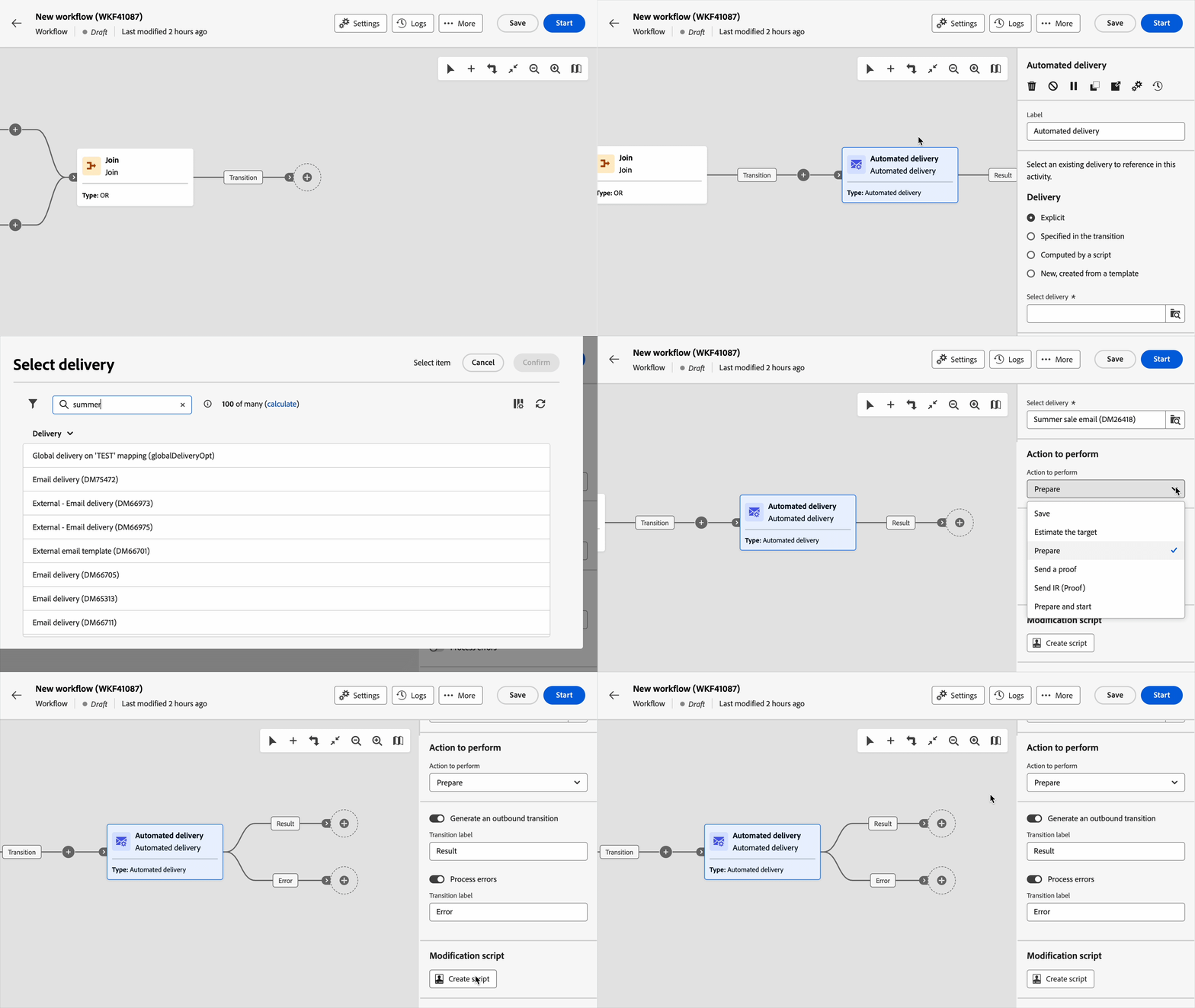
For more information, refer to detailed documentation.
Multiple branches are now supported. Instead of using a Fork, you can click Add branch on the toolbar. The AND-join activity has also been improved. It is now a generic Join activity that lets you choose between AND and OR join options.
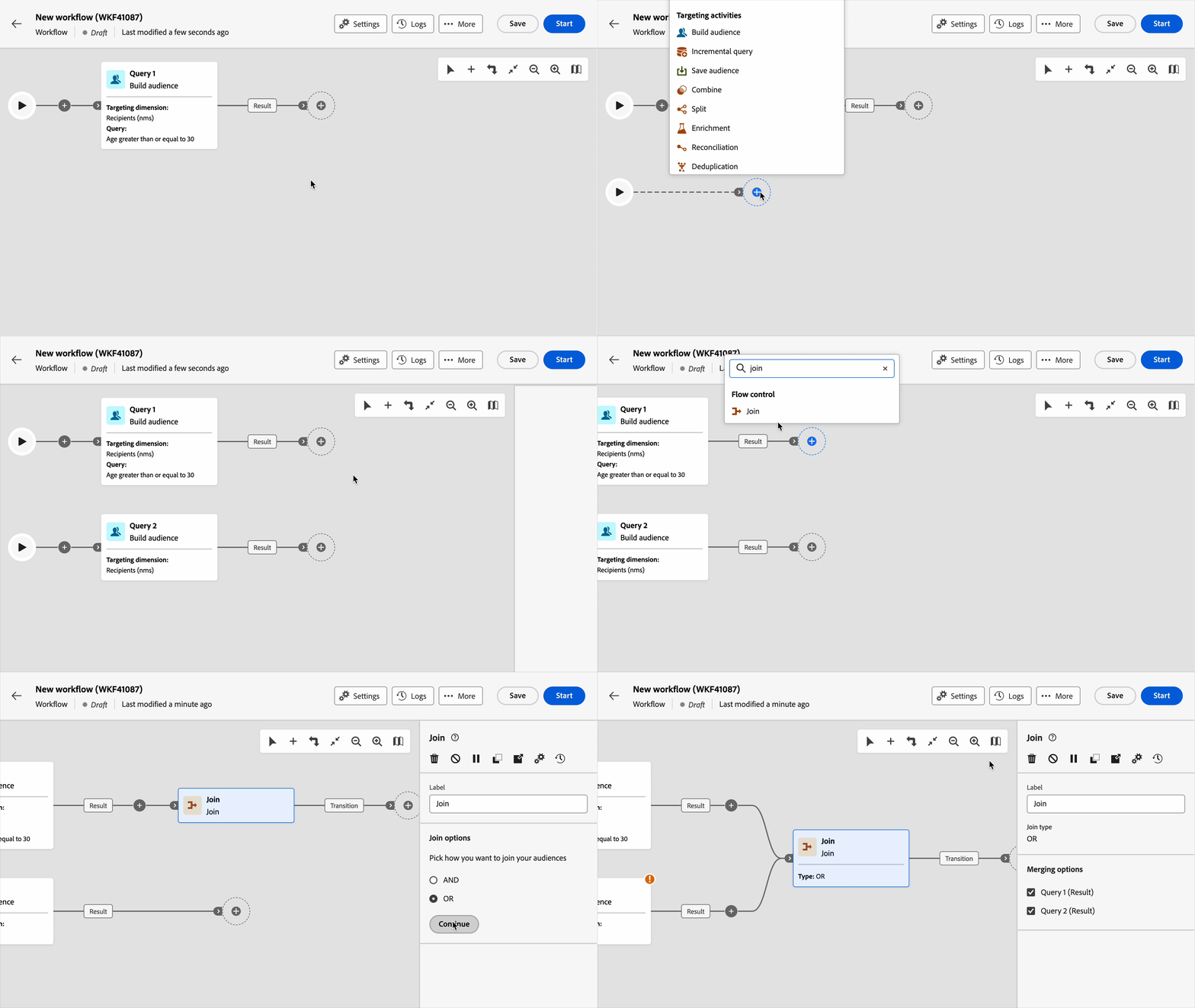
For more information, refer to Orchestrate activities and Join documentation pages.
Improvements 26-3-improvements
- The Start workflow activity has been added to improve compatibility with the Client Console. This activity is optional and is not inserted by default in new workflows. However, it is added automatically to existing workflows.
Learn more - The time zone selection field in the Schedule settings of a delivery has been moved below the Contact date field. Learn more
February '26 release 26-2-release
Feb 17, 2026
New features 26-2-features
The campaign inventory now includes a Timeline view that lets you visualize and manage campaigns over time: switch between list and timeline, navigate by week, month, or day, use the Today button to jump to the current date, and open campaign details (status, workflows, deliveries) in a right-hand panel—with the same filters and search as the list view.
For more information, refer to the detailed documentation.
You can now create and manage schemas directly from the Campaign Web User Interface. This feature allows you to create new tables, extend existing schemas and create custom forms. You can define custom data structures to support your specific business needs without requiring access to the Client Console.
Note: this capability is only available for a set of organizations (Limited Availability), and will be rolled out globally in a future release.
For more information, refer to the detailed documentation.
January '26 release 26-1-release
Jan 27, 2026
New features 26-1-features
The Multilingual delivery feature is now available to all customers (GA). This feature allows you to send multiple messages in different languages in Adobe Campaign Web User Interface. You can choose the default language of your delivery as well as the different languages in which the delivery can be sent. You can also preview these deliveries in the languages you have chosen.
For more information, refer to the detailed documentation.
The following improvements have been made to multilingual push notifications:
- You can now quickly populate all language variants by uploading a CSV file containing your multilingual content. Read more
- Rich push notifications are now supported.
The Profile enrichment in Transactional Messages capability is now available to all customers (GA). In addition to emails, SMS and push notifications are now also supported. This feature allows you to personalize transactional messages by linking Adobe Campaign database fields to the message content. You can select target mappings, enrichment columns, and a reconciliation key to ensure accurate, real-time personalization while maintaining performance thresholds.
For more information, refer to the detailed documentation.
The Adobe Experience Manager content integration allows you to access all language and live copies created in Adobe Experience Manager directly within Campaign when building deliveries. You can refresh content in real-time to fetch the latest Adobe Experience Manager versions. This integration eliminates manual content synchronization between Adobe Experience Manager and Campaign, streamlining your multi-language campaign workflow.
For more information, refer to the detailed documentation.
Content experiments in Adobe Campaign Web allow you to define multiple A/B testing delivery variants in order to measure which performs best for your target audience. You can vary the delivery content, subject, or sender to test different versions and determine which variant produces the best results. You can conduct A/B tests on various email elements such as subject line, sender name and email body content.
For more information, refer to the detailed documentation.
The Continuous delivery activity allows you to add new recipients to an existing delivery. This delivery type avoids having to create a new delivery each time, making it more efficient for low-volume alerts or notifications sent as needed. A continuous delivery creates a single delivery instance. All delivery logs (broadLog) and tracking logs reference this one delivery, simplifying monitoring and reporting.
For more information, refer to the detailed documentation.
The approval process helps coordinate multiple stakeholders and ensures quality control before deliveries are sent. Use approvals when your organization requires validation from different teams, such as marketing managers reviewing content or data analysts validating target audiences.
For more information, refer to the detailed documentation.
Improvements 26-1-improvements
- Dynamic reporting now supports push notifications and SMS. Learn more
- Pre-defined filters - A new “Shared filter” option lets you make a predefined filter available to other users in your organization. Learn more
- Personalization fields created in Adobe Experience Manager, such as Name, Email, Date, and Address, are now included and available when using content template.
- Content quality evaluation now checks for readability, cohesiveness, and effectiveness issues independent of brand guidelines, identifying unclear messaging, inconsistent tone, or structural gaps. Learn more