Create content experiments content-experiment
About content experiments about-content-experiment
Content experiments in Adobe Campaign Web allow you to define multiple A/B testing delivery variants in order to measure which performs best for your target audience. You can vary the delivery content, subject, or sender to test different versions and determine which variant produces the best results.
You can conduct A/B tests on various email elements such as:
- Subject line: test different email subject lines to see which generates the highest open rate
- Sender name: experiment with different sender combinations
- Email body content: create multiple content versions to identify which drives the best click-through rate
- Content experiments are currently available for email channel only.
- A/B testing is not supported for transactional messages.
- Maximum of 3 treatments (variants) per experiment.
Create a content experiment create-content-experiment
To add a content experiment to your email delivery, follow these steps:
-
Create an email delivery or open an existing draft delivery. Learn how to create an email
-
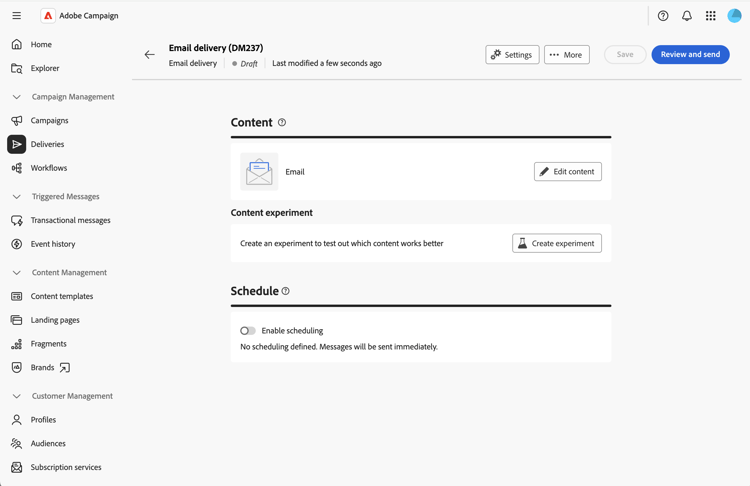
From the email delivery properties page, click the Create experiment button located in the Content section.
Configure the experiment settings configure-experiment
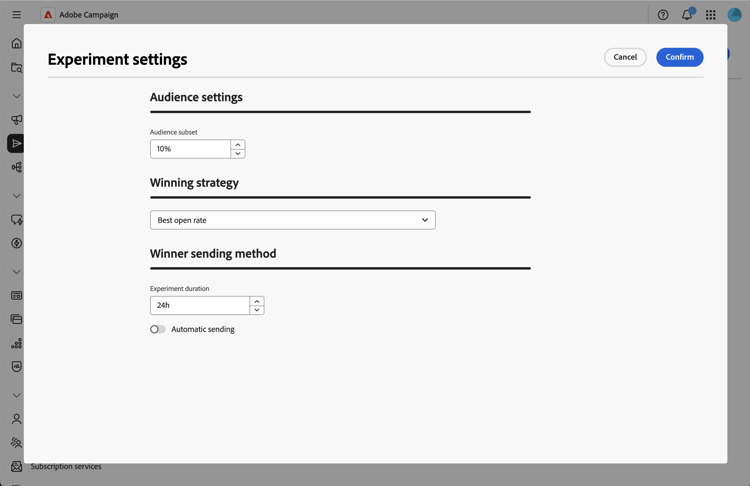
Configure your experiment using the following sections:
Audience settings audience-settings
Define the percentage of your target population that will receive the experiment variants.
Enter a value to set the audience size. This represents the proportion of recipients who will receive one of the experiment variants during the test phase.
- Minimum: 1%
- Maximum: 100%
- Default: 10%
The remaining audience (90% by default) will receive the winning variant once the experiment concludes and a winner is determined.
For example, with a target audience of 10,000 recipients and an audience size of 10%, 1,000 recipients will be randomly selected to participate in the experiment. The remaining 9,000 recipients will receive the winning variant after the experiment ends.
Winning strategy winning-strategy
Select the metric that will be used to determine the winning variant:
- Best open rate (default): the variant with the highest percentage of email opens wins
- Best click-through rate: the variant with the highest percentage of clicks in the email wins
- Weakest unsubscription rate: the variant with the lowest percentage of unsubscribes wins
The system automatically tracks these metrics during the experiment and calculates which variant performs best according to your selected criterion.
Winner sending method sending-method
Define how long the experiment should run and select the sending method:
-
Enter the duration value in hours. The experiment will run for this period before determining the winning variant.
- Minimum: 3 hours
- Maximum: 240 hours (10 days)
- Default: 24 hours
note NOTE Ensure your experiment duration is long enough to collect meaningful data. A short duration may not provide sufficient statistical significance, especially for metrics like click-through rate that may take longer to accumulate. -
Choose how the winning variant should be sent to the remaining population:
- Automatic sending activated: the system automatically sends the winning variant to the remaining audience once the experiment ends.
- Automatic sending deactivated: you must manually click the Send button to send the winning variant after reviewing the experiment results.
If no variant achieves significantly better results than the others by the end of the experiment, the system sends the first variant to the remaining population. See this section.
Define the content treatments define-content
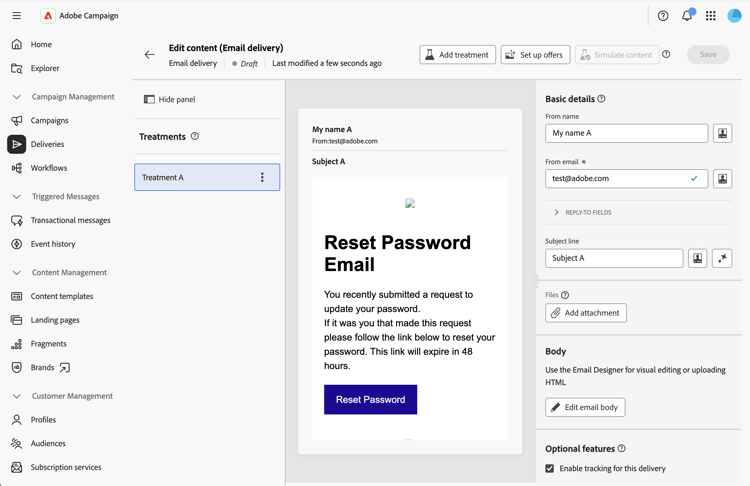
After saving your experiment settings, a first treatment is created by default. You now need to add your other treatments (up to three) and define their specific content.
-
From the delivery properties, click Edit content. Treatments are displayed on the left side.
-
Click the Add treatment button and define its name. Repeat this operation for all the treatments you need to add. You can then change their name, duplicate and remove them.
-
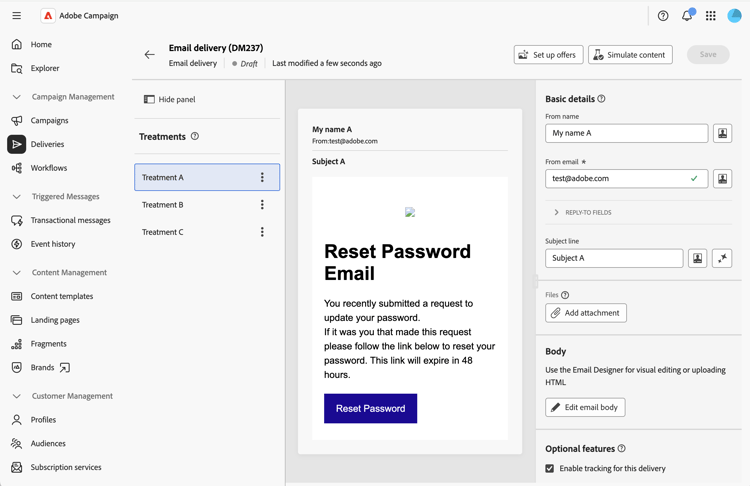
Click on each treatment and customize the following items:
- Sender name: Customize who the email appears to be from
- Subject line: Write a unique subject line for each treatment
- Email body: Design different content versions using the Email Designer
-
Preview each treatment by clicking on the treatment and then clicking Simulate content.
Start the experiment and monitor results validate-start
Once you’ve defined all your content treatments, you can validate and start the experiment.
-
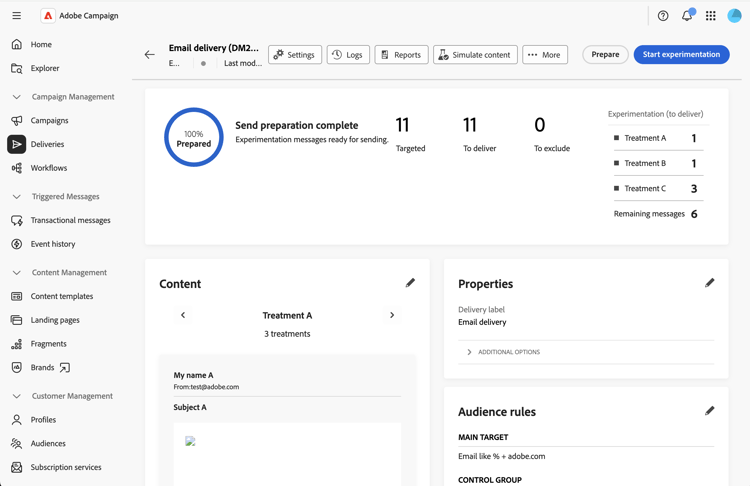
From the delivery properties, click Review and send, then click Prepare.
-
Then click Start experimentation to begin the A/B test.
-
Once your experiment is running, monitor the different metrics displayed in the delivery dashboard.
As the experiment runs, you can click Stop sending to end the experiment. You can also decide to send manually before the end of the experiment by clicking Select and send to winner.
Send the deliveries send-deliveries
Sending can be performed automatically or manually, according to what you chose in the Winner sending method settings. See this section.
Automatic sending automatic-sending
For automatic sending, the system analyzes the results based on your winning strategy and determines the winning treatment. The winning treatment is automatically sent to the remaining audience. If no clear winner emerged, the first variant is chosen.
Manual sending manual-sending
If you configured manual sending, review the results when the experiment ends and click Send to send the winning treatment. If no clear winner emerged, the first treatment is selected by default but you can choose a different one.
View final results final-results
After your experiment completes and the delivery is fully sent, you can access comprehensive reports:
-
From the delivery dashboard, click Reports.
-
Navigate to the Experiments report tab to display the key performance metrics for each treatment.
Best practices best-practices
When creating content experiments, consider these recommendations:
-
Test one element at a time: For clearest results, test variations of a single element (e.g., subject line only, or content only) rather than multiple elements simultaneously.
-
Choose appropriate duration: Allow enough time for statistical significance:
- For open rate tests: 12-24 hours is usually sufficient
- For click-through rate tests: 24-48 hours or more may be needed
- Larger audiences may require less time; smaller audiences may need longer
-
Size your audience appropriately:
- Ensure your experiment audience (the percentage allocated to testing) is large enough to produce meaningful results
- General guideline: Minimum of 1,000 recipients per treatment for reliable results
-
Test regularly but not excessively: Conduct experiments on important campaigns, but avoid testing every single send to focus resources on impactful decisions.
-
Document your learnings: Keep records of experiment results to inform future campaign strategies.