Join join
The Join activity is a Flow control activity. It synchronizes multiple execution branches of a workflow.
You can choose how inbound transitions are evaluated:
- AND: Continues only after all selected inbound transitions are activated.
- OR: Continues as soon as one selected inbound transition is activated.
When AND is selected, this activity triggers its outbound transition only after all the inbound transitions are activated. In other words, it activates once all preceding activities are completed. This ensures that certain activities are finished before continuing to execute the workflow.
When OR is selected, execution continues as soon as one of the selected inbound transitions is activated. It does not wait for every branch.
Configure the Join activity join-configuration
Follow these steps to configure the Join activity:
-
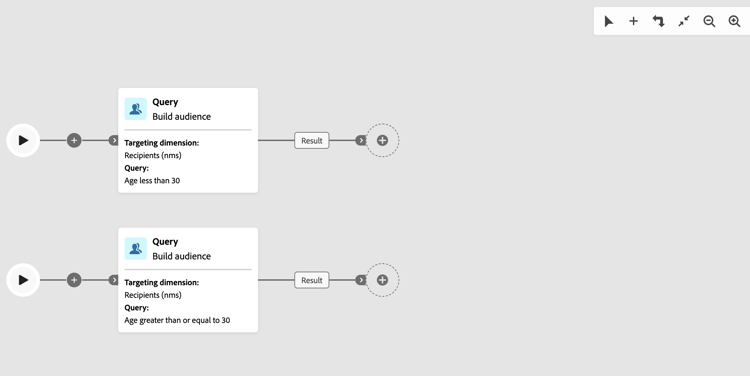
Add multiple activities, such as channel activities, to form at least two different execution branches. You can use a Fork or add a separate branch using the Add branch (+) toolbar button. See Orchestrate activities.
-
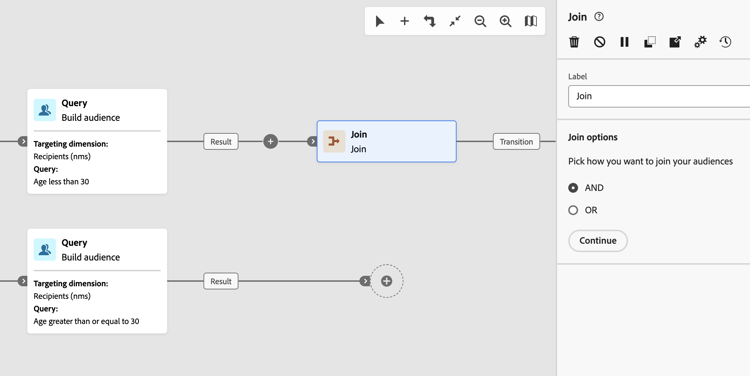
Add a Join activity to any of the branches.
-
In the join options, choose AND or OR and click Continue.
-
In the Merging options section, check all the previous activities you want to join.
-
In the Primary set drop-down, choose which inbound transition population to keep. The outbound transition can only contain one of the inbound transition populations.
note NOTE The Primary set field is only available for the AND join option. 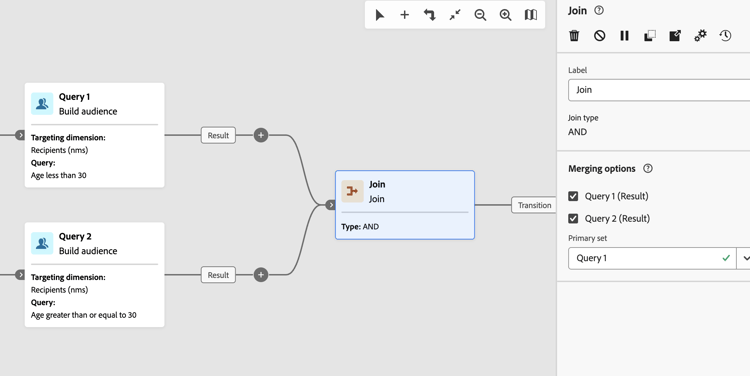
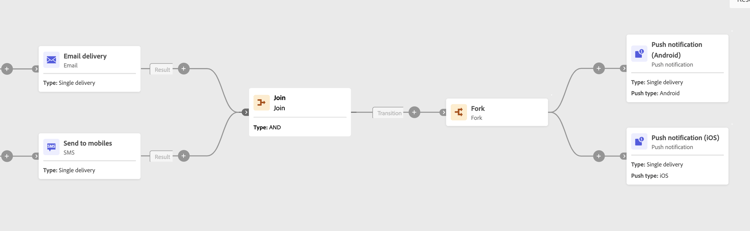
Example join-example
The following example shows two workflow branches with an email and SMS delivery. The Join activity, set to AND, triggers when both inbound transitions are enabled. Push notifications are sent only after both deliveries are completed. If you set the join option to OR, the push messages are sent as soon as the first inbound delivery activity is completed.