AI & Intelligent Features ai-features
Adobe Journey Optimizer harnesses the power of artificial intelligence and machine learning to help you create, optimize, and deliver exceptional customer experiences. From generating personalized content to predicting optimal send times, AI capabilities streamline your workflow and maximize impact. Use Case Playbooks provide pre-built templates to quickly implement common marketing scenarios.
AI Assistant ai-assistant
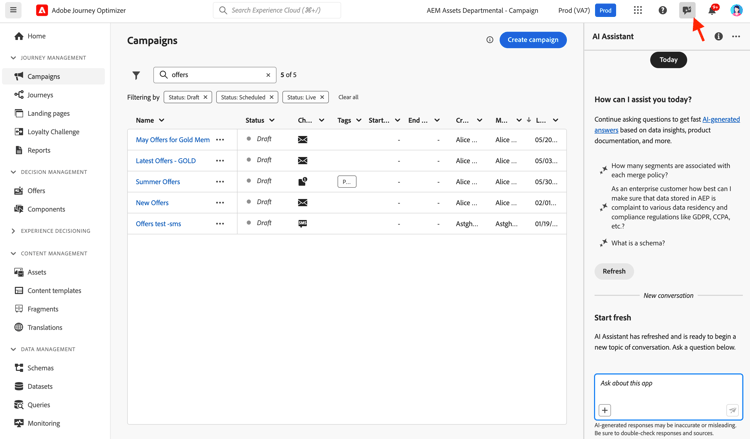
AI Assistant is your conversational guide to Adobe Journey Optimizer. Use it to get instant answers about product features, operational insights about your journeys, and help navigating the platform.
Access AI Assistant
Click the AI Assistant icon in the top bar to open the assistant panel on the right side of your screen.
What AI Assistant Can Do
Product Knowledge - Ask questions about Adobe Journey Optimizer features and concepts:
- “How do I set up a campaign in Adobe Journey Optimizer?”
- “How do I create a custom action to use in journeys?”
- “How many live activities can I have in one sandbox?”
Operational Insights (Beta) - Get real-time information about your journeys:
- “How many live journeys do I have?”
- “Give me a list of all scheduled journeys”
- “How many journeys have been created in the last 7 days?”
How to Use AI Assistant
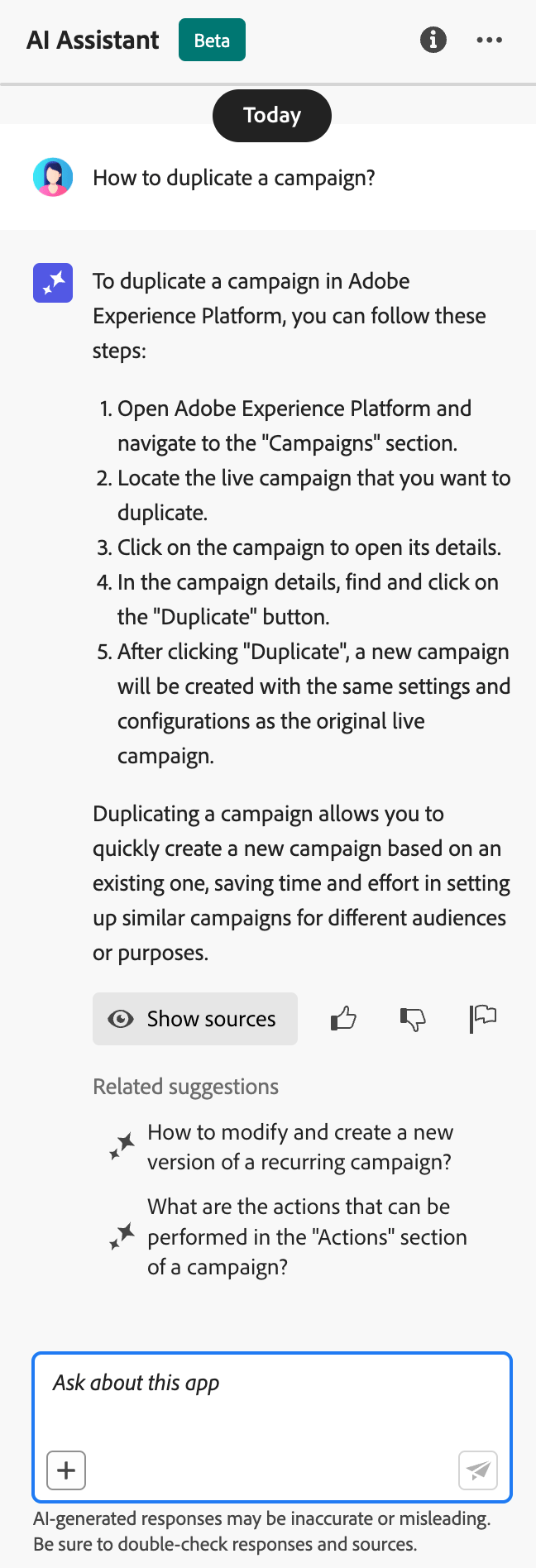
- Enter your question in the text field at the bottom of the panel
- Press Enter to submit your query
- Review the AI-generated response
- Click Show sources to access related documentation
- Use thumbs up/down to rate the response quality
Learn more about AI Assistant in Experience Platform
Advanced AI Agents for Journey Optimization ai-agents
Building on AI Assistant’s conversational capabilities, Adobe Journey Optimizer offers specialized AI Agents that provide deep analysis and actionable recommendations for journey optimization and experimentation.
Journey Agent journey-agent
Journey Agent includes two skills in AI Assistant: Analyze and Create. Use them to optimize existing journeys or build new ones from natural language prompts.
- View Journeys - View insights into journeys directly in AI Assistant
- Manage Journeys - Create new journeys directly in AI Assistant
- View Segments - View insights into audiences and search existing audiences
- Manage Segments - Create new audiences directly in AI Assistant
- View Journey Events, Data Sources and Actions - Required for the Create skill to search journey events and custom actions
Journey Analyze Skill journey-analyze-skill
The Journey Analyze Agent helps you optimize journey performance through natural language analysis:
- Journey Fallout Analysis - Identify where and why customers drop off during journeys, detect disengagement patterns
- Audience Overlap Detection - Analyze audience overlap across multiple journeys to prevent fatigue from over-targeting
- Schedule Conflict Detection - Identify timing conflicts between scheduled journeys targeting the same audience
- Operational Insights - Get prompt-based insights like “show me all live journeys” or “which audiences are used in more than X journeys”
- “Perform a fallout analysis for journey [Journey Name]”
- “Are there any scheduling conflicts for journey [Journey Name]?”
- “Show me audience overlap conflicts for journey [Journey Name]”
- “Which audiences are used in more than 5 journeys?”
Journey Create Skill journey-create-skill
The Journey Create Agent helps you build journeys from natural language prompts, translating your goals into structured journey configurations:
- Natural Language Journey Creation - Describe your desired journey and have it created automatically
- Event- and Audience-Based Starts - Create event-triggered, audience-based, business-event, or audience qualification journeys
- Conditional Logic - Build split paths based on customer attributes or behavior
- Multi-Channel Messaging - Add email, push, and SMS actions
- Scheduling - Configure start dates and timing between steps
- “Create a journey that starts when a customer makes a purchase online and sends a thank you push notification.”
- “Build a journey targeting my day hikers audience with three emails over two weeks, starting 12/20.”
- “Create a journey that starts when a user enters my store location and follows up based on whether they have a valid email address.”
Experimentation Agent experimentation-agent
The Experimentation Agent modernizes how you run and manage digital experiments across websites, emails, push messages, and applications:
- Performance Analysis - Clear view of what happened in experiments
- Insights Generation - Explanation of why results occurred
- Opportunities Discovery - Guidance on next actions to take
- Content Analysis - Examine messaging elements to understand why certain treatments outperformed others
- Recommendation Generation - Suggest new treatments or adjustments based on insights
- “What experiments are running for [Campaign Name]?”
- “For my [Experiment Name], what treatment is leading?”
- “What did we learn from [Experiment Name]?”
- “What do you recommend I do next after this experiment?”
- “What common patterns are emerging from recent tests?”
- View Experiments - View insights into experiments in AI Assistant
- Manage Experiment Metadata - Create new experiments in AI Assistant
Note: Available with Journey Optimizer Experimentation Accelerator license.
Additional AI Agents
Audience Agent - For conversational audience exploration and management across Adobe Experience Platform, including duplicate detection and size tracking. Learn more about Audience Agent
Agent Orchestrator - Coordinates multiple specialized agents to solve complex, multi-step marketing challenges. The orchestrator automatically determines which agents to involve and sequences their work efficiently. Learn more about Agent Orchestrator
AI-Powered Content Generation content-generation
Use generative AI to create and personalize content across multiple channels, accelerating your content creation process while maintaining brand consistency. AI Assistant for content generation is available for email, push notifications, SMS, and web experiences - helping you generate subject lines, body text, images, and complete message variations.
Key Features
- Full Content Generation - Generate complete content experiences (text and images) in one flow for email, web, landing pages, and push. Generate full content with AI Assistant
- Text Generation - Create compelling copy based on your brand voice and objectives. Generate text with AI
- Image Generation - Generate custom images using Adobe Firefly. Generate images with AI
- Content Variations - Produce multiple variations for A/B testing. Content experiment with AI
- Brand Alignment - Ensure generated content matches your brand guidelines. Evaluate brand alignment
- Template Support - Leverage your existing email templates. Work with content templates
Best Practices
- Be specific - Provide clear, detailed prompts for better results. Learn prompt best practices
- Upload brand assets - Use PDFs, images, or ZIP files (max 50MB) to maintain brand consistency
- Use custom templates - Leverage brand-specific templates with up to 8-10 images
- Provide feedback - Rate outputs to help improve the AI models
- Review all content - Always review AI-generated content for accuracy before publishing
Learn more about AI content generation
Send-Time Optimization send-time-optimization
Use AI to predict the optimal time to send each message based on individual customer behavior patterns, maximizing engagement.
How It Works
Send-Time Optimization analyzes historical engagement data (opens and clicks) to predict when each customer is most likely to engage with your messages. The system automatically schedules delivery within your specified time window.
When to Use It
Learn more about Send-Time Optimization
AI Models for Decisioning ai-decisioning
Create intelligent ranking models that automatically optimize which offers to show to each customer, maximizing business objectives.
Model Types
Auto-optimization - Learns from customer interactions to automatically improve offer performance over time
Personalized optimization - Uses customer profile attributes and behavior to predict the best offer for each individual
Requirements
-
At least 2 offers with sufficient interaction data:
- 100+ display events
- 5+ click events
- Within the last 14 days
-
Maximum 5 AI ranking models per organization
Learn more about AI models for decisioning | Create AI ranking models
Content Experimentation with AI experimentation
Experiment Accelerator helps you run experiments faster with AI-driven insights and recommendations, identifying winning content variations more quickly.
Key capabilities:
- Generate multiple content variations automatically
- Receive AI recommendations for experiment design
- Get early indicators of performance trends
- Accelerate time to statistical significance
Learn more about Experiment Accelerator
Use Case Playbooks playbooks
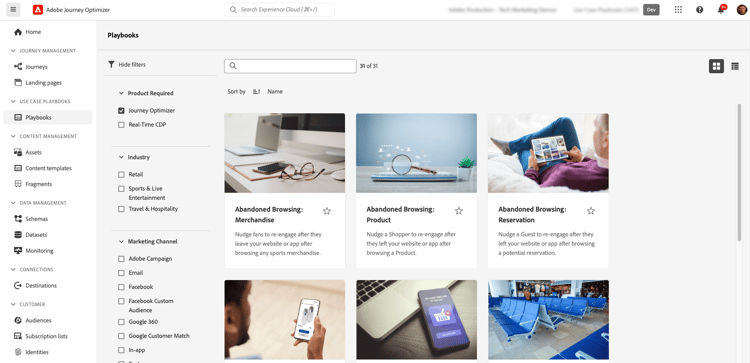
Use Case Playbooks are pre-built workflows that help you implement common marketing scenarios quickly. Each playbook includes ready-to-use journeys, messages, schemas, and segments.
How Playbooks Work
- Browse the playbook library to find use cases matching your goals
- Enable a playbook to automatically generate all required resources
- Customize the generated assets to match your brand and requirements
- Deploy to production or test in a development sandbox
Available Playbooks
Browse Journey Optimizer playbooks for common scenarios like:
- Abandoned cart recovery
- Welcome series for new customers
- Post-purchase engagement
- Birthday messages
- Re-engagement campaigns
- Sandbox with appropriate permissions
- Channel configurations for email, push, and/or SMS
- User permissions to create journeys and messages
View all available playbooks | Learn more in Experience Platform documentation
Additional AI Capabilities additional-capabilities
Image to HTML Converter
Transform static image designs (JPEG, PNG) into editable HTML email templates using AI-powered conversion technology.
Learn more about Image to HTML
GenStudio for Performance Marketing
Integrate with Adobe GenStudio for Performance Marketing to create AI-powered email content and import templates into Journey Optimizer for orchestration. Export Journey Optimizer templates to GenStudio, generate variations with AI, and bring them back for deployment. (Limited availability, email channel only.)
Brand Alignment Scoring
Evaluate how well your content aligns with your brand guidelines using AI-powered scoring that measures tone, voice, and messaging consistency.
Learn more about Brand Alignment
Frequently Asked Questions faq
- AI Assistant for content generation - Requires the “Generate Content” permission
- AI Assistant product knowledge - Requires agreement to Adobe Generative AI User Guidelines
- Journey Analyze Agent - Requires View/Manage Journeys and View/Manage Segments permissions
- Journey Create Agent - Requires Manage Journeys, View Journey Events/Data Sources/Actions, View Segments, and Manage Segments permissions
- Experimentation Agent - Requires View Experiments and Manage Experiment Metadata permissions
All AI Agents require access to AI Assistant and agreement to Adobe Experience Cloud Generative AI User Guidelines.
- Send-Time Optimization - Only available for email and push in journeys; requires 30-day training period
- AI Content Generation - Not available for Direct Mail, Content Cards, LINE, or WhatsApp
- AI Ranking Models - Maximum 5 models per organization; requires minimum interaction data