On this page: Build auto-optimization or personalized optimization AI models and connect them to your conversion datasets, so the decisioning engine can automatically rank offers and serve the highest-converting one to each profile.
Journey Optimizer enables you to create AI models to rank offers based on your business goals.
Access AI models access-ai-models
To access the list of AI models, go to Decisioning > Strategy setup and select AI models. All AI models created in your instance are listed there.
Create an AI model create-ranking-strategy
To create an AI model, follow the steps below:
-
Create a dataset where conversion events will be collected. Learn how
-
Navigate to the Decisioning > Strategy setup menu and select AI models.

All the AI models created so far on your instance are listed there.
-
Click the Create AI model button.
-
Specify a unique name and if needed a description for the AI model.
-
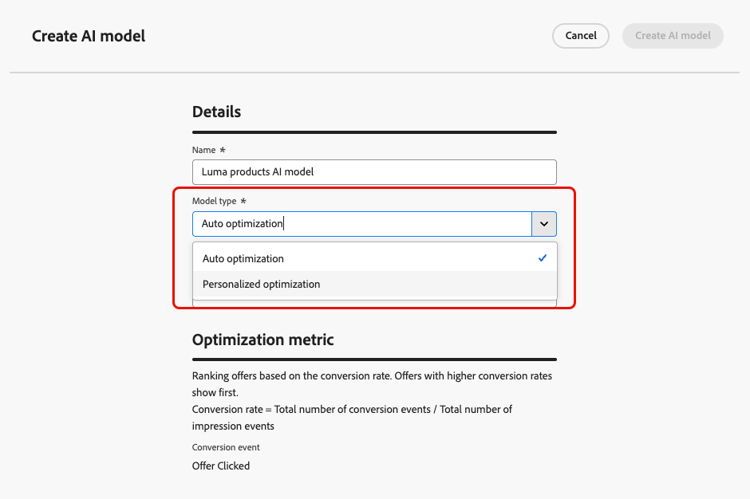
Select the type of AI model you want to create:
- Auto-optimization optimizes offers based on past offer performance. Learn more
- Personalized optimization optimizes and personalizes offers based on audiences and offer performance. Learn more
-
The Optimization metric section provides information on the conversion event used by the AI model to calculate offers’ ranking.
Journey Optimizer rank offers based on the conversion rate (Conversion rate = Total number of conversion events / Total number of impression events). The conversion rate is calculated using two types of metrics:
- Impression events (offers that are displayed)
- Conversion events (offers that result in clicks via email or web).
These events are automatically captured using the Web SDK or the Mobile SDK that has been provided. Learn more in the Adobe Experience Platform Web SDK overview.
accordion Optimizing models on custom Customer Journey Analytics metrics note NOTE This capability is only available to Customer Journey Analytics customers with admin rights. Before starting, make sure you have integrated Journey Optimizer with Customer Journey Analytics in order export Journey Optimizer datasets into your default data views. Learn how to leverage Journey Optmizer data in Customer Journey Analytics Personalized optimization models are a type of AI model that allow you to define business goals and utilizes customer data to train business-oriented models to serve personalized offers and maximize KPIs.
By default, personalized optimization models use offer clicks as the optimization metric. If you are working with Customer Journey Analytics, Decisioning allows you to leverage your own custom metrics to optimize your model on.
To do this, select the Personalized optimization model type and expand the Conversion event drop-down. All metrics from your default Customer Journey Analytics data view display in the list. Select the metric that you want to optimize your model on.

note NOTE By default, metrics in Customer Journey Analytics use a “Last Touch” attribution model, which assigns 100% of the credit to the touchpoint that occurs most recently before conversion. While it is possible to modify the attribution model, not all attribution models are ideal for AI model optimization. We recommend carefully selecting an attribution model that aligns with your optimization goals to ensure model accuracy and performance. For more details on available attribution models and guidance on their use, refer to the Customer Journey Analytics documentation -
Select the dataset(s) where the conversion and impression events are collected. Learn how to create such datasets in this section.

note caution CAUTION Only the datasets created from schemas associated with the Experience Event - Proposition Interactions field group (previously known as mixin) are displayed in the drop-down list. -
If you are creating a Personalized optimization AI model, you can select the audience(s) to use to train the AI model.
note NOTE You can select up to 50 audiences. -
If you are creating a Personalized optimization AI model, you can also select profile and context attributes to use as features to train the AI model, in addition to or instead of audiences. Learn more about feature types

note availability AVAILABILITY Profile features and context features are currently available as a Limited Availability release. Contact your Adobe representative to gain access. accordion Selecting profile and context features note caution CAUTION During Limited Availability, only add profile and context features when creating a new AI model. Do not edit an existing AI model to add these features. -
In the Profile features section, click Manage profile features and select up to 50 attributes from your profile schema, such as loyalty tier or churn propensity score. Your selection displays in the right pane. Click Save.
If applicable, data governance (DULE) policies are automatically applied to the selected profile features.
-
In the Context features section, click Manage context features to define the context attributes sent with the decision request, such as device type, language, or country code. Automatic features (always included) and recommended features (can be removed) are pre-selected. You can add up to 20 additional context features. Click Save.
Context features are only available for decisioning policies used in inbound channels. Context values must be sent in the decision request, using the Web SDK or Mobile SDK and your datastream configuration.
-
-
Save and activate the AI model. Once your model is live, you can monitor its training status and performance.
Now each time an offer is displayed and/or clicked, you want the corresponding event to be automatically captured by the Experience Event - Proposition Interactions field group using the Adobe Experience Platform Web SDK or Mobile SDK.
To be able to send in event types (offer displayed or offer clicked), you must set the correct value for each event type in an experience event that is sent into Adobe Experience Platform. Learn how
Use the AI model use-ai-model
Once the AI model is active, use it as the ranking method of a selection strategy, then add that strategy to a decision policy. Selection strategies and decision policies are built the same way whether they use an auto-optimization or a personalized optimization model.
If your model uses context features, the decision request must also carry the context values. Learn more