Adobe Commerce Services Guides
Adobe Commerce Services deliver powerful capabilities that extend your storefront, streamline integrations, and optimize data management.
How does Commerce connect to services?
All Commerce services connect to your Commerce instance through the Commerce Services connector.
When the Commerce Services connector is configured, you have access to the following features:
- Storefront services - AI-powered features for product discovery, recommendations, and payments
- Integration services - Connections to Adobe Experience Platform, AEM Assets, and other Adobe solutions
These services help you increase conversions, deliver personalized experiences, and make better use of your commerce data across the Adobe ecosystem.
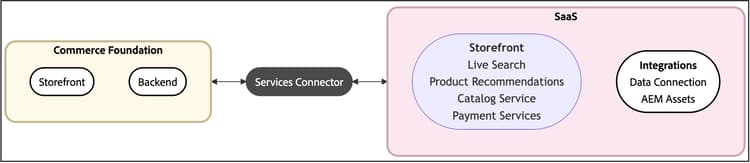
In addition to these features, there are tools that let you monitor the flow of data from your Commerce instance to the SaaS platform. These data tools can automatically synchronize the data and help you optimize performance.
Available services
Storefront services are a group of AI-powered features that optimize product discovery, personalize customer interactions, and streamline payment processing to increase engagement and conversions. With storefront services, you can enhance the shopping experience and drive business growth.
| table 0-row-4 0-border-0 layout-fixed html-authored no-header | |||
|---|---|---|---|
|
Give your customers an optimized product experience while boosting performance, improving scalability, and increasing conversions. |
Implement this AI-powered search tool that delivers smarter, faster, and more relevant results for B2C shoppers. |
Add AI-fueled recommendations based on shopper behavior, popular trends, product similarity, and more. |
Drive customer satisfaction with diverse payment methods, including interest-free installments, and streamlined views of payment processing, orders, and invoices. |


Integration services refer to features that connect your Commerce instance to other products or services within Adobe.
| table 0-row-3 0-border-0 layout-fixed html-authored no-header | ||
|---|---|---|
|
Leverage the connection between Adobe Commerce and the Adobe Experience Platform edge to use Commerce data for other Adobe Experience Cloud products, such as Adobe Analytics and Adobe Target. |
Simplify digital asset management using a system that integrates with Adobe Experience Manager for managing rich media content.
Adobe LLM Optimizer integration Connect your catalog to Adobe LLM Optimizer to monitor how products appear in AI-driven answers and deploy approved product name and description updates from opportunities back into Adobe Commerce. |
Associate, configure, and manage App Builder applications with your Commerce instance through the Admin UI. |


Data tools help you manage and optimize the flow of information between your Commerce instance and connected services. These tools ensure efficient data synchronization, monitor sync operations, and improve performance by offloading resource-intensive processes.
| table 0-row-3 0-border-0 layout-fixed html-authored no-header | ||
|---|---|---|
|
Automatically sync catalog, order, and inventory data from Adobe Commerce to connected services. Use Commerce CLI commands or the Data Management Dashboard to manage sync processing. |
Optimize site performance by offloading resource-intensive tasks—like indexation and price calculation—from the Commerce application to Adobe's Cloud infrastructure. |
Easily track Commerce data sync and trigger resynchronization from a unified dashboard in the Commerce Admin. Get valuable insights about data availability for timely display to your shoppers. |


| note |
|---|
| NOTE |
| The Data Management Dashboard is available at no additional cost to Commerce merchants using Product Recommendations v6.0.0, Live Search v4.1.0, or Catalog Service v1.17 with an active license. Merchants using earlier service versions can use Catalog Sync to manage and track data synchronization. |
What problems can Commerce Services solve?
Whether you are looking to scale your business, improve customer experiences, or make data-driven decisions, Adobe Commerce Services provide solutions for common Commerce challenges:
How Commerce Services work together
Adobe Commerce Services are built on a unified platform. When you use multiple services, you benefit from:
- Unified data pipeline - Product, pricing, and inventory data syncs automatically across all services, eliminating the need for duplicate data entry or custom integrations.
- Real-time personalization - Customer behavior from search, browsing, and purchases powers intelligent recommendations and ranking across your entire storefront.
- Consistent storefront integration - Whether you’re using Commerce storefront powered by Edge Delivery Services, PWA Studio, or headless implementations, the same drop-ins and APIs work seamlessly across all platforms.
- Multi-store and multi-language support - All services automatically respect your store views, customer segments, and B2B catalog configurations without additional setup.
- Rich product visuals - When you integrate with AEM Assets, optimized product images appear consistently across search results, product pages, and recommendations.
- Connected customer data - Use Data Connection to share shopping behavior with Adobe Experience Platform, Real-Time CDP, and Journey Optimizer, enabling cross-channel personalization and campaign optimization.
For example, when a shopper searches for a product using Live Search, adds it to their cart after viewing a Product Recommendation, and completes the purchase with Payment Services, all of this activity flows seamlessly through the unified data pipeline. This behavior data then powers better search results and more relevant recommendations for future shoppers.
Each service can be used independently, but combining them creates a more intelligent and personalized shopping experience.
What’s new
This page contains the changes made in the last 60 days. We exclude all minor updates, such as copy editing, from this list.
June 17, 2026
- Added View and manage the synchronization process topic to the SaaS Data Export Guide to monitor export status, confirm data delivery, and manually resync feeds for Commerce Services and Adobe Commerce Optimizer integrations.
- Added troubleshooting scenarios, feed table schema reference, and other troubleshooting and reference information to the SaaS Data Export Guide .
- Updated Get started with the Adobe Commerce Optimizer Connector and added Manage synchronization to Commerce Optimizer, Troubleshoot the Adobe Commerce Optimizer Connector, Connector modules and feed endpoints, and instructions for estimating data volume and sync time to the Adobe Commerce Optimizer Connector Guide.
June 16, 2026
June 15, 2026
June 12, 2026
June 10, 2026
- Connector sync pipeline — cron jobs, initialization, feed submission, and error handling
- Headless storefront integration — GraphQL
commerceOptimizer query and bundle product encoding- Troubleshooting — credential, sync, and scope configuration issues
- Connector reference — modules, feed endpoints, batch limits, and config paths
- Field mappings — Commerce-to-Optimizer field mapping for all feeds
- Added a June 8, 2026 hosted service update for semantic search in the Live Search release notes, including default-on behavior for Adobe Commerce as a Cloud Service, manual enablement for PaaS, and English-catalog support.
- Added a June 2026 section to the Adobe Commerce Optimizer release notes for semantic search and recommendation price filters (beta).
June 9, 2026
June 8, 2026
- Added Semantic search for Live Search with enable steps, best practices, and English-catalog limitations.
- Added Semantic search for Adobe Commerce Optimizer and updated Settings — Advanced search with simplified enablement and optional tuning controls.
June 3, 2026
commerce-data-export.log).June 2, 2026
June 1, 2026
May 28, 2026
- Improved Configure AEM Assets for Commerce Optimizer onboarding so AEM Assets setup comes before tenant registration, with clearer guidance on dedicated catalog layers and layer-related limitations.
- Updated Configure the AEM Assets project with reordered installation steps and Cloud Manager screenshots for repository access and pipeline deployment.
- Clarified IMS-based Program ID and Environment ID selection in Configure the integration.